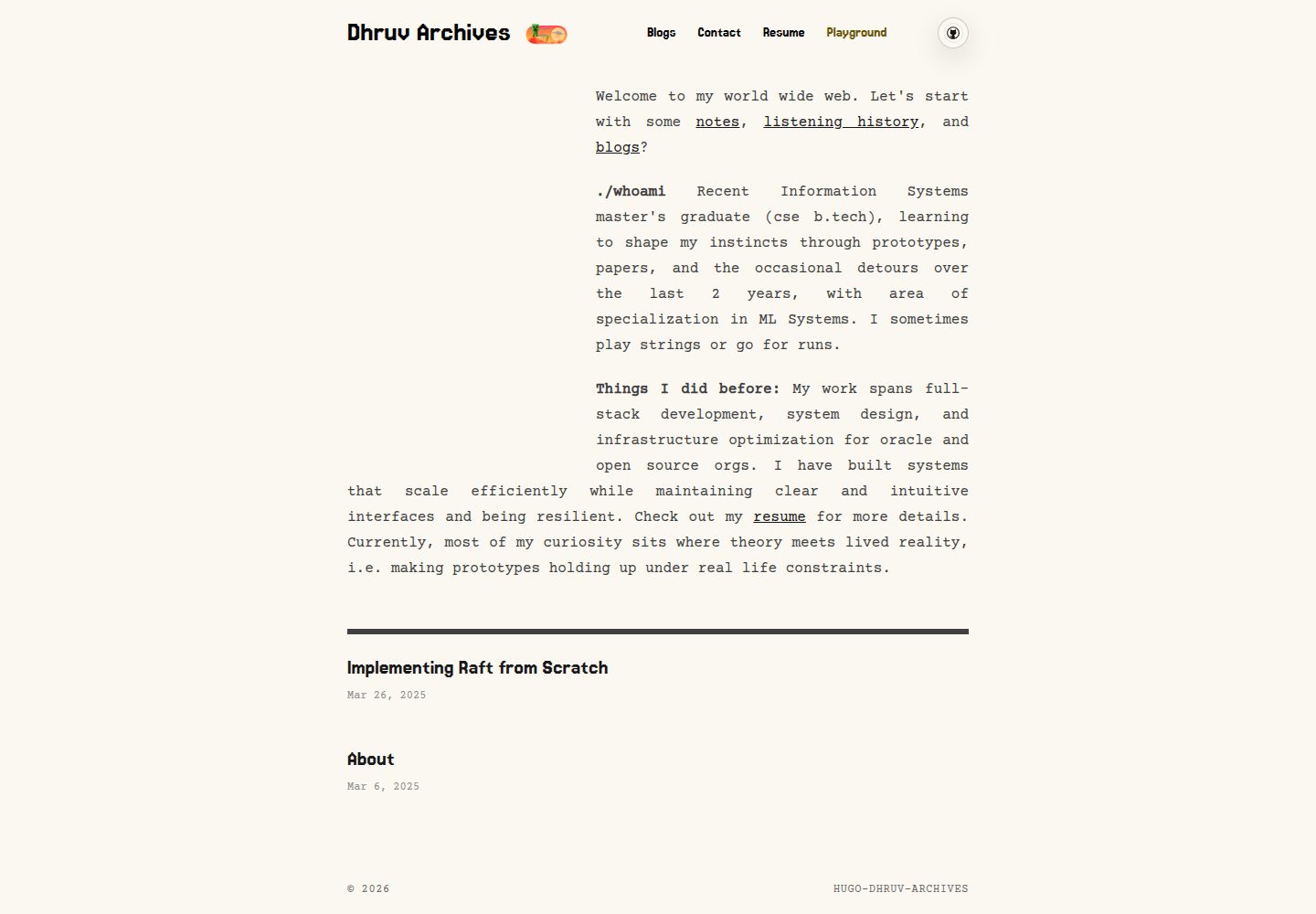
在 hugo-paper 基础上重做首页 UI,多数定制通过 hugo.toml 的 params 完成
Hugo作品集
hugo-dhruv-archives-theme — Hugo 作品集模板
作者 dhruv0000
基于 hugo-paper 二次开发的 Hugo 作品集主题,通过 params 配置字体、配色、首页卡片与可选 Playground 模块,并支持构建时加密的密码保护文章。
看看你的网站会是什么样
浏览真实页面截图,比较内容排版与手机效果。点击下方缩略图切换,放大查看整页细节。
全部页面与视图 3
截图用于了解视觉与布局,交互效果请以实际项目为准。
采集于 2026-10-13查看来源
值得关注的模板亮点
从已有项目资料中,快速了解它的特点。
首页「明信片」区域从 static/animation/ 顶层文件随机取媒体,按 *-dark / *-bright 后缀区分明暗模式
支持 params.postcardFocus 为单个媒体文件设置横竖裁切焦点,移动端与桌面端分别使用横版和竖版裁切
可选 Playground 页面,含标签式解谜模块、浏览器本地进度记录与乐器调音器
支持构建时加密的密码保护文章,使用 PBKDF2-HMAC-SHA256 与 AES-256-GCM 在浏览器端解密
模板详细介绍
这是一款为 dhruv-archives.com 定制的 Hugo 主题,在 hugo-paper 基础上做了较大改动,作者已断开与原仓库的 fork 更新关联。主题把多数定制项暴露为 hugo.toml 中的 params,包括标题与正文字体、Google Fonts 加载、以及受 Flexoki 启发的明暗配色方案。首页包含响应式「明信片」区域,从 static/animation/ 顶层文件随机选取媒体,按文件名后缀区分明暗模式,并可通过 params.postcardFocus 为单个文件设置横竖裁切焦点;首页介绍块由 params.aboutItems 定义。列表页与首页采用网格样式文章列表,主题切换按钮使用自定义动画资源。主题还提供可选的本地 Playground 页面,包含标签式解谜模块、进度记录与乐器调音器。此外支持构建时加密、浏览器端解锁的密码保护文章,但该机制并非服务端认证。
Hugo作品集
适合你的项目吗?
适用场景
- 搭建个人作品集或归档站点,需要可配置字体、配色与首页卡片区域
- 希望在首页随机展示本地动画或图片媒体,并按明暗模式筛选素材
- 需要在博客中发布带密码保护的文章,如草稿、日记或仅限朋友阅读的内容
- 想要在站点中加入可选的本地小游戏与调音器页面,并记录本地进度
适合人群
- 使用 Hugo 并熟悉 hugo.toml 参数配置的开发者
- 需要作品集或归档类个人站点的用户
- 接受以 params 驱动定制、愿意自行准备媒体素材的站点维护者
- 需要密码保护文章但理解其非服务端认证限制的用户
上手与定制指南
结合仓库当前版本的说明,按下面的资料检查内容、配置与运行要求。
- 1
以 git submodule 方式将主题加入 themes/hugo-dhruv-archives,并在 hugo.toml 中设置 theme = "hugo-dhruv-archives"
- 2
按 README 的 Config Template 配置 params,包括 mainSections、color、字体、社交链接与 aboutItems
- 3
首页明信片媒体放在 static/animation/ 顶层,文件名可用 *-dark 或 *-bright 后缀控制明暗模式显示
- 4
启用密码保护文章时,需在 Hugo 构建后运行 tools/protect-content.mjs,并通过 CONTENT_PASSWORD__* 环境变量设置文件夹密码
- 5
密码保护为构建时加密、浏览器端解密,加密载荷公开可下载,弱密码可被离线暴力破解,不应视为高安全性保密手段
授权与来源资料
使用条件与限制
免费使用 · 保留许可声明本次收录的是公开仓库中采用 MIT 许可的免费版本;免费范围为该版本代码,不代表外部服务或第三方素材免费。
使用时需要遵守
- 允许免费使用、修改、商用和分发该版本代码。
- 分发代码副本或实质性部分时,保留原作者版权声明和完整 MIT 许可声明。
- 代码按现状提供;担保与责任限制以原许可证及适用法律为准。
额外费用与待核对事项
- 演示图片、字体、图标及其他第三方素材需按各自许可核对,不能仅凭代码的 MIT 许可判断。
- 域名、托管、数据库、支付或 AI 等外部服务可能另外收费。
- 密码保护并非服务端认证,加密载荷公开可下载,不能作为高安全性保密手段。
- 弱密码可被离线暴力破解,需使用强密码,不应视为高价值保密方案。
- 使用密码保护功能时,建议将内容/站点仓库设为私有,主题仓库保持公开。
- 需在构建流程中运行加密脚本,才能将选定文件夹以加密载荷形式发布。
- 需通过环境变量为文件夹设置密码,路径相对于站点的 content/ 目录。
- 若部署在 Cloudflare Pages,需在对应环境的 Variables and Secrets 中设置这些环境变量。
- 修改环境变量后需重新部署,构建才会读取新变量。
- 字体加载依赖 Google Fonts 外部服务,可能涉及外部网络请求。
查看原文依据
Permission is hereby granted, free of charge
许可证原文
This is not server-side authentication. The encrypted payload is public and can be downloaded.
README 原文
A weak password can be brute-forced offline. Use a strong password and do not treat this as high-stakes secrecy.
README 原文
For a private Hugo blog setup, keep your content/site repo private and keep this theme public.
README 原文
Run the encryptor in your build pipeline so selected folders are shipped as encrypted payloads.
README 原文
Set one or more folder passwords via env vars (paths are relative to your site's `content/`):
README 原文
If you deploy on Cloudflare Pages, set these env vars in Variables and Secrets for the matching environment.
README 原文
Redeploy after variable changes so the build picks them up.
README 原文
https://github.com/dhruv0000/hugo-dhruv-archives-theme/blob/main/LICENSEhttps://github.com/dhruv0000/hugo-dhruv-archives-theme/blob/main/README.mdModular typography + font loading via Hugo params + Google Fonts
README 原文
DeepSeek 根据仓库许可证和 README 整理 ·2026-10-13。结果仅覆盖已读取资料,依赖、图片、字体及后续条款变更以各自原文为准。
项目核对记录与介绍依据
模板资料
- 来源平台
- GitHub
- 资料与维护参考分
- 资料较完整 · 80 / 100
- 技术栈
- Hugo
- 网站类型
- 作品集
这个分数如何计算
本站按许可资料(最高30分)、演示链接(12分)、预览图(10分)、Star数(15分)、记录的维护时间(15分)、描述完整度(8分)、功能记录(5分)和分类资料(5分)计算。它不是代码、安全或性能测试,也不是 Google 评分;有链接不代表已实测可用。
这个项目需要核对什么
- 记录的仓库更新时间
- 2026-06-16
- 截图检查日期
- 2026-10-13
已收录演示链接。请用你的内容与屏幕尺寸检查;有演示不代表表单、认证或支付已经可用。
目录记录的主要技术栈是 Hugo。请通过依赖清单和锁文件核对实际版本与托管要求。这些说明基于收录资料,不代表代码审计或部署实测。
查看具体选型方法 →介绍的制作与核对状态
介绍由 AI 辅助整理目录与仓库资料。仓库作者不等于这篇介绍的审核者。
审核声明: [email protected] · 2026-10-13
查看当时使用的来源资料
SHA-256: f4f383025b9f739d6522da52f65550caada45fe676b6f7d1f116921252f11401
2026-10-13T01:40:49.610Z
来源文件 / 仓库# Hugo Dhruv Archives Theme
Custom Hugo theme for [dhruv-archives.com](https://dhruv-archives.com) with modular, param-driven customization and a redesigned homepage UI.
## Credits
Built on top of [hugo-paper](https://github.com/nanxiaobei/hugo-paper). I disabled the "github" fork updates connection because the repo has comptletely diverged from origial code. But i have still tried to keep the history commits alive. Credits where due :)
## My Bits and Bobs
First, the philosophy. Most customizations are exposed as `params.*` in your `hugo.toml` so the theme stays modular.
- Modular typography + font loading via Hugo params + Google Fonts (`heading_*`, `body_*`, `google_fonts`) (compiled into CSS variables via `assets/font-variables.css`)
- Responsive homepage featured "postcard" area (fluid across devices) with random media sourced from:
- `static/animation/` (top-level files only)
- CSS-driven golden-ratio framing:
- mobile (`<=768px`): landscape crop
- desktop (`>=769px`): portrait crop
- Filename mode masking:
- `*-dark.*` only in dark mode
- `*-bright.*` only in light mode
- untagged files are eligible in both modes
- Optional per-file crop focus via `params.postcardFocus` in `hugo.toml`:
- set `landscape` and `portrait` as `"x% y%"`
- Homepage intro blocks via `params.aboutItems`
- Animated theme toggle with custom assets (`/static/button/*.webp`)
- Flexoki-inspired light/dark background palette controlled by `params.color`
- Grid-style post listing on list/home pages
- Optional local-first `Playground` hub with tabbed puzzle modes, progress tracking, and an instrument tuner
- [Private / Protected Posts (Optional)](#private--protected-posts-optional): build-time encryption + in-browser unlock UI (see section below)
## Screenshots
The images in `./images/` are snapshots and may not match your latest local changes.
Latest (images/new/):
Protected content gate:
<img src="./images/new/image.png" width="640" alt="Protected content gate screenshot" />
Homepage (mobile):
<img src="./images/new/image%20copy.png" width="360" alt="Homepage mobile screenshot" />
Homepage (desktop):
<img src="./images/new/image%20copy%202.png" width="720" alt="Homepage desktop screenshot" />
Homepage (mobile, alt):
<img src="./images/new/image%20copy%203.png" width="360" alt="Homepage mobile screenshot (alt)" />
Snapshot (light):
<img src="./images/screenshot.png" width="720" alt="Theme snapshot (light)" />
Snapshot (dark):
<img src="./images/screenshot_dark.png" width="720" alt="Theme snapshot (dark)" />
## Install
As a git submodule:
```bash
git submodule add https://github.com/dhruv0000/hugo-dhruv-archives-theme themes/hugo-dhruv-archives
```
Then in your `hugo.toml`:
```toml
theme = "hugo-dhruv-archives"
```
Run:
```bash
hugo server
```
## Config Template
Copy/paste and tweak:
```toml
theme = "hugo-dhruv-archives"
baseURL = "https://example.com/"
languageCode = "en-us"
title = "Your Site Title"
[params]
# which sections count as "posts" (affects home + prev/next nav)
mainSections = ["blog"]
# valid: linen, wheat, gray, light
color = "linen"
# fonts (optional)
google_fonts = [
["Jersey 15", "400"],
["Courier Prime", "400,700"]
]
heading_font = "Jersey 15"
heading_weight = "400"
body_font = "Courier Prime"
body_weight = "400,700"
body_h_weight = "700"
# social (optional)
github = "YOUR_GITHUB_ID"
twitter = "YOUR_TWITTER_ID"
linkedin = "YOUR_LINKEDIN_ID"
behance = "YOUR_BEHANCE_ID"
rss = true
# icons (optional)
favicon = "favicon.ico"
appleTouchIcon = "apple-touch-icon.png"
[[params.aboutItems]]
title = "./whoami"
description = "Short blurb for the homepage."
[params.puzzles]
enabled = true
navLabel = "Playground"
title = "Playground"
description = "Runtime puzzles, an instrument tuner, and a local progress desk."
[params.puzzles.modes.equationGrid]
enabled = true
label = "Equation Grid"
order = 1
[params.puzzles.modes.cageLogic]
enabled = true
label = "Cage Logic"
order = 2
[params.puzzles.modes.game2048]
enabled = true
label = "2048"
order = 3
[params.puzzles.modes.instrumentTuner]
enabled = true
label = "Instrument Tuner"
order = 4
# optional postcard crop focus (per file)
[params.postcardFocus]
[params.postcardFocus."cowboy-bright.webm"]
landscape = "55% 50%"
portrait = "70% 52%"
[menu]
[[menu.main]]
identifier = "blog"
name = "Blog"
url = "/blog/"
weight = 10
[[menu.main]]
identifier = "puzzles"
name = "Playground"
url = "/puzzles/"
weight = 10
```
## Playground Hub
The theme can render an optional `/puzzles/` playground page driven by `params.puzzles`.
- Shared progress desk stored in browser-local storage
- Tabbed puzzle modules (`Equation Grid`, `Cage Logic`, `2048`)
- Instrument tuner with preset tunings, custom note sequences, mic capture, and local progress tracking
- Nav item visibility is tied to enabled playground modes
## Additional Supported Params (From old template)
```toml
[services]
[services.disqus]
shortname = "YOUR_DISQUS_SHORTNAME"
[params]
# social icons rendered in header:
# twitter, github, instagram, linkedin, mastodon, threads, bluesky, behance, rss
mastodon = "https://mastodon.instance/@you"
threads = "@your_handle"
bluesky = "your-handle.bsky.social"
rss = true
# profile card
avatar = "[email protected]" # or image URL
name = "Your Name"
bio = "Your bio"
# behavior
disableHLJS = true
disablePostNavigation = true
monoDarkIcon = true
gravatarCdn = "https://cdn.v2ex.com/gravatar/"
math = true
localKatex = false
graphCommentId = "YOUR_GRAPHCOMMENT_ID"
direction = "rtl"
[params.giscus]
repo = "owner/repo"
repoId = "..."
category = "General"
categoryId = "..."
mapping = "pathname"
strict = "1"
reactionsEnabled = "0"
emitMetadata = "0"
inputPosition = "top"
theme = "light"
lang = "en"
loading = "lazy"
```
Front matter:
```toml
comments = false
math = true
mermaid = true
```
## Private / Protected Posts (Optional)
This theme supports password-protected pages intended for:
- Unfinished drafts you want to publish later
- Private diary entries
- Personal notes / study notes
- "Friends-only" writeups (shared password)
How it works (static-site friendly):
- At build time, your rendered post HTML is encrypted and replaced with a small unlock form + encrypted payload.
- At runtime (in the browser), readers enter the password to decrypt and render the post.
Important limitations:
- This is not server-side authentication. The encrypted payload is public and can be downloaded.
- A weak password can be brute-forced offline. Use a strong password and do not treat this as high-stakes secrecy.
### What The Theme Includes
- Runtime decrypt + unlock UI: `static/content-protection.js`
- Build-time encryptor reference: `themes/hugo-dhruv-archives/tools/protect-content.mjs`
- Unlock styles: `assets/custom.css` (protected-content-* classes)
- Single page content slot: `layouts/_default/single.html` (`id="protected-content-slot"`)
- Script include: `layouts/partials/head.html` (loads `content-protection.js` on pages)
### What You Add In Your Site Repo
For a private Hugo blog setup, keep your content/site repo private and keep this theme public.
Run the encryptor in your build pipeline so selected folders are shipped as encrypted payloads.
This lets you publish unfinished blogs, diary pages, or personal notes behind a password prompt.
1. Add a build step after Hugo:
(If you deploy on Cloudflare Pages, set these env vars in Variables and Secrets for the matching environment.
Preview branch deployments use Preview vars, and your production branch uses Production vars.
Redeploy after variable changes so the build picks them up.)
```bash
hugo --minify
node themes/hugo-dhruv-archives/tools/protect-content.mjs
```
2. Set one or more folder passwords via env vars (paths are relative to your site's `content/`):
```bash
# Protect all posts under content/blog/
CONTENT_PASSWORD__BLOG=change-this-password
# Protect only content/diary/
CONTENT_PASSWORD__DIARY=change-this-password
# Protect only content/primer/
CONTENT_PASSWORD__PRIMER=change-this-password
# Optional: KDF work factor (default is 600000)
CONTENT_PROTECTION_PBKDF2_ITERATIONS=600000
```
Env var mapping rules:
- `CONTENT_PASSWORD__BLOG__MY_POST=...` maps to `content/blog/my-post/` (`__` -> `/`, `_` -> `-`)
- If both a parent folder and a more specific folder are set, the more specific one wins.
Crypto choice:
- PBKDF2-HMAC-SHA256 + AES-256-GCM (WebCrypto in-browser).
- Random 16-byte salt + random 12-byte IV per page.
Sources:
- OWASP Password Storage Cheat Sheet: https://cheatsheetseries.owasp.org/cheatsheets/Password_Storage_Cheat_Sheet.html
- MDN SubtleCrypto.deriveKey (PBKDF2/AES-GCM): https://developer.mozilla.org/en-US/docs/Web/API/SubtleCrypto/deriveKey
- MDN AesGcmParams (IV requirements): https://developer.mozilla.org/en-US/docs/Web/API/AesGcmParams
## License
[MIT](./LICENSE) (c) [Dhruv Patel](https://dhruv-archives.com/)
看看同类模板
对比同技术栈与用途的模板,找到更适合的视觉与内容结构。

hugo-PaperMod
PaperMod 是 Hugo 生态里知名度较高的主题之一,定位很明确:给博客和轻量作品集站点提供一套干净、响应式的阅读界面。
Hugo · 作品集

Congo
Congo 是一款为 Hugo 设计的现代内容主题,核心定位是让内容本身成为页面焦点。 它基于 Tailwind CSS 3.0 构建,整体布局完全响应式,视觉风格干净且克制,没有多余装饰。
Hugo · 博客

toha
Toha 是一款面向个人作品集场景的 Hugo 主题,以极简设计和响应式布局为核心,适合用来搭建个人主页、作品展示或技术博客。
Hugo · 作品集

hugo-profile
A highly customizable and mobile first Hugo template for personal portfolio and blog.
Hugo · 作品集

hugo-theme-introduction
Minimal, single page, smooth-scrolling theme for Hugo static site generator.
Hugo · 作品集

hugo-theme-console
hugo-theme-console 是一款以系统终端为灵感的极简 Hugo 主题,基于 Terminal CSS 构建,整体视觉干净利落,强调快速加载与响应式布局。
Hugo · 作品集