Built with vanilla HTML/CSS/JS, no frameworks or runtime dependencies
HTMLPortfolio
portfolio-template (diyoriko) — HTML Portfolio Template
By diyoriko
A minimal bilingual portfolio template for designers, built with vanilla HTML/CSS/JS, no framework dependencies, and ready to deploy to GitHub Pages.
Explore the design
Compare the page layouts and mobile experience. Open any screenshot for a closer look.
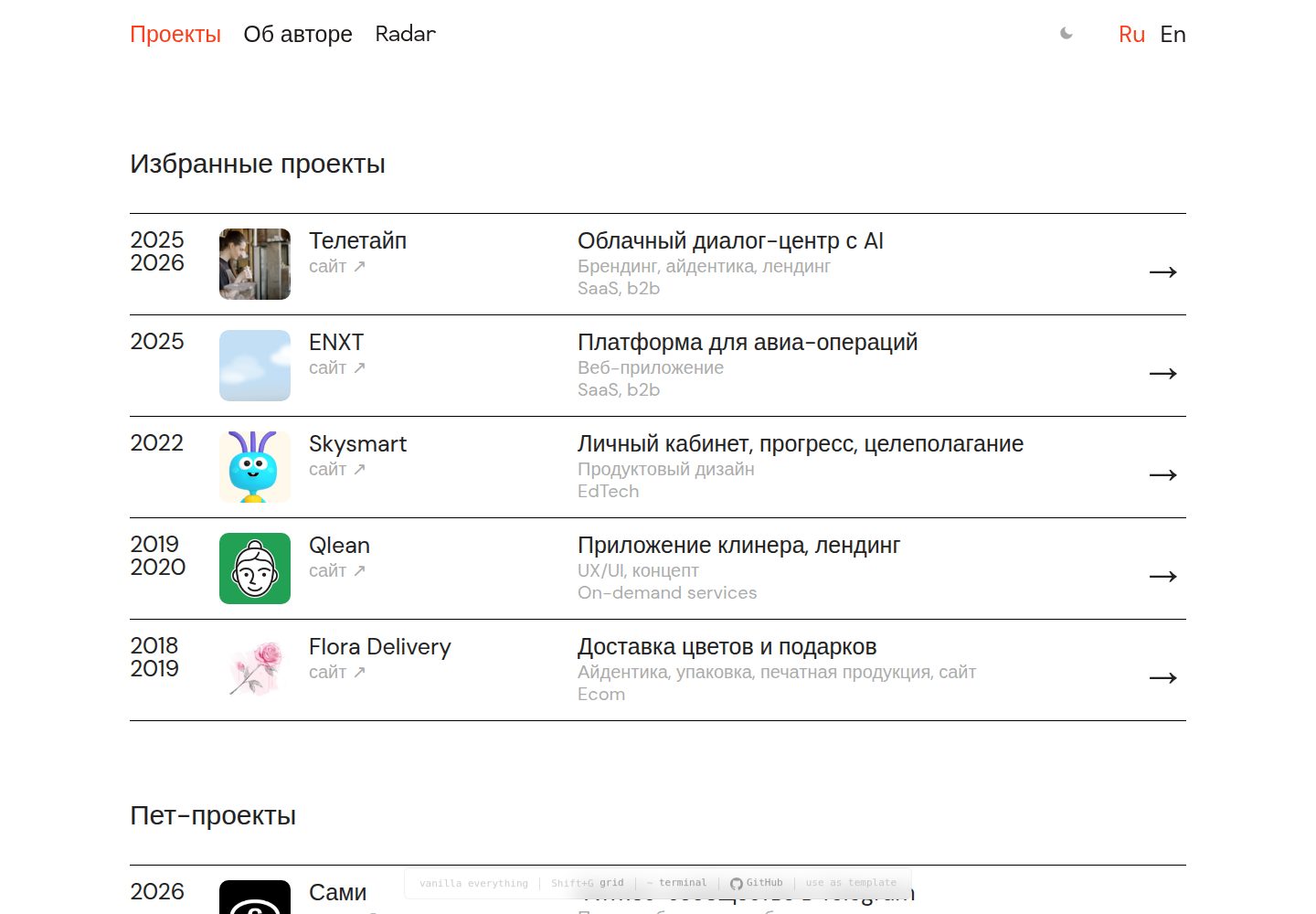
Desktop homepage1 / 3
Desktop captureTop of page
Actual screenshot captured by the server browser.
All pages & views 3
Screenshots show visual appearance; interactive behavior may differ.
Recorded 2026-10-02View source
What stands out
A quick read of the recorded project description.
Includes Russian and English bilingual pages and a language switcher
Case study pages offer about 20 reusable components, including stats grid, tabs, carousel, font showcase, and Mac window mockup
Includes scroll-triggered animations, image lightbox, 12-column grid visualization, and a terminal easter egg
Dark mode supports automatic system preference switching and a manual toggle, with the choice saved in localStorage
Comes with sitemap, robots, Open Graph metadata, and print styles for the about page
Template Details
This is a portfolio template based on the author's personal site diyor.design, designed for designers to showcase project case studies. The pages are built with vanilla HTML, CSS, and JavaScript, without frameworks or third-party dependencies. The repository provides both uncompressed and minified CSS/JS files.
The template includes two sets of pages, Russian and English, switched via a language switcher in the navigation bar. The root directory contains the Russian pages, and the en/ directory contains the English pages. The homepage divides projects into three sections: featured projects, personal projects, and archive. Each case study page provides a consistent numbered section structure and includes components such as a stats grid, image rows, tabs, carousel, font showcase, and Mac window mockup.
Interactions include scroll-triggered animations, click-to-zoom on case study images, a 12-column grid overlay toggled with Shift+G, a terminal easter egg opened with ~, and a dark mode that follows system preference and can be toggled manually. The pages include meta tags, Open Graph, and structured data, along with sitemap.xml and robots.txt, and provide print styles for the about page.
Before use, note the following: the template itself does not include a contact form. The README provides two integration methods: Formspree and Netlify Forms. Formspree's free tier allows 50 submissions per month; actual use requires configuring the endpoint yourself and checking the service terms. Analytics defaults to GoatCounter, and you need to replace the placeholder site identifier. Fonts come from Google Fonts, and the licenses for demo images, icons, and other third-party assets must be checked separately; they cannot be assumed from the code's MIT license alone.
HTMLPortfolio
Is it right for your project?
Use Cases
- Designers building a personal portfolio site to showcase featured projects and case studies
- Independent portfolios that need both Russian and English versions
- Deploying pure static files to GitHub Pages, Netlify, or Vercel
- Case study pages that require display components such as carousel, tabs, and font showcase
Suitable For
- Designers or front-end developers familiar with HTML/CSS basics who want to edit static files directly
- Individuals who need a lightweight portfolio template with no build step
- Users planning to host for free on GitHub Pages and bind a custom domain
Getting started & customization
Use these recorded setup notes alongside the repository instructions for your chosen version.
- 1
Get the repository via GitHub's Use this template or git clone, then run setup.sh to interactively replace placeholders such as name, domain, email, social accounts, and location, and generate favicon, update CNAME, sitemap, and config.json
- 2
To deploy to GitHub Pages, push the code to the main branch and set the source to main in the repository Settings → Pages; you can also use the one-click deploy buttons for Netlify or Vercel provided in the README
- 3
The template does not include a contact form by default. To add one, integrate Formspree or Netlify Forms and configure the corresponding endpoint. Note that Formspree's free tier allows 50 submissions per month
- 4
Analytics defaults to GoatCounter; replace the YOURSITE placeholder in the script or switch to another analytics service
- 5
After modifying styles.css or script.js, regenerate styles.min.css and script.min.js, because the HTML references the minified versions
License & source material
Usage conditions & limitations
Free to use · keep license noticeThis entry covers the free version under the MIT license in the public repository; the free scope is the code of this version and does not mean external services or third-party assets are free.
Must comply with when using
- You are allowed to use, modify, commercialize, and distribute the code of this version for free.
- When distributing copies or substantial portions of the code, retain the original author's copyright notice and the full MIT license notice.
- The code is provided as is; warranties and limitations of liability are governed by the original license and applicable law.
Additional costs & items to verify
- Analytics defaults to GoatCounter; you need to register an account and replace the YOURSITE placeholder in the script, or switch to another analytics service.
- The template does not include a contact form. To add one, you must integrate a third-party service such as Formspree and configure the endpoint. The free tier allows 50 submissions per month, and you must comply with its terms of service.
- Fonts come from the external Google Fonts service, requiring an internet connection or replacement with local font files; font licenses must be checked separately.
- Before use, you must replace the YOURSITE placeholder in the GoatCounter script, otherwise analytics will not work.
- Demo images and other assets must be replaced by you; their licenses are not covered by the code's MIT license and must be confirmed separately.
- The README mentions the Formspree form service; actual submissions require configuring the service endpoint, and its usage limits and fees must be checked separately.
- Demo images, fonts, icons, and other third-party assets must be checked against their respective licenses; they cannot be assumed from the code's MIT license alone.
- External services such as domain, hosting, database, payment, or AI may incur additional charges.
View Original Text Basis
Permission is hereby granted, free of charge
Original License Text
Sign up at [goatcounter.com](https://www.goatcounter.com/) (free, no cookies, GDPR-friendly).
Original README
**Option A: [Formspree](https://formspree.io)** (free tier: 50 submissions/month)
Original README
The template uses [Inter](https://fonts.google.com/specimen/Inter) + [DM Mono](https://fonts.google.com/specimen/DM+Mono) from Google Fonts.
Original README
Replace `YOURSITE` in the GoatCounter script tag, or run `setup.sh` which handles this automatically.
Original README
https://github.com/diyoriko/portfolio-template/blob/main/LICENSEhttps://github.com/diyoriko/portfolio-template/blob/main/README.mdReplace images in `assets/img/`
Original README
Compiled by DeepSeek based on repository license and README ·2026-10-02. Results only cover the materials read; dependencies, images, fonts, and subsequent term changes are subject to their respective original texts.
Project checks & description sources
Template Information
- Source platforms
- GitHub
- Documentation and maintenance reference score
- More documented · 83 / 100
- Technologies
- HTML
- Website type
- Portfolio
How this score is calculated
Our heuristic uses license records (up to 30), a demo link (12), a preview (10), stars (15), recorded maintenance (15), description completeness (8), feature records (5) and classification data (5). It is not a code, security or performance test, or a Google score. A link does not establish tested functionality.
What to verify for this project
- Repository update recorded
- 2026-04-02
- Screenshot last checked
- 2026-10-02
A demo link is listed. Check it with your own content and viewport sizes; its presence does not confirm that forms, authentication or payments work.
The catalog identifies HTML as the primary stack. Check the actual dependency manifest and lockfile for versions and hosting requirements. These notes use recorded metadata, not a code audit or a deployment test.
Use a selection guide →How this description was prepared
AI-assisted description based on catalog records and repository material. Repository authors are not automatically the reviewers of this description.
Automatically checked against source and license rules; no manual editorial review.
Inspect the recorded source material
SHA-256: b343514d297852d0542e733d43253187022d701595ae27a006417dce95bd364f
2026-10-02T17:32:25.980Z
Source file / repository# Portfolio Template
[](https://opensource.org/licenses/MIT)
[](https://github.com/diyoriko/portfolio-template/stargazers)
[](https://github.com/diyoriko/portfolio-template)
[](https://github.com/diyoriko/portfolio-template/generate)
A clean, minimal, bilingual (RU/EN) portfolio template for designers. Based on [diyor.design](https://diyor.design).

**[Live Demo →](https://portfolio-template-demo-463.netlify.app)** · **[Use this template →](https://github.com/diyoriko/portfolio-template/generate)**
## Features
- **Zero dependencies** — vanilla HTML, CSS, JavaScript
- **Bilingual** — Russian and English with language switcher
- **Responsive** — mobile-first, works on all screen sizes
- **Case study template** — 20 components: sections, stats, tabs, carousels, mac mockups, font showcases, image grids
- **Scroll reveal** — subtle entrance animations
- **Lightbox** — click-to-zoom on case study images
- **Terminal easter egg** — press `~` for a secret terminal
- **Design system overlay** — press `Shift+G` to see the 12-column grid
- **GoatCounter analytics** — privacy-friendly, cookie-free
- **SEO ready** — meta tags, Open Graph, structured data, sitemap
- **Print stylesheet** — clean printable version of the about page
- **Dark mode** — toggle button + automatic system preference, persisted in localStorage
- **Accessible** — ARIA attributes, keyboard focus styles, reduced motion support
- **GitHub Pages ready** — just push to main
## Quick Start
### 1. Get the template
Click **[Use this template](https://github.com/diyoriko/portfolio-template/generate)** on GitHub, or:
```bash
git clone https://github.com/YOUR_USERNAME/portfolio-template.git my-portfolio
cd my-portfolio
```
### 2. Run setup
```bash
chmod +x setup.sh
./setup.sh
```
The script will ask for your name, domain, email, socials, and location. It then:
- Replaces all placeholder values across every file
- Generates a favicon with your initial
- Updates CNAME, sitemap, config.json
### 3. Add your content
- Replace case studies in `projects/` and `en/projects/`
- Replace images in `assets/img/`
- Update bio in `about.html` and `en/about.html`
### 4. Deploy
```bash
git add .
git commit -m "my portfolio"
git push origin main
```
Go to **Settings → Pages** → set source to `main`.
## One-Click Deploy
[](https://app.netlify.com/start/deploy?repository=https://github.com/diyoriko/portfolio-template)
[](https://vercel.com/new/clone?repository-url=https://github.com/diyoriko/portfolio-template)
Or use GitHub Pages (free): push to `main` branch, enable Pages in Settings.
## Structure
```
.
├── index.html # Home page (RU)
├── about.html # About page (RU)
├── 404.html # 404 error page
├── projects/
│ └── example.html # Case study (RU)
├── en/
│ ├── index.html # Home page (EN)
│ ├── about.html # About page (EN)
│ └── projects/
│ └── example.html # Case study (EN)
├── assets/
│ └── img/ # Project thumbnails (WebP + PNG fallback)
├── .github/
│ └── ISSUE_TEMPLATE/ # Bug report & feature request templates
├── styles.css # Full CSS source
├── styles.min.css # Minified CSS
├── script.js # Full JS source
├── script.min.js # Minified JS
├── config.json # Template configuration
├── setup.sh # Interactive setup script
├── manifest.json # PWA manifest
├── sitemap.xml # Sitemap
├── robots.txt # Robots
├── CNAME # Custom domain
├── favicon.svg # Favicon
├── CONTRIBUTING.md # Contributor guide
└── README.md
```
## Customization
### Colors
Edit CSS variables in `styles.css`:
```css
:root {
--bg: #ffffff; /* Background */
--text: #222222; /* Text color */
--text-dim: #999999; /* Secondary text */
--accent: #F8401C; /* Accent color (links, hover, buttons) */
--line: #000000; /* Borders and dividers */
--selection-bg: #F8401C; /* Text selection highlight */
}
```
Also update the accent color in:
- `favicon.svg` — the circle fill color
- `config.json` — the `accent_color` field
### Dark Mode
Dark mode works in two ways:
- **Automatic** — follows the user's system preference (`prefers-color-scheme: dark`)
- **Manual toggle** — click the ☽/☀ button in the navigation bar
The user's choice is saved in `localStorage` and persists across sessions.
To customize dark mode colors, edit the `@media (prefers-color-scheme: dark)` and `html.dark` blocks in `styles.css`.
To disable dark mode entirely, remove those CSS blocks and the `initThemeToggle()` function from `script.js`.
### Fonts
The template uses [Inter](https://fonts.google.com/specimen/Inter) + [DM Mono](https://fonts.google.com/specimen/DM+Mono) from Google Fonts. To change:
1. Pick fonts at [fonts.google.com](https://fonts.google.com)
2. Replace the `<link href="https://fonts.googleapis.com/...">` in all HTML files
3. Update `--font-sans` and `--font-mono` in `styles.css`
Or use local font files:
1. Add `.woff2` files to `assets/fonts/`
2. Add `@font-face` declarations to `styles.css`
3. Remove the Google Fonts `<link>` from HTML files
### Project Sections
The home page has three sections:
- **Selected projects** — main work with thumbnails
- **Pet projects** — side projects, experiments
- **Archive** — older work
To remove a section, delete its `<h2>` and `<div class="project-list">` block.
### Adding Projects
1. Duplicate `projects/example.html` (and `en/projects/example.html`)
2. Update content, images, and meta tags
3. Add a project card to `index.html` (and `en/index.html`)
4. Add the URL to `sitemap.xml`
### Case Study Components
Case studies use a consistent structure:
```html
<section class="case-section">
<span class="case-section-num">1</span>
<h2 class="case-section-title">SECTION TITLE</h2>
<p>Section content...</p>
</section>
```
Available components:
| Component | Usage |
|---|---|
| `.case-section` | Numbered content section with title |
| `.case-stats` | Key metrics grid (4 columns) |
| `.case-img-full` | Full-width image (click to lightbox) |
| `.case-img-row` | Two images side by side |
| `.case-img-row--3` | Three-column image grid |
| `.case-concept` | Figure with image + caption (use inside `.case-img-row--3`) |
| `.case-img-bordered` | Image with visible 1px border |
| `.case-img-scroll` | Scrollable container for tall images (500px max) |
| `.case-caption` | Caption text below image |
| `.case-quote` | Blockquote with citation |
| `.case-description` | Large intro text with indent |
| `.case-links` | External links (Figma, prototype, site) |
| `.case-video` | Autoplay video wrapper |
| `.case-separator` | Horizontal divider |
| `.case-nav` | Previous/next project links |
| `.case-tabs` | Tabbed content (e.g. Identity / Landing) |
| `.case-slideshow-wrap` | Image carousel with arrows and counter |
| `.case-font-showcase` | Typography specimen (name, weights, characters) |
| `.mac-mockup` | Browser window mockup with titlebar |
Example slideshow:
```html
<div class="case-slideshow-wrap" data-slideshow>
<div class="case-slideshow">
<div class="case-slideshow-track">
<img src="slide-1.png" alt="Slide 1">
<img src="slide-2.png" alt="Slide 2">
</div>
<div class="case-slideshow-nav">
<span class="case-slideshow-counter" data-counter>1/2</span>
</div>
</div>
<button class="case-slideshow-arrow" data-prev>‹</button>
<button class="case-slideshow-arrow" data-next>›</button>
</div>
```
Example tabs:
```html
<div class="case-tabs" role="tablist">
<button class="case-tab active" data-tab="design" role="tab" aria-selected="true">Design</button>
<button class="case-tab" data-tab="dev" role="tab" aria-selected="false">Development</button>
</div>
<div class="case-tab-panel active" data-panel="design" role="tabpanel">
<!-- Design content -->
</div>
<div class="case-tab-panel" data-panel="dev" role="tabpanel">
<!-- Dev content -->
</div>
```
Example mac mockup:
```html
<div class="mac-mockup">
<div class="mac-mockup-titlebar">
<div class="mac-mockup-dots">
<span class="mac-mockup-dot mac-mockup-dot--close"></span>
<span class="mac-mockup-dot mac-mockup-dot--minimize"></span>
<span class="mac-mockup-dot mac-mockup-dot--maximize"></span>
</div>
<span class="mac-mockup-url">example.com</span>
</div>
<div class="mac-mockup-viewport">
<img src="screenshot.png" alt="Website">
</div>
</div>
```
### Spacing
Key spacing variables in `styles.css`:
```css
--content-max: 1156px; /* Max content width */
--content-pad: 48px; /* Side padding (24px on mobile) */
--radius-sm: 10px; /* Border radius */
```
### Analytics
Replace `YOURSITE` in the GoatCounter script tag, or run `setup.sh` which handles this automatically.
Sign up at [goatcounter.com](https://www.goatcounter.com/) (free, no cookies, GDPR-friendly).
To use a different analytics provider, replace the GoatCounter `<script>` tag in all HTML files.
### Custom Domain
1. Update `CNAME` with your domain
2. In GitHub repo: **Settings > Pages > Custom domain**
3. Set up DNS: CNAME record pointing to `YOUR_USERNAME.github.io`
### Removing Bilingual Support
If you only need one language:
1. Delete the `en/` folder (or root RU files)
2. Remove the language switcher from `<nav>` in all pages
3. Remove `hreflang` `<link>` tags from `<head>`
### Favicon
Replace `favicon.svg` with your own. The default is an accent-colored circle with "P". For best compatibility, also add a `favicon.ico` (32x32 PNG).
### OG Images
Replace `assets/img/og-image.png` (1200x630) for social media previews. Each project page can have its own OG image — update the `og:image` meta tag.
### Rebuilding Minified Files
After editing `styles.css` or `script.js`:
```bash
npx csso styles.css -o styles.min.css
npx terser script.js -o script.min.js --compress --mangle
```
HTML files load `.min.css` and `.min.js` — always rebuild after changes.
## Grid System
- 12-column grid, 1156px max width, 20px column gap
- Side padding: 48px (desktop), 24px (tablet/mobile)
- Text column: 764px centered
- Breakpoints: 1000px (tablet), 600px (compact), 480px (mobile)
- Press `Shift+G` in the browser to visualize the grid
## Contact Form
This template doesn't include a contact form by default. To add one:
**Option A: [Formspree](https://formspree.io)** (free tier: 50 submissions/month)
```html
<form action="https://formspree.io/f/YOUR_ID" method="POST">
<input type="email" name="email" placeholder="Your email" required>
<textarea name="message" placeholder="Message" required></textarea>
<button type="submit">Send</button>
</form>
```
**Option B: [Netlify Forms](https://docs.netlify.com/forms/setup/)** (free with Netlify hosting)
```html
<form name="contact" method="POST" data-netlify="true">
<input type="email" name="email" required>
<textarea name="message" required></textarea>
<button type="submit">Send</button>
</form>
```
## Adding More Languages
The template ships with Russian and English. To add a third language:
1. Create a new folder (e.g., `tr/` for Turkish)
2. Copy `en/index.html`, `en/about.html`, and `en/projects/` into it
3. Translate the content
4. Add `hreflang` links to all pages:
```html
<link rel="alternate" hreflang="tr" href="https://example.com/tr/">
```
5. Add a language option to the `<nav>` switcher in all pages
6. Add the new URLs to `sitemap.xml`
## Browser Support
All modern browsers (Chrome, Firefox, Safari, Edge). No IE11 support.
## Performance
Built for speed: no JavaScript frameworks, no CSS preprocessors, minimal assets.
Lighthouse scores (localhost, headless Chrome):
- Performance: 90
- Accessibility: 92
- Best Practices: 81
- SEO: 100
## License
MIT — use freely for personal and commercial projects.
---
Built by [Diyor Khakimov](https://diyor.design).
Explore similar templates
Compare previews and descriptions within the same stack and category.

simplefolio
Simplefolio is a minimal single-page portfolio template for developers, built with HTML, Bootstrap, SCSS, and Parcel under the MIT license. It includes Hero, About, Projects, Contact, and Footer sections, with content edited in /src/index.html and theme colors controlled by two SCSS variables.
HTML · Portfolio

Freelancer
A bright, single-page Bootstrap portfolio template for freelancers, designers, and small studios. It includes a responsive portfolio grid with modal detail windows and an SB Forms contact form that requires an API token.
HTML · Portfolio

Resume
A single-page resume and CV template from Start Bootstrap, built on Bootstrap with a fixed sidebar and content sections.
HTML · Portfolio

Creative
A single-page marketing template by Start Bootstrap for creative agencies and product services, built on Bootstrap with SCSS, featuring a portfolio grid and call-to-action sections. It includes pre-set SB Forms markers for form integration and npm build scripts for source customization.
HTML · Corporate Website

Grayscale
A dark single-page Bootstrap template from Start Bootstrap for photography, events and brand storytelling, with a large hero and clearly separated sections.
HTML · Corporate Website

startbootstrap-stylish-portfolio
A one-page Bootstrap portfolio theme from Start Bootstrap with multiple content sections and an off-canvas navigation menu. Basic use means editing HTML/CSS under dist and opening index.html; advanced use relies on npm with Pug and SCSS build scripts.
HTML · Portfolio