原生 HTML/CSS/JS 实现,无框架与运行时依赖
HTML作品集
portfolio-template (diyoriko) — HTML 作品集模板
作者 diyoriko
一个面向设计师的极简双语作品集模板,使用原生 HTML/CSS/JS 编写,无框架依赖,可直接部署到 GitHub Pages。
看看你的网站会是什么样
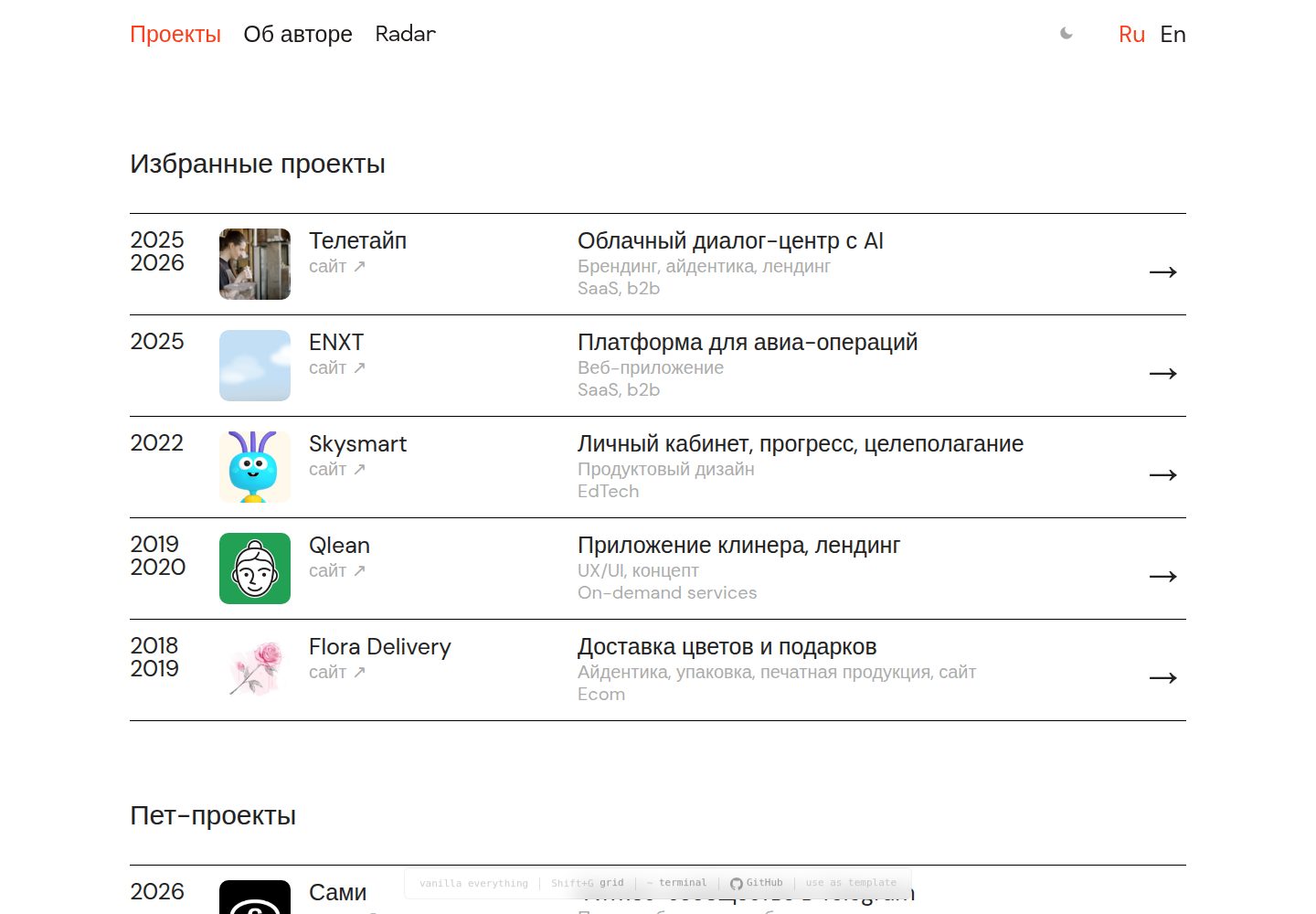
浏览真实页面截图,比较内容排版与手机效果。点击下方缩略图切换,放大查看整页细节。
全部页面与视图 3
截图用于了解视觉与布局,交互效果请以实际项目为准。
采集于 2026-10-02查看来源
值得关注的模板亮点
从已有项目资料中,快速了解它的特点。
内置俄语与英语双语页面及语言切换器
案例页提供约 20 种可复用组件,包括统计网格、标签页、轮播、字体展示和 Mac 窗口模型
包含滚动进入动画、图片灯箱、12 栏网格可视化与终端彩蛋
深色模式支持系统偏好自动切换和手动按钮,选择保存在 localStorage
附带 sitemap、robots、Open Graph 元数据和 about 页面打印样式
模板详细介绍
这是一个基于作者个人站点 diyor.design 整理出的作品集模板,面向设计师展示项目案例。页面使用原生 HTML、CSS 和 JavaScript 构建,不引入框架或第三方依赖,仓库同时提供未压缩与压缩后的 CSS/JS 文件。
模板内置俄语和英语两套页面,通过导航栏的语言切换器跳转,根目录为俄语页面,en/ 目录为英语页面。首页把项目分为精选项目、个人项目和归档三段;每个案例页提供统一的编号章节结构,并附带统计网格、图片行、标签页、轮播、字体展示、Mac 窗口模型等组件。
交互方面包含滚动进入动画、案例图片点击放大、按 Shift+G 显示 12 栏网格、按 ~ 打开终端彩蛋,以及跟随系统偏好并可手动切换的深色模式。页面标注了 meta、Open Graph 和结构化数据,附带 sitemap.xml 与 robots.txt,并提供 about 页面的打印样式。
使用前需要注意:模板本身不包含联系表单,README 给出 Formspree 与 Netlify Forms 两种接入方式,其中 Formspree 免费额度为每月 50 次提交,实际使用需自行配置端点并核对服务条款。分析统计默认接入 GoatCounter,需要替换占位站点标识。字体来自 Google Fonts,演示图片、图标等第三方素材的许可需单独核对,不能仅凭代码的 MIT 许可判断。
HTML作品集
适合你的项目吗?
适用场景
- 设计师搭建个人作品集站点,展示精选项目与案例研究
- 需要俄语和英语两种语言版本的独立作品集
- 希望用纯静态文件部署到 GitHub Pages、Netlify 或 Vercel
- 在案例页中需要轮播、标签页、字体展示等展示型组件
适合人群
- 熟悉 HTML/CSS 基础、希望直接编辑静态文件的设计师或前端开发者
- 需要轻量、无构建步骤作品集模板的个人用户
- 计划使用 GitHub Pages 免费托管并绑定自定义域名的用户
上手与定制指南
结合仓库当前版本的说明,按下面的资料检查内容、配置与运行要求。
- 1
可通过 GitHub 的 Use this template 或 git clone 获取仓库,然后运行 setup.sh 交互式替换姓名、域名、邮箱、社交账号和位置等占位信息,并生成 favicon、更新 CNAME、sitemap 和 config.json
- 2
部署到 GitHub Pages 时,把代码推送到 main 分支并在仓库 Settings → Pages 中将来源设为 main;也可使用 README 提供的 Netlify 或 Vercel 一键部署按钮
- 3
模板默认不含联系表单,如需表单要自行接入 Formspree 或 Netlify Forms 并配置对应端点,注意 Formspree 免费额度为每月 50 次提交
- 4
分析统计默认使用 GoatCounter,需替换脚本中的 YOURSITE 占位符或改用其他统计服务
- 5
修改 styles.css 或 script.js 后需重新生成 styles.min.css 与 script.min.js,因为 HTML 引用的是压缩版本
授权与来源资料
使用条件与限制
免费使用 · 保留许可声明本次收录的是公开仓库中采用 MIT 许可的免费版本;免费范围为该版本代码,不代表外部服务或第三方素材免费。
使用时需要遵守
- 允许免费使用、修改、商用和分发该版本代码。
- 分发代码副本或实质性部分时,保留原作者版权声明和完整 MIT 许可声明。
- 代码按现状提供;担保与责任限制以原许可证及适用法律为准。
额外费用与待核对事项
- 默认分析统计使用 GoatCounter,需自行注册账号并替换脚本中的 YOURSITE 占位符;也可改用其他统计服务。
- 模板不含联系表单,如需表单须自行接入 Formspree 等第三方服务并配置端点,免费额度为每月 50 次提交,需遵守其服务条款。
- 字体来自 Google Fonts 外部服务,需联网加载或自行替换为本地字体文件,字体许可需单独核对。
- 使用前必须替换 GoatCounter 脚本中的 YOURSITE 占位符,否则统计功能不可用。
- 演示图片等素材需自行替换,其许可不在代码 MIT 许可范围内,需单独确认。
- README 提及 Formspree 表单服务;真实提交需配置服务端点,其使用额度与费用需单独核对。
- 演示图片、字体、图标及其他第三方素材需按各自许可核对,不能仅凭代码的 MIT 许可判断。
- 域名、托管、数据库、支付或 AI 等外部服务可能另外收费。
查看原文依据
Permission is hereby granted, free of charge
许可证原文
Sign up at [goatcounter.com](https://www.goatcounter.com/) (free, no cookies, GDPR-friendly).
README 原文
**Option A: [Formspree](https://formspree.io)** (free tier: 50 submissions/month)
README 原文
The template uses [Inter](https://fonts.google.com/specimen/Inter) + [DM Mono](https://fonts.google.com/specimen/DM+Mono) from Google Fonts.
README 原文
Replace `YOURSITE` in the GoatCounter script tag, or run `setup.sh` which handles this automatically.
README 原文
https://github.com/diyoriko/portfolio-template/blob/main/LICENSEhttps://github.com/diyoriko/portfolio-template/blob/main/README.mdReplace images in `assets/img/`
README 原文
DeepSeek 根据仓库许可证和 README 整理 ·2026-10-02。结果仅覆盖已读取资料,依赖、图片、字体及后续条款变更以各自原文为准。
项目核对记录与介绍依据
模板资料
- 来源平台
- GitHub
- 资料与维护参考分
- 资料较完整 · 83 / 100
- 技术栈
- HTML
- 网站类型
- 作品集
这个分数如何计算
本站按许可资料(最高30分)、演示链接(12分)、预览图(10分)、Star数(15分)、记录的维护时间(15分)、描述完整度(8分)、功能记录(5分)和分类资料(5分)计算。它不是代码、安全或性能测试,也不是 Google 评分;有链接不代表已实测可用。
这个项目需要核对什么
- 记录的仓库更新时间
- 2026-04-02
- 截图检查日期
- 2026-10-02
已收录演示链接。请用你的内容与屏幕尺寸检查;有演示不代表表单、认证或支付已经可用。
目录记录的主要技术栈是 HTML。请通过依赖清单和锁文件核对实际版本与托管要求。这些说明基于收录资料,不代表代码审计或部署实测。
查看具体选型方法 →介绍的制作与核对状态
介绍由 AI 辅助整理目录与仓库资料。仓库作者不等于这篇介绍的审核者。
已完成服务器许可规则与 AI 来源核对;未经过人工编辑审核。
查看当时使用的来源资料
SHA-256: b343514d297852d0542e733d43253187022d701595ae27a006417dce95bd364f
2026-10-02T17:32:25.980Z
来源文件 / 仓库# Portfolio Template
[](https://opensource.org/licenses/MIT)
[](https://github.com/diyoriko/portfolio-template/stargazers)
[](https://github.com/diyoriko/portfolio-template)
[](https://github.com/diyoriko/portfolio-template/generate)
A clean, minimal, bilingual (RU/EN) portfolio template for designers. Based on [diyor.design](https://diyor.design).

**[Live Demo →](https://portfolio-template-demo-463.netlify.app)** · **[Use this template →](https://github.com/diyoriko/portfolio-template/generate)**
## Features
- **Zero dependencies** — vanilla HTML, CSS, JavaScript
- **Bilingual** — Russian and English with language switcher
- **Responsive** — mobile-first, works on all screen sizes
- **Case study template** — 20 components: sections, stats, tabs, carousels, mac mockups, font showcases, image grids
- **Scroll reveal** — subtle entrance animations
- **Lightbox** — click-to-zoom on case study images
- **Terminal easter egg** — press `~` for a secret terminal
- **Design system overlay** — press `Shift+G` to see the 12-column grid
- **GoatCounter analytics** — privacy-friendly, cookie-free
- **SEO ready** — meta tags, Open Graph, structured data, sitemap
- **Print stylesheet** — clean printable version of the about page
- **Dark mode** — toggle button + automatic system preference, persisted in localStorage
- **Accessible** — ARIA attributes, keyboard focus styles, reduced motion support
- **GitHub Pages ready** — just push to main
## Quick Start
### 1. Get the template
Click **[Use this template](https://github.com/diyoriko/portfolio-template/generate)** on GitHub, or:
```bash
git clone https://github.com/YOUR_USERNAME/portfolio-template.git my-portfolio
cd my-portfolio
```
### 2. Run setup
```bash
chmod +x setup.sh
./setup.sh
```
The script will ask for your name, domain, email, socials, and location. It then:
- Replaces all placeholder values across every file
- Generates a favicon with your initial
- Updates CNAME, sitemap, config.json
### 3. Add your content
- Replace case studies in `projects/` and `en/projects/`
- Replace images in `assets/img/`
- Update bio in `about.html` and `en/about.html`
### 4. Deploy
```bash
git add .
git commit -m "my portfolio"
git push origin main
```
Go to **Settings → Pages** → set source to `main`.
## One-Click Deploy
[](https://app.netlify.com/start/deploy?repository=https://github.com/diyoriko/portfolio-template)
[](https://vercel.com/new/clone?repository-url=https://github.com/diyoriko/portfolio-template)
Or use GitHub Pages (free): push to `main` branch, enable Pages in Settings.
## Structure
```
.
├── index.html # Home page (RU)
├── about.html # About page (RU)
├── 404.html # 404 error page
├── projects/
│ └── example.html # Case study (RU)
├── en/
│ ├── index.html # Home page (EN)
│ ├── about.html # About page (EN)
│ └── projects/
│ └── example.html # Case study (EN)
├── assets/
│ └── img/ # Project thumbnails (WebP + PNG fallback)
├── .github/
│ └── ISSUE_TEMPLATE/ # Bug report & feature request templates
├── styles.css # Full CSS source
├── styles.min.css # Minified CSS
├── script.js # Full JS source
├── script.min.js # Minified JS
├── config.json # Template configuration
├── setup.sh # Interactive setup script
├── manifest.json # PWA manifest
├── sitemap.xml # Sitemap
├── robots.txt # Robots
├── CNAME # Custom domain
├── favicon.svg # Favicon
├── CONTRIBUTING.md # Contributor guide
└── README.md
```
## Customization
### Colors
Edit CSS variables in `styles.css`:
```css
:root {
--bg: #ffffff; /* Background */
--text: #222222; /* Text color */
--text-dim: #999999; /* Secondary text */
--accent: #F8401C; /* Accent color (links, hover, buttons) */
--line: #000000; /* Borders and dividers */
--selection-bg: #F8401C; /* Text selection highlight */
}
```
Also update the accent color in:
- `favicon.svg` — the circle fill color
- `config.json` — the `accent_color` field
### Dark Mode
Dark mode works in two ways:
- **Automatic** — follows the user's system preference (`prefers-color-scheme: dark`)
- **Manual toggle** — click the ☽/☀ button in the navigation bar
The user's choice is saved in `localStorage` and persists across sessions.
To customize dark mode colors, edit the `@media (prefers-color-scheme: dark)` and `html.dark` blocks in `styles.css`.
To disable dark mode entirely, remove those CSS blocks and the `initThemeToggle()` function from `script.js`.
### Fonts
The template uses [Inter](https://fonts.google.com/specimen/Inter) + [DM Mono](https://fonts.google.com/specimen/DM+Mono) from Google Fonts. To change:
1. Pick fonts at [fonts.google.com](https://fonts.google.com)
2. Replace the `<link href="https://fonts.googleapis.com/...">` in all HTML files
3. Update `--font-sans` and `--font-mono` in `styles.css`
Or use local font files:
1. Add `.woff2` files to `assets/fonts/`
2. Add `@font-face` declarations to `styles.css`
3. Remove the Google Fonts `<link>` from HTML files
### Project Sections
The home page has three sections:
- **Selected projects** — main work with thumbnails
- **Pet projects** — side projects, experiments
- **Archive** — older work
To remove a section, delete its `<h2>` and `<div class="project-list">` block.
### Adding Projects
1. Duplicate `projects/example.html` (and `en/projects/example.html`)
2. Update content, images, and meta tags
3. Add a project card to `index.html` (and `en/index.html`)
4. Add the URL to `sitemap.xml`
### Case Study Components
Case studies use a consistent structure:
```html
<section class="case-section">
<span class="case-section-num">1</span>
<h2 class="case-section-title">SECTION TITLE</h2>
<p>Section content...</p>
</section>
```
Available components:
| Component | Usage |
|---|---|
| `.case-section` | Numbered content section with title |
| `.case-stats` | Key metrics grid (4 columns) |
| `.case-img-full` | Full-width image (click to lightbox) |
| `.case-img-row` | Two images side by side |
| `.case-img-row--3` | Three-column image grid |
| `.case-concept` | Figure with image + caption (use inside `.case-img-row--3`) |
| `.case-img-bordered` | Image with visible 1px border |
| `.case-img-scroll` | Scrollable container for tall images (500px max) |
| `.case-caption` | Caption text below image |
| `.case-quote` | Blockquote with citation |
| `.case-description` | Large intro text with indent |
| `.case-links` | External links (Figma, prototype, site) |
| `.case-video` | Autoplay video wrapper |
| `.case-separator` | Horizontal divider |
| `.case-nav` | Previous/next project links |
| `.case-tabs` | Tabbed content (e.g. Identity / Landing) |
| `.case-slideshow-wrap` | Image carousel with arrows and counter |
| `.case-font-showcase` | Typography specimen (name, weights, characters) |
| `.mac-mockup` | Browser window mockup with titlebar |
Example slideshow:
```html
<div class="case-slideshow-wrap" data-slideshow>
<div class="case-slideshow">
<div class="case-slideshow-track">
<img src="slide-1.png" alt="Slide 1">
<img src="slide-2.png" alt="Slide 2">
</div>
<div class="case-slideshow-nav">
<span class="case-slideshow-counter" data-counter>1/2</span>
</div>
</div>
<button class="case-slideshow-arrow" data-prev>‹</button>
<button class="case-slideshow-arrow" data-next>›</button>
</div>
```
Example tabs:
```html
<div class="case-tabs" role="tablist">
<button class="case-tab active" data-tab="design" role="tab" aria-selected="true">Design</button>
<button class="case-tab" data-tab="dev" role="tab" aria-selected="false">Development</button>
</div>
<div class="case-tab-panel active" data-panel="design" role="tabpanel">
<!-- Design content -->
</div>
<div class="case-tab-panel" data-panel="dev" role="tabpanel">
<!-- Dev content -->
</div>
```
Example mac mockup:
```html
<div class="mac-mockup">
<div class="mac-mockup-titlebar">
<div class="mac-mockup-dots">
<span class="mac-mockup-dot mac-mockup-dot--close"></span>
<span class="mac-mockup-dot mac-mockup-dot--minimize"></span>
<span class="mac-mockup-dot mac-mockup-dot--maximize"></span>
</div>
<span class="mac-mockup-url">example.com</span>
</div>
<div class="mac-mockup-viewport">
<img src="screenshot.png" alt="Website">
</div>
</div>
```
### Spacing
Key spacing variables in `styles.css`:
```css
--content-max: 1156px; /* Max content width */
--content-pad: 48px; /* Side padding (24px on mobile) */
--radius-sm: 10px; /* Border radius */
```
### Analytics
Replace `YOURSITE` in the GoatCounter script tag, or run `setup.sh` which handles this automatically.
Sign up at [goatcounter.com](https://www.goatcounter.com/) (free, no cookies, GDPR-friendly).
To use a different analytics provider, replace the GoatCounter `<script>` tag in all HTML files.
### Custom Domain
1. Update `CNAME` with your domain
2. In GitHub repo: **Settings > Pages > Custom domain**
3. Set up DNS: CNAME record pointing to `YOUR_USERNAME.github.io`
### Removing Bilingual Support
If you only need one language:
1. Delete the `en/` folder (or root RU files)
2. Remove the language switcher from `<nav>` in all pages
3. Remove `hreflang` `<link>` tags from `<head>`
### Favicon
Replace `favicon.svg` with your own. The default is an accent-colored circle with "P". For best compatibility, also add a `favicon.ico` (32x32 PNG).
### OG Images
Replace `assets/img/og-image.png` (1200x630) for social media previews. Each project page can have its own OG image — update the `og:image` meta tag.
### Rebuilding Minified Files
After editing `styles.css` or `script.js`:
```bash
npx csso styles.css -o styles.min.css
npx terser script.js -o script.min.js --compress --mangle
```
HTML files load `.min.css` and `.min.js` — always rebuild after changes.
## Grid System
- 12-column grid, 1156px max width, 20px column gap
- Side padding: 48px (desktop), 24px (tablet/mobile)
- Text column: 764px centered
- Breakpoints: 1000px (tablet), 600px (compact), 480px (mobile)
- Press `Shift+G` in the browser to visualize the grid
## Contact Form
This template doesn't include a contact form by default. To add one:
**Option A: [Formspree](https://formspree.io)** (free tier: 50 submissions/month)
```html
<form action="https://formspree.io/f/YOUR_ID" method="POST">
<input type="email" name="email" placeholder="Your email" required>
<textarea name="message" placeholder="Message" required></textarea>
<button type="submit">Send</button>
</form>
```
**Option B: [Netlify Forms](https://docs.netlify.com/forms/setup/)** (free with Netlify hosting)
```html
<form name="contact" method="POST" data-netlify="true">
<input type="email" name="email" required>
<textarea name="message" required></textarea>
<button type="submit">Send</button>
</form>
```
## Adding More Languages
The template ships with Russian and English. To add a third language:
1. Create a new folder (e.g., `tr/` for Turkish)
2. Copy `en/index.html`, `en/about.html`, and `en/projects/` into it
3. Translate the content
4. Add `hreflang` links to all pages:
```html
<link rel="alternate" hreflang="tr" href="https://example.com/tr/">
```
5. Add a language option to the `<nav>` switcher in all pages
6. Add the new URLs to `sitemap.xml`
## Browser Support
All modern browsers (Chrome, Firefox, Safari, Edge). No IE11 support.
## Performance
Built for speed: no JavaScript frameworks, no CSS preprocessors, minimal assets.
Lighthouse scores (localhost, headless Chrome):
- Performance: 90
- Accessibility: 92
- Best Practices: 81
- SEO: 100
## License
MIT — use freely for personal and commercial projects.
---
Built by [Diyor Khakimov](https://diyor.design).
看看同类模板
对比同技术栈与用途的模板,找到更适合的视觉与内容结构。

simplefolio
⚡️ A minimal portfolio template for Developers
HTML · 作品集

Freelancer
Freelancer 是 Start Bootstrap 出品的单页作品集模板,专为自由职业者、设计师和小型工作室设计。 页面结构清晰,包含多个内容区块、响应式作品集网格,每个作品项目配有模态窗口展示详情。
HTML · 作品集

Resume
Resume 是 Start Bootstrap 推出的简历与 CV 主题,基于 Bootstrap 构建,采用固定侧边栏加内容区块的结构。
HTML · 作品集

Creative
Creative 是 Start Bootstrap 团队维护的一款单页营销模板,定位明确:为创意机构或产品服务提供一个以作品展示和行动号召为核心的落地页。
HTML · 企业官网

Grayscale
Grayscale 是 Start Bootstrap 出品的深色系单页 HTML 模板,基于 Bootstrap 构建。 它的视觉重心放在大尺寸首屏和清晰的内容分区上,整体氛围偏暗,适合摄影、活动或品牌叙事类网站。
HTML · 企业官网

startbootstrap-stylish-portfolio
Stylish Portfolio 是 Start Bootstrap 维护的单页作品集主题,基于 Bootstrap 构建,采用多个内容区块加离屏导航菜单的结构。
HTML · 作品集