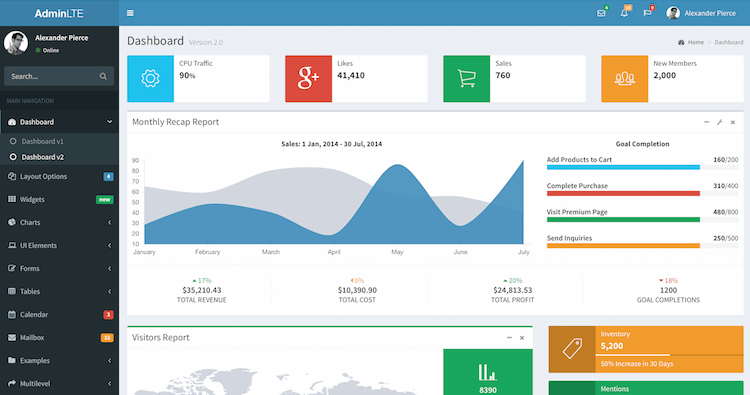
ASP.NET Core MVC backend project skeleton based on the AdminLTE theme
HTMLAdmin dashboardStarter
AdminLTE-Starter-Kit — HTML Admin dashboard Template
By dotnet-express
An AdminLTE backend starter template for ASP.NET Core, providing an MVC project skeleton and dotnet new template installation.
Explore the design
Compare the page layouts and mobile experience. Open any screenshot for a closer look.
Author preview
Author-provided preview
Preview provided in the project README.
One original preview is available. Open the full image to inspect the design.
Screenshots show visual appearance; interactive behavior may differ.
Recorded 2026-10-02View source
What stands out
A quick read of the recorded project description.
Supports installation via dotnet new template, and also supports direct repository cloning
Configuration centralized in appsettings.json, including database connection, email, and external login settings
Uses BuildBundlerMinifier to bundle and minify static assets at build time
Manages external frontend libraries via LibMan (libman.json), outputting to wwwroot/libs
MIT license, allowing modification, commercial use, and distribution
Template Details
This is an ASP.NET Core web application boilerplate project based on the AdminLTE backend interface theme. The repository is categorized as backend and starter, with a data interface (dashboard) style. It provides a directly runnable MVC project skeleton for setting up and testing backend management applications locally.
There are two ways to use it: install the template package from NuGet via the .NET Core CLI and then run dotnet new mvc-adminlte to generate a project, or clone the source directly from GitHub. Configuration is centralized in appsettings.json, including the database connection string, as well as optional SendGrid email settings and switch and key fields for Facebook and Google external login.
For frontend assets, the template uses BuildBundlerMinifier to bundle and minify static files at build time according to bundleconfig.json, and downloads external libraries to the wwwroot/libs directory via Visual Studio Library Manager (libman.json). The prerequisites stated in the README are Visual Studio 2017+ or Visual Studio Code, and .NET Core SDK 2.2+.
Regarding licensing, the repository uses the MIT license, allowing free use, modification, commercial use, and distribution of this version of the code, provided the copyright notice and license notice are retained when distributing. Third-party assets such as demo images, fonts, and icons require separate license verification; external services such as domain names, hosting, databases, email, or external login may incur additional charges.
HTMLBackendStarter
Is it right for your project?
Use Cases
- Projects that need to quickly set up an ASP.NET Core backend management interface skeleton
- Generating backend projects in bulk using the dotnet new template
- Backend applications that need preconfigured database connection, email sending, and external login configuration slots
- Verifying the AdminLTE backend layout and static asset bundling process in local development and testing environments
Suitable For
- Backend management projects using ASP.NET Core and MVC
- .NET developers accustomed to Visual Studio or Visual Studio Code
- Projects that need to be freely modifiable and distributable under the MIT license
- Teams that want to reuse the backend interface skeleton as a template
Getting started & customization
Use these recorded setup notes alongside the repository instructions for your chosen version.
- 1
Prerequisites are Visual Studio 2017+ or Visual Studio Code, and .NET Core SDK 2.2+
- 2
The template can be installed via dotnet new -i "Dynamic.NET.AdminLTE.ProjectTemplates", then a project generated with dotnet new mvc-adminlte
- 3
The source code can also be obtained by directly git clone-ing the repository
- 4
Database connection, email, and Facebook/Google login settings are filled in appsettings.json
- 5
At build time, BuildBundlerMinifier processes bundleconfig.json, and LibMan saves external libraries to wwwroot/libs
License & source material
Usage conditions & limitations
Free to use · keep license noticeThis entry covers the free version in the public repository under the MIT license; the free scope is the code of this version and does not mean external services or third-party assets are free.
Must comply with when using
- Free use, modification, commercial use, and distribution of this version of the code are permitted.
- When distributing copies or substantial portions of the code, retain the original author's copyright notice and the complete MIT license notice.
- The code is provided as is; warranties and limitations of liability are governed by the original license and applicable law.
Additional costs & items to verify
- This template is an open-source part of the .NET Express project; complete documentation and examples require visiting its external site dotnet.express.
- The email feature requires configuring an external email service provider (such as SendGrid), and you need to apply for an account and API key yourself, which may incur external service fees.
- Using SendGrid for email sending requires filling in its API key, which is a third-party paid/registration service.
- Enabling Facebook external login requires registering an application yourself and providing AppId and AppSecret.
- Enabling Google external login requires registering an application yourself and providing ClientId and ClientSecret.
- By default, a local SQL Server LocalDB connection is used; deploying to production requires preparing a database service yourself.
- The interface is based on the third-party AdminLTE theme, and the licenses for its assets (images, fonts, icons, etc.) need to be verified separately.
- Demo images, fonts, icons, and other third-party assets need to be checked against their respective licenses and cannot be judged solely by the MIT license of the code.
- External services such as domain names, hosting, databases, payments, or AI may incur additional charges.
View Original Text Basis
Permission is hereby granted, free of charge
Original License Text
This template is open-source part of [.NET Express Project](https://dotnet.express).
Original README
"EmailProvider": "", // Examples: "", "SendGrid"
Original README
"ApiKey": "{API KEY}"
Original README
"Facebook": { "IsEnabled": "true", "AppId": "{APP ID}", "AppSecret": "{SECRET KEY}"
Original README
"Google": { "IsEnabled": "false", "ClientId": "{CLIENT ID}", "ClientSecret": "{SECRET KEY}"
Original README
"DefaultConnection": "Server=(localdb)\\mssqllocaldb;Database=aspnet-Company.WebApplication1-53bc9b9d-9d6a-45d4-8429-2a2761773502;Trusted_Connection=True;MultipleActiveResultSets=true"
Original README
https://github.com/dotnet-express/AdminLTE-Starter-Kit/blob/master/LICENSEhttps://github.com/dotnet-express/AdminLTE-Starter-Kit/blob/master/README.mdbased on [AdminLTE](https://adminlte.io) by Abdullah Almasaeed
Original README
Compiled by DeepSeek based on repository license and README ·2026-10-02. Results only cover the materials read; dependencies, images, fonts, and subsequent term changes are subject to their respective original texts.
Project checks & description sources
Template Information
- Source platforms
- GitHub
- Documentation and maintenance reference score
- More documented · 81 / 100
- Technologies
- HTML
- Website type
- Admin dashboard · Starter
How this score is calculated
Our heuristic uses license records (up to 30), a demo link (12), a preview (10), stars (15), recorded maintenance (15), description completeness (8), feature records (5) and classification data (5). It is not a code, security or performance test, or a Google score. A link does not establish tested functionality.
What to verify for this project
- Repository update recorded
- 2023-01-04
- Screenshot last checked
- 2026-10-02
A demo link is listed. Check it with your own content and viewport sizes; its presence does not confirm that forms, authentication or payments work.
The catalog identifies HTML as the primary stack. Check the actual dependency manifest and lockfile for versions and hosting requirements. These notes use recorded metadata, not a code audit or a deployment test.
Use a selection guide →How this description was prepared
AI-assisted description based on catalog records and repository material. Repository authors are not automatically the reviewers of this description.
Automatically checked against source and license rules; no manual editorial review.
Inspect the recorded source material
SHA-256: 2bc8dbce98583ac88356b3a36996f4d54fd7aaa9f7465b7382fe4fcb4eb7228e
2026-10-02T16:01:15.703Z
Source file / repository# AdminLTE Starter Kit for ASP.NET Core
**AdminLTE Starter Kit** is a boilerplate projects for ASP.NET Core Web Applications with a modern UI (based on [AdminLTE](https://adminlte.io) by Abdullah Almasaeed).

## 1. Getting Started
This template is open-source part of [.NET Express Project](https://dotnet.express). You can find samples, documentation and getting started instructions for [.NET Express Project](https://dotnet.express/templates) at the [Templates Documentation](https://docs.dotnet.express/templates/).
These instructions will get you a copy of the project up and running on your local machine for development and testing purposes.
See installing, configuration and deploy for notes on how to run the project on a live system.
### 2. Prerequisites
What things you need to install the software and how to install them
* [Visual Studio 2017+](https://www.visualstudio.com/vs/) / [Visual Studio Code](https://code.visualstudio.com/)
* [.NET Core SDK 2.2+](https://www.microsoft.com/net/download/)
### 3. Installing
#### 3.1. Installing from .NET Core CLI
You can install the ```dotnet new``` templates from [NuGet.org](https://www.nuget.org/) by running the following command:
```shell
dotnet new -i "Dynamic.NET.AdminLTE.ProjectTemplates"
```
Once installed your will have to new templates available to create AdminLTE MVC bootstrap web application.
```shell
dotnet new mvc-adminlte [options]
```
This will create a new web application in the current folder.
#### 3.2. Installing from GitHub repository
You can clone source directly from GitHub
```shell
git clone https://github.com/dotnet-express/AdminLTE-Starter-Kit.git
```
## 4. Templates Settings
All configuration settings contains in ```appsettings.json```.
### 4.1. Database Connection
```json
"ConnectionStrings": {
"DefaultConnection": "Server=(localdb)\\mssqllocaldb;Database=aspnet-Company.WebApplication1-53bc9b9d-9d6a-45d4-8429-2a2761773502;Trusted_Connection=True;MultipleActiveResultSets=true"
},
```
### 4.2. Application Settings
All application configuration settings in ```appsettings.json```
```json
"Email": {
"EmailProvider": "", // Examples: "", "SendGrid"
"SupportTeamEmail": "[email protected]",
"SupportTeamName": ".NET Express - Support Team",
"SendGrid": {
"KeyName": "{KEY NAME}",
"ApiKey": "{API KEY}"
}
},
"Authentication": {
"Facebook": {
"IsEnabled": "true",
"AppId": "{APP ID}",
"AppSecret": "{SECRET KEY}"
},
"Google": {
"IsEnabled": "false",
"ClientId": "{CLIENT ID}",
"ClientSecret": "{SECRET KEY}"
}
```
## 5. Bundling and Minification
For bundling and minification files from bundleconfig.json, used [BuildBundlerMinifier](https://www.nuget.org/packages/BuildBundlerMinifier/) from NuGet.
This template include "BuildBundlerMinifier 2.8.391"
After building, you must see this lines in build output:
```shell
Bundler: Begin processing bundleconfig.json
Bundler: Done processing bundleconfig.json
```
Detailed documentation you find in [Bundle and minifiy static assets in ASP.NET Core](https://docs.microsoft.com/en-us/aspnet/core/client-side/bundling-and-minification?view=aspnetcore-2.0&tabs=netcore-cli%2Caspnetcore2x#build-time-execution-of-bundling-and-minification).
### 6. Library Manager
**This solution use Visual Studio Library Manager with config in ```libman.json``` and save all external libraries in ```\wwwroot\libs``` folder.**
[Client-side library acquisition in ASP.NET Core with LibMan](https://docs.microsoft.com/en-us/aspnet/core/client-side/libman/?view=aspnetcore-2.2)
For Visual Studio:
[Use LibMan with ASP.NET Core in Visual Studio](https://docs.microsoft.com/en-us/aspnet/core/client-side/libman/libman-vs?view=aspnetcore-2.2)
For Visual Studio Code/CLI:
[Use the LibMan command-line interface (CLI) with ASP.NET Core](https://docs.microsoft.com/en-us/aspnet/core/client-side/libman/libman-cli?view=aspnetcore-2.2)
## Contributing
Please read [CONTRIBUTING.md](CONTRIBUTING.md) for details on our code of conduct, and the process for submitting pull requests to us.
## Versioning
We use [Semantic Versioning 2.0](http://semver.org/) for versioning. For the versions available, see the [releases on this repository](https://github.com/dynamic-technologies/ASP.NET-Core-2.0-AdminLTE-Templates/releases).
## Authors
* **[Leonid Shishkin](https://github.com/leonex)** - *Initial work*
* **[.Net Express Team](https://github.com/dotnet-express)** - *Support and development*
See also the list of [contributors](https://github.com/dotnet-express/AdminLTE/contributors) who participated in this project.
## License
This project is licensed under the MIT License - see the [LICENSE](https://opensource.org/licenses/MIT) file for details
## Acknowledgments
* [Abdullah Almasaeed](https://adminlte.io/about) for great [AdminLTE](https://adminlte.io) Template project.
Explore similar templates
Compare previews and descriptions within the same stack and category.

gentelella
Gentelella v4 is a free, open-source admin dashboard template maintained by Colorlib, built with vanilla JavaScript, SCSS, and Vite 8 without Bootstrap or jQuery.
HTML · Admin dashboard

coreui-free-bootstrap-admin-template
A free Bootstrap admin template maintained by CoreUI, built on CoreUI's own UI component library. It provides compiled HTML pages and Pug template source code, covering dashboards, authentication, forms, components, icons, and error pages.
HTML · Admin dashboard

dashboards
A collection of responsive dashboard HTML templates open-sourced by Keen IO, built on CSS Grid, offering multiple prebuilt admin data interface layouts.
HTML · Admin dashboard

SB Admin 2
SB Admin 2 is a classic Bootstrap admin template from Start Bootstrap, offering dashboards, charts, tables, and common management pages.
HTML · Admin dashboard

Adminator-admin-dashboard
Adminator 4 is a vanilla HTML, CSS and JavaScript admin dashboard template with a CSS-variable token design system, built-in light and dark themes, no jQuery or Bootstrap dependency, and 18 pages covering dashboards, mail, calendar, charts, forms, tables and error pages.
HTML · Admin dashboard

SB Admin
SB Admin is a lightweight, open-source Bootstrap admin template from Start Bootstrap. It offers a sidebar-and-top-bar layout with data tables, forms, and stat cards, plus responsive design.
HTML · Admin dashboard