基于 AdminLTE 主题的 ASP.NET Core MVC 后台项目骨架
HTML后台启动器
AdminLTE-Starter-Kit — HTML 后台模板
作者 dotnet-express
面向 ASP.NET Core 的 AdminLTE 后台启动模板,提供 MVC 项目骨架与 dotnet new 模板安装方式。
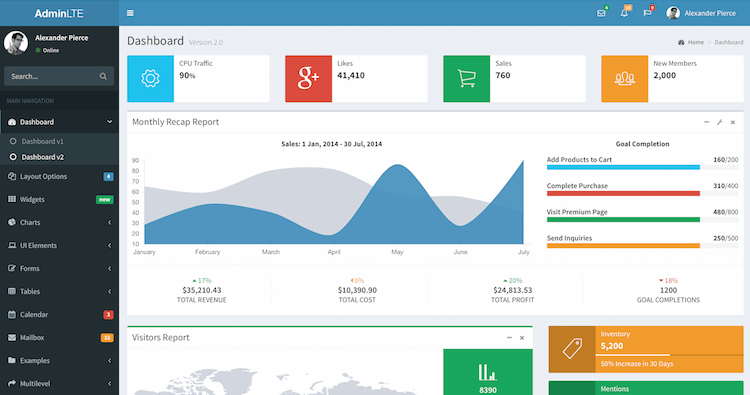
看看你的网站会是什么样
浏览真实页面截图,比较内容排版与手机效果。点击下方缩略图切换,放大查看整页细节。
目前有 1 张原始预览,可打开完整图片查看设计细节。
截图用于了解视觉与布局,交互效果请以实际项目为准。
采集于 2026-10-02查看来源
值得关注的模板亮点
从已有项目资料中,快速了解它的特点。
支持通过 dotnet new 模板安装,也支持直接克隆仓库
配置集中在 appsettings.json,含数据库连接、邮件与外部登录设置
使用 BuildBundlerMinifier 在构建时打包压缩静态资源
通过 LibMan(libman.json)管理外部前端库,输出到 wwwroot/libs
MIT 许可,允许修改、商用与分发
模板详细介绍
这是一个基于 AdminLTE 后台界面主题的 ASP.NET Core Web 应用样板项目,仓库归类为后台与启动器,界面风格为数据界面(dashboard)。它提供可直接运行的 MVC 项目骨架,用于在本地搭建和测试后台管理类应用。
使用方式有两种:通过 .NET Core CLI 从 NuGet 安装模板包后执行 dotnet new mvc-adminlte 生成项目,或直接从 GitHub 克隆源码。配置集中在 appsettings.json,包含数据库连接字符串,以及邮件(可选用 SendGrid)和 Facebook、Google 外部登录的开关与密钥字段。
前端资源方面,模板使用 BuildBundlerMinifier 按 bundleconfig.json 在构建时打包与压缩静态文件,并通过 Visual Studio Library Manager(libman.json)把外部库下载到 wwwroot/libs 目录。README 给出的前置环境为 Visual Studio 2017+ 或 Visual Studio Code,以及 .NET Core SDK 2.2+。
许可方面,仓库采用 MIT 许可,允许免费使用、修改、商用和分发该版本代码,分发时需保留版权声明与许可声明。演示图片、字体、图标等第三方素材需单独核对其许可;域名、托管、数据库、邮件或外部登录等外部服务可能另行收费。
HTML后台启动器
适合你的项目吗?
适用场景
- 需要快速搭建 ASP.NET Core 后台管理界面骨架的项目
- 希望以 dotnet new 模板方式批量生成后台项目
- 需要预置数据库连接、邮件发送与外部登录配置位的后台应用
- 在本地开发与测试环境验证 AdminLTE 后台布局与静态资源打包流程
适合人群
- 使用 ASP.NET Core 与 MVC 的后台管理类项目
- 习惯 Visual Studio 或 Visual Studio Code 的 .NET 开发者
- 需要 MIT 许可下可自由修改与分发的项目
- 希望以模板方式复用后台界面骨架的团队
上手与定制指南
结合仓库当前版本的说明,按下面的资料检查内容、配置与运行要求。
- 1
前置环境为 Visual Studio 2017+ 或 Visual Studio Code,以及 .NET Core SDK 2.2+
- 2
可通过 dotnet new -i "Dynamic.NET.AdminLTE.ProjectTemplates" 安装模板,再用 dotnet new mvc-adminlte 生成项目
- 3
也可直接 git clone 仓库获取源码
- 4
数据库连接、邮件与 Facebook/Google 登录等配置在 appsettings.json 中填写
- 5
构建时 BuildBundlerMinifier 会处理 bundleconfig.json,LibMan 将外部库保存到 wwwroot/libs
授权与来源资料
使用条件与限制
免费使用 · 保留许可声明本次收录的是公开仓库中采用 MIT 许可的免费版本;免费范围为该版本代码,不代表外部服务或第三方素材免费。
使用时需要遵守
- 允许免费使用、修改、商用和分发该版本代码。
- 分发代码副本或实质性部分时,保留原作者版权声明和完整 MIT 许可声明。
- 代码按现状提供;担保与责任限制以原许可证及适用法律为准。
额外费用与待核对事项
- 该模板是 .NET Express 项目的开源组成部分,完整文档与示例需访问其外部站点 dotnet.express 获取。
- 邮件功能需配置外部邮件服务商(如 SendGrid),需自行申请账号与 API Key,可能产生外部服务费用。
- 使用 SendGrid 邮件发送需填写其 API Key,属于第三方付费/注册服务。
- 启用 Facebook 外部登录需自行注册应用并提供 AppId 与 AppSecret。
- 启用 Google 外部登录需自行注册应用并提供 ClientId 与 ClientSecret。
- 默认使用本地 SQL Server LocalDB 连接,部署到生产环境需自行准备数据库服务。
- 界面基于第三方 AdminLTE 主题,其素材(图片、字体、图标等)许可需单独核对。
- 演示图片、字体、图标及其他第三方素材需按各自许可核对,不能仅凭代码的 MIT 许可判断。
- 域名、托管、数据库、支付或 AI 等外部服务可能另外收费。
查看原文依据
Permission is hereby granted, free of charge
许可证原文
This template is open-source part of [.NET Express Project](https://dotnet.express).
README 原文
"EmailProvider": "", // Examples: "", "SendGrid"
README 原文
"ApiKey": "{API KEY}"
README 原文
"Facebook": { "IsEnabled": "true", "AppId": "{APP ID}", "AppSecret": "{SECRET KEY}"
README 原文
"Google": { "IsEnabled": "false", "ClientId": "{CLIENT ID}", "ClientSecret": "{SECRET KEY}"
README 原文
"DefaultConnection": "Server=(localdb)\\mssqllocaldb;Database=aspnet-Company.WebApplication1-53bc9b9d-9d6a-45d4-8429-2a2761773502;Trusted_Connection=True;MultipleActiveResultSets=true"
README 原文
https://github.com/dotnet-express/AdminLTE-Starter-Kit/blob/master/LICENSEhttps://github.com/dotnet-express/AdminLTE-Starter-Kit/blob/master/README.mdbased on [AdminLTE](https://adminlte.io) by Abdullah Almasaeed
README 原文
DeepSeek 根据仓库许可证和 README 整理 ·2026-10-02。结果仅覆盖已读取资料,依赖、图片、字体及后续条款变更以各自原文为准。
项目核对记录与介绍依据
模板资料
- 来源平台
- GitHub
- 资料与维护参考分
- 资料较完整 · 81 / 100
- 技术栈
- HTML
- 网站类型
- 后台 · 启动器
这个分数如何计算
本站按许可资料(最高30分)、演示链接(12分)、预览图(10分)、Star数(15分)、记录的维护时间(15分)、描述完整度(8分)、功能记录(5分)和分类资料(5分)计算。它不是代码、安全或性能测试,也不是 Google 评分;有链接不代表已实测可用。
这个项目需要核对什么
- 记录的仓库更新时间
- 2023-01-04
- 截图检查日期
- 2026-10-02
已收录演示链接。请用你的内容与屏幕尺寸检查;有演示不代表表单、认证或支付已经可用。
目录记录的主要技术栈是 HTML。请通过依赖清单和锁文件核对实际版本与托管要求。这些说明基于收录资料,不代表代码审计或部署实测。
查看具体选型方法 →介绍的制作与核对状态
介绍由 AI 辅助整理目录与仓库资料。仓库作者不等于这篇介绍的审核者。
已完成服务器许可规则与 AI 来源核对;未经过人工编辑审核。
查看当时使用的来源资料
SHA-256: 2bc8dbce98583ac88356b3a36996f4d54fd7aaa9f7465b7382fe4fcb4eb7228e
2026-10-02T16:01:15.703Z
来源文件 / 仓库# AdminLTE Starter Kit for ASP.NET Core
**AdminLTE Starter Kit** is a boilerplate projects for ASP.NET Core Web Applications with a modern UI (based on [AdminLTE](https://adminlte.io) by Abdullah Almasaeed).

## 1. Getting Started
This template is open-source part of [.NET Express Project](https://dotnet.express). You can find samples, documentation and getting started instructions for [.NET Express Project](https://dotnet.express/templates) at the [Templates Documentation](https://docs.dotnet.express/templates/).
These instructions will get you a copy of the project up and running on your local machine for development and testing purposes.
See installing, configuration and deploy for notes on how to run the project on a live system.
### 2. Prerequisites
What things you need to install the software and how to install them
* [Visual Studio 2017+](https://www.visualstudio.com/vs/) / [Visual Studio Code](https://code.visualstudio.com/)
* [.NET Core SDK 2.2+](https://www.microsoft.com/net/download/)
### 3. Installing
#### 3.1. Installing from .NET Core CLI
You can install the ```dotnet new``` templates from [NuGet.org](https://www.nuget.org/) by running the following command:
```shell
dotnet new -i "Dynamic.NET.AdminLTE.ProjectTemplates"
```
Once installed your will have to new templates available to create AdminLTE MVC bootstrap web application.
```shell
dotnet new mvc-adminlte [options]
```
This will create a new web application in the current folder.
#### 3.2. Installing from GitHub repository
You can clone source directly from GitHub
```shell
git clone https://github.com/dotnet-express/AdminLTE-Starter-Kit.git
```
## 4. Templates Settings
All configuration settings contains in ```appsettings.json```.
### 4.1. Database Connection
```json
"ConnectionStrings": {
"DefaultConnection": "Server=(localdb)\\mssqllocaldb;Database=aspnet-Company.WebApplication1-53bc9b9d-9d6a-45d4-8429-2a2761773502;Trusted_Connection=True;MultipleActiveResultSets=true"
},
```
### 4.2. Application Settings
All application configuration settings in ```appsettings.json```
```json
"Email": {
"EmailProvider": "", // Examples: "", "SendGrid"
"SupportTeamEmail": "[email protected]",
"SupportTeamName": ".NET Express - Support Team",
"SendGrid": {
"KeyName": "{KEY NAME}",
"ApiKey": "{API KEY}"
}
},
"Authentication": {
"Facebook": {
"IsEnabled": "true",
"AppId": "{APP ID}",
"AppSecret": "{SECRET KEY}"
},
"Google": {
"IsEnabled": "false",
"ClientId": "{CLIENT ID}",
"ClientSecret": "{SECRET KEY}"
}
```
## 5. Bundling and Minification
For bundling and minification files from bundleconfig.json, used [BuildBundlerMinifier](https://www.nuget.org/packages/BuildBundlerMinifier/) from NuGet.
This template include "BuildBundlerMinifier 2.8.391"
After building, you must see this lines in build output:
```shell
Bundler: Begin processing bundleconfig.json
Bundler: Done processing bundleconfig.json
```
Detailed documentation you find in [Bundle and minifiy static assets in ASP.NET Core](https://docs.microsoft.com/en-us/aspnet/core/client-side/bundling-and-minification?view=aspnetcore-2.0&tabs=netcore-cli%2Caspnetcore2x#build-time-execution-of-bundling-and-minification).
### 6. Library Manager
**This solution use Visual Studio Library Manager with config in ```libman.json``` and save all external libraries in ```\wwwroot\libs``` folder.**
[Client-side library acquisition in ASP.NET Core with LibMan](https://docs.microsoft.com/en-us/aspnet/core/client-side/libman/?view=aspnetcore-2.2)
For Visual Studio:
[Use LibMan with ASP.NET Core in Visual Studio](https://docs.microsoft.com/en-us/aspnet/core/client-side/libman/libman-vs?view=aspnetcore-2.2)
For Visual Studio Code/CLI:
[Use the LibMan command-line interface (CLI) with ASP.NET Core](https://docs.microsoft.com/en-us/aspnet/core/client-side/libman/libman-cli?view=aspnetcore-2.2)
## Contributing
Please read [CONTRIBUTING.md](CONTRIBUTING.md) for details on our code of conduct, and the process for submitting pull requests to us.
## Versioning
We use [Semantic Versioning 2.0](http://semver.org/) for versioning. For the versions available, see the [releases on this repository](https://github.com/dynamic-technologies/ASP.NET-Core-2.0-AdminLTE-Templates/releases).
## Authors
* **[Leonid Shishkin](https://github.com/leonex)** - *Initial work*
* **[.Net Express Team](https://github.com/dotnet-express)** - *Support and development*
See also the list of [contributors](https://github.com/dotnet-express/AdminLTE/contributors) who participated in this project.
## License
This project is licensed under the MIT License - see the [LICENSE](https://opensource.org/licenses/MIT) file for details
## Acknowledgments
* [Abdullah Almasaeed](https://adminlte.io/about) for great [AdminLTE](https://adminlte.io) Template project.
看看同类模板
对比同技术栈与用途的模板,找到更适合的视觉与内容结构。

gentelella
Free admin dashboard template — vanilla JS, SCSS, Vite 8. No Bootstrap, no jQuery.
HTML · 后台

coreui-free-bootstrap-admin-template
Free Bootstrap Admin & Dashboard Template Built for AI-Assisted Development
HTML · 后台

dashboards
Responsive dashboard templates 📊✨
HTML · 后台

SB Admin 2
SB Admin 2 是 Start Bootstrap 推出的开源后台模板,基于 Bootstrap 构建,整体风格偏向经典管理界面。
HTML · 后台

Adminator-admin-dashboard
Adminator is easy to use and well design admin dashboard template with dark mode for web apps, websites, servi…
HTML · 后台

SB Admin
SB Admin 是 Start Bootstrap 推出的开源后台管理模板,基于 Bootstrap 构建,定位是简洁、实用的管理界面。
HTML · 后台