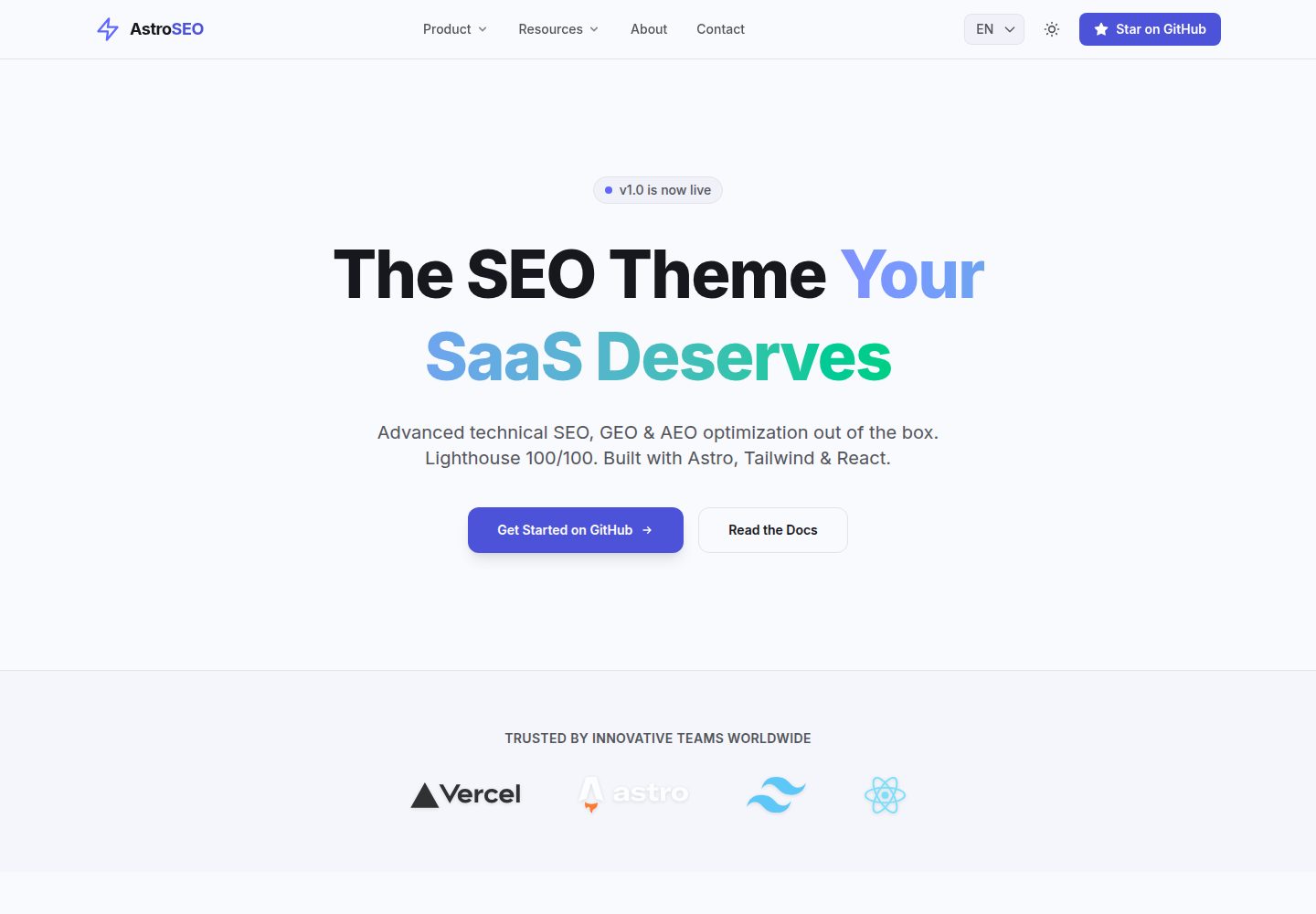
Three types of content—marketing landing pages, a Markdown/MDX blog, and case studies—in the same repository, sharing responsive layouts and navigation
AstroBlogSaaSCorporate Website
astro-seo-theme — Astro Blog Template
By druedaro
An SEO-first blog and marketing site template built on Astro, with built-in JSON-LD, i18n, Open Graph image generation, and security response headers, with content managed in Markdown/MDX.
Explore the design
Compare the page layouts and mobile experience. Open any screenshot for a closer look.
Desktop homepage1 / 3
Desktop captureTop of page
Actual screenshot captured by the server browser.
All pages & views 3
Screenshots show visual appearance; interactive behavior may differ.
Recorded 2026-10-02View source
What stands out
A quick read of the recorded project description.
BaseLayout automatically generates canonical, Open Graph, Twitter Card, and hreflang links; JsonLd and FaqSchema components inject JSON-LD structured data
Built-in English and Spanish implementations using file-based routing, with interface copy centralized in src/i18n/ui.ts
No JavaScript is sent to the client by default; only interactions such as the dark mode toggle use React islands
Comes with vercel.json security response header configuration and GitHub Actions workflows for type checking and dependency updates
Provides AI_GUIDE.md explaining project structure and conventions, making it easier to customize with AI assistants
Template Details
Astro SEO Theme is an open-source website template built with Astro, aimed at B2B SaaS, corporate websites, and blog scenarios. It places three types of content—marketing landing pages, a Markdown/MDX blog, and case studies—in the same repository, sharing one set of responsive layouts and navigation. The template includes a fairly complete SEO toolchain: BaseLayout automatically generates canonical, Open Graph, Twitter Card, and hreflang links; JsonLd.astro and FaqSchema.astro inject JSON-LD structured data; @astrojs/sitemap generates the sitemap at build time; and robots.txt is served statically from the public directory. Internationalization uses file-based routing: English pages are under src/pages/, Spanish under src/pages/es/, the LanguagePicker in the Header handles switching, and interface copy is centralized in src/i18n/ui.ts. Content collections are defined in src/content.config.ts, with blog posts and case studies stored in src/content/blog/ and src/content/case-studies/ respectively, organized by language subdirectories. On the technical stack side, the template uses Astro, Tailwind CSS, React, and TypeScript, with zero client-side JavaScript by default; only interactions such as the dark mode toggle use React islands. For deployment, npm run build outputs a static site to dist/, which can be hosted on any static host; the repository includes vercel.json for setting security response headers such as CSP, HSTS, X-Content-Type-Options, and X-Frame-Options, and includes GitHub Actions workflows for type checking and dependency updates. Before use, you need to change the site property in astro.config.mjs to your actual domain; otherwise the automatically generated sitemap and robots.txt will point to the wrong address. Because the default CSP is strict, integrating third-party scripts such as Google Analytics or Plausible requires adjusting script-src and connect-src in vercel.json accordingly. The template is MIT licensed and can be used free of charge for personal and commercial projects, but third-party assets such as demo images, fonts, and icons need separate license verification, and external services such as domains and hosting may incur costs.
AstroBlogSaaSCorporate website
Is it right for your project?
Use Cases
- Building a marketing site with landing pages, a blog, and case studies for a B2B SaaS or startup
- A blog or corporate website that needs multilingual (English/Spanish) content and automatic hreflang handling
- Managing articles and case content in Markdown/MDX and automatically generating sitemaps and structured data
- Projects that need strict CSP and security response headers and plan to deploy to Vercel, Netlify, or Cloudflare Pages
- Building content-oriented sites with low client-side JavaScript overhead while retaining a few React interactive components
Suitable For
- Front-end developers familiar with Astro and Markdown/MDX content workflows
- B2B SaaS or corporate website projects that need SEO and structured data configured out of the box
- Multilingual sites that need to maintain both English and Spanish content
- Teams that accept static site deployment and are willing to adjust CSP as needed to integrate analytics scripts
Getting started & customization
Use these recorded setup notes alongside the repository instructions for your chosen version.
- 1
Requires Node.js 18+ and npm (or pnpm/yarn); you can create a project with npm create astro@latest -- --template druedaro/astro-seo-theme
- 2
Before going live, you must change the site property in astro.config.mjs; otherwise sitemap and robots.txt will point to the wrong domain
- 3
If you only need one language, you can delete the src/pages/es directory and remove the language picker from the Header
- 4
The default CSP blocks third-party scripts; integrating Google Analytics or Plausible requires adjusting script-src and connect-src in vercel.json
- 5
Third-party assets such as demo images, fonts, and icons need separate license verification, and external services such as domains and hosting may be charged separately
License & source material
Usage conditions & limitations
Free to use · keep license noticeThis entry covers the free version under the MIT license in the public repository; the free scope is the code of that version and does not mean external services or third-party assets are free.
Must comply with when using
- You may use, modify, commercialize, and distribute the code of this version free of charge.
- When distributing copies or substantial portions of the code, retain the original author's copyright notice and the full MIT license notice.
- The code is provided as is; warranties and limitations of liability are governed by the original license and applicable law.
Additional costs & items to verify
- Before going live, you must change the site property in astro.config.mjs to your actual domain; otherwise the automatically generated sitemap and robots.txt will point to the wrong domain, affecting SEO.
- The default CSP is strict; integrating third-party scripts such as Google Analytics or Plausible, or images from external domains, requires adjusting script-src and connect-src in vercel.json yourself, otherwise they will be blocked.
- Loading external scripts or cross-origin images is an additional configuration requirement; the template itself does not include analytics services, and related third-party services may incur costs or require you to apply for an account.
- Demo images, fonts, icons, and other third-party assets need to be checked against their respective licenses and cannot be judged solely by the code's MIT license.
- External services such as domains, hosting, databases, payments, or AI may be charged separately.
View Original Text Basis
Permission is hereby granted, free of charge
Original License Text
Change the `site` property in `astro.config.mjs` before going to production.
Original README
you will need to adjust the `Content-Security-Policy` inside that file so they aren't blocked.
Original README
https://github.com/druedaro/astro-seo-theme/blob/main/LICENSEhttps://github.com/druedaro/astro-seo-theme/blob/main/README.mdIf you plan to load external scripts (like Google Analytics) or images from other domains
Original README
Compiled by DeepSeek based on repository license and README ·2026-10-02. Results only cover the materials read; dependencies, images, fonts, and subsequent term changes are subject to their respective original texts.
Project checks & description sources
Template Information
- Source platforms
- GitHub
- Documentation and maintenance reference score
- More documented · 88 / 100
- Technologies
- Astro
- Website type
- Blog · SaaS · Corporate Website
How this score is calculated
Our heuristic uses license records (up to 30), a demo link (12), a preview (10), stars (15), recorded maintenance (15), description completeness (8), feature records (5) and classification data (5). It is not a code, security or performance test, or a Google score. A link does not establish tested functionality.
What to verify for this project
- Repository update recorded
- 2026-10-01
- Screenshot last checked
- 2026-10-02
A demo link is listed. Check it with your own content and viewport sizes; its presence does not confirm that forms, authentication or payments work.
The catalog identifies Astro as the primary stack. Check the actual dependency manifest and lockfile for versions and hosting requirements. These notes use recorded metadata, not a code audit or a deployment test.
Use a selection guide →How this description was prepared
AI-assisted description based on catalog records and repository material. Repository authors are not automatically the reviewers of this description.
Automatically checked against source and license rules; no manual editorial review.
Inspect the recorded source material
SHA-256: 041c5b1c7ce904eb71c66f5377b89df1352ece96c73ce1be67b9567d616905e3
2026-10-02T09:38:39.890Z
Source file / repository<div align="center">
<h1>Astro SEO Theme</h1>
<img src="public/social-preview.jpg" alt="Astro SEO Theme Cover" width="100%" />
<p><strong>The ultimate open-source SEO theme for Astro, designed for B2B SaaS and Enterprise.</strong></p>
[](https://choosealicense.com/licenses/mit/)
[](https://astro.build/)
[](https://tailwindcss.com/)
[](http://makeapullrequest.com)
[](https://github.com/druedaro/astro-seo-theme)
<br />
<a href="https://vercel.com/new/clone?repository-url=https%3A%2F%2Fgithub.com%2Fdruedaro%2Fastro-seo-theme">
<img src="https://vercel.com/button" alt="Deploy with Vercel" />
</a>
<br />
<a href="https://astro-seo-theme.vercel.app">View Demo</a>
·
<a href="https://github.com/druedaro/astro-seo-theme/issues">Report Bug</a>
·
<a href="https://github.com/druedaro/astro-seo-theme/issues">Request Feature</a>
</div>
---
Astro SEO Theme is an open-source website template built with [Astro](https://astro.build/), [Tailwind CSS v4](https://tailwindcss.com/), and [React](https://react.dev/). You get a highly-optimized landing page, dynamic blog, case studies section, and enterprise-grade SEO tooling in one repo. It's designed so you can launch a premium web presence for a B2B SaaS or startup just by editing content, instead of wrestling with Core Web Vitals from scratch. Unlike generic themes, it ships with an incredibly strict SEO setup, multilingual i18n, security headers, and CI pipelines already wired up.
Live demo: [astro-seo-theme.vercel.app](https://astro-seo-theme.vercel.app/)
<div align="center">
<br />
<img src="public/lighthouse-score.jpg" alt="Perfect 100/100 Lighthouse Score for Mobile and Desktop" width="100%" />
<br />
<sub><em>Validated perfectly for Mobile & Desktop Performance, Accessibility, Best Practices, and SEO.</em></sub>
</div>
<br />
- **Three content hubs in one.** High-converting landing page, markdown-driven blog, and case studies portfolio, all sharing a single responsive layout and megamenu.
- **Enterprise-grade SEO.** Centralized `hreflang` generation, JSON-LD structured data, auto-generated sitemaps, and `robots.txt`. Built-in support for GEO (Generative Engine Optimization).
- **100/100 Lighthouse Performance.** "Zero-JS by default" architecture using Astro Islands. Ships 0 KB of JavaScript to the client unless absolutely necessary (like the React-based dark mode toggle).
- **Multilingual out of the box.** Complete English and Spanish implementations included. File-based routing makes it trivial to add more languages.
- **Production-hardened.** Strict Content Security Policy (CSP) and security headers via `vercel.json`, GitHub Actions CI pipeline for type-checking and automated dependabot updates.
- **Modern stack.** Astro 5, Tailwind CSS 4, React 19, TypeScript.
- **AI-assistant friendly.** [`AI_GUIDE.md`](AI_GUIDE.md) tells Cursor, Copilot, and Claude where things live and which conventions to follow so you can prompt your way to a customized site.
- **MIT licensed.** 100% free to use for personal and commercial projects.
Pages are composed using semantic Astro components and native CSS grid/flexbox:
```astro
---
import BaseLayout from '@/layouts/BaseLayout.astro';
import HeroSection from '@/components/marketing/HeroSection.astro';
---
<BaseLayout title="Home" description="The best SaaS product ever.">
<HeroSection />
<!-- Other components... -->
</BaseLayout>
```
---
## Table of Contents
- [Quick Start](#quick-start)
- [Theme Configuration](#theme-configuration)
- [Global Meta Settings](#global-meta-settings)
- [Header & Megamenu](#header--megamenu)
- [Building Landing Pages](#building-landing-pages)
- [Managing Content Collections](#managing-content-collections)
- [Localization (i18n)](#localization-i18n)
- [Deploying to Production](#deploying-to-production)
- [Directory Layout](#directory-layout)
- [Technical Highlights](#technical-highlights)
- [Generative Engine Optimization (GEO)](#generative-engine-optimization-geo)
- [Sitemap & Crawlability](#sitemap--crawlability)
- [Enterprise Security](#enterprise-security)
- [Contributing](#contributing)
- [License](#license)
---
## Quick Start
You need **Node.js 18+** and **npm** (or pnpm/yarn).
**1. Create your repo.** You can use the Astro CLI to scaffold a new project directly from this template:
```bash
npm create astro@latest -- --template druedaro/astro-seo-theme my-saas-website
cd my-saas-website
```
**2. Install dependencies:**
```bash
npm install
```
**3. Start the dev server:**
```bash
npm run dev
```
Open [http://localhost:4321](http://localhost:4321). Edits to any file reload the page instantly.
**4. Build for production:**
```bash
npm run build
```
This builds the site into `dist/`. Preview the result with `npm run preview`.
> **Tip**
> Only need one language? Simply delete the `src/pages/es` folder and remove the language picker from the Header component.
---
## Theme Configuration
### Global Meta Settings
Everything site-wide lives in `src/layouts/BaseLayout.astro` and `src/i18n/ui.ts`. The default `siteName` is injected automatically into titles and metadata.
> [!IMPORTANT]
> Change the `site` property in `astro.config.mjs` before going to production. If you skip this, your auto-generated sitemap and `robots.txt` will point to the wrong domain, which will severely hurt your SEO.
### Header & Megamenu
Edit `src/components/layout/Header.astro` to modify the navigation. The theme includes a robust, CSS-only desktop megamenu and a mobile accordion menu built without heavy client-side JavaScript.
<img width="1280" height="717" alt="AstroSEO" src="https://github.com/user-attachments/assets/1ef5f911-d08e-4dc0-95ed-89195c5730a4" />
### Building Landing Pages
Pages in `src/pages/` compose sections from `src/components/marketing/` and `src/components/seo/`. Open `src/pages/index.astro` to see the full homepage, then edit the props or remove sections you don't need.
### Managing Content Collections
Content is Markdown/MDX in `src/content/blog/` and `src/content/case-studies/`. Schemas are defined in `src/content.config.ts`. A case study looks like this:
```mdx
---
title: 'How TechCorp Scaled with Us'
description: 'A deep dive into B2B growth.'
client: 'TechCorp'
date: 2026-09-15
---
Case study body here.
```
### Localization (i18n)
Marketing pages are file-based: `src/pages/` for English, `src/pages/es/` for Spanish. A `LanguagePicker` component in the Header switches between them. UI strings are centralized in `src/i18n/ui.ts`. `BaseLayout` automatically handles `hreflang` tag generation to prevent duplicate content penalties across languages.
---
## Deploying to Production
`npm run build` produces a static site in `dist/` that any static host can serve.
> [!TIP]
> The included `vercel.json` enforces strict security headers by default. If you plan to load external scripts (like Google Analytics) or images from other domains, you will need to adjust the `Content-Security-Policy` inside that file so they aren't blocked.
- **Vercel:** Import the project directly. The included `vercel.json` adds strict security headers and caching rules.
- **Netlify / Cloudflare Pages:** Works out of the box with zero configuration required.
---
## Directory Layout
```text
src/
├── assets/ # Local images and fonts
├── components/
│ ├── layout/ # Header, Footer, megamenu
│ ├── marketing/ # Hero, BentoGrid, PricingTable, ContactForm
│ ├── seo/ # Breadcrumbs, JsonLd, FaqSchema
│ └── ui/ # LanguagePicker, DarkModeToggle
├── content/
│ ├── authors/ # JSON files for author profiles (E-E-A-T)
│ ├── blog/ # MDX posts separated by language (en/ & es/)
│ └── case-studies/ # MDX case studies separated by language (en/ & es/)
├── i18n/ # ui.ts (translations) & utils.ts
├── layouts/ # BaseLayout.astro & specific page layouts
├── pages/ # File-based routes
│ ├── index.astro # English Home
│ ├── blog/ # English blog routes
│ ├── case-studies/ # English case studies routes
│ ├── es/ # Spanish localized routes
│ └── rss.xml.js # RSS feed generator
├── content.config.ts # Astro Content Collections schemas
└── styles/
└── global.css # Tailwind v4 theme and typography vars
```
---
## Technical Highlights
### Generative Engine Optimization (GEO)
`BaseLayout.astro` is the brain of the theme. It accepts `title`, `description`, `image`, and `articleDate` props. It automatically generates canonical URLs, Open Graph tags, Twitter cards, and `hreflang` alternate links.
For structured data, the theme uses `src/components/seo/JsonLd.astro` and `FaqSchema.astro` to inject `<script type="application/ld+json">` payloads, crucial for Generative Engine Optimization (GEO).
### Sitemap & Crawlability
The `@astrojs/sitemap` integration generates the sitemap automatically at build time. `robots.txt` is served statically from the `public/` directory.
### Enterprise Security
`vercel.json` sets `Content-Security-Policy`, `Strict-Transport-Security`, `X-Content-Type-Options`, and `X-Frame-Options` to ensure the site gets an A+ on security scanners like Mozilla Observatory.
### Adding Analytics (Adjusting CSP)
Because the default `Content-Security-Policy` (CSP) is strict, third-party scripts will be blocked by default. To add analytics like Google Analytics or Plausible, you must adjust the `Content-Security-Policy` header in `vercel.json` to allow those specific domains.
**Example: Allowing Google Analytics**
Modify the `script-src` and `connect-src` directives in `vercel.json`:
```json
"value": "default-src 'self'; script-src 'self' 'unsafe-inline' 'unsafe-eval' https://www.googletagmanager.com; connect-src 'self' https://www.google-analytics.com;"
```
**Example: Allowing Plausible**
```json
"value": "default-src 'self'; script-src 'self' 'unsafe-inline' 'unsafe-eval' https://plausible.io; connect-src 'self' https://plausible.io;"
```
### Formatting
Code formatting is enforced using [Prettier](https://prettier.io/). The project includes `prettier-plugin-astro` and `prettier-plugin-tailwindcss` to automatically format `.astro` files and logically sort all Tailwind CSS classes.
> [!NOTE]
> Run `npm run format` locally before committing to ensure all files are perfectly formatted. If you use VS Code, the workspace is already configured to format on save.
---
## Contributing
- **Bugs and ideas:** open an issue.
- **Pull requests:** welcome.
See `CODE_OF_CONDUCT.md` and `CONTRIBUTING.md`.
## License
MIT. See `LICENSE`.
<div align="center">
Crafted by <a href="https://github.com/druedaro">druedaro</a>.
</div>
Explore similar templates
Compare previews and descriptions within the same stack and category.

astrowind
AstroWind is a free, open-source Astro starter theme using Astro and Tailwind CSS, released under the MIT license.
Astro · Blog

astro-paper
AstroPaper is a minimal, responsive, accessible, and SEO-friendly Astro blog theme. Articles are stored as Markdown/MDX in src/content/posts/, with subdirectories affecting URLs.
Astro · Blog

fuwari
Fuwari is a static blog template built with Astro and Tailwind CSS for personal blogs. It manages posts as Markdown files in src/content/posts/, with frontmatter for title, date, description, cover, tags, categories, draft status, and language.
Astro · Blog

Firefly
Firefly is a clean personal blog theme forked from Astro and Fuwari, offering four background modes, single/double sidebar and list/grid layouts, Pagefind client-side full-text search, and a six-language UI.
Astro · Blog

astro-theme-cactus
Astro Cactus is an Astro-based blog and portfolio theme that uses Markdown/MDX content collections to manage posts, notes, and tags, with frontmatter type-checked by a schema.
Astro · Portfolio

astrofy
Astrofy is a free and open-source personal portfolio website template built with Astro and TailwindCSS, with built-in blog, CV timeline, project showcase, store, and RSS feed modules.
Astro · Portfolio