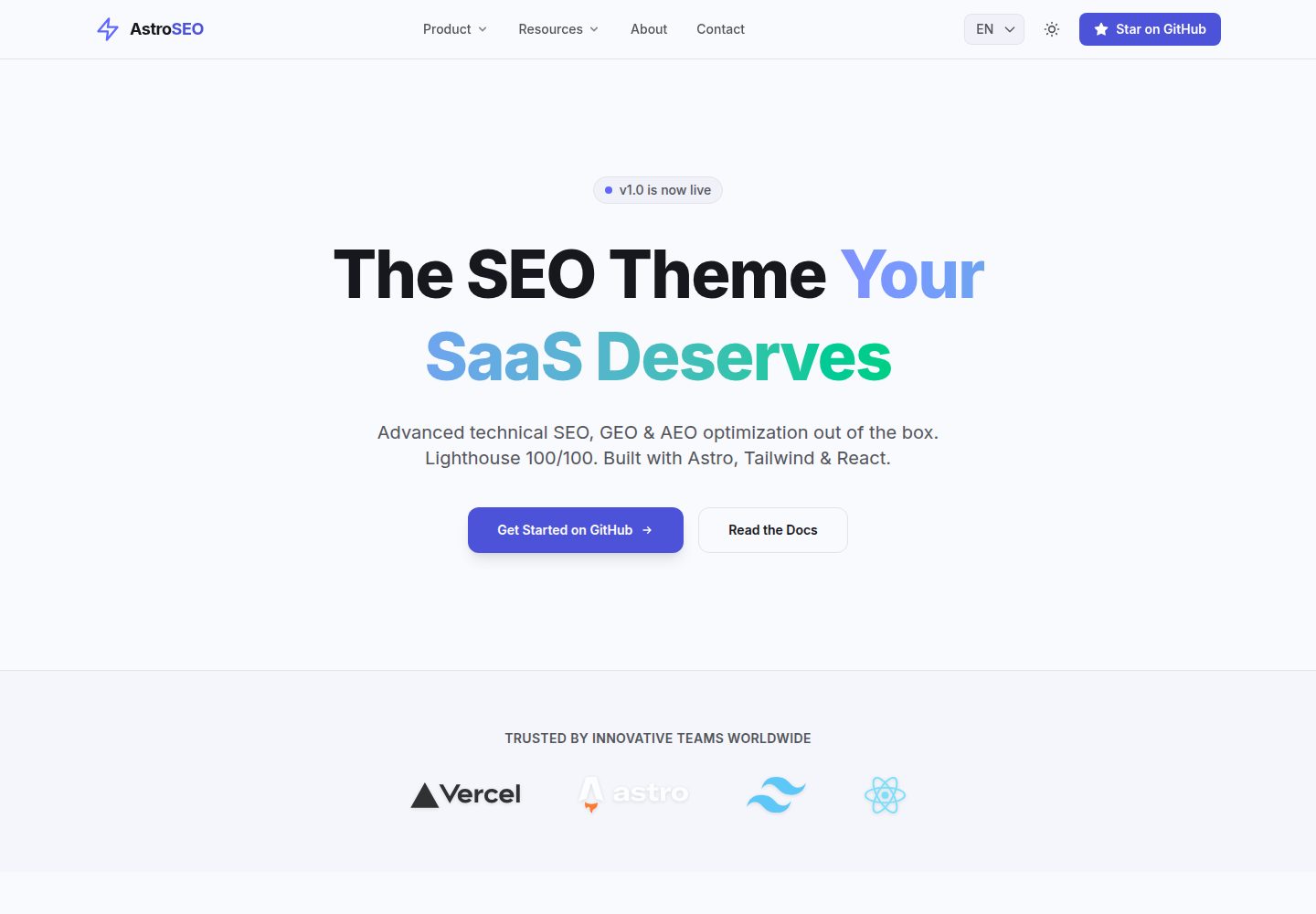
同一仓库内包含营销落地页、Markdown/MDX 博客与案例研究三类内容,共用响应式布局与导航
Astro博客SaaS企业官网
astro-seo-theme — Astro 博客模板
作者 druedaro
基于 Astro 的 SEO 优先博客与营销站点模板,内置 JSON-LD、i18n、Open Graph 图片生成与安全响应头,内容以 Markdown/MDX 管理。
看看你的网站会是什么样
浏览真实页面截图,比较内容排版与手机效果。点击下方缩略图切换,放大查看整页细节。
全部页面与视图 3
截图用于了解视觉与布局,交互效果请以实际项目为准。
采集于 2026-10-02查看来源
值得关注的模板亮点
从已有项目资料中,快速了解它的特点。
BaseLayout 自动生成 canonical、Open Graph、Twitter Card 与 hreflang 链接,JsonLd 与 FaqSchema 组件注入 JSON-LD 结构化数据
内置英文与西班牙文两套实现,基于文件路由,界面文案集中在 src/i18n/ui.ts
默认不向客户端发送 JavaScript,仅暗色模式切换等交互使用 React 岛
自带 vercel.json 安全响应头配置与 GitHub Actions 类型检查、依赖更新工作流
提供 AI_GUIDE.md,说明项目结构与约定,便于用 AI 助手辅助定制
模板详细介绍
Astro SEO Theme 是一个用 Astro 构建的开源网站模板,面向 B2B SaaS、企业官网与博客场景。它把营销落地页、Markdown/MDX 博客和案例研究(case studies)三类内容放在同一个仓库中,共用一套响应式布局与导航。模板内置较完整的 SEO 工具链:BaseLayout 自动生成 canonical、Open Graph、Twitter Card 与 hreflang 链接,JsonLd.astro 与 FaqSchema.astro 注入 JSON-LD 结构化数据,@astrojs/sitemap 在构建时生成站点地图,robots.txt 从 public 目录静态提供。国际化采用基于文件的路由:英文页面位于 src/pages/,西班牙文位于 src/pages/es/,Header 中的 LanguagePicker 负责切换,界面文案集中在 src/i18n/ui.ts。内容集合定义在 src/content.config.ts,博客与案例研究分别存放在 src/content/blog/ 和 src/content/case-studies/,并按语言分目录。技术栈方面,模板使用 Astro、Tailwind CSS、React 与 TypeScript,默认零客户端 JavaScript,仅暗色模式切换等交互使用 React 岛。部署上,npm run build 输出静态站点到 dist/,可托管于任意静态主机;仓库自带 vercel.json,用于设置 CSP、HSTS、X-Content-Type-Options 与 X-Frame-Options 等安全响应头,并包含 GitHub Actions 工作流做类型检查与依赖更新。使用前需要把 astro.config.mjs 中的 site 属性改为实际域名,否则自动生成的站点地图与 robots.txt 会指向错误地址。由于默认 CSP 较严格,接入 Google Analytics、Plausible 等第三方脚本时需要相应调整 vercel.json 中的 script-src 与 connect-src。模板采用 MIT 许可,可免费用于个人与商业项目,但演示图片、字体、图标等第三方素材需单独核对许可,域名、托管等外部服务也可能产生费用。
Astro博客SaaS企业官网
适合你的项目吗?
适用场景
- 为 B2B SaaS 或初创公司搭建包含落地页、博客与案例研究的营销站点
- 需要多语言(英文/西班牙文)内容并自动处理 hreflang 的博客或企业官网
- 希望以 Markdown/MDX 管理文章与案例内容,并自动生成站点地图和结构化数据
- 需要严格 CSP 与安全响应头、并计划部署到 Vercel 或 Netlify、Cloudflare Pages 的项目
- 想以较低客户端 JavaScript 开销构建内容型站点,同时保留少量 React 交互组件
适合人群
- 熟悉 Astro 与 Markdown/MDX 内容工作流的前端开发者
- 需要 SEO 与结构化数据开箱配置的 B2B SaaS 或企业官网项目
- 希望同时维护英文与西班牙文内容的多语言站点
- 接受静态站点部署、并愿意按需调整 CSP 以接入分析脚本的团队
上手与定制指南
结合仓库当前版本的说明,按下面的资料检查内容、配置与运行要求。
- 1
需要 Node.js 18+ 与 npm(或 pnpm/yarn),可通过 npm create astro@latest -- --template druedaro/astro-seo-theme 创建项目
- 2
上线前必须修改 astro.config.mjs 中的 site 属性,否则 sitemap 与 robots.txt 会指向错误域名
- 3
若只需一种语言,可删除 src/pages/es 目录并移除 Header 中的语言选择器
- 4
默认 CSP 会拦截第三方脚本,接入 Google Analytics 或 Plausible 等需调整 vercel.json 中的 script-src 与 connect-src
- 5
演示图片、字体、图标等第三方素材需单独核对许可,域名与托管等外部服务可能另行收费
授权与来源资料
使用条件与限制
免费使用 · 保留许可声明本次收录的是公开仓库中采用 MIT 许可的免费版本;免费范围为该版本代码,不代表外部服务或第三方素材免费。
使用时需要遵守
- 允许免费使用、修改、商用和分发该版本代码。
- 分发代码副本或实质性部分时,保留原作者版权声明和完整 MIT 许可声明。
- 代码按现状提供;担保与责任限制以原许可证及适用法律为准。
额外费用与待核对事项
- 上线前必须修改 astro.config.mjs 中的 site 属性为实际域名,否则自动生成的 sitemap 与 robots.txt 会指向错误域名,影响 SEO。
- 默认 CSP 较严格,接入 Google Analytics、Plausible 等第三方脚本或外部域名图片时,需自行调整 vercel.json 中的 script-src 与 connect-src,否则会被拦截。
- 加载外部脚本或跨域图片属于额外配置需求,模板本身不包含分析服务,相关第三方服务可能产生费用或需自行申请账号。
- 演示图片、字体、图标及其他第三方素材需按各自许可核对,不能仅凭代码的 MIT 许可判断。
- 域名、托管、数据库、支付或 AI 等外部服务可能另外收费。
查看原文依据
Permission is hereby granted, free of charge
许可证原文
Change the `site` property in `astro.config.mjs` before going to production.
README 原文
you will need to adjust the `Content-Security-Policy` inside that file so they aren't blocked.
README 原文
https://github.com/druedaro/astro-seo-theme/blob/main/LICENSEhttps://github.com/druedaro/astro-seo-theme/blob/main/README.mdIf you plan to load external scripts (like Google Analytics) or images from other domains
README 原文
DeepSeek 根据仓库许可证和 README 整理 ·2026-10-02。结果仅覆盖已读取资料,依赖、图片、字体及后续条款变更以各自原文为准。
项目核对记录与介绍依据
模板资料
- 来源平台
- GitHub
- 资料与维护参考分
- 资料较完整 · 88 / 100
- 技术栈
- Astro
- 网站类型
- 博客 · SaaS · 企业官网
这个分数如何计算
本站按许可资料(最高30分)、演示链接(12分)、预览图(10分)、Star数(15分)、记录的维护时间(15分)、描述完整度(8分)、功能记录(5分)和分类资料(5分)计算。它不是代码、安全或性能测试,也不是 Google 评分;有链接不代表已实测可用。
这个项目需要核对什么
- 记录的仓库更新时间
- 2026-10-01
- 截图检查日期
- 2026-10-02
已收录演示链接。请用你的内容与屏幕尺寸检查;有演示不代表表单、认证或支付已经可用。
目录记录的主要技术栈是 Astro。请通过依赖清单和锁文件核对实际版本与托管要求。这些说明基于收录资料,不代表代码审计或部署实测。
查看具体选型方法 →介绍的制作与核对状态
介绍由 AI 辅助整理目录与仓库资料。仓库作者不等于这篇介绍的审核者。
已完成服务器许可规则与 AI 来源核对;未经过人工编辑审核。
查看当时使用的来源资料
SHA-256: 041c5b1c7ce904eb71c66f5377b89df1352ece96c73ce1be67b9567d616905e3
2026-10-02T09:38:39.890Z
来源文件 / 仓库<div align="center">
<h1>Astro SEO Theme</h1>
<img src="public/social-preview.jpg" alt="Astro SEO Theme Cover" width="100%" />
<p><strong>The ultimate open-source SEO theme for Astro, designed for B2B SaaS and Enterprise.</strong></p>
[](https://choosealicense.com/licenses/mit/)
[](https://astro.build/)
[](https://tailwindcss.com/)
[](http://makeapullrequest.com)
[](https://github.com/druedaro/astro-seo-theme)
<br />
<a href="https://vercel.com/new/clone?repository-url=https%3A%2F%2Fgithub.com%2Fdruedaro%2Fastro-seo-theme">
<img src="https://vercel.com/button" alt="Deploy with Vercel" />
</a>
<br />
<a href="https://astro-seo-theme.vercel.app">View Demo</a>
·
<a href="https://github.com/druedaro/astro-seo-theme/issues">Report Bug</a>
·
<a href="https://github.com/druedaro/astro-seo-theme/issues">Request Feature</a>
</div>
---
Astro SEO Theme is an open-source website template built with [Astro](https://astro.build/), [Tailwind CSS v4](https://tailwindcss.com/), and [React](https://react.dev/). You get a highly-optimized landing page, dynamic blog, case studies section, and enterprise-grade SEO tooling in one repo. It's designed so you can launch a premium web presence for a B2B SaaS or startup just by editing content, instead of wrestling with Core Web Vitals from scratch. Unlike generic themes, it ships with an incredibly strict SEO setup, multilingual i18n, security headers, and CI pipelines already wired up.
Live demo: [astro-seo-theme.vercel.app](https://astro-seo-theme.vercel.app/)
<div align="center">
<br />
<img src="public/lighthouse-score.jpg" alt="Perfect 100/100 Lighthouse Score for Mobile and Desktop" width="100%" />
<br />
<sub><em>Validated perfectly for Mobile & Desktop Performance, Accessibility, Best Practices, and SEO.</em></sub>
</div>
<br />
- **Three content hubs in one.** High-converting landing page, markdown-driven blog, and case studies portfolio, all sharing a single responsive layout and megamenu.
- **Enterprise-grade SEO.** Centralized `hreflang` generation, JSON-LD structured data, auto-generated sitemaps, and `robots.txt`. Built-in support for GEO (Generative Engine Optimization).
- **100/100 Lighthouse Performance.** "Zero-JS by default" architecture using Astro Islands. Ships 0 KB of JavaScript to the client unless absolutely necessary (like the React-based dark mode toggle).
- **Multilingual out of the box.** Complete English and Spanish implementations included. File-based routing makes it trivial to add more languages.
- **Production-hardened.** Strict Content Security Policy (CSP) and security headers via `vercel.json`, GitHub Actions CI pipeline for type-checking and automated dependabot updates.
- **Modern stack.** Astro 5, Tailwind CSS 4, React 19, TypeScript.
- **AI-assistant friendly.** [`AI_GUIDE.md`](AI_GUIDE.md) tells Cursor, Copilot, and Claude where things live and which conventions to follow so you can prompt your way to a customized site.
- **MIT licensed.** 100% free to use for personal and commercial projects.
Pages are composed using semantic Astro components and native CSS grid/flexbox:
```astro
---
import BaseLayout from '@/layouts/BaseLayout.astro';
import HeroSection from '@/components/marketing/HeroSection.astro';
---
<BaseLayout title="Home" description="The best SaaS product ever.">
<HeroSection />
<!-- Other components... -->
</BaseLayout>
```
---
## Table of Contents
- [Quick Start](#quick-start)
- [Theme Configuration](#theme-configuration)
- [Global Meta Settings](#global-meta-settings)
- [Header & Megamenu](#header--megamenu)
- [Building Landing Pages](#building-landing-pages)
- [Managing Content Collections](#managing-content-collections)
- [Localization (i18n)](#localization-i18n)
- [Deploying to Production](#deploying-to-production)
- [Directory Layout](#directory-layout)
- [Technical Highlights](#technical-highlights)
- [Generative Engine Optimization (GEO)](#generative-engine-optimization-geo)
- [Sitemap & Crawlability](#sitemap--crawlability)
- [Enterprise Security](#enterprise-security)
- [Contributing](#contributing)
- [License](#license)
---
## Quick Start
You need **Node.js 18+** and **npm** (or pnpm/yarn).
**1. Create your repo.** You can use the Astro CLI to scaffold a new project directly from this template:
```bash
npm create astro@latest -- --template druedaro/astro-seo-theme my-saas-website
cd my-saas-website
```
**2. Install dependencies:**
```bash
npm install
```
**3. Start the dev server:**
```bash
npm run dev
```
Open [http://localhost:4321](http://localhost:4321). Edits to any file reload the page instantly.
**4. Build for production:**
```bash
npm run build
```
This builds the site into `dist/`. Preview the result with `npm run preview`.
> **Tip**
> Only need one language? Simply delete the `src/pages/es` folder and remove the language picker from the Header component.
---
## Theme Configuration
### Global Meta Settings
Everything site-wide lives in `src/layouts/BaseLayout.astro` and `src/i18n/ui.ts`. The default `siteName` is injected automatically into titles and metadata.
> [!IMPORTANT]
> Change the `site` property in `astro.config.mjs` before going to production. If you skip this, your auto-generated sitemap and `robots.txt` will point to the wrong domain, which will severely hurt your SEO.
### Header & Megamenu
Edit `src/components/layout/Header.astro` to modify the navigation. The theme includes a robust, CSS-only desktop megamenu and a mobile accordion menu built without heavy client-side JavaScript.
<img width="1280" height="717" alt="AstroSEO" src="https://github.com/user-attachments/assets/1ef5f911-d08e-4dc0-95ed-89195c5730a4" />
### Building Landing Pages
Pages in `src/pages/` compose sections from `src/components/marketing/` and `src/components/seo/`. Open `src/pages/index.astro` to see the full homepage, then edit the props or remove sections you don't need.
### Managing Content Collections
Content is Markdown/MDX in `src/content/blog/` and `src/content/case-studies/`. Schemas are defined in `src/content.config.ts`. A case study looks like this:
```mdx
---
title: 'How TechCorp Scaled with Us'
description: 'A deep dive into B2B growth.'
client: 'TechCorp'
date: 2026-09-15
---
Case study body here.
```
### Localization (i18n)
Marketing pages are file-based: `src/pages/` for English, `src/pages/es/` for Spanish. A `LanguagePicker` component in the Header switches between them. UI strings are centralized in `src/i18n/ui.ts`. `BaseLayout` automatically handles `hreflang` tag generation to prevent duplicate content penalties across languages.
---
## Deploying to Production
`npm run build` produces a static site in `dist/` that any static host can serve.
> [!TIP]
> The included `vercel.json` enforces strict security headers by default. If you plan to load external scripts (like Google Analytics) or images from other domains, you will need to adjust the `Content-Security-Policy` inside that file so they aren't blocked.
- **Vercel:** Import the project directly. The included `vercel.json` adds strict security headers and caching rules.
- **Netlify / Cloudflare Pages:** Works out of the box with zero configuration required.
---
## Directory Layout
```text
src/
├── assets/ # Local images and fonts
├── components/
│ ├── layout/ # Header, Footer, megamenu
│ ├── marketing/ # Hero, BentoGrid, PricingTable, ContactForm
│ ├── seo/ # Breadcrumbs, JsonLd, FaqSchema
│ └── ui/ # LanguagePicker, DarkModeToggle
├── content/
│ ├── authors/ # JSON files for author profiles (E-E-A-T)
│ ├── blog/ # MDX posts separated by language (en/ & es/)
│ └── case-studies/ # MDX case studies separated by language (en/ & es/)
├── i18n/ # ui.ts (translations) & utils.ts
├── layouts/ # BaseLayout.astro & specific page layouts
├── pages/ # File-based routes
│ ├── index.astro # English Home
│ ├── blog/ # English blog routes
│ ├── case-studies/ # English case studies routes
│ ├── es/ # Spanish localized routes
│ └── rss.xml.js # RSS feed generator
├── content.config.ts # Astro Content Collections schemas
└── styles/
└── global.css # Tailwind v4 theme and typography vars
```
---
## Technical Highlights
### Generative Engine Optimization (GEO)
`BaseLayout.astro` is the brain of the theme. It accepts `title`, `description`, `image`, and `articleDate` props. It automatically generates canonical URLs, Open Graph tags, Twitter cards, and `hreflang` alternate links.
For structured data, the theme uses `src/components/seo/JsonLd.astro` and `FaqSchema.astro` to inject `<script type="application/ld+json">` payloads, crucial for Generative Engine Optimization (GEO).
### Sitemap & Crawlability
The `@astrojs/sitemap` integration generates the sitemap automatically at build time. `robots.txt` is served statically from the `public/` directory.
### Enterprise Security
`vercel.json` sets `Content-Security-Policy`, `Strict-Transport-Security`, `X-Content-Type-Options`, and `X-Frame-Options` to ensure the site gets an A+ on security scanners like Mozilla Observatory.
### Adding Analytics (Adjusting CSP)
Because the default `Content-Security-Policy` (CSP) is strict, third-party scripts will be blocked by default. To add analytics like Google Analytics or Plausible, you must adjust the `Content-Security-Policy` header in `vercel.json` to allow those specific domains.
**Example: Allowing Google Analytics**
Modify the `script-src` and `connect-src` directives in `vercel.json`:
```json
"value": "default-src 'self'; script-src 'self' 'unsafe-inline' 'unsafe-eval' https://www.googletagmanager.com; connect-src 'self' https://www.google-analytics.com;"
```
**Example: Allowing Plausible**
```json
"value": "default-src 'self'; script-src 'self' 'unsafe-inline' 'unsafe-eval' https://plausible.io; connect-src 'self' https://plausible.io;"
```
### Formatting
Code formatting is enforced using [Prettier](https://prettier.io/). The project includes `prettier-plugin-astro` and `prettier-plugin-tailwindcss` to automatically format `.astro` files and logically sort all Tailwind CSS classes.
> [!NOTE]
> Run `npm run format` locally before committing to ensure all files are perfectly formatted. If you use VS Code, the workspace is already configured to format on save.
---
## Contributing
- **Bugs and ideas:** open an issue.
- **Pull requests:** welcome.
See `CODE_OF_CONDUCT.md` and `CONTRIBUTING.md`.
## License
MIT. See `LICENSE`.
<div align="center">
Crafted by <a href="https://github.com/druedaro">druedaro</a>.
</div>
看看同类模板
对比同技术栈与用途的模板,找到更适合的视觉与内容结构。

astrowind
⭕️ AstroWind: A free template using Astro v7 and Tailwind CSS v4. Astro starter theme.
Astro · 博客

astro-paper
A minimal, accessible and SEO-friendly Astro blog theme.
Astro · 博客

fuwari
✨A static blog template built with Astro.
Astro · 博客

Firefly
Firefly 是一款基于 Astro 的静态博客主题,由 CuteLeaf 在 saicaca 的 Fuwari 模板基础上二次开发,主打清新美观的视觉风格。
Astro · 博客

astro-theme-cactus
A simple Astro theme. Use it to create your blog or website.
Astro · 作品集

astrofy
Astrofy is a free and open-source template for your Personal Portfolio Website built with Astro and TailwindCS…
Astro · 作品集