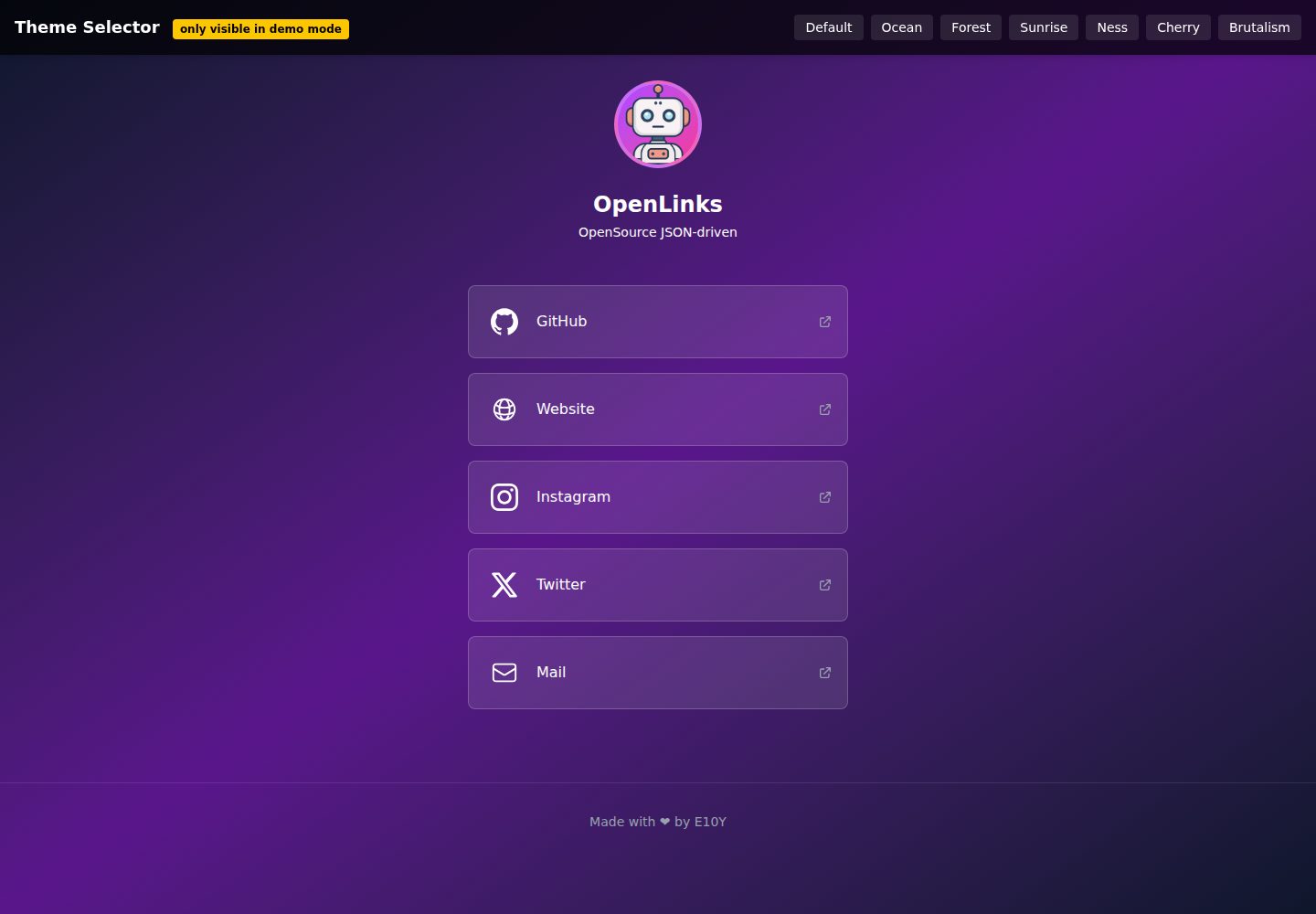
All page configuration is centralized in the root OpenLinks.json, including name, bio, avatar, theme, and link list
AstroStarter
OpenLinks — Astro Starter Template
By E10YDEV
OpenLinks is an open-source link-in-bio page template built on Astro. It centralizes profile, links, theme, and icon configuration in a root-level OpenLinks.json file, making it suitable for quickly building a personal link aggregation page.
Explore the design
Compare the page layouts and mobile experience. Open any screenshot for a closer look.
Desktop homepage1 / 2
Desktop captureTop of page
Actual screenshot captured by the server browser.
All pages & views 2
Screenshots show visual appearance; interactive behavior may differ.
Recorded 2026-10-04View source
What stands out
A quick read of the recorded project description.
Multiple built-in themes such as default, ocean, forest, sunrise, ness, arctic, cherry, and brutalism, extensible in themes.ts
Link entries support custom SVG icons, with icon files placed in the public/icons/ directory and referenced by path
Provides an optional +18 adult content warning banner controlled by the adultContent field in the JSON
Includes a responsive layout and SEO and meta configuration for social sharing
Released under the MIT license, allowing free use, modification, commercial use, and distribution
Template Details
OpenLinks is a free, open-source template released under the MIT license and built with Astro to generate link-in-bio style link aggregation pages. Its core design centralizes page content and style configuration in the OpenLinks.json file at the project root. Users fill in their name, bio, avatar path, theme name, and link array in this file to personalize the page without modifying component code page by page.
The template includes built-in themes such as default, ocean, forest, sunrise, ness, arctic, cherry, and brutalism. Theme definitions are located in themes.ts and can be switched via the theme field in the JSON, or you can add or remove themes in that file. Link entries support title, url, and icon fields, with icons referenced by SVG file paths placed under public/icons/. The page includes a responsive layout, an optional +18 adult content warning banner controlled by the adultContent field, and SEO and meta configuration for social sharing.
The project structure is clear, including directories such as src/components, src/layouts, src/lib, src/pages, and src/styles, along with standard Astro project files like astro.config.mjs and package.json. The development workflow is: clone the repository, run npm install, edit OpenLinks.json, and run npm run dev to start the local development server (default port 4321). Production builds output to /dist and can be previewed with npm run preview. The README lists future plans including a link sharing system, more advanced customization options, SVG icon color support, and more themes; these are planned features not yet released.
Usage limitations: The code is under the MIT license, allowing free use, modification, commercial use, and distribution, but the copyright notice and full MIT license text must be retained when distributing. Third-party assets such as demo images, fonts, and icons require separate verification under their respective licenses and cannot be judged solely by the code license. External services such as domains and hosting may incur additional costs. The template does not claim database, backend, or payment capabilities; its positioning is a static link aggregation page.
AstroStarter
Is it right for your project?
Use Cases
- Building a page for an individual or creator to centrally display multiple social and external links
- Deploying a link aggregation page on static hosting platforms such as Vercel, Netlify, or GitHub Pages
- Quickly changing avatar, bio, links, and theme by editing OpenLinks.json without modifying component code
- Adding or adjusting themes in themes.ts to customize the page's color scheme and visual style
- Enabling a +18 warning banner for link pages containing adult content
Suitable For
- Developers or creators who need to quickly launch a personal link aggregation page
- Front-end users familiar with or willing to use Astro and JSON configuration
- Individuals or teams who want to freely modify and distribute the page code under the MIT license
- Users who need a responsive page and care about social sharing meta configuration
Getting started & customization
Use these recorded setup notes alongside the repository instructions for your chosen version.
- 1
After cloning the repository, run npm install to install dependencies, then edit the root OpenLinks.json to complete personalization
- 2
Run npm run dev to start the local development server, accessible by default at http://localhost:4321
- 3
Run npm run build to generate a production build in /dist, and use npm run preview to preview locally
- 4
Place static assets such as avatars in the public/ directory, and SVG icons in public/icons/ with their paths entered in the icon field of links
- 5
Theme names must match the values defined in themes.ts, otherwise they will not be applied correctly
License & source material
Usage conditions & limitations
Free to use · keep license noticeThis entry covers the free version under the MIT license in the public repository; the free scope applies to that version's code and does not imply that external services or third-party assets are free.
Must comply with when using
- Free use, modification, commercial use, and distribution of this version's code are permitted.
- When distributing copies or substantial portions of the code, retain the original author's copyright notice and the full MIT license notice.
- The code is provided as is; warranties and limitations of liability are governed by the original license and applicable law.
Additional costs & items to verify
- Demo images, fonts, icons, and other third-party assets must be verified under their respective licenses and cannot be judged solely by the code's MIT license.
- External services such as domains, hosting, databases, payments, or AI may incur additional charges.
View Original Text Basis
https://github.com/E10YDEV/OpenLinks/blob/main/LICENSEhttps://github.com/E10YDEV/OpenLinks/blob/main/README.mdPermission is hereby granted, free of charge
Original License Text
Compiled by DeepSeek based on repository license and README ·2026-10-04. Results only cover the materials read; dependencies, images, fonts, and subsequent term changes are subject to their respective original texts.
Project checks & description sources
Template Information
- Source platforms
- Astro Themes
- Documentation and maintenance reference score
- More documented · 81 / 100
- Technologies
- Astro
- Website type
- Starter
How this score is calculated
Our heuristic uses license records (up to 30), a demo link (12), a preview (10), stars (15), recorded maintenance (15), description completeness (8), feature records (5) and classification data (5). It is not a code, security or performance test, or a Google score. A link does not establish tested functionality.
What to verify for this project
- Repository update recorded
- 2025-06-22
- Screenshot last checked
- 2026-10-04
A demo link is listed. Check it with your own content and viewport sizes; its presence does not confirm that forms, authentication or payments work.
The catalog identifies Astro as the primary stack. Check the actual dependency manifest and lockfile for versions and hosting requirements. These notes use recorded metadata, not a code audit or a deployment test.
Use a selection guide →How this description was prepared
AI-assisted description based on catalog records and repository material. Repository authors are not automatically the reviewers of this description.
Review declaration: [email protected] · 2026-10-05
Inspect the recorded source material
SHA-256: 716870b862a20e550b882d028999894803bf8b1870ce6278bccef29f858c3e10
2026-10-04T22:35:41.625Z
Source file / repository# OpenLinks 🚀
**OpenLinks** is a free, open-source Astro template for creating customizable link-in-bio pages. All configuration is handled via a single JSON file, making it extremely easy to personalize and deploy.

---
## ✨ Features
⭐ **100% JSON-driven:** Configure your profile, links, theme, and more via [`OpenLinks.json`](OpenLinks.json).
⭐ **Customizable themes:** Switch between built-in themes or create your own in [`themes.ts`](themes.ts).
⭐ **Responsive design:** Looks great on mobile and desktop.
⭐ **Custom icons support:** Add SVG icons to your links.
⭐ **TailwindCSS integration:** Modern, easily editable styles.
⭐ **Adult content warning:** Optional +18 warning banner.
⭐ **SEO & social meta:** Optimized for sharing on social media.
⭐ **Easy deployment:** Works with Vercel, Netlify, GitHub Pages, and more.
---
## 📦 Project Structure
```text
/
├── OpenLinks.json # Main config (profile, links, theme, etc)
├── themes.ts # Available themes
├── src/
│ ├── components/ # Reusable Astro components
│ ├── layouts/ # Main layout
│ ├── lib/ # Utilities (e.g. getTheme)
│ ├── pages/ # Astro pages
│ └── styles/ # Global styles and Tailwind
├── public/ # Static files (icons, fonts, avatar)
├── astro.config.mjs # Astro + Tailwind config
├── package.json # Dependencies and scripts
└── README.md
```
---
## 🚀 Getting Started
1. **Clone the repository:**
```sh
git clone https://github.com/E10YDEV/OpenLinks.git
cd OpenLinks
```
2. **Install dependencies:**
```sh
npm install
```
3. **Customize your page:**
- Edit [`OpenLinks.json`](OpenLinks.json) to change your profile, links, theme, etc.
- (Optional) Edit [`themes.ts`](themes.ts) to add or modify themes.
4. **Start the development server:**
```sh
npm run dev
```
Open [http://localhost:4321](http://localhost:4321) in your browser.
5. **Build for production:**
```sh
npm run build
```
6. **Preview the production build:**
```sh
npm run preview
```
---
## ⚙ Configuration
- **Profile & links:** All managed in [`OpenLinks.json`](OpenLinks.json).
- **Themes:** Set the `"theme"` value in the JSON to any available in [`themes.ts`](themes.ts): `default`, `ocean`, `forest`, `sunrise`, `ness`, `arctic`, `cherry`, `brutalism`.
- **Icons:** Place your SVGs in `public/icons/` and reference the path in each link.
---
## 📝 How to Edit `OpenLinks.json`
All your profile information, links, and theme settings are managed in the `OpenLinks.json` file at the root of the project. Here’s how to customize it:
### Example Structure
```json
{
"name": "Your Name",
"description": "Short bio or description.",
"avatar": "/avatar.png",
"theme": "ocean",
"links": [
{
"title": "GitHub",
"url": "https://github.com/yourusername",
"icon": "/icons/github.svg"
},
{
"title": "Twitter",
"url": "https://twitter.com/yourusername",
"icon": "/icons/twitter.svg"
}
],
"adultContent": false
}
```
### Fields
- **name:** Your display name.
- **description:** A short description or tagline.
- **avatar:** Path to your profile image (place it in the `public/` folder).
- **theme:** Choose a theme from those available in `themes.ts`.
- **links:** An array of your links. Each link can have:
- `title`: The label shown on your page.
- `url`: The destination URL.
- `icon`: Path to an SVG icon (place SVGs in `public/icons/`).
- **adultContent:** Set to `true` to show a +18 warning banner.
### Customizing
- Add, remove, or edit links as needed.
- Change the theme by updating the `"theme"` value.
- Update your avatar or bio at any time.
After saving changes to `OpenLinks.json`, your site will update automatically in development mode.
---
## 🛠 Available Scripts
| Command | Action |
|--------------------|------------------------------------------------|
| `npm run dev` | Start the development server |
| `npm run build` | Build the site for production in `/dist` |
| `npm run preview` | Preview the production build locally |
| `npm run astro` | Run Astro CLI commands |
---
## 🛣 Upcoming Features
OpenLinks is actively developed! Here’s what’s coming soon:
- **Link sharing system:** Easily share and manage your links with others.
- **Advanced customization:** More options to personalize layouts and components.
- **SVG icon color support:** Change the color of your SVG icons directly from your configuration.
- **More themes:** A wider variety of built-in themes to choose from.
Stay tuned for updates and feel free to suggest features or contribute!
---
## 🤝 Contributing
Contributions are welcome! If you have ideas for new features, improvements, or bug fixes, feel free to open an issue or submit a pull request.
**How to contribute:**
1. Fork the repository.
2. Create a new branch for your feature or fix.
3. Make your changes and commit them.
4. Open a pull request describing your changes.
Please follow the existing code style and include clear commit messages. Thank you for helping make OpenLinks better!
---
## 📄 License
MIT. Made with ❤ by [E10Y](https://github.com/E10YDEV).
---
Customize, deploy, and share your link-in-bio page in minutes!
Explore similar templates
Compare previews and descriptions within the same stack and category.

astrowind
AstroWind is a free, open-source Astro starter theme using Astro and Tailwind CSS, released under the MIT license.
Astro · Blog
accessible-astro-starter
An accessibility-focused Astro 6 starter template with WCAG 2.2 AA practices, Tailwind CSS 4, TypeScript, Prettier, ESLint, form validation, blog and portfolio examples, and preference toggles for dark mode, high contrast, and reduced motion.
Astro · Blog

astro-erudite
astro-erudite is an opinionated, unstyled static blog template built with Astro and native CSS, with no UI or CSS framework and minimal dependencies.
Astro · Portfolio

astro-shopify
A lightweight Shopify headless ecommerce starter template built with Astro and Svelte, integrating the Shopify Storefront API for product and inventory data, with built-in cart state management and basic add-to-cart and checkout flow.
Astro · E-commerce

brutal
Brutal is a neobrutalism Astro starter theme from ElianCodes, derived from the author's personal site and generalized. It includes a Markdown blog collection, build-time RSS and sitemap, image optimization, Tailwind CSS styling, and Biome checks, with no JavaScript by default.
Astro · Starter

qwind
Qwind is a free and open-source website template built on Qwik and Tailwind CSS, featuring directory-based routing via QwikCity, a Markdown blog, dark mode, and static deployment configuration.
Astro · Tool Site