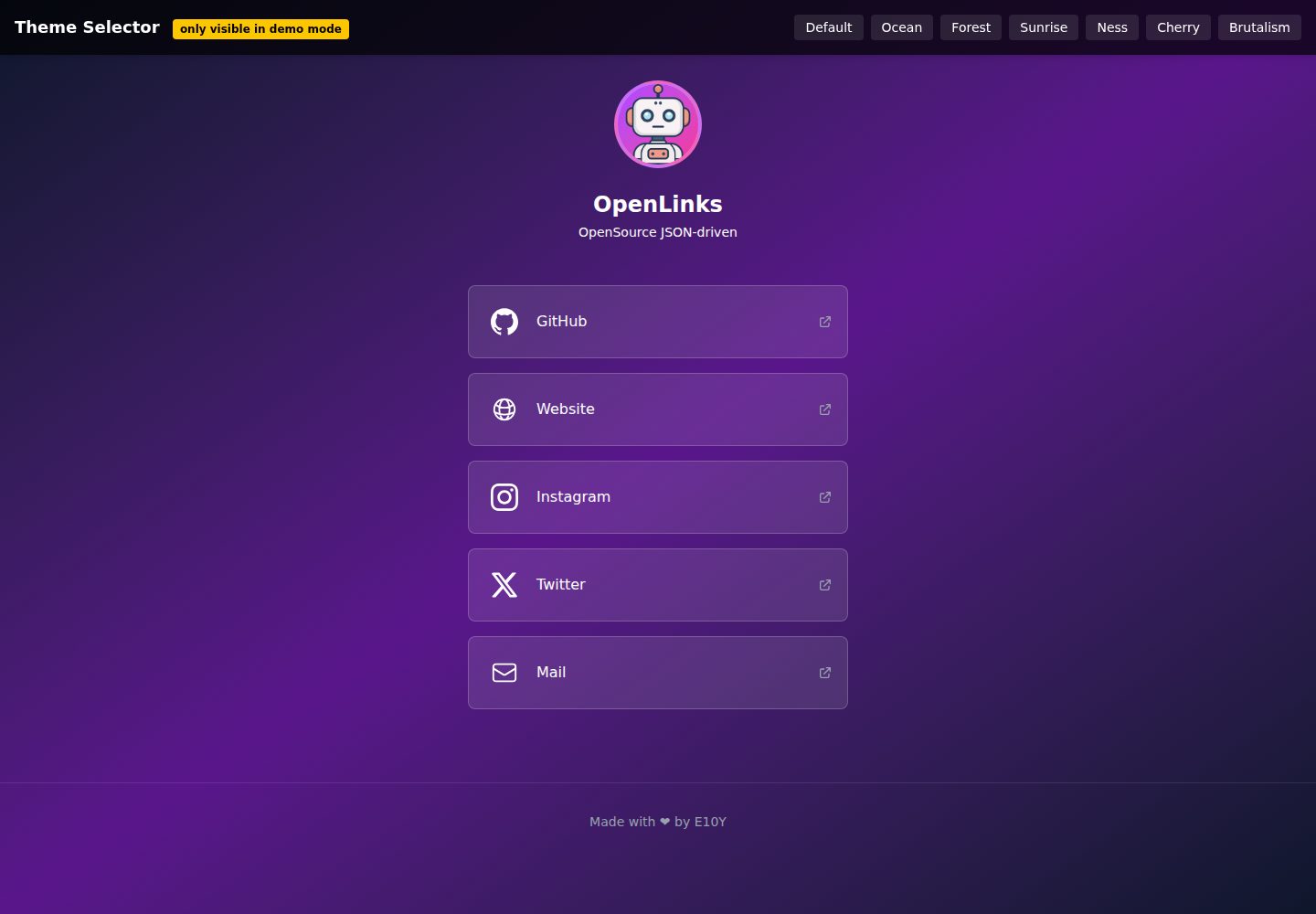
所有页面配置集中在根目录的 OpenLinks.json 中,包括姓名、简介、头像、主题与链接列表
Astro启动器
OpenLinks — Astro 启动器模板
作者 E10YDEV
OpenLinks 是一个基于 Astro 的开源 link-in-bio 页面模板,通过根目录的 OpenLinks.json 文件统一配置个人资料、链接、主题与图标,适合快速搭建个人链接聚合页。
看看你的网站会是什么样
浏览真实页面截图,比较内容排版与手机效果。点击下方缩略图切换,放大查看整页细节。
全部页面与视图 2
截图用于了解视觉与布局,交互效果请以实际项目为准。
采集于 2026-10-04查看来源
值得关注的模板亮点
从已有项目资料中,快速了解它的特点。
内置 default、ocean、forest、sunrise、ness、arctic、cherry、brutalism 等多套主题,可在 themes.ts 中扩展
链接条目支持自定义 SVG 图标,图标文件放在 public/icons/ 目录并通过路径引用
提供可选的 +18 成人内容警告横幅,由 JSON 中的 adultContent 字段控制
包含响应式布局以及面向社交分享的 SEO 与 meta 配置
采用 MIT 许可发布,允许免费使用、修改、商用和分发
模板详细介绍
OpenLinks 是一个采用 MIT 许可的免费开源模板,基于 Astro 构建,用于生成 link-in-bio 风格的链接聚合页面。它的核心设计是把页面内容与样式配置集中到项目根目录的 OpenLinks.json 文件中,用户在该文件里填写姓名、简介、头像路径、主题名称以及链接数组,即可完成页面个性化,无需逐页修改组件代码。
模板内置了 default、ocean、forest、sunrise、ness、arctic、cherry、brutalism 等主题,主题定义位于 themes.ts,可通过 JSON 中的 theme 字段切换,也可以在该文件中自行增删主题。链接条目支持 title、url、icon 三个字段,图标使用放在 public/icons/ 下的 SVG 文件路径引用。页面包含响应式布局,并提供可选的 +18 成人内容警告横幅(由 adultContent 字段控制)以及面向社交分享的 SEO 与 meta 配置。
项目结构清晰,包含 src/components、src/layouts、src/lib、src/pages、src/styles 等目录,以及 astro.config.mjs、package.json 等常规 Astro 工程文件。开发流程为克隆仓库、npm install、编辑 OpenLinks.json、npm run dev 启动本地开发服务器(默认 4321 端口),生产构建输出到 /dist,可用 npm run preview 预览。README 中列出的后续计划包括链接分享系统、更高级的自定义选项、SVG 图标颜色支持与更多主题,这些属于尚未发布的规划内容。
使用限制方面:代码采用 MIT 许可,允许免费使用、修改、商用和分发,但分发时需保留版权声明与完整 MIT 许可文本;演示图片、字体、图标等第三方素材需按各自许可单独核对,不能仅凭代码许可判断。域名、托管等外部服务可能产生额外费用。模板未声明数据库、后端或支付等能力,其定位是静态链接聚合页。
Astro启动器
适合你的项目吗?
适用场景
- 为个人或创作者搭建一个集中展示多个社交与外部链接的页面
- 在 Vercel、Netlify、GitHub Pages 等静态托管平台上部署链接聚合页
- 通过修改 OpenLinks.json 快速更换头像、简介、链接与主题,无需改动组件代码
- 在 themes.ts 中新增或调整主题,定制页面的配色与视觉风格
- 为包含成人内容的链接页启用 +18 警告横幅
适合人群
- 需要快速上线个人链接聚合页的开发者或创作者
- 熟悉或愿意使用 Astro 与 JSON 配置的前端用户
- 希望以 MIT 许可自由修改和分发页面代码的个人或团队
- 需要响应式页面并关注社交分享 meta 配置的使用者
上手与定制指南
结合仓库当前版本的说明,按下面的资料检查内容、配置与运行要求。
- 1
克隆仓库后执行 npm install 安装依赖,再编辑根目录的 OpenLinks.json 完成个性化配置
- 2
运行 npm run dev 启动本地开发服务器,默认访问 http://localhost:4321
- 3
运行 npm run build 生成生产构建到 /dist,可用 npm run preview 在本地预览
- 4
头像等静态资源放入 public/ 目录,SVG 图标放入 public/icons/ 并在链接的 icon 字段中填写路径
- 5
主题名称需与 themes.ts 中定义的值一致,否则无法正确应用
授权与来源资料
使用条件与限制
免费使用 · 保留许可声明本次收录的是公开仓库中采用 MIT 许可的免费版本;免费范围为该版本代码,不代表外部服务或第三方素材免费。
使用时需要遵守
- 允许免费使用、修改、商用和分发该版本代码。
- 分发代码副本或实质性部分时,保留原作者版权声明和完整 MIT 许可声明。
- 代码按现状提供;担保与责任限制以原许可证及适用法律为准。
额外费用与待核对事项
- 演示图片、字体、图标及其他第三方素材需按各自许可核对,不能仅凭代码的 MIT 许可判断。
- 域名、托管、数据库、支付或 AI 等外部服务可能另外收费。
查看原文依据
https://github.com/E10YDEV/OpenLinks/blob/main/LICENSEhttps://github.com/E10YDEV/OpenLinks/blob/main/README.mdPermission is hereby granted, free of charge
许可证原文
DeepSeek 根据仓库许可证和 README 整理 ·2026-10-04。结果仅覆盖已读取资料,依赖、图片、字体及后续条款变更以各自原文为准。
项目核对记录与介绍依据
模板资料
- 来源平台
- Astro Themes
- 资料与维护参考分
- 资料较完整 · 81 / 100
- 技术栈
- Astro
- 网站类型
- 启动器
这个分数如何计算
本站按许可资料(最高30分)、演示链接(12分)、预览图(10分)、Star数(15分)、记录的维护时间(15分)、描述完整度(8分)、功能记录(5分)和分类资料(5分)计算。它不是代码、安全或性能测试,也不是 Google 评分;有链接不代表已实测可用。
这个项目需要核对什么
- 记录的仓库更新时间
- 2025-06-22
- 截图检查日期
- 2026-10-04
已收录演示链接。请用你的内容与屏幕尺寸检查;有演示不代表表单、认证或支付已经可用。
目录记录的主要技术栈是 Astro。请通过依赖清单和锁文件核对实际版本与托管要求。这些说明基于收录资料,不代表代码审计或部署实测。
查看具体选型方法 →介绍的制作与核对状态
介绍由 AI 辅助整理目录与仓库资料。仓库作者不等于这篇介绍的审核者。
审核声明: [email protected] · 2026-10-05
查看当时使用的来源资料
SHA-256: 716870b862a20e550b882d028999894803bf8b1870ce6278bccef29f858c3e10
2026-10-04T22:35:41.625Z
来源文件 / 仓库# OpenLinks 🚀
**OpenLinks** is a free, open-source Astro template for creating customizable link-in-bio pages. All configuration is handled via a single JSON file, making it extremely easy to personalize and deploy.

---
## ✨ Features
⭐ **100% JSON-driven:** Configure your profile, links, theme, and more via [`OpenLinks.json`](OpenLinks.json).
⭐ **Customizable themes:** Switch between built-in themes or create your own in [`themes.ts`](themes.ts).
⭐ **Responsive design:** Looks great on mobile and desktop.
⭐ **Custom icons support:** Add SVG icons to your links.
⭐ **TailwindCSS integration:** Modern, easily editable styles.
⭐ **Adult content warning:** Optional +18 warning banner.
⭐ **SEO & social meta:** Optimized for sharing on social media.
⭐ **Easy deployment:** Works with Vercel, Netlify, GitHub Pages, and more.
---
## 📦 Project Structure
```text
/
├── OpenLinks.json # Main config (profile, links, theme, etc)
├── themes.ts # Available themes
├── src/
│ ├── components/ # Reusable Astro components
│ ├── layouts/ # Main layout
│ ├── lib/ # Utilities (e.g. getTheme)
│ ├── pages/ # Astro pages
│ └── styles/ # Global styles and Tailwind
├── public/ # Static files (icons, fonts, avatar)
├── astro.config.mjs # Astro + Tailwind config
├── package.json # Dependencies and scripts
└── README.md
```
---
## 🚀 Getting Started
1. **Clone the repository:**
```sh
git clone https://github.com/E10YDEV/OpenLinks.git
cd OpenLinks
```
2. **Install dependencies:**
```sh
npm install
```
3. **Customize your page:**
- Edit [`OpenLinks.json`](OpenLinks.json) to change your profile, links, theme, etc.
- (Optional) Edit [`themes.ts`](themes.ts) to add or modify themes.
4. **Start the development server:**
```sh
npm run dev
```
Open [http://localhost:4321](http://localhost:4321) in your browser.
5. **Build for production:**
```sh
npm run build
```
6. **Preview the production build:**
```sh
npm run preview
```
---
## ⚙ Configuration
- **Profile & links:** All managed in [`OpenLinks.json`](OpenLinks.json).
- **Themes:** Set the `"theme"` value in the JSON to any available in [`themes.ts`](themes.ts): `default`, `ocean`, `forest`, `sunrise`, `ness`, `arctic`, `cherry`, `brutalism`.
- **Icons:** Place your SVGs in `public/icons/` and reference the path in each link.
---
## 📝 How to Edit `OpenLinks.json`
All your profile information, links, and theme settings are managed in the `OpenLinks.json` file at the root of the project. Here’s how to customize it:
### Example Structure
```json
{
"name": "Your Name",
"description": "Short bio or description.",
"avatar": "/avatar.png",
"theme": "ocean",
"links": [
{
"title": "GitHub",
"url": "https://github.com/yourusername",
"icon": "/icons/github.svg"
},
{
"title": "Twitter",
"url": "https://twitter.com/yourusername",
"icon": "/icons/twitter.svg"
}
],
"adultContent": false
}
```
### Fields
- **name:** Your display name.
- **description:** A short description or tagline.
- **avatar:** Path to your profile image (place it in the `public/` folder).
- **theme:** Choose a theme from those available in `themes.ts`.
- **links:** An array of your links. Each link can have:
- `title`: The label shown on your page.
- `url`: The destination URL.
- `icon`: Path to an SVG icon (place SVGs in `public/icons/`).
- **adultContent:** Set to `true` to show a +18 warning banner.
### Customizing
- Add, remove, or edit links as needed.
- Change the theme by updating the `"theme"` value.
- Update your avatar or bio at any time.
After saving changes to `OpenLinks.json`, your site will update automatically in development mode.
---
## 🛠 Available Scripts
| Command | Action |
|--------------------|------------------------------------------------|
| `npm run dev` | Start the development server |
| `npm run build` | Build the site for production in `/dist` |
| `npm run preview` | Preview the production build locally |
| `npm run astro` | Run Astro CLI commands |
---
## 🛣 Upcoming Features
OpenLinks is actively developed! Here’s what’s coming soon:
- **Link sharing system:** Easily share and manage your links with others.
- **Advanced customization:** More options to personalize layouts and components.
- **SVG icon color support:** Change the color of your SVG icons directly from your configuration.
- **More themes:** A wider variety of built-in themes to choose from.
Stay tuned for updates and feel free to suggest features or contribute!
---
## 🤝 Contributing
Contributions are welcome! If you have ideas for new features, improvements, or bug fixes, feel free to open an issue or submit a pull request.
**How to contribute:**
1. Fork the repository.
2. Create a new branch for your feature or fix.
3. Make your changes and commit them.
4. Open a pull request describing your changes.
Please follow the existing code style and include clear commit messages. Thank you for helping make OpenLinks better!
---
## 📄 License
MIT. Made with ❤ by [E10Y](https://github.com/E10YDEV).
---
Customize, deploy, and share your link-in-bio page in minutes!
看看同类模板
对比同技术栈与用途的模板,找到更适合的视觉与内容结构。

astrowind
⭕️ AstroWind: A free template using Astro v7 and Tailwind CSS v4. Astro starter theme.
Astro · 博客
accessible-astro-starter
Accessible Astro Starter 是一个以无障碍为核心理念的 Astro 6 启动模板,由 incluud 团队维护。
Astro · 博客

astro-erudite
An opinionated, unstyled static blogging template built with Astro and native CSS.
Astro · 作品集

astro-shopify
astro-shopify 是一个面向开发者的轻量级电商启动模板,用于构建基于 Shopify 的无头店面。
Astro · 电商

brutal
A neobrutalism Astro starter theme
Astro · 启动器

qwind
⭕️ Qwind: A template to make your website using Qwik + Tailwind CSS.
Astro · 工具站