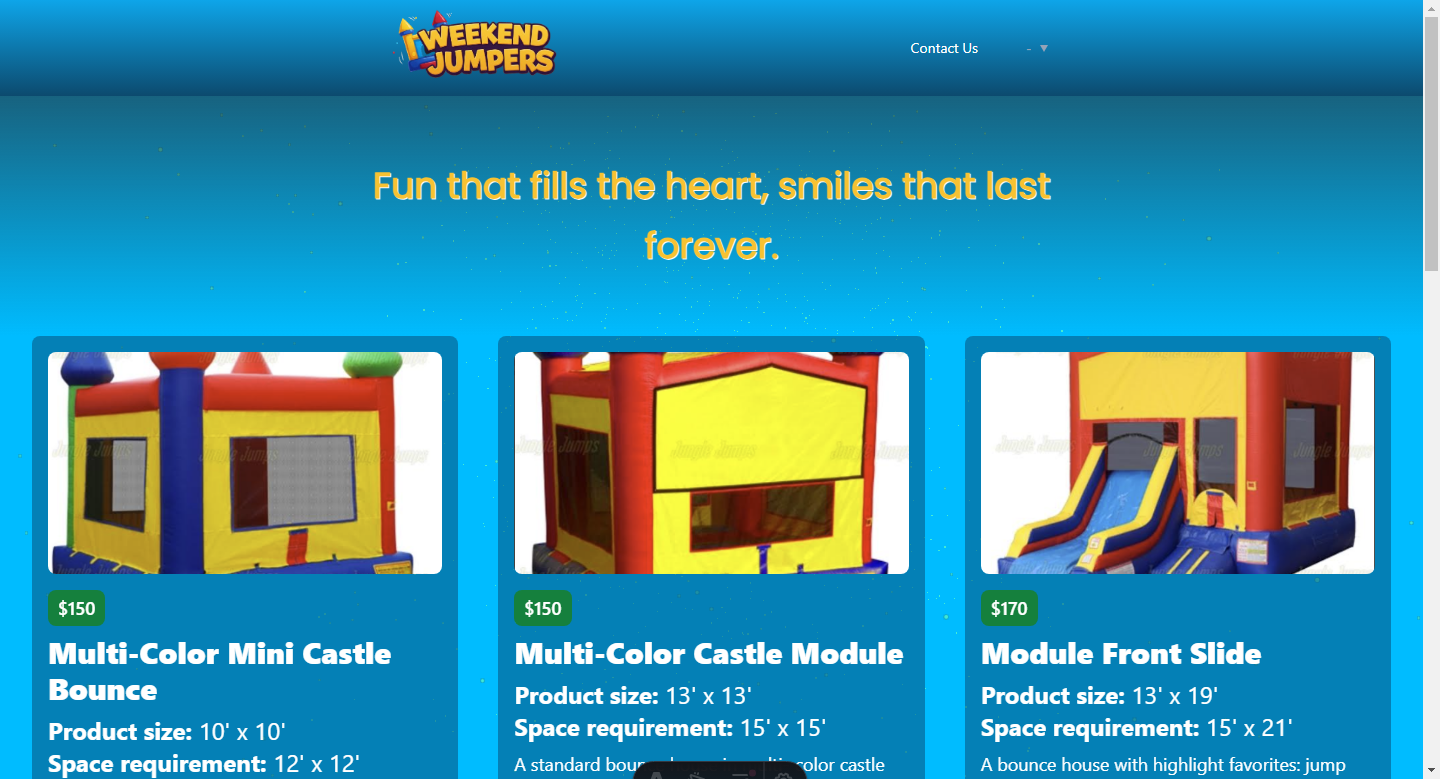
A customized WeekendJumpers landing page adapted from the Astro Leo theme, with substantial adjustments to styles and content
AstroReactCorporate Website
weekendjumpers — Astro Business Template
By eeem77
A WeekendJumpers landing page adapted from the Astro Leo theme, using Astro, React, and Tailwind CSS, with a Web3Forms email notification form integrated.
Explore the design
Compare the page layouts and mobile experience. Open any screenshot for a closer look.
Author preview
Author-provided preview
Preview provided in the project README.
One original preview is available. Open the full image to inspect the design.
Screenshots show visual appearance; interactive behavior may differ.
Recorded 2026-10-12View source
What stands out
A quick read of the recorded project description.
The technology stack is Astro, React, and Tailwind CSS, with official integrations including MDX, RSS, and Sitemap
The starry background animation is implemented with React and Canvas, driven by Three.js, slowing down on mouse interaction and resuming after interaction stops
The background animation component is loaded via Astro's client:idle directive to avoid impacting page load
Integrates a Web3Forms email notification form, with the access key to be configured in a .env file
Supports i18n multilingual content, allowing languages to be set in src/config.ts and MDX articles to be organized by language code
Template Details
This repository is a customized landing page for WeekendJumpers, derived from the Astro Leo theme. The author made substantial adjustments to the original theme's styles and content to match the client's design style, with a technology stack including Astro, React, and Tailwind CSS. The page retains the Leo theme's starry background animation: this background is implemented with React and Canvas, driven by Three.js for continuous motion, and nearly stops moving on mouse interaction, resuming after a period of no interaction; the component is loaded via Astro's client:idle directive to avoid impacting page load. The project also integrates Web3Forms for a form that sends email notifications, with the access key to be configured in the corresponding .env file. The theme itself provides i18n multilingual support, allowing LANGUAGES to be set in src/config.ts and MDX articles to be organized in folders by language code under the content directory; the homepage lists all articles regardless of language, while the Posts link in the header points to the English version by default. Additionally, the theme provides a <Notation /> component based on Rough Notation, which can add underlines, circles, highlights, and other annotations to text in MDX content. Site configuration is centralized in src/config.ts, covering icons, logo, title, description, avatar, language, menu, footer, contact information, and Google Tag Manager ID. The project is under the MIT license, but third-party assets such as demo images, fonts, and icons require separate license verification.
AstroReactCorporate Website
Is it right for your project?
Use Cases
- Building a brand landing page for WeekendJumpers to showcase the customized visual style and content
- Introducing React and Canvas in an Astro project to implement an interactive starry background animation
- Adding a Web3Forms-based email notification contact form to a static site
- Setting up a site structure that supports multilingual MDX content along with RSS and Sitemap
Suitable For
- Developers who need an Astro + React + Tailwind CSS landing page starting point
- Astro projects looking to reference a Three.js starry background animation and client:idle loading approach
- Sites that need an example of Web3Forms email notification form integration
- Blogs or corporate sites planning to use i18n multilingual MDX content
Getting started & customization
Use these recorded setup notes alongside the repository instructions for your chosen version.
- 1
Use pnpm install to install dependencies, and pnpm run dev to start the local development server (default localhost:4321)
- 2
The Web3Forms access key must be configured in the corresponding .env file
- 3
Site information (icons, logo, title, description, avatar, language, menu, footer, contact information, Google Tag Manager ID) is modified in src/config.ts
- 4
For multilingual content, set LANGUAGES in src/config.ts and create folders by language code under src/content/blog
- 5
Third-party assets such as demo images, fonts, and icons require separate license verification according to their respective licenses; they cannot be judged solely based on the code's MIT license
License & source material
Usage conditions & limitations
Free to use · keep license noticeThis entry covers the free version under the MIT license in a public repository; the free scope applies to that version's code and does not imply that external services or third-party assets are free.
Must comply with when using
- Free use, modification, commercial use, and distribution of this version's code are permitted.
- When distributing copies or substantial portions of the code, retain the original author's copyright notice and the full MIT license notice.
- The code is provided as is; warranties and limitations of liability are governed by the original license and applicable law.
Additional costs & items to verify
- Demo images, fonts, icons, and other third-party assets require license verification according to their respective licenses; they cannot be judged solely based on the code's MIT license.
- External services such as domains, hosting, databases, payments, or AI may incur additional charges.
- Using the Web3Forms email notification form requires an access key, which must be configured in the corresponding .env file; otherwise, the form cannot send emails properly.
- The Posts link in the header points to the English version by default; if other languages are needed, this behavior must be modified manually.
View Original Text Basis
Permission is hereby granted, free of charge
Original License Text
Note: Please check the relevant .env file for the access key.
Original README
https://github.com/eeem77/weekendjumpers/blob/main/LICENSEhttps://github.com/eeem77/weekendjumpers/blob/main/README.mdthe "Posts" link in the header will direct to the English version by default. You can modify this behavior according to your needs.
Original README
Compiled by DeepSeek based on repository license and README ·2026-10-12. Results only cover the materials read; dependencies, images, fonts, and subsequent term changes are subject to their respective original texts.
Project checks & description sources
Template Information
- Source platforms
- GitHub
- Documentation and maintenance reference score
- Partly documented · 70 / 100
- Technologies
- Astro · React
- Website type
- Corporate Website
How this score is calculated
Our heuristic uses license records (up to 30), a demo link (12), a preview (10), stars (15), recorded maintenance (15), description completeness (8), feature records (5) and classification data (5). It is not a code, security or performance test, or a Google score. A link does not establish tested functionality.
What to verify for this project
- Repository update recorded
- 2025-03-24
- Screenshot last checked
- 2026-10-12
No demo link is recorded. Use the repository instructions to evaluate the project locally; the screenshot alone cannot establish interactive behavior.
The catalog identifies Astro as the primary stack. Check the actual dependency manifest and lockfile for versions and hosting requirements. These notes use recorded metadata, not a code audit or a deployment test.
Use a selection guide →How this description was prepared
AI-assisted description based on catalog records and repository material. Repository authors are not automatically the reviewers of this description.
Review declaration: [email protected] · 2026-10-13
Inspect the recorded source material
SHA-256: 7c10427f1821791ae476466da9c0f494bfd075202e9c9cfffbd6eba138d799c5
2026-10-12T18:38:22.075Z
Source file / repository# Leo - eeem77 - Astro Theme With Tailwindcss & MDX
We undertook a thorough adaptation of the Astro Leo theme for a landing page client, involving extensive changes to styles and content. Furthermore, we integrated a form for sending email notifications using Web3Forms technology. This implementation enhances the user experience by improving both the visual and functional aspects of the website.
Note: Please check the relevant .env file for the access key.
Leo is an Astro theme built with [Tailwind](https://tailwindcss.com/), [React.js](https://react.dev/) and [Three.js](https://threejs.org/) that gives you a sense of exploration in the universe and is designed to make writing posts easy. Besides the features offered by other blog themes, the Leo theme comes with an i18n setting for multi-language writers.
For the starry sky background animation on the page, I implemented the continuous movement effect using Three.js. Initially, you will see the constantly moving animation. However, to prevent this animation from affecting the user's reading experience, the movement speed slows down almost to a stop whenever there is any mouse interaction. It will only return to the fast movement once the user stops interacting for a while.
This background component is created using React and Canvas. Since animations are typically resource-intensive, I added the [client:idle Client Directive](https://docs.astro.build/en/reference/directives-reference/#clientidle) to this component to ensure it doesn't impact the page's loading speed.

## Install
You can quickly create an Astro blog project and use this theme as a template with the following command in just a few seconds.
```
pnpm create astro@latest moojing/astro-leo-theme
```
## Commands
All commands are run from the root of the project, from a terminal:
| Command | Action |
| :------------------------ | :----------------------------------------------- |
| `pnpm install` | Installs dependencies |
| `pnpm run dev` | Starts local dev server at `localhost:4321` |
| `pnpm run build` | Build your production site to `./dist/` |
| `pnpm run preview` | Preview your build locally, before deploying |
| `pnpm run astro ...` | Run CLI commands like `astro add`, `astro check` |
| `pnpm run astro -- --help` | Get help using the Astro CLI |
## i18n Content Support
You can have your content in different langugages after setting the `LANGUAGES` in the `src/config.ts` file. Then add the folder with corresponding language code in your entry folder. For example, in the project, the folder structure inside `src/content/blog` is like this:
```
...
├── blog
│ ├── en
│ │ ├── some-en-post.mdx
│ │ ├── s ome-en-post-1.mdx
│ │ └── ...
│ └── zh
│ ├── some-zh-post.mdx
│ ├── some-zh-post-1.mdx
│ └── ...
...
```
One thing to note is that on the homepage, all posts will be listed without distinguishing between languages. However, the "Posts" link in the header will direct to the English version by default. You can modify this behavior according to your needs.
For other issue you're facing about i18n support from Astro, read the [Astro Docs](https://docs.astro.build/en/recipes/i18n/) for more information.
### Using Rough Notation
Leo is an Astro theme inspired by another Astro theme [Mia](https://github.com/infinity-ooo/astro-theme-mia). So is also based on the [Rough Notation](https://roughnotation.com/) library. You can use `<Notation />` component in your MDX content, such as:
```mdx
In JavaScript, the Array object can be seen as a combination of both <Notation type="box" color="blue">list storage</Notation> and <Notation type="box" color="blue">utility methods</Notation>, providing a unified structure for storing and manipulating data.
```
And following is the type of this component:
```tsx
type Props = {
type?: "underline" | "circle" | "crossed-off" | "highlight" | "strike-through" | "bracket";
color?: string;
strokeWidth?: number;
};
```
### Theme Configuration
Update the `src/config.ts` file to configure the theme:
- `SITE_FAVICON`: the favicon of the site
- `SITE_LOGO`: the logo of the site
- `SITE_TITLE`: the title of the site
- `SITE_DESCRIPTION`: the description of the site
- `ME_AVATAR`: the avatar of the site
- `LANGUAGES`: the i18n languages of the site
- `MENUS`: the menus of the site
- `FOOTER_CONTENT`: the content of the footer
- `CONTACTS`: the contacts about the site
- `GOOGLE_GTAG`: the Google Tag Manager ID
### Theme Integrations
- @astrojs/mdx: <https://docs.astro.build/en/guides/markdown-content/>
- @astrojs/rss: <https://docs.astro.build/en/guides/rss/>
- @astrojs/sitemap: <https://docs.astro.build/en/guides/integrations-guide/sitemap/>
- @astrojs/tailwind: <https://docs.astro.build/en/guides/integrations-guide/tailwind/>
- rough-notation: <https://roughnotation.com/>
### License
- [MIT](LICENSE)
Explore similar templates
Compare previews and descriptions within the same stack and category.

astrowind
AstroWind is a free, open-source Astro starter theme using Astro and Tailwind CSS, released under the MIT license.
Astro · Blog

astro-landing-page
An Astro + Tailwind CSS landing page example template with theme variables, dark mode, responsive layout, and Open Graph tags, under the MIT license, suitable as a starting point for single-page product, event, or corporate homepage sites.
Astro · Corporate Website

Tailcast
Tailcast is a dark-themed corporate website template built with Astro and Tailwind CSS for a fictional startup.
Astro · Corporate Website

Positivus
Positivus is an Astro and Tailwind CSS landing page theme for digital marketing agencies, maintained by manulthanura with a demo on Vercel.
Astro · Corporate Website

qwind
Qwind is a free and open-source website template built on Qwik and Tailwind CSS, featuring directory-based routing via QwikCity, a Markdown blog, dark mode, and static deployment configuration.
Astro · Tool Site

agency-landing-page-Astrojs
A single-page digital agency landing page template built with Astro and Tailwind CSS, featuring light and dark themes and a modular component directory. Suitable for static showcase pages, with MIT-licensed code and third-party assets requiring separate license verification.
Astro · Corporate Website