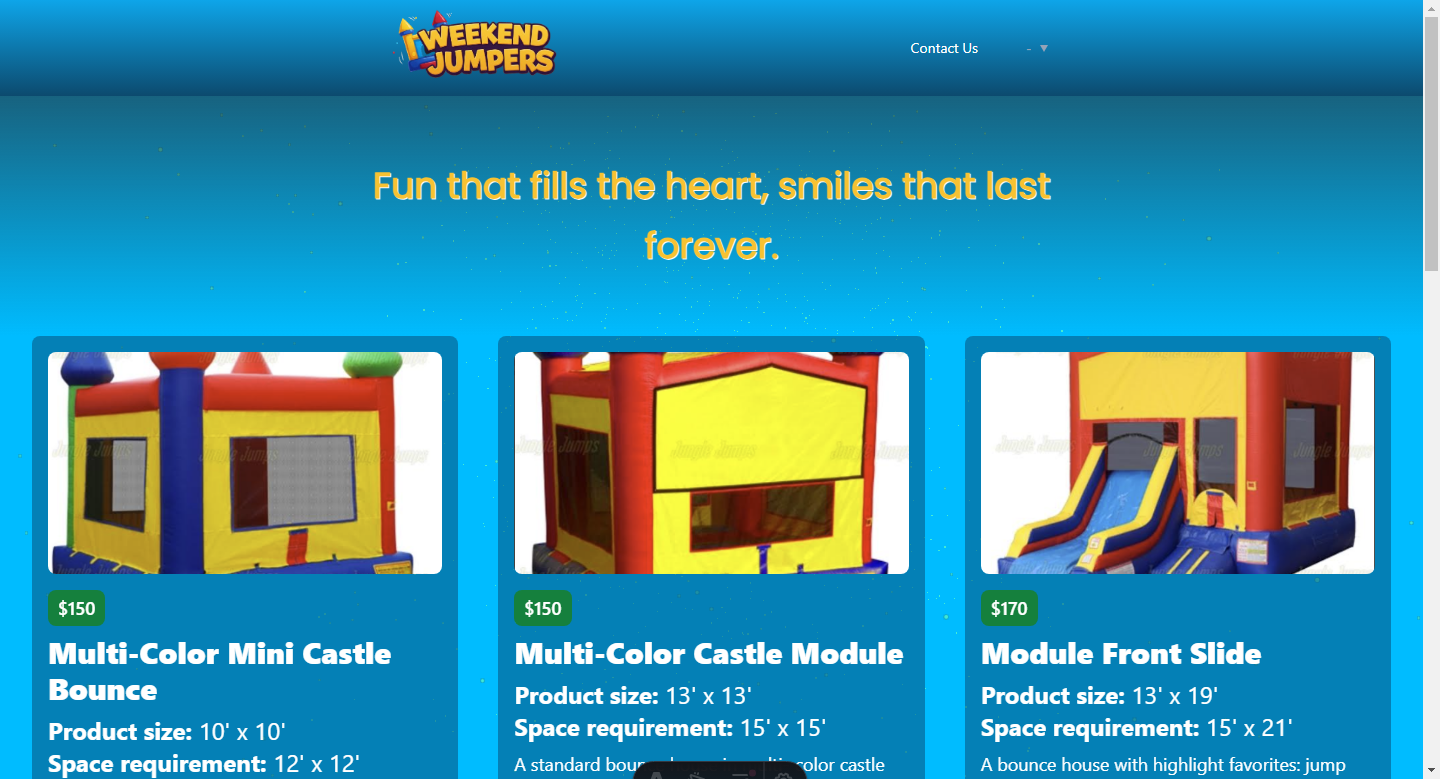
基于 Astro Leo 主题改造的 WeekendJumpers 定制落地页,样式与内容经过大幅调整
AstroReact企业官网
weekendjumpers — Astro 企业官网模板
作者 eeem77
基于 Astro Leo 主题改造的 WeekendJumpers 落地页,使用 Astro、React 与 Tailwind CSS,并接入 Web3Forms 邮件通知表单。
看看你的网站会是什么样
浏览真实页面截图,比较内容排版与手机效果。点击下方缩略图切换,放大查看整页细节。
目前有 1 张原始预览,可打开完整图片查看设计细节。
截图用于了解视觉与布局,交互效果请以实际项目为准。
采集于 2026-10-12查看来源
值得关注的模板亮点
从已有项目资料中,快速了解它的特点。
技术栈为 Astro、React 与 Tailwind CSS,并集成 MDX、RSS、Sitemap 等官方集成
星空背景动画由 React 与 Canvas 实现,使用 Three.js 驱动,鼠标交互时减速、停止交互后恢复
通过 Astro 的 client:idle 指令加载背景动画组件,避免影响页面加载
集成 Web3Forms 邮件通知表单,访问密钥需在 .env 文件中配置
支持 i18n 多语言内容,可在 src/config.ts 设置语言并按语言代码组织 MDX 文章
模板详细介绍
该仓库是 WeekendJumpers 的定制落地页,源自 Astro Leo 主题。作者对原主题的样式与内容做了较大幅度调整,以贴合客户的设计风格,技术栈包括 Astro、React 和 Tailwind CSS。页面保留了 Leo 主题的星空背景动画:该背景由 React 与 Canvas 实现,使用 Three.js 驱动持续运动效果,并在鼠标交互时几乎停止移动,停止交互一段时间后恢复;组件通过 Astro 的 client:idle 指令加载,以避免影响页面加载。项目还集成了 Web3Forms 用于发送邮件通知的表单,访问密钥需在相应的 .env 文件中配置。主题本身提供 i18n 多语言支持,可在 src/config.ts 中设置 LANGUAGES,并按语言代码在内容目录下分文件夹组织 MDX 文章;首页会不分语言列出全部文章,而页头的 Posts 链接默认指向英文版本。此外,主题基于 Rough Notation 提供 <Notation /> 组件,可在 MDX 内容中为文字添加下划线、圆圈、高亮等标注。站点配置集中在 src/config.ts,涵盖图标、Logo、标题、描述、头像、语言、菜单、页脚、联系方式和 Google Tag Manager ID。项目采用 MIT 许可,但演示图片、字体、图标等第三方素材需单独核对许可。
AstroReact企业官网
适合你的项目吗?
适用场景
- 为 WeekendJumpers 搭建品牌落地页,展示定制后的视觉风格与内容
- 在 Astro 项目中引入 React 与 Canvas 实现交互式星空背景动画
- 为静态站点添加基于 Web3Forms 的邮件通知联系表单
- 搭建支持多语言 MDX 内容与 RSS、Sitemap 的站点结构
适合人群
- 需要 Astro + React + Tailwind CSS 落地页起点的开发者
- 希望参考 Three.js 星空背景动画与 client:idle 加载方式的 Astro 项目
- 需要 Web3Forms 邮件通知表单集成示例的站点
- 计划使用 i18n 多语言 MDX 内容的博客或企业站点
上手与定制指南
结合仓库当前版本的说明,按下面的资料检查内容、配置与运行要求。
- 1
使用 pnpm install 安装依赖,pnpm run dev 启动本地开发服务器(默认 localhost:4321)
- 2
Web3Forms 的访问密钥需在相应的 .env 文件中配置
- 3
站点信息(图标、Logo、标题、描述、头像、语言、菜单、页脚、联系方式、Google Tag Manager ID)在 src/config.ts 中修改
- 4
多语言内容需在 src/config.ts 设置 LANGUAGES,并在 src/content/blog 下按语言代码建立文件夹
- 5
演示图片、字体、图标等第三方素材需按各自许可单独核对,不能仅依据代码的 MIT 许可判断
授权与来源资料
使用条件与限制
免费使用 · 保留许可声明本次收录的是公开仓库中采用 MIT 许可的免费版本;免费范围为该版本代码,不代表外部服务或第三方素材免费。
使用时需要遵守
- 允许免费使用、修改、商用和分发该版本代码。
- 分发代码副本或实质性部分时,保留原作者版权声明和完整 MIT 许可声明。
- 代码按现状提供;担保与责任限制以原许可证及适用法律为准。
额外费用与待核对事项
- 演示图片、字体、图标及其他第三方素材需按各自许可核对,不能仅凭代码的 MIT 许可判断。
- 域名、托管、数据库、支付或 AI 等外部服务可能另外收费。
- 使用 Web3Forms 邮件通知表单需要访问密钥,须在相应的 .env 文件中配置该密钥,否则表单无法正常发送邮件。
- 页头的 Posts 链接默认指向英文版本,如需其他语言需自行修改该行为。
查看原文依据
Permission is hereby granted, free of charge
许可证原文
Note: Please check the relevant .env file for the access key.
README 原文
https://github.com/eeem77/weekendjumpers/blob/main/LICENSEhttps://github.com/eeem77/weekendjumpers/blob/main/README.mdthe "Posts" link in the header will direct to the English version by default. You can modify this behavior according to your needs.
README 原文
DeepSeek 根据仓库许可证和 README 整理 ·2026-10-12。结果仅覆盖已读取资料,依赖、图片、字体及后续条款变更以各自原文为准。
项目核对记录与介绍依据
模板资料
- 来源平台
- GitHub
- 资料与维护参考分
- 资料一般 · 70 / 100
- 技术栈
- Astro · React
- 网站类型
- 企业官网
这个分数如何计算
本站按许可资料(最高30分)、演示链接(12分)、预览图(10分)、Star数(15分)、记录的维护时间(15分)、描述完整度(8分)、功能记录(5分)和分类资料(5分)计算。它不是代码、安全或性能测试,也不是 Google 评分;有链接不代表已实测可用。
这个项目需要核对什么
- 记录的仓库更新时间
- 2025-03-24
- 截图检查日期
- 2026-10-12
目前没有记录演示链接。请依据仓库说明在本地评估;仅凭截图无法确认交互行为。
目录记录的主要技术栈是 Astro。请通过依赖清单和锁文件核对实际版本与托管要求。这些说明基于收录资料,不代表代码审计或部署实测。
查看具体选型方法 →介绍的制作与核对状态
介绍由 AI 辅助整理目录与仓库资料。仓库作者不等于这篇介绍的审核者。
审核声明: [email protected] · 2026-10-13
查看当时使用的来源资料
SHA-256: 7c10427f1821791ae476466da9c0f494bfd075202e9c9cfffbd6eba138d799c5
2026-10-12T18:38:22.075Z
来源文件 / 仓库# Leo - eeem77 - Astro Theme With Tailwindcss & MDX
We undertook a thorough adaptation of the Astro Leo theme for a landing page client, involving extensive changes to styles and content. Furthermore, we integrated a form for sending email notifications using Web3Forms technology. This implementation enhances the user experience by improving both the visual and functional aspects of the website.
Note: Please check the relevant .env file for the access key.
Leo is an Astro theme built with [Tailwind](https://tailwindcss.com/), [React.js](https://react.dev/) and [Three.js](https://threejs.org/) that gives you a sense of exploration in the universe and is designed to make writing posts easy. Besides the features offered by other blog themes, the Leo theme comes with an i18n setting for multi-language writers.
For the starry sky background animation on the page, I implemented the continuous movement effect using Three.js. Initially, you will see the constantly moving animation. However, to prevent this animation from affecting the user's reading experience, the movement speed slows down almost to a stop whenever there is any mouse interaction. It will only return to the fast movement once the user stops interacting for a while.
This background component is created using React and Canvas. Since animations are typically resource-intensive, I added the [client:idle Client Directive](https://docs.astro.build/en/reference/directives-reference/#clientidle) to this component to ensure it doesn't impact the page's loading speed.

## Install
You can quickly create an Astro blog project and use this theme as a template with the following command in just a few seconds.
```
pnpm create astro@latest moojing/astro-leo-theme
```
## Commands
All commands are run from the root of the project, from a terminal:
| Command | Action |
| :------------------------ | :----------------------------------------------- |
| `pnpm install` | Installs dependencies |
| `pnpm run dev` | Starts local dev server at `localhost:4321` |
| `pnpm run build` | Build your production site to `./dist/` |
| `pnpm run preview` | Preview your build locally, before deploying |
| `pnpm run astro ...` | Run CLI commands like `astro add`, `astro check` |
| `pnpm run astro -- --help` | Get help using the Astro CLI |
## i18n Content Support
You can have your content in different langugages after setting the `LANGUAGES` in the `src/config.ts` file. Then add the folder with corresponding language code in your entry folder. For example, in the project, the folder structure inside `src/content/blog` is like this:
```
...
├── blog
│ ├── en
│ │ ├── some-en-post.mdx
│ │ ├── s ome-en-post-1.mdx
│ │ └── ...
│ └── zh
│ ├── some-zh-post.mdx
│ ├── some-zh-post-1.mdx
│ └── ...
...
```
One thing to note is that on the homepage, all posts will be listed without distinguishing between languages. However, the "Posts" link in the header will direct to the English version by default. You can modify this behavior according to your needs.
For other issue you're facing about i18n support from Astro, read the [Astro Docs](https://docs.astro.build/en/recipes/i18n/) for more information.
### Using Rough Notation
Leo is an Astro theme inspired by another Astro theme [Mia](https://github.com/infinity-ooo/astro-theme-mia). So is also based on the [Rough Notation](https://roughnotation.com/) library. You can use `<Notation />` component in your MDX content, such as:
```mdx
In JavaScript, the Array object can be seen as a combination of both <Notation type="box" color="blue">list storage</Notation> and <Notation type="box" color="blue">utility methods</Notation>, providing a unified structure for storing and manipulating data.
```
And following is the type of this component:
```tsx
type Props = {
type?: "underline" | "circle" | "crossed-off" | "highlight" | "strike-through" | "bracket";
color?: string;
strokeWidth?: number;
};
```
### Theme Configuration
Update the `src/config.ts` file to configure the theme:
- `SITE_FAVICON`: the favicon of the site
- `SITE_LOGO`: the logo of the site
- `SITE_TITLE`: the title of the site
- `SITE_DESCRIPTION`: the description of the site
- `ME_AVATAR`: the avatar of the site
- `LANGUAGES`: the i18n languages of the site
- `MENUS`: the menus of the site
- `FOOTER_CONTENT`: the content of the footer
- `CONTACTS`: the contacts about the site
- `GOOGLE_GTAG`: the Google Tag Manager ID
### Theme Integrations
- @astrojs/mdx: <https://docs.astro.build/en/guides/markdown-content/>
- @astrojs/rss: <https://docs.astro.build/en/guides/rss/>
- @astrojs/sitemap: <https://docs.astro.build/en/guides/integrations-guide/sitemap/>
- @astrojs/tailwind: <https://docs.astro.build/en/guides/integrations-guide/tailwind/>
- rough-notation: <https://roughnotation.com/>
### License
- [MIT](LICENSE)
看看同类模板
对比同技术栈与用途的模板,找到更适合的视觉与内容结构。

astrowind
⭕️ AstroWind: A free template using Astro v7 and Tailwind CSS v4. Astro starter theme.
Astro · 博客

astro-landing-page
An Astro + Tailwind CSS Example/Template for Landing Pages
Astro · 企业官网

Tailcast
Dark-themed website template built on Astro and Tailwind CSS
Astro · 企业官网

Positivus
A stunning and versatile Astro theme designed for digital marketing agencies.
Astro · 企业官网

qwind
⭕️ Qwind: A template to make your website using Qwik + Tailwind CSS.
Astro · 工具站

agency-landing-page-Astrojs
A simple agency landing page made with astrojs and tailwindcss
Astro · 企业官网