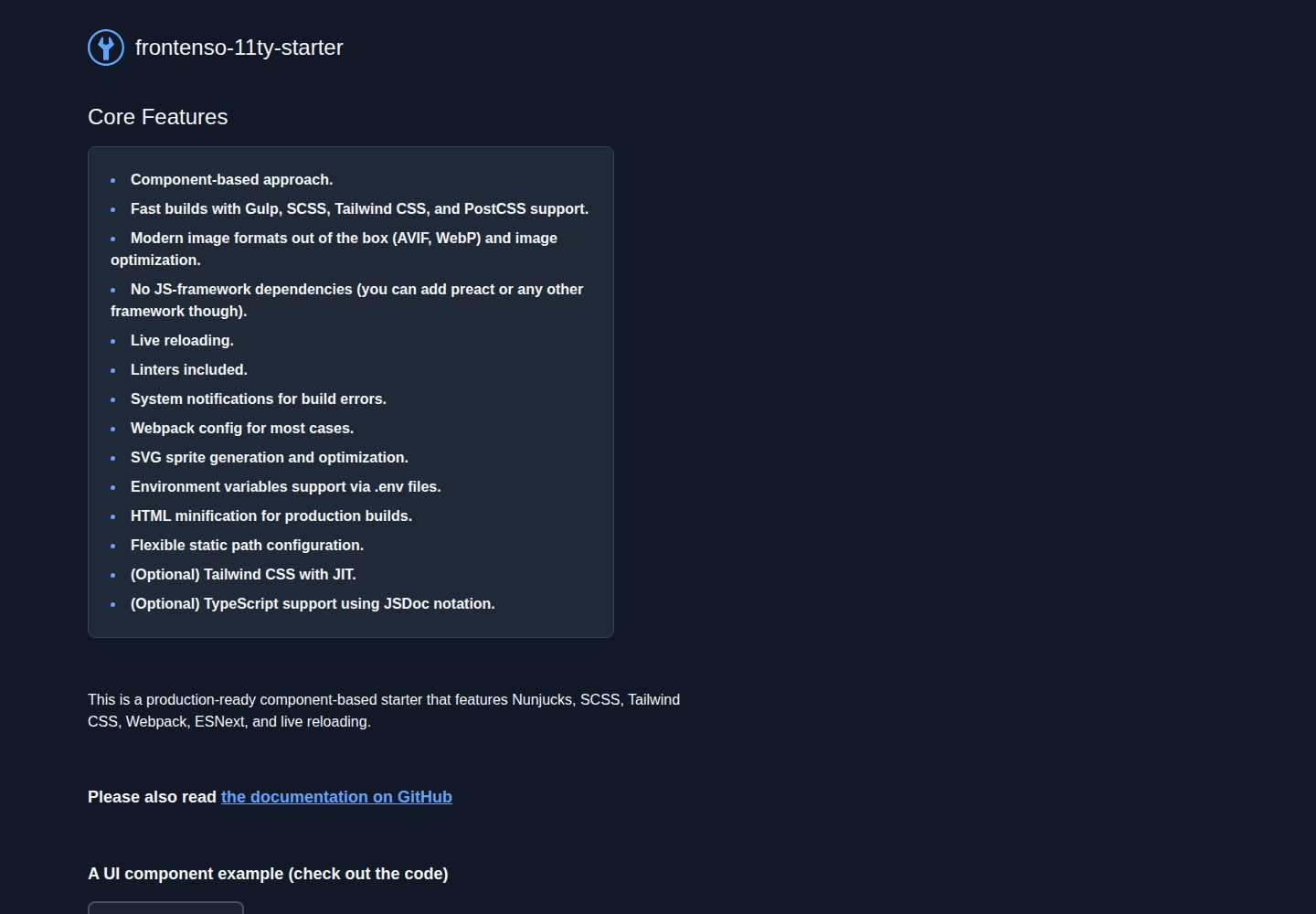
Eleventy handles HTML generation, Gulp takes care of the rest of the build process
EleventyTool SiteStarter
frontenso-11ty-starter — Eleventy Tool Template
By einomi
A static site starter based on Eleventy and Gulp, integrating Nunjucks, SCSS, Tailwind CSS, and ESNext, with component-based structure and modern image format handling.
Explore the design
Compare the page layouts and mobile experience. Open any screenshot for a closer look.
Desktop homepage1 / 2
Desktop captureTop of page
Actual screenshot captured by the server browser.
All pages & views 2
Screenshots show visual appearance; interactive behavior may differ.
Recorded 2026-09-30View source
What stands out
A quick read of the recorded project description.
Nunjucks templating engine with src/components/ component-based directory organizing markup, styles, and scripts
SCSS, PostCSS, and optional Tailwind CSS (including JIT)
Webpack bundles ESNext, with optional TypeScript support (via JSDoc, can be disabled by removing tsconfig.json)
@11ty/eleventy-img generates AVIF, WebP, and optimizes images, providing an {% image %} tag and inline filter
gulp-svgstore generates SVG sprites, .env and dotenv manage environment variables, supports custom STATIC_PATH
Template Details
frontenso-11ty-starter is a static site starter template for Jamstack, using Eleventy to generate HTML while delegating the rest of the build process to Gulp. The template is organized around components, placing markup, styles, and scripts under src/components/, and uses the Nunjucks templating engine to write maintainable HTML. On the styling side, it supports SCSS, PostCSS, and optional Tailwind CSS (including JIT); on the scripting side, it bundles ESNext via Webpack and offers optional TypeScript support—provided through JSDoc annotations, which can be disabled by removing tsconfig.json.
The build and development workflow includes: npm install to install dependencies, npm start to launch the development server (default http://localhost:9000/), npm run build to generate a production build, and npm run zip to output build.zip after building. The template includes live reload, code linting, system notifications for build errors, HTML minification, and environment variable management via .env and dotenv; the static asset path can be customized with the STATIC_PATH variable, for example to point to a CDN.
For images, it uses @11ty/eleventy-img to generate and optimize AVIF and WebP, with compression quality adjustable in .eleventy.js; it provides an {% image %} Nunjucks tag to automatically generate srcset, and also supports using an inline filter to inline images as base64 (the README notes this may increase HTML size). SVGs are combined into a sprite via gulp-svgstore, inlined as a shortcode in base.njk, and referenced on pages using <use xlink:href="#icon-filename">. The template does not depend on a JS framework and can be integrated with Preact or similar; data sources can be a headless CMS, JSON, Markdown, or any source JavaScript can fetch.
Limitations and notes: Webpack configuration does not enable hot reload; when using STATIC_PATH, it must be passed as props in Nunjucks macros; replacing the templating engine requires adjustments in .eleventy.js. The repository uses the MIT license, but third-party assets such as demo images, fonts, and icons require separate license verification, and external services like domains and hosting may incur additional charges.
EleventyTooling siteStarter
Is it right for your project?
Use Cases
- Building a Jamstack static site from scratch with a ready-made build and styling pipeline
- Writing multi-page HTML in a component-based way, reusing UI fragments such as buttons, sections, and sliders
- Projects that need to automatically output modern image formats like AVIF and WebP and generate srcset
- Generating pages with Nunjucks templates combined with a headless CMS, JSON, or Markdown data sources
Suitable For
- Front-end developers familiar with Node.js and npm scripts
- Static site projects that prefer no JS framework and focus on templates and build tools
- Teams that need to organize Nunjucks, SCSS, and scripts in a component-based way
- Projects that want to enable or disable Tailwind CSS and TypeScript as needed
Getting started & customization
Use these recorded setup notes alongside the repository instructions for your chosen version.
- 1
Install dependencies: npm install
- 2
Development: npm start, default access at http://localhost:9000/
- 3
Production build: npm run build; create a zip archive: npm run zip generates build.zip
- 4
Custom static asset path: set STATIC_PATH in the root .env; in Nunjucks macros it must be passed as props
- 5
When Tailwind CSS is not needed, remove the corresponding stylesheet reference from src/_layouts/base.njk, and optionally remove related configurations in postcss.config.js and gulpfile.js
License & source material
Usage conditions & limitations
Free to use · keep license noticeThis entry covers the free version under the MIT license in the public repository; the free scope is the code of this version and does not imply that external services or third-party assets are free.
Must comply with when using
- Free use, modification, commercial use, and distribution of this version's code are permitted.
- When distributing copies or substantial portions of the code, retain the original author's copyright notice and the full MIT license notice.
- The code is provided as-is; warranties and limitations of liability are governed by the original license and applicable law.
Additional costs & items to verify
- Webpack build does not enable hot module replacement (HMR); after code changes, rely on page refresh rather than module hot swapping.
- When using the STATIC_PATH variable in Nunjucks macros, it must be explicitly passed via props, otherwise it will not take effect.
- Changing the templating engine requires manual modification of the .eleventy.js configuration; the template only integrates Nunjucks by default.
- The inline filter inlines images as base64, which significantly increases HTML size and is only suitable for small files.
- postcss-assets inlining images may make the CSS file too large; it is recommended only for small images.
- System notifications for build errors require manually enabling notification permissions for the terminal application at the OS level, otherwise they will not pop up.
- Demo images, fonts, icons, and other third-party assets must be checked against their respective licenses and cannot be judged solely by the code's MIT license.
- External services such as domains, hosting, databases, payments, or AI may incur additional charges.
View Original Text Basis
Permission is hereby granted, free of charge
Original License Text
This starter kit uses Webpack v5 to build the JavaScript bundle. However, it does not have hot reloading feature enabled, as it is not necessary for static websites.
Original README
**Note:** When using _STATIC_PATH_ in Nunjucks macros, it must be passed as props.
Original README
To do this, you need to replace Nunjucks with your desired template engine in the `.eleventy.js` file.
Original README
<b>Warning!</b> Please use this feature with caution as it may bloat the final `HTML` file.
Original README
<b>Warning!</b> Use this feature with caution as it may cause the final CSS file to become large.
Original README
https://github.com/einomi/frontenso-11ty-starter/blob/master/LICENSEhttps://github.com/einomi/frontenso-11ty-starter/blob/master/README.mdIf you want to see these notifications in your operating system, make sure to enable notifications for your terminal application
Original README
Compiled by DeepSeek based on repository license and README ·2026-10-01. Results only cover the materials read; dependencies, images, fonts, and subsequent term changes are subject to their respective original texts.
Project checks & description sources
Template Information
- Source platforms
- GitHub
- Documentation and maintenance reference score
- More documented · 86 / 100
- Technologies
- Eleventy
- Website type
- Tool Site · Starter
How this score is calculated
Our heuristic uses license records (up to 30), a demo link (12), a preview (10), stars (15), recorded maintenance (15), description completeness (8), feature records (5) and classification data (5). It is not a code, security or performance test, or a Google score. A link does not establish tested functionality.
What to verify for this project
- Repository update recorded
- 2025-07-20
- Screenshot last checked
- 2026-10-01
A demo link is listed. Check it with your own content and viewport sizes; its presence does not confirm that forms, authentication or payments work.
The catalog identifies Eleventy as the primary stack. Check the actual dependency manifest and lockfile for versions and hosting requirements. These notes use recorded metadata, not a code audit or a deployment test.
Use a selection guide →How this description was prepared
AI-assisted description based on catalog records and repository material. Repository authors are not automatically the reviewers of this description.
Automatically checked against source and license rules; no manual editorial review.
Inspect the recorded source material
SHA-256: 91c36ce7a3568b91041ca2bbdb3738a3c6bcb2db6a834f2870e2461d95c1157e
2026-10-01T14:03:26.923Z
Source file / repository<img style="margin-right: 10px;" src="src/svg/logo-with-text.svg" alt="" />
# Jamstack Compatible 11ty Boilerplate
# Nunjucks + SCSS + Tailwind CSS + ESNext starter based on 11ty and Gulp ✨
## Netlify demo page with examples and additional bits of documentation and examples
[https://frontenso-11ty-starter.netlify.app/](https://frontenso-11ty-starter.netlify.app/)
# Table of Contents
- [Jamstack compatible 11ty Boilerplate](#jamstack-compatible-11ty-boilerplate)
- [Netlify demo page](#netlify-demo-page)
- [Features](#features)
- [Getting started](#getting-started)
- [Using this repository as a template](#using-this-repository-as-a-template)
- [Running for development](#running-for-development)
- [Build the project for production environment](#build-the-project-for-production-environment)
- [Creating a zip-archive `build.zip`](#creating-a-zip-archive-buildzip)
- [Component-based Approach](#component-based-approach)
- [Modern image formats](#modern-image-formats)
- [Image quality settings](#image-quality-settings)
- [TypeScript (optional)](#typescript-optional)
- [Tailwind CSS (optional)](#tailwindcss-optional)
- [Nunjucks HTML template engine](#nunjucks-html-template-engine)
- [Using a different template engine](#using-a-different-template-engine)
- [Webpack v5](#webpack-v5)
- [Customize static path](#customize-static-path)
- [.env file and environment variables](#env-file-and-environment-variables)
- [The SVG sprite](#the-svg-sprite)
- [{% image %} Nunjucks tag](#-image-nunjucks-tag)
- [Inlining images as base64 strings inside Nunjucks templates using `inline` filter](#inlining-images-as-base64-strings-inside-nunjucks-templates-using-inline-filter)
- [Inlining raster or svg images in CSS](#inlining-raster-or-svg-images-in-css)
- [Enabling system notifications for errors (node-notifier)](#enabling-system-notifications-for-errors-node-notifier)
- [Prettier configuration](#prettier-configuration)
- [HTML minification](#html-minification)
- [Examples](#examples)
- [Useful links](#useful-links)
## Features
This starter kit is built on a component-based structure, utilizing the power of Nunjucks, SCSS, and Tailwind CSS, Webpack, ESNext, and live reloading. Modern image formats out of the box (AVIF, WebP) and image optimization.
It uses 11ty to handle HTML generation and Gulp for the rest of the build process.
Core features:
- Component-based approach.
- Fast builds with Gulp, SCSS, Tailwind CSS, and PostCSS support.
- Modern image formats out of the box (AVIF, WebP) and image optimization.
- No JS-framework dependencies (you can add preact or any other framework though).
- Live reloading.
- Linters included.
- System notifications for build errors.
- Webpack config for most cases.
- SVG sprite generation and optimization.
- Environment variables support via .env files.
- HTML minification for production builds.
- Flexible static path configuration.
- (Optional) Tailwind CSS with JIT.
- (Optional) TypeScript support using JSDoc notation.
It is flexible and can be used in conjunction with any data source, whether it be a headless CMS, JSON, Markdown or any other data source that can be fetched via JavaScript. For more information on how to work with data sources, please refer to the [11ty documentation](https://www.11ty.dev/docs/data/).
## Getting started
### Using this repository as a template
This repository can be a perfect starting point for your next project. By simply clicking on the green "Use this template" button on this GitHub page, you can easily create a new repository. After creating a new repository you can customize and configure it to your liking and begin your development journey with ease.
### Running for development
#### 1. Install dependencies:
```
npm install
```
#### 2. Run the project for development:
```
npm start
```
#### 3. Open development URL - [`http://localhost:9000/`](http://localhost:9000/).
### Build the project for production environment:
```
npm run build
```
### Creating a zip-archive `build.zip`:
```
npm run zip
```
This command uses `npm run build` to build the project and then creates a zip-archive `build.zip` in the root folder of the project.
## Component-based Approach
Decomposing the UI into separate, less coupled components is highly recommended for many reasons.
It is a best practice to create components for parts of the UI that appear in multiple places in your project, such as buttons, common page sections, widgets, and sliders.
To keep your components organized, it is a good idea to keep them inside the `src/components/` folder. This starter kit allows you to keep the markup, styles, and JavaScript code for a component all in one place, making it easy to use them in multiple locations throughout your project. Take a look at the `src/components/` folder for examples of how different types of components are arranged. It's important to note that it is not always necessary to include Nunjucks or JavaScript code for a component if it does not make sense to do so, for example, when the markup is quite simple or when a component does not have any JavaScript logic.
## Modern Image Formats
This starter uses `@11ty/eleventy-img` to generate modern image formats (AVIF, WebP) and optimize images. See examples on the [demo page](https://frontenso-11ty-starter.netlify.app/).
## Image Quality Settings
You can change image compression settings for avif, webp, jpeg files in `.eleventy.js` config.
## TypeScript (optional)
This boilerplate has built-in support for TypeScript, but it is completely optional to use it during development. We have chosen to use JSDoc notation ([which is officially supported by TypeScript team](https://www.typescriptlang.org/docs/handbook/jsdoc-supported-types.html)) to provide TypeScript support. This means that you don't have to write your code using TypeScript syntax, and can instead continue to write your code using JavaScript syntax with JSDoc notation for TypeScript support. This approach also allows you to easily disable TypeScript if you do not need it at some point during your development process, for example, to speed up development or if you have new developers working on the project who are not familiar with TypeScript.
### If you don't need TypeScript
Simply remove tsconfig.json file from your project.
## Tailwind CSS (optional)
This starter kit comes with Tailwind CSS support out of the box. Tailwind CSS is a utility-first CSS framework that allows you to quickly build custom user interfaces. For more information on how to use Tailwind CSS, please refer to the [Tailwind CSS documentation](https://tailwindcss.com/docs).
### If you don't need Tailwind CSS
Simply remove the following line:
```
<link rel="stylesheet" href="{{ STATIC_PATH }}/css/tailwind.css" />
```
from `src/_layouts/base.njk` file.
You can also remove `tailwindcss` section from `postcss.config.js` and remove `tailwind` gulp task from `gulpfile.js`, but it is optional.
## Nunjucks HTML template engine
[Nunjucks](https://mozilla.github.io/nunjucks/) is a powerful HTML template engine with a syntax very similar to jinja2. Nunjucks makes easier writing highly-maintainable HTML code.
Nunjucks templates seat in `src/_layouts/`, `src/components/` folders.
To make the most out of Nunjucks, it is recommended to read through its [documentation](https://mozilla.github.io/nunjucks/templating.html). This will give you a good understanding of its features and how to use them effectively in your project.
You can also read [11ty documentation](https://www.11ty.dev/docs/languages/nunjucks/) on templating and [data sources](https://www.11ty.dev/docs/data/).
Another tip for working with Nunjucks is to ensure that your code editor has syntax highlighting for Nunjucks. If your editor does not have native support for Nunjucks, you can set up the syntax highlighting for the Twig template engine instead. This can be done by configuring your editor to use the Twig syntax highlighting when opening .njk files.
## Using a different template engine
11ty has support for many template engines. If you prefer to use a different template engine, you can easily do so.
To do this, you need to replace Nunjucks with your desired template engine in the `.eleventy.js` file. You can find information on how to configure a different template engine in the [11ty documentation](https://www.11ty.dev/docs/languages/).
## Webpack v5
This starter kit uses Webpack v5 to build the JavaScript bundle. However, it does not have hot reloading feature enabled, as it is not necessary for static websites.
## Customize static path
This template provides the ability to customize the static path for project resources such as images, scripts, styles, etc. For example, you can use a custom CDN URL. Add an `.env` file to the root directory of the project with the following content `STATIC_PATH=http://localhost:9000` then you can reference the _STATIC_PATH_ variable in your code like this `<link rel="stylesheet" href="{{ STATIC_PATH }}/css/tailwind.css">`
**Note:** When using _STATIC_PATH_ in Nunjucks macros, it must be passed as props.
## .env file and environment variables
### Environment variables in JS code
This starter kit uses the [dotenv](https://www.npmjs.com/package/dotenv) package to load environment variables from a `.env` file. You can add environment variables to the `.env` file and use them in your code. Additionally, don't forget to include the new variable in the webpack configuration under the EnvironmentPlugin settings. After restarting the project, you will be able to reference the variable within your code like this: `process.env.MY_VARIABLE`.
### Environment variables in Nunjucks templates
If you need to use environment variables in Nunjucks templates, you can add JS files for the variables in `src/_data/` folder and then reference them in Nunjucks templates like this: `{{ MY_VARIABLE }}`. As an example, see the `src/_data/STATIC_PATH.js` file.
## The SVG sprite
This starter features a convenient way to include SVG files through the use of SVG sprites. By utilizing the [gulp-svgstore](https://github.com/w0rm/gulp-svgstore) plugin, it generates a single sprite containing all of your SVG files.
The SVG sprite markup is inlined in `base.njk` template using `{% svg_prite %}` shortcode function (there is no need to modify this code).
To show an SVG image on the webpage, first place it in the `src/svg` folder. For example, if the file is named `some-vector.svg`.
Then add it to the page in the following way:
```
<svg><use xlink:href="#icon-some-vector"></use></svg>
```
**Note:** `some-vector.svg` file should be located in the `src/svg` directory so that `gulp-svgstore` could add it to the SVG sprite.
You can also use CSS selectors to set properties such as the `fill` or `stroke` for this element on the page, without having to edit the SVG file. Additionally, you can even animate specific parts of the SVG element, such as a `<path>` or `<circle>`.
You can also take a look at the `<svg>` examples in the `index.njk`.
## {% image %} Nunjucks tag
This feature allows you to easily create AVIF and WebP images. It automatically generates multiple sizes for the `srcset` attribute based on the maximum width specified (the third argument) and the widths defined in the `.eleventy.js` configuration file.
If you need to add CSS class to `<picture>` tag then pass it as `pictureClass` among the options (second argument). To add CSS class to `<img>` pass `class` to `options` argument.
See examples in `index.njk` to get familiar with `{% image %}` tag.
### Inlining images as base64 strings inside Nunjucks templates using `inline` filter
This may become a useful approach if you need to display an image instantly on the page without making a request to the server.
```
<img src="{{ 'src/images/some-image.png' | inline }}" alt="" />
```
<b>Warning!</b> Please use this feature with caution as it may bloat the final `HTML` file. Inlining images could be a good approach if the file is quite small, in other cases prefer `{% image %}` tag.
### Inlining raster or svg images in CSS
The `postcss-assets` plugin allows to inline images into CSS code in Base64 encoding or as is for SVG files:
```
background: inline('some-image.png')
```
The plugin also can insert an image sizes:
```
width: width('some-image.png')
```
```
height: height('some-image.png')
```
```
background-size: size('some-image.png')
```
<b>Warning!</b> Use this feature with caution as it may cause the final CSS file to become large. Inlining images is a good option if the file is relatively small, otherwise, it is recommended to use the `{% image %}` tag instead.
## Enabling system notifications for errors (node-notifier)
We use `node-notifier` to display system notifications for Eleventy errors. If you want to see these notifications in your operating system, make sure to enable notifications for your terminal application:
macOS: Go to System Settings (or System Preferences) → Notifications & Focus → Find your terminal application (e.g. Terminal, iTerm, VS Code integrated terminal), then enable Allow Notifications.
Windows: Open Settings → System → Notifications & actions and ensure notifications are allowed for your chosen terminal or shell app.
Linux: This can depend on your distribution and notification daemon. In GNOME-based distros, open Settings → Notifications; in others, consult your system’s notification settings.
Once notifications are enabled, any error messages sent via `node-notifier` will pop up on your system. If you don't see them, double-check that you granted permission to the correct application.
## Prettier configuration
This starter kit uses Prettier to format the code. The configuration is located in the `.prettierrc` file. For .njk files, it uses the `jinja-template` parser.
## HTML minification
HTML minification is handled during the production build process via the `beautify-html` script in package.json. It uses `html-minifier` with the following default settings:
- Collapses whitespace
- Removes comments
- Removes optional tags
- Removes redundant attributes
- Removes script type attributes
- Removes tag whitespace
- Uses short doctype
- Minifies CSS and JavaScript within HTML
The full command is:
```
npm run beautify-html
```
### Disabling HTML minification
If you need to disable HTML minification for any reason, you can:
1. Remove the `beautify-html` step from the build script in `package.json`. Change:
## Examples
For code examples, please refer to `src/index.njk`.
To see them live, open the index page in the browser by running `npm start` and going to [http://localhost:9000](http://localhost:9000)
You can also check them on the [live demo page](https://frontenso-11ty-starter.netlify.app/)
## Useful links
[Nunjucks syntax](https://mozilla.github.io/nunjucks/templating.html)
[11ty Image plugin](https://www.11ty.dev/docs/plugins/image/)
[11ty Documentation](https://www.11ty.dev/docs/)
[Gulp Documentation](https://gulpjs.com/docs/en/getting-started/quick-start)
[SCSS Documentation](https://sass-lang.com/documentation/)
[Tailwind CSS](https://tailwindcss.com/)
[Tailwind CSS Cheatsheet](https://nerdcave.com/tailwind-cheat-sheet)
Explore similar templates
Compare previews and descriptions within the same stack and category.

eleventy-base-blog
The officially maintained Eleventy blog starter template, MIT licensed, includes posts, tag pages, archives, an about page, a 404 page, an Atom feed, and sitemap.xml, with per-page CSS bundling, syntax highlighting, and image optimization.
Eleventy · Blog

eleventy-garden
An Eleventy-based digital garden starter template for building a personal knowledge site organized through hyperlinks. It supports Roam-style double-bracket links, backlink display, and hover cards for backlinks.
Eleventy · Starter

eleventastic
Eleventastic is an Eleventy starter kit by Max Böck, used as the base for new 11ty projects. It integrates Sass, Webpack, SVG icon sprites, critical CSS, and HTML minification into the 11ty build without external steps.
Eleventy · Starter

neat-starter
An Eleventy-based static site starter template integrating Netlify CMS, Alpine.js, and Tailwind CSS. It provides a ready-to-run example site, a one-click Netlify deploy button, and an MIT-licensed codebase.
Eleventy · Starter

Eleventy-Starter-Boilerplate
An Eleventy-based blog starter template with Tailwind CSS, Webpack, PostCSS, ESLint, and Prettier, optional Netlify CMS, and built-in SEO metadata, sitemap, and 404 page.
Eleventy · Blog

eleventy-plus-vite
A static site starter combining Eleventy and Vite, with a live-reloading development server, Vite-based production post-processing, a PostCSS pipeline with Autoprefixer and cssnano, critical CSS inlining and asynchronous CSS loading, a web font loading strategy example, fluid typography, basic dark mode, an…
Eleventy · Starter