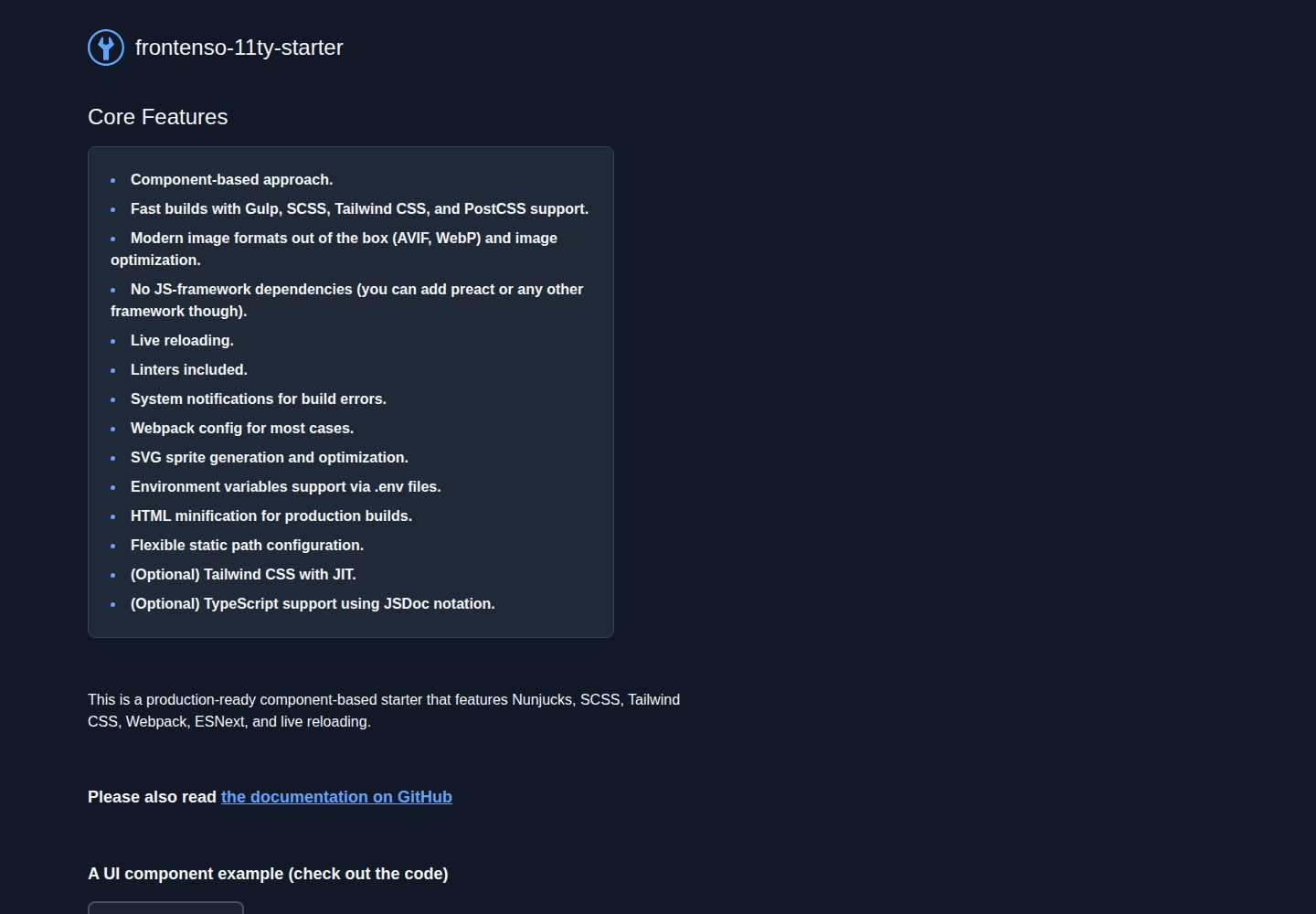
Eleventy 负责 HTML 生成,Gulp 承担其余构建流程
Eleventy工具站启动器
frontenso-11ty-starter — Eleventy 工具站模板
作者 einomi
基于 Eleventy 与 Gulp 的静态站点启动器,集成 Nunjucks、SCSS、Tailwind CSS 与 ESNext,提供组件化结构与现代图片格式处理。
看看你的网站会是什么样
浏览真实页面截图,比较内容排版与手机效果。点击下方缩略图切换,放大查看整页细节。
全部页面与视图 2
截图用于了解视觉与布局,交互效果请以实际项目为准。
采集于 2026-09-30查看来源
值得关注的模板亮点
从已有项目资料中,快速了解它的特点。
Nunjucks 模板引擎配合 src/components/ 组件化目录组织标记、样式与脚本
SCSS、PostCSS 与可选 Tailwind CSS(含 JIT)
Webpack 打包 ESNext,可选 TypeScript 支持(JSDoc 形式,可移除 tsconfig.json 关闭)
@11ty/eleventy-img 生成 AVIF、WebP 并优化图片,提供 {% image %} 标签与 inline 过滤器
gulp-svgstore 生成 SVG 雪碧图,.env 与 dotenv 管理环境变量,支持自定义 STATIC_PATH
模板详细介绍
frontenso-11ty-starter 是一个面向 Jamstack 的静态站点启动模板,使用 Eleventy 生成 HTML,其余构建流程交给 Gulp。模板以组件化为组织方式,把标记、样式与脚本放在 src/components/ 下,配合 Nunjucks 模板引擎编写可维护的 HTML。样式侧支持 SCSS、PostCSS 与可选的 Tailwind CSS(含 JIT),脚本侧通过 Webpack 打包 ESNext,并提供可选的 TypeScript 支持——采用 JSDoc 注释形式,移除 tsconfig.json 即可关闭。
构建与开发流程包括:npm install 安装依赖,npm start 启动开发服务(默认 http://localhost:9000/),npm run build 生成生产构建,npm run zip 在构建后输出 build.zip。模板内置实时刷新、代码检查、构建错误系统通知、HTML 压缩,以及通过 .env 与 dotenv 管理环境变量;静态资源路径可用 STATIC_PATH 变量自定义,例如指向 CDN。
图片方面使用 @11ty/eleventy-img 生成 AVIF 与 WebP 并做优化,压缩质量可在 .eleventy.js 中调整;提供 {% image %} Nunjucks 标签自动生成 srcset,也支持用 inline 过滤器把图片内联为 base64(README 提醒可能增大 HTML 体积)。SVG 通过 gulp-svgstore 合并为雪碧图,在 base.njk 中以 shortcode 内联,页面用 <use xlink:href="#icon-文件名"> 引用。模板不依赖 JS 框架,可自行接入 Preact 等;数据源可以是无头 CMS、JSON、Markdown 或任何 JavaScript 可获取的来源。
限制与注意:Webpack 配置未启用热重载;使用 STATIC_PATH 时在 Nunjucks 宏中需作为 props 传入;替换模板引擎需在 .eleventy.js 中调整。仓库采用 MIT 许可,但演示图片、字体、图标等第三方素材需单独核对许可,域名、托管等外部服务可能另行收费。
Eleventy工具站启动器
适合你的项目吗?
适用场景
- 从零搭建 Jamstack 静态站点,需要现成的构建与样式管线
- 以组件化方式编写多页面 HTML,复用按钮、区块、滑块等 UI 片段
- 需要自动输出 AVIF、WebP 等现代图片格式并生成 srcset 的项目
- 希望用 Nunjucks 模板配合无头 CMS、JSON 或 Markdown 数据源生成页面
适合人群
- 熟悉 Node.js 与 npm 脚本的前端开发者
- 偏好无 JS 框架、以模板和构建工具为主的静态站点项目
- 需要组件化组织 Nunjucks、SCSS 与脚本的团队
- 希望按需启用或关闭 Tailwind CSS、TypeScript 的项目
上手与定制指南
结合仓库当前版本的说明,按下面的资料检查内容、配置与运行要求。
- 1
安装依赖:npm install
- 2
开发:npm start,默认访问 http://localhost:9000/
- 3
生产构建:npm run build;打包压缩包:npm run zip 生成 build.zip
- 4
自定义静态资源路径:在根目录 .env 中设置 STATIC_PATH,在 Nunjucks 宏中需作为 props 传入
- 5
不需要 Tailwind CSS 时,从 src/_layouts/base.njk 移除对应样式表引用,并可移除 postcss.config.js 与 gulpfile.js 中的相关配置
授权与来源资料
使用条件与限制
免费使用 · 保留许可声明本次收录的是公开仓库中采用 MIT 许可的免费版本;免费范围为该版本代码,不代表外部服务或第三方素材免费。
使用时需要遵守
- 允许免费使用、修改、商用和分发该版本代码。
- 分发代码副本或实质性部分时,保留原作者版权声明和完整 MIT 许可声明。
- 代码按现状提供;担保与责任限制以原许可证及适用法律为准。
额外费用与待核对事项
- Webpack 构建未启用热重载(HMR),修改代码后需依赖页面刷新而非模块热替换。
- 在 Nunjucks 宏中使用 STATIC_PATH 变量时,必须通过 props 显式传入,否则无法生效。
- 更换模板引擎需手动修改 .eleventy.js 配置,模板默认仅集成 Nunjucks。
- inline 过滤器将图片内联为 base64 会显著增大 HTML 体积,仅适合小文件。
- postcss-assets 内联图片可能使 CSS 文件体积过大,建议仅用于小图。
- 构建错误系统通知需在操作系统层面为终端应用手动开启通知权限,否则不会弹出。
- 演示图片、字体、图标及其他第三方素材需按各自许可核对,不能仅凭代码的 MIT 许可判断。
- 域名、托管、数据库、支付或 AI 等外部服务可能另外收费。
查看原文依据
Permission is hereby granted, free of charge
许可证原文
This starter kit uses Webpack v5 to build the JavaScript bundle. However, it does not have hot reloading feature enabled, as it is not necessary for static websites.
README 原文
**Note:** When using _STATIC_PATH_ in Nunjucks macros, it must be passed as props.
README 原文
To do this, you need to replace Nunjucks with your desired template engine in the `.eleventy.js` file.
README 原文
<b>Warning!</b> Please use this feature with caution as it may bloat the final `HTML` file.
README 原文
<b>Warning!</b> Use this feature with caution as it may cause the final CSS file to become large.
README 原文
https://github.com/einomi/frontenso-11ty-starter/blob/master/LICENSEhttps://github.com/einomi/frontenso-11ty-starter/blob/master/README.mdIf you want to see these notifications in your operating system, make sure to enable notifications for your terminal application
README 原文
DeepSeek 根据仓库许可证和 README 整理 ·2026-10-01。结果仅覆盖已读取资料,依赖、图片、字体及后续条款变更以各自原文为准。
项目核对记录与介绍依据
模板资料
- 来源平台
- GitHub
- 资料与维护参考分
- 资料较完整 · 86 / 100
- 技术栈
- Eleventy
- 网站类型
- 工具站 · 启动器
这个分数如何计算
本站按许可资料(最高30分)、演示链接(12分)、预览图(10分)、Star数(15分)、记录的维护时间(15分)、描述完整度(8分)、功能记录(5分)和分类资料(5分)计算。它不是代码、安全或性能测试,也不是 Google 评分;有链接不代表已实测可用。
这个项目需要核对什么
- 记录的仓库更新时间
- 2025-07-20
- 截图检查日期
- 2026-10-01
已收录演示链接。请用你的内容与屏幕尺寸检查;有演示不代表表单、认证或支付已经可用。
目录记录的主要技术栈是 Eleventy。请通过依赖清单和锁文件核对实际版本与托管要求。这些说明基于收录资料,不代表代码审计或部署实测。
查看具体选型方法 →介绍的制作与核对状态
介绍由 AI 辅助整理目录与仓库资料。仓库作者不等于这篇介绍的审核者。
已完成服务器许可规则与 AI 来源核对;未经过人工编辑审核。
查看当时使用的来源资料
SHA-256: 91c36ce7a3568b91041ca2bbdb3738a3c6bcb2db6a834f2870e2461d95c1157e
2026-10-01T14:03:26.923Z
来源文件 / 仓库<img style="margin-right: 10px;" src="src/svg/logo-with-text.svg" alt="" />
# Jamstack Compatible 11ty Boilerplate
# Nunjucks + SCSS + Tailwind CSS + ESNext starter based on 11ty and Gulp ✨
## Netlify demo page with examples and additional bits of documentation and examples
[https://frontenso-11ty-starter.netlify.app/](https://frontenso-11ty-starter.netlify.app/)
# Table of Contents
- [Jamstack compatible 11ty Boilerplate](#jamstack-compatible-11ty-boilerplate)
- [Netlify demo page](#netlify-demo-page)
- [Features](#features)
- [Getting started](#getting-started)
- [Using this repository as a template](#using-this-repository-as-a-template)
- [Running for development](#running-for-development)
- [Build the project for production environment](#build-the-project-for-production-environment)
- [Creating a zip-archive `build.zip`](#creating-a-zip-archive-buildzip)
- [Component-based Approach](#component-based-approach)
- [Modern image formats](#modern-image-formats)
- [Image quality settings](#image-quality-settings)
- [TypeScript (optional)](#typescript-optional)
- [Tailwind CSS (optional)](#tailwindcss-optional)
- [Nunjucks HTML template engine](#nunjucks-html-template-engine)
- [Using a different template engine](#using-a-different-template-engine)
- [Webpack v5](#webpack-v5)
- [Customize static path](#customize-static-path)
- [.env file and environment variables](#env-file-and-environment-variables)
- [The SVG sprite](#the-svg-sprite)
- [{% image %} Nunjucks tag](#-image-nunjucks-tag)
- [Inlining images as base64 strings inside Nunjucks templates using `inline` filter](#inlining-images-as-base64-strings-inside-nunjucks-templates-using-inline-filter)
- [Inlining raster or svg images in CSS](#inlining-raster-or-svg-images-in-css)
- [Enabling system notifications for errors (node-notifier)](#enabling-system-notifications-for-errors-node-notifier)
- [Prettier configuration](#prettier-configuration)
- [HTML minification](#html-minification)
- [Examples](#examples)
- [Useful links](#useful-links)
## Features
This starter kit is built on a component-based structure, utilizing the power of Nunjucks, SCSS, and Tailwind CSS, Webpack, ESNext, and live reloading. Modern image formats out of the box (AVIF, WebP) and image optimization.
It uses 11ty to handle HTML generation and Gulp for the rest of the build process.
Core features:
- Component-based approach.
- Fast builds with Gulp, SCSS, Tailwind CSS, and PostCSS support.
- Modern image formats out of the box (AVIF, WebP) and image optimization.
- No JS-framework dependencies (you can add preact or any other framework though).
- Live reloading.
- Linters included.
- System notifications for build errors.
- Webpack config for most cases.
- SVG sprite generation and optimization.
- Environment variables support via .env files.
- HTML minification for production builds.
- Flexible static path configuration.
- (Optional) Tailwind CSS with JIT.
- (Optional) TypeScript support using JSDoc notation.
It is flexible and can be used in conjunction with any data source, whether it be a headless CMS, JSON, Markdown or any other data source that can be fetched via JavaScript. For more information on how to work with data sources, please refer to the [11ty documentation](https://www.11ty.dev/docs/data/).
## Getting started
### Using this repository as a template
This repository can be a perfect starting point for your next project. By simply clicking on the green "Use this template" button on this GitHub page, you can easily create a new repository. After creating a new repository you can customize and configure it to your liking and begin your development journey with ease.
### Running for development
#### 1. Install dependencies:
```
npm install
```
#### 2. Run the project for development:
```
npm start
```
#### 3. Open development URL - [`http://localhost:9000/`](http://localhost:9000/).
### Build the project for production environment:
```
npm run build
```
### Creating a zip-archive `build.zip`:
```
npm run zip
```
This command uses `npm run build` to build the project and then creates a zip-archive `build.zip` in the root folder of the project.
## Component-based Approach
Decomposing the UI into separate, less coupled components is highly recommended for many reasons.
It is a best practice to create components for parts of the UI that appear in multiple places in your project, such as buttons, common page sections, widgets, and sliders.
To keep your components organized, it is a good idea to keep them inside the `src/components/` folder. This starter kit allows you to keep the markup, styles, and JavaScript code for a component all in one place, making it easy to use them in multiple locations throughout your project. Take a look at the `src/components/` folder for examples of how different types of components are arranged. It's important to note that it is not always necessary to include Nunjucks or JavaScript code for a component if it does not make sense to do so, for example, when the markup is quite simple or when a component does not have any JavaScript logic.
## Modern Image Formats
This starter uses `@11ty/eleventy-img` to generate modern image formats (AVIF, WebP) and optimize images. See examples on the [demo page](https://frontenso-11ty-starter.netlify.app/).
## Image Quality Settings
You can change image compression settings for avif, webp, jpeg files in `.eleventy.js` config.
## TypeScript (optional)
This boilerplate has built-in support for TypeScript, but it is completely optional to use it during development. We have chosen to use JSDoc notation ([which is officially supported by TypeScript team](https://www.typescriptlang.org/docs/handbook/jsdoc-supported-types.html)) to provide TypeScript support. This means that you don't have to write your code using TypeScript syntax, and can instead continue to write your code using JavaScript syntax with JSDoc notation for TypeScript support. This approach also allows you to easily disable TypeScript if you do not need it at some point during your development process, for example, to speed up development or if you have new developers working on the project who are not familiar with TypeScript.
### If you don't need TypeScript
Simply remove tsconfig.json file from your project.
## Tailwind CSS (optional)
This starter kit comes with Tailwind CSS support out of the box. Tailwind CSS is a utility-first CSS framework that allows you to quickly build custom user interfaces. For more information on how to use Tailwind CSS, please refer to the [Tailwind CSS documentation](https://tailwindcss.com/docs).
### If you don't need Tailwind CSS
Simply remove the following line:
```
<link rel="stylesheet" href="{{ STATIC_PATH }}/css/tailwind.css" />
```
from `src/_layouts/base.njk` file.
You can also remove `tailwindcss` section from `postcss.config.js` and remove `tailwind` gulp task from `gulpfile.js`, but it is optional.
## Nunjucks HTML template engine
[Nunjucks](https://mozilla.github.io/nunjucks/) is a powerful HTML template engine with a syntax very similar to jinja2. Nunjucks makes easier writing highly-maintainable HTML code.
Nunjucks templates seat in `src/_layouts/`, `src/components/` folders.
To make the most out of Nunjucks, it is recommended to read through its [documentation](https://mozilla.github.io/nunjucks/templating.html). This will give you a good understanding of its features and how to use them effectively in your project.
You can also read [11ty documentation](https://www.11ty.dev/docs/languages/nunjucks/) on templating and [data sources](https://www.11ty.dev/docs/data/).
Another tip for working with Nunjucks is to ensure that your code editor has syntax highlighting for Nunjucks. If your editor does not have native support for Nunjucks, you can set up the syntax highlighting for the Twig template engine instead. This can be done by configuring your editor to use the Twig syntax highlighting when opening .njk files.
## Using a different template engine
11ty has support for many template engines. If you prefer to use a different template engine, you can easily do so.
To do this, you need to replace Nunjucks with your desired template engine in the `.eleventy.js` file. You can find information on how to configure a different template engine in the [11ty documentation](https://www.11ty.dev/docs/languages/).
## Webpack v5
This starter kit uses Webpack v5 to build the JavaScript bundle. However, it does not have hot reloading feature enabled, as it is not necessary for static websites.
## Customize static path
This template provides the ability to customize the static path for project resources such as images, scripts, styles, etc. For example, you can use a custom CDN URL. Add an `.env` file to the root directory of the project with the following content `STATIC_PATH=http://localhost:9000` then you can reference the _STATIC_PATH_ variable in your code like this `<link rel="stylesheet" href="{{ STATIC_PATH }}/css/tailwind.css">`
**Note:** When using _STATIC_PATH_ in Nunjucks macros, it must be passed as props.
## .env file and environment variables
### Environment variables in JS code
This starter kit uses the [dotenv](https://www.npmjs.com/package/dotenv) package to load environment variables from a `.env` file. You can add environment variables to the `.env` file and use them in your code. Additionally, don't forget to include the new variable in the webpack configuration under the EnvironmentPlugin settings. After restarting the project, you will be able to reference the variable within your code like this: `process.env.MY_VARIABLE`.
### Environment variables in Nunjucks templates
If you need to use environment variables in Nunjucks templates, you can add JS files for the variables in `src/_data/` folder and then reference them in Nunjucks templates like this: `{{ MY_VARIABLE }}`. As an example, see the `src/_data/STATIC_PATH.js` file.
## The SVG sprite
This starter features a convenient way to include SVG files through the use of SVG sprites. By utilizing the [gulp-svgstore](https://github.com/w0rm/gulp-svgstore) plugin, it generates a single sprite containing all of your SVG files.
The SVG sprite markup is inlined in `base.njk` template using `{% svg_prite %}` shortcode function (there is no need to modify this code).
To show an SVG image on the webpage, first place it in the `src/svg` folder. For example, if the file is named `some-vector.svg`.
Then add it to the page in the following way:
```
<svg><use xlink:href="#icon-some-vector"></use></svg>
```
**Note:** `some-vector.svg` file should be located in the `src/svg` directory so that `gulp-svgstore` could add it to the SVG sprite.
You can also use CSS selectors to set properties such as the `fill` or `stroke` for this element on the page, without having to edit the SVG file. Additionally, you can even animate specific parts of the SVG element, such as a `<path>` or `<circle>`.
You can also take a look at the `<svg>` examples in the `index.njk`.
## {% image %} Nunjucks tag
This feature allows you to easily create AVIF and WebP images. It automatically generates multiple sizes for the `srcset` attribute based on the maximum width specified (the third argument) and the widths defined in the `.eleventy.js` configuration file.
If you need to add CSS class to `<picture>` tag then pass it as `pictureClass` among the options (second argument). To add CSS class to `<img>` pass `class` to `options` argument.
See examples in `index.njk` to get familiar with `{% image %}` tag.
### Inlining images as base64 strings inside Nunjucks templates using `inline` filter
This may become a useful approach if you need to display an image instantly on the page without making a request to the server.
```
<img src="{{ 'src/images/some-image.png' | inline }}" alt="" />
```
<b>Warning!</b> Please use this feature with caution as it may bloat the final `HTML` file. Inlining images could be a good approach if the file is quite small, in other cases prefer `{% image %}` tag.
### Inlining raster or svg images in CSS
The `postcss-assets` plugin allows to inline images into CSS code in Base64 encoding or as is for SVG files:
```
background: inline('some-image.png')
```
The plugin also can insert an image sizes:
```
width: width('some-image.png')
```
```
height: height('some-image.png')
```
```
background-size: size('some-image.png')
```
<b>Warning!</b> Use this feature with caution as it may cause the final CSS file to become large. Inlining images is a good option if the file is relatively small, otherwise, it is recommended to use the `{% image %}` tag instead.
## Enabling system notifications for errors (node-notifier)
We use `node-notifier` to display system notifications for Eleventy errors. If you want to see these notifications in your operating system, make sure to enable notifications for your terminal application:
macOS: Go to System Settings (or System Preferences) → Notifications & Focus → Find your terminal application (e.g. Terminal, iTerm, VS Code integrated terminal), then enable Allow Notifications.
Windows: Open Settings → System → Notifications & actions and ensure notifications are allowed for your chosen terminal or shell app.
Linux: This can depend on your distribution and notification daemon. In GNOME-based distros, open Settings → Notifications; in others, consult your system’s notification settings.
Once notifications are enabled, any error messages sent via `node-notifier` will pop up on your system. If you don't see them, double-check that you granted permission to the correct application.
## Prettier configuration
This starter kit uses Prettier to format the code. The configuration is located in the `.prettierrc` file. For .njk files, it uses the `jinja-template` parser.
## HTML minification
HTML minification is handled during the production build process via the `beautify-html` script in package.json. It uses `html-minifier` with the following default settings:
- Collapses whitespace
- Removes comments
- Removes optional tags
- Removes redundant attributes
- Removes script type attributes
- Removes tag whitespace
- Uses short doctype
- Minifies CSS and JavaScript within HTML
The full command is:
```
npm run beautify-html
```
### Disabling HTML minification
If you need to disable HTML minification for any reason, you can:
1. Remove the `beautify-html` step from the build script in `package.json`. Change:
## Examples
For code examples, please refer to `src/index.njk`.
To see them live, open the index page in the browser by running `npm start` and going to [http://localhost:9000](http://localhost:9000)
You can also check them on the [live demo page](https://frontenso-11ty-starter.netlify.app/)
## Useful links
[Nunjucks syntax](https://mozilla.github.io/nunjucks/templating.html)
[11ty Image plugin](https://www.11ty.dev/docs/plugins/image/)
[11ty Documentation](https://www.11ty.dev/docs/)
[Gulp Documentation](https://gulpjs.com/docs/en/getting-started/quick-start)
[SCSS Documentation](https://sass-lang.com/documentation/)
[Tailwind CSS](https://tailwindcss.com/)
[Tailwind CSS Cheatsheet](https://nerdcave.com/tailwind-cheat-sheet)
看看同类模板
对比同技术栈与用途的模板,找到更适合的视觉与内容结构。

eleventy-base-blog
A starter repository for a blog web site using the Eleventy static site generator.
Eleventy · 博客

eleventy-garden
:seedling: A starter site for building a mind garden with eleventy
Eleventy · 启动器

eleventastic
An Eleventy Starter Kit
Eleventy · 启动器

neat-starter
Starter Template for Netlify CMS, Eleventy, Alpine JS & Tailwind CSS
Eleventy · 启动器

Eleventy-Starter-Boilerplate
🚀 Eleventy Starter is production-ready with SEO-friendly for quickly starting a blog. ⚡ Built with Eleventy, …
Eleventy · 博客

eleventy-plus-vite
A clean and fast Eleventy Starter Project with Vite
Eleventy · 启动器