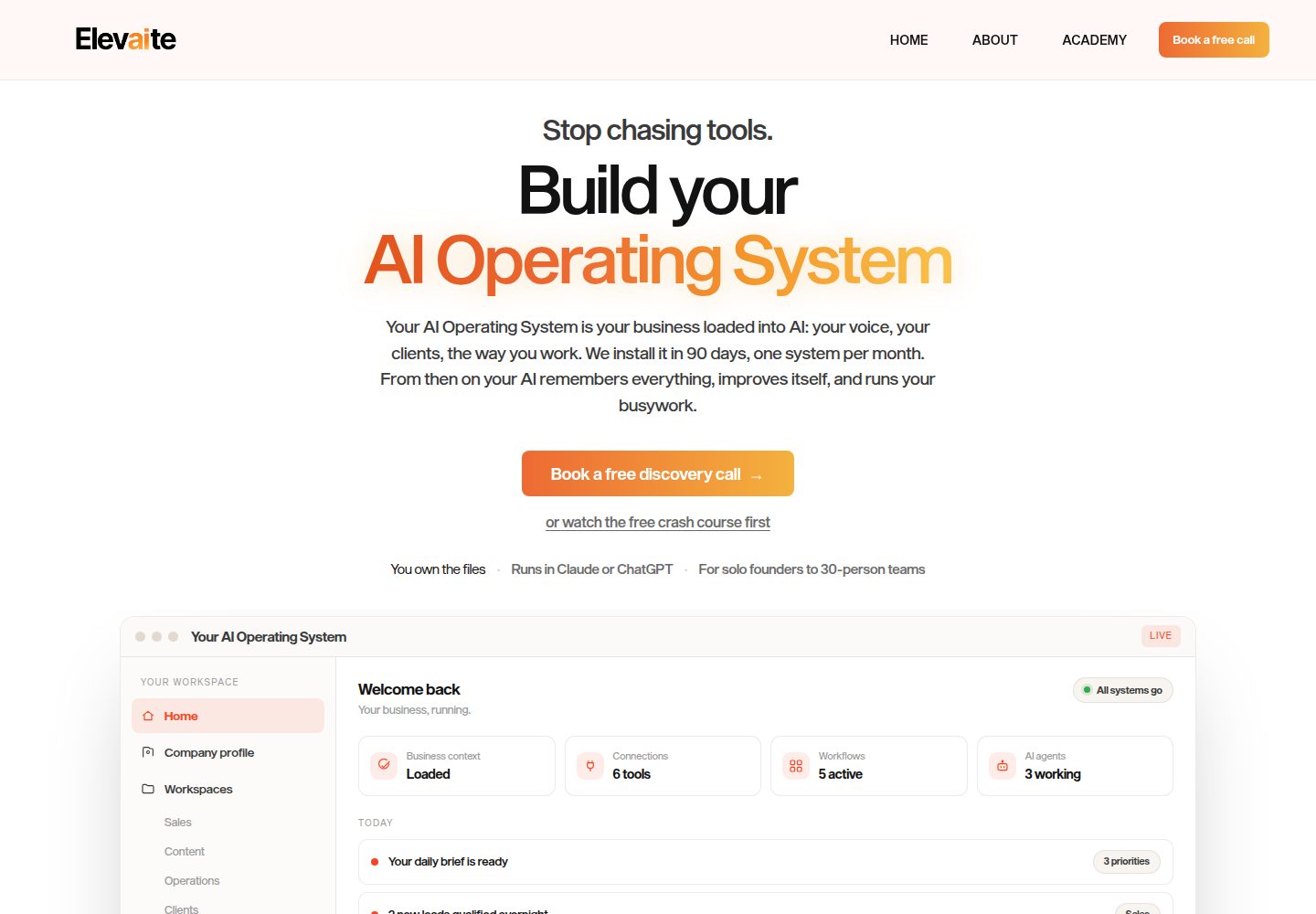
Only two pages (Home and About), simple structure, which the README calls a starter template with a clear point of view
Next.jsReactPortfolioCorporate Website
website-template — Next.js Portfolio Template
By elevaiteworks
A two-page (Home + About) website starter template based on Next.js 14 and Tailwind, with content driven by a single brand configuration file and Markdown copy, plus a customization instruction file for Claude Code.
Explore the design
Compare the page layouts and mobile experience. Open any screenshot for a closer look.
Desktop homepage1 / 3
Desktop captureTop of page
Actual screenshot captured by the server browser.
All pages & views 3
Screenshots show visual appearance; interactive behavior may differ.
Recorded 2026-10-14View source
What stands out
A quick read of the recorded project description.
Brand information centralized in brand.config.ts: site name, 5 colors, 2 font names
Copy driven by Markdown in content/home.md and content/about.md, with frontmatter controlling each section
Includes CLAUDE.md explaining how to have Claude Code adjust styles based on screenshots or add new pages and sections following existing patterns
Provides a Vercel one-click clone deployment button; the README states automatic deployment after push, free for personal sites
Uses the MIT license
Template Details
This is a concise starter template for a business or personal website. The README states it includes two pages, Home and About, with brand information centralized in one configuration file and copy written in Markdown. The tech stack is Next.js 14 and Tailwind. The template includes CLAUDE.md to guide Claude Code in assisting with customization, such as adjusting colors, fonts, and spacing based on screenshots, or adding new pages following the pattern of app/about/page.tsx and new section components in components/sections/.
The usage flow is divided into four steps according to the README: first, modify the site name, 5 colors, and 2 font names in brand.config.ts; then rewrite the body of content/home.md and content/about.md, where frontmatter controls each section and the about.md body is used for long-form narrative; next, place the logo and images into public/ and reference them in Markdown as /filename.jpg, with the navigation logo path set in brand.config.ts (SVG recommended), and if left blank, the company name text is displayed; finally, push to GitHub and import into Vercel for deployment, and the README states personal sites can be used for free. Deployment can also be done via Vercel's one-click clone button, after which every push deploys automatically.
Local running requires Node.js 18 or higher. Run git clone, npm install, npm run dev in sequence, then visit http://localhost:3000 to view the site with placeholder content. The README also recommends using GitHub's Use this template button to create your own copy. The repository directory structure includes brand.config.ts, content/, app/, components/sections/, public/, references/, CLAUDE.md, and BRAND.md, where BRAND.md provides color and font pairing suggestions. The license is MIT. The README does not describe testing, accessibility, SEO, or deployment methods other than Vercel.
Next.jsPortfolioCorporate website
Is it right for your project?
Use Cases
- Building a showcase website with only a home page and an about page for a small business or individual
- Quickly replacing the site name, colors, fonts, and copy via a brand configuration file plus Markdown
- Using CLAUDE.md instructions in Claude Code to adjust colors, fonts, and spacing based on screenshots
- Extending with new pages following the pattern of app/about/page.tsx, or adding new home page sections in components/sections/
- Deploying via Vercel one-click clone or importing the repository and enabling automatic deployment on push
Suitable For
- Developers who need a two-page starter structure for a business or personal website
- Those who want to manage brand name, colors, and fonts uniformly through a single configuration file
- Content maintainers accustomed to maintaining page copy in Markdown rather than editing JSX directly
- Developers using Claude Code to assist with customizing front-end styles
- Personal site authors planning to deploy to Vercel
Getting started & customization
Use these recorded setup notes alongside the repository instructions for your chosen version.
- 1
Local environment requires Node.js 18 or higher
- 2
Run git clone, npm install, npm run dev, then open http://localhost:3000
- 3
It is recommended to use GitHub's Use this template button to create your own copy rather than cloning directly
- 4
First edit the brand settings in brand.config.ts, then rewrite the Markdown copy under content/
- 5
Place images and logo into public/; the navigation logo path must be set in brand.config.ts, and if left blank, the company name text is displayed
License & source material
Usage conditions & limitations
Free to use · keep license noticeThis entry covers the free version under the MIT license in a public repository; the free scope is the code of this version and does not mean external services or third-party assets are free.
Must comply with when using
- Free use, modification, commercial use, and distribution of this version's code are permitted.
- When distributing copies or substantial portions of the code, retain the original author's copyright notice and the full MIT license notice.
- The code is provided as is; warranties and limitations of liability are governed by the original license and applicable law.
Additional costs & items to verify
- Demo images, fonts, icons, and other third-party assets must be checked against their respective licenses and cannot be judged solely by the code's MIT license.
- External services such as domains, hosting, databases, payments, or AI may incur additional charges.
- Local running requires Node.js 18 or higher.
- Deploying to Vercel requires a Vercel account; the README states personal sites are free but does not state whether commercial use is charged.
- The optional Claude Code customization feature requires the Claude Code service (which may involve an account or payment).
View Original Text Basis
Permission is hereby granted, free of charge
Original License Text
You'll need [Node.js](https://nodejs.org) 18 or higher.
Original README
4. **Deploy.** Push to GitHub, import the repo in [Vercel](https://vercel.com/new), click deploy. Free for personal sites.
Original README
https://github.com/elevaiteworks/website-template/blob/main/LICENSEhttps://github.com/elevaiteworks/website-template/blob/main/README.mdThis template ships with a `CLAUDE.md` that teaches Claude Code how to help you customize. Open the folder in [Claude Code](https://claude.com/claude-code) and try:
Original README
Compiled by DeepSeek based on repository license and README ·2026-10-14. Results only cover the materials read; dependencies, images, fonts, and subsequent term changes are subject to their respective original texts.
Project checks & description sources
Template Information
- Source platforms
- GitHub
- Documentation and maintenance reference score
- More documented · 88 / 100
- Technologies
- Next.js · React
- Website type
- Portfolio · Corporate Website
How this score is calculated
Our heuristic uses license records (up to 30), a demo link (12), a preview (10), stars (15), recorded maintenance (15), description completeness (8), feature records (5) and classification data (5). It is not a code, security or performance test, or a Google score. A link does not establish tested functionality.
What to verify for this project
- Repository update recorded
- 2026-05-18
- Screenshot last checked
- 2026-10-14
A demo link is listed. Check it with your own content and viewport sizes; its presence does not confirm that forms, authentication or payments work.
The catalog identifies Next.js as the primary stack. Check the actual dependency manifest and lockfile for versions and hosting requirements. These notes use recorded metadata, not a code audit or a deployment test.
Use a selection guide →How this description was prepared
AI-assisted description based on catalog records and repository material. Repository authors are not automatically the reviewers of this description.
Review declaration: codex-user-requested-batch-review-20261015 · 2026-10-15
Inspect the recorded source material
SHA-256: df6d721b7d1aa17806d5ceea985bd4eb5c7cbb6841d28636231e5cc75c287b8a
2026-10-14T19:16:52.830Z
Source file / repository# Website Template A simple, opinionated starter for a business or personal website. Two pages (Home + About), one config file for branding, markdown for copy. Built with Next.js 14 + Tailwind. Designed to work well with Claude Code: open the folder, ask Claude to "match this reference" or "add a services page," and it knows where everything lives. ## Deploy your own copy [](https://vercel.com/new/clone?repository-url=https%3A%2F%2Fgithub.com%2Felevaiteworks%2Fwebsite-template&project-name=my-website&repository-name=my-website) One click. Vercel forks this repo into your account, deploys it, and gives you a live URL in about 60 seconds. You can customize the code afterward and every push auto-deploys. ## Quickstart (5 minutes) You'll need [Node.js](https://nodejs.org) 18 or higher. ```bash git clone https://github.com/elevaiteworks/website-template.git cd website-template npm install npm run dev ``` > Tip: instead of cloning directly, click the green **Use this template** button at the top of this page. That creates your own copy under your GitHub account so you can publish your own changes. Open [http://localhost:3000](http://localhost:3000). You'll see a complete-looking site with placeholder content. ## Make it yours (in order) 1. **Rebrand.** Open `brand.config.ts`. Change the site name, 5 colors, and 2 font names. Save. The whole site updates. 2. **Rewrite the copy.** Open `content/home.md` and `content/about.md`. Replace the placeholder text. Frontmatter (the stuff between `---` lines) controls each section; the body of `about.md` is your long-form story. 3. **Add your images.** Drop a logo and any photos into `public/`. Reference them as `/your-file.jpg` in markdown. To use a logo in the nav, drop the file (SVG recommended) into `public/` and set `logo: "/your-logo.svg"` in `brand.config.ts`. Leave `logo: ""` to show your company name as text instead. 4. **Deploy.** Push to GitHub, import the repo in [Vercel](https://vercel.com/new), click deploy. Free for personal sites. That's the whole workflow. You can stop here and have a live site. ## Optional: use Claude Code This template ships with a `CLAUDE.md` that teaches Claude Code how to help you customize. Open the folder in [Claude Code](https://claude.com/claude-code) and try: - **"Match this reference site"** — drop a screenshot into `references/` and ask Claude to make the site feel similar. It'll sample colors, adjust fonts and spacing, and iterate with you. - **"Add a Services page"** — Claude follows the patterns in `app/about/page.tsx` to create new pages. - **"Add a testimonials section"** — Claude creates a new component in `components/sections/` and wires it into the home page. See `BRAND.md` for guidance on choosing colors and fonts that work well together. ## What's in here ``` brand.config.ts ← edit this first content/ ← edit your copy here home.md about.md app/ ← page layouts components/sections/ ← individual page sections public/ ← images, favicon, logo references/ ← drop reference screenshots here CLAUDE.md ← instructions for Claude Code BRAND.md ← guide to choosing colors and fonts ``` ## License MIT. Use it for anything.
Explore similar templates
Compare previews and descriptions within the same stack and category.

SaaS-Boilerplate
SaaS-Boilerplate is an open-source SaaS starter template built with Next.js App Router, React 19, TypeScript, Tailwind CSS, and Shadcn UI.
Next.js · SaaS

react-resume-template
A personal resume website template for software developers, built with Next.js, React, and TypeScript and styled with Tailwind CSS. Site content is driven by a single data file at /src/data/data.tsx, with types in dataDef.ts and images in src/images/.
Next.js · Portfolio

Next-JS-Landing-Page-Starter-Template
A free Next.js landing page starter template written in Tailwind CSS and TypeScript, featuring built-in navbar, hero, features, CTA banner, and footer sections.
Next.js · Corporate Website

next-saas-starter
A free Next.js SaaS marketing landing page template from Blazity, using static generation and styled-components with no extra UI library.
Next.js · SaaS

startup-nextjs
Startup is a free, MIT-licensed Next.js template from NextJSTemplates for SaaS startups and corporate landing pages.
Next.js · SaaS

shadcn-landing-page
A Next.js landing page template built with Shadcn, TypeScript, and Tailwind, converted from a Shadcn-Vue version. It includes sections such as Navbar, mobile Sidebar, Hero, Pricing, FAQ, and Footer, and highlights responsive design, navigation, and dark mode.
Next.js · Corporate Website