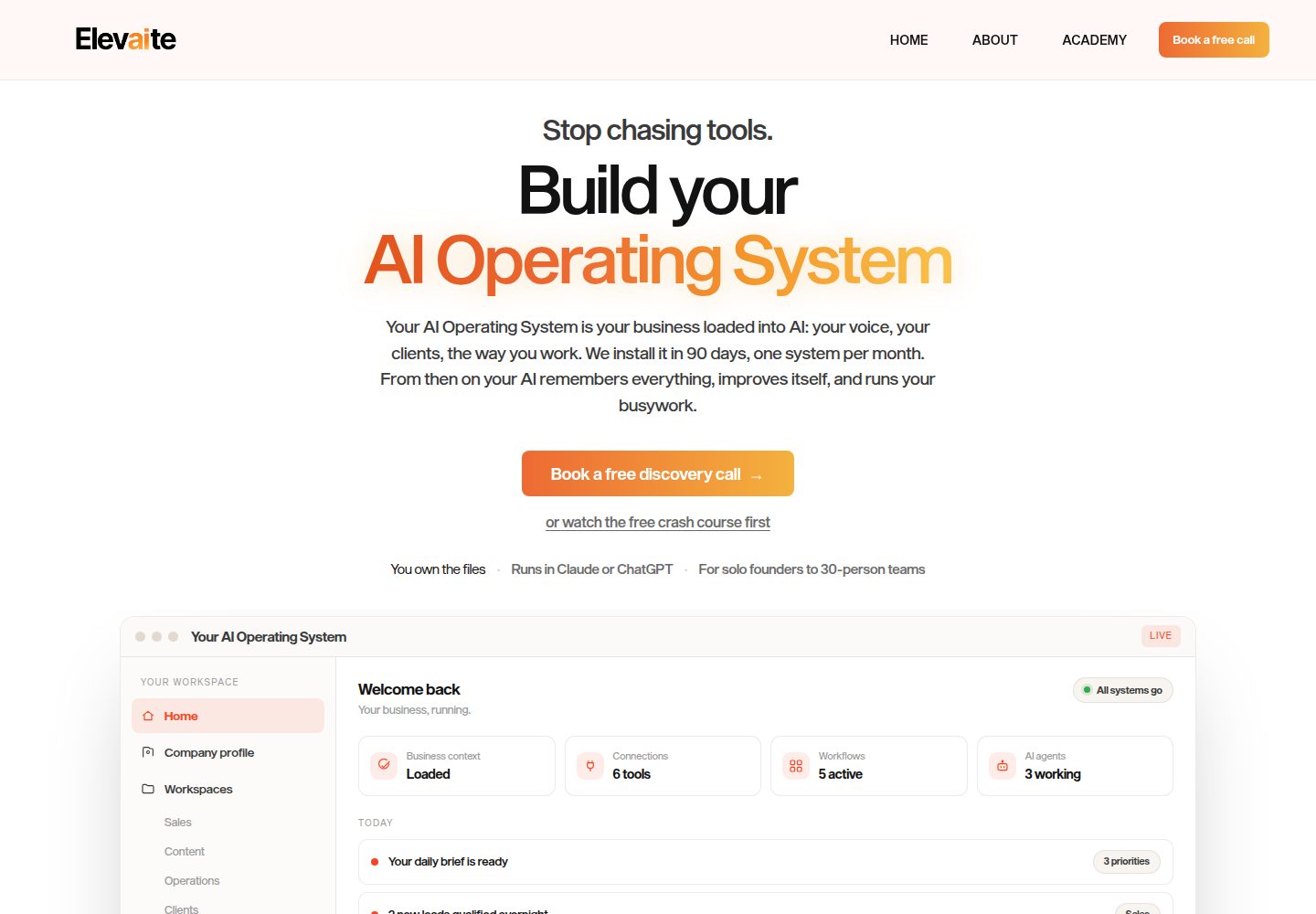
仅两个页面(Home 与 About),结构简单,README 称其为有明确主张的起步模板
Next.jsReact作品集企业官网
website-template — Next.js 作品集模板
作者 elevaiteworks
基于 Next.js 14 与 Tailwind 的两页(首页 + 关于)网站起步模板,通过一个品牌配置文件与 Markdown 文案驱动内容,并附带面向 Claude Code 的定制说明文件。
看看你的网站会是什么样
浏览真实页面截图,比较内容排版与手机效果。点击下方缩略图切换,放大查看整页细节。
全部页面与视图 3
截图用于了解视觉与布局,交互效果请以实际项目为准。
采集于 2026-10-14查看来源
值得关注的模板亮点
从已有项目资料中,快速了解它的特点。
品牌信息集中在 brand.config.ts:站点名称、5 种颜色、2 个字体名
文案由 content/home.md 与 content/about.md 的 Markdown 驱动,frontmatter 控制各区块
附带 CLAUDE.md,说明如何让 Claude Code 参照截图调整样式或按既有模式新增页面与区块
提供 Vercel 一键克隆部署按钮,README 称推送后自动部署,个人站点免费
采用 MIT 许可
模板详细介绍
这是一个面向企业或个人网站的简洁起步模板,README 说明其包含 Home 与 About 两个页面,品牌信息集中在一个配置文件中,文案使用 Markdown 编写。技术栈为 Next.js 14 与 Tailwind。模板附带 CLAUDE.md,用于指导 Claude Code 协助定制,例如参照截图调整配色、字体与间距,或按 app/about/page.tsx 的模式新增页面、在 components/sections/ 中新增区块组件。
使用流程按 README 分为四步:先修改 brand.config.ts 中的站点名称、5 种颜色与 2 个字体名;再改写 content/home.md 与 content/about.md 的正文,其中 frontmatter 控制各区块,about.md 正文用于长篇叙述;随后把 logo 与图片放入 public/,在 Markdown 中以 /文件名.jpg 引用,导航 logo 需在 brand.config.ts 中设置 logo 路径(推荐 SVG),留空则显示公司名称文本;最后推送到 GitHub 并在 Vercel 导入部署,README 称个人站点可免费使用。也可通过 Vercel 的一键克隆按钮部署,之后每次推送自动部署。
本地运行需要 Node.js 18 或更高版本,依次执行 git clone、npm install、npm run dev,然后访问 http://localhost:3000 查看带占位内容的站点。README 还建议使用 GitHub 的 Use this template 按钮创建自己的副本。仓库目录结构包含 brand.config.ts、content/、app/、components/sections/、public/、references/、CLAUDE.md 与 BRAND.md,其中 BRAND.md 提供配色与字体搭配建议。许可为 MIT。README 未说明测试、可访问性、SEO 或除 Vercel 之外的其他部署方式。
Next.js作品集企业官网
适合你的项目吗?
适用场景
- 为小型企业或个人搭建只有首页与关于页的展示型网站
- 以品牌配置文件加 Markdown 的方式快速替换站点名称、配色、字体与文案
- 在 Claude Code 中借助 CLAUDE.md 的说明,参照截图调整配色、字体与间距
- 按 app/about/page.tsx 的模式扩展新页面,或在 components/sections/ 中新增首页区块
- 通过 Vercel 一键克隆或导入仓库完成部署并启用推送自动部署
适合人群
- 需要两页式企业或个人网站起步结构的开发者
- 希望用单个配置文件统一管理品牌名称、颜色与字体的人
- 习惯用 Markdown 维护页面文案而非直接改 JSX 的内容维护者
- 使用 Claude Code 辅助定制前端样式的开发者
- 计划部署到 Vercel 的个人站点作者
上手与定制指南
结合仓库当前版本的说明,按下面的资料检查内容、配置与运行要求。
- 1
本地环境需要 Node.js 18 或更高版本
- 2
执行 git clone、npm install、npm run dev,然后打开 http://localhost:3000
- 3
建议使用 GitHub 的 Use this template 按钮创建自己的副本,而非直接克隆
- 4
先编辑 brand.config.ts 的品牌设置,再改写 content/ 下的 Markdown 文案
- 5
图片与 logo 放入 public/,导航 logo 需在 brand.config.ts 中设置路径,留空则显示公司名称文本
授权与来源资料
使用条件与限制
免费使用 · 保留许可声明本次收录的是公开仓库中采用 MIT 许可的免费版本;免费范围为该版本代码,不代表外部服务或第三方素材免费。
使用时需要遵守
- 允许免费使用、修改、商用和分发该版本代码。
- 分发代码副本或实质性部分时,保留原作者版权声明和完整 MIT 许可声明。
- 代码按现状提供;担保与责任限制以原许可证及适用法律为准。
额外费用与待核对事项
- 演示图片、字体、图标及其他第三方素材需按各自许可核对,不能仅凭代码的 MIT 许可判断。
- 域名、托管、数据库、支付或 AI 等外部服务可能另外收费。
- 本地运行需要 Node.js 18 或更高版本。
- 部署到 Vercel 需要 Vercel 账号;README 称个人站点免费,但未说明商业用途是否收费。
- 可选的 Claude Code 定制功能需要 Claude Code 服务(可能涉及账号或付费)。
查看原文依据
Permission is hereby granted, free of charge
许可证原文
You'll need [Node.js](https://nodejs.org) 18 or higher.
README 原文
4. **Deploy.** Push to GitHub, import the repo in [Vercel](https://vercel.com/new), click deploy. Free for personal sites.
README 原文
https://github.com/elevaiteworks/website-template/blob/main/LICENSEhttps://github.com/elevaiteworks/website-template/blob/main/README.mdThis template ships with a `CLAUDE.md` that teaches Claude Code how to help you customize. Open the folder in [Claude Code](https://claude.com/claude-code) and try:
README 原文
DeepSeek 根据仓库许可证和 README 整理 ·2026-10-14。结果仅覆盖已读取资料,依赖、图片、字体及后续条款变更以各自原文为准。
项目核对记录与介绍依据
模板资料
- 来源平台
- GitHub
- 资料与维护参考分
- 资料较完整 · 88 / 100
- 技术栈
- Next.js · React
- 网站类型
- 作品集 · 企业官网
这个分数如何计算
本站按许可资料(最高30分)、演示链接(12分)、预览图(10分)、Star数(15分)、记录的维护时间(15分)、描述完整度(8分)、功能记录(5分)和分类资料(5分)计算。它不是代码、安全或性能测试,也不是 Google 评分;有链接不代表已实测可用。
这个项目需要核对什么
- 记录的仓库更新时间
- 2026-05-18
- 截图检查日期
- 2026-10-14
已收录演示链接。请用你的内容与屏幕尺寸检查;有演示不代表表单、认证或支付已经可用。
目录记录的主要技术栈是 Next.js。请通过依赖清单和锁文件核对实际版本与托管要求。这些说明基于收录资料,不代表代码审计或部署实测。
查看具体选型方法 →介绍的制作与核对状态
介绍由 AI 辅助整理目录与仓库资料。仓库作者不等于这篇介绍的审核者。
审核声明: codex-user-requested-batch-review-20261015 · 2026-10-15
查看当时使用的来源资料
SHA-256: df6d721b7d1aa17806d5ceea985bd4eb5c7cbb6841d28636231e5cc75c287b8a
2026-10-14T19:16:52.830Z
来源文件 / 仓库# Website Template A simple, opinionated starter for a business or personal website. Two pages (Home + About), one config file for branding, markdown for copy. Built with Next.js 14 + Tailwind. Designed to work well with Claude Code: open the folder, ask Claude to "match this reference" or "add a services page," and it knows where everything lives. ## Deploy your own copy [](https://vercel.com/new/clone?repository-url=https%3A%2F%2Fgithub.com%2Felevaiteworks%2Fwebsite-template&project-name=my-website&repository-name=my-website) One click. Vercel forks this repo into your account, deploys it, and gives you a live URL in about 60 seconds. You can customize the code afterward and every push auto-deploys. ## Quickstart (5 minutes) You'll need [Node.js](https://nodejs.org) 18 or higher. ```bash git clone https://github.com/elevaiteworks/website-template.git cd website-template npm install npm run dev ``` > Tip: instead of cloning directly, click the green **Use this template** button at the top of this page. That creates your own copy under your GitHub account so you can publish your own changes. Open [http://localhost:3000](http://localhost:3000). You'll see a complete-looking site with placeholder content. ## Make it yours (in order) 1. **Rebrand.** Open `brand.config.ts`. Change the site name, 5 colors, and 2 font names. Save. The whole site updates. 2. **Rewrite the copy.** Open `content/home.md` and `content/about.md`. Replace the placeholder text. Frontmatter (the stuff between `---` lines) controls each section; the body of `about.md` is your long-form story. 3. **Add your images.** Drop a logo and any photos into `public/`. Reference them as `/your-file.jpg` in markdown. To use a logo in the nav, drop the file (SVG recommended) into `public/` and set `logo: "/your-logo.svg"` in `brand.config.ts`. Leave `logo: ""` to show your company name as text instead. 4. **Deploy.** Push to GitHub, import the repo in [Vercel](https://vercel.com/new), click deploy. Free for personal sites. That's the whole workflow. You can stop here and have a live site. ## Optional: use Claude Code This template ships with a `CLAUDE.md` that teaches Claude Code how to help you customize. Open the folder in [Claude Code](https://claude.com/claude-code) and try: - **"Match this reference site"** — drop a screenshot into `references/` and ask Claude to make the site feel similar. It'll sample colors, adjust fonts and spacing, and iterate with you. - **"Add a Services page"** — Claude follows the patterns in `app/about/page.tsx` to create new pages. - **"Add a testimonials section"** — Claude creates a new component in `components/sections/` and wires it into the home page. See `BRAND.md` for guidance on choosing colors and fonts that work well together. ## What's in here ``` brand.config.ts ← edit this first content/ ← edit your copy here home.md about.md app/ ← page layouts components/sections/ ← individual page sections public/ ← images, favicon, logo references/ ← drop reference screenshots here CLAUDE.md ← instructions for Claude Code BRAND.md ← guide to choosing colors and fonts ``` ## License MIT. Use it for anything.
看看同类模板
对比同技术栈与用途的模板,找到更适合的视觉与内容结构。

SaaS-Boilerplate
🚀🎉📚 SaaS Boilerplate built with Next.js + Tailwind CSS + Shadcn UI + TypeScript. ⚡️ Full-stack React applic…
Next.js · SaaS

react-resume-template
A personal resume website template built with React.js, Typescript, Next.js, and styled with Tailwind css
Next.js · 作品集

Next-JS-Landing-Page-Starter-Template
🚀 Free NextJS Landing Page Template written in Tailwind CSS 3 and TypeScript ⚡️ Made with developer experienc…
Next.js · 企业官网

next-saas-starter
⚡️ Free Next.js responsive landing page template for SaaS products made using JAMStack architecture.
Next.js · SaaS

startup-nextjs
Startup is free Next.js template for SaaS startups comes with all the essential pages, components, and section…
Next.js · SaaS

shadcn-landing-page
New design 🎉 Nextjs + Shadcn + TypeScript + Tailwind. Landing page template ease-to-use
Next.js · 企业官网