Implemented in pure HTML/CSS/JavaScript with no external frontend framework dependencies
HTMLPortfolio
cyberpunk-portfolio — HTML Portfolio Template
By emancode-dev
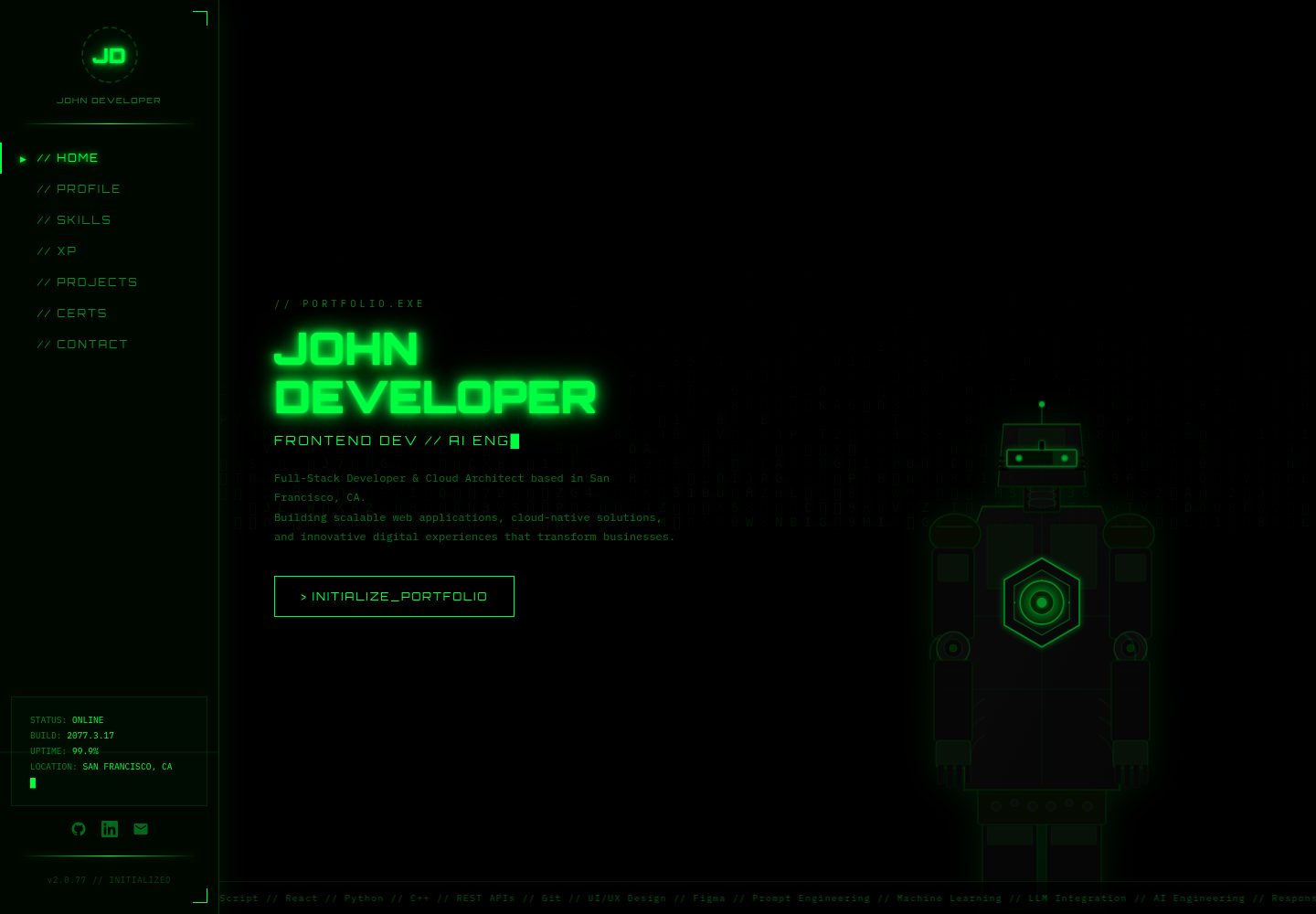
A cyberpunk-style developer portfolio template built with pure HTML, CSS, and JavaScript, featuring interactive effects such as a matrix rain background and a cursor-following robot.
Explore the design
Compare the page layouts and mobile experience. Open any screenshot for a closer look.
Desktop homepage
Desktop captureTop of page
Actual screenshot captured by the server browser.
One original preview is available. Open the full image to inspect the design.
Screenshots show visual appearance; interactive behavior may differ.
Recorded 2026-10-13View source
What stands out
A quick read of the recorded project description.
Canvas matrix rain background and cursor-following SVG robot animation
Includes complete sections: Hero, About, Skills, Experience, Projects, Certifications, Contact
Neon color scheme centrally controlled via CSS variables for easy theme replacement
Skills section generates a hexagon grid from an array in js/main.js
MIT licensed; code can be freely used, modified, and distributed
Template Details
This is a personal portfolio website template for developers, architects, and engineers, using a cyberpunk neon visual style. The code is organized into a modular structure of index.html, css/styles.css, js/main.js, and assets/images/, with no external frontend framework dependencies.
The page includes Hero, About, Skills, Experience, Projects, Certifications, and Contact sections, along with a fixed side navigation. Interactive effects include a Canvas matrix rain background, scrolling text marquee, title typing animation, skill hexagon grid generation, an SVG robot cursor follower, Intersection Observer-based scroll animations, and contact form submission feedback.
The theme is controlled via CSS variables in css/styles.css, and content edits are concentrated in the corresponding sections of index.html and the skills array in js/main.js. The README notes that fonts come from Google Fonts (Orbitron, IBM Plex Mono), icons use Unicode symbols, and the robot SVG is custom. The repository is under the MIT license, allowing free use, modification, and distribution of the code, but third-party assets such as demo images, fonts, and icons require separate license verification.
HTMLPortfolio
Is it right for your project?
Use Cases
- Developers building a personal portfolio website to showcase projects and skills
- Engineers or cloud architects creating a personal homepage with a tech-forward visual style
- As a reference example for learning Canvas animations and Intersection Observer scroll animations
- Deploying a personal resume and contact page on a purely static hosting service
Suitable For
- Frontend developers who want a cyberpunk-style portfolio page quickly
- Users who prefer a framework-free, pure static HTML/CSS/JS tech stack
- Engineers or architects who need to display skills, experience, projects, and certifications
- Users preparing to deploy a static site to Netlify, Vercel, or GitHub Pages
Getting started & customization
Use these recorded setup notes alongside the repository instructions for your chosen version.
- 1
For local preview, start a static server with python -m http.server 5000 or npx http-server -p 8000
- 2
Alternatively, open index.html directly in a browser by double-clicking
- 3
Replace the name, experience, and project content in index.html, and update skills in the skills array in js/main.js
- 4
Modify the CSS variables at the top of css/styles.css to adjust primary and background colors
- 5
When using Google Fonts and other third-party assets, verify their respective licenses yourself
License & source material
Usage conditions & limitations
Free to use · keep license noticeThis entry covers the free version under the MIT license in the public repository; the free scope applies to that version's code and does not imply that external services or third-party assets are free.
Must comply with when using
- Free use, modification, commercial use, and distribution of this version's code are permitted.
- When distributing copies or substantial portions of the code, retain the original author's copyright notice and the full MIT license notice.
- The code is provided as is; warranties and limitations of liability are governed by the original license and applicable law.
Additional costs & items to verify
- Demo images, fonts, icons, and other third-party assets must be checked against their respective licenses; the code's MIT license alone is not sufficient to determine this.
- External services such as domains, hosting, databases, payments, or AI may incur additional charges.
- The template uses Google Fonts' Orbitron and IBM Plex Mono fonts, which are provided by third parties and require you to verify and comply with their respective license terms.
View Original Text Basis
Permission is hereby granted, free of charge
Original License Text
https://github.com/emancode-dev/cyberpunk-portfolio/blob/main/LICENSEhttps://github.com/emancode-dev/cyberpunk-portfolio/blob/main/README.md**Fonts:** Google Fonts (Orbitron, IBM Plex Mono)
Original README
Compiled by DeepSeek based on repository license and README ·2026-10-13. Results only cover the materials read; dependencies, images, fonts, and subsequent term changes are subject to their respective original texts.
Project checks & description sources
Template Information
- Source platforms
- GitHub
- Documentation and maintenance reference score
- More documented · 83 / 100
- Technologies
- HTML
- Website type
- Portfolio
How this score is calculated
Our heuristic uses license records (up to 30), a demo link (12), a preview (10), stars (15), recorded maintenance (15), description completeness (8), feature records (5) and classification data (5). It is not a code, security or performance test, or a Google score. A link does not establish tested functionality.
What to verify for this project
- Repository update recorded
- 2026-04-07
- Screenshot last checked
- 2026-10-13
A demo link is listed. Check it with your own content and viewport sizes; its presence does not confirm that forms, authentication or payments work.
The catalog identifies HTML as the primary stack. Check the actual dependency manifest and lockfile for versions and hosting requirements. These notes use recorded metadata, not a code audit or a deployment test.
Use a selection guide →How this description was prepared
AI-assisted description based on catalog records and repository material. Repository authors are not automatically the reviewers of this description.
Review declaration: [email protected] · 2026-10-13
Inspect the recorded source material
SHA-256: b071583f970a9baedb1697dfb767ff474b72fca8ff4a69e4498a943ed7461b80
2026-10-13T08:12:48.173Z
Source file / repository# 🤖 JOHN DEVELOPER // PORTFOLIO.EXE
A professional, fully-responsive cyberpunk-themed portfolio website for a Full-Stack Developer & Cloud Architect. Modern tech stack with stunning neon aesthetics and smooth animations.
**Version:** 2.0.77
**Repository:** portfolio
**Status:** Production Ready
---
## 📁 Project Structure
```
portfolio/
├── index.html # Main HTML file
├── css/
│ └── styles.css # All styles (no inline CSS)
├── js/
│ └── main.js # All JavaScript functionality
├── assets/
│ └── images/ # Image files (placeholder)
├── package.json # Project metadata & scripts
├── .gitignore # Git ignore rules
├── README.md # This file
└── lock.json # Optional dependency lock file
```
---
## 🚀 Quick Start
### Prerequisites
- A modern web browser (Chrome, Firefox, Safari, Edge)
- Python 3.x (for local server) OR Node.js with http-server
- Git (for version control)
### Installation & Running
#### Option 1: Using Python (Built-In)
```bash
cd portfolio
python -m http.server 5000
# Open browser to: http://localhost:5000
```
#### Option 2: Using Node.js HTTP Server
```bash
cd portfolio
npx http-server -p 8000
# Open browser to: http://localhost:8000
```
#### Option 3: Open Directly in Browser
Simply double-click `index.html` or open it in your browser:
```
file:///path/to/portfolio-refactored/index.html
```
---
## 📋 Features
✅ **Fully Responsive Design** - Works on desktop, tablet, and mobile
✅ **Matrix Rain Background** - Animated canvas effect
✅ **Interactive Robot** - Cursor-tracking animated SVG character
✅ **Smooth Animations** - CSS + JavaScript powered animations
✅ **Professional Styling** - Cyberpunk neon aesthetic
✅ **Navigation Sidebar** - Fixed sidebar with smooth transitions
✅ **Multiple Sections** - Hero, About, Skills, Experience, Projects, Certifications, Contact
✅ **Form Handling** - Contact form with submit feedback
✅ **No External Framework Dependencies** - Pure HTML, CSS, JavaScript
---
## 🎨 Customization Guide
### Colors
Edit the CSS variables in `css/styles.css`:
```css
:root {
--green: #00FF41; /* Primary neon green */
--green-dim: rgba(0,255,65,0.4);
--green-deep: #003B00;
--black: #000000;
}
```
### Content Updates
#### Update Your Name & Info
Edit `index.html` line sections:
```html
<h1 class="hero-name">YOUR NAME HERE</h1>
<div class="logo-name">Your Name</div>
<a href="https://github.com/yourusername"><!-- GitHub link --></a>
```
#### Update Experience
Find the "EXPERIENCE" section in `index.html` and modify the experience items:
```html
<div class="exp-role">Your Job Title</div>
<div class="exp-company">Company Name</div>
<div class="exp-date">START DATE — END DATE</div>
<div class="exp-desc">Your description</div>
```
#### Update Projects
Modify the "PROJECTS" section cards with your project details:
```html
<div class="proj-title">Project Name</div>
<p class="proj-desc">Project description</p>
<span class="tech-pill">Technology</span>
```
#### Update Skills
Edit the skills array in `js/main.js`:
```javascript
const skills=[
{name:'HTML5',icon:'⬡'},
{name:'Your Skill',icon:'✦'},
// Add more...
];
```
---
## 📦 File Descriptions
### `index.html`
- Pure semantic HTML structure
- Links to external CSS and JavaScript files
- Contains all page content and layout
- No inline styles or scripts
### `css/styles.css`
- All visual styling for the website
- CSS variables for theming
- Responsive media queries for mobile
- Animations and transitions
### `js/main.js`
- Matrix rain canvas animation
- Ticker scrolling effect
- Typing animation for hero title
- Hex grid skill generation
- Robot SVG cursor tracking
- Intersection Observer for scroll animations
- Contact form handling
### `package.json`
- Project metadata
- NPM scripts for starting server
- Project description and links
- License information
### `.gitignore`
- Ignores node_modules and build files
- Ignores IDE and editor files
- Ignores OS-specific files
- Development files excluded from git
---
## 🔧 Development
### Adding New Sections
1. Create new `<section>` in `index.html`
2. Style in `css/styles.css`
3. Add any JavaScript logic to `js/main.js`
4. Test responsiveness on mobile
### Adding New Images
1. Place images in `assets/images/`
2. Reference in HTML: `<img src="assets/images/filename.ext" alt="description">`
### Deploying to Production
1. Ensure all links use relative paths (not absolute)
2. Optimize images for web
3. Minify CSS and JavaScript (optional)
4. Deploy to hosting service (Netlify, Vercel, GitHub Pages, etc.)
---
## 📱 Browser Compatibility
- ✅ Chrome 90+
- ✅ Firefox 88+
- ✅ Safari 14+
- ✅ Edge 90+
- ✅ Mobile browsers (iOS Safari, Chrome Mobile)
---
## 🔒 Version Control Setup
Initialize Git repository and push to GitHub:
```bash
# Initialize git
git init
# Add all files
git add .
# Create initial commit
git commit -m "Initial portfolio setup"
# Add remote (replace with your repository URL)
git remote add origin https://github.com/yourusername/portfolio.git
# Push to GitHub
git branch -M main
git push -u origin main
```
---
## 📄 License
MIT License - Feel free to use, modify, and distribute this portfolio template.
---
## 🤝 Support & Contributions
For issues, questions, or improvements:
- Create an issue on GitHub
- Submit a pull request with changes
- Email contact information in the portfolio
---
## ✨ Credits
**Design & Development:** John Developer
**Theme:** Cyberpunk Neon
**Fonts:** Google Fonts (Orbitron, IBM Plex Mono)
**Icons:** Unicode symbols
**SVG:** Custom animated robot with cursor tracking
---
## 📜 Changelog
### v2.0.77 (Current)
- Refactored single-file portfolio into modular structure
- Separated HTML, CSS, and JavaScript
- Added comprehensive documentation
- Professional folder structure
- Git-ready setup
---
**Last Updated:** April 7, 2026
**Status:** Production Ready ✓
Explore similar templates
Compare previews and descriptions within the same stack and category.

simplefolio
Simplefolio is a minimal single-page portfolio template for developers, built with HTML, Bootstrap, SCSS, and Parcel under the MIT license. It includes Hero, About, Projects, Contact, and Footer sections, with content edited in /src/index.html and theme colors controlled by two SCSS variables.
HTML · Portfolio

Freelancer
A bright, single-page Bootstrap portfolio template for freelancers, designers, and small studios. It includes a responsive portfolio grid with modal detail windows and an SB Forms contact form that requires an API token.
HTML · Portfolio

Resume
A single-page resume and CV template from Start Bootstrap, built on Bootstrap with a fixed sidebar and content sections.
HTML · Portfolio

Creative
A single-page marketing template by Start Bootstrap for creative agencies and product services, built on Bootstrap with SCSS, featuring a portfolio grid and call-to-action sections. It includes pre-set SB Forms markers for form integration and npm build scripts for source customization.
HTML · Corporate Website

Grayscale
A dark single-page Bootstrap template from Start Bootstrap for photography, events and brand storytelling, with a large hero and clearly separated sections.
HTML · Corporate Website

startbootstrap-stylish-portfolio
A one-page Bootstrap portfolio theme from Start Bootstrap with multiple content sections and an off-canvas navigation menu. Basic use means editing HTML/CSS under dist and opening index.html; advanced use relies on npm with Pug and SCSS build scripts.
HTML · Portfolio