纯 HTML/CSS/JavaScript 实现,无外部前端框架依赖
HTML作品集
cyberpunk-portfolio — HTML 作品集模板
作者 emancode-dev
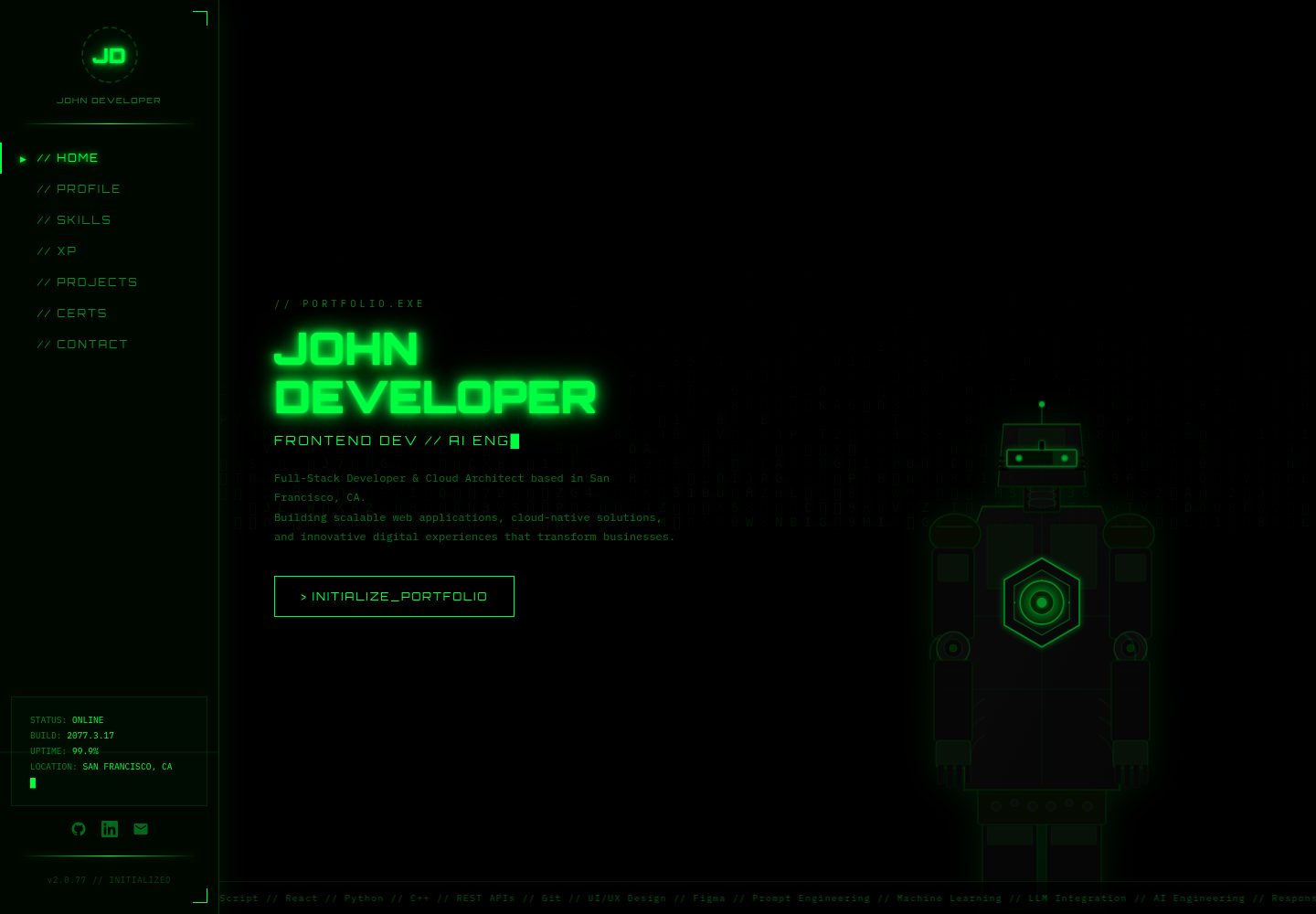
赛博朋克风格的开发者个人作品集模板,使用纯 HTML、CSS 和 JavaScript 构建,包含矩阵雨背景、光标跟随机器人等交互动效。
看看你的网站会是什么样
浏览真实页面截图,比较内容排版与手机效果。点击下方缩略图切换,放大查看整页细节。
目前有 1 张原始预览,可打开完整图片查看设计细节。
截图用于了解视觉与布局,交互效果请以实际项目为准。
采集于 2026-10-13查看来源
值得关注的模板亮点
从已有项目资料中,快速了解它的特点。
Canvas 矩阵雨背景与光标跟随的 SVG 机器人动画
包含 Hero、About、Skills、Experience、Projects、Certifications、Contact 等完整区块
通过 CSS 变量集中控制霓虹配色,便于替换主题
技能区由 js/main.js 中的数组生成六边形网格
采用 MIT 许可,代码可免费使用、修改和分发
模板详细介绍
这是一个面向开发者、架构师和工程师的个人作品集网站模板,采用赛博朋克霓虹视觉风格。代码按 index.html、css/styles.css、js/main.js 和 assets/images/ 的模块化结构组织,不依赖外部前端框架。
页面包含 Hero、About、Skills、Experience、Projects、Certifications、Contact 等区块,并配有固定侧边导航。交互效果包括 Canvas 矩阵雨背景、滚动文字条、标题打字动画、技能六边形网格生成、SVG 机器人光标跟随、基于 Intersection Observer 的滚动动画,以及联系表单的提交反馈。
主题通过 css/styles.css 中的 CSS 变量控制,内容修改集中在 index.html 对应区块和 js/main.js 的技能数组中。README 提到字体来自 Google Fonts(Orbitron、IBM Plex Mono),图标使用 Unicode 符号,机器人 SVG 为自定义。仓库采用 MIT 许可,可免费使用、修改和分发代码,但演示图片、字体、图标等第三方素材需单独核对许可。
HTML作品集
适合你的项目吗?
适用场景
- 开发者搭建个人作品集网站并展示项目与技能
- 工程师或云架构师制作带有科技感视觉风格的个人主页
- 作为学习 Canvas 动画、Intersection Observer 滚动动画的参考示例
- 在纯静态托管服务上部署个人简历与联系方式页面
适合人群
- 希望快速获得赛博朋克风格作品集页面的前端开发者
- 偏好无框架、纯静态 HTML/CSS/JS 技术栈的使用者
- 需要展示技能、经历、项目与认证信息的工程师或架构师
- 准备将静态站点部署到 Netlify、Vercel 或 GitHub Pages 的用户
上手与定制指南
结合仓库当前版本的说明,按下面的资料检查内容、配置与运行要求。
- 1
本地预览可用 python -m http.server 5000 或 npx http-server -p 8000 启动静态服务器
- 2
也可直接双击 index.html 在浏览器中打开
- 3
替换 index.html 中的姓名、经历与项目内容,并在 js/main.js 的 skills 数组中更新技能
- 4
修改 css/styles.css 顶部的 CSS 变量可调整主色与背景色
- 5
使用 Google Fonts 字体及其他第三方素材时需自行核对相应许可
授权与来源资料
使用条件与限制
免费使用 · 保留许可声明本次收录的是公开仓库中采用 MIT 许可的免费版本;免费范围为该版本代码,不代表外部服务或第三方素材免费。
使用时需要遵守
- 允许免费使用、修改、商用和分发该版本代码。
- 分发代码副本或实质性部分时,保留原作者版权声明和完整 MIT 许可声明。
- 代码按现状提供;担保与责任限制以原许可证及适用法律为准。
额外费用与待核对事项
- 演示图片、字体、图标及其他第三方素材需按各自许可核对,不能仅凭代码的 MIT 许可判断。
- 域名、托管、数据库、支付或 AI 等外部服务可能另外收费。
- 模板使用 Google Fonts 的 Orbitron 与 IBM Plex Mono 字体,这些字体由第三方提供,需自行核对并遵守其各自的许可条款。
查看原文依据
Permission is hereby granted, free of charge
许可证原文
https://github.com/emancode-dev/cyberpunk-portfolio/blob/main/LICENSEhttps://github.com/emancode-dev/cyberpunk-portfolio/blob/main/README.md**Fonts:** Google Fonts (Orbitron, IBM Plex Mono)
README 原文
DeepSeek 根据仓库许可证和 README 整理 ·2026-10-13。结果仅覆盖已读取资料,依赖、图片、字体及后续条款变更以各自原文为准。
项目核对记录与介绍依据
模板资料
- 来源平台
- GitHub
- 资料与维护参考分
- 资料较完整 · 83 / 100
- 技术栈
- HTML
- 网站类型
- 作品集
这个分数如何计算
本站按许可资料(最高30分)、演示链接(12分)、预览图(10分)、Star数(15分)、记录的维护时间(15分)、描述完整度(8分)、功能记录(5分)和分类资料(5分)计算。它不是代码、安全或性能测试,也不是 Google 评分;有链接不代表已实测可用。
这个项目需要核对什么
- 记录的仓库更新时间
- 2026-04-07
- 截图检查日期
- 2026-10-13
已收录演示链接。请用你的内容与屏幕尺寸检查;有演示不代表表单、认证或支付已经可用。
目录记录的主要技术栈是 HTML。请通过依赖清单和锁文件核对实际版本与托管要求。这些说明基于收录资料,不代表代码审计或部署实测。
查看具体选型方法 →介绍的制作与核对状态
介绍由 AI 辅助整理目录与仓库资料。仓库作者不等于这篇介绍的审核者。
审核声明: [email protected] · 2026-10-13
查看当时使用的来源资料
SHA-256: b071583f970a9baedb1697dfb767ff474b72fca8ff4a69e4498a943ed7461b80
2026-10-13T08:12:48.173Z
来源文件 / 仓库# 🤖 JOHN DEVELOPER // PORTFOLIO.EXE
A professional, fully-responsive cyberpunk-themed portfolio website for a Full-Stack Developer & Cloud Architect. Modern tech stack with stunning neon aesthetics and smooth animations.
**Version:** 2.0.77
**Repository:** portfolio
**Status:** Production Ready
---
## 📁 Project Structure
```
portfolio/
├── index.html # Main HTML file
├── css/
│ └── styles.css # All styles (no inline CSS)
├── js/
│ └── main.js # All JavaScript functionality
├── assets/
│ └── images/ # Image files (placeholder)
├── package.json # Project metadata & scripts
├── .gitignore # Git ignore rules
├── README.md # This file
└── lock.json # Optional dependency lock file
```
---
## 🚀 Quick Start
### Prerequisites
- A modern web browser (Chrome, Firefox, Safari, Edge)
- Python 3.x (for local server) OR Node.js with http-server
- Git (for version control)
### Installation & Running
#### Option 1: Using Python (Built-In)
```bash
cd portfolio
python -m http.server 5000
# Open browser to: http://localhost:5000
```
#### Option 2: Using Node.js HTTP Server
```bash
cd portfolio
npx http-server -p 8000
# Open browser to: http://localhost:8000
```
#### Option 3: Open Directly in Browser
Simply double-click `index.html` or open it in your browser:
```
file:///path/to/portfolio-refactored/index.html
```
---
## 📋 Features
✅ **Fully Responsive Design** - Works on desktop, tablet, and mobile
✅ **Matrix Rain Background** - Animated canvas effect
✅ **Interactive Robot** - Cursor-tracking animated SVG character
✅ **Smooth Animations** - CSS + JavaScript powered animations
✅ **Professional Styling** - Cyberpunk neon aesthetic
✅ **Navigation Sidebar** - Fixed sidebar with smooth transitions
✅ **Multiple Sections** - Hero, About, Skills, Experience, Projects, Certifications, Contact
✅ **Form Handling** - Contact form with submit feedback
✅ **No External Framework Dependencies** - Pure HTML, CSS, JavaScript
---
## 🎨 Customization Guide
### Colors
Edit the CSS variables in `css/styles.css`:
```css
:root {
--green: #00FF41; /* Primary neon green */
--green-dim: rgba(0,255,65,0.4);
--green-deep: #003B00;
--black: #000000;
}
```
### Content Updates
#### Update Your Name & Info
Edit `index.html` line sections:
```html
<h1 class="hero-name">YOUR NAME HERE</h1>
<div class="logo-name">Your Name</div>
<a href="https://github.com/yourusername"><!-- GitHub link --></a>
```
#### Update Experience
Find the "EXPERIENCE" section in `index.html` and modify the experience items:
```html
<div class="exp-role">Your Job Title</div>
<div class="exp-company">Company Name</div>
<div class="exp-date">START DATE — END DATE</div>
<div class="exp-desc">Your description</div>
```
#### Update Projects
Modify the "PROJECTS" section cards with your project details:
```html
<div class="proj-title">Project Name</div>
<p class="proj-desc">Project description</p>
<span class="tech-pill">Technology</span>
```
#### Update Skills
Edit the skills array in `js/main.js`:
```javascript
const skills=[
{name:'HTML5',icon:'⬡'},
{name:'Your Skill',icon:'✦'},
// Add more...
];
```
---
## 📦 File Descriptions
### `index.html`
- Pure semantic HTML structure
- Links to external CSS and JavaScript files
- Contains all page content and layout
- No inline styles or scripts
### `css/styles.css`
- All visual styling for the website
- CSS variables for theming
- Responsive media queries for mobile
- Animations and transitions
### `js/main.js`
- Matrix rain canvas animation
- Ticker scrolling effect
- Typing animation for hero title
- Hex grid skill generation
- Robot SVG cursor tracking
- Intersection Observer for scroll animations
- Contact form handling
### `package.json`
- Project metadata
- NPM scripts for starting server
- Project description and links
- License information
### `.gitignore`
- Ignores node_modules and build files
- Ignores IDE and editor files
- Ignores OS-specific files
- Development files excluded from git
---
## 🔧 Development
### Adding New Sections
1. Create new `<section>` in `index.html`
2. Style in `css/styles.css`
3. Add any JavaScript logic to `js/main.js`
4. Test responsiveness on mobile
### Adding New Images
1. Place images in `assets/images/`
2. Reference in HTML: `<img src="assets/images/filename.ext" alt="description">`
### Deploying to Production
1. Ensure all links use relative paths (not absolute)
2. Optimize images for web
3. Minify CSS and JavaScript (optional)
4. Deploy to hosting service (Netlify, Vercel, GitHub Pages, etc.)
---
## 📱 Browser Compatibility
- ✅ Chrome 90+
- ✅ Firefox 88+
- ✅ Safari 14+
- ✅ Edge 90+
- ✅ Mobile browsers (iOS Safari, Chrome Mobile)
---
## 🔒 Version Control Setup
Initialize Git repository and push to GitHub:
```bash
# Initialize git
git init
# Add all files
git add .
# Create initial commit
git commit -m "Initial portfolio setup"
# Add remote (replace with your repository URL)
git remote add origin https://github.com/yourusername/portfolio.git
# Push to GitHub
git branch -M main
git push -u origin main
```
---
## 📄 License
MIT License - Feel free to use, modify, and distribute this portfolio template.
---
## 🤝 Support & Contributions
For issues, questions, or improvements:
- Create an issue on GitHub
- Submit a pull request with changes
- Email contact information in the portfolio
---
## ✨ Credits
**Design & Development:** John Developer
**Theme:** Cyberpunk Neon
**Fonts:** Google Fonts (Orbitron, IBM Plex Mono)
**Icons:** Unicode symbols
**SVG:** Custom animated robot with cursor tracking
---
## 📜 Changelog
### v2.0.77 (Current)
- Refactored single-file portfolio into modular structure
- Separated HTML, CSS, and JavaScript
- Added comprehensive documentation
- Professional folder structure
- Git-ready setup
---
**Last Updated:** April 7, 2026
**Status:** Production Ready ✓
看看同类模板
对比同技术栈与用途的模板,找到更适合的视觉与内容结构。

simplefolio
⚡️ A minimal portfolio template for Developers
HTML · 作品集

Freelancer
Freelancer 是 Start Bootstrap 出品的单页作品集模板,专为自由职业者、设计师和小型工作室设计。 页面结构清晰,包含多个内容区块、响应式作品集网格,每个作品项目配有模态窗口展示详情。
HTML · 作品集

Resume
Resume 是 Start Bootstrap 推出的简历与 CV 主题,基于 Bootstrap 构建,采用固定侧边栏加内容区块的结构。
HTML · 作品集

Creative
Creative 是 Start Bootstrap 团队维护的一款单页营销模板,定位明确:为创意机构或产品服务提供一个以作品展示和行动号召为核心的落地页。
HTML · 企业官网

Grayscale
Grayscale 是 Start Bootstrap 出品的深色系单页 HTML 模板,基于 Bootstrap 构建。 它的视觉重心放在大尺寸首屏和清晰的内容分区上,整体氛围偏暗,适合摄影、活动或品牌叙事类网站。
HTML · 企业官网

startbootstrap-stylish-portfolio
Stylish Portfolio 是 Start Bootstrap 维护的单页作品集主题,基于 Bootstrap 构建,采用多个内容区块加离屏导航菜单的结构。
HTML · 作品集