Based on Astro and Tailwind CSS, outputs static pages by default, with interactive components loaded on demand
AstroBlog
AstroNova — Astro Blog Template
By encorexin
AstroNova is a blog template based on Astro and Tailwind CSS, supporting Markdown/MDX content, categories and tags, full-text search, RSS, Giscus comments, and Mermaid diagrams, released under the MIT license.
Explore the design
Compare the page layouts and mobile experience. Open any screenshot for a closer look.
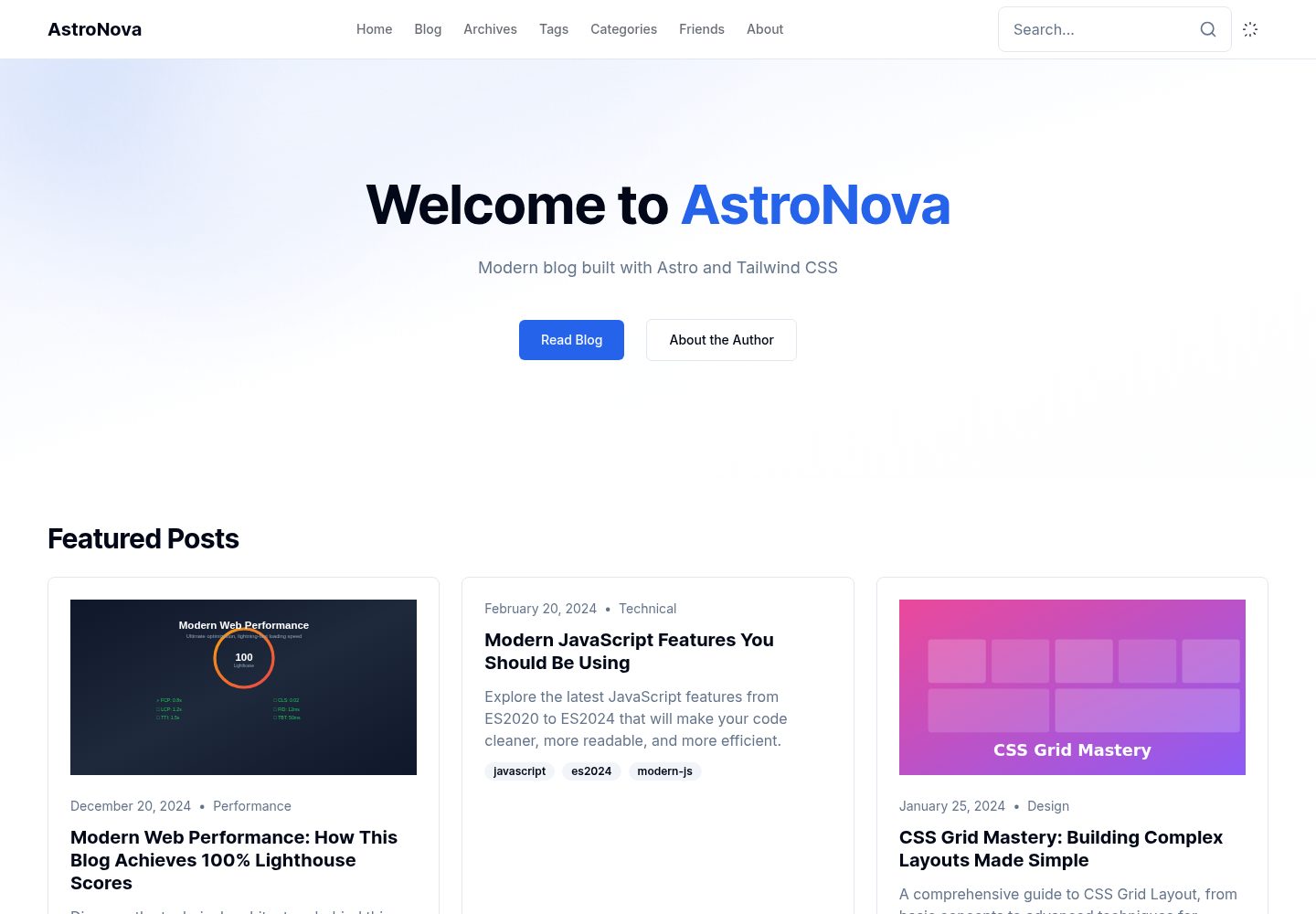
Desktop homepage1 / 3
Desktop captureTop of page
Actual screenshot captured by the server browser.
All pages & views 3
Screenshots show visual appearance; interactive behavior may differ.
Recorded 2026-10-03View source
What stands out
A quick read of the recorded project description.
Content uses Markdown/MDX, with frontmatter supporting categories, tags, cover, draft, featured, and pinned
Built-in blog modules including full-text search, RSS 2.0, related articles, table of contents, reading progress, and code copy
Integrates Giscus comments, Mermaid diagram rendering, and image lightbox
Site configuration, friend links, and theme colors are maintained in site.ts, friends.ts, and globals.css respectively
MIT license, allowing free use, modification, commercial use, and distribution of this version of the code
Template Details
AstroNova is a blog template open-sourced by encorexin on GitHub. Its tech stack is Astro, styling uses Tailwind CSS, and the code is released under the MIT license. It targets technical blogging scenarios, with content stored as Markdown or MDX files in the src/content/blog/ directory. Frontmatter defines fields such as title, description, publication date, categories, tags, cover image, draft, featured, and pinned. The template includes common blog modules: category pages, tag pages, full-text search, RSS 2.0 output, related article recommendations, table of contents, reading progress bar, code copy button, image lightbox, previous/next navigation, author card, and Giscus comments, plus a full-screen mobile search. Site information, social links, and Giscus parameters are centralized in src/config/site.ts, friend links data in src/config/friends.ts, and theme colors are adjusted via CSS variables in src/styles/globals.css. The project requires Node.js 18 or higher, recommends pnpm, and provides scripts such as dev, build, preview, type-check, lint, format, and newpost. The build output is static files, deployable to Vercel, Netlify, or any static hosting. The Lighthouse perfect scores, WCAG 2.1 AAA, LCP, and other performance and accessibility metrics listed in the README are the author's own claims and have not been independently verified in this material.
AstroBlog
Is it right for your project?
Use Cases
- Building a personal technical blog and publishing Markdown/MDX articles
- Adding organization and reading features such as categories, tags, search, RSS, and related recommendations to articles
- Embedding Mermaid flowcharts, sequence diagrams, class diagrams, and other charts in articles
- Integrating comments based on GitHub Discussions via Giscus
- Deploying the built static files to Vercel, Netlify, or a self-chosen static host
Suitable For
- Developers who are used to writing in Markdown/MDX and want to self-host a blog
- Sites that need basic content organization capabilities such as categories, tags, search, and RSS
- Users who accept the Astro and Tailwind CSS tech stack and are willing to directly modify configuration and styles
- Individuals or teams that need code freely modifiable and distributable under the MIT license
Getting started & customization
Use these recorded setup notes alongside the repository instructions for your chosen version.
- 1
Requires Node.js 18.0.0 or higher; it is recommended to use pnpm to install dependencies and run pnpm dev to start the local development server
- 2
Fill in the site title, description, domain, author information, social links, and Giscus repository parameters in src/config/site.ts
- 3
Create .md or .mdx files under src/content/blog/ to write articles, and fill in required frontmatter fields such as title, description, publication date, and categories
- 4
Friend links are maintained in src/config/friends.ts; theme colors and light/dark mode variables are adjusted in src/styles/globals.css
- 5
Use pnpm build to generate static files; the dist/ directory can be deployed to Vercel, Netlify, or any static hosting service
License & source material
Usage conditions & limitations
Free to use · keep license noticeThis entry covers the free version under the MIT license in the public repository; the free scope is the code of this version and does not mean external services or third-party assets are free.
Must comply with when using
- Free use, modification, commercial use, and distribution of this version of the code are allowed.
- When distributing copies or substantial portions of the code, retain the original author's copyright notice and the full MIT license notice.
- The code is provided as is; warranties and limitations of liability are governed by the original license and applicable law.
Additional costs & items to verify
- The comment feature depends on Giscus, requiring a GitHub repository with Discussions enabled and parameters such as repo, repoId, and categoryId filled in site.ts; without configuration, there are no comments.
- Using Giscus comments requires providing a GitHub repository identifier and category ID, which is an external service configuration requirement.
- Deploying to Vercel requires installing its CLI and using a Vercel account/service, which is an external service dependency.
- Deploying to Netlify requires installing its CLI and using a Netlify account/service, which is an external service dependency.
- Demo images, fonts, icons, and other third-party assets must be checked against their respective licenses; they cannot be judged solely by the code's MIT license.
- External services such as domain, hosting, database, payment, or AI may incur additional charges.
View Original Text Basis
Permission is hereby granted, free of charge
Original License Text
Giscus comment system integration
Original README
repo: 'username/repo', repoId: 'R_xxx', category: 'Announcements', categoryId: 'DIC_xxx',
Original README
pnpm add -g vercel
Original README
https://github.com/encorexin/AstroNova/blob/main/LICENSEhttps://github.com/encorexin/AstroNova/blob/main/README.mdpnpm add -g netlify-cli
Original README
Compiled by DeepSeek based on repository license and README ·2026-10-03. Results only cover the materials read; dependencies, images, fonts, and subsequent term changes are subject to their respective original texts.
Project checks & description sources
Template Information
- Source platforms
- GitHub
- Documentation and maintenance reference score
- More documented · 83 / 100
- Technologies
- Astro
- Website type
- Blog
How this score is calculated
Our heuristic uses license records (up to 30), a demo link (12), a preview (10), stars (15), recorded maintenance (15), description completeness (8), feature records (5) and classification data (5). It is not a code, security or performance test, or a Google score. A link does not establish tested functionality.
What to verify for this project
- Repository update recorded
- 2025-12-30
- Screenshot last checked
- 2026-10-03
A demo link is listed. Check it with your own content and viewport sizes; its presence does not confirm that forms, authentication or payments work.
The catalog identifies Astro as the primary stack. Check the actual dependency manifest and lockfile for versions and hosting requirements. These notes use recorded metadata, not a code audit or a deployment test.
Use a selection guide →How this description was prepared
AI-assisted description based on catalog records and repository material. Repository authors are not automatically the reviewers of this description.
Automatically checked against source and license rules; no manual editorial review.
Inspect the recorded source material
SHA-256: b3e94d1c9396791b1c24e215846b0951205ad39ae780665d625916d2ba62edb8
2026-10-03T05:57:48.706Z
Source file / repository# 🚀 AstroNova
<div align="center">





**A high-performance, feature-rich modern technical blog template**
[Live Demo](https://nova.encorexin.online) · [Quick Start](#-quick-start) · [Features](#-core-features) · [Documentation](#-content-management)

</div>
---
## 📖 About
AstroNova is a production-ready blog template built with Astro, following modern web development best practices. It combines exceptional performance optimization, WCAG 2.1 AAA accessibility standards, and excellent developer experience, making it the ideal choice for building technical blogs.
## ✨ Core Features
### 🎯 Performance Optimization
| Feature | Description |
|---------|-------------|
| ⚡ **Islands Architecture** | Zero JavaScript by default, interactive components load on demand |
| 🎯 **Perfect Lighthouse Score** | 100/100 in Performance, Accessibility, Best Practices, and SEO |
| 🖼️ **Smart Image Optimization** | Automatic WebP compression, responsive images, lazy loading |
| 📦 **Critical CSS Inlining** | Above-the-fold CSS automatically inlined for faster FCP |
| 🔄 **Font Optimization** | Preconnect, font-display swap, subsetting |
### 📝 Content Management
| Feature | Description |
|---------|-------------|
| 📄 **Markdown/MDX** | Full Markdown and MDX support |
| 🏷️ **Categories & Tags** | Flexible content organization system |
| ⭐ **Featured Posts** | Support for pinned and featured articles |
| 📊 **Mermaid Diagrams** | Flowcharts, sequence diagrams, class diagrams, and more |
| 🔍 **Full-text Search** | Instant search with caching and highlighting |
| 📰 **RSS Feed** | Automatically generated RSS 2.0 feed |
### 🎨 User Experience
| Feature | Description |
|---------|-------------|
| 🌙 **Dark Mode** | System preference detection + manual toggle |
| 📖 **Reading Progress** | Top progress bar indicator |
| 📑 **Table of Contents** | Auto-generated TOC with scroll highlighting |
| 👤 **Author Card** | Author info displayed at article footer |
| 🔗 **Related Posts** | Smart related article recommendations |
| 💬 **Comments** | Giscus comment system integration |
| 📱 **Mobile Search** | Full-screen mobile search experience |
### 🛠️ Developer Experience
| Feature | Description |
|---------|-------------|
| 📘 **TypeScript** | Full type support with strict mode |
| 🎨 **Design System** | CSS variable-based theming system |
| ⚠️ **Error Boundaries** | React component error catching |
| 📁 **Path Aliases** | Convenient imports with `@/` prefix |
| 🔧 **Code Standards** | ESLint + Prettier configuration |
---
## 🚀 Quick Start
### Requirements
- **Node.js** 18.0.0+
- **pnpm** (recommended) or npm/yarn
### Installation
```bash
# 1. Clone the repository
git clone https://github.com/encorexin/AstroNova.git
cd AstroNova
# 2. Install dependencies
pnpm install
# 3. Start development server
pnpm dev
# 4. Open browser at http://localhost:4321
```
### Available Scripts
| Command | Description |
|---------|-------------|
| `pnpm dev` | Start development server |
| `pnpm build` | Build for production |
| `pnpm preview` | Preview production build |
| `pnpm type-check` | Run type checking |
| `pnpm lint` | Run ESLint |
| `pnpm format` | Format code |
| `pnpm newpost` | Create new post |
---
## 📁 Project Structure
```
AstroNova/
├── public/ # Static assets
│ ├── icons/ # PWA icons
│ ├── images/ # Image assets
│ ├── manifest.json # PWA manifest
│ ├── sw.js # Service worker
│ └── favicon.svg # Site icon
├── src/
│ ├── components/ # Component library
│ │ ├── AuthorCard.astro
│ │ ├── BlogCard.astro
│ │ ├── CodeCopy.astro # Code copy button
│ │ ├── Comments.astro
│ │ ├── Header.astro
│ │ ├── ImageLightbox.astro
│ │ ├── Mermaid.astro
│ │ ├── MobileSearch.astro
│ │ ├── PostNavigation.astro # Prev/Next navigation
│ │ ├── RelatedPosts.astro
│ │ ├── ScrollToTop.astro
│ │ ├── SearchBox.astro
│ │ ├── TableOfContents.astro
│ │ ├── ViewCounter.astro # View counter
│ │ └── ...
│ ├── config/ # Site configuration
│ │ ├── site.ts # Main site config
│ │ └── friends.ts # Friend links config
│ ├── content/ # Content collections
│ │ ├── blog/ # Blog posts (Markdown/MDX)
│ │ ├── pages/ # Static pages
│ │ └── config.ts # Content schema
│ ├── layouts/ # Layout templates
│ │ ├── BaseLayout.astro
│ │ └── PostLayout.astro
│ ├── pages/ # Page routes
│ │ ├── blog/ # Blog pages
│ │ ├── categories/ # Category pages
│ │ ├── tags/ # Tag pages
│ │ ├── friends.astro # Friends page
│ │ └── index.astro # Home page
│ ├── styles/ # Global styles
│ ├── types/ # TypeScript types
│ └── utils/ # Utility functions
├── astro.config.mjs # Astro configuration
├── tailwind.config.mjs # Tailwind configuration
├── tsconfig.json # TypeScript configuration
└── package.json # Dependencies
```
---
## 📝 Content Management
### Creating Posts
Create `.md` or `.mdx` files in the `src/content/blog/` directory:
```yaml
---
title: 'Post Title'
description: 'Post description for SEO and previews'
publishedAt: 2024-12-26
updatedAt: 2024-12-26 # Optional
category: 'Technical'
tags: ['astro', 'web']
heroImage: '/images/hero.jpg' # Optional
draft: false
featured: true # Optional, featured post
pinned: true # Optional, pinned post
---
Post content goes here...
```
### Frontmatter Fields
| Field | Type | Required | Description |
|-------|------|:--------:|-------------|
| `title` | string | ✅ | Post title |
| `description` | string | ✅ | Post description |
| `publishedAt` | date | ✅ | Publish date |
| `category` | string | ✅ | Category name |
| `tags` | string[] | ❌ | Tag array |
| `heroImage` | string | ❌ | Cover image path |
| `updatedAt` | date | ❌ | Update date |
| `draft` | boolean | ❌ | Draft status |
| `featured` | boolean | ❌ | Featured status |
| `pinned` | boolean | ❌ | Pinned status |
### Using Mermaid Diagrams
Use mermaid code blocks in Markdown:
````markdown
```mermaid
flowchart TD
A[Start] --> B{Decision}
B -->|Yes| C[Action A]
B -->|No| D[Action B]
C --> E[End]
D --> E
```
````
Supported diagram types:
- Flowcharts (`flowchart`, `graph`)
- Sequence diagrams (`sequenceDiagram`)
- Class diagrams (`classDiagram`)
- State diagrams (`stateDiagram`)
- ER diagrams (`erDiagram`)
- Git graphs (`gitGraph`)
- Pie charts (`pie`)
- Gantt charts (`gantt`)
### Adding Friend Links
Edit `src/config/friends.ts` to add friend links:
```typescript
import type { FriendLink } from '@/config/friends';
export const friendLinks: FriendLink[] = [
{
name: 'Site Name',
url: 'https://example.com',
avatar: 'https://example.com/avatar.png', // Optional
description: 'Site description',
tags: ['Tag1', 'Tag2'], // Optional
},
// Add more links...
];
```
| Field | Type | Required | Description |
|-------|------|:--------:|-------------|
| `name` | string | ✅ | Site name |
| `url` | string | ✅ | Site URL |
| `avatar` | string | ❌ | Avatar image URL |
| `description` | string | ✅ | Site description |
| `tags` | string[] | ❌ | Category tags |
---
## ⚙️ Configuration
### Site Configuration
Edit `src/config/site.ts`:
```typescript
export const siteConfig = {
title: 'AstroNova',
description: 'Modern Technical Blog',
url: 'https://your-domain.com',
author: {
name: 'Author Name',
email: '[email protected]',
bio: 'Author bio',
},
social: {
github: 'https://github.com/username',
twitter: 'https://twitter.com/username',
},
// Giscus comment configuration
giscus: {
repo: 'username/repo',
repoId: 'R_xxx',
category: 'Announcements',
categoryId: 'DIC_xxx',
},
};
```
### Astro Configuration
Main configuration options (`astro.config.mjs`):
```javascript
export default defineConfig({
site: 'https://your-domain.com',
integrations: [
tailwind(),
mdx(),
sitemap(),
react(),
compress({
Image: { quality: 80 }, // Image compression quality
HTML: true,
CSS: true,
JavaScript: true,
}),
],
});
```
---
## 🎨 Theme Customization
### CSS Variables
Customize the theme in `src/styles/globals.css`:
```css
:root {
--background: 0 0% 100%;
--foreground: 222.2 84% 4.9%;
--primary: 222.2 47.4% 11.2%;
--secondary: 210 40% 96.1%;
--muted: 210 40% 96.1%;
--accent: 210 40% 96.1%;
/* ... */
}
.dark {
--background: 222.2 84% 4.9%;
--foreground: 210 40% 98%;
/* ... */
}
```
### Tailwind Extensions
Extend configuration in `tailwind.config.mjs`:
```javascript
export default {
theme: {
extend: {
colors: {
primary: 'hsl(var(--primary))',
secondary: 'hsl(var(--secondary))',
},
fontFamily: {
sans: ['Inter', 'system-ui', 'sans-serif'],
mono: ['JetBrains Mono', 'monospace'],
},
},
},
};
```
---
## 🚢 Deployment
### Vercel (Recommended)
```bash
# Install Vercel CLI
pnpm add -g vercel
# Deploy
vercel
```
### Netlify
```bash
# Install Netlify CLI
pnpm add -g netlify-cli
# Deploy
netlify deploy --prod
```
### Static Hosting
```bash
# Build static files
pnpm build
# dist/ directory can be deployed to any static hosting service
```
---
## 📊 Performance Metrics
Based on Lighthouse test results:
| Metric | Score | Description |
|--------|:-----:|-------------|
| Performance | 100 | First load < 1.5s |
| Accessibility | 100 | WCAG 2.1 AAA compliant |
| Best Practices | 100 | Modern web best practices |
| SEO | 100 | Complete SEO optimization |
### Core Web Vitals
| Metric | Value | Rating |
|--------|-------|:------:|
| LCP (Largest Contentful Paint) | < 1.5s | 🟢 |
| FID (First Input Delay) | < 100ms | 🟢 |
| CLS (Cumulative Layout Shift) | < 0.1 | 🟢 |
---
## 🤝 Contributing
Contributions are welcome! Please follow these steps:
1. Fork the repository
2. Create a feature branch (`git checkout -b feature/amazing-feature`)
3. Commit your changes (`git commit -m 'Add amazing feature'`)
4. Push to the branch (`git push origin feature/amazing-feature`)
5. Create a Pull Request
### Code Standards
- Use TypeScript strict mode
- Follow ESLint and Prettier configuration
- Keep components single-responsibility
- Write clear comments and documentation
---
## 📄 License
This project is open source under the [MIT License](LICENSE).
---
## 🙏 Acknowledgments
- [Astro](https://astro.build/) - Next-generation static site generator
- [Tailwind CSS](https://tailwindcss.com/) - Utility-first CSS framework
- [Mermaid](https://mermaid.js.org/) - Text-based diagram rendering
- [Giscus](https://giscus.app/) - GitHub Discussions-powered comments
---
<div align="center">
**Built with ❤️**
[⬆ Back to Top](#-astronova)
</div>
Explore similar templates
Compare previews and descriptions within the same stack and category.

astrowind
AstroWind is a free, open-source Astro starter theme using Astro and Tailwind CSS, released under the MIT license.
Astro · Blog

astro-paper
AstroPaper is a minimal, responsive, accessible, and SEO-friendly Astro blog theme. Articles are stored as Markdown/MDX in src/content/posts/, with subdirectories affecting URLs.
Astro · Blog

fuwari
Fuwari is a static blog template built with Astro and Tailwind CSS for personal blogs. It manages posts as Markdown files in src/content/posts/, with frontmatter for title, date, description, cover, tags, categories, draft status, and language.
Astro · Blog

Firefly
Firefly is a clean personal blog theme forked from Astro and Fuwari, offering four background modes, single/double sidebar and list/grid layouts, Pagefind client-side full-text search, and a six-language UI.
Astro · Blog

astro-theme-cactus
Astro Cactus is an Astro-based blog and portfolio theme that uses Markdown/MDX content collections to manage posts, notes, and tags, with frontmatter type-checked by a schema.
Astro · Portfolio

astrofy
Astrofy is a free and open-source personal portfolio website template built with Astro and TailwindCSS, with built-in blog, CV timeline, project showcase, store, and RSS feed modules.
Astro · Portfolio