基于 Astro 与 Tailwind CSS,默认输出静态页面,交互组件按需加载
Astro博客
AstroNova — Astro 博客模板
作者 encorexin
AstroNova 是一个基于 Astro 与 Tailwind CSS 的博客模板,支持 Markdown/MDX 内容、分类标签、全文搜索、RSS、Giscus 评论与 Mermaid 图表,采用 MIT 许可。
看看你的网站会是什么样
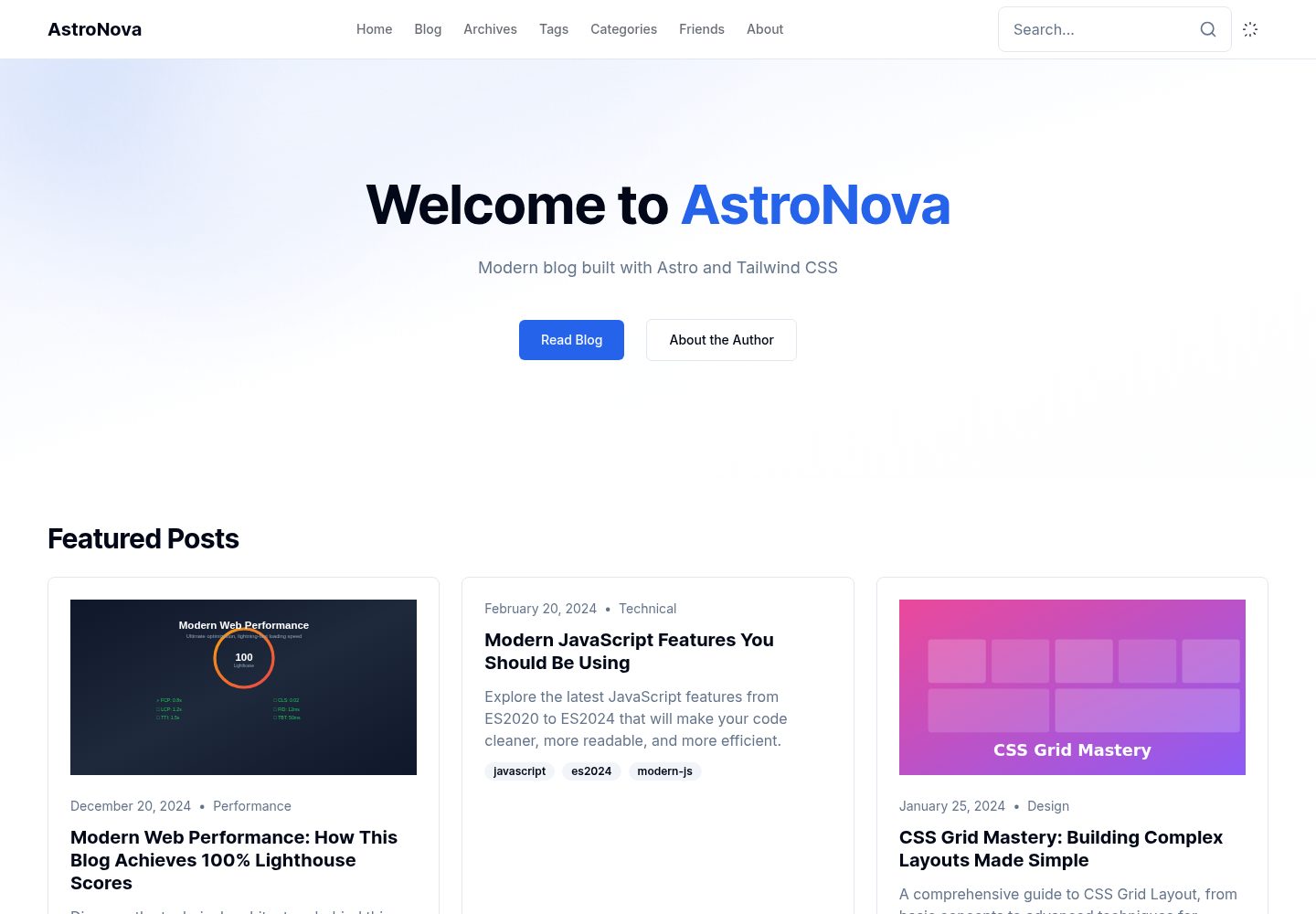
浏览真实页面截图,比较内容排版与手机效果。点击下方缩略图切换,放大查看整页细节。
全部页面与视图 3
截图用于了解视觉与布局,交互效果请以实际项目为准。
采集于 2026-10-03查看来源
值得关注的模板亮点
从已有项目资料中,快速了解它的特点。
内容使用 Markdown/MDX,frontmatter 支持分类、标签、封面、草稿、精选与置顶
内置全文搜索、RSS 2.0、相关文章、文章目录、阅读进度与代码复制等博客模块
集成 Giscus 评论、Mermaid 图表渲染与图片灯箱
站点配置、友链与主题色分别集中在 site.ts、friends.ts 和 globals.css 中维护
MIT 许可,允许免费使用、修改、商用与分发该版本代码
模板详细介绍
AstroNova 是 encorexin 在 GitHub 上开源的博客模板,技术栈为 Astro,样式使用 Tailwind CSS,代码以 MIT 许可发布。它面向技术博客场景,内容以 Markdown 或 MDX 文件存放在 src/content/blog/ 目录,通过 frontmatter 定义标题、描述、发布日期、分类、标签、封面图、草稿、精选与置顶等字段。模板内置分类页、标签页、全文搜索、RSS 2.0 输出、相关文章推荐、文章目录、阅读进度条、代码复制按钮、图片灯箱、上一篇/下一篇导航、作者卡片与 Giscus 评论等博客常用模块,并提供移动端全屏搜索。站点信息、社交链接与 Giscus 参数集中在 src/config/site.ts,友链数据在 src/config/friends.ts,主题色通过 CSS 变量在 src/styles/globals.css 中调整。项目要求 Node.js 18 及以上,推荐使用 pnpm,提供 dev、build、preview、type-check、lint、format、newpost 等脚本,构建产物为静态文件,可部署到 Vercel、Netlify 或任意静态托管。README 中列出的 Lighthouse 满分、WCAG 2.1 AAA、LCP 等性能与无障碍指标属于作者自述,未在本资料中独立验证。
Astro博客
适合你的项目吗?
适用场景
- 搭建个人技术博客并发布 Markdown/MDX 文章
- 为文章添加分类、标签、搜索、RSS 与相关推荐等组织与阅读功能
- 在文章中嵌入 Mermaid 流程图、时序图、类图等图表
- 通过 Giscus 接入基于 GitHub Discussions 的评论
- 将构建出的静态文件部署到 Vercel、Netlify 或自选静态托管
适合人群
- 习惯用 Markdown/MDX 写作、希望自行托管博客的开发者
- 需要分类、标签、搜索与 RSS 等基础内容组织能力的站点
- 接受 Astro 与 Tailwind CSS 技术栈、愿意直接修改配置与样式的使用者
- 需要 MIT 许可下可自由修改和分发代码的个人或团队
上手与定制指南
结合仓库当前版本的说明,按下面的资料检查内容、配置与运行要求。
- 1
需要 Node.js 18.0.0 及以上,推荐使用 pnpm 安装依赖并运行 pnpm dev 启动本地开发服务器
- 2
在 src/config/site.ts 中填写站点标题、描述、域名、作者信息、社交链接与 Giscus 仓库参数
- 3
在 src/content/blog/ 下新建 .md 或 .mdx 文件撰写文章,并按 frontmatter 字段填写标题、描述、发布日期与分类等必填项
- 4
友链在 src/config/friends.ts 中维护,主题色与明暗模式变量在 src/styles/globals.css 中调整
- 5
使用 pnpm build 生成静态文件,dist/ 目录可部署到 Vercel、Netlify 或任意静态托管服务
授权与来源资料
使用条件与限制
免费使用 · 保留许可声明本次收录的是公开仓库中采用 MIT 许可的免费版本;免费范围为该版本代码,不代表外部服务或第三方素材免费。
使用时需要遵守
- 允许免费使用、修改、商用和分发该版本代码。
- 分发代码副本或实质性部分时,保留原作者版权声明和完整 MIT 许可声明。
- 代码按现状提供;担保与责任限制以原许可证及适用法律为准。
额外费用与待核对事项
- 评论功能依赖 Giscus,需要 GitHub 仓库并启用 Discussions,且需在 site.ts 中填写 repo、repoId、categoryId 等参数;不配置则无评论。
- 使用 Giscus 评论需提供 GitHub 仓库标识与分类 ID,属于外部服务配置要求。
- 部署到 Vercel 需安装其 CLI 并使用 Vercel 账号/服务,属于外部服务依赖。
- 部署到 Netlify 需安装其 CLI 并使用 Netlify 账号/服务,属于外部服务依赖。
- 演示图片、字体、图标及其他第三方素材需按各自许可核对,不能仅凭代码的 MIT 许可判断。
- 域名、托管、数据库、支付或 AI 等外部服务可能另外收费。
查看原文依据
Permission is hereby granted, free of charge
许可证原文
Giscus comment system integration
README 原文
repo: 'username/repo', repoId: 'R_xxx', category: 'Announcements', categoryId: 'DIC_xxx',
README 原文
pnpm add -g vercel
README 原文
https://github.com/encorexin/AstroNova/blob/main/LICENSEhttps://github.com/encorexin/AstroNova/blob/main/README.mdpnpm add -g netlify-cli
README 原文
DeepSeek 根据仓库许可证和 README 整理 ·2026-10-03。结果仅覆盖已读取资料,依赖、图片、字体及后续条款变更以各自原文为准。
项目核对记录与介绍依据
模板资料
- 来源平台
- GitHub
- 资料与维护参考分
- 资料较完整 · 83 / 100
- 技术栈
- Astro
- 网站类型
- 博客
这个分数如何计算
本站按许可资料(最高30分)、演示链接(12分)、预览图(10分)、Star数(15分)、记录的维护时间(15分)、描述完整度(8分)、功能记录(5分)和分类资料(5分)计算。它不是代码、安全或性能测试,也不是 Google 评分;有链接不代表已实测可用。
这个项目需要核对什么
- 记录的仓库更新时间
- 2025-12-30
- 截图检查日期
- 2026-10-03
已收录演示链接。请用你的内容与屏幕尺寸检查;有演示不代表表单、认证或支付已经可用。
目录记录的主要技术栈是 Astro。请通过依赖清单和锁文件核对实际版本与托管要求。这些说明基于收录资料,不代表代码审计或部署实测。
查看具体选型方法 →介绍的制作与核对状态
介绍由 AI 辅助整理目录与仓库资料。仓库作者不等于这篇介绍的审核者。
已完成服务器许可规则与 AI 来源核对;未经过人工编辑审核。
查看当时使用的来源资料
SHA-256: b3e94d1c9396791b1c24e215846b0951205ad39ae780665d625916d2ba62edb8
2026-10-03T05:57:48.706Z
来源文件 / 仓库# 🚀 AstroNova
<div align="center">





**A high-performance, feature-rich modern technical blog template**
[Live Demo](https://nova.encorexin.online) · [Quick Start](#-quick-start) · [Features](#-core-features) · [Documentation](#-content-management)

</div>
---
## 📖 About
AstroNova is a production-ready blog template built with Astro, following modern web development best practices. It combines exceptional performance optimization, WCAG 2.1 AAA accessibility standards, and excellent developer experience, making it the ideal choice for building technical blogs.
## ✨ Core Features
### 🎯 Performance Optimization
| Feature | Description |
|---------|-------------|
| ⚡ **Islands Architecture** | Zero JavaScript by default, interactive components load on demand |
| 🎯 **Perfect Lighthouse Score** | 100/100 in Performance, Accessibility, Best Practices, and SEO |
| 🖼️ **Smart Image Optimization** | Automatic WebP compression, responsive images, lazy loading |
| 📦 **Critical CSS Inlining** | Above-the-fold CSS automatically inlined for faster FCP |
| 🔄 **Font Optimization** | Preconnect, font-display swap, subsetting |
### 📝 Content Management
| Feature | Description |
|---------|-------------|
| 📄 **Markdown/MDX** | Full Markdown and MDX support |
| 🏷️ **Categories & Tags** | Flexible content organization system |
| ⭐ **Featured Posts** | Support for pinned and featured articles |
| 📊 **Mermaid Diagrams** | Flowcharts, sequence diagrams, class diagrams, and more |
| 🔍 **Full-text Search** | Instant search with caching and highlighting |
| 📰 **RSS Feed** | Automatically generated RSS 2.0 feed |
### 🎨 User Experience
| Feature | Description |
|---------|-------------|
| 🌙 **Dark Mode** | System preference detection + manual toggle |
| 📖 **Reading Progress** | Top progress bar indicator |
| 📑 **Table of Contents** | Auto-generated TOC with scroll highlighting |
| 👤 **Author Card** | Author info displayed at article footer |
| 🔗 **Related Posts** | Smart related article recommendations |
| 💬 **Comments** | Giscus comment system integration |
| 📱 **Mobile Search** | Full-screen mobile search experience |
### 🛠️ Developer Experience
| Feature | Description |
|---------|-------------|
| 📘 **TypeScript** | Full type support with strict mode |
| 🎨 **Design System** | CSS variable-based theming system |
| ⚠️ **Error Boundaries** | React component error catching |
| 📁 **Path Aliases** | Convenient imports with `@/` prefix |
| 🔧 **Code Standards** | ESLint + Prettier configuration |
---
## 🚀 Quick Start
### Requirements
- **Node.js** 18.0.0+
- **pnpm** (recommended) or npm/yarn
### Installation
```bash
# 1. Clone the repository
git clone https://github.com/encorexin/AstroNova.git
cd AstroNova
# 2. Install dependencies
pnpm install
# 3. Start development server
pnpm dev
# 4. Open browser at http://localhost:4321
```
### Available Scripts
| Command | Description |
|---------|-------------|
| `pnpm dev` | Start development server |
| `pnpm build` | Build for production |
| `pnpm preview` | Preview production build |
| `pnpm type-check` | Run type checking |
| `pnpm lint` | Run ESLint |
| `pnpm format` | Format code |
| `pnpm newpost` | Create new post |
---
## 📁 Project Structure
```
AstroNova/
├── public/ # Static assets
│ ├── icons/ # PWA icons
│ ├── images/ # Image assets
│ ├── manifest.json # PWA manifest
│ ├── sw.js # Service worker
│ └── favicon.svg # Site icon
├── src/
│ ├── components/ # Component library
│ │ ├── AuthorCard.astro
│ │ ├── BlogCard.astro
│ │ ├── CodeCopy.astro # Code copy button
│ │ ├── Comments.astro
│ │ ├── Header.astro
│ │ ├── ImageLightbox.astro
│ │ ├── Mermaid.astro
│ │ ├── MobileSearch.astro
│ │ ├── PostNavigation.astro # Prev/Next navigation
│ │ ├── RelatedPosts.astro
│ │ ├── ScrollToTop.astro
│ │ ├── SearchBox.astro
│ │ ├── TableOfContents.astro
│ │ ├── ViewCounter.astro # View counter
│ │ └── ...
│ ├── config/ # Site configuration
│ │ ├── site.ts # Main site config
│ │ └── friends.ts # Friend links config
│ ├── content/ # Content collections
│ │ ├── blog/ # Blog posts (Markdown/MDX)
│ │ ├── pages/ # Static pages
│ │ └── config.ts # Content schema
│ ├── layouts/ # Layout templates
│ │ ├── BaseLayout.astro
│ │ └── PostLayout.astro
│ ├── pages/ # Page routes
│ │ ├── blog/ # Blog pages
│ │ ├── categories/ # Category pages
│ │ ├── tags/ # Tag pages
│ │ ├── friends.astro # Friends page
│ │ └── index.astro # Home page
│ ├── styles/ # Global styles
│ ├── types/ # TypeScript types
│ └── utils/ # Utility functions
├── astro.config.mjs # Astro configuration
├── tailwind.config.mjs # Tailwind configuration
├── tsconfig.json # TypeScript configuration
└── package.json # Dependencies
```
---
## 📝 Content Management
### Creating Posts
Create `.md` or `.mdx` files in the `src/content/blog/` directory:
```yaml
---
title: 'Post Title'
description: 'Post description for SEO and previews'
publishedAt: 2024-12-26
updatedAt: 2024-12-26 # Optional
category: 'Technical'
tags: ['astro', 'web']
heroImage: '/images/hero.jpg' # Optional
draft: false
featured: true # Optional, featured post
pinned: true # Optional, pinned post
---
Post content goes here...
```
### Frontmatter Fields
| Field | Type | Required | Description |
|-------|------|:--------:|-------------|
| `title` | string | ✅ | Post title |
| `description` | string | ✅ | Post description |
| `publishedAt` | date | ✅ | Publish date |
| `category` | string | ✅ | Category name |
| `tags` | string[] | ❌ | Tag array |
| `heroImage` | string | ❌ | Cover image path |
| `updatedAt` | date | ❌ | Update date |
| `draft` | boolean | ❌ | Draft status |
| `featured` | boolean | ❌ | Featured status |
| `pinned` | boolean | ❌ | Pinned status |
### Using Mermaid Diagrams
Use mermaid code blocks in Markdown:
````markdown
```mermaid
flowchart TD
A[Start] --> B{Decision}
B -->|Yes| C[Action A]
B -->|No| D[Action B]
C --> E[End]
D --> E
```
````
Supported diagram types:
- Flowcharts (`flowchart`, `graph`)
- Sequence diagrams (`sequenceDiagram`)
- Class diagrams (`classDiagram`)
- State diagrams (`stateDiagram`)
- ER diagrams (`erDiagram`)
- Git graphs (`gitGraph`)
- Pie charts (`pie`)
- Gantt charts (`gantt`)
### Adding Friend Links
Edit `src/config/friends.ts` to add friend links:
```typescript
import type { FriendLink } from '@/config/friends';
export const friendLinks: FriendLink[] = [
{
name: 'Site Name',
url: 'https://example.com',
avatar: 'https://example.com/avatar.png', // Optional
description: 'Site description',
tags: ['Tag1', 'Tag2'], // Optional
},
// Add more links...
];
```
| Field | Type | Required | Description |
|-------|------|:--------:|-------------|
| `name` | string | ✅ | Site name |
| `url` | string | ✅ | Site URL |
| `avatar` | string | ❌ | Avatar image URL |
| `description` | string | ✅ | Site description |
| `tags` | string[] | ❌ | Category tags |
---
## ⚙️ Configuration
### Site Configuration
Edit `src/config/site.ts`:
```typescript
export const siteConfig = {
title: 'AstroNova',
description: 'Modern Technical Blog',
url: 'https://your-domain.com',
author: {
name: 'Author Name',
email: '[email protected]',
bio: 'Author bio',
},
social: {
github: 'https://github.com/username',
twitter: 'https://twitter.com/username',
},
// Giscus comment configuration
giscus: {
repo: 'username/repo',
repoId: 'R_xxx',
category: 'Announcements',
categoryId: 'DIC_xxx',
},
};
```
### Astro Configuration
Main configuration options (`astro.config.mjs`):
```javascript
export default defineConfig({
site: 'https://your-domain.com',
integrations: [
tailwind(),
mdx(),
sitemap(),
react(),
compress({
Image: { quality: 80 }, // Image compression quality
HTML: true,
CSS: true,
JavaScript: true,
}),
],
});
```
---
## 🎨 Theme Customization
### CSS Variables
Customize the theme in `src/styles/globals.css`:
```css
:root {
--background: 0 0% 100%;
--foreground: 222.2 84% 4.9%;
--primary: 222.2 47.4% 11.2%;
--secondary: 210 40% 96.1%;
--muted: 210 40% 96.1%;
--accent: 210 40% 96.1%;
/* ... */
}
.dark {
--background: 222.2 84% 4.9%;
--foreground: 210 40% 98%;
/* ... */
}
```
### Tailwind Extensions
Extend configuration in `tailwind.config.mjs`:
```javascript
export default {
theme: {
extend: {
colors: {
primary: 'hsl(var(--primary))',
secondary: 'hsl(var(--secondary))',
},
fontFamily: {
sans: ['Inter', 'system-ui', 'sans-serif'],
mono: ['JetBrains Mono', 'monospace'],
},
},
},
};
```
---
## 🚢 Deployment
### Vercel (Recommended)
```bash
# Install Vercel CLI
pnpm add -g vercel
# Deploy
vercel
```
### Netlify
```bash
# Install Netlify CLI
pnpm add -g netlify-cli
# Deploy
netlify deploy --prod
```
### Static Hosting
```bash
# Build static files
pnpm build
# dist/ directory can be deployed to any static hosting service
```
---
## 📊 Performance Metrics
Based on Lighthouse test results:
| Metric | Score | Description |
|--------|:-----:|-------------|
| Performance | 100 | First load < 1.5s |
| Accessibility | 100 | WCAG 2.1 AAA compliant |
| Best Practices | 100 | Modern web best practices |
| SEO | 100 | Complete SEO optimization |
### Core Web Vitals
| Metric | Value | Rating |
|--------|-------|:------:|
| LCP (Largest Contentful Paint) | < 1.5s | 🟢 |
| FID (First Input Delay) | < 100ms | 🟢 |
| CLS (Cumulative Layout Shift) | < 0.1 | 🟢 |
---
## 🤝 Contributing
Contributions are welcome! Please follow these steps:
1. Fork the repository
2. Create a feature branch (`git checkout -b feature/amazing-feature`)
3. Commit your changes (`git commit -m 'Add amazing feature'`)
4. Push to the branch (`git push origin feature/amazing-feature`)
5. Create a Pull Request
### Code Standards
- Use TypeScript strict mode
- Follow ESLint and Prettier configuration
- Keep components single-responsibility
- Write clear comments and documentation
---
## 📄 License
This project is open source under the [MIT License](LICENSE).
---
## 🙏 Acknowledgments
- [Astro](https://astro.build/) - Next-generation static site generator
- [Tailwind CSS](https://tailwindcss.com/) - Utility-first CSS framework
- [Mermaid](https://mermaid.js.org/) - Text-based diagram rendering
- [Giscus](https://giscus.app/) - GitHub Discussions-powered comments
---
<div align="center">
**Built with ❤️**
[⬆ Back to Top](#-astronova)
</div>
看看同类模板
对比同技术栈与用途的模板,找到更适合的视觉与内容结构。

astrowind
⭕️ AstroWind: A free template using Astro v7 and Tailwind CSS v4. Astro starter theme.
Astro · 博客

astro-paper
A minimal, accessible and SEO-friendly Astro blog theme.
Astro · 博客

fuwari
✨A static blog template built with Astro.
Astro · 博客

Firefly
Firefly 是一款基于 Astro 的静态博客主题,由 CuteLeaf 在 saicaca 的 Fuwari 模板基础上二次开发,主打清新美观的视觉风格。
Astro · 博客

astro-theme-cactus
A simple Astro theme. Use it to create your blog or website.
Astro · 作品集

astrofy
Astrofy is a free and open-source template for your Personal Portfolio Website built with Astro and TailwindCS…
Astro · 作品集