A web application template with Flask as the backend and HTML/CSS/JavaScript as the frontend
HTMLCorporate Website
travel-ai-translator — HTML Business Template
By End2EndAI
Travel AI Translator is a Flask-based multilingual recording transcription and translation web application template that calls OpenAI Whisper, GPT, and Google Text-to-Speech APIs, supporting about 50 languages.
Explore the design
Compare the page layouts and mobile experience. Open any screenshot for a closer look.
Desktop homepage1 / 2
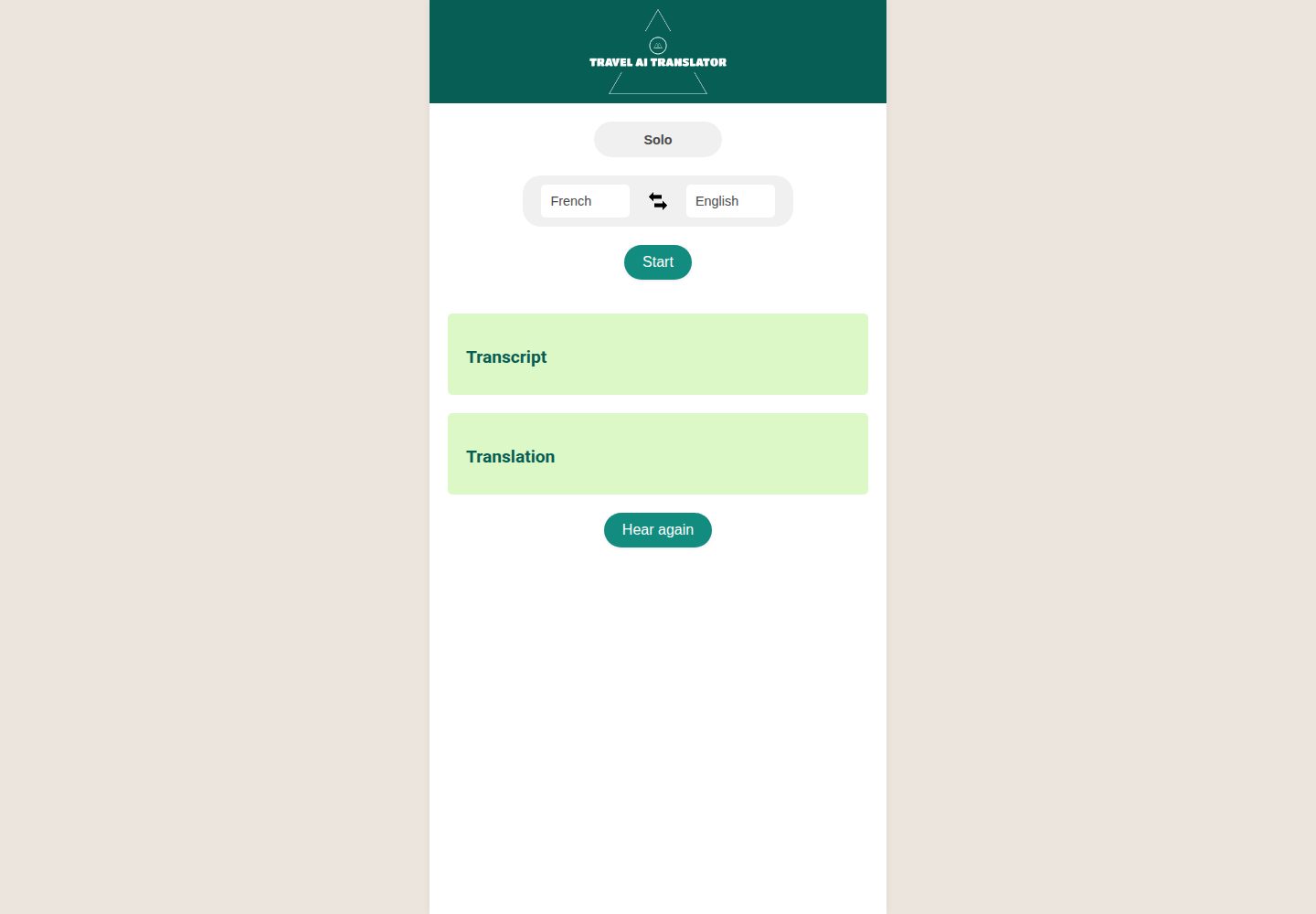
Desktop captureTop of page
Actual screenshot captured by the server browser.
All pages & views 2
Screenshots show visual appearance; interactive behavior may differ.
Recorded 2026-10-02View source
What stands out
A quick read of the recorded project description.
Integrates OpenAI Whisper speech-to-text, GPT translation, and Google Text-to-Speech
Supports about 50 input and output languages, and provides language swapping and conversation modes
Provides instructions for three deployment paths: local running, Vercel, and Render
Released under the MIT license, permitting free use, modification, commercial use, and distribution of this version of the code
Template Details
Travel AI Translator is an open-source web application template by End2EndAI on GitHub, released under the MIT license. Its example application is a multilingual transcription and translation tool: after the user selects an input language and an output language and records in the browser, the application first transcribes the speech into text, then translates it into the target language, and returns speech of the translation. The entire flow relies on OpenAI's speech-to-text API (Whisper), the GPT API, and the Google Text-to-Speech API.
The repository also provides instructions for local running and deployment. Locally, it requires Python 3.9+, pip, and an OpenAI API key, and a self-signed SSL certificate must be generated because browser microphone access requires HTTPS. The deployment section gives two methods, Vercel and Render; the repository already includes vercel.json and api/index.py. On Vercel, audio files are stored in /tmp as temporary files, which suits scenarios where the translation is played immediately after being produced.
The README lists about 50 supported languages and explains that audio and transcriptions are processed through OpenAI and Google APIs; the author states that recordings and translations will not be used for purposes other than providing the service. The template itself uses HTML/CSS/JavaScript for the frontend and Python/Flask for the backend, making it suitable as starter code for integrating the above APIs, but the availability, costs, and data processing terms of external services must be checked against their respective policies.
HTMLCorporate Website
Is it right for your project?
Use Cases
- Record during travel or cross-language conversations and obtain text and speech translations in the target language
- Use as a starter template for a Flask project that integrates OpenAI speech and text APIs
- Deploy to Vercel or Render to run a translation page with microphone recording
Suitable For
- Developers who need to quickly build a speech transcription and translation prototype
- Python developers who want a reference for calling OpenAI and Google APIs from Flask
- Teams preparing to deploy a small web application on Vercel or Render
Getting started & customization
Use these recorded setup notes alongside the repository instructions for your chosen version.
- 1
Requires Python 3.9+, pip, and an OpenAI API key, configurable via environment variables or config.ini
- 2
Local running requires generating a self-signed SSL certificate because browser microphone access requires HTTPS
- 3
Vercel deployment requires setting the OPENAI_API_KEY and SECRET_KEY environment variables in the console
- 4
Render deployment requires adding gunicorn to requirements.txt and starting with gunicorn app:app
- 5
On Vercel, audio files are stored in /tmp as temporary files, suitable only for immediate playback after translation
License & source material
Usage conditions & limitations
Free to use · keep license noticeThis entry covers the free version in the public repository under the MIT license; the free scope is this version of the code and does not mean that external services or third-party materials are free.
Must comply with when using
- Permits free use, modification, commercial use, and distribution of this version of the code.
- When distributing copies or substantial portions of the code, retain the original author's copyright notice and the complete MIT license notice.
- The code is provided as is; warranties and limitations of liability are governed by the original license and applicable law.
Additional costs & items to verify
- Using this template requires your own OpenAI API key; transcription and translation depend on OpenAI's paid API services, so you must register an account and bear the call costs yourself.
- Speech output depends on the Google Text-to-Speech API; you must enable and configure a Google Cloud account yourself, which may incur additional costs.
- Browser microphone recording requires HTTPS; local development must generate a self-signed SSL certificate, otherwise the recording function cannot be used.
- When deployed to Vercel, audio files are stored in /tmp as temporary files, suitable only for immediate playback after translation and not for persistent audio storage.
- Deploying to Render requires adding gunicorn to requirements.txt yourself and starting with gunicorn app:app.
- Demo images, fonts, icons, and other third-party materials must be checked against their respective licenses and cannot be judged solely by the code's MIT license.
- External services such as domains, hosting, databases, payments, or AI may charge additional fees.
View Original Text Basis
Permission is hereby granted, free of charge
Original License Text
An [OpenAI API key](https://platform.openai.com/api-keys)
Original README
Google Text-to-Speech API
Original README
Browser microphone access requires HTTPS.
Original README
Audio files are stored in `/tmp` on Vercel (the filesystem is otherwise read-only on serverless). Files are ephemeral
Original README
https://github.com/End2EndAI/travel-ai-translator/blob/main/LICENSEhttps://github.com/End2EndAI/travel-ai-translator/blob/main/README.mdAdd `gunicorn` to your requirements:
Original README
Compiled by DeepSeek based on repository license and README ·2026-10-02. Results only cover the materials read; dependencies, images, fonts, and subsequent term changes are subject to their respective original texts.
Project checks & description sources
Template Information
- Source platforms
- GitHub
- Documentation and maintenance reference score
- More documented · 87 / 100
- Technologies
- HTML
- Website type
- Corporate Website
How this score is calculated
Our heuristic uses license records (up to 30), a demo link (12), a preview (10), stars (15), recorded maintenance (15), description completeness (8), feature records (5) and classification data (5). It is not a code, security or performance test, or a Google score. A link does not establish tested functionality.
What to verify for this project
- Repository update recorded
- 2026-03-17
- Screenshot last checked
- 2026-10-02
A demo link is listed. Check it with your own content and viewport sizes; its presence does not confirm that forms, authentication or payments work.
The catalog identifies HTML as the primary stack. Check the actual dependency manifest and lockfile for versions and hosting requirements. These notes use recorded metadata, not a code audit or a deployment test.
Use a selection guide →How this description was prepared
AI-assisted description based on catalog records and repository material. Repository authors are not automatically the reviewers of this description.
Automatically checked against source and license rules; no manual editorial review.
Inspect the recorded source material
SHA-256: 2b36531011e661d380019a7d6f96cf997bfb47b6f7e97b4b2ece9ea2acfb7b99
2026-10-02T07:26:48.950Z
Source file / repository# Travel AI Translator
This repository is a template for anyone wishing to build quickly a web application using the following technologies:
- Flask
- OpenAI Speech-to-text API (Whisper)
- OpenAI GPT API (GPT-4o-mini)
- Google Text-to-Speech API
You are welcome to inspire and use the code freely for your own projects.
The showcase application, Travel AI Translator, is a multi-language transcription and translation web application. The application allows users to record audio and transcribes the audio into the text of a selected language. Then, it translates the transcribed text into another selected language and returns an audio output of the translated text. This entire process is powered by OpenAI's API, ensuring high accuracy and efficient translation.
</br>
<div align="center">
<img src="static/img/screenshot1.jpg" width="304" height="607" >
<img src="static/img/screenshot2.png" width="304" height="607" >
</div>
## Demo
To see the Travel AI Translator in action, please visit the live demo webapp [here](https://lfontaine.pythonanywhere.com/) or download the android app on the Play Store [here](https://play.google.com/store/apps/details?id=com.end2endai.traveltranslatorai&pcampaignid=web_share).
Try recording your own voice and see how efficiently and accurately it transcribes and translates your words. This tool can greatly assist you during your travels or in any cross-language conversation scenario.
## Table of Contents
1. [Getting Started](#getting-started)
2. [Prerequisites](#prerequisites)
3. [Installation](#installation)
4. [Deployment](#deployment)
5. [Built With](#built-with)
6. [Supported languages](#supported-languages)
7. [How to Use](#how-to-use)
8. [Contribute](#contribute)
9. [License](#license)
10. [Confidentiality rules](#confidentiality-rules)
11. [Contact](#contact)
## Getting Started
Follow the steps below to set up the project locally.
### Prerequisites
- Python 3.9+ and pip
- An [OpenAI API key](https://platform.openai.com/api-keys)
### Installation
1. Clone this repository:
```bash
git clone https://github.com/End2EndAI/travel-ai-translator.git
cd travel-ai-translator
```
2. Install the required packages:
```bash
pip install -r requirements.txt
```
3. Configure the OpenAI API Key
**Option A — environment variable (recommended):**
```bash
export OPENAI_API_KEY=your-key-here
```
**Option B — config.ini file:**
Create a `config.ini` file at the root of the project:
```ini
[OPENAI_API]
key = your-key-here
```
4. Generate SSL certificates
Browser microphone access requires HTTPS. Generate a self-signed certificate for local development:
```bash
openssl genrsa -out key.pem 2048
openssl req -new -x509 -key key.pem -out cert.pem -days 365 -subj "/CN=localhost"
```
5. Start the Flask server:
```bash
flask --app app.py run --port 5009 --host 0.0.0.0 --cert=cert.pem --key=key.pem
```
6. Navigate to `https://localhost:5009` in your web browser.
> Your browser will show a security warning for the self-signed certificate — click "Advanced" and proceed.
---
## Deployment
### Vercel
Vercel runs Flask as a serverless Python function. The `vercel.json` and `api/index.py` files are already included in this repository.
1. **Install the Vercel CLI:**
```bash
npm install -g vercel
```
2. **Log in to Vercel:**
```bash
vercel login
```
3. **Deploy:**
```bash
vercel --prod
```
Vercel will detect `vercel.json` and deploy automatically.
4. **Set environment variables** in the [Vercel dashboard](https://vercel.com/dashboard) under your project → Settings → Environment Variables:
| Variable | Description |
|---|---|
| `OPENAI_API_KEY` | Your OpenAI API key |
| `SECRET_KEY` | A random secret for Flask sessions |
Or set them via CLI:
```bash
vercel env add OPENAI_API_KEY
vercel env add SECRET_KEY
```
5. Your app is live at `your-project.vercel.app`.
> **Note:** Vercel provides HTTPS automatically — browser microphone access works out of the box, no SSL certificate setup needed.
> **Note:** Audio files are stored in `/tmp` on Vercel (the filesystem is otherwise read-only on serverless). Files are ephemeral and served directly by the app — this works fine since audio is played immediately after translation.
---
### Render (free tier available)
[Render](https://render.com) deploys directly from GitHub with zero configuration.
1. **Push your code** to a GitHub repository.
2. **Create a new Web Service** on Render and connect your GitHub repo.
3. Set the following:
- **Runtime:** Python 3
- **Build command:** `pip install -r requirements.txt`
- **Start command:** `gunicorn app:app`
4. Add `gunicorn` to your requirements:
```bash
echo "gunicorn" >> requirements.txt
```
5. **Add environment variables** in the Render dashboard:
- `OPENAI_API_KEY` = your OpenAI key
- `SECRET_KEY` = a random string (e.g. `python -c "import secrets; print(secrets.token_hex(32))"`)
6. Deploy. Render provides HTTPS automatically.
> **Note:** Browser microphone access works out of the box on Render since the app is served over HTTPS.
---
### Environment Variables Reference
| Variable | Required | Description |
|---|---|---|
| `OPENAI_API_KEY` | Yes | Your OpenAI API key |
| `SECRET_KEY` | No | Flask session secret (auto-generated if not set) |
| `PORT` | No | Port to run on locally (default: `5009`) |
| `SSL_CERT` | No | Path to SSL cert for local dev (default: `cert.pem`) |
| `SSL_KEY` | No | Path to SSL key for local dev (default: `key.pem`) |
---
## Built With
- HTML
- CSS
- JavaScript
- Python
- Flask
- OpenAI API (Whisper + GPT-4o-mini)
- Google Text-to-Speech API
## Supported languages
Our project proudly supports a vast number of languages to cater to a global audience. The currently supported languages include:
Afrikaans, Arabic, Armenian, Azerbaijani, Belarusian, Bosnian, Bulgarian, Catalan, Chinese, Croatian, Czech, Danish, Dutch, English, Estonian, Finnish, French, Galician, German, Greek, Hebrew, Hindi, Hungarian, Icelandic, Indonesian, Italian, Japanese, Kannada, Kazakh, Korean, Latvian, Lithuanian, Macedonian, Malay, Marathi, Maori, Nepali, Norwegian, Persian, Polish, Portuguese, Romanian, Russian, Serbian, Slovak, Slovenian, Spanish, Swahili, Swedish, Tagalog, Tamil, Thai, Turkish, Ukrainian, Urdu, Vietnamese, and Welsh.
## How to Use
1. Select the input language — this is the language you will speak.
2. Select the output language — this is the language you want the translation in.
3. Click **Start** to begin recording. The button turns red and pulses while recording.
4. Speak into your device's microphone.
5. Click **Stop**. The app transcribes your speech, translates it, and plays the audio translation.
6. Use the **copy** buttons (📋) next to Transcript or Translation to copy the text.
7. Click **Clear** to reset the output for a new recording.
8. Click **Hear again** to replay the last translation audio.
9. Click the arrow between languages to swap input and output.
10. Switch to **Conversation** mode to automatically swap languages after each translation — useful for back-and-forth dialogue.
## Contribute
Contributions are always welcome! Thanks!
## License
This project is licensed under the MIT License - see the [LICENSE](LICENSE.md) file for details.
## Confidentiality Rules
We prioritize the privacy and confidentiality of our users. All audio recordings and transcriptions are processed securely using OpenAI's API and Google Text-to-Speech API. While these services ensure high accuracy and efficient translation, we want to assure our users that we do not store, share, or use your audio recordings and translations for any purpose other than to provide you with the service. Both OpenAI and Google have stringent data protection standards, and any data sent to their APIs is used solely for the purpose of transcription and translation. When using our application on the Android Play Store, rest assured that your data remains private and is treated with the utmost care. We are committed to upholding the highest standards of data protection and encourage users to review our privacy policy, as well as those of OpenAI and Google, for further details.
## Contact
For any inquiries, feedback, or suggestions, please feel free to reach out to me. I am always eager to discuss this project, potential improvements, or any other topics of interest. You can contact me directly via email at [[email protected]](mailto:[email protected]). I look forward to hearing from you and working together to improve and expand this tool's capabilities!
Explore similar templates
Compare previews and descriptions within the same stack and category.

mazer
Mazer is a free and open-source Bootstrap 5 admin dashboard and landing page template that does not depend on jQuery. It provides prebuilt releases, source builds, and CDN inclusion, and includes dark mode, perfect-scrollbar, and ApexCharts examples.
HTML · Admin dashboard

Freelancer
A bright, single-page Bootstrap portfolio template for freelancers, designers, and small studios. It includes a responsive portfolio grid with modal detail windows and an SB Forms contact form that requires an API token.
HTML · Portfolio

Creative
A single-page marketing template by Start Bootstrap for creative agencies and product services, built on Bootstrap with SCSS, featuring a portfolio grid and call-to-action sections. It includes pre-set SB Forms markers for form integration and npm build scripts for source customization.
HTML · Corporate Website

startbootstrap-agency
Agency is a one-page Bootstrap portfolio theme from Start Bootstrap, MIT licensed. It includes a responsive portfolio grid with modal details and a preconfigured SB Forms contact form that requires an API token.
HTML · Corporate Website

startbootstrap-landing-page
A general-purpose Bootstrap landing page template from Start Bootstrap, MIT licensed, with a Pug/SCSS/npm build pipeline.
HTML · Corporate Website

Landing-Page
A general-purpose landing page HTML template maintained by Tailwind Toolbox, written in pure HTML and loading the complete Tailwind CSS via CDN.
HTML · Corporate Website