以 Flask 为后端、HTML/CSS/JavaScript 为前端的 Web 应用模板
HTML企业官网
travel-ai-translator — HTML 企业官网模板
作者 End2EndAI
Travel AI Translator 是一个基于 Flask 的多语言录音转写与翻译 Web 应用模板,调用 OpenAI Whisper、GPT 与 Google 文本转语音 API,支持约 50 种语言。
看看你的网站会是什么样
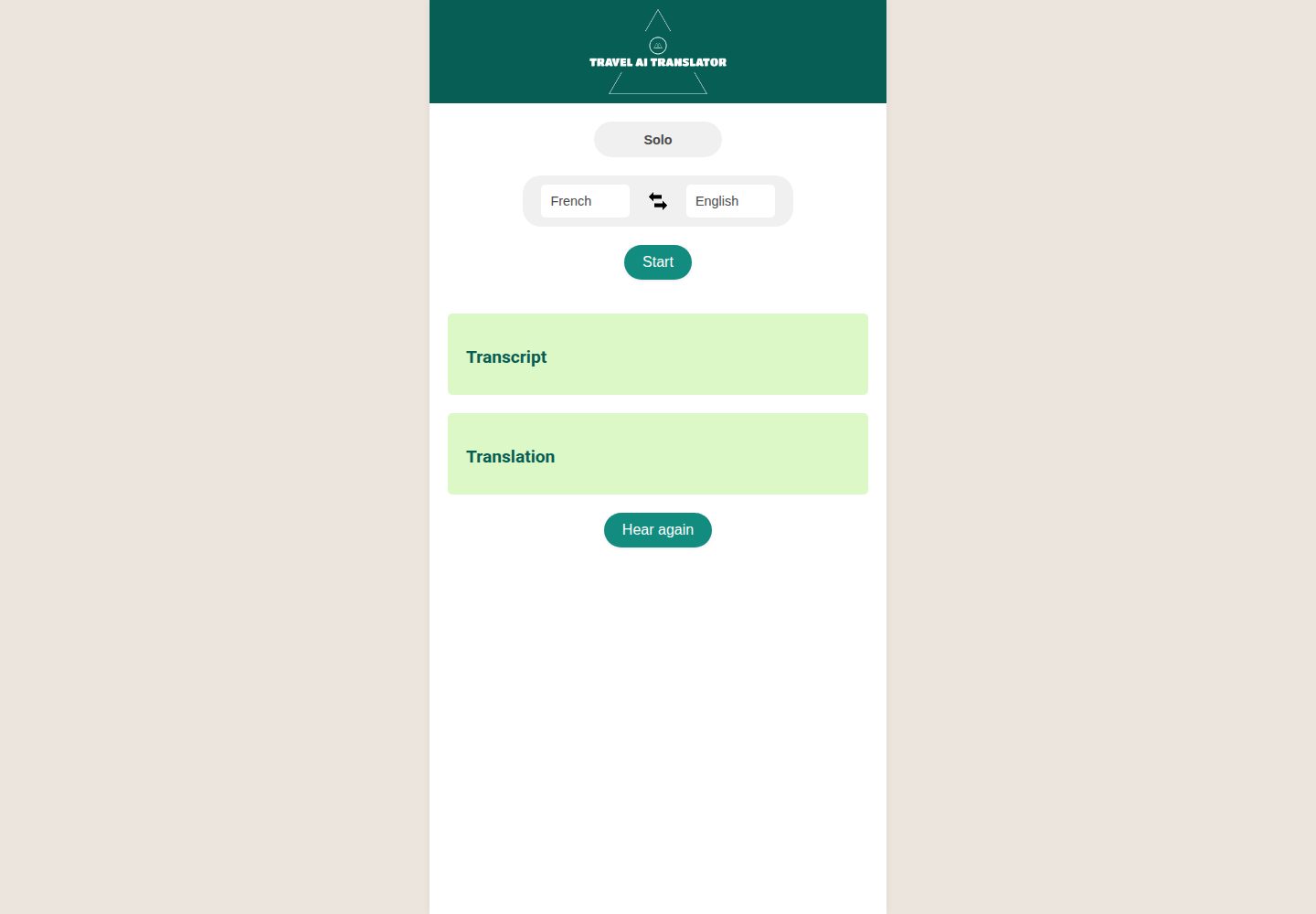
浏览真实页面截图,比较内容排版与手机效果。点击下方缩略图切换,放大查看整页细节。
全部页面与视图 2
截图用于了解视觉与布局,交互效果请以实际项目为准。
采集于 2026-10-02查看来源
值得关注的模板亮点
从已有项目资料中,快速了解它的特点。
集成 OpenAI Whisper 语音转文字、GPT 翻译与 Google 文本转语音
支持约 50 种输入与输出语言,并提供语言互换与对话模式
提供本地运行、Vercel 与 Render 三种部署路径说明
采用 MIT 许可,允许免费使用、修改、商用和分发该版本代码
模板详细介绍
Travel AI Translator 是 End2EndAI 在 GitHub 上开源的 Web 应用模板,采用 MIT 许可。它的示例应用是一个多语言转写与翻译工具:用户选择输入语言和输出语言后,在浏览器中录音,应用先把语音转写成文字,再翻译为目标语言,并返回翻译结果的语音。整个流程依赖 OpenAI 的语音转文字 API(Whisper)、GPT API 和 Google Text-to-Speech API。
仓库同时提供本地运行与部署说明。本地需要 Python 3.9+、pip 和 OpenAI API key,并需生成自签名 SSL 证书,因为浏览器麦克风访问要求 HTTPS。部署部分给出 Vercel 与 Render 两种方式,仓库内已包含 vercel.json 和 api/index.py;在 Vercel 上音频文件存放在 /tmp,属于临时文件,适合翻译后立即播放的场景。
README 列出了约 50 种支持语言,并说明音频与转写内容通过 OpenAI 和 Google 的 API 处理,作者声明不会将录音和翻译用于提供服务以外的用途。模板本身以 HTML/CSS/JavaScript 为前端,Python/Flask 为后端,适合作为接入上述 API 的起步代码,但外部服务的可用性、费用与数据处理条款需按各自政策核对。
HTML企业官网
适合你的项目吗?
适用场景
- 在旅行或跨语言对话中录音并获取目标语言的文字与语音翻译
- 作为接入 OpenAI 语音与文本 API 的 Flask 项目起步模板
- 部署到 Vercel 或 Render 上运行一个带麦克风录音的翻译页面
适合人群
- 需要快速搭建语音转写与翻译原型的开发者
- 希望参考 Flask 调用 OpenAI 与 Google API 的 Python 开发者
- 准备在 Vercel 或 Render 上部署小型 Web 应用的团队
上手与定制指南
结合仓库当前版本的说明,按下面的资料检查内容、配置与运行要求。
- 1
需要 Python 3.9+、pip 和 OpenAI API key,可通过环境变量或 config.ini 配置
- 2
本地运行需生成自签名 SSL 证书,因为浏览器麦克风访问要求 HTTPS
- 3
Vercel 部署需在控制台设置 OPENAI_API_KEY 与 SECRET_KEY 环境变量
- 4
Render 部署需在 requirements.txt 中加入 gunicorn,并使用 gunicorn app:app 启动
- 5
Vercel 上音频文件存放在 /tmp,属于临时文件,仅适合翻译后立即播放
授权与来源资料
使用条件与限制
免费使用 · 保留许可声明本次收录的是公开仓库中采用 MIT 许可的免费版本;免费范围为该版本代码,不代表外部服务或第三方素材免费。
使用时需要遵守
- 允许免费使用、修改、商用和分发该版本代码。
- 分发代码副本或实质性部分时,保留原作者版权声明和完整 MIT 许可声明。
- 代码按现状提供;担保与责任限制以原许可证及适用法律为准。
额外费用与待核对事项
- 使用该模板必须自备 OpenAI API key,转写与翻译功能依赖 OpenAI 的付费 API 服务,需自行注册账号并承担调用费用。
- 语音输出依赖 Google Text-to-Speech API,需自行开通并配置 Google 云服务账号,可能产生额外费用。
- 浏览器麦克风录音要求 HTTPS,本地开发必须生成自签名 SSL 证书,否则无法使用录音功能。
- 部署到 Vercel 时音频文件存放在 /tmp 且为临时文件,仅适合翻译后立即播放,不适合持久保存音频。
- 部署到 Render 需自行在 requirements.txt 中加入 gunicorn 并以 gunicorn app:app 启动。
- 演示图片、字体、图标及其他第三方素材需按各自许可核对,不能仅凭代码的 MIT 许可判断。
- 域名、托管、数据库、支付或 AI 等外部服务可能另外收费。
查看原文依据
Permission is hereby granted, free of charge
许可证原文
An [OpenAI API key](https://platform.openai.com/api-keys)
README 原文
Google Text-to-Speech API
README 原文
Browser microphone access requires HTTPS.
README 原文
Audio files are stored in `/tmp` on Vercel (the filesystem is otherwise read-only on serverless). Files are ephemeral
README 原文
https://github.com/End2EndAI/travel-ai-translator/blob/main/LICENSEhttps://github.com/End2EndAI/travel-ai-translator/blob/main/README.mdAdd `gunicorn` to your requirements:
README 原文
DeepSeek 根据仓库许可证和 README 整理 ·2026-10-02。结果仅覆盖已读取资料,依赖、图片、字体及后续条款变更以各自原文为准。
项目核对记录与介绍依据
模板资料
- 来源平台
- GitHub
- 资料与维护参考分
- 资料较完整 · 87 / 100
- 技术栈
- HTML
- 网站类型
- 企业官网
这个分数如何计算
本站按许可资料(最高30分)、演示链接(12分)、预览图(10分)、Star数(15分)、记录的维护时间(15分)、描述完整度(8分)、功能记录(5分)和分类资料(5分)计算。它不是代码、安全或性能测试,也不是 Google 评分;有链接不代表已实测可用。
这个项目需要核对什么
- 记录的仓库更新时间
- 2026-03-17
- 截图检查日期
- 2026-10-02
已收录演示链接。请用你的内容与屏幕尺寸检查;有演示不代表表单、认证或支付已经可用。
目录记录的主要技术栈是 HTML。请通过依赖清单和锁文件核对实际版本与托管要求。这些说明基于收录资料,不代表代码审计或部署实测。
查看具体选型方法 →介绍的制作与核对状态
介绍由 AI 辅助整理目录与仓库资料。仓库作者不等于这篇介绍的审核者。
已完成服务器许可规则与 AI 来源核对;未经过人工编辑审核。
查看当时使用的来源资料
SHA-256: 2b36531011e661d380019a7d6f96cf997bfb47b6f7e97b4b2ece9ea2acfb7b99
2026-10-02T07:26:48.950Z
来源文件 / 仓库# Travel AI Translator
This repository is a template for anyone wishing to build quickly a web application using the following technologies:
- Flask
- OpenAI Speech-to-text API (Whisper)
- OpenAI GPT API (GPT-4o-mini)
- Google Text-to-Speech API
You are welcome to inspire and use the code freely for your own projects.
The showcase application, Travel AI Translator, is a multi-language transcription and translation web application. The application allows users to record audio and transcribes the audio into the text of a selected language. Then, it translates the transcribed text into another selected language and returns an audio output of the translated text. This entire process is powered by OpenAI's API, ensuring high accuracy and efficient translation.
</br>
<div align="center">
<img src="static/img/screenshot1.jpg" width="304" height="607" >
<img src="static/img/screenshot2.png" width="304" height="607" >
</div>
## Demo
To see the Travel AI Translator in action, please visit the live demo webapp [here](https://lfontaine.pythonanywhere.com/) or download the android app on the Play Store [here](https://play.google.com/store/apps/details?id=com.end2endai.traveltranslatorai&pcampaignid=web_share).
Try recording your own voice and see how efficiently and accurately it transcribes and translates your words. This tool can greatly assist you during your travels or in any cross-language conversation scenario.
## Table of Contents
1. [Getting Started](#getting-started)
2. [Prerequisites](#prerequisites)
3. [Installation](#installation)
4. [Deployment](#deployment)
5. [Built With](#built-with)
6. [Supported languages](#supported-languages)
7. [How to Use](#how-to-use)
8. [Contribute](#contribute)
9. [License](#license)
10. [Confidentiality rules](#confidentiality-rules)
11. [Contact](#contact)
## Getting Started
Follow the steps below to set up the project locally.
### Prerequisites
- Python 3.9+ and pip
- An [OpenAI API key](https://platform.openai.com/api-keys)
### Installation
1. Clone this repository:
```bash
git clone https://github.com/End2EndAI/travel-ai-translator.git
cd travel-ai-translator
```
2. Install the required packages:
```bash
pip install -r requirements.txt
```
3. Configure the OpenAI API Key
**Option A — environment variable (recommended):**
```bash
export OPENAI_API_KEY=your-key-here
```
**Option B — config.ini file:**
Create a `config.ini` file at the root of the project:
```ini
[OPENAI_API]
key = your-key-here
```
4. Generate SSL certificates
Browser microphone access requires HTTPS. Generate a self-signed certificate for local development:
```bash
openssl genrsa -out key.pem 2048
openssl req -new -x509 -key key.pem -out cert.pem -days 365 -subj "/CN=localhost"
```
5. Start the Flask server:
```bash
flask --app app.py run --port 5009 --host 0.0.0.0 --cert=cert.pem --key=key.pem
```
6. Navigate to `https://localhost:5009` in your web browser.
> Your browser will show a security warning for the self-signed certificate — click "Advanced" and proceed.
---
## Deployment
### Vercel
Vercel runs Flask as a serverless Python function. The `vercel.json` and `api/index.py` files are already included in this repository.
1. **Install the Vercel CLI:**
```bash
npm install -g vercel
```
2. **Log in to Vercel:**
```bash
vercel login
```
3. **Deploy:**
```bash
vercel --prod
```
Vercel will detect `vercel.json` and deploy automatically.
4. **Set environment variables** in the [Vercel dashboard](https://vercel.com/dashboard) under your project → Settings → Environment Variables:
| Variable | Description |
|---|---|
| `OPENAI_API_KEY` | Your OpenAI API key |
| `SECRET_KEY` | A random secret for Flask sessions |
Or set them via CLI:
```bash
vercel env add OPENAI_API_KEY
vercel env add SECRET_KEY
```
5. Your app is live at `your-project.vercel.app`.
> **Note:** Vercel provides HTTPS automatically — browser microphone access works out of the box, no SSL certificate setup needed.
> **Note:** Audio files are stored in `/tmp` on Vercel (the filesystem is otherwise read-only on serverless). Files are ephemeral and served directly by the app — this works fine since audio is played immediately after translation.
---
### Render (free tier available)
[Render](https://render.com) deploys directly from GitHub with zero configuration.
1. **Push your code** to a GitHub repository.
2. **Create a new Web Service** on Render and connect your GitHub repo.
3. Set the following:
- **Runtime:** Python 3
- **Build command:** `pip install -r requirements.txt`
- **Start command:** `gunicorn app:app`
4. Add `gunicorn` to your requirements:
```bash
echo "gunicorn" >> requirements.txt
```
5. **Add environment variables** in the Render dashboard:
- `OPENAI_API_KEY` = your OpenAI key
- `SECRET_KEY` = a random string (e.g. `python -c "import secrets; print(secrets.token_hex(32))"`)
6. Deploy. Render provides HTTPS automatically.
> **Note:** Browser microphone access works out of the box on Render since the app is served over HTTPS.
---
### Environment Variables Reference
| Variable | Required | Description |
|---|---|---|
| `OPENAI_API_KEY` | Yes | Your OpenAI API key |
| `SECRET_KEY` | No | Flask session secret (auto-generated if not set) |
| `PORT` | No | Port to run on locally (default: `5009`) |
| `SSL_CERT` | No | Path to SSL cert for local dev (default: `cert.pem`) |
| `SSL_KEY` | No | Path to SSL key for local dev (default: `key.pem`) |
---
## Built With
- HTML
- CSS
- JavaScript
- Python
- Flask
- OpenAI API (Whisper + GPT-4o-mini)
- Google Text-to-Speech API
## Supported languages
Our project proudly supports a vast number of languages to cater to a global audience. The currently supported languages include:
Afrikaans, Arabic, Armenian, Azerbaijani, Belarusian, Bosnian, Bulgarian, Catalan, Chinese, Croatian, Czech, Danish, Dutch, English, Estonian, Finnish, French, Galician, German, Greek, Hebrew, Hindi, Hungarian, Icelandic, Indonesian, Italian, Japanese, Kannada, Kazakh, Korean, Latvian, Lithuanian, Macedonian, Malay, Marathi, Maori, Nepali, Norwegian, Persian, Polish, Portuguese, Romanian, Russian, Serbian, Slovak, Slovenian, Spanish, Swahili, Swedish, Tagalog, Tamil, Thai, Turkish, Ukrainian, Urdu, Vietnamese, and Welsh.
## How to Use
1. Select the input language — this is the language you will speak.
2. Select the output language — this is the language you want the translation in.
3. Click **Start** to begin recording. The button turns red and pulses while recording.
4. Speak into your device's microphone.
5. Click **Stop**. The app transcribes your speech, translates it, and plays the audio translation.
6. Use the **copy** buttons (📋) next to Transcript or Translation to copy the text.
7. Click **Clear** to reset the output for a new recording.
8. Click **Hear again** to replay the last translation audio.
9. Click the arrow between languages to swap input and output.
10. Switch to **Conversation** mode to automatically swap languages after each translation — useful for back-and-forth dialogue.
## Contribute
Contributions are always welcome! Thanks!
## License
This project is licensed under the MIT License - see the [LICENSE](LICENSE.md) file for details.
## Confidentiality Rules
We prioritize the privacy and confidentiality of our users. All audio recordings and transcriptions are processed securely using OpenAI's API and Google Text-to-Speech API. While these services ensure high accuracy and efficient translation, we want to assure our users that we do not store, share, or use your audio recordings and translations for any purpose other than to provide you with the service. Both OpenAI and Google have stringent data protection standards, and any data sent to their APIs is used solely for the purpose of transcription and translation. When using our application on the Android Play Store, rest assured that your data remains private and is treated with the utmost care. We are committed to upholding the highest standards of data protection and encourage users to review our privacy policy, as well as those of OpenAI and Google, for further details.
## Contact
For any inquiries, feedback, or suggestions, please feel free to reach out to me. I am always eager to discuss this project, potential improvements, or any other topics of interest. You can contact me directly via email at [[email protected]](mailto:[email protected]). I look forward to hearing from you and working together to improve and expand this tool's capabilities!
看看同类模板
对比同技术栈与用途的模板,找到更适合的视觉与内容结构。

mazer
Free and Open-source Bootstrap 5 Admin Dashboard Template and Landing Page
HTML · 后台

Freelancer
Freelancer 是 Start Bootstrap 出品的单页作品集模板,专为自由职业者、设计师和小型工作室设计。 页面结构清晰,包含多个内容区块、响应式作品集网格,每个作品项目配有模态窗口展示详情。
HTML · 作品集

Creative
Creative 是 Start Bootstrap 团队维护的一款单页营销模板,定位明确:为创意机构或产品服务提供一个以作品展示和行动号召为核心的落地页。
HTML · 企业官网

startbootstrap-agency
Agency 是 Start Bootstrap 维护的单页代理商作品集主题,基于 Bootstrap 构建,MIT 许可。
HTML · 企业官网

startbootstrap-landing-page
这是 Start Bootstrap 系列中一款通用型落地页模板,基于 Bootstrap 构建,定位是给产品或服务做单页推广。
HTML · 企业官网

Landing-Page
Tailwind CSS Starter Template - Landing Page
HTML · 企业官网