A Hugo theme with a black color scheme and simple structure, released under the MIT license
HugoStarter
enervoid-theme — Hugo Starter Template
By Enerhim
enervoid-theme is an MIT-licensed black theme for Hugo that supports KaTeX math formulas and Mermaid diagrams, and includes page structures for home, blog, personal, and projects.
Explore the design
Compare the page layouts and mobile experience. Open any screenshot for a closer look.
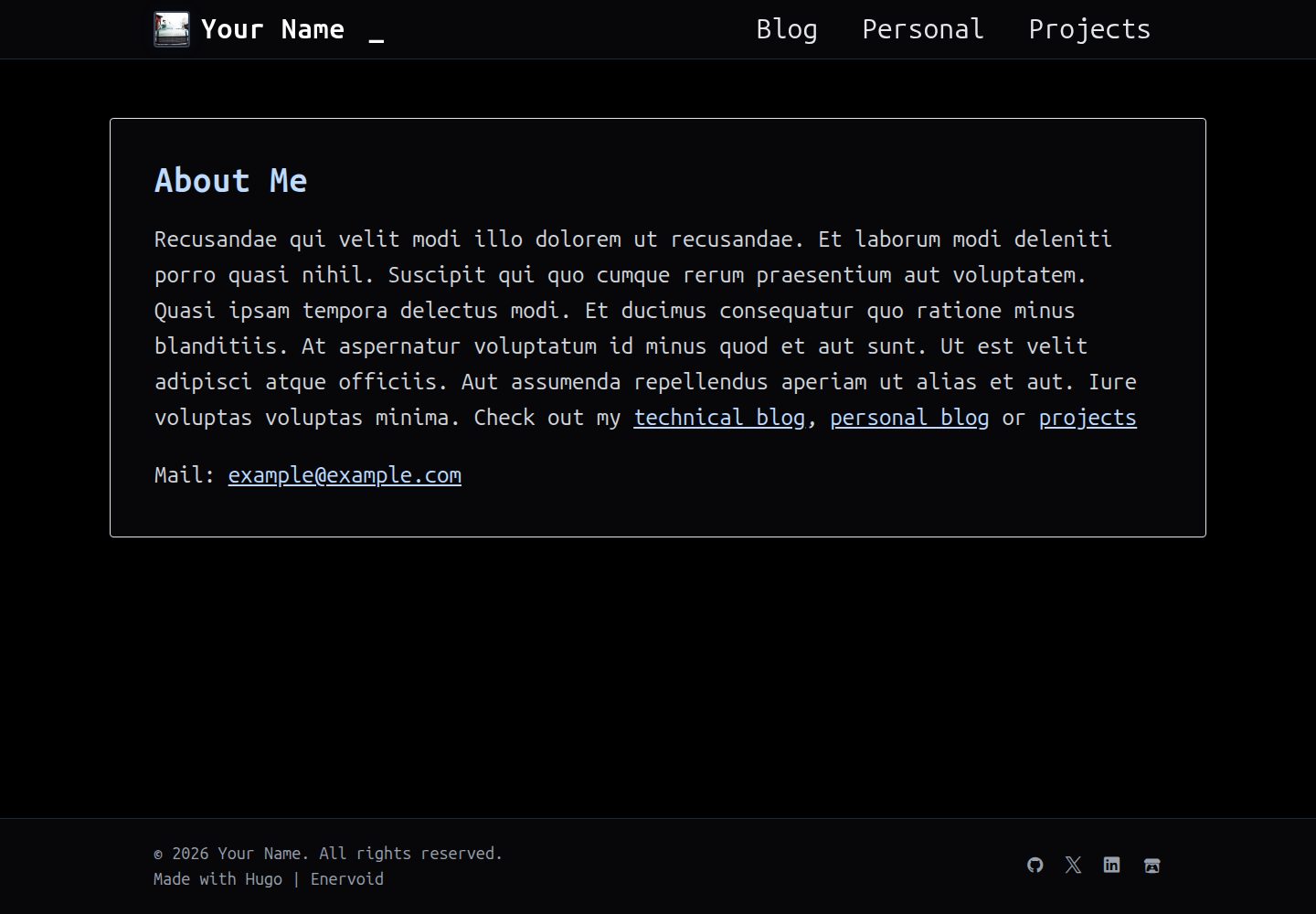
Desktop homepage1 / 3
Desktop captureTop of page
Actual screenshot captured by the server browser.
All pages & views 3
Screenshots show visual appearance; interactive behavior may differ.
Recorded 2026-10-03View source
What stands out
A quick read of the recorded project description.
Built-in KaTeX math formula support, with delimiters configured through Goldmark passthrough
Built-in Mermaid diagram support, with a code example provided in the README
Presets three page types—home, blog/personal, and projects—with corresponding menus
Configuration examples include avatar and social link parameters; social icons use devicon and Font Awesome class names
Code highlighting uses the monokai style; tab width and similar settings can be adjusted in hugo.toml
Template Details
enervoid-theme is a static site theme for Hugo with an overall black color scheme. The repository description positions it as a "simple black theme" and additionally provides KaTeX and Mermaid support. The theme is published on Hugo Themes, with a demo site at https://enerhim.github.io/enervoid-demo/.
Based on the screenshots and configuration examples in the repository README, the theme presets three types of content display: home, blog/personal, and projects, and provides parameters for menus, avatars, and social links. For Markdown, the configuration example enables math formula delimiters through Goldmark's passthrough extension, and provides example files for math, formats, embeds, and code. Code highlighting uses the monokai style.
Usage follows the standard Hugo workflow: create a new site, place the theme in themes/enervoid via Git submodule or direct clone, copy example/hugo.toml as the site configuration, then run hugo server -D to preview. Content is created with the hugo new command for Markdown files under blog, personal, and projects respectively. Project page front matter supports fields such as summary, github, website, and link.
Limitations: the materials do not specify the theme's browser compatibility range, accessibility support, or long-term maintenance plans. Third-party assets such as demo images, fonts, and icons must be checked separately under their respective licenses; the MIT license covers only this version of the code.
HugoStarter
Is it right for your project?
Use Cases
- Building a personal blog or notes site focused on text and formulas
- Hugo sites that need to display mathematical derivations and formula typesetting
- Documentation sites that need to embed Mermaid flowcharts or sequence diagrams in articles
- Presenting personal works as a project list with GitHub, website, or external links
- Hugo users who want to start quickly with a black theme and then modify templates as needed
Suitable For
- Developers who use Hugo and are familiar with hugo.toml configuration
- Content authors who need KaTeX math formulas and Mermaid diagrams
- Individual users who want to build a personal blog, notes, or project showcase page
- Users who accept the MIT license terms and can independently verify third-party asset licensing
Getting started & customization
Use these recorded setup notes alongside the repository instructions for your chosen version.
- 1
First run hugo new site my-site and enter the directory, then add the theme to themes/enervoid via git submodule add or git clone
- 2
Copy themes/enervoid/example/hugo.toml to the site root as a configuration starting point, and modify baseURL, title, menus, and params as needed
- 3
Run hugo server -D for local preview, accessible by default at http://localhost:1313
- 4
Create content with hugo new blog/xxx.md, hugo new personal/xxx.md, and hugo new projects/xxx.md respectively
- 5
Math formulas require keeping the markup.goldmark.extensions.passthrough setting in the configuration; for syntax, refer to the example files under content/blog in the repository
License & source material
Usage conditions & limitations
Free to use · keep license noticeThis entry covers the free version in the public repository under the MIT license; the free scope is the code of this version and does not mean external services or third-party assets are free.
Must comply with when using
- Free use, modification, commercial use, and distribution of this version of the code are permitted.
- When distributing copies or substantial portions of the code, retain the original author's copyright notice and the full MIT license notice.
- The code is provided as is; warranties and liability limitations are governed by the original license and applicable law.
Additional costs & items to verify
- Demo images, fonts, icons, and other third-party assets must be checked under their respective licenses and cannot be judged solely by the code's MIT license.
- External services such as domains, hosting, databases, payments, or AI may incur separate charges.
View Original Text Basis
https://github.com/Enerhim/enervoid-theme/blob/main/LICENSEhttps://github.com/Enerhim/enervoid-theme/blob/main/README.mdPermission is hereby granted, free of charge
Original License Text
Compiled by DeepSeek based on repository license and README ·2026-10-03. Results only cover the materials read; dependencies, images, fonts, and subsequent term changes are subject to their respective original texts.
Project checks & description sources
Template Information
- Source platforms
- Hugo Themes
- Documentation and maintenance reference score
- More documented · 87 / 100
- Technologies
- Hugo
- Website type
- Starter
How this score is calculated
Our heuristic uses license records (up to 30), a demo link (12), a preview (10), stars (15), recorded maintenance (15), description completeness (8), feature records (5) and classification data (5). It is not a code, security or performance test, or a Google score. A link does not establish tested functionality.
What to verify for this project
- Repository update recorded
- 2026-09-29
- Screenshot last checked
- 2026-10-03
A demo link is listed. Check it with your own content and viewport sizes; its presence does not confirm that forms, authentication or payments work.
The catalog identifies Hugo as the primary stack. Check the actual dependency manifest and lockfile for versions and hosting requirements. These notes use recorded metadata, not a code audit or a deployment test.
Use a selection guide →How this description was prepared
AI-assisted description based on catalog records and repository material. Repository authors are not automatically the reviewers of this description.
Automatically checked against source and license rules; no manual editorial review.
Inspect the recorded source material
SHA-256: 381d58d61a99ca7c7873af581f5ba7fd90485206b25023cdbfb47bdc1c307b2b
2026-10-03T07:29:22.538Z
Source file / repository<h1 align="center">Enervoid Theme</h1>
<p align="center">
A simple black theme for Hugo with KaTeX & mermaid support.
</p>
<p align="center">
<img src="https://img.shields.io/github/license/Enerhim/enervoid-theme?color=blue"/>
</p>
[Demo Site](https://enerhim.github.io/enervoid-demo/)
## Images
<details>
<summary>Lists</summary>
### Home:
<img width="1920" height="1080" alt="Enervoid Home" src="https://github.com/user-attachments/assets/224c0d55-1705-4824-86fe-6b7c49682031" />
### Blog / Personal:
<img width="1920" height="1080" alt="Enervoid Blog / Personal" src="https://github.com/user-attachments/assets/56a484c5-b3bb-478a-859f-f862bbb3a2b6" />
### Projects:
<img width="1920" height="1080" alt="Enervoid Projects" src="https://github.com/user-attachments/assets/62ba3d14-2764-4a6a-a60f-f64157583cf9" />
</details>
<details>
<summary>Markdown</summary>
### Math / Katex
<img width="1920" height="1080" alt="KaTex" src="https://github.com/user-attachments/assets/63f3dfbd-3d41-46b1-b265-d7eef9678eb3" />
### Formattings
<img width="1920" height="1080" alt="image" src="https://github.com/user-attachments/assets/59765ecc-b26a-4a66-87f9-d1aa9d27381f" />
### Code / Mermaid
<img width="1920" height="1080" alt="Code" src="https://github.com/user-attachments/assets/d181782a-e169-4d5d-96ae-c6ef19712a28" />
### Embeds
<img width="1920" height="1080" alt="Embeds" src="https://github.com/user-attachments/assets/3ee06cff-ce39-4445-b4ab-2aa6fc2488be" />
</details>
## Installation
1. **Create a new Hugo site** (or use existing):
```bash
hugo new site my-site
cd my-site
```
2. **Install the theme** using Git submodule:
```bash
git init
git submodule add https://github.com/Enerhim/enervoid-theme.git themes/enervoid
```
Or clone it directly:
```bash
git clone https://github.com/Enerhim/enervoid-theme.git themes/enervoid
```
4. **Configure your site** — Copy the example configuration:
```bash
cp themes/enervoid/example/hugo.toml ./hugo.toml
```
5. **Start Hugo server**:
```bash
hugo server -D
```
6. **Visit** `http://localhost:1313` in your browser.
## Configuration
The default `hugo.toml` configuration file:
```toml
baseURL = 'https://example.com'
languageCode = 'en-us'
title = "Your Name"
theme = "enervoid"
[menus]
[[menus.main]]
name = 'Blog'
pageRef = '/blog'
weight = 10
[[menus.main]]
name = 'Personal'
pageRef = '/personal'
weight = 20
[[menus.main]]
name = 'Projects'
pageRef = '/projects'
weight = 30
[params]
avatar = "https://picsum.photos/200"
[[params.socials]]
link = "https://github.com/yourgithub"
icon = "devicon-github-original"
[[params.socials]]
link = "https://twitter.com/yourx"
icon = "devicon-twitter-original"
[[params.socials]]
link = "https://linkedin.in/yourlinkedin"
icon = "devicon-linkedin-plain"
[[params.socials]]
link = "https://itch.io/profile/youritch"
icon = "fa-brands fa-itch-io"
[markup]
[markup.goldmark]
[markup.goldmark.extensions.passthrough]
enable = true
[markup.goldmark.extensions.passthrough.delimiters]
block = [['$$','$$'], ['\\[','\\]']]
inline = [['$','$'], ['\\(','\\)']]
[markup.goldmark.parser]
[markup.goldmark.parser.attribute]
block = true
[markup.highlight]
noClasses = true
codeFences = true
guessSyntax = true
tabWidth = 4
style = "monokai"
```
For markdown configuration,
- For katex/ math, see [math.md](https://github.com/Enerhim/enervoid-theme/blob/main/content/blog/math.md?plain=1)
- For formatting, see [formats.md](https://github.com/Enerhim/enervoid-theme/blob/main/content/blog/formats.md?plain=1)
- For images and embeds, see [embeds.md](https://github.com/Enerhim/enervoid-theme/blob/main/content/blog/embeds.md?plain=1)
- For code and mermaid, see [code.md](https://github.com/Enerhim/enervoid-theme/blob/main/content/blog/code.md?plain=1)
## Creating Content
**Blog Post:**
```bash
hugo new blog/my-first-post.md
```
```markdown
+++
title = "My first post"
date = 2024-03-22T14:45:30Z
tags = ["Your", "Tags"]
description = "Your description."
+++
Your content here...
```
Note: Creating a personal post is identical to blog post. Just do
```bash
hugo new personal/my-personal-post.md
```
**Project:**
```bash
hugo new projects/my-project.md
```
```markdown
+++
title = "My first project"
date = 2024-03-22T14:45:30Z
tags = ["Your", "Project"]
summary = "Your project summary."
github= "Your Github"
website= "Or your website"
link= "Or any other link"
+++
Fallback content
```
## License
This theme is released under the MIT License. See [LICENSE](LICENSE) for details.
Explore similar templates
Compare previews and descriptions within the same stack and category.

hugo-xmin
hugo-xmin is an extremely minimal Hugo theme written by Yihui Xie for template beginners. HTML and CSS total about 140 lines, with no external dependencies, and it uses the MIT license.
Hugo · Starter

hugo-theme-gallery
A Hugo Extended photo gallery theme that organizes images with Page Bundles, automatically generating album lists and gallery pages with a Justified layout and PhotoSwipe lightbox.
Hugo · Starter

reveal-hugo
reveal-hugo is a Hugo theme that converts Markdown content into Reveal.js-based HTML presentations. It supports slide separation with `---`, shortcodes for fragments, slides, sections, notes, Markdown, and MathJax, and organizes content as root or section presentations with order controlled by weight.
Hugo · Starter

anatole
Anatole is a minimalistic two-column Hugo theme ported from farbox-theme-Anatole, featuring dark mode, multilingual and RTL support, and optional portfolio, comments, analytics, KaTeX, and Mermaid integrations. It suits personal blogs, portfolios, or documentation sites built with Hugo.
Hugo · Starter

hugo-theme-diary
A Hugo diary-style theme ported from the Hexo theme Journal, with a grid homepage for essays and daily notes. It supports six languages, dark mode, table-of-contents scroll positioning, reading time, code highlighting, and configurable sidebar, fonts, and colors.
Hugo · Starter

risotto
risotto is a minimalist, responsive Hugo theme inspired by terminal ricing aesthetics. It uses semantic HTML and pure CSS with no JavaScript, and its layout relies on CSS Grid for native responsiveness without manual breakpoints.
Hugo · Starter