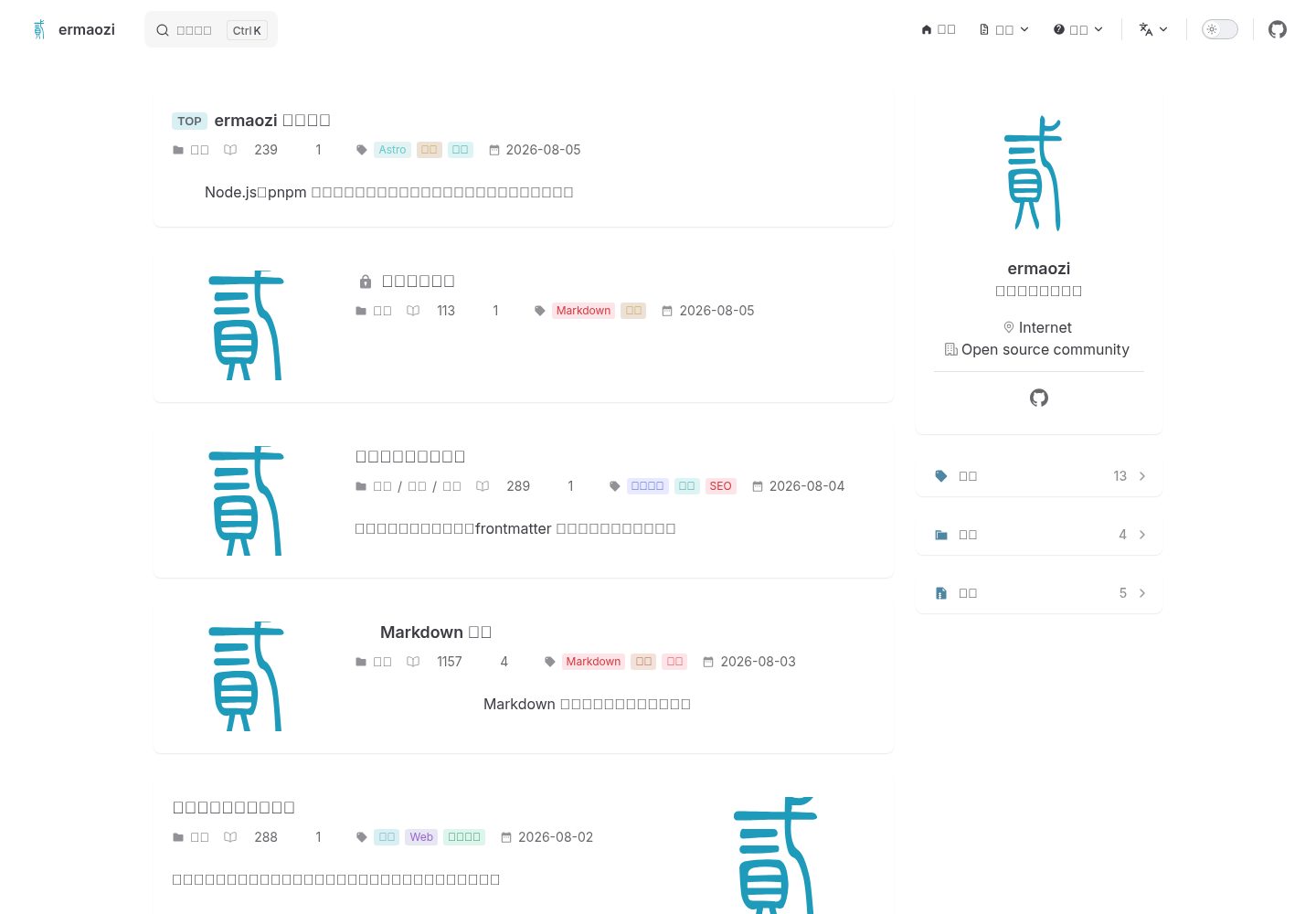
Chinese and English content with hreflang, supporting root language selection and a language switcher
AstroBlogDocumentationTool Site
astro-theme-ermaozi — Astro Blog Template
By ermaozi
An Astro-based static blog and documentation theme, deeply customized from Plume, supporting Chinese and English, automatic documentation sidebars, and Pagefind full-text search; the 0.2 series is still in beta.
Explore the design
Compare the page layouts and mobile experience. Open any screenshot for a closer look.
Desktop homepage1 / 3
Desktop captureTop of page
Actual screenshot captured by the server browser.
All pages & views 3
Screenshots show visual appearance; interactive behavior may differ.
Recorded 2026-10-01View source
What stands out
A quick read of the recorded project description.
Documentation pages automatically generate grouped sidebars, mobile navigation, and previous/next links
Pagefind full-text search, requiring index verification after build
Shiki syntax highlighting and rich Markdown extensions (admonitions, tabs, Mermaid, etc.)
Build-time PBKDF2 + AES-GCM content encryption, capable of encrypting entire pages or partial content
Built-in SEO output: canonical links, Open Graph, JSON-LD, sitemap, robots, and llms.txt
Template Details
astro-theme-ermaozi is an Astro static theme for blogs, knowledge bases, and product documentation sites, deeply customized from VuePress Theme Plume. It provides Chinese and English routing with hreflang, automatically generated documentation sidebars, Pagefind full-text search, light, dark, and system-following themes, as well as categories, tags, archives, and client-side pagination. Content is divided into three types: blog posts, regular pages, and documentation. Documentation pages use frontmatter group, order, and badge to control sidebar grouping, sorting, and badges, and support Markdown source export.
Markdown enhancements include Shiki syntax highlighting (light and dark dual themes, code titles, line numbers, line highlighting, copy button), footnotes, admonitions, task lists, highlight markers, file trees, code trees, steps, windows, table copy, collapsible panels, tabs, and Mermaid. The theme also provides build-time PBKDF2 + AES-GCM encryption for entire pages or partial content, click-to-preview images, and YouTube, Bilibili, audio, video, and PDF embeds; SEO includes canonical links, Open Graph, JSON-LD, sitemap, robots, and llms.txt. Comments, page views, likes, and popular posts are disabled by default; before enabling them, configure the corresponding services in site.config.mjs.
Note that the README explicitly states that the 0.2 series is still in beta, and features and configuration are not yet fully stable. Later versions may introduce breaking changes. It is recommended to pin the version during beta and review release notes before upgrading. The theme requires Node.js 22.12+, and development mode does not generate the Pagefind index; run build and preview to verify search and production output. Content encryption cannot replace server-side access control, and passwords or truly confidential content should not be committed to public repositories.
AstroBlogDocumentationUtility site
Is it right for your project?
Use Cases
- Building a Chinese-English bilingual personal blog or technical article site
- Building product documentation or a knowledge base with automatic sidebars and full-text search
- Content sites that need Markdown enhancements (code highlighting, Mermaid, tabs, admonitions)
- Projects that want static deployment and optional integration with external services such as comments
Suitable For
- Developers using Astro who want to quickly get both blog and documentation forms
- Technical writing teams that need Chinese-English routing and automatic documentation sidebar generation
- Users who accept possible breaking changes during beta and are willing to pin versions
- Content sites that prefer static output and can be deployed without a backend
Getting started & customization
Use these recorded setup notes alongside the repository instructions for your chosen version.
- 1
Requires Node.js 22.12+ and npm, pnpm, or Yarn; a site can be created with npm create astro-theme-ermaozi
- 2
Daily modifications are concentrated in site.config.mjs and content/; try not to modify theme/ to facilitate later theme updates
- 3
Development mode does not generate the Pagefind index; run build and preview to verify search and production output
- 4
Before enabling comments, page views, likes, and similar features, configure the corresponding services in site.config.mjs
- 5
The README notes that the 0.2 series is beta; it is recommended to pin the version and watch release notes for breaking changes
License & source material
Usage conditions & limitations
Free to use · keep license noticeThis entry covers the free version under the MIT license in the public repository; the free scope is the code of that version and does not mean that external services or third-party assets are free.
Must comply with when using
- The code of this version may be used, modified, used commercially, and distributed free of charge.
- When distributing copies or substantial portions of the code, retain the original author's copyright notice and the complete MIT license notice.
- The code is provided as is; warranties and limitations of liability are governed by the original license and applicable law.
Additional costs & items to verify
- The 0.2 series is still in beta; features and configuration are not yet fully stable, and later versions may introduce breaking changes. It is recommended to pin the version during beta and review release notes before upgrading.
- The runtime requires Node.js 22.12 or later and one of npm, pnpm, or Yarn as the package manager.
- Development mode does not generate the Pagefind index; build and preview commands must be run to verify search functionality and production output.
- Comments, page views, likes, and popular posts are disabled by default. Before enabling them, configure the corresponding features and service addresses in site.config.mjs; pure static deployment requires no backend.
- Algolia, Waline, Twikoo, and Artalk still need to connect to real external services and may involve accounts or API keys.
- Static content encryption cannot replace server-side access control, and passwords or truly confidential content should not be committed to public repositories.
- The code license does not automatically cover articles, images, or third-party assets added by users; authorization for these must be confirmed separately.
- The README mentions Firebase integration; before enabling related dynamic features, configure it yourself and check Firebase quotas and charges.
- Demo images, fonts, icons, and other third-party assets must be checked against their respective licenses and cannot be judged solely by the code's MIT license.
- External services such as domains, hosting, databases, payments, or AI may incur additional charges.
View Original Text Basis
Permission is hereby granted, free of charge
Original License Text
The `0.2` series is still in beta. Features and configuration are not yet fully stable, and future releases may introduce breaking changes.
Original README
Requires Node.js 22.12+ and npm, pnpm, or Yarn.
Original README
Development mode does not generate a Pagefind index; run `npm run build && npm run preview` to verify search and the production output.
Original README
Comments, view counts, likes, and popular posts are disabled by default. Configure the corresponding features and service URLs in `site.config.mjs` before enabling them; a purely static deployment requires no backend.
Original README
Algolia, Waline, Twikoo, and Artalk still require connections to actual services.
Original README
Static content encryption is not a substitute for server-side access control: do not commit passwords or genuinely confidential content to a public repository.
Original README
https://github.com/ermaozi/astro-theme-ermaozi/blob/main/LICENSEhttps://github.com/ermaozi/astro-theme-ermaozi/blob/main/README.mdThe code license does not automatically cover articles, images, or third-party materials you add.
Original README
Compiled by DeepSeek based on repository license and README ·2026-10-01. Results only cover the materials read; dependencies, images, fonts, and subsequent term changes are subject to their respective original texts.
Project checks & description sources
Template Information
- Source platforms
- GitHub
- Documentation and maintenance reference score
- More documented · 88 / 100
- Technologies
- Astro
- Website type
- Blog · Documentation · Tool Site
How this score is calculated
Our heuristic uses license records (up to 30), a demo link (12), a preview (10), stars (15), recorded maintenance (15), description completeness (8), feature records (5) and classification data (5). It is not a code, security or performance test, or a Google score. A link does not establish tested functionality.
What to verify for this project
- Repository update recorded
- 2026-09-08
- Screenshot last checked
- 2026-10-01
A demo link is listed. Check it with your own content and viewport sizes; its presence does not confirm that forms, authentication or payments work.
The catalog identifies Astro as the primary stack. Check the actual dependency manifest and lockfile for versions and hosting requirements. These notes use recorded metadata, not a code audit or a deployment test.
Use a selection guide →How this description was prepared
AI-assisted description based on catalog records and repository material. Repository authors are not automatically the reviewers of this description.
Automatically checked against source and license rules; no manual editorial review.
Inspect the recorded source material
SHA-256: e9633e5c6fc346793da506fcc5565d731379dd7d8aaf72d5346a307b9836c6d2
2026-10-01T01:08:24.497Z
Source file / repository# ermaozi English | [简体中文](./readme-cn.md) `ermaozi` is an Astro static theme for blogs, knowledge bases, and product documentation, heavily customized from Plume. It includes bilingual routing, automatic documentation sidebars, Pagefind full-text search, dark mode, categories, tags, archives, SEO, and enhanced Markdown. > [!WARNING] > The `0.2` series is still in beta. Features and configuration are not yet fully stable, and future releases may introduce breaking changes. Pin your version during the beta period and review the release notes before upgrading. Live demo: <https://astro.ermao.net> Create a new site and automatically install dependencies: ```bash npm create astro-theme-ermaozi ``` You can also specify a directory or use the equivalent command for your package manager: ```bash npm create astro-theme-ermaozi my-site pnpm create astro-theme-ermaozi my-site yarn create astro-theme-ermaozi my-site ``` The interactive wizard lets you choose Simplified Chinese or English as the root language and decide whether to show the language switcher. For automated setup, append `-- --yes --lang=en-US --multilingual`; the generator adjusts content directories, permalinks, translation relationships, and internal links accordingly. ## Getting Started Requires Node.js 22.12+ and npm, pnpm, or Yarn. ```bash # npm npm install npm run dev # pnpm pnpm install pnpm dev # Yarn yarn install yarn dev ``` `dev` starts the Astro development server with hot reloading. Development mode does not generate a Pagefind index; run `npm run build && npm run preview` to verify search and the production output. `dev:fast` remains available as a legacy alias. ## Customize Your Site For your first site, follow the [beginner's quick start](./content/en/docs/guide/getting-started.md). Day-to-day changes only require `site.config.mjs` and `content/`; leaving `theme/` untouched makes future theme updates easier. `defineSiteConfig()` provides editor completion for common settings, and `npm run check` identifies common configuration errors. 1. Update the domain, site name, author, navigation, and optional services in [`site.config.mjs`](./site.config.mjs). 2. Replace [`public/img/logo.svg`](./public/img/logo.svg). 3. Remove the sample posts in `content/` and add your own Markdown files. 4. Run the `validate` script with your chosen package manager. In the default content structure, Chinese posts go in `content/blog/category/`, and English posts go in `content/en/blog/category/`. Documentation goes in `content/docs/` and `content/en/docs/`; setting `type: doc` automatically generates grouped sidebars and previous/next navigation. Use a stable `permalink` for long-lived pages; English translations point to the Chinese route through `translationOf`. Minimal frontmatter: ```yaml --- title: My post description: What the reader will learn. permalink: /blog/my-post/ createTime: 2026-08-05 tags: [Astro] type: post # post, doc, or page --- ``` Documentation pages can use `group`, `order`, and `badge` to control sidebar grouping, sorting, and badges. Without a `permalink`, the theme generates a route from the file path, stripping leading numeric prefixes such as `1.` used to sort files or directories. ## Built-in Features - Static output with three content types: blog posts, regular pages, and documentation - Chinese and English content with `hreflang` - Pagefind full-text search - Light, dark, and system themes - Categories, tags, archives, and client-side pagination - Automatic documentation sidebars, mobile documentation navigation, previous/next links, and Markdown source export - Shiki syntax highlighting with light and dark themes, code titles, line numbers, line highlighting, and copy buttons - Footnotes, callouts, task lists, `==highlighting==`, file trees, code trees, steps, windows, table copying, collapsible panels, tabs, and Mermaid - Build-time PBKDF2 + AES-GCM encryption for full pages or selected content, QR codes, and npm/GitHub status badges - Click-to-preview images and YouTube, Bilibili, audio, video, and PDF embeds - Canonical URLs, Open Graph, JSON-LD, sitemaps, robots, and llms.txt - Optional Giscus comments and a self-hosted interaction API Comments, view counts, likes, and popular posts are disabled by default. Configure the corresponding features and service URLs in `site.config.mjs` before enabling them; a purely static deployment requires no backend. Static content encryption is not a substitute for server-side access control: do not commit passwords or genuinely confidential content to a public repository. Algolia, Waline, Twikoo, and Artalk still require connections to actual services. ## Commands ```bash npm run check # Astro and TypeScript checks npm run build # Static build and search index npm run deploy # Generate deployable dist/ without uploading it npm test # Build output tests npm run test:visual # Browser interaction and responsive layout tests npm run audit # Route, SEO, privacy, and unsafe markup audit npm run validate # Full pre-release checks, excluding browser tests ``` The examples above use npm; pnpm and Yarn use the same script names. Use `pnpm run deploy` to avoid a conflict with pnpm's built-in `deploy` command. ## Static Deployment The setup wizard can generate configurations for GitHub Pages, GitLab Pages, Netlify, Vercel, or Firebase Hosting, or you can choose Custom. All three package managers produce the same `dist/` output: ```bash npm install && npm run deploy pnpm install && pnpm run deploy yarn install && yarn deploy ``` For Custom hosting, set `dist/` as the static publish directory. Use any of the lines above as your hosting platform's build command and `dist` as its output directory. For sites hosted under a subpath, set `base` in `site.config.mjs`; CI can also override the domain and subpath through `SITE_ORIGIN` and `BASE_PATH`. See [Deploy Your Site](./content/en/docs/guide/deployment.md) for full instructions. Dependency audit commands vary by package manager: use `npm audit --omit=dev`, `pnpm audit --prod`, or `yarn npm audit --environment production`, respectively. ## Publishing the Site Generator npm resolves `npm create astro-theme-ermaozi` to the stable release of `create-astro-theme-ermaozi` and runs it. Before publishing, check the template package from the generator directory: ```bash cd internal/create npm test npm pack --dry-run npm publish --access public ``` The public `npm create astro-theme-ermaozi` command only becomes available after the final step successfully publishes the package to npm; this project never publishes automatically during builds or tests. Stable releases use the npm `latest` tag, and prereleases use `beta`. Subsequent versions can be published automatically through [`.github/workflows/publish-npm.yml`](./.github/workflows/publish-npm.yml): 1. In the npm settings for `create-astro-theme-ermaozi`, configure a GitHub Actions Trusted Publisher with owner `ermaozi`, repository `astro-theme-ermaozi`, and workflow `publish-npm.yml`, and allow `npm publish`. 2. No `NPM_TOKEN` or GitHub Actions secret is needed; the workflow publishes using short-lived OIDC credentials. 3. Update the generator's `package.json` version to `x.y.z`, pass the full validation checks, then create and publish a GitHub Release tagged `vx.y.z`. The workflow reinstalls dependencies, runs `pnpm validate`, verifies that the release tag exactly matches the package version, and publishes through npm Trusted Publisher. It stops if the tag does not match or the version already exists. ## Project Structure The top level contains everyday content, public assets, site configuration, and files required by Astro. Theme implementation and maintenance scripts live in `theme/`, which regular site customization does not require you to edit. - `content/`: Chinese and English pages and sample posts - `public/`: Logos, images, and other static files published as-is - `site.config.mjs`: Site identity, navigation, and optional services - `theme/components/`: UI components and lightweight client-side interactions, without site-specific configuration - `theme/lib/`: Shared content, navigation, Markdown, and SEO logic - `theme/styles/`: Global variables, theme styles, and Plume compatibility styles - `theme/scripts/audit.mjs`: Standalone project audit When adding features, reuse shared logic from `theme/lib/` first. Pages assemble data, components handle presentation, and site-specific differences stay in `site.config.mjs` and Markdown. This lets the generator template and regular sites share the same code without maintaining two implementations. ## License and Attribution `theme/styles/vendor/` includes compatibility styles from VuePress Theme Plume. Their MIT license is preserved in [`theme/styles/vendor/LICENSE`](./theme/styles/vendor/LICENSE). Project code is licensed under the [MIT License](./LICENSE). See [`theme/licenses/THIRD_PARTY_NOTICES.md`](./theme/licenses/THIRD_PARTY_NOTICES.md) for third-party notices. The code license does not automatically cover articles, images, or third-party materials you add.
Explore similar templates
Compare previews and descriptions within the same stack and category.

astrowind
AstroWind is a free, open-source Astro starter theme using Astro and Tailwind CSS, released under the MIT license.
Astro · Blog

astro-paper
AstroPaper is a minimal, responsive, accessible, and SEO-friendly Astro blog theme. Articles are stored as Markdown/MDX in src/content/posts/, with subdirectories affecting URLs.
Astro · Blog

fuwari
Fuwari is a static blog template built with Astro and Tailwind CSS for personal blogs. It manages posts as Markdown files in src/content/posts/, with frontmatter for title, date, description, cover, tags, categories, draft status, and language.
Astro · Blog

Firefly
Firefly is a clean personal blog theme forked from Astro and Fuwari, offering four background modes, single/double sidebar and list/grid layouts, Pagefind client-side full-text search, and a six-language UI.
Astro · Blog

astro-theme-cactus
Astro Cactus is an Astro-based blog and portfolio theme that uses Markdown/MDX content collections to manage posts, notes, and tags, with frontmatter type-checked by a schema.
Astro · Portfolio

astrofy
Astrofy is a free and open-source personal portfolio website template built with Astro and TailwindCSS, with built-in blog, CV timeline, project showcase, store, and RSS feed modules.
Astro · Portfolio