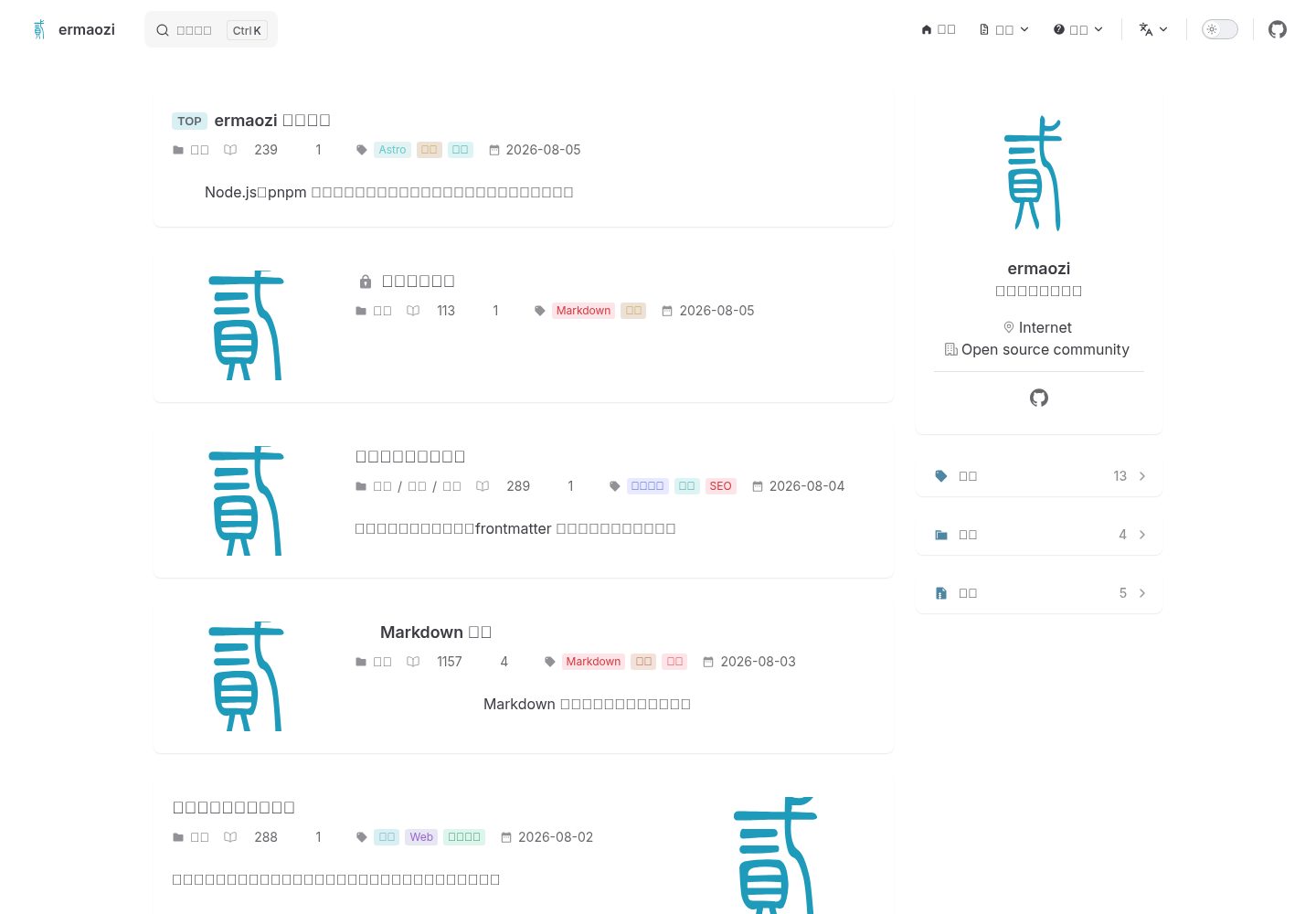
中英双语内容与 hreflang,支持根语言选择和语言切换器
Astro博客文档工具站
astro-theme-ermaozi — Astro 博客模板
作者 ermaozi
基于 Astro 的静态博客与文档主题,从 Plume 深度定制,支持中英双语、自动文档侧栏与 Pagefind 全文搜索,0.2 系列仍处于 beta。
看看你的网站会是什么样
浏览真实页面截图,比较内容排版与手机效果。点击下方缩略图切换,放大查看整页细节。
全部页面与视图 3
截图用于了解视觉与布局,交互效果请以实际项目为准。
采集于 2026-10-01查看来源
值得关注的模板亮点
从已有项目资料中,快速了解它的特点。
文档页自动生成分组侧栏、移动端导航和上一篇/下一篇链接
Pagefind 全文搜索,需在构建后验证索引
Shiki 语法高亮与丰富的 Markdown 扩展(提示块、标签页、Mermaid 等)
构建时 PBKDF2 + AES-GCM 内容加密,可加密整页或局部内容
内置 SEO 输出:规范链接、Open Graph、JSON-LD、站点地图、robots 和 llms.txt
模板详细介绍
astro-theme-ermaozi 是一个 Astro 静态主题,面向博客、知识库和产品文档站点,从 VuePress Theme Plume 深度定制而来。它提供中英双语路由与 hreflang、自动生成的文档侧栏、Pagefind 全文搜索、明暗与跟随系统三种主题,以及分类、标签、归档和客户端分页。内容分为博客文章、普通页面和文档三种类型,文档页通过 frontmatter 的 group、order、badge 控制侧栏分组、排序和徽标,并支持 Markdown 源码导出。
Markdown 增强包括 Shiki 语法高亮(明暗双主题、代码标题、行号、行高亮、复制按钮)、脚注、提示块、任务列表、高亮标记、文件树、代码树、步骤、窗口、表格复制、折叠面板、标签页和 Mermaid。主题还提供构建时 PBKDF2 + AES-GCM 的整页或局部内容加密、图片点击预览,以及 YouTube、Bilibili、音频、视频和 PDF 嵌入;SEO 方面包含规范链接、Open Graph、JSON-LD、站点地图、robots 和 llms.txt。评论、浏览量、点赞和热门文章默认关闭,启用前需在 site.config.mjs 中配置对应服务。
需要留意的是,README 明确说明 0.2 系列仍处于 beta,功能和配置尚未完全稳定,后续版本可能引入破坏性变更,建议在 beta 期间固定版本并在升级前查看发布说明。主题要求 Node.js 22.12+,开发模式不生成 Pagefind 索引,需运行构建和预览来验证搜索与生产输出。内容加密不能替代服务端访问控制,不应将密码或真正机密的内容提交到公开仓库。
Astro博客文档工具站
适合你的项目吗?
适用场景
- 搭建中英双语的个人博客或技术文章站点
- 构建带自动侧栏和全文搜索的产品文档或知识库
- 需要 Markdown 增强能力(代码高亮、Mermaid、标签页、提示块)的内容站点
- 希望以静态方式部署,并可选接入评论等外部服务的项目
适合人群
- 使用 Astro 并希望快速获得博客与文档双形态的开发者
- 需要中英双语路由和文档侧栏自动生成的技术写作团队
- 接受 beta 阶段可能发生破坏性变更、愿意固定版本的用户
- 偏好静态输出、不依赖后端即可部署的内容站点
上手与定制指南
结合仓库当前版本的说明,按下面的资料检查内容、配置与运行要求。
- 1
需要 Node.js 22.12+ 以及 npm、pnpm 或 Yarn;可用 npm create astro-theme-ermaozi 创建站点
- 2
日常修改集中在 site.config.mjs 和 content/,尽量不改 theme/ 以便后续更新主题
- 3
开发模式不生成 Pagefind 索引,需运行构建和预览来验证搜索与生产输出
- 4
启用评论、浏览量、点赞等功能前,需在 site.config.mjs 中配置对应服务
- 5
README 提示 0.2 系列为 beta,建议固定版本并关注发布说明中的破坏性变更
授权与来源资料
使用条件与限制
免费使用 · 保留许可声明本次收录的是公开仓库中采用 MIT 许可的免费版本;免费范围为该版本代码,不代表外部服务或第三方素材免费。
使用时需要遵守
- 允许免费使用、修改、商用和分发该版本代码。
- 分发代码副本或实质性部分时,保留原作者版权声明和完整 MIT 许可声明。
- 代码按现状提供;担保与责任限制以原许可证及适用法律为准。
额外费用与待核对事项
- 0.2 系列仍处于 beta 阶段,功能与配置尚未完全稳定,后续版本可能引入破坏性变更;建议在 beta 期间固定版本,并在升级前查看发布说明。
- 运行环境要求 Node.js 22.12 及以上版本,并使用 npm、pnpm 或 Yarn 之一作为包管理器。
- 开发模式不会生成 Pagefind 索引,需执行构建与预览命令才能验证搜索功能和生产输出。
- 评论、浏览量、点赞和热门文章默认关闭,启用前需在 site.config.mjs 中配置对应功能与服务地址;纯静态部署无需后端。
- Algolia、Waline、Twikoo 和 Artalk 仍需连接真实的外部服务,可能涉及账号或 API 密钥。
- 静态内容加密不能替代服务端访问控制,不应将密码或真正机密的内容提交到公开仓库。
- 代码许可证不自动覆盖用户自行添加的文章、图片或第三方素材,这些内容需另行确认授权。
- README 提及 Firebase 集成;启用相关动态功能前需自行配置,并核对 Firebase 的额度与收费。
- 演示图片、字体、图标及其他第三方素材需按各自许可核对,不能仅凭代码的 MIT 许可判断。
- 域名、托管、数据库、支付或 AI 等外部服务可能另外收费。
查看原文依据
Permission is hereby granted, free of charge
许可证原文
The `0.2` series is still in beta. Features and configuration are not yet fully stable, and future releases may introduce breaking changes.
README 原文
Requires Node.js 22.12+ and npm, pnpm, or Yarn.
README 原文
Development mode does not generate a Pagefind index; run `npm run build && npm run preview` to verify search and the production output.
README 原文
Comments, view counts, likes, and popular posts are disabled by default. Configure the corresponding features and service URLs in `site.config.mjs` before enabling them; a purely static deployment requires no backend.
README 原文
Algolia, Waline, Twikoo, and Artalk still require connections to actual services.
README 原文
Static content encryption is not a substitute for server-side access control: do not commit passwords or genuinely confidential content to a public repository.
README 原文
https://github.com/ermaozi/astro-theme-ermaozi/blob/main/LICENSEhttps://github.com/ermaozi/astro-theme-ermaozi/blob/main/README.mdThe code license does not automatically cover articles, images, or third-party materials you add.
README 原文
DeepSeek 根据仓库许可证和 README 整理 ·2026-10-01。结果仅覆盖已读取资料,依赖、图片、字体及后续条款变更以各自原文为准。
项目核对记录与介绍依据
模板资料
- 来源平台
- GitHub
- 资料与维护参考分
- 资料较完整 · 88 / 100
- 技术栈
- Astro
- 网站类型
- 博客 · 文档 · 工具站
这个分数如何计算
本站按许可资料(最高30分)、演示链接(12分)、预览图(10分)、Star数(15分)、记录的维护时间(15分)、描述完整度(8分)、功能记录(5分)和分类资料(5分)计算。它不是代码、安全或性能测试,也不是 Google 评分;有链接不代表已实测可用。
这个项目需要核对什么
- 记录的仓库更新时间
- 2026-09-08
- 截图检查日期
- 2026-10-01
已收录演示链接。请用你的内容与屏幕尺寸检查;有演示不代表表单、认证或支付已经可用。
目录记录的主要技术栈是 Astro。请通过依赖清单和锁文件核对实际版本与托管要求。这些说明基于收录资料,不代表代码审计或部署实测。
查看具体选型方法 →介绍的制作与核对状态
介绍由 AI 辅助整理目录与仓库资料。仓库作者不等于这篇介绍的审核者。
已完成服务器许可规则与 AI 来源核对;未经过人工编辑审核。
查看当时使用的来源资料
SHA-256: e9633e5c6fc346793da506fcc5565d731379dd7d8aaf72d5346a307b9836c6d2
2026-10-01T01:08:24.497Z
来源文件 / 仓库# ermaozi English | [简体中文](./readme-cn.md) `ermaozi` is an Astro static theme for blogs, knowledge bases, and product documentation, heavily customized from Plume. It includes bilingual routing, automatic documentation sidebars, Pagefind full-text search, dark mode, categories, tags, archives, SEO, and enhanced Markdown. > [!WARNING] > The `0.2` series is still in beta. Features and configuration are not yet fully stable, and future releases may introduce breaking changes. Pin your version during the beta period and review the release notes before upgrading. Live demo: <https://astro.ermao.net> Create a new site and automatically install dependencies: ```bash npm create astro-theme-ermaozi ``` You can also specify a directory or use the equivalent command for your package manager: ```bash npm create astro-theme-ermaozi my-site pnpm create astro-theme-ermaozi my-site yarn create astro-theme-ermaozi my-site ``` The interactive wizard lets you choose Simplified Chinese or English as the root language and decide whether to show the language switcher. For automated setup, append `-- --yes --lang=en-US --multilingual`; the generator adjusts content directories, permalinks, translation relationships, and internal links accordingly. ## Getting Started Requires Node.js 22.12+ and npm, pnpm, or Yarn. ```bash # npm npm install npm run dev # pnpm pnpm install pnpm dev # Yarn yarn install yarn dev ``` `dev` starts the Astro development server with hot reloading. Development mode does not generate a Pagefind index; run `npm run build && npm run preview` to verify search and the production output. `dev:fast` remains available as a legacy alias. ## Customize Your Site For your first site, follow the [beginner's quick start](./content/en/docs/guide/getting-started.md). Day-to-day changes only require `site.config.mjs` and `content/`; leaving `theme/` untouched makes future theme updates easier. `defineSiteConfig()` provides editor completion for common settings, and `npm run check` identifies common configuration errors. 1. Update the domain, site name, author, navigation, and optional services in [`site.config.mjs`](./site.config.mjs). 2. Replace [`public/img/logo.svg`](./public/img/logo.svg). 3. Remove the sample posts in `content/` and add your own Markdown files. 4. Run the `validate` script with your chosen package manager. In the default content structure, Chinese posts go in `content/blog/category/`, and English posts go in `content/en/blog/category/`. Documentation goes in `content/docs/` and `content/en/docs/`; setting `type: doc` automatically generates grouped sidebars and previous/next navigation. Use a stable `permalink` for long-lived pages; English translations point to the Chinese route through `translationOf`. Minimal frontmatter: ```yaml --- title: My post description: What the reader will learn. permalink: /blog/my-post/ createTime: 2026-08-05 tags: [Astro] type: post # post, doc, or page --- ``` Documentation pages can use `group`, `order`, and `badge` to control sidebar grouping, sorting, and badges. Without a `permalink`, the theme generates a route from the file path, stripping leading numeric prefixes such as `1.` used to sort files or directories. ## Built-in Features - Static output with three content types: blog posts, regular pages, and documentation - Chinese and English content with `hreflang` - Pagefind full-text search - Light, dark, and system themes - Categories, tags, archives, and client-side pagination - Automatic documentation sidebars, mobile documentation navigation, previous/next links, and Markdown source export - Shiki syntax highlighting with light and dark themes, code titles, line numbers, line highlighting, and copy buttons - Footnotes, callouts, task lists, `==highlighting==`, file trees, code trees, steps, windows, table copying, collapsible panels, tabs, and Mermaid - Build-time PBKDF2 + AES-GCM encryption for full pages or selected content, QR codes, and npm/GitHub status badges - Click-to-preview images and YouTube, Bilibili, audio, video, and PDF embeds - Canonical URLs, Open Graph, JSON-LD, sitemaps, robots, and llms.txt - Optional Giscus comments and a self-hosted interaction API Comments, view counts, likes, and popular posts are disabled by default. Configure the corresponding features and service URLs in `site.config.mjs` before enabling them; a purely static deployment requires no backend. Static content encryption is not a substitute for server-side access control: do not commit passwords or genuinely confidential content to a public repository. Algolia, Waline, Twikoo, and Artalk still require connections to actual services. ## Commands ```bash npm run check # Astro and TypeScript checks npm run build # Static build and search index npm run deploy # Generate deployable dist/ without uploading it npm test # Build output tests npm run test:visual # Browser interaction and responsive layout tests npm run audit # Route, SEO, privacy, and unsafe markup audit npm run validate # Full pre-release checks, excluding browser tests ``` The examples above use npm; pnpm and Yarn use the same script names. Use `pnpm run deploy` to avoid a conflict with pnpm's built-in `deploy` command. ## Static Deployment The setup wizard can generate configurations for GitHub Pages, GitLab Pages, Netlify, Vercel, or Firebase Hosting, or you can choose Custom. All three package managers produce the same `dist/` output: ```bash npm install && npm run deploy pnpm install && pnpm run deploy yarn install && yarn deploy ``` For Custom hosting, set `dist/` as the static publish directory. Use any of the lines above as your hosting platform's build command and `dist` as its output directory. For sites hosted under a subpath, set `base` in `site.config.mjs`; CI can also override the domain and subpath through `SITE_ORIGIN` and `BASE_PATH`. See [Deploy Your Site](./content/en/docs/guide/deployment.md) for full instructions. Dependency audit commands vary by package manager: use `npm audit --omit=dev`, `pnpm audit --prod`, or `yarn npm audit --environment production`, respectively. ## Publishing the Site Generator npm resolves `npm create astro-theme-ermaozi` to the stable release of `create-astro-theme-ermaozi` and runs it. Before publishing, check the template package from the generator directory: ```bash cd internal/create npm test npm pack --dry-run npm publish --access public ``` The public `npm create astro-theme-ermaozi` command only becomes available after the final step successfully publishes the package to npm; this project never publishes automatically during builds or tests. Stable releases use the npm `latest` tag, and prereleases use `beta`. Subsequent versions can be published automatically through [`.github/workflows/publish-npm.yml`](./.github/workflows/publish-npm.yml): 1. In the npm settings for `create-astro-theme-ermaozi`, configure a GitHub Actions Trusted Publisher with owner `ermaozi`, repository `astro-theme-ermaozi`, and workflow `publish-npm.yml`, and allow `npm publish`. 2. No `NPM_TOKEN` or GitHub Actions secret is needed; the workflow publishes using short-lived OIDC credentials. 3. Update the generator's `package.json` version to `x.y.z`, pass the full validation checks, then create and publish a GitHub Release tagged `vx.y.z`. The workflow reinstalls dependencies, runs `pnpm validate`, verifies that the release tag exactly matches the package version, and publishes through npm Trusted Publisher. It stops if the tag does not match or the version already exists. ## Project Structure The top level contains everyday content, public assets, site configuration, and files required by Astro. Theme implementation and maintenance scripts live in `theme/`, which regular site customization does not require you to edit. - `content/`: Chinese and English pages and sample posts - `public/`: Logos, images, and other static files published as-is - `site.config.mjs`: Site identity, navigation, and optional services - `theme/components/`: UI components and lightweight client-side interactions, without site-specific configuration - `theme/lib/`: Shared content, navigation, Markdown, and SEO logic - `theme/styles/`: Global variables, theme styles, and Plume compatibility styles - `theme/scripts/audit.mjs`: Standalone project audit When adding features, reuse shared logic from `theme/lib/` first. Pages assemble data, components handle presentation, and site-specific differences stay in `site.config.mjs` and Markdown. This lets the generator template and regular sites share the same code without maintaining two implementations. ## License and Attribution `theme/styles/vendor/` includes compatibility styles from VuePress Theme Plume. Their MIT license is preserved in [`theme/styles/vendor/LICENSE`](./theme/styles/vendor/LICENSE). Project code is licensed under the [MIT License](./LICENSE). See [`theme/licenses/THIRD_PARTY_NOTICES.md`](./theme/licenses/THIRD_PARTY_NOTICES.md) for third-party notices. The code license does not automatically cover articles, images, or third-party materials you add.
看看同类模板
对比同技术栈与用途的模板,找到更适合的视觉与内容结构。

astrowind
⭕️ AstroWind: A free template using Astro v7 and Tailwind CSS v4. Astro starter theme.
Astro · 博客

astro-paper
A minimal, accessible and SEO-friendly Astro blog theme.
Astro · 博客

fuwari
✨A static blog template built with Astro.
Astro · 博客

Firefly
Firefly 是一款基于 Astro 的静态博客主题,由 CuteLeaf 在 saicaca 的 Fuwari 模板基础上二次开发,主打清新美观的视觉风格。
Astro · 博客

astro-theme-cactus
A simple Astro theme. Use it to create your blog or website.
Astro · 作品集

astrofy
Astrofy is a free and open-source template for your Personal Portfolio Website built with Astro and TailwindCS…
Astro · 作品集