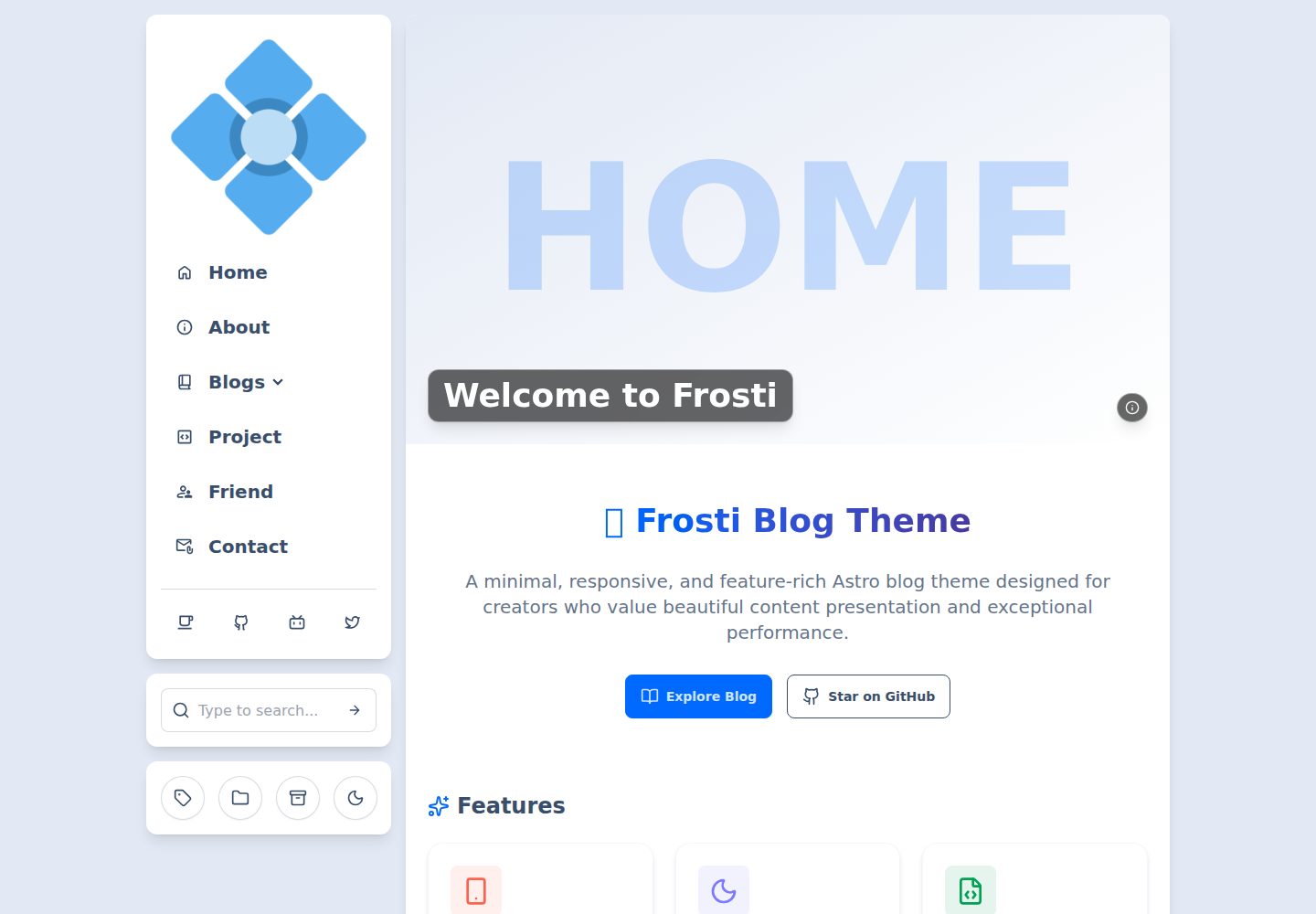
Light and dark modes, with themes based on daisyUI and code block themes based on Shiki
AstroBlog
Frosti — Astro Blog Template
By EveSunMaple
Frosti is a static blog template built with Astro, Tailwind CSS, and daisyUI. It includes light and dark themes, Pagefind search, RSS, and view transition animations, with site information, menus, and social links configured centrally via frosti.config.yaml.
Explore the design
Compare the page layouts and mobile experience. Open any screenshot for a closer look.
Desktop homepage1 / 3
Desktop captureTop of page
Actual screenshot captured by the server browser.
All pages & views 3
Screenshots show visual appearance; interactive behavior may differ.
Recorded 2026-10-05View source
What stands out
A quick read of the recorded project description.
Article search provided by Pagefind; requires running search:index to generate the index
View transition animations implemented with ClientRouter
Responsive design based on Tailwind CSS and daisyUI
Supports RSS subscription
Centralized configuration of site information, menus, user information, and social links via frosti.config.yaml
Template Details
Frosti is a static blog template developed with Astro. The repository is MIT-licensed, and the demo site is frosti.saroprock.com. The template uses frosti.config.yaml as its main configuration file, where you can set the browser tab text, site title and description, language code, favicon, as well as daisyUI-based light and dark themes and Shiki-based code block themes. Menu items support id, text, href, svg icon, and target, and can include submenus; social links can be configured separately for the sidebar and footer. Posts are managed through frontmatter fields: title, description, and pubDate are required, while image, categories, tags, badge, and draft are optional. Setting badge to Pin pins a post, and posts with draft: true do not appear in the list. UI text is managed centrally in src/i18n/translations.yaml, where you can add or remove languages or modify translations. Search is powered by Pagefind; after the first run or content updates, you need to run pnpm run search:index to generate the index. For comments, the repository provides a Waline stylesheet src/styles/waline.scss that matches the site style, and the README links to a tutorial for adding a comment system. The repository also includes a frosti.update.sh update script to pull the latest version and update project files according to the rules in .updateignore.
AstroBlog
Is it right for your project?
Use Cases
- Building a personal static blog and deploying it to a static hosting service
- Blog sites that need light/dark theme switching, article search, and RSS output
- Projects where site information, navigation, and social links are adjusted through a single YAML file
- Blogs that need multilingual UI text management
- Sites that want to integrate the Waline comment system and reuse the existing stylesheet
Suitable For
- Developers familiar with Astro and pnpm workflows
- Personal bloggers who prefer statically generated blogs without server-side rendering
- Writers who need to manage post metadata via Markdown frontmatter
- Users who want to use an MIT-licensed template and retain the copyright notice
Getting started & customization
Use these recorded setup notes alongside the repository instructions for your chosen version.
- 1
Install pnpm first, then clone the repository and run pnpm i to install dependencies
- 2
After the first run or content updates, run pnpm run search:index to generate the search index, then run pnpm run dev
- 3
Site information, themes, menus, user, and social links are configured in frosti.config.yaml
- 4
UI translations are maintained in src/i18n/translations.yaml and must correspond to site.language
- 5
You can use bash frosti.update.sh to update project files according to the rules in .updateignore
License & source material
Usage conditions & limitations
Free to use · keep license noticeThis entry covers the free version under the MIT license in the public repository; the free scope is the code of this version and does not imply that external services or third-party assets are free.
Must comply with when using
- You may use, modify, commercialize, and distribute the code of this version for free.
- When distributing copies or substantial portions of the code, retain the original author's copyright notice and the full MIT license notice.
- The code is provided as is; warranties and limitations of liability are governed by the original license and applicable law.
Additional costs & items to verify
- Demo images, fonts, icons, and other third-party assets must be checked against their respective licenses; the code's MIT license alone cannot be used to judge them.
- External services such as domains, hosting, databases, payments, or AI may incur separate charges.
- Before using search, you must run search:index after the first run or content updates; otherwise search will not work.
- The project requires the pnpm package manager for installation and building; if pnpm is not installed, install it globally first.
- Icons rely on the Iconify icon library; the svg field for configuring menus and social links must use Iconify icon codes.
- Light and dark themes are based on the theme options provided by daisyUI; custom themes must follow the daisyUI theme system.
- Code block theme styles come from Shiki; available themes are limited to the Shiki theme list.
- The comment system must be integrated by following the Waline tutorial linked in the README; the template itself does not include a ready-to-use comment backend.
View Original Text Basis
Permission is hereby granted, free of charge
Original License Text
**On first run or after updating content**, execute `search:index` to generate the search index:
Original README
1. Install pnpm package manager (if you haven't already)
Original README
Frosti uses [Iconify](https://icon-sets.iconify.design/) as its icon library.
Original README
- Themes are based on options provided by [daisyUI](https://daisyui.com/docs/themes/)
Original README
- Code block themes use styles from [Shiki](https://shiki.style/themes)
Original README
https://github.com/EveSunMaple/Frosti/blob/main/LICENSEhttps://github.com/EveSunMaple/Frosti/blob/main/README.md**Tutorial (Waline)**
Original README
Compiled by DeepSeek based on repository license and README ·2026-10-05. Results only cover the materials read; dependencies, images, fonts, and subsequent term changes are subject to their respective original texts.
Project checks & description sources
Template Information
- Source platforms
- Astro Themes
- Documentation and maintenance reference score
- More documented · 91 / 100
- Technologies
- Astro
- Website type
- Blog
How this score is calculated
Our heuristic uses license records (up to 30), a demo link (12), a preview (10), stars (15), recorded maintenance (15), description completeness (8), feature records (5) and classification data (5). It is not a code, security or performance test, or a Google score. A link does not establish tested functionality.
What to verify for this project
- Repository update recorded
- 2026-10-03
- Screenshot last checked
- 2026-10-05
A demo link is listed. Check it with your own content and viewport sizes; its presence does not confirm that forms, authentication or payments work.
The catalog identifies Astro as the primary stack. Check the actual dependency manifest and lockfile for versions and hosting requirements. These notes use recorded metadata, not a code audit or a deployment test.
Use a selection guide →How this description was prepared
AI-assisted description based on catalog records and repository material. Repository authors are not automatically the reviewers of this description.
Review declaration: [email protected] · 2026-10-05
Inspect the recorded source material
SHA-256: cab95ea5c10c833112c192d8037ed0d17ace40218b9ebe57e0b1e5d26a94be87
2026-10-05T11:02:44.471Z
Source file / repository<pre align="center">
A clean, elegant, and fast static blog template! 🚀 Built with Astro
</pre>
<div align="center">
<img alt="Frosti Logo" src="https://github.com/EveSunMaple/Frosti/blob/main/docs/logo.png" width="280px">
</div>
[](https://github.com/EveSunMaple/Frosti/blob/main/LICENSE) [](https://github.com/EveSunMaple/Frosti/releases) [](https://stackblitz.com/github/EveSunMaple/Frosti)
[**🖥️ Frosti Demo**](https://frosti.saroprock.com) / [**🌏 Chinese README**](https://github.com/EveSunMaple/Frosti/blob/main/docs/README.zh-CN.md) / [**❤️ My Blog**](https://www.saroprock.com)
## 📷 Preview

## ✨ Features
- ✅ **Light** / **Dark** mode available
- ✅ Super fast performance with excellent SEO
- ✅ View transition animations (using ClientRouter)
- ✅ Search functionality for your articles (using Pagefind)
- ✅ Responsive design built with [Tailwind CSS](https://tailwindcss.com/) and [daisyUI](https://daisyui.com/)
- ✅ RSS feed support
- 🛠️ Easy to use blog
- Customize your blog content in `frosti.config.yaml`
## 💬 Comment System
- **Tutorial (Waline)**
- https://frosti.saroprock.com/blog/adding-comment-systems
- **Custom styles (SCSS)**
- This repo provides a default, site-matching comment stylesheet at `src/styles/waline.scss`. You can use it as-is or modify it to fit your needs.
## ✒️ Article Information
| Name | Meaning | Required |
| :---------: | :-----------------: | :------: |
| title | Article title | Yes |
| description | Article description | Yes |
| pubDate | Publication date | Yes |
| image | Article cover image | No |
| categories | Article categories | No |
| tags | Article tags | No |
| badge | Article badge | No |
| draft | Draft status | No |
> [!TIP]
>
> - You can pin your article by setting the `badge` property to `Pin`
> - Setting `draft: true` will mark the article as a draft, and it won't appear in the article list
## ⬇️ Usage
1. Install pnpm package manager (if you haven't already)
```sh
npm i -g pnpm
```
2. Clone the project
```sh
git clone https://github.com/EveSunMaple/Frosti.git Frosti
```
3. Enter the project folder
```sh
cd Frosti
```
4. Install dependencies
```sh
pnpm i
```
### 5. Debug and Run the Project
**On first run or after updating content**, execute `search:index` to generate the search index:
```sh
# Generate the search index for development use
pnpm run search:index
pnpm run dev
```
## 🔧 Configuration
Frosti uses `frosti.config.yaml` as its configuration file, where you can configure the website's basic information, navigation bar, footer, and more.
### Website Basic Information (site)
```yaml
site:
tab: Frosti # Text displayed in the browser tab
title: Frosti # Website title
description: A clean, elegant, and fast static blog template! # Website description for SEO
language: en # Website language code, e.g., "en" for English, "zh" for Chinese
favicon: /favicon.ico # Website favicon path
```
### Theme Settings (theme)
```yaml
theme:
light: winter # Light mode theme, based on daisyUI themes
dark: dracula # Dark mode theme, based on daisyUI themes
code: github-dark # Code block theme style
```
- Themes are based on options provided by [daisyUI](https://daisyui.com/docs/themes/)
- Code block themes use styles from [Shiki](https://shiki.style/themes)
### Date Format (date_format)
```yaml
date_format: ddd MMM DD YYYY # Date display format
```
### Menu Configuration (menu)
```yaml
menu:
- id: home # Unique identifier for the menu item
text: Home # Text displayed in the menu
href: / # Link address
svg: "material-symbols:home-outline-rounded" # Icon
target: _self # Link target
```
Each menu item includes the following properties:
- `id`: Unique identifier
- `text`: Displayed text
- `href`: Link address
- `svg`: Icon code using [Iconify](https://icon-sets.iconify.design/) icon set
- `target`: Link target (`_self` for current window or `_blank` for new window)
#### Sub-menu Items (subItems)
You can configure sub-menu items by adding `subItems` with the same format as main menu items.
### User Information (user)
```yaml
user:
name: EveSunMaple # Username
site: "https://example.com" # User website
avatar: /profile.png # User avatar
```
### Social Media Configuration (social)
Sidebar and footer can have different social media links:
```yaml
sidebar:
social:
- href: "https://github.com/username" # Link address
ariaLabel: Github # Accessibility label
title: Github # Tooltip on hover
svg: "ri:github-line" # Icon code
```
### Icon Settings (icon)
Frosti uses [Iconify](https://icon-sets.iconify.design/) as its icon library. You can search for icons you like on their website, then copy the icon code to the `svg` field in the configuration file.
### Language Settings (language)
Frosti supports multiple languages, configured through:
1. Setting the default language in `frosti.config.yaml`:
```yaml
site:
language: en # Set to "en" for English, "zh" for Chinese
```
2. Managing all interface text translations in the `src/i18n/translations.yaml` file:
```yaml
en: # English translations
label:
noTag: No tags assigned
tagCard: Tags
# Other English labels...
zh: # Chinese translations
label:
noTag: 未分配标签
tagCard: 标签
# Other Chinese labels...
```
#### Adding or Modifying Translations
To add new language support or modify existing translations:
1. Add a new language code and corresponding translations in the `translations.yaml` file, or modify existing translations
2. Change `site.language` in `frosti.config.yaml` to your preferred language code
## 🚀 Automatic Updates
To keep your project up to date with the latest version of Frosti, you can use the provided update script.
```sh
bash frosti.update.sh
```
This script will:
1. **Clone the latest version** of the Frosti repository.
2. **Safely update** your project files, adding and overwriting files based on the `.updateignore` file.
3. **Intelligently delete** files that have been removed from the official repository, without affecting your ignored files.
4. **Clean up** any remaining empty folders and temporary files.
5. **Install or update** dependencies using `pnpm`.
## 👀 Issues
If you have any questions or suggestions, you can provide feedback or communicate with the developer by submitting Issues!
## 🎉 Acknowledgements
@[Saicaca](https://github.com/saicaca) Their inspiration was the main reason I created this theme
@[WRXinYue](https://github.com/WRXinYue) They helped me a lot when I was first getting started
Explore similar templates
Compare previews and descriptions within the same stack and category.

astrowind
AstroWind is a free, open-source Astro starter theme using Astro and Tailwind CSS, released under the MIT license.
Astro · Blog

astro-paper
AstroPaper is a minimal, responsive, accessible, and SEO-friendly Astro blog theme. Articles are stored as Markdown/MDX in src/content/posts/, with subdirectories affecting URLs.
Astro · Blog

fuwari
Fuwari is a static blog template built with Astro and Tailwind CSS for personal blogs. It manages posts as Markdown files in src/content/posts/, with frontmatter for title, date, description, cover, tags, categories, draft status, and language.
Astro · Blog

Firefly
Firefly is a clean personal blog theme forked from Astro and Fuwari, offering four background modes, single/double sidebar and list/grid layouts, Pagefind client-side full-text search, and a six-language UI.
Astro · Blog

astro-theme-cactus
Astro Cactus is an Astro-based blog and portfolio theme that uses Markdown/MDX content collections to manage posts, notes, and tags, with frontmatter type-checked by a schema.
Astro · Portfolio

astrofy
Astrofy is a free and open-source personal portfolio website template built with Astro and TailwindCSS, with built-in blog, CV timeline, project showcase, store, and RSS feed modules.
Astro · Portfolio