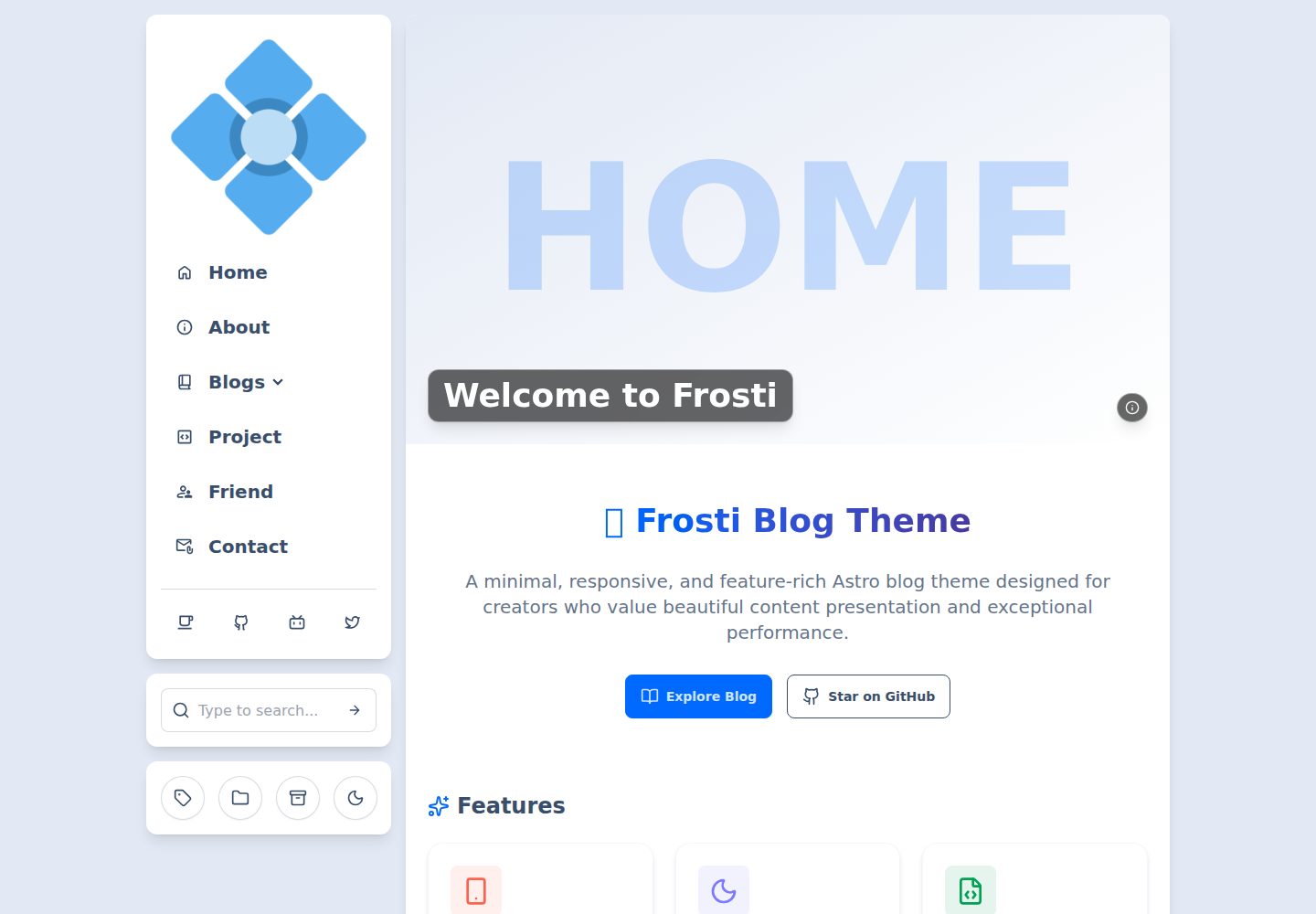
明暗两种模式,主题基于 daisyUI,代码块主题基于 Shiki
Astro博客
Frosti — Astro 博客模板
作者 EveSunMaple
Frosti 是一个基于 Astro 的静态博客模板,使用 Tailwind CSS 与 daisyUI 构建,内置明暗主题、Pagefind 搜索、RSS 与视图过渡动画,并通过 frosti.config.yaml 集中配置站点信息、菜单和社交链接。
看看你的网站会是什么样
浏览真实页面截图,比较内容排版与手机效果。点击下方缩略图切换,放大查看整页细节。
全部页面与视图 3
截图用于了解视觉与布局,交互效果请以实际项目为准。
采集于 2026-10-05查看来源
值得关注的模板亮点
从已有项目资料中,快速了解它的特点。
使用 Pagefind 提供文章搜索,需运行 search:index 生成索引
使用 ClientRouter 实现视图过渡动画
响应式设计,基于 Tailwind CSS 与 daisyUI
支持 RSS 订阅
通过 frosti.config.yaml 集中配置站点信息、菜单、用户信息与社交链接
模板详细介绍
Frosti 是一个用 Astro 开发的静态博客模板,仓库采用 MIT 许可,演示站为 frosti.saroprock.com。模板以 frosti.config.yaml 作为主要配置文件,可设置浏览器标签文字、站点标题与描述、语言代码、favicon,以及基于 daisyUI 的明暗主题和基于 Shiki 的代码块主题。菜单项支持 id、text、href、svg 图标和 target,并可添加子菜单;侧边栏与页脚可分别配置社交链接。文章使用 frontmatter 字段管理,title、description、pubDate 为必填,image、categories、tags、badge、draft 为可选,其中 badge 设为 Pin 可置顶文章,draft: true 的文章不会出现在列表中。界面文案集中在 src/i18n/translations.yaml 管理,可增删语言或修改翻译。搜索基于 Pagefind,首次运行或内容更新后需执行 pnpm run search:index 生成索引。评论系统方面,仓库提供了与站点风格匹配的 Waline 样式表 src/styles/waline.scss,README 链接到添加评论系统的教程。仓库还附带 frosti.update.sh 更新脚本,用于拉取最新版本并按 .updateignore 规则更新项目文件。
Astro博客
适合你的项目吗?
适用场景
- 搭建个人静态博客并部署到静态托管服务
- 需要明暗主题切换、文章搜索和 RSS 输出的博客站点
- 希望通过单个 YAML 文件调整站点信息、导航和社交链接的项目
- 需要多语言界面文案管理的博客
- 希望接入 Waline 评论系统并复用现成样式表的站点
适合人群
- 熟悉 Astro 与 pnpm 工作流的开发者
- 偏好静态生成博客、不依赖服务端渲染的个人博主
- 需要以 Markdown frontmatter 管理文章元数据的写作者
- 希望使用 MIT 许可模板并保留版权声明的使用者
上手与定制指南
结合仓库当前版本的说明,按下面的资料检查内容、配置与运行要求。
- 1
需要先安装 pnpm,再克隆仓库并执行 pnpm i 安装依赖
- 2
首次运行或更新内容后需执行 pnpm run search:index 生成搜索索引,再运行 pnpm run dev
- 3
站点信息、主题、菜单、用户与社交链接在 frosti.config.yaml 中配置
- 4
界面翻译在 src/i18n/translations.yaml 中维护,并需与 site.language 对应
- 5
可使用 bash frosti.update.sh 按 .updateignore 规则更新项目文件
授权与来源资料
使用条件与限制
免费使用 · 保留许可声明本次收录的是公开仓库中采用 MIT 许可的免费版本;免费范围为该版本代码,不代表外部服务或第三方素材免费。
使用时需要遵守
- 允许免费使用、修改、商用和分发该版本代码。
- 分发代码副本或实质性部分时,保留原作者版权声明和完整 MIT 许可声明。
- 代码按现状提供;担保与责任限制以原许可证及适用法律为准。
额外费用与待核对事项
- 演示图片、字体、图标及其他第三方素材需按各自许可核对,不能仅凭代码的 MIT 许可判断。
- 域名、托管、数据库、支付或 AI 等外部服务可能另外收费。
- 使用搜索功能前,首次运行或内容更新后必须执行 search:index 生成搜索索引,否则搜索不可用。
- 项目要求使用 pnpm 包管理器进行安装与构建,未安装 pnpm 时需先全局安装。
- 图标依赖 Iconify 图标库,配置菜单与社交链接的 svg 字段需使用 Iconify 图标代码。
- 明暗主题基于 daisyUI 提供的主题选项,自定义主题需遵循 daisyUI 主题体系。
- 代码块主题样式来自 Shiki,可选主题受 Shiki 主题列表限制。
- 评论系统需按 README 链接的 Waline 教程自行接入,模板本身不内置可直接使用的评论后端。
查看原文依据
Permission is hereby granted, free of charge
许可证原文
**On first run or after updating content**, execute `search:index` to generate the search index:
README 原文
1. Install pnpm package manager (if you haven't already)
README 原文
Frosti uses [Iconify](https://icon-sets.iconify.design/) as its icon library.
README 原文
- Themes are based on options provided by [daisyUI](https://daisyui.com/docs/themes/)
README 原文
- Code block themes use styles from [Shiki](https://shiki.style/themes)
README 原文
https://github.com/EveSunMaple/Frosti/blob/main/LICENSEhttps://github.com/EveSunMaple/Frosti/blob/main/README.md**Tutorial (Waline)**
README 原文
DeepSeek 根据仓库许可证和 README 整理 ·2026-10-05。结果仅覆盖已读取资料,依赖、图片、字体及后续条款变更以各自原文为准。
项目核对记录与介绍依据
模板资料
- 来源平台
- Astro Themes
- 资料与维护参考分
- 资料较完整 · 91 / 100
- 技术栈
- Astro
- 网站类型
- 博客
这个分数如何计算
本站按许可资料(最高30分)、演示链接(12分)、预览图(10分)、Star数(15分)、记录的维护时间(15分)、描述完整度(8分)、功能记录(5分)和分类资料(5分)计算。它不是代码、安全或性能测试,也不是 Google 评分;有链接不代表已实测可用。
这个项目需要核对什么
- 记录的仓库更新时间
- 2026-10-03
- 截图检查日期
- 2026-10-05
已收录演示链接。请用你的内容与屏幕尺寸检查;有演示不代表表单、认证或支付已经可用。
目录记录的主要技术栈是 Astro。请通过依赖清单和锁文件核对实际版本与托管要求。这些说明基于收录资料,不代表代码审计或部署实测。
查看具体选型方法 →介绍的制作与核对状态
介绍由 AI 辅助整理目录与仓库资料。仓库作者不等于这篇介绍的审核者。
审核声明: [email protected] · 2026-10-05
查看当时使用的来源资料
SHA-256: cab95ea5c10c833112c192d8037ed0d17ace40218b9ebe57e0b1e5d26a94be87
2026-10-05T11:02:44.471Z
来源文件 / 仓库<pre align="center">
A clean, elegant, and fast static blog template! 🚀 Built with Astro
</pre>
<div align="center">
<img alt="Frosti Logo" src="https://github.com/EveSunMaple/Frosti/blob/main/docs/logo.png" width="280px">
</div>
[](https://github.com/EveSunMaple/Frosti/blob/main/LICENSE) [](https://github.com/EveSunMaple/Frosti/releases) [](https://stackblitz.com/github/EveSunMaple/Frosti)
[**🖥️ Frosti Demo**](https://frosti.saroprock.com) / [**🌏 Chinese README**](https://github.com/EveSunMaple/Frosti/blob/main/docs/README.zh-CN.md) / [**❤️ My Blog**](https://www.saroprock.com)
## 📷 Preview

## ✨ Features
- ✅ **Light** / **Dark** mode available
- ✅ Super fast performance with excellent SEO
- ✅ View transition animations (using ClientRouter)
- ✅ Search functionality for your articles (using Pagefind)
- ✅ Responsive design built with [Tailwind CSS](https://tailwindcss.com/) and [daisyUI](https://daisyui.com/)
- ✅ RSS feed support
- 🛠️ Easy to use blog
- Customize your blog content in `frosti.config.yaml`
## 💬 Comment System
- **Tutorial (Waline)**
- https://frosti.saroprock.com/blog/adding-comment-systems
- **Custom styles (SCSS)**
- This repo provides a default, site-matching comment stylesheet at `src/styles/waline.scss`. You can use it as-is or modify it to fit your needs.
## ✒️ Article Information
| Name | Meaning | Required |
| :---------: | :-----------------: | :------: |
| title | Article title | Yes |
| description | Article description | Yes |
| pubDate | Publication date | Yes |
| image | Article cover image | No |
| categories | Article categories | No |
| tags | Article tags | No |
| badge | Article badge | No |
| draft | Draft status | No |
> [!TIP]
>
> - You can pin your article by setting the `badge` property to `Pin`
> - Setting `draft: true` will mark the article as a draft, and it won't appear in the article list
## ⬇️ Usage
1. Install pnpm package manager (if you haven't already)
```sh
npm i -g pnpm
```
2. Clone the project
```sh
git clone https://github.com/EveSunMaple/Frosti.git Frosti
```
3. Enter the project folder
```sh
cd Frosti
```
4. Install dependencies
```sh
pnpm i
```
### 5. Debug and Run the Project
**On first run or after updating content**, execute `search:index` to generate the search index:
```sh
# Generate the search index for development use
pnpm run search:index
pnpm run dev
```
## 🔧 Configuration
Frosti uses `frosti.config.yaml` as its configuration file, where you can configure the website's basic information, navigation bar, footer, and more.
### Website Basic Information (site)
```yaml
site:
tab: Frosti # Text displayed in the browser tab
title: Frosti # Website title
description: A clean, elegant, and fast static blog template! # Website description for SEO
language: en # Website language code, e.g., "en" for English, "zh" for Chinese
favicon: /favicon.ico # Website favicon path
```
### Theme Settings (theme)
```yaml
theme:
light: winter # Light mode theme, based on daisyUI themes
dark: dracula # Dark mode theme, based on daisyUI themes
code: github-dark # Code block theme style
```
- Themes are based on options provided by [daisyUI](https://daisyui.com/docs/themes/)
- Code block themes use styles from [Shiki](https://shiki.style/themes)
### Date Format (date_format)
```yaml
date_format: ddd MMM DD YYYY # Date display format
```
### Menu Configuration (menu)
```yaml
menu:
- id: home # Unique identifier for the menu item
text: Home # Text displayed in the menu
href: / # Link address
svg: "material-symbols:home-outline-rounded" # Icon
target: _self # Link target
```
Each menu item includes the following properties:
- `id`: Unique identifier
- `text`: Displayed text
- `href`: Link address
- `svg`: Icon code using [Iconify](https://icon-sets.iconify.design/) icon set
- `target`: Link target (`_self` for current window or `_blank` for new window)
#### Sub-menu Items (subItems)
You can configure sub-menu items by adding `subItems` with the same format as main menu items.
### User Information (user)
```yaml
user:
name: EveSunMaple # Username
site: "https://example.com" # User website
avatar: /profile.png # User avatar
```
### Social Media Configuration (social)
Sidebar and footer can have different social media links:
```yaml
sidebar:
social:
- href: "https://github.com/username" # Link address
ariaLabel: Github # Accessibility label
title: Github # Tooltip on hover
svg: "ri:github-line" # Icon code
```
### Icon Settings (icon)
Frosti uses [Iconify](https://icon-sets.iconify.design/) as its icon library. You can search for icons you like on their website, then copy the icon code to the `svg` field in the configuration file.
### Language Settings (language)
Frosti supports multiple languages, configured through:
1. Setting the default language in `frosti.config.yaml`:
```yaml
site:
language: en # Set to "en" for English, "zh" for Chinese
```
2. Managing all interface text translations in the `src/i18n/translations.yaml` file:
```yaml
en: # English translations
label:
noTag: No tags assigned
tagCard: Tags
# Other English labels...
zh: # Chinese translations
label:
noTag: 未分配标签
tagCard: 标签
# Other Chinese labels...
```
#### Adding or Modifying Translations
To add new language support or modify existing translations:
1. Add a new language code and corresponding translations in the `translations.yaml` file, or modify existing translations
2. Change `site.language` in `frosti.config.yaml` to your preferred language code
## 🚀 Automatic Updates
To keep your project up to date with the latest version of Frosti, you can use the provided update script.
```sh
bash frosti.update.sh
```
This script will:
1. **Clone the latest version** of the Frosti repository.
2. **Safely update** your project files, adding and overwriting files based on the `.updateignore` file.
3. **Intelligently delete** files that have been removed from the official repository, without affecting your ignored files.
4. **Clean up** any remaining empty folders and temporary files.
5. **Install or update** dependencies using `pnpm`.
## 👀 Issues
If you have any questions or suggestions, you can provide feedback or communicate with the developer by submitting Issues!
## 🎉 Acknowledgements
@[Saicaca](https://github.com/saicaca) Their inspiration was the main reason I created this theme
@[WRXinYue](https://github.com/WRXinYue) They helped me a lot when I was first getting started
看看同类模板
对比同技术栈与用途的模板,找到更适合的视觉与内容结构。

astrowind
⭕️ AstroWind: A free template using Astro v7 and Tailwind CSS v4. Astro starter theme.
Astro · 博客

astro-paper
A minimal, accessible and SEO-friendly Astro blog theme.
Astro · 博客

fuwari
✨A static blog template built with Astro.
Astro · 博客

Firefly
Firefly 是一款基于 Astro 的静态博客主题,由 CuteLeaf 在 saicaca 的 Fuwari 模板基础上二次开发,主打清新美观的视觉风格。
Astro · 博客

astro-theme-cactus
A simple Astro theme. Use it to create your blog or website.
Astro · 作品集

astrofy
Astrofy is a free and open-source template for your Personal Portfolio Website built with Astro and TailwindCS…
Astro · 作品集