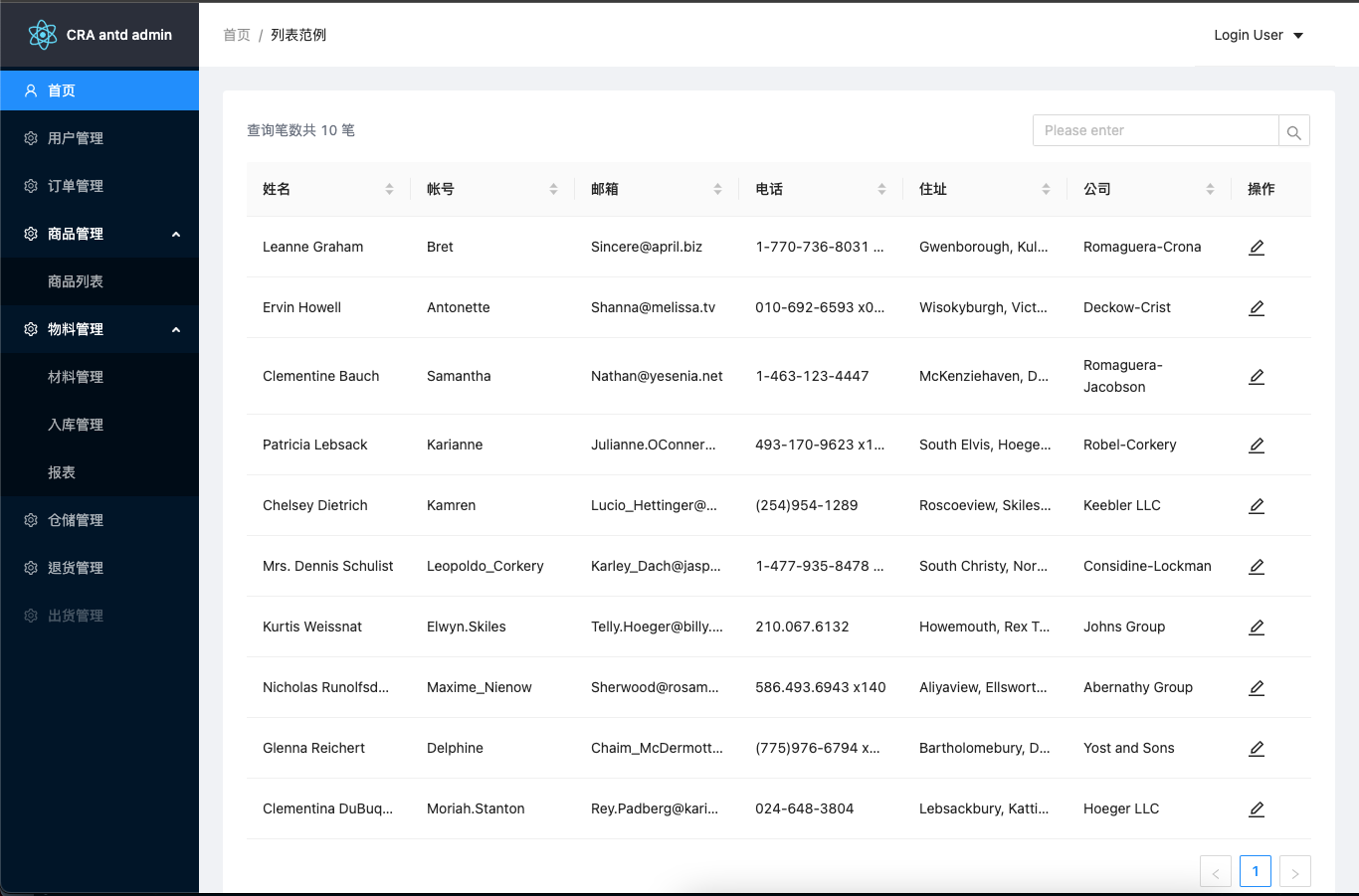
Based on Create React App, projects are generated directly with `--template antd-admin`
ReactAdmin dashboard
cra-template-antd-admin — React Admin dashboard Template
By FallOutChonny
An antd + TypeScript admin template for Create React App, with routing, styling solutions and data-fetching wrappers preconfigured.
Explore the design
Compare the page layouts and mobile experience. Open any screenshot for a closer look.
Author preview
Author-provided previewTop of page
Preview provided in the project README.
One original preview is available. Open the full image to inspect the design.
Screenshots show visual appearance; interactive behavior may differ.
Recorded 2026-10-02View source
What stands out
A quick read of the recorded project description.
Provides a basic layout with antd and includes a table list and CRUD example page
Integrates react-router, with routes centralized in lib/routes for use by Sider and App
Extends webpack via craco, supporting `@`-prefixed absolute imports and bundle analysis
Introduces both tailwindcss and styled-components, used for layout and custom component styles respectively
Includes react-query and a useQuery wrapper, plus hooks such as useModal and useTableRowSelection
Template Details
This is an admin template for Create React App, created with the `--template antd-admin` parameter. It sets up a basic layout with antd and integrates react-router, styled-components, tailwindcss, react-query, craco and a prettier commit hook, aiming to skip steps such as pulling in a layout, configuring routes, and setting up babel and webpack path aliases.
The template provides a Home page as a basic table list and CRUD example. The source is divided into components, hooks, lib, pages and utils: components includes Layout, Loading, Modal, Header, Sider, ErrorBoundary, Exception and others; hooks provides useModal and useTableRowSelection; lib contains routes, queryClient, useQuery and data-request-related types; utils contains env, form, history, request and webHelper. Routes are centralized in lib/routes for use by components such as Sider and App.
For builds, craco extends the webpack configuration without ejecting, supports absolute import paths prefixed with `@`, and integrates webpack-bundle-analyzer (`ANALYZE=true craco build`), babel-plugin-import and babel-plugin-styled-components. For styling, tailwindcss has purge enabled, and styled-components is used for custom components and overriding antd component styles.
Note: the repository has not been updated since 2021, and the README does not specify dependency versions or runtime environment requirements; the template layout contains no custom styles, the CRUD page is only an example, and actual data APIs must be integrated by the user.
ReactAdmin
Is it right for your project?
Use Cases
- You need an antd admin interface skeleton and do not want to configure routing and layout from scratch
- You want to customize CRA's webpack configuration and path aliases without ejecting
- Your project plans to use both tailwindcss and styled-components for styling
- You need react-query for data fetching and caching and want ready-made wrapper examples
Suitable For
- Developers building admin interfaces with Create React App and antd
- Teams that need a TypeScript admin template and accept the tailwindcss and styled-components combination
- Projects that want to reference the table CRUD, centralized route configuration and hook wrapper patterns
Getting started & customization
Use these recorded setup notes alongside the repository instructions for your chosen version.
- 1
Create a project with `npx create-react-app my-app --template antd-admin` or `yarn create react-app my-app --template antd-admin`
- 2
Node.js and npm or yarn must be installed beforehand
- 3
API addresses, application basename and similar settings are adjusted in src/utils/env.ts
- 4
Run bundle analysis with `ANALYZE=true craco build`
- 5
The repository was last updated in 2021 and the README does not list dependency versions; check dependency compatibility before use
License & source material
Usage conditions & limitations
Free to use · keep license noticeThis entry covers the free version under the MIT license in the public repository; the free scope is the code of that version and does not mean external services or third-party assets are free.
Must comply with when using
- You may use, modify, commercialize and distribute the code of this version for free.
- When distributing copies or substantial portions of the code, retain the original author's copyright notice and the full MIT license notice.
- The code is provided as is; warranties and limitations of liability are governed by the original license and applicable law.
Additional costs & items to verify
- Demo images, fonts, icons and other third-party assets must be checked against their respective licenses and cannot be judged solely by the code's MIT license.
- External services such as domains, hosting, databases, payments or AI may incur separate charges.
View Original Text Basis
https://github.com/FallOutChonny/cra-template-antd-admin/blob/master/LICENSEhttps://github.com/FallOutChonny/cra-template-antd-admin/blob/master/README.mdPermission is hereby granted, free of charge
Original License Text
Compiled by DeepSeek based on repository license and README ·2026-10-02. Results only cover the materials read; dependencies, images, fonts, and subsequent term changes are subject to their respective original texts.
Project checks & description sources
Template Information
- Source platforms
- GitHub
- Documentation and maintenance reference score
- Partly documented · 56 / 100
- Technologies
- React
- Website type
- Admin dashboard
How this score is calculated
Our heuristic uses license records (up to 30), a demo link (12), a preview (10), stars (15), recorded maintenance (15), description completeness (8), feature records (5) and classification data (5). It is not a code, security or performance test, or a Google score. A link does not establish tested functionality.
What to verify for this project
- Repository update recorded
- 2021-08-25
- Screenshot last checked
- 2026-10-02
No demo link is recorded. Use the repository instructions to evaluate the project locally; the screenshot alone cannot establish interactive behavior.
The catalog identifies React as the primary stack. Check the actual dependency manifest and lockfile for versions and hosting requirements. These notes use recorded metadata, not a code audit or a deployment test.
Use a selection guide →How this description was prepared
AI-assisted description based on catalog records and repository material. Repository authors are not automatically the reviewers of this description.
Automatically checked against source and license rules; no manual editorial review.
Inspect the recorded source material
SHA-256: cb6657a02c7e2d71626a5ccc9faf15b96016670a946997f1e3a65aa42c7f4014
2026-10-02T21:02:17.944Z
Source file / repository# cra-template-antd-admin
<!-- PROJECT SHIELDS -->
<!--
*** I'm using markdown "reference style" links for readability.
*** Reference links are enclosed in brackets [ ] instead of parentheses ( ).
*** See the bottom of this document for the declaration of the reference variables
*** for contributors-url, forks-url, etc. This is an optional, concise syntax you may use.
*** https://www.markdownguide.org/basic-syntax/#reference-style-links
-->
[![Contributors][contributors-shield]][contributors-url]
[![Forks][forks-shield]][forks-url]
[![Stargazers][stars-shield]][stars-url]
[![Issues][issues-shield]][issues-url]
[![MIT License][license-shield]][license-url]
[![LinkedIn][linkedin-shield]][linkedin-url]
The antd+TS, tailwindcss, styled-components, react-router, react-query template for [Create React App](https://create-react-app.dev/)
一款使用 antd 拉好基本佈局、並整合好 [router](https://reactrouter.com/), [styled-components](https://styled-components.com/), [tailwindcss](https://tailwindcss.com/), [prettier commit hook](https://prettier.io/docs/en/precommit.html) 和 [craco](https://github.com/gsoft-inc/craco) 設定的 CRA 樣板,讓你跳過拉佈局、設定路由、 babel 和 webpack 的路徑別名等等步驟,可以快速開始一個以 antd 作為基礎功能和 UI 的專案
<!-- PROJECT LOGO -->
<br />
<p align="center">
<a href="https://github.com/FalloutChonny/cra-template-antd-admin">
<img src="images/logo.png" alt="Logo" width="80" height="80">
</a>
<h3 align="center">cra-template-antd-admin</h3>
<p align="center">
An awesome cra template to jumpstart your projects!
<br />
<a href="https://github.com/FalloutChonny/cra-template-antd-admin"><strong>Explore the docs »</strong></a>
<br />
<br />
<a href="https://github.com/othneildrew/Best-README-Template">View Demo</a>
·
<a href="https://github.com/FalloutChonny/cra-template-antd-admin/issues">Report Bug</a>
·
<a href="https://github.com/FalloutChonny/cra-template-antd-admin/issues">Request Feature</a>
</p>
</p>
<!-- TABLE OF CONTENTS -->
<details open="open">
<summary>Table of Contents</summary>
<ol>
<li>
<a href="#about-the-project">About The Project</a>
<ul>
<li><a href="#built-with">Built With</a></li>
</ul>
</li>
<li>
<a href="#getting-started">Getting Started</a>
<ul>
<li><a href="#prerequisites">Prerequisites</a></li>
<li><a href="#installation">Installation</a></li>
</ul>
</li>
<li>
<a href="#folder-structure">Folder Structure</a>
</li>
<li><a href="#roadmap">Roadmap</a></li>
<li><a href="#contributing">Contributing</a></li>
<li><a href="#license">License</a></li>
<li><a href="#contact">Contact</a></li>
<li><a href="#acknowledgements">Acknowledgements</a></li>
</ol>
</details>
<!-- ABOUT THE PROJECT -->
## About The Project
[![Product Name Screen Shot][product-screenshot]](https://github.com/FallOutChonny/cra-template-antd-admin)
This is a [Create React App](https://create-react-app.dev/) template that integrates many tools and libs, it can let you start the development work directly and quickly without trivial steps to set up your project.
<!-- BUILT WITH -->
### Built with
- [ant design](https://github.com/ant-design/ant-design)
- basic layouts (do not include any custom styles, you can easily adjust it to what you want.)
- this template provides a page for basic CRUD actions sample.
- [craco](https://github.com/gsoft-inc/craco) for extend webpack config provided by create-react-app without eject
- absolute import path with `@` prefix, such as:
- @pages/Home
- @hooks/useModal
- @components/Layout
- webpack-bundle-analyzer - generate a interactive zoomable treemap to reivew your bundle.
- usage: `ANALYZE=true craco build`
- babel-plugin-import - only boundle the styles and components of antd that used by the app.
- babel-plugin-styled-components
- purge unused styles
- support css props in native html tag.
- [prettier](https://prettier.io/docs/en/precommit.html)
- pre-commit hook with husky, lint-staged, this can re-format your files that are marked as “staged” via git add before you commit.
- [tailwindcss](https://tailwindcss.com/)
- building layouts freely.
- purge enabled.
- [styled-components](https://styled-components.com/)
- building custom components.
- overriding antd component styles.
- [react-router](https://reactrouter.com/)
- The route setting has been written in lib/routes, which is provided to Sider, App or any other components.
- [react-query](https://react-query.tanstack.com/) - Fetch, cache and update data
<!-- GETTING STARTED -->
## Getting Started
To use this template, add --template antd-admin when creating a new app.
### Prerequisites
- [node](https://nodejs.org/en/)
- [npm](https://www.npmjs.com/) or [yarn](https://yarnpkg.com/)
### Installation
```sh
npx create-react-app my-app --template antd-admin
# or
yarn create react-app my-app --template antd-admin
```
It will create a directory called my-app inside the current folder.
<!-- FOLDER STRUCTURE -->
## Folder Structure
Inside that directory, it will generate the initial project structure and install the transitive dependencies:
```
my-app
├── README.md
├── node_modules
├── package.json
├── .gitignore
├── public
│ ├── img
│ │ ├── 403.svg
│ │ ├── 404.svg
│ │ ├── 500.svg
│ ├── favicon.ico
│ ├── index.html
│ └── manifest.json
└── src
├── components
│ ├── common
│ │ ├── Layout.tsx - basic page layout
│ │ ├── Loading.tsx - loading indicator
│ │ └── Modal.tsx - global modal
│ ├── icons - custom/extend icons
│ │ ├── Add.tsx
│ │ └── Edit.tsx
│ ├── ui - should be atomic and pure, like Button, Select, Tabs
│ │ ├── Header.tsx - the navbar of app
│ │ └── Sider.tsx - the left sider of app
│ ├── ErrorBoundary.tsx - handling react errors
│ └── Exception.tsx - feed back the 404/403/500 results
├── hooks
│ ├── useModal.ts - react hook for simplify the interaction with Modal
│ └── useTableRowSelection.ts - react hook for simplify the interaction with Table
├── lib
│ ├── queryClient.ts - create a query client for react-query provider
│ ├── routes.ts - global route setting
│ ├── types.ts - types about data fetching
│ └── useQuery.ts - react-query's useQuery wrapper
├── pages
│ ├── Home - basic table list, CRUD example page
├── utils
│ ├── env.ts - app config such as `api url`, `app basename`
│ ├── form.ts - antd form helpers
│ ├── history.ts - global history
│ ├── request.ts - simple custom fetch wrapper
│ └── webHelper.ts - util functions
├── App.js
├── App.test.js
├── index.css
├── index.js
└── serviceWorker.js
└── setupTests.js
```
<!-- ROADMAP -->
## Roadmap
See the [open issues](https://github.com/FallOutChonny/cra-template-antd-admin/issues) for a list of proposed features (and known issues).
<!-- CONTRIBUTING -->
## Contributing
Contributions are what make the open source community such an amazing place to be learn, inspire, and create. Any contributions you make are **greatly appreciated**.
1. Fork the Project
2. Create your Feature Branch (`git checkout -b feature/AmazingFeature`)
3. Commit your Changes (`git commit -m 'Add some AmazingFeature'`)
4. Push to the Branch (`git push origin feature/AmazingFeature`)
5. Open a Pull Request
<!-- LICENSE -->
## License
Distributed under the MIT License. See `LICENSE` for more information.
<!-- CONTACT -->
## Contact
Chonny Chu - [email protected]
Project Link - [https://github.com/FallOutChonny/cra-template-antd-admin](https://github.com/FallOutChonny/cra-template-antd-admin)
<!-- ACKNOWLEDGEMENTS -->
## Acknowledgements
- [Ant-Design](https://img.shields.io/github/contributors/othneildrew/Best-README-Template.svg?style=for-the-badge)
- [Create-React-App](https://github.com/othneildrew/Best-README-Template/graphs/contributors)
<!-- MARKDOWN LINKS & IMAGES -->
<!-- https://www.markdownguide.org/basic-syntax/#reference-style-links -->
[contributors-shield]: https://img.shields.io/github/contributors/FallOutChonny/repo.svg?style=for-the-badge
[contributors-url]: https://github.com/FallOutChonny/cra-template-antd-admin/graphs/contributors
[forks-shield]: https://img.shields.io/github/forks/FallOutChonny/repo.svg?style=for-the-badge
[forks-url]: https://github.com/FallOutChonny/cra-template-antd-admin/network/members
[stars-shield]: https://img.shields.io/github/stars/falloutchonny/repo.svg?style=for-the-badge
[stars-url]: https://github.com/FallOutChonny/cra-template-antd-admin/stargazers
[issues-shield]: https://img.shields.io/github/issues/falloutchonny/repo.svg?style=for-the-badge
[issues-url]: https://github.com/FallOutChonny/cra-template-antd-admin/issues
[license-shield]: https://img.shields.io/github/license/falloutchonny/repo.svg?style=for-the-badge
[license-url]: https://github.com/FallOutChonny/cra-template-antd-admin/blob/master/LICENSE.txt
[linkedin-shield]: https://img.shields.io/badge/-LinkedIn-black.svg?style=for-the-badge&logo=linkedin&colorB=555
[linkedin-url]: https://linkedin.com/in/FallOutChonny
[product-screenshot]: screenshots/screenshots1.png
Explore similar templates
Compare previews and descriptions within the same stack and category.
ant-design-pro
Ant Design Pro is an enterprise-grade React admin scaffold built on React 19, Umi Max 4, and antd 6 with TypeScript.
React · Admin dashboard

coreui-free-react-admin-template
CoreUI's free React admin template, built on React and the CoreUI component library, provides dashboard layouts, sidebar navigation, routing, and example views. It includes .cursorrules, ARCHITECTURE.md, and DEVELOPMENT.md context files, plus JSDoc comments and PropTypes, to support AI-assisted development.
React · Admin dashboard

fastapi-react
A Cookiecutter template for FastAPI + React (TypeScript) full-stack projects, integrating PostgreSQL, SQLAlchemy, Alembic, Celery, Redis, JWT authentication, a react-admin admin panel, and a Docker Compose development environment with Nginx reverse proxy.
React · Admin dashboard

react-antd-admin-template
A React + Ant Design admin template for mid- and back-office products, with built-in login/logout, dynamic routing, permission checks, and user management.
React · Admin dashboard

react-saas-template
A React and Material-UI template for SaaS or admin websites, offering dashboard, chart, blog, payment, and file upload components. It uses Create-React-App, React-Router, Recharts, React-Stripe-js, React-Dropzone, and React-Cropper, with theme colors centralized in src/theme.js.
React · Admin dashboard

react-material-admin
React Material Admin is an MIT-licensed React admin template by Flatlogic, built on Material-UI. It provides dashboards, charts, tables, authentication, profile, and notification pages, with three color themes and responsive layouts.
React · Admin dashboard