基于 Create React App,通过 `--template antd-admin` 直接生成项目
React后台
cra-template-antd-admin — React 后台模板
作者 FallOutChonny
基于 Create React App 的 antd + TypeScript 后台管理模板,预置路由、样式方案与数据请求封装。
看看你的网站会是什么样
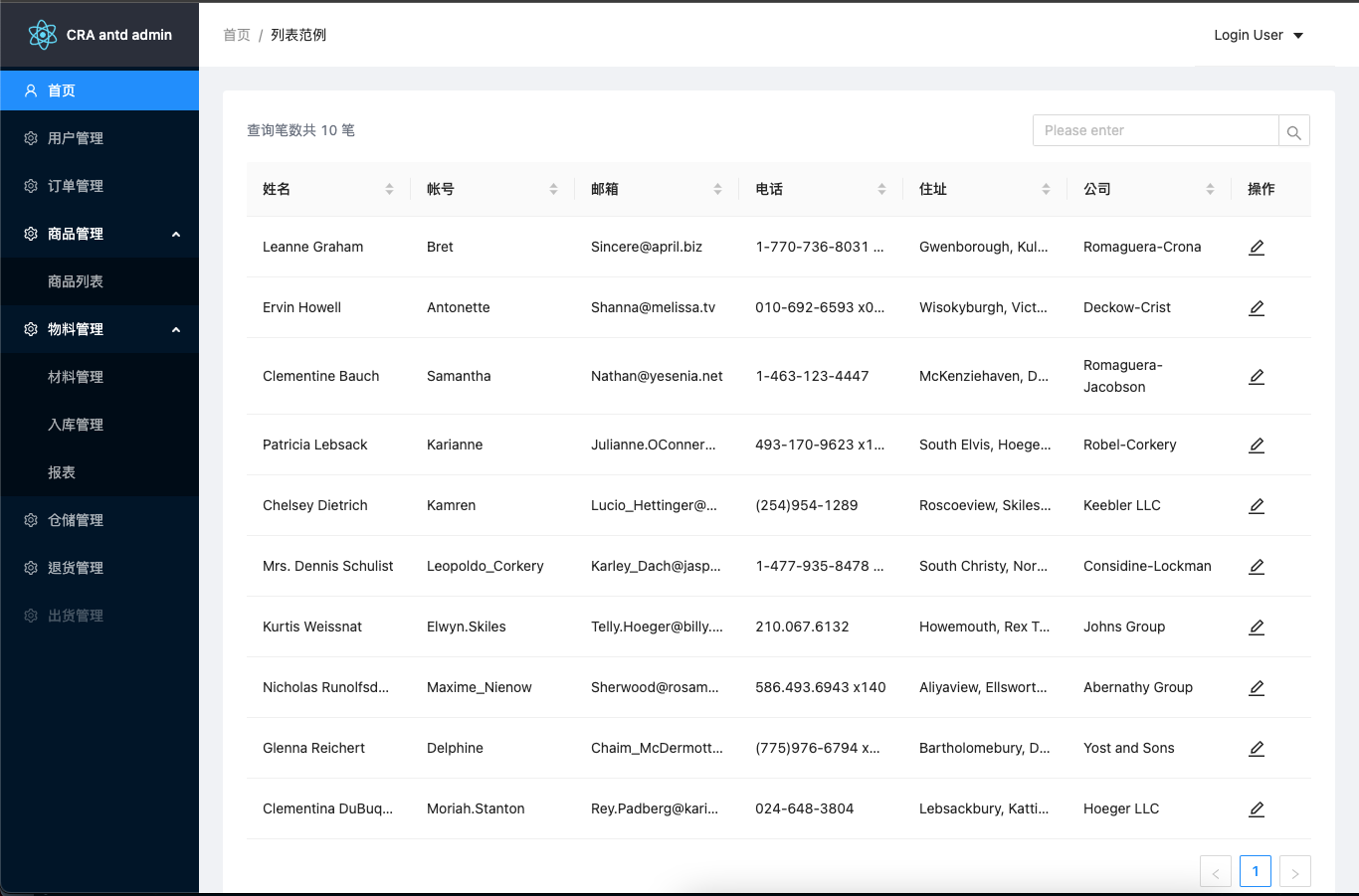
浏览真实页面截图,比较内容排版与手机效果。点击下方缩略图切换,放大查看整页细节。
目前有 1 张原始预览,可打开完整图片查看设计细节。
截图用于了解视觉与布局,交互效果请以实际项目为准。
采集于 2026-10-02查看来源
值得关注的模板亮点
从已有项目资料中,快速了解它的特点。
用 antd 提供基础布局,并附带一个表格列表与 CRUD 示例页面
集成 react-router,路由集中配置在 lib/routes 中供 Sider、App 使用
通过 craco 扩展 webpack,支持 `@` 前缀绝对导入与 bundle 分析
同时引入 tailwindcss 与 styled-components,分别用于布局与自定义组件样式
内置 react-query 与 useQuery 封装,以及 useModal、useTableRowSelection 等 hooks
模板详细介绍
这是一个用于 Create React App 的后台管理模板,通过 `--template antd-admin` 参数创建项目。它用 antd 搭好基本布局,并整合了 react-router、styled-components、tailwindcss、react-query、craco 以及 prettier 提交钩子,目的是省去拉布局、配置路由、设置 babel 与 webpack 路径别名等步骤。
模板提供 Home 页面作为基础表格列表与 CRUD 示例,源码按 components、hooks、lib、pages、utils 划分:components 下有 Layout、Loading、Modal、Header、Sider、ErrorBoundary、Exception 等;hooks 提供 useModal 与 useTableRowSelection;lib 包含 routes、queryClient、useQuery 与数据请求相关类型;utils 包含 env、form、history、request 与 webHelper。路由集中写在 lib/routes 中,供 Sider、App 等组件使用。
构建方面,craco 用于在不 eject 的前提下扩展 webpack 配置,支持以 `@` 为前缀的绝对导入路径,并接入 webpack-bundle-analyzer(`ANALYZE=true craco build`)、babel-plugin-import 与 babel-plugin-styled-components。样式上 tailwindcss 启用了 purge,styled-components 用于自定义组件和覆盖 antd 组件样式。
需要注意:仓库更新停留在 2021 年,README 中未给出依赖版本与运行环境要求;模板的布局不含自定义样式,CRUD 页面仅为示例,实际数据接口需自行接入。
React后台
适合你的项目吗?
适用场景
- 需要 antd 后台管理界面骨架,不想从零配置路由与布局
- 希望在不 eject 的情况下自定义 CRA 的 webpack 配置与路径别名
- 项目计划同时使用 tailwindcss 与 styled-components 组织样式
- 需要 react-query 做数据获取与缓存,并希望有现成的封装示例
适合人群
- 使用 Create React App 与 antd 搭建后台管理界面的开发者
- 需要 TypeScript 后台模板并接受 tailwindcss、styled-components 组合的团队
- 希望参考表格 CRUD、路由集中配置与 hooks 封装写法的项目
上手与定制指南
结合仓库当前版本的说明,按下面的资料检查内容、配置与运行要求。
- 1
使用 `npx create-react-app my-app --template antd-admin` 或 `yarn create react-app my-app --template antd-admin` 创建项目
- 2
需要预先安装 Node.js 以及 npm 或 yarn
- 3
接口地址、应用 basename 等配置在 src/utils/env.ts 中调整
- 4
运行 bundle 分析使用 `ANALYZE=true craco build`
- 5
仓库最后更新于 2021 年,README 未列出依赖版本,使用前建议核对依赖兼容性
授权与来源资料
使用条件与限制
免费使用 · 保留许可声明本次收录的是公开仓库中采用 MIT 许可的免费版本;免费范围为该版本代码,不代表外部服务或第三方素材免费。
使用时需要遵守
- 允许免费使用、修改、商用和分发该版本代码。
- 分发代码副本或实质性部分时,保留原作者版权声明和完整 MIT 许可声明。
- 代码按现状提供;担保与责任限制以原许可证及适用法律为准。
额外费用与待核对事项
- 演示图片、字体、图标及其他第三方素材需按各自许可核对,不能仅凭代码的 MIT 许可判断。
- 域名、托管、数据库、支付或 AI 等外部服务可能另外收费。
查看原文依据
https://github.com/FallOutChonny/cra-template-antd-admin/blob/master/LICENSEhttps://github.com/FallOutChonny/cra-template-antd-admin/blob/master/README.mdPermission is hereby granted, free of charge
许可证原文
DeepSeek 根据仓库许可证和 README 整理 ·2026-10-02。结果仅覆盖已读取资料,依赖、图片、字体及后续条款变更以各自原文为准。
项目核对记录与介绍依据
模板资料
- 来源平台
- GitHub
- 资料与维护参考分
- 资料一般 · 56 / 100
- 技术栈
- React
- 网站类型
- 后台
这个分数如何计算
本站按许可资料(最高30分)、演示链接(12分)、预览图(10分)、Star数(15分)、记录的维护时间(15分)、描述完整度(8分)、功能记录(5分)和分类资料(5分)计算。它不是代码、安全或性能测试,也不是 Google 评分;有链接不代表已实测可用。
这个项目需要核对什么
- 记录的仓库更新时间
- 2021-08-25
- 截图检查日期
- 2026-10-02
目前没有记录演示链接。请依据仓库说明在本地评估;仅凭截图无法确认交互行为。
目录记录的主要技术栈是 React。请通过依赖清单和锁文件核对实际版本与托管要求。这些说明基于收录资料,不代表代码审计或部署实测。
查看具体选型方法 →介绍的制作与核对状态
介绍由 AI 辅助整理目录与仓库资料。仓库作者不等于这篇介绍的审核者。
已完成服务器许可规则与 AI 来源核对;未经过人工编辑审核。
查看当时使用的来源资料
SHA-256: cb6657a02c7e2d71626a5ccc9faf15b96016670a946997f1e3a65aa42c7f4014
2026-10-02T21:02:17.944Z
来源文件 / 仓库# cra-template-antd-admin
<!-- PROJECT SHIELDS -->
<!--
*** I'm using markdown "reference style" links for readability.
*** Reference links are enclosed in brackets [ ] instead of parentheses ( ).
*** See the bottom of this document for the declaration of the reference variables
*** for contributors-url, forks-url, etc. This is an optional, concise syntax you may use.
*** https://www.markdownguide.org/basic-syntax/#reference-style-links
-->
[![Contributors][contributors-shield]][contributors-url]
[![Forks][forks-shield]][forks-url]
[![Stargazers][stars-shield]][stars-url]
[![Issues][issues-shield]][issues-url]
[![MIT License][license-shield]][license-url]
[![LinkedIn][linkedin-shield]][linkedin-url]
The antd+TS, tailwindcss, styled-components, react-router, react-query template for [Create React App](https://create-react-app.dev/)
一款使用 antd 拉好基本佈局、並整合好 [router](https://reactrouter.com/), [styled-components](https://styled-components.com/), [tailwindcss](https://tailwindcss.com/), [prettier commit hook](https://prettier.io/docs/en/precommit.html) 和 [craco](https://github.com/gsoft-inc/craco) 設定的 CRA 樣板,讓你跳過拉佈局、設定路由、 babel 和 webpack 的路徑別名等等步驟,可以快速開始一個以 antd 作為基礎功能和 UI 的專案
<!-- PROJECT LOGO -->
<br />
<p align="center">
<a href="https://github.com/FalloutChonny/cra-template-antd-admin">
<img src="images/logo.png" alt="Logo" width="80" height="80">
</a>
<h3 align="center">cra-template-antd-admin</h3>
<p align="center">
An awesome cra template to jumpstart your projects!
<br />
<a href="https://github.com/FalloutChonny/cra-template-antd-admin"><strong>Explore the docs »</strong></a>
<br />
<br />
<a href="https://github.com/othneildrew/Best-README-Template">View Demo</a>
·
<a href="https://github.com/FalloutChonny/cra-template-antd-admin/issues">Report Bug</a>
·
<a href="https://github.com/FalloutChonny/cra-template-antd-admin/issues">Request Feature</a>
</p>
</p>
<!-- TABLE OF CONTENTS -->
<details open="open">
<summary>Table of Contents</summary>
<ol>
<li>
<a href="#about-the-project">About The Project</a>
<ul>
<li><a href="#built-with">Built With</a></li>
</ul>
</li>
<li>
<a href="#getting-started">Getting Started</a>
<ul>
<li><a href="#prerequisites">Prerequisites</a></li>
<li><a href="#installation">Installation</a></li>
</ul>
</li>
<li>
<a href="#folder-structure">Folder Structure</a>
</li>
<li><a href="#roadmap">Roadmap</a></li>
<li><a href="#contributing">Contributing</a></li>
<li><a href="#license">License</a></li>
<li><a href="#contact">Contact</a></li>
<li><a href="#acknowledgements">Acknowledgements</a></li>
</ol>
</details>
<!-- ABOUT THE PROJECT -->
## About The Project
[![Product Name Screen Shot][product-screenshot]](https://github.com/FallOutChonny/cra-template-antd-admin)
This is a [Create React App](https://create-react-app.dev/) template that integrates many tools and libs, it can let you start the development work directly and quickly without trivial steps to set up your project.
<!-- BUILT WITH -->
### Built with
- [ant design](https://github.com/ant-design/ant-design)
- basic layouts (do not include any custom styles, you can easily adjust it to what you want.)
- this template provides a page for basic CRUD actions sample.
- [craco](https://github.com/gsoft-inc/craco) for extend webpack config provided by create-react-app without eject
- absolute import path with `@` prefix, such as:
- @pages/Home
- @hooks/useModal
- @components/Layout
- webpack-bundle-analyzer - generate a interactive zoomable treemap to reivew your bundle.
- usage: `ANALYZE=true craco build`
- babel-plugin-import - only boundle the styles and components of antd that used by the app.
- babel-plugin-styled-components
- purge unused styles
- support css props in native html tag.
- [prettier](https://prettier.io/docs/en/precommit.html)
- pre-commit hook with husky, lint-staged, this can re-format your files that are marked as “staged” via git add before you commit.
- [tailwindcss](https://tailwindcss.com/)
- building layouts freely.
- purge enabled.
- [styled-components](https://styled-components.com/)
- building custom components.
- overriding antd component styles.
- [react-router](https://reactrouter.com/)
- The route setting has been written in lib/routes, which is provided to Sider, App or any other components.
- [react-query](https://react-query.tanstack.com/) - Fetch, cache and update data
<!-- GETTING STARTED -->
## Getting Started
To use this template, add --template antd-admin when creating a new app.
### Prerequisites
- [node](https://nodejs.org/en/)
- [npm](https://www.npmjs.com/) or [yarn](https://yarnpkg.com/)
### Installation
```sh
npx create-react-app my-app --template antd-admin
# or
yarn create react-app my-app --template antd-admin
```
It will create a directory called my-app inside the current folder.
<!-- FOLDER STRUCTURE -->
## Folder Structure
Inside that directory, it will generate the initial project structure and install the transitive dependencies:
```
my-app
├── README.md
├── node_modules
├── package.json
├── .gitignore
├── public
│ ├── img
│ │ ├── 403.svg
│ │ ├── 404.svg
│ │ ├── 500.svg
│ ├── favicon.ico
│ ├── index.html
│ └── manifest.json
└── src
├── components
│ ├── common
│ │ ├── Layout.tsx - basic page layout
│ │ ├── Loading.tsx - loading indicator
│ │ └── Modal.tsx - global modal
│ ├── icons - custom/extend icons
│ │ ├── Add.tsx
│ │ └── Edit.tsx
│ ├── ui - should be atomic and pure, like Button, Select, Tabs
│ │ ├── Header.tsx - the navbar of app
│ │ └── Sider.tsx - the left sider of app
│ ├── ErrorBoundary.tsx - handling react errors
│ └── Exception.tsx - feed back the 404/403/500 results
├── hooks
│ ├── useModal.ts - react hook for simplify the interaction with Modal
│ └── useTableRowSelection.ts - react hook for simplify the interaction with Table
├── lib
│ ├── queryClient.ts - create a query client for react-query provider
│ ├── routes.ts - global route setting
│ ├── types.ts - types about data fetching
│ └── useQuery.ts - react-query's useQuery wrapper
├── pages
│ ├── Home - basic table list, CRUD example page
├── utils
│ ├── env.ts - app config such as `api url`, `app basename`
│ ├── form.ts - antd form helpers
│ ├── history.ts - global history
│ ├── request.ts - simple custom fetch wrapper
│ └── webHelper.ts - util functions
├── App.js
├── App.test.js
├── index.css
├── index.js
└── serviceWorker.js
└── setupTests.js
```
<!-- ROADMAP -->
## Roadmap
See the [open issues](https://github.com/FallOutChonny/cra-template-antd-admin/issues) for a list of proposed features (and known issues).
<!-- CONTRIBUTING -->
## Contributing
Contributions are what make the open source community such an amazing place to be learn, inspire, and create. Any contributions you make are **greatly appreciated**.
1. Fork the Project
2. Create your Feature Branch (`git checkout -b feature/AmazingFeature`)
3. Commit your Changes (`git commit -m 'Add some AmazingFeature'`)
4. Push to the Branch (`git push origin feature/AmazingFeature`)
5. Open a Pull Request
<!-- LICENSE -->
## License
Distributed under the MIT License. See `LICENSE` for more information.
<!-- CONTACT -->
## Contact
Chonny Chu - [email protected]
Project Link - [https://github.com/FallOutChonny/cra-template-antd-admin](https://github.com/FallOutChonny/cra-template-antd-admin)
<!-- ACKNOWLEDGEMENTS -->
## Acknowledgements
- [Ant-Design](https://img.shields.io/github/contributors/othneildrew/Best-README-Template.svg?style=for-the-badge)
- [Create-React-App](https://github.com/othneildrew/Best-README-Template/graphs/contributors)
<!-- MARKDOWN LINKS & IMAGES -->
<!-- https://www.markdownguide.org/basic-syntax/#reference-style-links -->
[contributors-shield]: https://img.shields.io/github/contributors/FallOutChonny/repo.svg?style=for-the-badge
[contributors-url]: https://github.com/FallOutChonny/cra-template-antd-admin/graphs/contributors
[forks-shield]: https://img.shields.io/github/forks/FallOutChonny/repo.svg?style=for-the-badge
[forks-url]: https://github.com/FallOutChonny/cra-template-antd-admin/network/members
[stars-shield]: https://img.shields.io/github/stars/falloutchonny/repo.svg?style=for-the-badge
[stars-url]: https://github.com/FallOutChonny/cra-template-antd-admin/stargazers
[issues-shield]: https://img.shields.io/github/issues/falloutchonny/repo.svg?style=for-the-badge
[issues-url]: https://github.com/FallOutChonny/cra-template-antd-admin/issues
[license-shield]: https://img.shields.io/github/license/falloutchonny/repo.svg?style=for-the-badge
[license-url]: https://github.com/FallOutChonny/cra-template-antd-admin/blob/master/LICENSE.txt
[linkedin-shield]: https://img.shields.io/badge/-LinkedIn-black.svg?style=for-the-badge&logo=linkedin&colorB=555
[linkedin-url]: https://linkedin.com/in/FallOutChonny
[product-screenshot]: screenshots/screenshots1.png
看看同类模板
对比同技术栈与用途的模板,找到更适合的视觉与内容结构。
ant-design-pro
Ant Design Pro 是 Ant Design 官方推出的企业级中后台前端脚手架,基于 React 19、Umi Max 4 和 antd 6 构建,内置 TypeScript 支持。
React · 后台

coreui-free-react-admin-template
Free React Admin & Dashboard Template Built for AI-Assisted Development
React · 后台

fastapi-react
fastapi-react 是一个基于 Cookiecutter 的模板,用于快速搭建 FastAPI 与 React(TypeScript)的全栈项目。
React · 后台

react-antd-admin-template
一个基于React+Antd的后台管理模版,在线预览https://nlrx-wjc.github.io/react-antd-admin-template/
React · 后台

react-saas-template
🌊 Template for building an SaaS / admin website using React + Material-UI
React · 后台

react-material-admin
☄️React Material Admin is a React template built with Material-UI
React · 后台