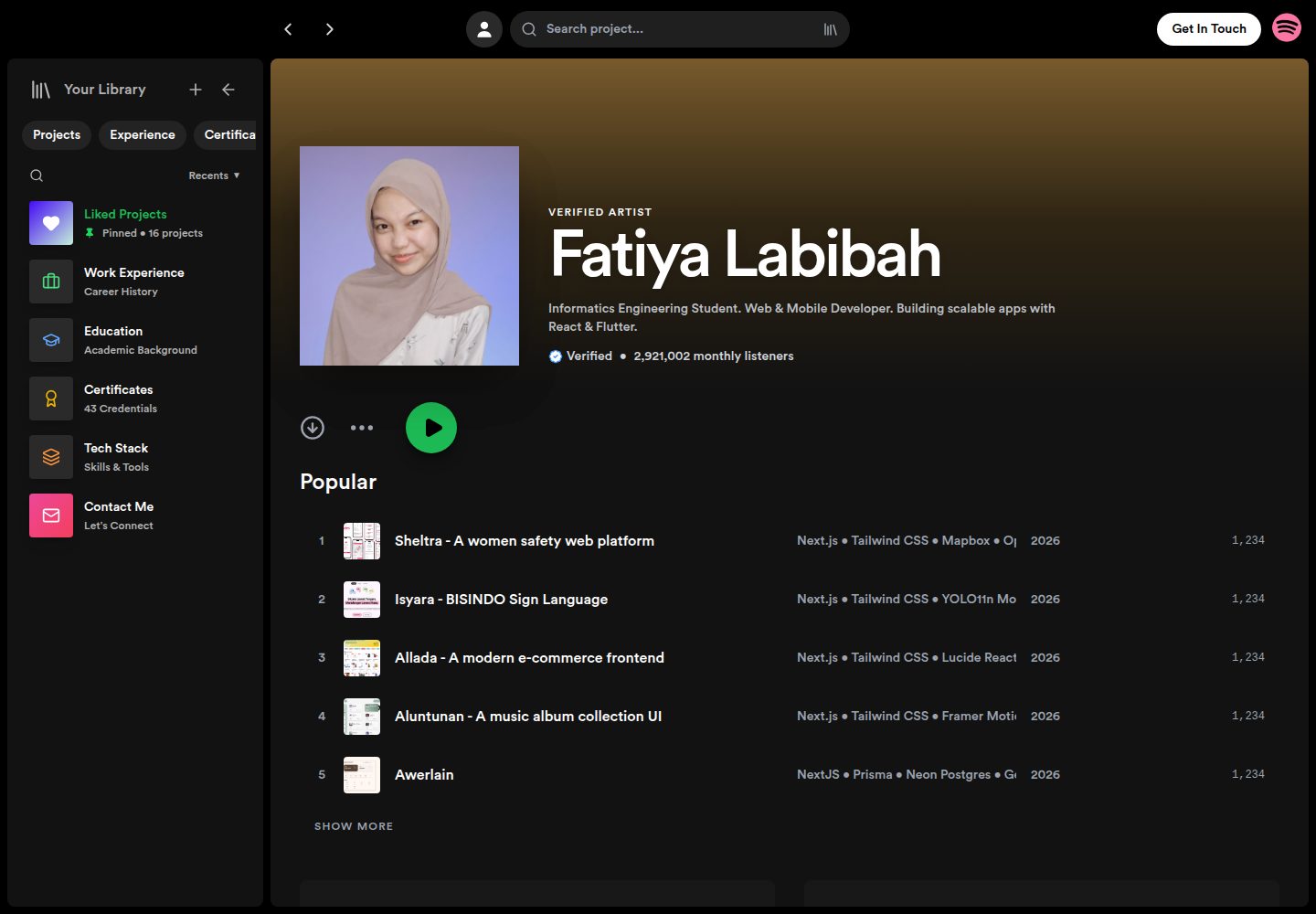
Spotify-style dark interface with sidebar navigation and a bottom player-bar-style action area
ReactAdmin dashboardPortfolio
portfolio-spotify — React Admin dashboard Template
By fatiya17
A personal portfolio website inspired by the Spotify interface, with a React frontend and a Node/Express backend using MongoDB and Cloudinary, allowing projects, certificates, and other content to be maintained through an admin panel.
Explore the design
Compare the page layouts and mobile experience. Open any screenshot for a closer look.
Desktop homepage1 / 3
Desktop captureTop of page
Actual screenshot captured by the server browser.
All pages & views 3
Screenshots show visual appearance; interactive behavior may differ.
Recorded 2026-10-13View source
What stands out
A quick read of the recorded project description.
Content such as projects, education, experience, and certificates is read dynamically from the database and can be created, read, updated, and deleted in the admin panel
Integrates Cloudinary for image upload and storage, with data stored in MongoDB Atlas
Supports opening a specified project's details directly via URL parameters, and allows copying the link or sharing to WhatsApp or LinkedIn
The sidebar collapsed state is remembered with Local Storage, with layouts adapted for both desktop and mobile
Template Details
This is a personal portfolio website template whose visuals and interactions reference Spotify's dark interface: left sidebar navigation, a bottom player-bar-style action area, and layouts adapted for desktop, tablet, and mobile. The frontend is built with React, and content such as projects, education, work experience, and certificates is read from a database rather than hardcoded into pages.
The repository also includes a backend: it provides admin login and CRUD endpoints for projects, certificates, and other content, uploads images to Cloudinary, and stores data in MongoDB Atlas. The frontend also has several interactions relevant to a portfolio context, such as sharing a project link to WhatsApp or LinkedIn or copying the link, opening a project's detail sidebar directly via URL parameters (e.g. /?id=xyz), and remembering the sidebar collapsed state with Local Storage. The contact form relies on EmailJS's Service ID, Template ID, and Public Key.
Before use, you need to prepare your own MongoDB Atlas and Cloudinary accounts and configure environment variables separately in the server and frontend as described in the README; the README gives local ports of 5000 for the backend and 5173 for the frontend, and the deployment example targets Vercel. The repository uses the MIT license, but third-party assets such as demo images, fonts, and icons must be checked separately under their respective licenses.
ReactAdmin dashboardPortfolio
Is it right for your project?
Use Cases
- Building a personal portfolio website that presents projects and experience with a Spotify-style interface
- Needing a portfolio with a login-protected admin panel where content can be maintained by yourself rather than a purely static page
- A personal site where project images are hosted on Cloudinary and data is stored in MongoDB Atlas
- Using it as a React + Express + MongoDB full-stack practice project to study a separated frontend/backend and admin CRUD implementation
Suitable For
- Developers with React and Node fundamentals who are willing to configure the database and image service themselves
- People who need an admin panel to manage content and do not want to redeploy the frontend every time they update their portfolio
- Personal site authors who like Spotify's dark interface style and want to reuse this visual design directly
Getting started & customization
Use these recorded setup notes alongside the repository instructions for your chosen version.
- 1
You need to prepare MongoDB Atlas and Cloudinary accounts, and fill in MONGO_URI, ADMIN_PASSWORD, and Cloudinary's cloud name, API key, and API secret in the server's .env
- 2
The frontend needs EmailJS's VITE_EMAILJS_SERVICE_ID, VITE_EMAILJS_TEMPLATE_ID, and VITE_EMAILJS_PUBLIC_KEY configured before the contact form can send email
- 3
For local running, use two terminals: in the server directory, run npm install then npm start for the backend (default 5000); in the root directory, run npm install then npm run dev for the frontend (default 5173)
- 4
When deploying to Vercel, add an SPA rewrite rule for the frontend and fill in the frontend environment variables in the project settings
- 5
Third-party assets such as demo images, fonts (e.g. Circular Std), and icons must be checked under their respective licenses and cannot be judged solely by the code's MIT license
License & source material
Usage conditions & limitations
Free to use · keep license noticeThis entry covers the free version in the public repository under the MIT license; the free scope is the code of that version and does not mean external services or third-party assets are free.
Must comply with when using
- You may use, modify, commercially use, and distribute the code of this version for free.
- When distributing copies or substantial portions of the code, retain the original author's copyright notice and the complete MIT license notice.
- The code is provided as is; warranties and limitations of liability are governed by the original license and applicable law.
Additional costs & items to verify
- Demo images, fonts, icons, and other third-party assets must be checked under their respective licenses and cannot be judged solely by the code's MIT license.
- External services such as domains, hosting, databases, payments, or AI may incur separate charges.
- Using this project requires registering your own MongoDB Atlas account to host the database.
- Using this project requires registering your own Cloudinary account for image upload and storage.
- The contact form relies on the EmailJS service, requiring an account and configuration of the Service ID, Template ID, and Public Key.
- Admin panel login requires setting the admin password environment variable yourself.
- You must provide credentials such as the Cloudinary API Key yourself to enable image upload functionality.
- The frontend must be configured with the EmailJS public key, otherwise the contact form cannot send email.
View Original Text Basis
Permission is hereby granted, free of charge
Original License Text
MongoDB Atlas Account
Original README
Cloudinary Account
Original README
Create a free account at [EmailJS](https://www.emailjs.com/).
Original README
ADMIN_PASSWORD=your_secret_admin_password
Original README
CLOUDINARY_API_KEY=your_api_key
Original README
https://github.com/fatiya17/portfolio-spotify/blob/main/LICENSEhttps://github.com/fatiya17/portfolio-spotify/blob/main/README.mdVITE_EMAILJS_PUBLIC_KEY=your_emailjs_public_key_here
Original README
Compiled by DeepSeek based on repository license and README ·2026-10-13. Results only cover the materials read; dependencies, images, fonts, and subsequent term changes are subject to their respective original texts.
Project checks & description sources
Template Information
- Source platforms
- GitHub
- Documentation and maintenance reference score
- More documented · 88 / 100
- Technologies
- React
- Website type
- Admin dashboard · Portfolio
How this score is calculated
Our heuristic uses license records (up to 30), a demo link (12), a preview (10), stars (15), recorded maintenance (15), description completeness (8), feature records (5) and classification data (5). It is not a code, security or performance test, or a Google score. A link does not establish tested functionality.
What to verify for this project
- Repository update recorded
- 2026-04-23
- Screenshot last checked
- 2026-10-13
A demo link is listed. Check it with your own content and viewport sizes; its presence does not confirm that forms, authentication or payments work.
The catalog identifies React as the primary stack. Check the actual dependency manifest and lockfile for versions and hosting requirements. These notes use recorded metadata, not a code audit or a deployment test.
Use a selection guide →How this description was prepared
AI-assisted description based on catalog records and repository material. Repository authors are not automatically the reviewers of this description.
Review declaration: [email protected] · 2026-10-13
Inspect the recorded source material
SHA-256: 1ea585b0d7060a34864ba1335eeef525b99b4cc9ab554b375a7035c0ec9c0ec4
2026-10-13T03:21:40.502Z
Source file / repository# <img src="./public/icon-spotify.png" alt="Spotify Logo" width="40" height="40" /> Fatiya Labibah - Portfolio (Spotify Style)
> A dynamic personal portfolio website inspired by Spotify's UI/UX. Built with the MERN Stack, featuring a custom Admin Dashboard, Cloudinary image optimization, and fully responsive design.

## 🎵 Live Demo
- **Frontend:** [https://fatiyalabibah.vercel.app](https://portfolio-frontend-yours.vercel.app)
- **Backend (Open Source):** [https://github.com/fatiya17/portfolio-be](https://github.com/fatiya17/portfolio-be)
## ✨ Key Features
### 🦊 User Interface (Frontend)
- **Spotify-inspired Design:** Dark mode aesthetic, sidebar navigation, and familiar layout.
- **Responsive:** Fully optimized for Desktop, Tablet, and Mobile devices.
- **Dynamic Content:** Projects, Education, Experience, and Certificates are fetched directly from the database.
- **Interactive Player Bar:** "Share Project" functionality (Copy Link, WhatsApp, LinkedIn).
- **Deep Linking:** Share specific projects via URL (e.g., `/?id=xyz`), which automatically opens the details sidebar.
- **Smart Sidebar:** Remembers user preference (collapsed/expanded) using Local Storage.
### 🦉 Administrator (Backend & CMS)
- **Secure Admin Panel:** Login system to manage portfolio content.
- **CRUD Operations:** Create, Read, Update, and Delete projects, certificates, etc.
- **Image Optimization:** Integrated with **Cloudinary** for fast image loading and efficient storage.
- **Database:** Hosted on **MongoDB Atlas** for real-time data access.
## ♟️ Tech Stack
| Area | Technologies |
| :--- | :--- |
| **Frontend** | React.js, Vite, Tailwind CSS, Framer Motion, Axios, Lucide React |
| **Backend** | Node.js, Express.js |
| **Database** | MongoDB Atlas (Mongoose ODM) |
| **Storage** | Cloudinary (Image CDN) |
| **Deployment** | Vercel (Frontend & Backend) |
## ⚙️ Installation & Setup (Local)
Follow these steps to run the project locally on your machine.
### Prerequisites
- Node.js (v16+)
- NPM or Yarn
- MongoDB Atlas Account
- Cloudinary Account
### 1. Clone Repository
```bash
git clone [https://github.com/your-username/repo-name.git](https://github.com/your-username/repo-name.git)
cd repo-name
```
### 2. Backend Setup
Navigate to the server folder and install dependencies.
```bash
cd server
npm install
```
Create a `.env` file inside the `server/` directory and add the following configuration:
```env
PORT=5000
MONGO_URI=mongodb+srv://<username>:<password>@cluster.mongodb.net/spotify_portfolio_db?appName=Cluster0
ADMIN_PASSWORD=your_secret_admin_password
# Cloudinary Config
CLOUDINARY_CLOUD_NAME=your_cloud_name
CLOUDINARY_API_KEY=your_api_key
CLOUDINARY_API_SECRET=your_api_secret
```
Start the server:
```bash
npm start
# Server runs at http://localhost:5000
```
### 3. Frontend Setup
Open a new terminal, navigate to the frontend folder (root).
```bash
# Assuming frontend is in the root directory
npm install
```
Ensure your API configuration in `src/api/axiosConfig.js` (or wherever you define Axios) points to localhost during development, or configure it via `.env`.
Create a `.env` file inside the `client/` (or root frontend) directory for EmailJS configuration:
```env
VITE_EMAILJS_SERVICE_ID=your_emailjs_service_id_here
VITE_EMAILJS_TEMPLATE_ID=your_emailjs_template_id_here
VITE_EMAILJS_PUBLIC_KEY=your_emailjs_public_key_here
```
**How to get EmailJS keys:**
1. Create a free account at [EmailJS](https://www.emailjs.com/).
2. Add an **Email Service** (e.g., Gmail) to get your `Service ID`.
3. Create an **Email Template** to get your `Template ID`. Ensure your template payload (`{{name}}`, `{{email}}`, `{{subject}}`, `{{message}}`) matches the frontend form parameters. *(Note: You can use the provided [emailjs-template.html](./emailjs-template.html) file in this repository as a starting point for your email design!)*
4. Go to **Account > API Keys** to find your `Public Key`.
Start the frontend:
```bash
npm run dev
# Website runs at http://localhost:5173
```
---
## 🔗 API Endpoints
The backend provides a RESTful API for the frontend.
| Method | Endpoint | Description |
| --- | --- | --- |
| **POST** | `/api/login` | Admin authentication |
| **GET** | `/api/projects` | Get all projects |
| **POST** | `/api/projects` | Create new project (Image uploaded to Cloudinary) |
| **PUT** | `/api/projects/:id` | Update project |
| **DELETE** | `/api/projects/:id` | Delete project |
| **GET** | `/api/certificates` | Get all certificates |
| ... | ... | *(Same patterns for Education, Experience, Skills)* |
---
## ☁️ Deployment Guide
This project is configured for deployment on **Vercel**.
### Frontend Deployment
1. Push the frontend code to GitHub.
2. Ensure `vercel.json` exists in the frontend root to handle React routing (SPA):
```json
{
"rewrites": [{"source": "/(.*)", "destination": "/index.html"}]
}
```
3. Import the project into Vercel.
4. Add all frontend **Environment Variables** (`VITE_EMAILJS_SERVICE_ID`, etc.) in the Vercel project settings.
5. Deploy!
---
## 🪶 Credits
Developed by **Fatiya Labibah**.
* **Design Inspiration:** Spotify
* **Icons:** Lucide React
* **Fonts:** Circular Std (Spotify Font)
---
⭐ **Don't forget to star this repo if you find it useful!**
---
*© 2026 Portfolio Project. All Rights Reserved.*Explore similar templates
Compare previews and descriptions within the same stack and category.
ant-design-pro
Ant Design Pro is an enterprise-grade React admin scaffold built on React 19, Umi Max 4, and antd 6 with TypeScript.
React · Admin dashboard

coreui-free-react-admin-template
CoreUI's free React admin template, built on React and the CoreUI component library, provides dashboard layouts, sidebar navigation, routing, and example views. It includes .cursorrules, ARCHITECTURE.md, and DEVELOPMENT.md context files, plus JSDoc comments and PropTypes, to support AI-assisted development.
React · Admin dashboard

fastapi-react
A Cookiecutter template for FastAPI + React (TypeScript) full-stack projects, integrating PostgreSQL, SQLAlchemy, Alembic, Celery, Redis, JWT authentication, a react-admin admin panel, and a Docker Compose development environment with Nginx reverse proxy.
React · Admin dashboard

react-antd-admin-template
A React + Ant Design admin template for mid- and back-office products, with built-in login/logout, dynamic routing, permission checks, and user management.
React · Admin dashboard

react-saas-template
A React and Material-UI template for SaaS or admin websites, offering dashboard, chart, blog, payment, and file upload components. It uses Create-React-App, React-Router, Recharts, React-Stripe-js, React-Dropzone, and React-Cropper, with theme colors centralized in src/theme.js.
React · Admin dashboard

react-material-admin
React Material Admin is an MIT-licensed React admin template by Flatlogic, built on Material-UI. It provides dashboards, charts, tables, authentication, profile, and notification pages, with three color themes and responsive layouts.
React · Admin dashboard