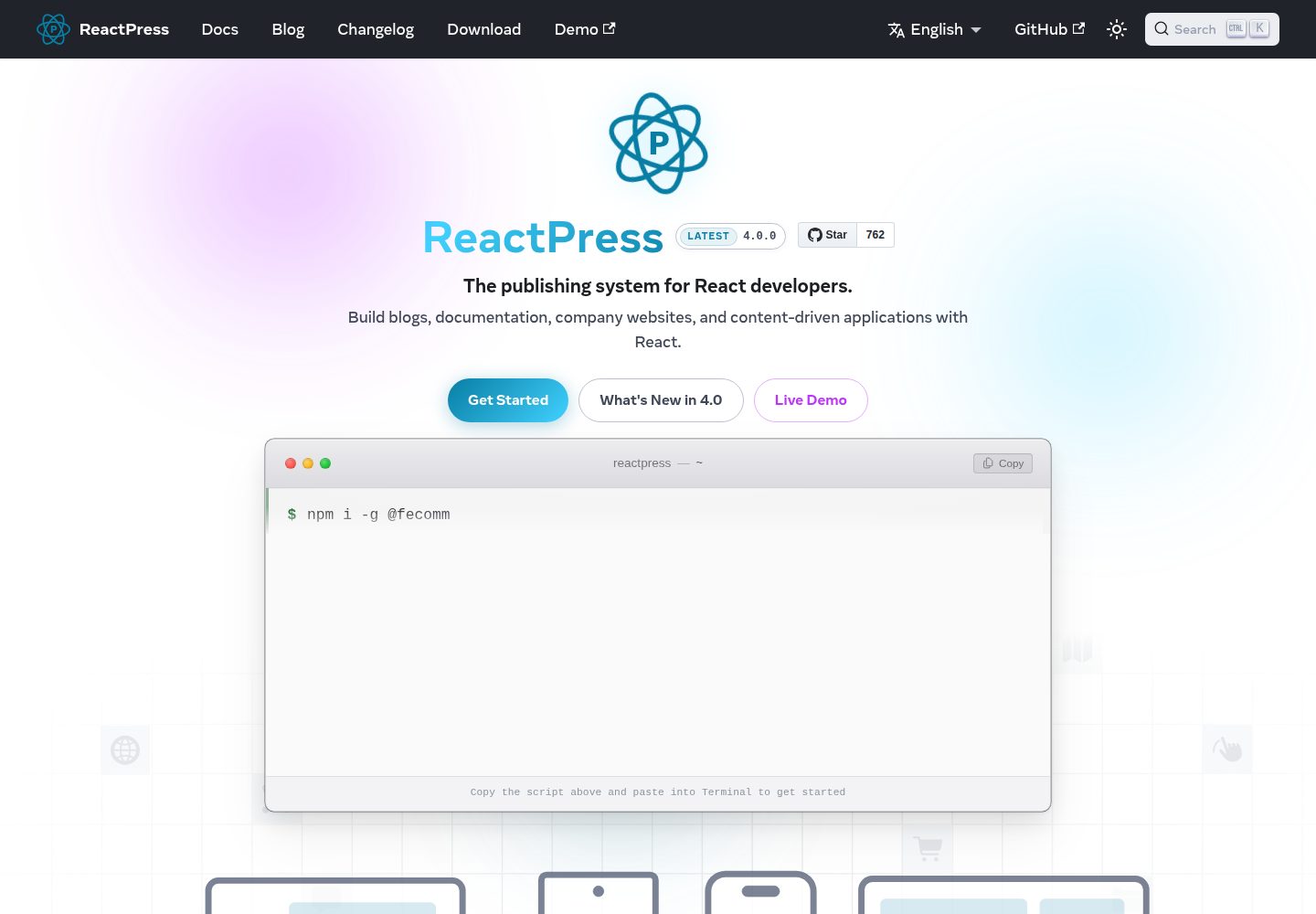
Provides a runnable minimal plugin, including the server-side register(hooks, ctx) entry and an example subscription to the article.afterPublish hook
WordPressReactAdmin dashboardStarter
reactpress-plugin-starter — WordPress Admin dashboard Template
By fecommunity
ReactPress plugin starter template demonstrating server-side hooks, plugin.json manifest configuration, internationalization, and Admin UI slot integration.
Explore the design
Compare the page layouts and mobile experience. Open any screenshot for a closer look.
Desktop homepage1 / 3
Desktop captureTop of page
Actual screenshot captured by the server browser.
All pages & views 3
Screenshots show visual appearance; interactive behavior may differ.
Recorded 2026-10-03View source
What stands out
A quick read of the recorded project description.
plugin.json manifest-driven configuration: declares settings.schema, with configuration persisted in globalSetting.plugins.entries.{id}.config
Built-in admin settings page (admin.menu → /plugins/{id}/settings) and editor slot (article.editor.meta.afterSummary)
Provides multilingual admin UI text via src/locales/{locale}.json
Includes directory structure, dependency boundaries, and fork steps, and points to reference implementations such as hello-world and seo
Template Details
This is the plugin starter template for ReactPress, used to create plugins under the ReactPress 4.0 plugin layout. The template itself is a runnable minimal plugin (plugin-starter) that demonstrates several key integration points in the plugin system: the server entry src/server/index.ts exports register(hooks, ctx), subscribing to the article.afterPublish action hook via hooks.addAction; plugin.json declares id, name, version, server.hooks.subscribe, and settings.schema; the admin settings page is mounted at /plugins/{id}/settings via admin.menu; the editor slot is registered to article.editor.meta.afterSummary via admin.slots; UI text is placed in src/locales/{locale}.json.
By responsibility, ReactPress assigns the visitor interface and SSR to themes (Next.js), business rules and hooks to plugins (NestJS API), and Webhooks handle outbound asynchronous notifications. The template clarifies two boundaries: plugins must not inject theme routes or modify the Next.js build, and themes must not write directly to the database. Enabling and disabling plugins does not require restarting the API; hooks are hot-loaded at runtime.
Before use, Node.js 18 or later, ReactPress 4.0.0 or later, and the 4.x beta version of @fecommunity/reactpress-toolkit are required (the plugin/server subpath is only exported in that beta). The template must be placed in the plugins/{id}/ directory of the ReactPress monorepo, the id must match the id in plugin.json, and it must be registered in plugins/package.json under reactpress.local. src/server/ may only import from the toolkit's plugin/server; after modifying server-side code, rebuild and disable then re-enable the plugin in the admin or save the configuration to trigger a reload; after modifying src/admin/, rebuild ReactPress's web package.
WordPressReactAdminStarter
Is it right for your project?
Use Cases
- Developing plugins that extend server-side business logic for ReactPress sites
- Hook development that needs to trigger custom processing (such as logging, syncing, or notifications) after an article is published
- Developing an admin settings page and article editor slot component for a plugin
- Forking a new ReactPress plugin package based on the template
Suitable For
- Developers using ReactPress 4.0 who need to write plugins
- Technical staff familiar with TypeScript, NestJS, and React admin development
- Teams that need to extend a site with a WordPress-style install/enable/configure workflow
Getting started & customization
Use these recorded setup notes alongside the repository instructions for your chosen version.
- 1
Environment requirements: Node.js >= 18, ReactPress >= 4.0.0, and the toolkit @fecommunity/reactpress-toolkit 4.x beta (the plugin/server subpath is only available in the beta)
- 2
Copy or symlink the template into the ReactPress monorepo's plugins/{id}/, where id must be kebab-case and match the id in plugin.json, and register it in plugins/package.json under reactpress.local
- 3
Change the $schema in plugin.json to the monorepo-relative path ../plugin.manifest.schema.json
- 4
Run npm run build to generate dist/index.js, and enable it in the admin under Plugins → Install → Enable → Settings or use the reactpress plugin install/activate commands
- 5
After modifying src/server/, rebuild and disable then re-enable the plugin (or save the configuration) to trigger a reload; after modifying src/admin/, rebuild the web package
License & source material
Usage conditions & limitations
Free to use · keep license noticeThis entry covers the free version under the MIT license in the public repository; the free scope is that version's code and does not imply that external services or third-party assets are free.
Must comply with when using
- Free use, modification, commercial use, and distribution of that version's code are permitted.
- When distributing copies or substantial portions of the code, retain the original author's copyright notice and the full MIT license notice.
- The code is provided as is; warranties and limitations of liability are governed by the original license and applicable law.
Additional costs & items to verify
- The template must be placed in the ReactPress monorepo's plugins/{id}/ directory to obtain the full runtime; it cannot run independently of ReactPress.
- It depends on the 4.x beta version of @fecommunity/reactpress-toolkit; the plugin/server subpath is only exported in that beta, and the external package must be installed from npm.
- It requires a host ReactPress version of at least 4.0.0; lower-version environments cannot use it.
- Building and running require Node.js 18 or later.
- Before use, manually change the $schema in plugin.json to the monorepo-relative path ../plugin.manifest.schema.json.
- The plugin id must be registered in the ReactPress project's plugins/package.json under reactpress.local to be loaded.
- After modifying server-side code, rebuild and disable then re-enable the plugin in the admin or save the configuration to trigger a reload.
- After modifying src/admin/, rebuild ReactPress's web package for changes to take effect.
- Server-side code may only import from the toolkit's plugin/server subpath, which imposes an import boundary.
- Plugins must not inject theme routes or modify the Next.js build, and themes must not write directly to the database, which imposes architectural boundary constraints.
- Demo images, fonts, icons, and other third-party assets must be checked against their respective licenses; the code's MIT license alone is not sufficient to judge them.
- External services such as domains, hosting, databases, payments, or AI may incur separate charges.
View Original Text Basis
Permission is hereby granted, free of charge
Original License Text
Install into the [ReactPress monorepo](https://github.com/fecommunity/reactpress) for full runtime.
Original README
Toolkit | `@fecommunity/reactpress-toolkit@^4.0.0-beta.18` (types & server build)
Original README
ReactPress | >= 4.0.0 (see `plugin.json` → `requires`)
Original README
Node.js | >= 18
Original README
Update `plugin.json` → `$schema` to the monorepo-relative path:
Original README
Add the plugin id to `plugins/package.json`:
Original README
After editing `src/server/`, rebuild and **deactivate → reactivate** the plugin in Admin, or save config to trigger reload.
Original README
After editing `src/admin/`, rebuild the ReactPress `web/` package.
Original README
**Rule:** `src/server/` must only import from `@fecommunity/reactpress-toolkit/plugin/server`.
Original README
https://github.com/fecommunity/reactpress-plugin-starter/blob/master/LICENSEhttps://github.com/fecommunity/reactpress-plugin-starter/blob/master/README.md**Boundary:** plugins must not inject theme routes or modify the Next.js build. Themes must not write to the database directly.
Original README
Compiled by DeepSeek based on repository license and README ·2026-10-03. Results only cover the materials read; dependencies, images, fonts, and subsequent term changes are subject to their respective original texts.
Project checks & description sources
Template Information
- Source platforms
- GitHub
- Documentation and maintenance reference score
- More documented · 88 / 100
- Technologies
- WordPress · React
- Website type
- Admin dashboard · Starter
How this score is calculated
Our heuristic uses license records (up to 30), a demo link (12), a preview (10), stars (15), recorded maintenance (15), description completeness (8), feature records (5) and classification data (5). It is not a code, security or performance test, or a Google score. A link does not establish tested functionality.
What to verify for this project
- Repository update recorded
- 2026-07-12
- Screenshot last checked
- 2026-10-03
A demo link is listed. Check it with your own content and viewport sizes; its presence does not confirm that forms, authentication or payments work.
The catalog identifies WordPress as the primary stack. Check the actual dependency manifest and lockfile for versions and hosting requirements. These notes use recorded metadata, not a code audit or a deployment test.
Use a selection guide →How this description was prepared
AI-assisted description based on catalog records and repository material. Repository authors are not automatically the reviewers of this description.
Review declaration: [email protected] · 2026-10-04
Inspect the recorded source material
SHA-256: abb37fc6fcbb9d8a8e9916beb563469b61d2062beed20c2ee58bb529cfb450cb
2026-10-03T13:52:49.205Z
Source file / repository# ReactPress Plugin Starter
Starter template for building **ReactPress plugins** — server-side hooks, manifest-driven settings, locales, and Admin UI slots.
> Aligned with [fecommunity/reactpress/plugins](https://github.com/fecommunity/reactpress/tree/master/plugins) · [Plugin system reference](https://github.com/fecommunity/reactpress/blob/master/plugins/README.md) · [简体中文](./README_zh.md)
## Overview
ReactPress plugins extend **server-side business logic** (hooks, content rules, integrations). They follow a WordPress-style model: install and enable from Admin, configure via `plugin.json`, integrate through `register()` and hook subscriptions.
| Extension | Responsibility | Runtime |
| :--- | :--- | :--- |
| **Theme** | Visitor UI, SSR | Next.js (:3001) |
| **Plugin** | Business rules, hooks | NestJS API (:3002) |
| **Webhook** | Outbound async notifications | Server HTTP |
**Boundary:** plugins must not inject theme routes or modify the Next.js build. Themes must not write to the database directly.
This repository ships a minimal working plugin (`plugin-starter`) that demonstrates:
| Capability | Implementation |
| :--- | :--- |
| Server entry | `src/server/index.ts` → `register(hooks, ctx)` |
| Hook subscription | `article.afterPublish` (action) |
| Manifest | `plugin.json` with `settings.schema` |
| Admin settings page | `admin.menu` → `/plugins/plugin-starter/settings` |
| i18n | `src/locales/{locale}.json` |
| Admin slot | `src/admin/` + `admin.slots` → `article.editor.meta.afterSummary` |
## Requirements
| Item | Version |
| :--- | :--- |
| Node.js | >= 18 |
| ReactPress | >= 4.0.0 (see `plugin.json` → `requires`) |
| Toolkit | `@fecommunity/reactpress-toolkit@^4.0.0-beta.18` (types & server build) |
> Targets the **ReactPress 4.0** plugin layout (`src/server`, `src/admin`, `src/locales`). Install into the [ReactPress monorepo](https://github.com/fecommunity/reactpress) for full runtime. The `plugin/server` subpath is exported from toolkit **4.x beta** only.
## Quick start
### 1. Install dependencies
```bash
git clone <your-repo-url> my-plugin
cd my-plugin
npm install # .npmrc enables legacy-peer-deps for toolkit peer resolution
```
### 2. Customize the plugin
| File | Purpose |
| :--- | :--- |
| `plugin.json` | `id`, `name`, `version`, `server.hooks.subscribe`, `settings.schema` |
| `package.json` | Package name (e.g. `@your-scope/reactpress-plugin-my-plugin`) |
| `src/server/index.ts` | Hook handlers and business logic |
| `src/locales/*.json` | Admin UI strings for plugin name and settings fields |
**Plugin id rules:** kebab-case; must match the directory name under `plugins/{id}/` in your ReactPress project.
### 3. Build
```bash
npm run build
# Output: dist/index.js ← referenced by plugin.json → server.module
```
### 4. Register in a ReactPress project
Copy or symlink this directory into the ReactPress monorepo as `plugins/{id}/` (id must match `plugin.json` → `id`):
```bash
# From your ReactPress project root
cp -r /path/to/my-plugin plugins/my-plugin
```
Update `plugin.json` → `$schema` to the monorepo-relative path:
```json
"$schema": "../plugin.manifest.schema.json"
```
Add the plugin id to `plugins/package.json`:
```json
{
"reactpress": {
"local": ["my-plugin"]
}
}
```
Start development:
```bash
pnpm dev # compiles local plugins before the API starts
```
Enable the plugin:
- **Admin:** Plugins → Install → Enable → Settings
- **CLI:** `reactpress plugin install my-plugin && reactpress plugin activate my-plugin`
Plugin enable/disable **does not require an API restart** — hooks are hot-loaded at runtime.
## Directory structure
Every plugin package uses the same layout: **manifest at the root**, **all TypeScript under `src/`**, split by runtime (aligned with ReactPress 4.0):
```text
plugin-starter/
├── plugin.json # Manifest (id, hooks, settings schema, admin slots)
├── plugin.manifest.schema.json
├── package.json
├── tsconfig.json # extends tsconfig.base.json — server compile only
├── tsconfig.base.json # shared tsc defaults
├── README.md
├── README_zh.md
├── src/
│ ├── server/ # Node hook logic → tsc → dist/
│ │ ├── index.ts # export register(hooks, ctx)
│ │ ├── config.ts
│ │ └── types.ts
│ ├── admin/ # React Admin UI (bundled by web via Vite)
│ │ ├── index.ts # export registerAdmin(registry, ctx)
│ │ └── StarterPanel.tsx
│ └── locales/ # Admin UI strings (en.json, zh.json, …)
│ ├── en.json
│ └── zh.json
└── dist/ # plugin.json → server.module (./dist/index.js)
└── index.js
```
| Path | Runtime | Build |
| :--- | :--- | :--- |
| `src/server/` | NestJS `require()` at API startup | `npm run build` → `tsc` → `dist/` |
| `src/admin/` | Admin SPA (Vite `import.meta.glob`) | Compiled when building `web/` |
| `src/locales/` | Admin i18n API | No build — served as JSON |
| `plugin.json` | Install / enable / config | No build |
## Hook system
This starter subscribes to one hook:
| Hook | Type | Behavior in this template |
| :--- | :--- | :--- |
| `article.afterPublish` | action | Logs article title to server output when `logTitle` is enabled |
Built-in hooks (full list in the [plugin system reference](https://github.com/fecommunity/reactpress/blob/master/plugins/README.md)):
| Hook | Type |
| :--- | :--- |
| `article.beforeCreate` | filter |
| `article.beforePublish` | filter |
| `article.afterPublish` | action |
| `comment.beforeCreate` | filter |
| `comment.afterCreate` | action |
### Server entry contract
This template implements `article.afterPublish`:
```ts
import type { HookService, PluginContext } from '@fecommunity/reactpress-toolkit/plugin/server';
export function register(hooks: HookService, ctx: PluginContext): void {
hooks.addAction(
'article.afterPublish',
async (payload) => {
// handle { article, isNew }
},
{ priority: 10, pluginId: ctx.id },
);
}
export function deactivate(): void {} // optional: cleanup on disable
```
## Configuration
Settings are declared in `plugin.json` → `settings.schema` and persisted at:
`globalSetting.plugins.entries.{id}.config`
Update via Admin **Settings** or REST API:
```bash
curl -X PUT http://localhost:3002/api/extension/plugins/plugin-starter/config \
-H "Authorization: Bearer <token>" \
-H "Content-Type: application/json" \
-d '{"config":{"enabled":true,"logTitle":false}}'
```
Saving config triggers an automatic plugin reload.
## Admin UI
`plugin.json` declares both a **settings menu** (`admin.menu`) and an **editor slot** (`admin.slots`). When the plugin is active, ReactPress Admin loads `src/admin/index.ts` via Vite `import.meta.glob` and calls `registerAdmin()`.
| Declaration | Purpose |
| :--- | :--- |
| `admin.menu` | WordPress-style settings page at `/plugins/{id}/settings` |
| `admin.slots.subscribe` | Built-in editor mount points (enum ids) |
| `src/admin/index.ts` | `registerAdmin()` — register slot components |
> Plugins with only `admin.menu` (no `src/admin/`) still get a settings page — see [hello-world](https://github.com/fecommunity/reactpress/tree/master/plugins/hello-world).
Built-in slot ids:
| Slot id | Location |
| :--- | :--- |
| `article.editor.meta.afterSummary` | Article editor — below summary |
| `article.editor.sidebar.afterPublish` | Article editor — below publish box |
## Development
| Command | Purpose |
| :--- | :--- |
| `npm run build` | Compile `src/server/` → `dist/` |
| `npm run typecheck` | Type-check without emit |
| `npm run clean` | Remove `dist/` |
After editing `src/server/`, rebuild and **deactivate → reactivate** the plugin in Admin, or save config to trigger reload. After editing `src/admin/`, rebuild the ReactPress `web/` package.
## Dependency boundaries
| Import path | Used in | Purpose |
| :--- | :--- | :--- |
| `@fecommunity/reactpress-toolkit/plugin/server` | `src/server/` | `HookService`, `PluginContext` |
| `@fecommunity/reactpress-toolkit/plugin/admin` | `src/admin/` | Slot registration |
| `@fecommunity/reactpress-toolkit/plugin/react` | Core Admin pages | `<AdminSlot />` mount points |
**Rule:** `src/server/` must only import from `@fecommunity/reactpress-toolkit/plugin/server`.
## Forking this template
Reference implementations: [hello-world](https://github.com/fecommunity/reactpress/tree/master/plugins/hello-world) (server + settings menu), [seo](https://github.com/fecommunity/reactpress/tree/master/plugins/seo) (server + admin slots).
1. Copy this repository to `plugins/{your-id}/`
2. Update `plugin.json` — `id`, `name`, `server.hooks.subscribe`
3. Implement business logic in `src/server/`
4. Register the id in `plugins/package.json` → `reactpress.local`
## Related resources
| Resource | Link |
| :--- | :--- |
| ReactPress documentation | [docs.gaoredu.com](https://docs.gaoredu.com/) |
| ReactPress source | [github.com/fecommunity/reactpress](https://github.com/fecommunity/reactpress) |
| Plugin system reference | [plugins/README.md](https://github.com/fecommunity/reactpress/blob/master/plugins/README.md) |
| Built-in plugin example | [plugins/hello-world](https://github.com/fecommunity/reactpress/tree/master/plugins/hello-world) |
| Theme starter | [reactpress-theme-starter](https://github.com/fecommunity/reactpress-theme-starter) |
| Toolkit (npm) | [@fecommunity/reactpress-toolkit](https://www.npmjs.com/package/@fecommunity/reactpress-toolkit) |
[MIT License](./LICENSE) · © ReactPress / FECommunity
Explore similar templates
Compare previews and descriptions within the same stack and category.
mallok
Mallok is a Cloudflare-native open-source CMS and website builder for multilingual B2B sites, positioned as a WordPress alternative.
WordPress · Admin dashboard

MemeCoin-WordPress-Theme
A WordPress theme for Meme coin and cryptocurrency projects, offering home page modules such as account registration, roadmap, tokenomics, and buy tokens.
WordPress · Starter
ant-design-pro
Ant Design Pro is an enterprise-grade React admin scaffold built on React 19, Umi Max 4, and antd 6 with TypeScript.
React · Admin dashboard

react-boilerplate
A production-grade React + Redux starter for experienced developers, integrating Redux, redux-saga, styled-components, and react-router, with offline-first and PWA support, CLI code generation, and built-in testing and CI configuration. Requires Node.js v8.15.1 and npm v5 or higher; not suitable for beginners.
React · Starter

react-starter-kit
A full-stack SaaS monorepo starter built on Vite and React, with Bun, TypeScript, tRPC, Drizzle ORM, Better Auth, Stripe, and Cloudflare Workers. It includes email OTP, passkey, Google OAuth, organizations, subscription billing, Drizzle migrations, seed scripts, and Terraform infrastructure.
Vite · SaaS

Next.js SaaS Starter
The official Next.js SaaS starter template, integrating email/password authentication, Stripe Checkout subscriptions, a dashboard with user/team CRUD, basic Owner/Member RBAC, and activity logging.
Next.js · SaaS