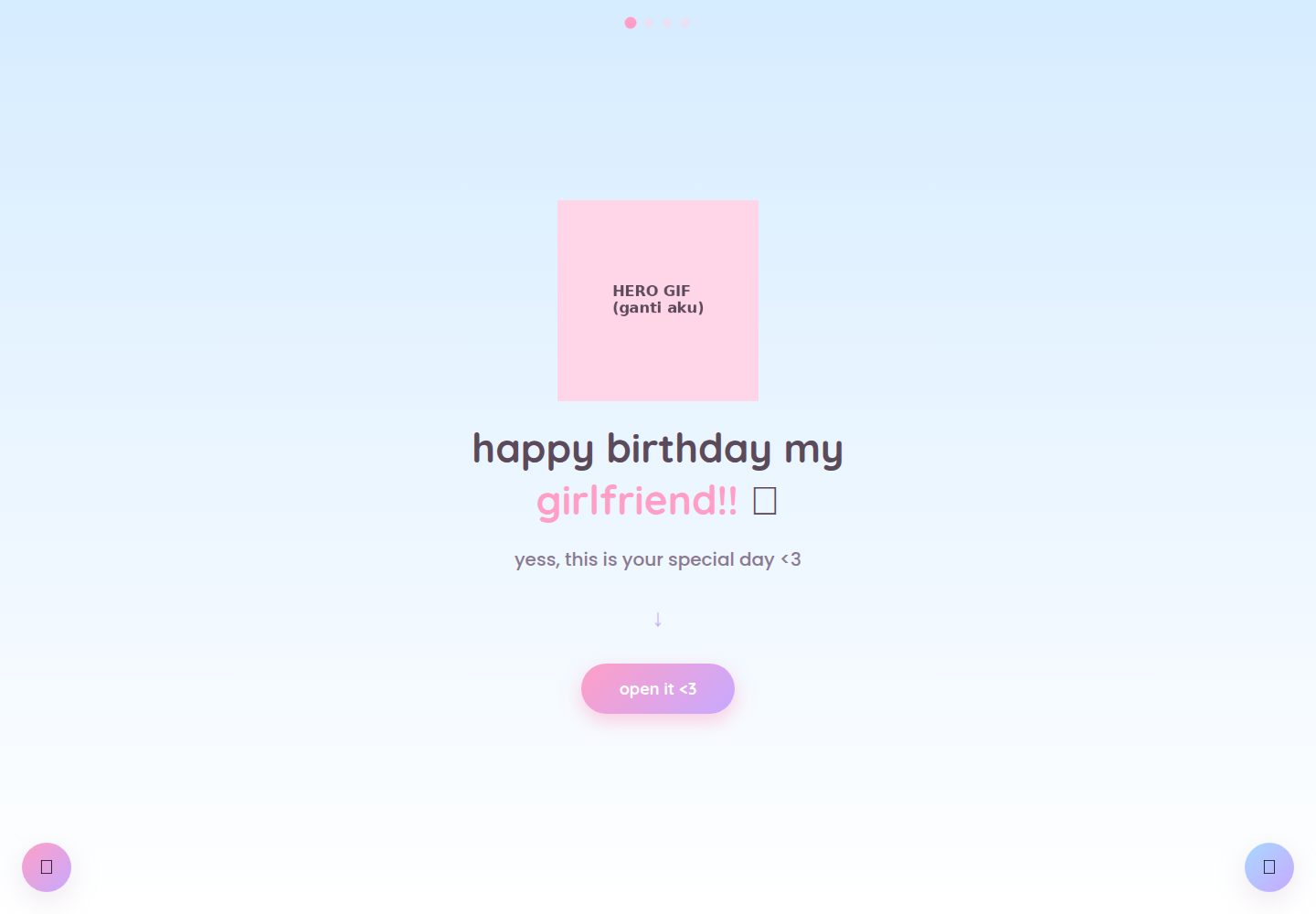
Four pages form a complete flow: homepage introduction, photo gallery, 100 reasons, birthday letter
HTMLStarter
cute-birthday-website — HTML Starter Template
By felisaans
A multi-page birthday greeting website template built with pure HTML, CSS, and JavaScript, featuring a photo gallery, 100 reasons, a typewriter letter, and confetti effects. All assets are placeholders and can be replaced before deploying to static hosting.
Explore the design
Compare the page layouts and mobile experience. Open any screenshot for a closer look.
Desktop homepage1 / 2
Desktop captureTop of page
Actual screenshot captured by the server browser.
All pages & views 2
Screenshots show visual appearance; interactive behavior may differ.
Recorded 2026-10-03View source
What stands out
A quick read of the recorded project description.
Pure HTML/CSS/JS implementation, no build step or backend service required
Built-in music button that keeps playing across page changes; message button content saved in the browser locally
The letter page uses a typewriter effect and triggers a confetti animation
All GIFs, photos, and music are placeholder files; replace them using the same filenames
Color theme centralized in the :root variables of css/style.css for unified adjustment
Template Details
This is a birthday greeting website template for personal use, with no build tools or backend dependencies. It consists of four pages: a homepage introduction, a clickable/swipeable photo gallery, a "100 Reasons" list, and a birthday letter page with a typewriter effect and confetti burst. Shared CSS and JavaScript keep music playing across pages, and an editable message button saves messages in the browser's local storage.
The GIFs, photos, and music files in the template are placeholder assets (color blocks marked "REPLACE ME") and need to be replaced with your own content using the same filenames. Text content is spread across index.html, reasons.html, js/gallery.js, and js/script.js. The color theme is centralized in the :root variables at the top of css/style.css.
Usage limitations: Cross-page music playback and message saving rely on the browser's sessionStorage/localStorage, which may not work when opening directly via file://; previewing with a local server is recommended. Messages are only saved in the browser on the device where they were written and do not sync across devices. These features work normally after deploying to static hosting such as Netlify.
HTMLLauncher
Is it right for your project?
Use Cases
- Create a personalized birthday greeting page for a partner or friend
- Use as a reference project for learning multi-page static websites, localStorage, and CSS variable usage
- Quickly publish a no-backend commemorative page on static hosting such as Netlify
Suitable For
- People who want to customize a birthday page without coding or with only minor text replacements
- Developers who need a purely static, backend-free gift website template
- Front-end beginners who want to reference multi-page shared state and simple animation implementations
Getting started & customization
Use these recorded setup notes alongside the repository instructions for your chosen version.
- 1
Download or use GitHub's "Use this template" to create a copy, replace the placeholder files in photos/ and assets/, keeping filenames and extensions consistent
- 2
Text content is located in index.html, reasons.html, js/gallery.js, and js/script.js; modify them according to the README table
- 3
For local preview, it is recommended to start a local server with python3 -m http.server to avoid cross-page music and message storage failures under file://
- 4
When deploying to Netlify, you can drag and drop the project folder directly, or connect a GitHub repository for import; no build command is needed
- 5
Messages are saved in the browser's localStorage and do not sync across devices; if synchronization is needed, you must add a backend or database yourself
License & source material
Usage conditions & limitations
Free to use · keep license noticeThis entry covers the free version under the MIT license in the public repository; the free scope applies to that version's code and does not imply that external services or third-party assets are free.
Must comply with when using
- Free use, modification, commercial use, and distribution of this version's code are permitted.
- When distributing copies or substantial portions of the code, retain the original author's copyright notice and the full MIT license notice.
- The code is provided as is; warranties and limitations of liability are governed by the original license and applicable law.
Additional costs & items to verify
- The README license section states free use, modification, and sharing for personal use only and does not explicitly grant commercial use; if used commercially, you must confirm the scope of authorization yourself.
- The message feature only saves to local storage in the browser on the device where it was written and does not sync across devices or browsers; if synchronization is needed, you must add a backend or database yourself.
- When opening directly by double-clicking via file://, cross-page music playback and message saving may fail; previewing with a local server is recommended.
- Music does not autoplay; it only starts after the user clicks the music button.
- All GIFs, photos, and music in the repository are placeholder assets and must be replaced by you; copyright and licensing for replacement assets are your responsibility.
- Demo images, fonts, icons, and other third-party assets must be checked against their respective licenses and cannot be judged solely by the code's MIT license.
- External services such as domains, hosting, databases, payments, or AI may incur additional charges.
View Original Text Basis
Permission is hereby granted, free of charge
Original License Text
Free to use, modify, and share for personal purposes (like surprising someone you love!)
Original README
the note is saved in that specific browser (`localStorage`), not on a server or shared database
Original README
some browsers (especially Chrome) treat each local file as its own separate origin, so those features might not carry over perfectly during local testing
Original README
modern browsers block audio from autoplaying with sound before there's been any user interaction
Original README
https://github.com/felisaans/cute-birthday-website/blob/main/LICENSEhttps://github.com/felisaans/cute-birthday-website/blob/main/README.mdEvery GIF, photo, and music file included right now is a **dummy placeholder**
Original README
Compiled by DeepSeek based on repository license and README ·2026-10-03. Results only cover the materials read; dependencies, images, fonts, and subsequent term changes are subject to their respective original texts.
Project checks & description sources
Template Information
- Source platforms
- GitHub
- Documentation and maintenance reference score
- More documented · 83 / 100
- Technologies
- HTML
- Website type
- Starter
How this score is calculated
Our heuristic uses license records (up to 30), a demo link (12), a preview (10), stars (15), recorded maintenance (15), description completeness (8), feature records (5) and classification data (5). It is not a code, security or performance test, or a Google score. A link does not establish tested functionality.
What to verify for this project
- Repository update recorded
- 2026-09-03
- Screenshot last checked
- 2026-10-03
A demo link is listed. Check it with your own content and viewport sizes; its presence does not confirm that forms, authentication or payments work.
The catalog identifies HTML as the primary stack. Check the actual dependency manifest and lockfile for versions and hosting requirements. These notes use recorded metadata, not a code audit or a deployment test.
Use a selection guide →How this description was prepared
AI-assisted description based on catalog records and repository material. Repository authors are not automatically the reviewers of this description.
Review declaration: [email protected] · 2026-10-04
Inspect the recorded source material
SHA-256: 0619b058583e418846cfb729adbfa65390c8e47c593aa456c55fcd8a9b9815b1
2026-10-03T16:24:14.600Z
Source file / repository# 💌 Cute Birthday Website Template
*[Baca versi Bahasa Indonesia](README.id.md)*
A cute, interactive digital birthday website you can fully customize for your girlfriend (or anyone you love) — no coding experience required! Built to be used as a **template**: just swap in your own photos, GIFs, and text, then deploy.
**The flow:** intro page → interactive photo gallery → "100 reasons why I love you" → birthday letter with a confetti burst 🎉
It also includes a music button (the song keeps playing as she moves between pages) and a little editable note button where she can write back to you — her message auto-saves right in her browser.
---
## 📁 Folder structure
```
my-birthday-site/
├── index.html → Page 1: intro / hero
├── gallery.html → Page 2: interactive photo gallery (swipe/click)
├── reasons.html → Page 3: "100 reasons why i love you"
├── letter.html → Page 4: birthday letter + confetti
├── css/
│ └── style.css → all styling & colors, shared across every page
├── js/
│ ├── script.js → logic that runs on every page (transitions, music, note, letter, confetti)
│ ├── gallery.js → logic specific to the photo gallery
│ └── reasons.js → logic specific to the 100-reasons page (photo lightbox + auto-scroll)
├── assets/ → put your GIFs and music here
│ ├── hero.gif
│ ├── sparkle1.gif
│ ├── sparkle2.gif
│ ├── celebration.gif
│ ├── gif1.gif
│ ├── gif2.gif
│ └── music.mp3
└── photos/ → put your own photos here
├── photo1.jpg ... photo4.jpg (for the gallery)
└── reason1.jpg ... reason6.jpg (for the 100-reasons page)
```
> Every GIF, photo, and music file included right now is a **dummy placeholder** (a pastel-colored box that says "REPLACE ME"), so you know exactly what needs to be swapped out.
---
## 🚀 Getting started (step-by-step for beginners)
### 1. Download this project
If you got this from GitHub, click **Code → Download ZIP**, then extract it anywhere on your computer. Or, even easier, click the green **"Use this template"** button on the repo page to create your own copy on GitHub first.
### 2. Replace the photos & GIFs
Open the `photos/` and `assets/` folders, then **overwrite the existing files using the exact same filenames** (capitalization matters!). For example:
- Want new gallery photos? Overwrite `photos/photo1.jpg`, `photo2.jpg`, etc. with your own (`.jpg` or `.png` both work, but if you change the extension, you'll also need to update the filename referenced in the HTML — see step 4).
- Want a different intro GIF? Overwrite `assets/hero.gif`.
- Want your own song? Overwrite `assets/music.mp3` with your own track (mp3 format).
**If your filenames or extensions are different**, just look for the `<!-- INSERT YOUR GIF/PHOTO HERE -->` comments in the relevant HTML file and update the `src="..."` there.
### 3. Edit all the text
This is the most personal part — the text lives in a few different places:
| What do you want to edit? | Open this file | Look for |
|---|---|---|
| Title & subtitle on the intro page | `index.html` | `<h1 class="hero-title">` and `<p class="hero-subtitle">` |
| Captions under each gallery photo | `js/gallery.js` | the `photos` array near the top of the file |
| The "100 reasons" list | `reasons.html` | find `<ol class="reasons-list">` — each reason is one `<li>...</li>` line. It currently ships with placeholder text ("reason 1", "reason 2", etc.) — replace with your own (fewer than 100 is fine too, just delete the extra `<li>` lines) |
| The typewriter birthday letter | `js/script.js` | the `letterMessage` variable in the middle of the file |
| The signature on the letter | `letter.html` | `<p class="signature">` |
### 4. Preview it in your browser (local testing)
Just double-click `index.html` — it should open right up in your default browser.
⚠️ **Important note:** the "music keeps playing across pages" feature and the note button's saved state rely on the browser's `sessionStorage`/`localStorage`. If you open the files by **double-clicking** them (`file://...`), some browsers (especially Chrome) treat each local file as its own separate origin, so those features might not carry over perfectly during local testing. This is **normal** and will work smoothly once the site is deployed (step 5), since all pages will then share one real website address.
For more accurate local testing, run a simple local server instead. If you have Python installed, open a terminal in this project folder and run:
```
python3 -m http.server
```
then open `http://localhost:8000` in your browser.
### 5. Deploy to Netlify (free)
The easiest way:
1. Go to [app.netlify.com/drop](https://app.netlify.com/drop)
2. Drag this project's folder (make sure `index.html` is at the top level/root) onto the page
3. Netlify instantly gives you a live link, like `random-name.netlify.app`
4. You can rename that link under **Site settings → Change site name**
For something more polished (auto-updates every time you push a change), upload this project to a GitHub repo, then in Netlify choose **Add new site → Import an existing project** and connect it to that repo. No build command needed — this is a plain static site.
---
## 🎨 Changing the color theme
All colors are defined in one place: open `css/style.css`, look at the very top (`:root { ... }`). Change the hex color codes (e.g. `#ffd6e8`) to whatever you like — it updates across every page automatically.
---
## ❓ FAQ / Troubleshooting
**My GIF/photo isn't showing up — just a broken image icon.**
Double-check the filename matches EXACTLY what's in the code (including capitalization and file extension — `.jpg` is different from `.JPG` on some systems). Also make sure the file actually exists inside `assets/` or `photos/`.
**The music doesn't play automatically when the page loads.**
That's intentional — modern browsers block audio from autoplaying with sound before there's been any user interaction. That's why the music only starts once the music button (🎵, bottom-right corner) is clicked.
**The note she wrote using the 📝 button isn't showing up on my phone/laptop.**
That's expected — the note is saved in that specific browser (`localStorage`), not on a server or shared database. So if she writes it on her phone, it only lives on her phone's browser. If you'd like a version that syncs across devices, that would require adding a small backend/database (outside the scope of this static template).
**I want to add/remove photos in the gallery or the clothesline on the reasons page.**
- Gallery (`gallery.html`): edit the `photos` array in `js/gallery.js`, adding or removing objects from it. Also update the number of `<button class="dot">` elements in `gallery.html` to match.
- Clothesline photos on the reasons page (`reasons.html`): add or remove `<div class="hang-photo">...</div>` blocks inside `.hanging-photos`.
---
## 📜 License
Free to use, modify, and share for personal purposes (like surprising someone you love!). If you improve on this, feel free to fork it and share it with others too 💕
Explore similar templates
Compare previews and descriptions within the same stack and category.

startbootstrap-simple-sidebar
A Bootstrap off-canvas sidebar navigation HTML starter template from Start Bootstrap. It provides directly editable HTML and CSS in the dist directory, while the source uses Pug, SCSS, and JavaScript with npm build scripts for live preview and compilation.
HTML · Starter

adminkit
AdminKit is a free, MIT-licensed HTML admin and dashboard template built on Bootstrap 5. The free version includes 15 demo pages, 1 plugin, and 1 color scheme, with hundreds of UI components, forms, tables, charts, and icons.
HTML · Admin dashboard

Landing-Page
A general-purpose landing page HTML template maintained by Tailwind Toolbox, written in pure HTML and loading the complete Tailwind CSS via CDN.
HTML · Corporate Website

light-bootstrap-dashboard
Light Bootstrap Dashboard is a free, MIT-licensed admin dashboard template from Creative Tim, built on Bootstrap with a responsive static HTML structure.
HTML · Admin dashboard

sing-app
Sing App Lite is a free, open-source admin dashboard template from Flatlogic, built with Bootstrap 4.5 and SCSS. It provides a responsive layout, dashboard examples, typography, tables, notifications, basic charts, icons, maps, and a hover sidebar, along with styled Bootstrap components.
HTML · Admin dashboard

startbootstrap-modern-business
Modern Business is a multipurpose Bootstrap full-site HTML template from Start Bootstrap with 17 standalone pages covering home, about, services, portfolio, pricing, blog, FAQ, and contact.
HTML · Starter