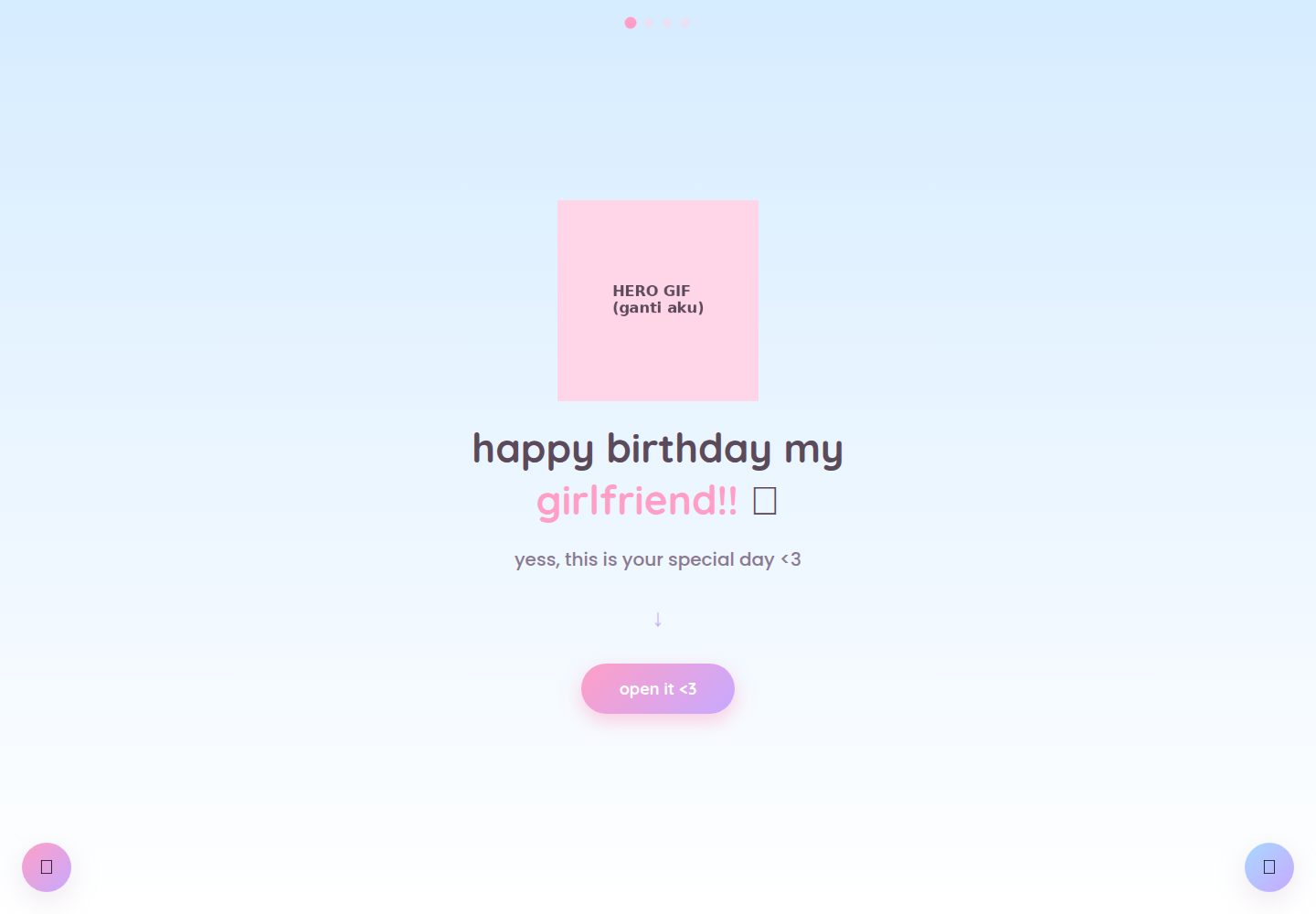
四个页面组成完整流程:首页介绍、照片画廊、100 个理由、生日信件
HTML启动器
cute-birthday-website — HTML 启动器模板
作者 felisaans
一个用纯 HTML、CSS 和 JavaScript 搭建的多页生日祝福网站模板,包含照片画廊、100 个理由、打字机信件与彩纸效果,素材均为占位文件,可替换后部署到静态托管。
看看你的网站会是什么样
浏览真实页面截图,比较内容排版与手机效果。点击下方缩略图切换,放大查看整页细节。
全部页面与视图 2
截图用于了解视觉与布局,交互效果请以实际项目为准。
采集于 2026-10-03查看来源
值得关注的模板亮点
从已有项目资料中,快速了解它的特点。
纯 HTML/CSS/JS 实现,无需构建步骤或后端服务
内置音乐按钮,切页时保持播放;留言按钮内容保存在浏览器本地
信件页使用打字机效果并触发彩纸动画
所有 GIF、照片、音乐均为占位文件,按原文件名替换即可
颜色主题集中在 css/style.css 的 :root 变量中统一调整
模板详细介绍
这是一个面向个人使用的生日祝福网站模板,不依赖构建工具或后端,由四个页面组成:首页介绍、可点击/滑动的照片画廊、“100 个理由”列表、以及带打字机效果和彩纸爆发的生日信件页。页面之间通过共享的 CSS 与 JavaScript 保持音乐播放状态,并提供一个可编辑的留言按钮,留言保存在浏览器本地存储中。
模板中的 GIF、照片和音乐文件都是占位素材(标注“REPLACE ME”的色块),需要按原文件名替换为自己的内容;文字部分分散在 index.html、reasons.html、js/gallery.js 和 js/script.js 中修改。颜色主题集中在 css/style.css 顶部的 :root 变量里。
使用限制:音乐跨页播放和留言保存依赖浏览器的 sessionStorage/localStorage,直接以 file:// 方式打开时可能不生效,建议用本地服务器预览;留言仅保存在写入设备的那一个浏览器里,不会跨设备同步。部署到 Netlify 等静态托管后这些功能可正常工作。
HTML启动器
适合你的项目吗?
适用场景
- 为伴侣或朋友制作个性化的生日祝福页面
- 作为学习多页静态网站、localStorage 与 CSS 变量用法的参考项目
- 在 Netlify 等静态托管上快速发布一个无需后端的纪念页面
适合人群
- 希望不写代码或仅做少量文本替换就能定制生日页面的人
- 需要纯静态、无后端依赖的礼物类网站模板的开发者
- 想参考多页面共享状态与简单动画实现方式的前端初学者
上手与定制指南
结合仓库当前版本的说明,按下面的资料检查内容、配置与运行要求。
- 1
下载或使用 GitHub 的 Use this template 创建副本,替换 photos/ 与 assets/ 中的占位文件,保持文件名和扩展名一致
- 2
文字内容分别位于 index.html、reasons.html、js/gallery.js 和 js/script.js,按 README 表格对应修改
- 3
本地预览建议用 python3 -m http.server 启动本地服务器,避免 file:// 下跨页音乐与留言存储失效
- 4
部署到 Netlify 时可直接拖拽项目文件夹,或连接 GitHub 仓库导入,无需构建命令
- 5
留言保存在浏览器 localStorage 中,不会跨设备同步;如需同步需自行添加后端或数据库
授权与来源资料
使用条件与限制
免费使用 · 保留许可声明本次收录的是公开仓库中采用 MIT 许可的免费版本;免费范围为该版本代码,不代表外部服务或第三方素材免费。
使用时需要遵守
- 允许免费使用、修改、商用和分发该版本代码。
- 分发代码副本或实质性部分时,保留原作者版权声明和完整 MIT 许可声明。
- 代码按现状提供;担保与责任限制以原许可证及适用法律为准。
额外费用与待核对事项
- README 许可部分声明仅限个人用途免费使用、修改和分享,未明确授予商业用途;若用于商业场景需自行确认授权范围。
- 留言功能仅保存在写入设备的那一个浏览器本地存储中,不会跨设备或跨浏览器同步;如需同步需自行添加后端或数据库。
- 直接以 file:// 双击打开时,跨页音乐播放与留言保存可能失效,建议使用本地服务器预览。
- 音乐不会自动播放,必须由用户点击音乐按钮后才会开始播放。
- 仓库内所有 GIF、照片和音乐均为占位素材,需自行替换;替换素材的版权与许可由使用者自行负责。
- 演示图片、字体、图标及其他第三方素材需按各自许可核对,不能仅凭代码的 MIT 许可判断。
- 域名、托管、数据库、支付或 AI 等外部服务可能另外收费。
查看原文依据
Permission is hereby granted, free of charge
许可证原文
Free to use, modify, and share for personal purposes (like surprising someone you love!)
README 原文
the note is saved in that specific browser (`localStorage`), not on a server or shared database
README 原文
some browsers (especially Chrome) treat each local file as its own separate origin, so those features might not carry over perfectly during local testing
README 原文
modern browsers block audio from autoplaying with sound before there's been any user interaction
README 原文
https://github.com/felisaans/cute-birthday-website/blob/main/LICENSEhttps://github.com/felisaans/cute-birthday-website/blob/main/README.mdEvery GIF, photo, and music file included right now is a **dummy placeholder**
README 原文
DeepSeek 根据仓库许可证和 README 整理 ·2026-10-03。结果仅覆盖已读取资料,依赖、图片、字体及后续条款变更以各自原文为准。
项目核对记录与介绍依据
模板资料
- 来源平台
- GitHub
- 资料与维护参考分
- 资料较完整 · 83 / 100
- 技术栈
- HTML
- 网站类型
- 启动器
这个分数如何计算
本站按许可资料(最高30分)、演示链接(12分)、预览图(10分)、Star数(15分)、记录的维护时间(15分)、描述完整度(8分)、功能记录(5分)和分类资料(5分)计算。它不是代码、安全或性能测试,也不是 Google 评分;有链接不代表已实测可用。
这个项目需要核对什么
- 记录的仓库更新时间
- 2026-09-03
- 截图检查日期
- 2026-10-03
已收录演示链接。请用你的内容与屏幕尺寸检查;有演示不代表表单、认证或支付已经可用。
目录记录的主要技术栈是 HTML。请通过依赖清单和锁文件核对实际版本与托管要求。这些说明基于收录资料,不代表代码审计或部署实测。
查看具体选型方法 →介绍的制作与核对状态
介绍由 AI 辅助整理目录与仓库资料。仓库作者不等于这篇介绍的审核者。
审核声明: [email protected] · 2026-10-04
查看当时使用的来源资料
SHA-256: 0619b058583e418846cfb729adbfa65390c8e47c593aa456c55fcd8a9b9815b1
2026-10-03T16:24:14.600Z
来源文件 / 仓库# 💌 Cute Birthday Website Template
*[Baca versi Bahasa Indonesia](README.id.md)*
A cute, interactive digital birthday website you can fully customize for your girlfriend (or anyone you love) — no coding experience required! Built to be used as a **template**: just swap in your own photos, GIFs, and text, then deploy.
**The flow:** intro page → interactive photo gallery → "100 reasons why I love you" → birthday letter with a confetti burst 🎉
It also includes a music button (the song keeps playing as she moves between pages) and a little editable note button where she can write back to you — her message auto-saves right in her browser.
---
## 📁 Folder structure
```
my-birthday-site/
├── index.html → Page 1: intro / hero
├── gallery.html → Page 2: interactive photo gallery (swipe/click)
├── reasons.html → Page 3: "100 reasons why i love you"
├── letter.html → Page 4: birthday letter + confetti
├── css/
│ └── style.css → all styling & colors, shared across every page
├── js/
│ ├── script.js → logic that runs on every page (transitions, music, note, letter, confetti)
│ ├── gallery.js → logic specific to the photo gallery
│ └── reasons.js → logic specific to the 100-reasons page (photo lightbox + auto-scroll)
├── assets/ → put your GIFs and music here
│ ├── hero.gif
│ ├── sparkle1.gif
│ ├── sparkle2.gif
│ ├── celebration.gif
│ ├── gif1.gif
│ ├── gif2.gif
│ └── music.mp3
└── photos/ → put your own photos here
├── photo1.jpg ... photo4.jpg (for the gallery)
└── reason1.jpg ... reason6.jpg (for the 100-reasons page)
```
> Every GIF, photo, and music file included right now is a **dummy placeholder** (a pastel-colored box that says "REPLACE ME"), so you know exactly what needs to be swapped out.
---
## 🚀 Getting started (step-by-step for beginners)
### 1. Download this project
If you got this from GitHub, click **Code → Download ZIP**, then extract it anywhere on your computer. Or, even easier, click the green **"Use this template"** button on the repo page to create your own copy on GitHub first.
### 2. Replace the photos & GIFs
Open the `photos/` and `assets/` folders, then **overwrite the existing files using the exact same filenames** (capitalization matters!). For example:
- Want new gallery photos? Overwrite `photos/photo1.jpg`, `photo2.jpg`, etc. with your own (`.jpg` or `.png` both work, but if you change the extension, you'll also need to update the filename referenced in the HTML — see step 4).
- Want a different intro GIF? Overwrite `assets/hero.gif`.
- Want your own song? Overwrite `assets/music.mp3` with your own track (mp3 format).
**If your filenames or extensions are different**, just look for the `<!-- INSERT YOUR GIF/PHOTO HERE -->` comments in the relevant HTML file and update the `src="..."` there.
### 3. Edit all the text
This is the most personal part — the text lives in a few different places:
| What do you want to edit? | Open this file | Look for |
|---|---|---|
| Title & subtitle on the intro page | `index.html` | `<h1 class="hero-title">` and `<p class="hero-subtitle">` |
| Captions under each gallery photo | `js/gallery.js` | the `photos` array near the top of the file |
| The "100 reasons" list | `reasons.html` | find `<ol class="reasons-list">` — each reason is one `<li>...</li>` line. It currently ships with placeholder text ("reason 1", "reason 2", etc.) — replace with your own (fewer than 100 is fine too, just delete the extra `<li>` lines) |
| The typewriter birthday letter | `js/script.js` | the `letterMessage` variable in the middle of the file |
| The signature on the letter | `letter.html` | `<p class="signature">` |
### 4. Preview it in your browser (local testing)
Just double-click `index.html` — it should open right up in your default browser.
⚠️ **Important note:** the "music keeps playing across pages" feature and the note button's saved state rely on the browser's `sessionStorage`/`localStorage`. If you open the files by **double-clicking** them (`file://...`), some browsers (especially Chrome) treat each local file as its own separate origin, so those features might not carry over perfectly during local testing. This is **normal** and will work smoothly once the site is deployed (step 5), since all pages will then share one real website address.
For more accurate local testing, run a simple local server instead. If you have Python installed, open a terminal in this project folder and run:
```
python3 -m http.server
```
then open `http://localhost:8000` in your browser.
### 5. Deploy to Netlify (free)
The easiest way:
1. Go to [app.netlify.com/drop](https://app.netlify.com/drop)
2. Drag this project's folder (make sure `index.html` is at the top level/root) onto the page
3. Netlify instantly gives you a live link, like `random-name.netlify.app`
4. You can rename that link under **Site settings → Change site name**
For something more polished (auto-updates every time you push a change), upload this project to a GitHub repo, then in Netlify choose **Add new site → Import an existing project** and connect it to that repo. No build command needed — this is a plain static site.
---
## 🎨 Changing the color theme
All colors are defined in one place: open `css/style.css`, look at the very top (`:root { ... }`). Change the hex color codes (e.g. `#ffd6e8`) to whatever you like — it updates across every page automatically.
---
## ❓ FAQ / Troubleshooting
**My GIF/photo isn't showing up — just a broken image icon.**
Double-check the filename matches EXACTLY what's in the code (including capitalization and file extension — `.jpg` is different from `.JPG` on some systems). Also make sure the file actually exists inside `assets/` or `photos/`.
**The music doesn't play automatically when the page loads.**
That's intentional — modern browsers block audio from autoplaying with sound before there's been any user interaction. That's why the music only starts once the music button (🎵, bottom-right corner) is clicked.
**The note she wrote using the 📝 button isn't showing up on my phone/laptop.**
That's expected — the note is saved in that specific browser (`localStorage`), not on a server or shared database. So if she writes it on her phone, it only lives on her phone's browser. If you'd like a version that syncs across devices, that would require adding a small backend/database (outside the scope of this static template).
**I want to add/remove photos in the gallery or the clothesline on the reasons page.**
- Gallery (`gallery.html`): edit the `photos` array in `js/gallery.js`, adding or removing objects from it. Also update the number of `<button class="dot">` elements in `gallery.html` to match.
- Clothesline photos on the reasons page (`reasons.html`): add or remove `<div class="hang-photo">...</div>` blocks inside `.hanging-photos`.
---
## 📜 License
Free to use, modify, and share for personal purposes (like surprising someone you love!). If you improve on this, feel free to fork it and share it with others too 💕
看看同类模板
对比同技术栈与用途的模板,找到更适合的视觉与内容结构。

startbootstrap-simple-sidebar
An off canvas sidebar navigation Bootstrap HTML template created by Start Bootstrap
HTML · 启动器

adminkit
AdminKit is a free & open-source HTML dashboard & admin template based on Bootstrap 5
HTML · 后台

Landing-Page
Tailwind CSS Starter Template - Landing Page
HTML · 企业官网

light-bootstrap-dashboard
Light Bootstrap Dashboard is an admin dashboard template designed to be beautiful and simple.
HTML · 后台

sing-app
💥Free and open-source admin dashboard template built with Bootstrap 4.5 💥
HTML · 后台

startbootstrap-modern-business
A multipurpose Bootstrap full website template created by Start Bootstrap
HTML · 启动器