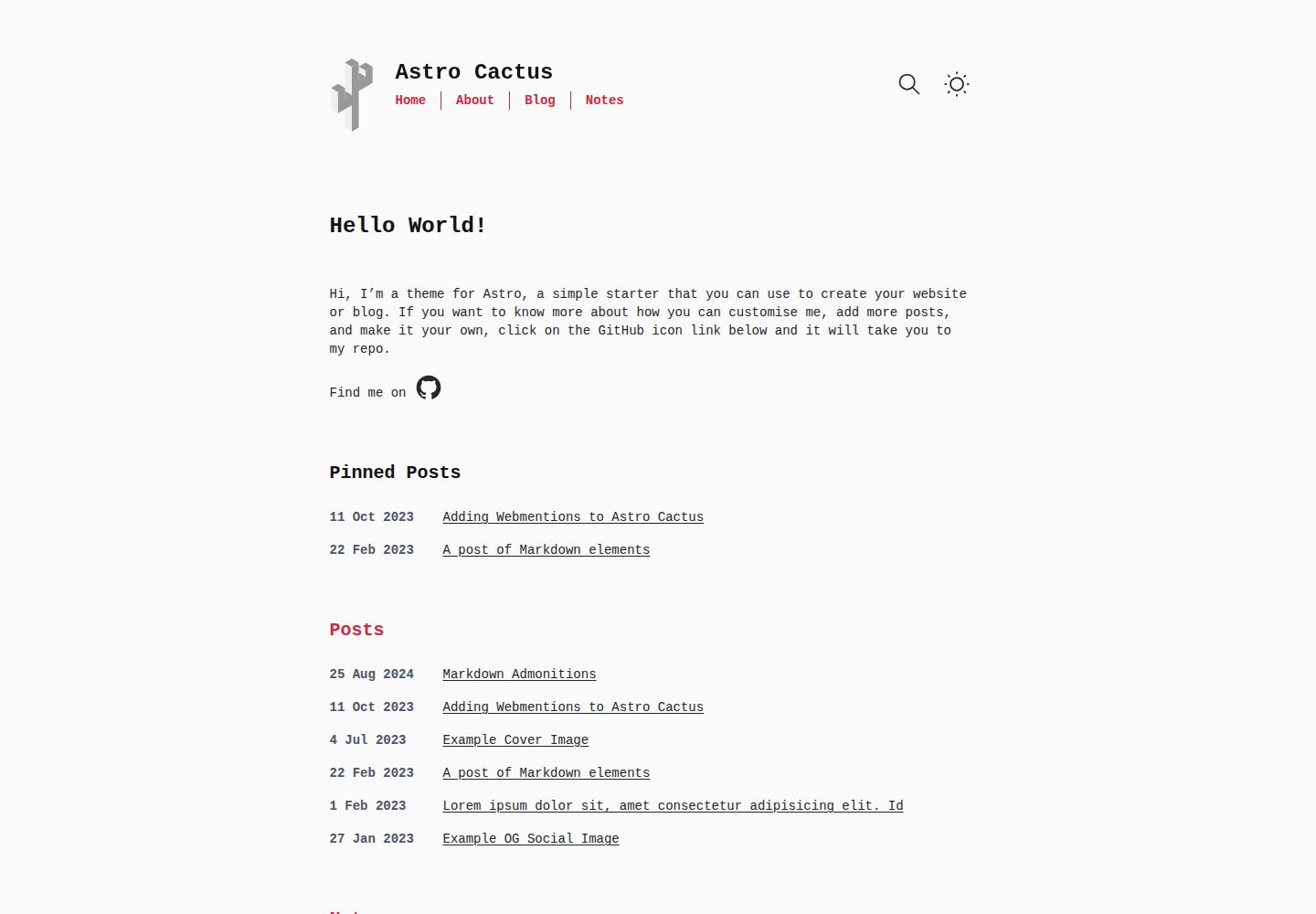
Write articles and notes using Markdown and MDX, with filenames automatically used as URL slugs
AstroPortfolioBlog
astro-theme-cactus — Astro Portfolio Template
By figlesias221
An Astro-based static blog and portfolio template that provides out-of-the-box capabilities such as Markdown/MDX content, dark mode, static search, and automatic RSS.
Explore the design
Compare the page layouts and mobile experience. Open any screenshot for a closer look.
Desktop homepage1 / 3
Desktop captureTop of page
Actual screenshot captured by the server browser.
All pages & views 3
Screenshots show visual appearance; interactive behavior may differ.
Recorded 2026-10-06View source
What stands out
A quick read of the recorded project description.
Type-check frontmatter through Content Collections and schemas
Includes both light and dark themes, with pages using semantic HTML
Integrates Pagefind static search for on-site searching of articles and notes
Automatically generates sitemap, robots.txt, web app manifest, and RSS feeds
Uses Satori to automatically generate Open Graph images for articles, and also supports custom ogImage
Template Details
Astro Cactus is a static site template built with Astro, aimed at blog and personal portfolio scenarios. Content is stored as Markdown or MDX files in the src/content/post and src/content/note directories; the filename serves as the slug for the article URL, and frontmatter is type-checked through Content Collections and schemas. The template includes both light and dark themes, uses semantic HTML for pages, and automatically generates sitemap, robots.txt, and a web app manifest.
On the feature side, the template integrates Pagefind static search, Satori for generating Open Graph images, automatic RSS feeds, Webmentions, and Astro Icon components; code blocks are rendered with Expressive Code. Search only covers posts and notes content, and it requires running a build first and then the postbuild script to take effect.
Before use, you need to modify the site URL in src/site.config.ts and replace the icons and social card images in the public directory. The licenses for third-party assets such as demo images, fonts, and icons must be checked separately; they cannot be judged solely based on the code's MIT license.
AstroPortfolioBlog
Is it right for your project?
Use Cases
- Building a personal blog focused on Markdown writing
- Maintaining a portfolio site with an article list and tag pages
- Static sites that need dark mode and static search
- Content sites that want automatic RSS, sitemap, and OG image generation
Suitable For
- Individual developers accustomed to writing in Markdown or MDX
- Sites that combine a blog and portfolio and are deployed via static generation
- Astro users who want to control site configuration and styling themselves
Getting started & customization
Use these recorded setup notes alongside the repository instructions for your chosen version.
- 1
Set your own site URL in src/site.config.ts and adjust options such as date format
- 2
Replace icon.svg and social-card.png in the public directory
- 3
Add .md or .mdx files in src/content/post and src/content/note to publish content
- 4
For search functionality, first run a build, then run the postbuild script to generate the Pagefind index
- 5
Modify social links in src/components/SocialList.astro and adjust light/dark theme styles in src/styles/global.css
License & source material
Usage conditions & limitations
Free to use · keep license noticeThis entry covers the free version under the MIT license in the public repository; the free scope is the code of this version and does not mean that external services or third-party assets are free.
Must comply with when using
- Free use, modification, commercial use, and distribution of this version's code are permitted.
- When distributing copies or substantial portions of the code, retain the original author's copyright notice and the full MIT license notice.
- The code is provided as is; warranties and limitations of liability are governed by the original license and applicable law.
Additional costs & items to verify
- Demo images, fonts, icons, and other third-party assets must be checked against their respective licenses; they cannot be judged solely based on the code's MIT license.
- External services such as domains, hosting, databases, payments, or AI may incur additional charges.
- Before use, you must change the url property in src/site.config.ts to your own domain, otherwise the site configuration will be incorrect.
- You need to replace and update files such as icon.svg and social-card.png in the /public directory yourself; the placeholder assets included with the template cannot be used directly on a production site.
- Pagefind search is only available after the site is built; you must first run a build and then the postbuild script, and it cannot be used without building.
- Search scope only covers posts and notes content; other pages are not indexed by default.
- The template does not include any analytics solution; if you need visit statistics, you must integrate a third-party service yourself, which may incur additional costs or account requirements.
- When integrating an analytics service, you usually need to insert the third-party-provided code snippet into the HEAD tag yourself.
- The Webmentions feature requires configuring it yourself by referring to external articles and may depend on external services such as webmention.io.
View Original Text Basis
Permission is hereby granted, free of charge
Original License Text
**Important**: set the url property with your own domain.
Original README
Replace & update files within the `/public` folder:
Original README
This integration brings a static search feature for searching blog posts and notes. In its current form, pagefind only works once the site has been built.
Original README
Search results only includes pages from posts and notes.
Original README
This theme/template doesn't include a specific solution due to there being a number of use cases and/or options which some people may or may not use.
Original README
You may be asked to included a snippet inside the **HEAD** tag of your website when setting it up
Original README
https://github.com/figlesias221/astro-theme-cactus/blob/main/LICENSEhttps://github.com/figlesias221/astro-theme-cactus/blob/main/README.mdRead [this post](http://astro-cactus.chriswilliams.dev/posts/webmentions/) for adding webmentions to your site.
Original README
Compiled by DeepSeek based on repository license and README ·2026-10-06. Results only cover the materials read; dependencies, images, fonts, and subsequent term changes are subject to their respective original texts.
Project checks & description sources
Template Information
- Source platforms
- GitHub
- Documentation and maintenance reference score
- More documented · 79 / 100
- Technologies
- Astro
- Website type
- Portfolio · Blog
How this score is calculated
Our heuristic uses license records (up to 30), a demo link (12), a preview (10), stars (15), recorded maintenance (15), description completeness (8), feature records (5) and classification data (5). It is not a code, security or performance test, or a Google score. A link does not establish tested functionality.
What to verify for this project
- Repository update recorded
- 2025-05-01
- Screenshot last checked
- 2026-10-06
A demo link is listed. Check it with your own content and viewport sizes; its presence does not confirm that forms, authentication or payments work.
The catalog identifies Astro as the primary stack. Check the actual dependency manifest and lockfile for versions and hosting requirements. These notes use recorded metadata, not a code audit or a deployment test.
Use a selection guide →How this description was prepared
AI-assisted description based on catalog records and repository material. Repository authors are not automatically the reviewers of this description.
Review declaration: [email protected] · 2026-10-06
Inspect the recorded source material
SHA-256: 93c50a515b96dcb5b30d01a1cac212bf4a5ab791be646b4647a1595fc0b57720
2026-10-06T14:12:29.969Z
Source file / repository<div align="center"> <img alt="Astro Cactus logo" src="https://github.com/chrismwilliams/astro-theme-cactus/assets/12715988/85aa0d3c-ef6a-44e2-954d-ef035b4f4315" width="70" /> </div> <h1 align="center"> Astro Cactus </h1> Astro Cactus is a simple opinionated starter built with [Astro](https://astro.build). Use it to create an easy-to-use blog or website. ## Table Of Contents 1. [Key Features](#key-features) 2. [Demo](#demo-💻) 3. [Quick start](#quick-start) 4. [Preview](#preview) 5. [Commands](#commands) 6. [Configure](#configure) 7. [Updating](#updating) 8. [Adding Posts](#adding-posts) - [Frontmatter](#frontmatter) - [Frontmatter Snippet](#frontmatter-snippet) 9. [Pagefind search](#pagefind-search) 10. [Analytics](#analytics) 11. [Deploy](#deploy) 12. [Acknowledgment](#acknowledgment) ## Key Features - Astro v5 Fast 🚀 - Tailwind v4 - Accessible, semantic HTML markup - Responsive & SEO-friendly - Dark & Light mode - MD & [MDX](https://docs.astro.build/en/guides/markdown-content/#mdx-only-features) posts & notes - Includes [Admonitions](https://astro-cactus.chriswilliams.dev/posts/markdown-elements/admonistions/) - [Satori](https://github.com/vercel/satori) for creating open graph png images - [Automatic RSS feeds](https://docs.astro.build/en/guides/rss) - [Webmentions](https://webmention.io/) - Auto-generated: - [sitemap](https://docs.astro.build/en/guides/integrations-guide/sitemap/) - [robots.txt](https://github.com/alextim/astro-lib/blob/main/packages/astro-robots-txt/README.md) - [web app manifest](https://github.com/alextim/astro-lib/blob/main/packages/astro-webmanifest/README.md) - [Pagefind](https://pagefind.app/) static search library integration - [Astro Icon](https://github.com/natemoo-re/astro-icon) svg icon component - [Expressive Code](https://expressive-code.com/) code blocks and syntax highlighter ## Demo 💻 Check out the [Demo](https://astro-cactus.chriswilliams.dev/), hosted on Netlify ## Quick start [Create a new repo](https://github.com/chrismwilliams/astro-theme-cactus/generate) from this template. ```bash # npm 7+ npm create astro@latest -- --template chrismwilliams/astro-theme-cactus # pnpm pnpm dlx create-astro --template chrismwilliams/astro-theme-cactus ``` [](https://app.netlify.com/start/deploy?repository=https://github.com/chrismwilliams/astro-theme-cactus) [](https://vercel.com/new/clone?repository-url=https%3A%2F%2Fgithub.com%2Fchrismwilliams%2Fastro-theme-cactus&project-name=astro-theme-cactus) ## Preview 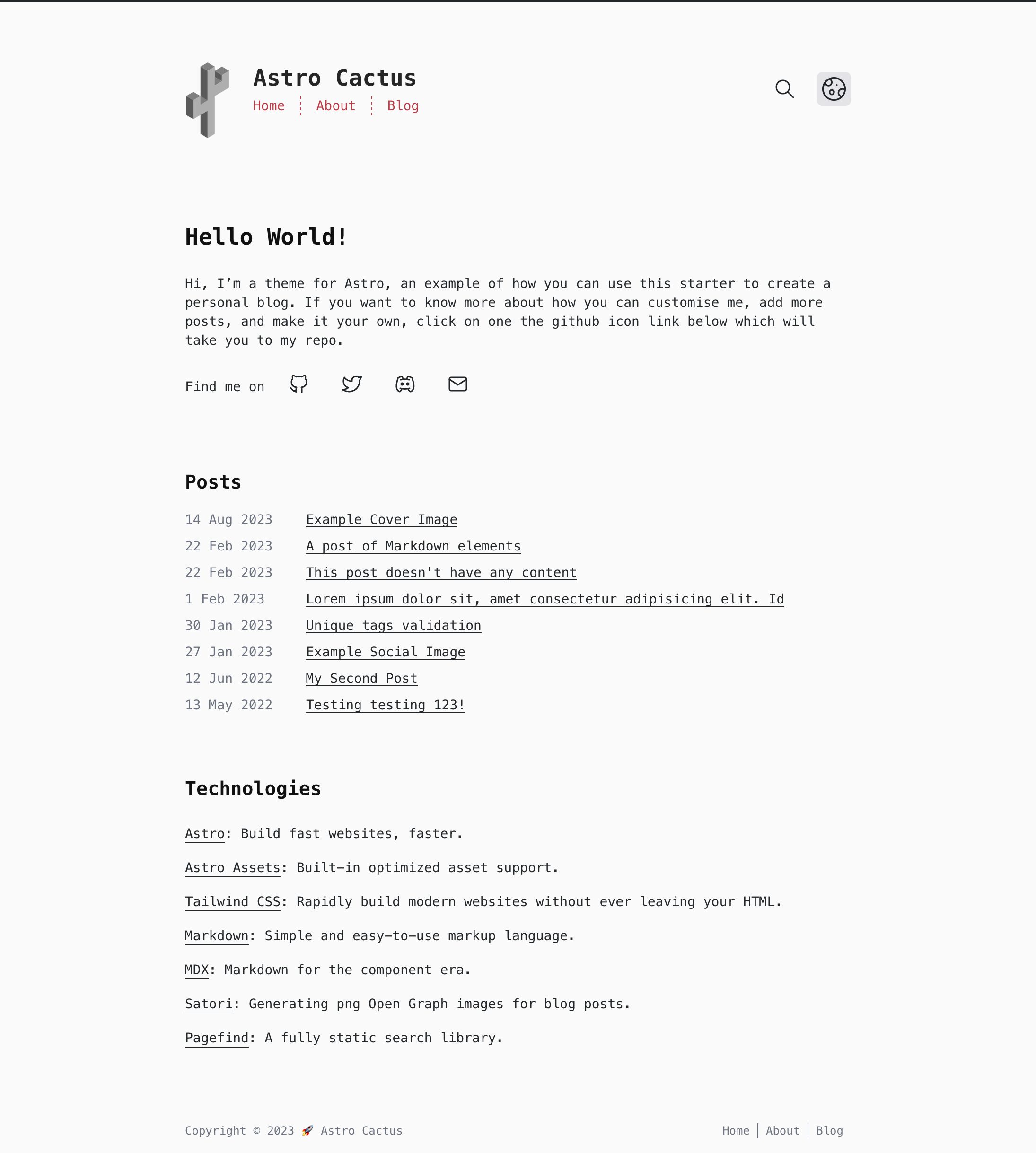  ## Commands Replace pnpm with your choice of npm / yarn | Command | Action | | :--------------- | :------------------------------------------------------------- | | `pnpm install` | Installs dependencies | | `pnpm dev` | Starts local dev server at `localhost:3000` | | `pnpm build` | Build your production site to `./dist/` | | `pnpm postbuild` | Pagefind script to build the static search of your blog posts | | `pnpm preview` | Preview your build locally, before deploying | | `pnpm sync` | Generate types based on your config in `src/content/config.ts` | ## Configure - Edit the template's config file `src/site.config.ts` - **Important**: set the url property with your own domain. - Modify the settings for markdown code blocks, generated by [Expressive Code](https://expressive-code.com). Astro Cactus has both a dark (dracula) and light (github-light) theme. You can find more options [here](https://expressive-code.com/guides/themes/#available-themes). - Update file `astro.config.ts` - [astro-webmanifest options](https://github.com/alextim/astro-lib/blob/main/packages/astro-webmanifest/README.md) - Replace & update files within the `/public` folder: - icon.svg - used as the source to create favicons & manifest icons - social-card.png - used as the default og:image - Modify file `src/styles/global.css` with your own light and dark styles, and customise [Tailwind's theme settings](https://tailwindcss.com/docs/theme#customizing-your-theme). - Edit social links in `src/components/SocialList.astro` to add/replace your media profile. Icons can be found @ [icones.js.org](https://icones.js.org/), per [Astro Icon's instructions](https://www.astroicon.dev/guides/customization/#find-an-icon-set). - Create/edit posts & notes for your blog within `src/content/post/` & `src/content/note/` with .md/mdx file(s). See [below](#adding-posts-and-notes) for more details. - Read [this post](http://astro-cactus.chriswilliams.dev/posts/webmentions/) for adding webmentions to your site. - OG Image: - If you would like to change the style of the generated image the Satori library creates, open up `src/pages/og-image/[slug].png.ts` to the markup function where you can edit the html/tailwind-classes as necessary. You can use this [playground](https://og-playground.vercel.app/) to aid your design. - You can also create your own og images and skip satori generating it for you by adding an ogImage property in the frontmatter with a link to the asset, an example can be found in `src/content/post/social-image.md`. More info on frontmatter can be found [here](#frontmatter) - Optional: - Fonts: This theme sets the body element to the font family `font-mono`, in `src/layouts/Base.astro` on the `<body>`. You can change fonts by removing the variant `font-mono`, after which TailwindCSS will default to the `font-sans` [font family stack](https://tailwindcss.com/docs/font-family). ## Updating If you've forked the template, you can [sync the fork](https://docs.github.com/en/pull-requests/collaborating-with-pull-requests/working-with-forks/syncing-a-fork) with your own project, remembering to **not** click Discard Changes as you will lose your own. If you have a template repository, you can add this template as a remote, as discussed [here](https://stackoverflow.com/questions/56577184/github-pull-changes-from-a-template-repository). ## Adding posts and notes This theme uses [Content Collections](https://docs.astro.build/en/guides/content-collections/) to organise local Markdown and MDX files, as well as type-checking frontmatter with a schema -> `src/content.config.ts`. Adding a post/note is as simple as adding your .md(x) files to the `src/content/post` and/or `src/content/note` folder, the filename of which will be used as the slug/url. The posts included with this template are there as an example of how to structure your frontmatter. Additionally, the [Astro docs](https://docs.astro.build/en/guides/markdown-content/) has a detailed section on markdown pages. ### Post Frontmatter | Property (\* required) | Description | | ---------------------- | ------------------------------------------------------------------------------------------------------------------------------------------------------------------------------------------------------------------------------------------------------------------------------------------------------------ | | title \* | Self explanatory. Used as the text link to the post, the h1 on the posts' page, and the pages title property. Has a max length of 60 chars, set in `src/content/config.ts` | | description \* | Similar to above, used as the seo description property. Has a min length of 50 and a max length of 160 chars, set in the post schema. | | publishDate \* | Again pretty simple. To change the date format/locale, currently **en-GB**, update the date option in `src/site.config.ts`. Note you can also pass additional options to the component `<FormattedDate>` if required. | | updatedDate | This is an optional date representing when a post has been updated, in the same format as the publishDate. | | tags | Tags are optional with any created post. Any new tag(s) will be shown in `yourdomain.com/posts` & `yourdomain.com/tags`, and generate the page(s) `yourdomain.com/tags/[yourTag]` | | coverImage | This is an optional object that will add a cover image to the top of a post. Include both a `src`: "_path-to-image_" and `alt`: "_image alt_". You can view an example in `src/content/post/cover-image.md`. | | ogImage | This is an optional property. An OG Image will be generated automatically for every post where this property **isn't** provided. If you would like to create your own for a specific post, include this property and a link to your image, the theme will then skip automatically generating one. | | draft | This is an optional property as it is set to false by default in the schema. By adding true, the post will be filtered out of the production build in a number of places, inc. getAllPosts() calls, og-images, rss feeds, and generated page[s]. You can view an example in `src/content/post/draft-post.md` | ### Note Frontmatter | Property (\* required) | Description | | ---------------------- | -------------------------------------------------- | | title \* | string, max length 60 chars. | | description | to be used for the head meta description property. | | publishDate \* | ISO 8601 format with offsets allowed. | ### Frontmatter snippets Astro Cactus includes a helpful VSCode snippet which creates a frontmatter 'stub' for posts and note's, found here -> `.vscode/post.code-snippets`. Start typing the word `frontmatter` on your newly created .md(x) file to trigger it. Visual Studio Code snippets appear in IntelliSense via (⌃Space) on mac, (Ctrl+Space) on windows. ## Pagefind search This integration brings a static search feature for searching blog posts and notes. In its current form, pagefind only works once the site has been built. This theme adds a postbuild script that should be run after Astro has built the site. You can preview locally by running both build && postbuild. Search results only includes pages from posts and notes. If you would like to include other/all your pages, remove/re-locate the attribute `data-pagefind-body` to the article tag found in `src/layouts/BlogPost.astro` and `src/components/note/Note.astro`. It also allows you to filter posts by tags added in the frontmatter of blog posts. If you would rather remove this, remove the data attribute `data-pagefind-filter="tag"` from the link in `src/components/blog/Masthead.astro`. If you would rather not include this integration, simply remove the component `src/components/Search.astro`, and uninstall both `@pagefind/default-ui` & `pagefind` from package.json. You will also need to remove the postbuild script from here as well. You can reduce the initial css payload of your css, as demonstrated [here](https://github.com/chrismwilliams/astro-theme-cactus/pull/145#issue-1943779868), by lazy loading the web components styles. ## Analytics You may want to track the number of visitors you receive to your blog/website in order to understand trends and popular posts/pages you've created. There are a number of providers out there one could use, including web hosts such as [vercel](https://vercel.com/analytics), [netlify](https://www.netlify.com/products/analytics/), and [cloudflare](https://www.cloudflare.com/web-analytics/). This theme/template doesn't include a specific solution due to there being a number of use cases and/or options which some people may or may not use. You may be asked to included a snippet inside the **HEAD** tag of your website when setting it up, which can be found in `src/layouts/Base.astro`. Alternatively, you can add the snippet in `src/components/BaseHead.astro`. ## Deploy [Astro docs](https://docs.astro.build/en/guides/deploy/) has a great section and breakdown of how to deploy your own Astro site on various platforms and their idiosyncrasies. By default the site will be built (see [Commands](#commands) section above) to a `/dist` directory. ## Acknowledgment This theme was inspired by [Hexo Theme Cactus](https://github.com/probberechts/hexo-theme-cactus) ## License MIT
Explore similar templates
Compare previews and descriptions within the same stack and category.

astrowind
AstroWind is a free, open-source Astro starter theme using Astro and Tailwind CSS, released under the MIT license.
Astro · Blog

astro-paper
AstroPaper is a minimal, responsive, accessible, and SEO-friendly Astro blog theme. Articles are stored as Markdown/MDX in src/content/posts/, with subdirectories affecting URLs.
Astro · Blog

fuwari
Fuwari is a static blog template built with Astro and Tailwind CSS for personal blogs. It manages posts as Markdown files in src/content/posts/, with frontmatter for title, date, description, cover, tags, categories, draft status, and language.
Astro · Blog

Firefly
Firefly is a clean personal blog theme forked from Astro and Fuwari, offering four background modes, single/double sidebar and list/grid layouts, Pagefind client-side full-text search, and a six-language UI.
Astro · Blog

astro-theme-cactus
Astro Cactus is an Astro-based blog and portfolio theme that uses Markdown/MDX content collections to manage posts, notes, and tags, with frontmatter type-checked by a schema.
Astro · Portfolio

astrofy
Astrofy is a free and open-source personal portfolio website template built with Astro and TailwindCSS, with built-in blog, CV timeline, project showcase, store, and RSS feed modules.
Astro · Portfolio