使用 Markdown 与 MDX 撰写文章和笔记,文件名自动作为 URL slug
Astro作品集博客
astro-theme-cactus — Astro 作品集模板
作者 figlesias221
基于 Astro 的静态博客与作品集模板,提供 Markdown/MDX 内容、暗色模式、静态搜索与自动 RSS 等开箱能力。
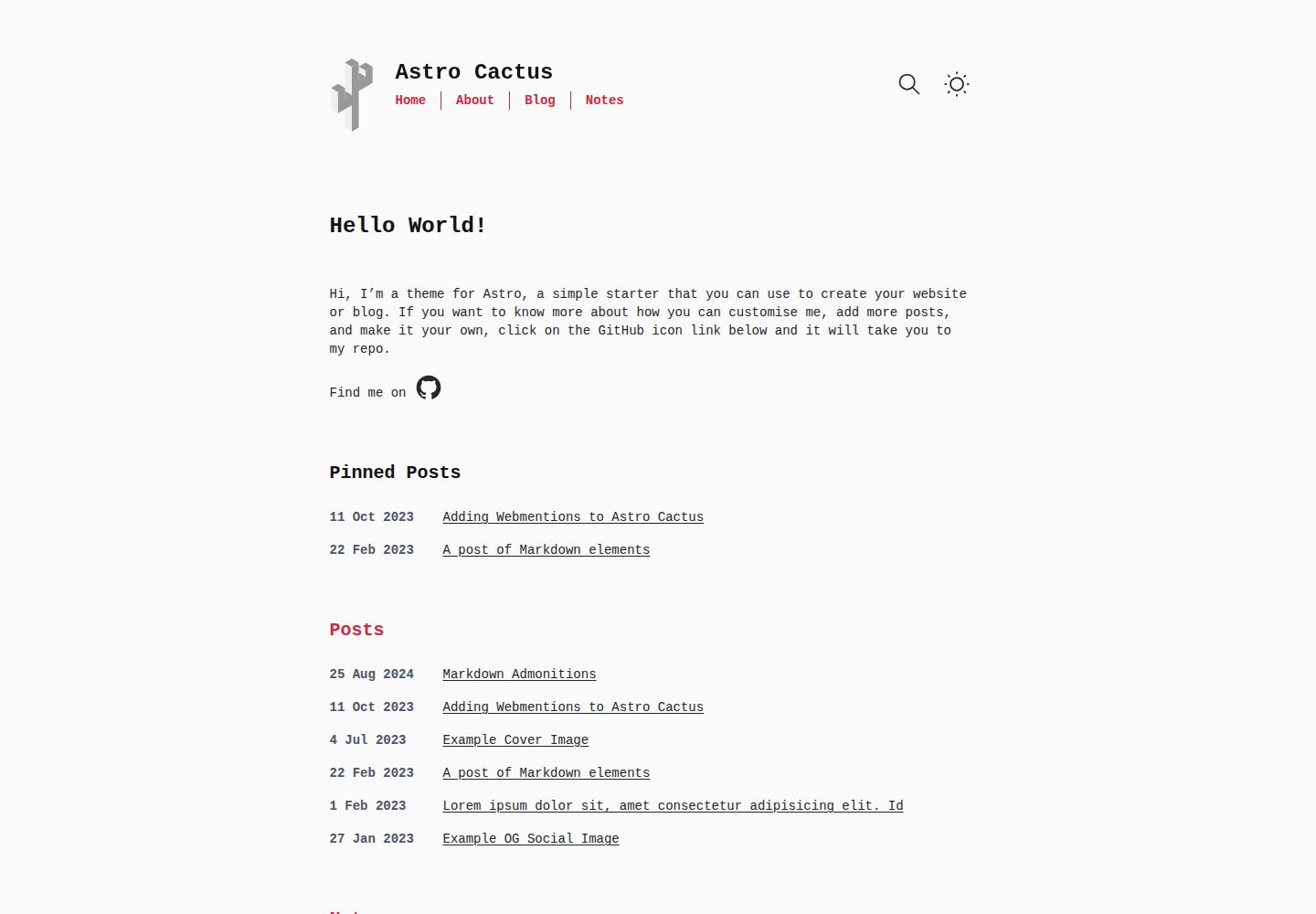
看看你的网站会是什么样
浏览真实页面截图,比较内容排版与手机效果。点击下方缩略图切换,放大查看整页细节。
全部页面与视图 3
截图用于了解视觉与布局,交互效果请以实际项目为准。
采集于 2026-10-06查看来源
值得关注的模板亮点
从已有项目资料中,快速了解它的特点。
通过 Content Collections 与 schema 对 frontmatter 做类型校验
内置亮色与暗色两套主题,页面采用语义化 HTML
集成 Pagefind 静态搜索,可对文章和笔记进行站内检索
自动生成 sitemap、robots.txt、web app manifest 与 RSS 订阅
使用 Satori 为文章自动生成 Open Graph 图片,也支持自定义 ogImage
模板详细介绍
Astro Cactus 是一个用 Astro 构建的静态站点模板,面向博客与个人作品集场景。内容以 Markdown 或 MDX 文件形式存放在 src/content/post 与 src/content/note 目录中,文件名即作为文章 URL 的 slug,并通过 Content Collections 与 schema 对 frontmatter 做类型校验。模板内置亮色与暗色两套主题,页面使用语义化 HTML,并自动生成 sitemap、robots.txt 和 web app manifest。
功能层面,模板集成了 Pagefind 静态搜索、Satori 生成 Open Graph 图片、自动 RSS 订阅、Webmentions 以及 Astro Icon 图标组件,代码块使用 Expressive Code 渲染。搜索只覆盖 posts 与 notes 内容,需要先执行构建再运行 postbuild 脚本才能生效。
使用前需要自行修改 src/site.config.ts 中的站点 URL,并替换 public 目录下的图标与社交卡片图片。演示图片、字体、图标等第三方素材的许可需单独核对,不能仅凭代码的 MIT 许可判断。
Astro作品集博客
适合你的项目吗?
适用场景
- 搭建以 Markdown 写作的个人博客
- 维护带文章列表与标签页的作品集站点
- 需要暗色模式与静态搜索的静态站点
- 希望自动生成 RSS、sitemap 与 OG 图片的内容站点
适合人群
- 习惯用 Markdown 或 MDX 写作的个人开发者
- 需要博客与作品集合一、以静态生成方式部署的站点
- 希望自行掌控站点配置与样式的 Astro 使用者
上手与定制指南
结合仓库当前版本的说明,按下面的资料检查内容、配置与运行要求。
- 1
在 src/site.config.ts 中设置自己的站点 URL,并调整日期格式等选项
- 2
替换 public 目录下的 icon.svg 与 social-card.png
- 3
在 src/content/post 与 src/content/note 中添加 .md 或 .mdx 文件来发布内容
- 4
搜索功能需先执行构建,再运行 postbuild 脚本生成 Pagefind 索引
- 5
在 src/components/SocialList.astro 中修改社交链接,在 src/styles/global.css 中调整亮暗主题样式
授权与来源资料
使用条件与限制
免费使用 · 保留许可声明本次收录的是公开仓库中采用 MIT 许可的免费版本;免费范围为该版本代码,不代表外部服务或第三方素材免费。
使用时需要遵守
- 允许免费使用、修改、商用和分发该版本代码。
- 分发代码副本或实质性部分时,保留原作者版权声明和完整 MIT 许可声明。
- 代码按现状提供;担保与责任限制以原许可证及适用法律为准。
额外费用与待核对事项
- 演示图片、字体、图标及其他第三方素材需按各自许可核对,不能仅凭代码的 MIT 许可判断。
- 域名、托管、数据库、支付或 AI 等外部服务可能另外收费。
- 使用前必须将 src/site.config.ts 中的 url 属性改为你自己的域名,否则站点配置不正确。
- 需要自行替换并更新 /public 目录下的 icon.svg 与 social-card.png 等文件,模板自带的占位素材不能直接用于正式站点。
- Pagefind 搜索仅在站点构建完成后才可用,需先执行构建再运行 postbuild 脚本,无法在未构建状态下使用。
- 搜索范围仅覆盖 posts 与 notes 内容,其他页面默认不会被检索到。
- 模板不内置任何分析统计方案,如需访问统计须自行接入第三方服务并可能产生额外费用或账号要求。
- 接入分析服务时通常需要自行在 HEAD 标签中插入第三方提供的代码片段。
- Webmentions 功能需参考外部文章自行配置,可能依赖 webmention.io 等外部服务。
查看原文依据
Permission is hereby granted, free of charge
许可证原文
**Important**: set the url property with your own domain.
README 原文
Replace & update files within the `/public` folder:
README 原文
This integration brings a static search feature for searching blog posts and notes. In its current form, pagefind only works once the site has been built.
README 原文
Search results only includes pages from posts and notes.
README 原文
This theme/template doesn't include a specific solution due to there being a number of use cases and/or options which some people may or may not use.
README 原文
You may be asked to included a snippet inside the **HEAD** tag of your website when setting it up
README 原文
https://github.com/figlesias221/astro-theme-cactus/blob/main/LICENSEhttps://github.com/figlesias221/astro-theme-cactus/blob/main/README.mdRead [this post](http://astro-cactus.chriswilliams.dev/posts/webmentions/) for adding webmentions to your site.
README 原文
DeepSeek 根据仓库许可证和 README 整理 ·2026-10-06。结果仅覆盖已读取资料,依赖、图片、字体及后续条款变更以各自原文为准。
项目核对记录与介绍依据
模板资料
- 来源平台
- GitHub
- 资料与维护参考分
- 资料较完整 · 79 / 100
- 技术栈
- Astro
- 网站类型
- 作品集 · 博客
这个分数如何计算
本站按许可资料(最高30分)、演示链接(12分)、预览图(10分)、Star数(15分)、记录的维护时间(15分)、描述完整度(8分)、功能记录(5分)和分类资料(5分)计算。它不是代码、安全或性能测试,也不是 Google 评分;有链接不代表已实测可用。
这个项目需要核对什么
- 记录的仓库更新时间
- 2025-05-01
- 截图检查日期
- 2026-10-06
已收录演示链接。请用你的内容与屏幕尺寸检查;有演示不代表表单、认证或支付已经可用。
目录记录的主要技术栈是 Astro。请通过依赖清单和锁文件核对实际版本与托管要求。这些说明基于收录资料,不代表代码审计或部署实测。
查看具体选型方法 →介绍的制作与核对状态
介绍由 AI 辅助整理目录与仓库资料。仓库作者不等于这篇介绍的审核者。
审核声明: [email protected] · 2026-10-06
查看当时使用的来源资料
SHA-256: 93c50a515b96dcb5b30d01a1cac212bf4a5ab791be646b4647a1595fc0b57720
2026-10-06T14:12:29.969Z
来源文件 / 仓库<div align="center"> <img alt="Astro Cactus logo" src="https://github.com/chrismwilliams/astro-theme-cactus/assets/12715988/85aa0d3c-ef6a-44e2-954d-ef035b4f4315" width="70" /> </div> <h1 align="center"> Astro Cactus </h1> Astro Cactus is a simple opinionated starter built with [Astro](https://astro.build). Use it to create an easy-to-use blog or website. ## Table Of Contents 1. [Key Features](#key-features) 2. [Demo](#demo-💻) 3. [Quick start](#quick-start) 4. [Preview](#preview) 5. [Commands](#commands) 6. [Configure](#configure) 7. [Updating](#updating) 8. [Adding Posts](#adding-posts) - [Frontmatter](#frontmatter) - [Frontmatter Snippet](#frontmatter-snippet) 9. [Pagefind search](#pagefind-search) 10. [Analytics](#analytics) 11. [Deploy](#deploy) 12. [Acknowledgment](#acknowledgment) ## Key Features - Astro v5 Fast 🚀 - Tailwind v4 - Accessible, semantic HTML markup - Responsive & SEO-friendly - Dark & Light mode - MD & [MDX](https://docs.astro.build/en/guides/markdown-content/#mdx-only-features) posts & notes - Includes [Admonitions](https://astro-cactus.chriswilliams.dev/posts/markdown-elements/admonistions/) - [Satori](https://github.com/vercel/satori) for creating open graph png images - [Automatic RSS feeds](https://docs.astro.build/en/guides/rss) - [Webmentions](https://webmention.io/) - Auto-generated: - [sitemap](https://docs.astro.build/en/guides/integrations-guide/sitemap/) - [robots.txt](https://github.com/alextim/astro-lib/blob/main/packages/astro-robots-txt/README.md) - [web app manifest](https://github.com/alextim/astro-lib/blob/main/packages/astro-webmanifest/README.md) - [Pagefind](https://pagefind.app/) static search library integration - [Astro Icon](https://github.com/natemoo-re/astro-icon) svg icon component - [Expressive Code](https://expressive-code.com/) code blocks and syntax highlighter ## Demo 💻 Check out the [Demo](https://astro-cactus.chriswilliams.dev/), hosted on Netlify ## Quick start [Create a new repo](https://github.com/chrismwilliams/astro-theme-cactus/generate) from this template. ```bash # npm 7+ npm create astro@latest -- --template chrismwilliams/astro-theme-cactus # pnpm pnpm dlx create-astro --template chrismwilliams/astro-theme-cactus ``` [](https://app.netlify.com/start/deploy?repository=https://github.com/chrismwilliams/astro-theme-cactus) [](https://vercel.com/new/clone?repository-url=https%3A%2F%2Fgithub.com%2Fchrismwilliams%2Fastro-theme-cactus&project-name=astro-theme-cactus) ## Preview 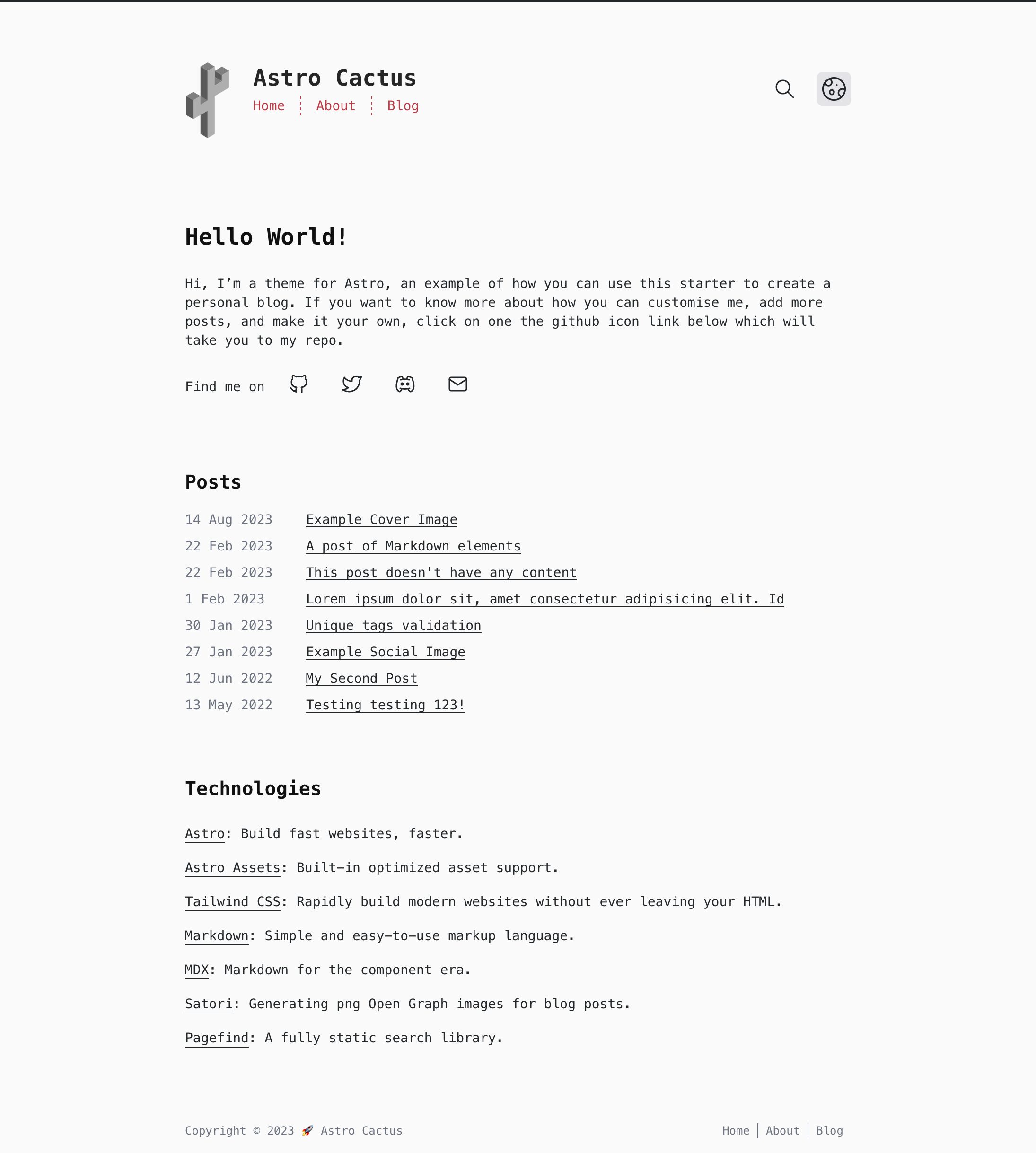  ## Commands Replace pnpm with your choice of npm / yarn | Command | Action | | :--------------- | :------------------------------------------------------------- | | `pnpm install` | Installs dependencies | | `pnpm dev` | Starts local dev server at `localhost:3000` | | `pnpm build` | Build your production site to `./dist/` | | `pnpm postbuild` | Pagefind script to build the static search of your blog posts | | `pnpm preview` | Preview your build locally, before deploying | | `pnpm sync` | Generate types based on your config in `src/content/config.ts` | ## Configure - Edit the template's config file `src/site.config.ts` - **Important**: set the url property with your own domain. - Modify the settings for markdown code blocks, generated by [Expressive Code](https://expressive-code.com). Astro Cactus has both a dark (dracula) and light (github-light) theme. You can find more options [here](https://expressive-code.com/guides/themes/#available-themes). - Update file `astro.config.ts` - [astro-webmanifest options](https://github.com/alextim/astro-lib/blob/main/packages/astro-webmanifest/README.md) - Replace & update files within the `/public` folder: - icon.svg - used as the source to create favicons & manifest icons - social-card.png - used as the default og:image - Modify file `src/styles/global.css` with your own light and dark styles, and customise [Tailwind's theme settings](https://tailwindcss.com/docs/theme#customizing-your-theme). - Edit social links in `src/components/SocialList.astro` to add/replace your media profile. Icons can be found @ [icones.js.org](https://icones.js.org/), per [Astro Icon's instructions](https://www.astroicon.dev/guides/customization/#find-an-icon-set). - Create/edit posts & notes for your blog within `src/content/post/` & `src/content/note/` with .md/mdx file(s). See [below](#adding-posts-and-notes) for more details. - Read [this post](http://astro-cactus.chriswilliams.dev/posts/webmentions/) for adding webmentions to your site. - OG Image: - If you would like to change the style of the generated image the Satori library creates, open up `src/pages/og-image/[slug].png.ts` to the markup function where you can edit the html/tailwind-classes as necessary. You can use this [playground](https://og-playground.vercel.app/) to aid your design. - You can also create your own og images and skip satori generating it for you by adding an ogImage property in the frontmatter with a link to the asset, an example can be found in `src/content/post/social-image.md`. More info on frontmatter can be found [here](#frontmatter) - Optional: - Fonts: This theme sets the body element to the font family `font-mono`, in `src/layouts/Base.astro` on the `<body>`. You can change fonts by removing the variant `font-mono`, after which TailwindCSS will default to the `font-sans` [font family stack](https://tailwindcss.com/docs/font-family). ## Updating If you've forked the template, you can [sync the fork](https://docs.github.com/en/pull-requests/collaborating-with-pull-requests/working-with-forks/syncing-a-fork) with your own project, remembering to **not** click Discard Changes as you will lose your own. If you have a template repository, you can add this template as a remote, as discussed [here](https://stackoverflow.com/questions/56577184/github-pull-changes-from-a-template-repository). ## Adding posts and notes This theme uses [Content Collections](https://docs.astro.build/en/guides/content-collections/) to organise local Markdown and MDX files, as well as type-checking frontmatter with a schema -> `src/content.config.ts`. Adding a post/note is as simple as adding your .md(x) files to the `src/content/post` and/or `src/content/note` folder, the filename of which will be used as the slug/url. The posts included with this template are there as an example of how to structure your frontmatter. Additionally, the [Astro docs](https://docs.astro.build/en/guides/markdown-content/) has a detailed section on markdown pages. ### Post Frontmatter | Property (\* required) | Description | | ---------------------- | ------------------------------------------------------------------------------------------------------------------------------------------------------------------------------------------------------------------------------------------------------------------------------------------------------------ | | title \* | Self explanatory. Used as the text link to the post, the h1 on the posts' page, and the pages title property. Has a max length of 60 chars, set in `src/content/config.ts` | | description \* | Similar to above, used as the seo description property. Has a min length of 50 and a max length of 160 chars, set in the post schema. | | publishDate \* | Again pretty simple. To change the date format/locale, currently **en-GB**, update the date option in `src/site.config.ts`. Note you can also pass additional options to the component `<FormattedDate>` if required. | | updatedDate | This is an optional date representing when a post has been updated, in the same format as the publishDate. | | tags | Tags are optional with any created post. Any new tag(s) will be shown in `yourdomain.com/posts` & `yourdomain.com/tags`, and generate the page(s) `yourdomain.com/tags/[yourTag]` | | coverImage | This is an optional object that will add a cover image to the top of a post. Include both a `src`: "_path-to-image_" and `alt`: "_image alt_". You can view an example in `src/content/post/cover-image.md`. | | ogImage | This is an optional property. An OG Image will be generated automatically for every post where this property **isn't** provided. If you would like to create your own for a specific post, include this property and a link to your image, the theme will then skip automatically generating one. | | draft | This is an optional property as it is set to false by default in the schema. By adding true, the post will be filtered out of the production build in a number of places, inc. getAllPosts() calls, og-images, rss feeds, and generated page[s]. You can view an example in `src/content/post/draft-post.md` | ### Note Frontmatter | Property (\* required) | Description | | ---------------------- | -------------------------------------------------- | | title \* | string, max length 60 chars. | | description | to be used for the head meta description property. | | publishDate \* | ISO 8601 format with offsets allowed. | ### Frontmatter snippets Astro Cactus includes a helpful VSCode snippet which creates a frontmatter 'stub' for posts and note's, found here -> `.vscode/post.code-snippets`. Start typing the word `frontmatter` on your newly created .md(x) file to trigger it. Visual Studio Code snippets appear in IntelliSense via (⌃Space) on mac, (Ctrl+Space) on windows. ## Pagefind search This integration brings a static search feature for searching blog posts and notes. In its current form, pagefind only works once the site has been built. This theme adds a postbuild script that should be run after Astro has built the site. You can preview locally by running both build && postbuild. Search results only includes pages from posts and notes. If you would like to include other/all your pages, remove/re-locate the attribute `data-pagefind-body` to the article tag found in `src/layouts/BlogPost.astro` and `src/components/note/Note.astro`. It also allows you to filter posts by tags added in the frontmatter of blog posts. If you would rather remove this, remove the data attribute `data-pagefind-filter="tag"` from the link in `src/components/blog/Masthead.astro`. If you would rather not include this integration, simply remove the component `src/components/Search.astro`, and uninstall both `@pagefind/default-ui` & `pagefind` from package.json. You will also need to remove the postbuild script from here as well. You can reduce the initial css payload of your css, as demonstrated [here](https://github.com/chrismwilliams/astro-theme-cactus/pull/145#issue-1943779868), by lazy loading the web components styles. ## Analytics You may want to track the number of visitors you receive to your blog/website in order to understand trends and popular posts/pages you've created. There are a number of providers out there one could use, including web hosts such as [vercel](https://vercel.com/analytics), [netlify](https://www.netlify.com/products/analytics/), and [cloudflare](https://www.cloudflare.com/web-analytics/). This theme/template doesn't include a specific solution due to there being a number of use cases and/or options which some people may or may not use. You may be asked to included a snippet inside the **HEAD** tag of your website when setting it up, which can be found in `src/layouts/Base.astro`. Alternatively, you can add the snippet in `src/components/BaseHead.astro`. ## Deploy [Astro docs](https://docs.astro.build/en/guides/deploy/) has a great section and breakdown of how to deploy your own Astro site on various platforms and their idiosyncrasies. By default the site will be built (see [Commands](#commands) section above) to a `/dist` directory. ## Acknowledgment This theme was inspired by [Hexo Theme Cactus](https://github.com/probberechts/hexo-theme-cactus) ## License MIT
看看同类模板
对比同技术栈与用途的模板,找到更适合的视觉与内容结构。

astrowind
⭕️ AstroWind: A free template using Astro v7 and Tailwind CSS v4. Astro starter theme.
Astro · 博客

astro-paper
A minimal, accessible and SEO-friendly Astro blog theme.
Astro · 博客

fuwari
✨A static blog template built with Astro.
Astro · 博客

Firefly
Firefly 是一款基于 Astro 的静态博客主题,由 CuteLeaf 在 saicaca 的 Fuwari 模板基础上二次开发,主打清新美观的视觉风格。
Astro · 博客

astro-theme-cactus
A simple Astro theme. Use it to create your blog or website.
Astro · 作品集

astrofy
Astrofy is a free and open-source template for your Personal Portfolio Website built with Astro and TailwindCS…
Astro · 作品集