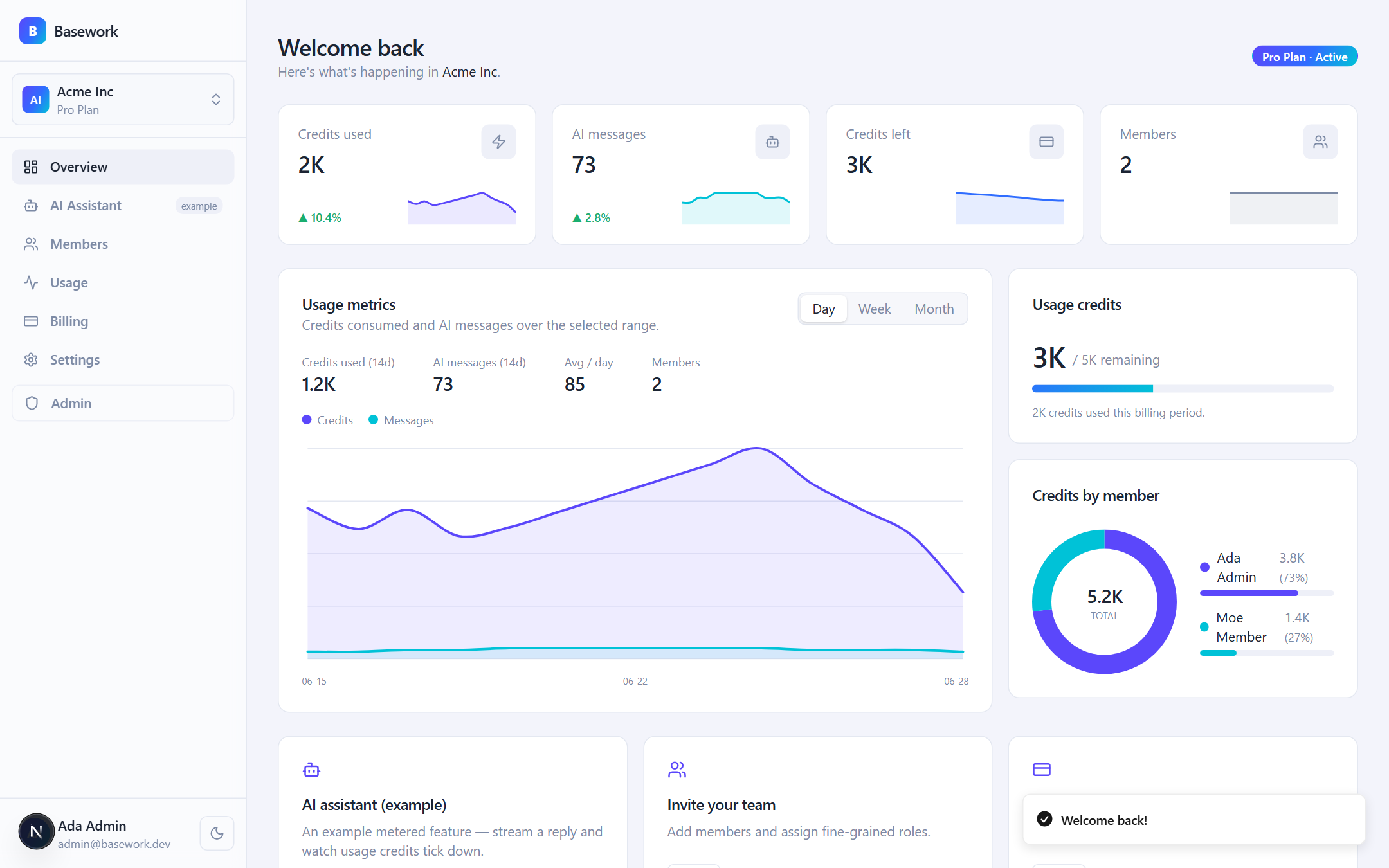
Multi-tenant organizations, members, invitations, and fine-grained permission policies, with tenant isolation covered by tests
Next.jsReactAdmin dashboardSaaSStarter
BaseworkSaaS — Next.js Admin dashboard Template
By fizzexual
Basework is a multi-tenant SaaS starter template built on Next.js, featuring organizations and fine-grained RBAC, Stripe billing, usage-based credit metering, an admin panel with impersonation, and audit logs, with zero-config local operation.
Explore the design
Compare the page layouts and mobile experience. Open any screenshot for a closer look.
Author preview
Author-provided preview
Preview provided in the project README.
One original preview is available. Open the full image to inspect the design.
Screenshots show visual appearance; interactive behavior may differ.
Recorded 2026-10-05View source
What stands out
A quick read of the recorded project description.
Stripe subscriptions and usage-based metering: credit ledger, plan limits, overage reporting, and customer portal
Admin panel supports secure impersonation, feature flags, and immutable audit logs
Zero-config local operation: embedded PGlite and mock email, billing, and AI providers, no keys required
Switch to real Postgres, Stripe, LLM, and Resend via .env without code changes
Includes type checking, linting, unit/integration tests, and Playwright E2E, with CI not depending on external services
Template Details
Basework is a Next.js starter codebase for multi-tenant SaaS products, aimed at developers who want to skip building authentication, organizations, billing, usage metering, and an admin panel. It provides organizations, members, invitations, and fine-grained permission policies, with tenant isolation covered by tests; the billing flow includes Checkout, signature-verified webhooks with database synchronization, a customer portal, and credit resets on plan changes; usage metering records operations such as API calls, exports, and AI tokens as credits per organization, and reports overage usage to Stripe according to plan limits. The admin panel supports secure impersonation, feature flags, and immutable audit logs.
Local development requires no keys: when DATABASE_URL is not set, an embedded PGlite is used; when Stripe keys are not set, mock billing is used; when LLM keys are not set, mock AI is used; when Resend keys are not set, emails are output to the console. After setting the corresponding .env variables, it automatically switches to real Postgres, Stripe, LLM, and email services. The project uses Drizzle ORM for database migrations and includes type checking, linting, unit and integration tests, and Playwright end-to-end tests, with CI not depending on external services.
The template includes a streaming AI assistant as an example consumer of usage metering, and provides page structures such as marketing pages, authentication pages, a dashboard, and an admin panel. Theming is based on semantic design tokens, supporting light and dark modes and two layouts: sidebar or top navigation. Super admins can adjust appearance at runtime in /admin/settings, toggle feature modules, disable registration, or enable maintenance mode, with settings persisted in the platform_settings singleton row.
Limitations: this template is a starter codebase, not a finished SaaS product, and developers must implement product features themselves; third-party assets such as demo images, fonts, and icons require separate license verification; external services such as domains, hosting, databases, payments, and AI may incur costs.
Next.jsAdmin panelSaaSStarter
Is it right for your project?
Use Cases
- Quickly building a multi-tenant SaaS backend that needs organizations, permissions, and subscription billing
- Implementing usage-based billing and credit deduction for operations such as API calls, exports, or AI tokens
- Impersonating users in the admin panel to troubleshoot issues while retaining audit logs
- Developing and testing billing, authentication, and usage metering flows locally without external service dependencies
- Using it as a reference project for learning multi-tenant isolation, Stripe webhook synchronization, and RBAC implementation
Suitable For
- Next.js developers who need ready-made authentication, organizations, billing, and usage metering foundations
- Teams planning to build a multi-tenant SaaS and wanting to implement product features themselves
- Developers who need a zero-config local demo environment to evaluate SaaS infrastructure
- Projects looking for reference implementations of Stripe webhook synchronization, RBAC, and audit logs
Getting started & customization
Use these recorded setup notes alongside the repository instructions for your chosen version.
- 1
Local run: clone the repository, then run pnpm install and pnpm dev, and visit http://localhost:3000 to log in with seed accounts
- 2
Seed accounts: [email protected] / password123 (owner + admin) and [email protected] / password123 (member)
- 3
Production deployment: copy .env.example to .env and configure DATABASE_URL, Stripe, BETTER_AUTH_SECRET, ENCRYPTION_KEY, and LLM keys
- 4
Database migrations use pnpm db:migrate, and Stripe product/price creation uses pnpm stripe:sync
- 5
After deployment, point cron to POST /api/jobs/tick to consume the persistent job queue
License & source material
Usage conditions & limitations
Free to use · keep license noticeThis entry covers the free version under the MIT license in the public repository; the free scope is the code of this version and does not mean external services or third-party assets are free.
Must comply with when using
- Free use, modification, commercial use, and distribution of this version's code are permitted.
- When distributing copies or substantial portions of the code, retain the original author's copyright notice and the full MIT license notice.
- The code is provided as is; warranties and limitations of liability are governed by the original license and applicable law.
Additional costs & items to verify
- Demo images, fonts, icons, and other third-party assets must be checked against their respective licenses and cannot be judged solely by the code's MIT license.
- External services such as domains, hosting, databases, payments, or AI may incur additional charges.
- Local development uses mock providers by default and requires no keys; to connect to real Postgres, Stripe, email, and LLM services, you must configure the corresponding .env environment variables yourself.
- Zero-config operation applies only to local demo mode; this mode does not connect to a real database, Stripe account, or API keys and cannot be used directly in production.
- Production deployment requires preparing your own Postgres database (e.g., Neon) and setting DATABASE_URL, which is an external service dependency and may incur costs.
- In production, you must create Stripe products and prices yourself and configure STRIPE_* keys, which depends on a Stripe account and may incur costs.
- Production deployment requires providing BETTER_AUTH_SECRET, ENCRYPTION_KEY, and LLM keys yourself; the LLM service is an external dependency and may incur costs.
- After deployment, you must configure cron to periodically call POST /api/jobs/tick to consume the persistent job queue; otherwise, jobs will not be executed.
- The built-in AI assistant is only an example consumer of usage metering, not a complete product feature; developers must implement actual business logic themselves.
- This template is only a SaaS foundation framework; product features must be implemented by developers, and unnecessary parts must be removed.
View Original Text Basis
Permission is hereby granted, free of charge
Original License Text
It runs locally with mock providers and no keys, and switches to real Postgres, Stripe, email and LLM providers when the matching `.env` values are set.
Original README
No `.env`, no database, no Stripe account, no API keys. It just runs.
Original README
Provision Postgres (e.g. [Neon](https://neon.tech)) and set `DATABASE_URL`.
Original README
Create Stripe products/prices (`pnpm stripe:sync`) and set `STRIPE_*`.
Original README
Set `BETTER_AUTH_SECRET`, `ENCRYPTION_KEY`, and an LLM key.
Original README
Point a cron at `POST /api/jobs/tick` to drain the job queue.
Original README
The included AI assistant is just one example consumer.
Original README
https://github.com/fizzexual/BaseworkSaaS/blob/main/LICENSEhttps://github.com/fizzexual/BaseworkSaaS/blob/main/README.mdYou bring the product (a CRM, an analytics tool, a dev platform, an AI app — anything); it brings everything around it, and you delete the parts you don't use.
Original README
Compiled by DeepSeek based on repository license and README ·2026-10-05. Results only cover the materials read; dependencies, images, fonts, and subsequent term changes are subject to their respective original texts.
Project checks & description sources
Template Information
- Source platforms
- GitHub
- Documentation and maintenance reference score
- Partly documented · 73 / 100
- Technologies
- Next.js · React
- Website type
- Admin dashboard · SaaS · Starter
How this score is calculated
Our heuristic uses license records (up to 30), a demo link (12), a preview (10), stars (15), recorded maintenance (15), description completeness (8), feature records (5) and classification data (5). It is not a code, security or performance test, or a Google score. A link does not establish tested functionality.
What to verify for this project
- Repository update recorded
- 2026-10-05
- Screenshot last checked
- 2026-10-05
No demo link is recorded. Use the repository instructions to evaluate the project locally; the screenshot alone cannot establish interactive behavior.
The catalog identifies Next.js as the primary stack. Check the actual dependency manifest and lockfile for versions and hosting requirements. These notes use recorded metadata, not a code audit or a deployment test.
Use a selection guide →How this description was prepared
AI-assisted description based on catalog records and repository material. Repository authors are not automatically the reviewers of this description.
Review declaration: [email protected] · 2026-10-06
Inspect the recorded source material
SHA-256: 3936c7b58e4a2d76395e6f15109401b1591e6e1095822352cbd590d0ccb0dea5
2026-10-05T18:07:20.479Z
Source file / repository<div align="center"> # Basework 🌱 ### The complete, multi-tenant SaaS template — you bring the product. Auth · Organizations & fine-grained RBAC · Stripe billing · **usage-based metering** · admin panel with impersonation · audit logs · durable jobs — every functionality your SaaS needs, so you just build the product. **Runs with zero configuration.** [](https://github.com/fizzexual/BaseworkSaaS/actions/workflows/ci.yml) [](./LICENSE)    <br/> <img src="./docs/screenshots/dashboard.png" alt="Basework dashboard" width="100%"/> </div> --- ## About Basework is a starter codebase for building a multi-tenant SaaS product on Next.js. It is for developers who want auth, organizations, billing, usage metering and an admin panel already in place, so they can focus on their own product. It runs locally with mock providers and no keys, and switches to real Postgres, Stripe, email and LLM providers when the matching `.env` values are set. ## Why Basework? Basework isn't tied to one product idea — it's the **complete foundation** every SaaS needs. You bring the product (a CRM, an analytics tool, a dev platform, an AI app — anything); it brings everything around it, and you delete the parts you don't use. - 📊 **Usage-based metering & billing.** Meter any action — API calls, exports, AI tokens — as per-org **credits**, enforce plan limits, and report overage to Stripe. The included AI assistant is just one example consumer. Almost no template ships this. - 🏢 **Real multi-tenancy.** Organizations, members, invitations, and a **fine-grained permission policy** (not bare role strings). Tenant isolation is covered by tests. - 💳 **Billing done right.** Checkout → **signature-verified webhook → database** sync, customer portal, plan changes that reset credits. The "everyone fakes it" part is real and tested. - 🛡️ **Admin panel with secure impersonation**, feature flags, and an immutable **audit log**. - ⚡ **Zero-config dev.** `pnpm dev` boots a fully seeded demo with **no accounts and no keys** — embedded Postgres (PGlite), plus mock email / billing / AI providers. Flip to production by filling `.env`. - ✅ **Genuinely tested.** Typecheck, lint, unit + integration (in-memory Postgres), and Playwright E2E — all in CI with no external services. > **The 30-second pitch:** clone it, run `pnpm dev`, and you have a multi-tenant dashboard with working billing, usage metering, an admin panel, and a streaming AI *example* — before you've created a single account anywhere. Then delete what you don't need and build your product. ## Quickstart ```bash git clone https://github.com/fizzexual/BaseworkSaaS.git cd BaseworkSaaS pnpm install pnpm dev ``` Open **http://localhost:3000** and sign in with the seeded demo accounts: | Account | Email | Password | Role | | --- | --- | --- | --- | | Owner / super-admin | `[email protected]` | `password123` | owner + admin | | Member | `[email protected]` | `password123` | member | No `.env`, no database, no Stripe account, no API keys. It just runs. ## Screenshots | AI assistant (streamed + metered) | Billing & plans | | --- | --- | | <img src="./docs/screenshots/ai-chat.png" width="100%"/> | <img src="./docs/screenshots/billing.png" width="100%"/> | | Usage ledger | Admin panel | | --- | --- | | <img src="./docs/screenshots/usage.png" width="100%"/> | <img src="./docs/screenshots/admin.png" width="100%"/> | ## Stack | Layer | Choice | | --- | --- | | Framework | **Next.js 16** (App Router, RSC, Server Actions), React 19, TypeScript (strict) | | UI | Tailwind CSS v4, Radix primitives, a token-driven design system with light & dark themes | | Database | **Drizzle ORM** — embedded **PGlite** in dev ↔ **Postgres / Neon** in prod | | Auth | **Better Auth** — email+password, OAuth, organizations, admin + impersonation | | Billing | **Stripe** (subscriptions + usage metering) behind a provider interface, with a mock provider for zero-config | | AI | **Vercel AI SDK** — streaming chat, credit metering, bring-your-own keys; mock provider when no key | | Infra | durable job queue, feature flags, per-plan rate limiting, structured logging, audit log, React Email + Resend | | Tooling | Biome, Vitest, Playwright, GitHub Actions | ## How it works Basework has **two modes**, chosen automatically from the environment: ``` DATABASE_URL empty → embedded PGlite (Postgres in-process) | set it → Postgres / Neon STRIPE_SECRET_KEY → mock billing (simulated checkout) | set it → real Stripe OPENAI/ANTHROPIC key → mock AI (deterministic streaming) | set it → real LLM RESEND_API_KEY empty → console email transport | set it → Resend ``` The credit-metering flow is the heart of it: ``` chat request → check org credit balance / plan overage policy → stream the model response (Vercel AI SDK) → on finish: count tokens → deduct credits (atomic, ledgered) → report overage to Stripe as a metered usage event ``` ## Theming & layout Every component is built on semantic design tokens (`bg-card`, `text-foreground`, `bg-brand`, …) defined once in [`src/app/globals.css`](src/app/globals.css) — so the whole app re-skins from one file. Two switches ship out of the box: - **Light / dark mode** — a persisted toggle (next-themes) in the sidebar and marketing header. The `.dark` class overrides the palette vars via `@theme inline`; no per-component changes. - **Nav layout** — a left sidebar rail or a horizontal top bar. Seed the default with `NEXT_PUBLIC_NAV_LAYOUT=topnav`, or flip it live from the admin panel (below). ## Superadmin controls A super-admin (global `admin` role or a `SUPER_ADMIN_EMAILS` address) configures the whole app at runtime from **`/admin/settings`** — no redeploy: - **Appearance** — nav layout, default theme, brand name, and accent color, applied app-wide and live. - **Feature modules** — switch AI, Billing, Members, or Usage off; a disabled module disappears from the nav, its pages redirect, and its API route / server actions reject (enforced server-side, not just in the UI). - **Access** — close sign-ups (invite-only mode — unexpired invitations still work) or flip on maintenance mode, which locks the app for non-admins in both the UI and at the mutation boundary. Settings persist in a `platform_settings` singleton row; module on/off rides the existing feature-flags table. The env flags seed the initial defaults, and the stored values override them once set — so it still boots zero-config. ## Going to production 1. Copy `.env.example` to `.env` and fill the values. 2. Provision Postgres (e.g. [Neon](https://neon.tech)) and set `DATABASE_URL`. 3. `pnpm db:migrate` to apply migrations. 4. Create Stripe products/prices (`pnpm stripe:sync`) and set `STRIPE_*`. 5. Set `BETTER_AUTH_SECRET`, `ENCRYPTION_KEY`, and an LLM key. 6. Deploy. Point a cron at `POST /api/jobs/tick` to drain the job queue. Run `pnpm doctor` anytime to see which mode each subsystem is in. ## Project structure ``` src/ app/ (marketing)/ # landing + pricing (auth)/ # sign-in / sign-up / accept-invitation dashboard/ # app shell: overview, ai, members, usage, billing, settings admin/ # super-admin: platform settings, users, flags, audit api/ # better-auth, stripe webhook, ai chat, jobs lib/ auth/ db/ billing/ ai/ rbac/ email/ jobs/ flags/ modules/ settings/ ratelimit/ observability/ env server/ # request context + server actions drizzle/ # schema migrations tests/ # vitest (unit + integration) and playwright (e2e) ``` ## Scripts | Command | Description | | --- | --- | | `pnpm dev` | Run the app (zero-config) | | `pnpm build` / `pnpm start` | Production build / serve | | `pnpm typecheck` | `tsc --noEmit` | | `pnpm lint` / `pnpm lint:fix` | Biome check / autofix | | `pnpm test` | Vitest (in-memory Postgres) | | `pnpm test:e2e` | Playwright end-to-end | | `pnpm db:generate` / `pnpm db:migrate` | Drizzle migrations | | `pnpm stripe:sync` | Create Stripe products/prices/meters | | `pnpm doctor` | Print the active runtime modes | ## How it compares | | **Basework** | Typical boilerplate | | --- | :---: | :---: | | Usage-based **metering & credits** | ✅ | ❌ | | Multi-tenant orgs + **fine-grained RBAC** | ✅ | partial | | Admin **impersonation** | ✅ | ❌ | | **Tested** Stripe webhook sync | ✅ | ❌ | | **Zero-config** runnable demo | ✅ | ❌ | | Audit log + durable jobs | ✅ | rare | | 100% open source (MIT) | ✅ | varies | ## Contributing Contributions are welcome — see [CONTRIBUTING.md](./CONTRIBUTING.md). Please keep `pnpm typecheck`, `pnpm lint`, `pnpm test`, and `pnpm build` green. ## License [MIT](./LICENSE) — use it for anything, including commercial products.
Explore similar templates
Compare previews and descriptions within the same stack and category.

Next.js SaaS Starter
The official Next.js SaaS starter template, integrating email/password authentication, Stripe Checkout subscriptions, a dashboard with user/team CRUD, basic Owner/Member RBAC, and activity logging.
Next.js · SaaS

Next.js Commerce
Vercel's officially maintained Next.js App Router ecommerce starter with deep Shopify integration, offering a complete product catalog, cart, and checkout flow. Core logic is modular for swapping backends, and community provider versions exist for BigCommerce, Medusa, and Saleor.
Next.js · E-commerce

Next-js-Boilerplate
A developer-first Next.js 16 starter with Tailwind CSS 4 and TypeScript, supporting both App Router and Page Router.
Next.js · Starter

tailwind-nextjs-starter-blog
A Next.js and Tailwind CSS blog starter template using Contentlayer for Markdown/MDX, with built-in SEO, code highlighting, and tags. It targets personal technical blogs and migration from Jekyll/Hugo to React, and supports one-click Vercel deployment.
Next.js · Blog

next-forge
next-forge is a Turborepo-based Next.js template maintained by Vercel, positioned as a starting point for SaaS products.
Next.js · Starter

SaaS-Boilerplate
SaaS-Boilerplate is an open-source SaaS starter template built with Next.js App Router, React 19, TypeScript, Tailwind CSS, and Shadcn UI.
Next.js · SaaS