Supports RSS, Atom, and JSON feed formats
HugoBlog
hugo-theme-arch-terminal — Hugo Blog Template
By foo-dogsquared
A Hugo-based remake of the Arch Terminal theme, aimed at Asciidoctor content and suitable for single-author blogs or portfolio sites.
Explore the design
Compare the page layouts and mobile experience. Open any screenshot for a closer look.
Desktop homepage1 / 3
Desktop captureTop of page
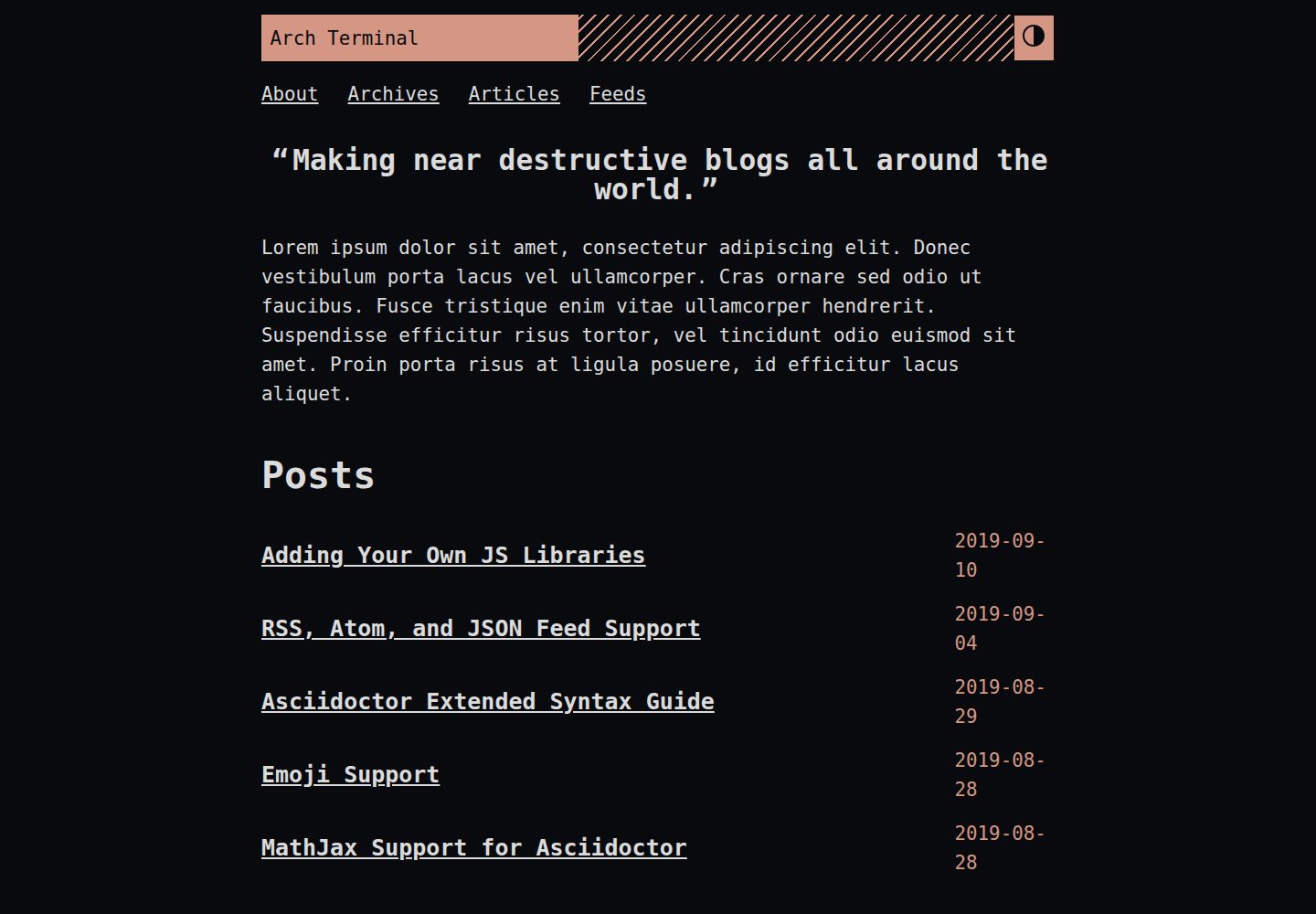
Actual screenshot captured by the server browser.
All pages & views 3
Screenshots show visual appearance; interactive behavior may differ.
Recorded 2026-10-02View source
What stands out
A quick read of the recorded project description.
Built-in MathJax math rendering support
Lazy-loaded syntax highlighting via PrismJS
Supports multilingual mode and theme switching (dark mode)
Built-in Fuse.js-based search index and search component
Provides JSON+LD structured data, image scaling, and custom 404 messages
Template Details
Arch Terminal is a complete remake of the Hugo Terminal theme, replacing its original features and using a different development and build approach. It is explicitly aimed at technical writers, programmers, and technology enthusiasts, positioned as a single-author portfolio or blog site; it is not suitable for multi-author sites.
One of the theme's design goals is to support Asciidoctor content while acting as much as possible as a UI component for the content, without introducing custom shortcodes or extra frontmatter. It provides a minimal base theme but retains many customization options, and all listed features must be enabled manually. The README recommends reading MANUAL.adoc for full instructions and provides a demo site and its configuration file as a starting reference.
Before use, note that the theme requires the Hugo extended version; some features (such as applying edited SCSS) depend on the extended version. Installation methods include cloning the repository, Git submodule, and Hugo module, with Hugo module being the recommended method.
HugoBlog
Is it right for your project?
Use Cases
- Building a single-author technical blog publishing Asciidoctor-written content
- Creating a personal portfolio page to showcase projects and articles
- Technical documentation sites that need math formulas, syntax highlighting, and site search
- Hugo sites that want to start with minimal configuration and enable features as needed
Suitable For
- Technical writers, programmers, and technology enthusiasts
- Users who prefer DIY configuration and are willing to read the manual to enable features step by step
- Developers using the Hugo extended version who need Asciidoctor content support
- Individuals running a single-author blog or portfolio site
Getting started & customization
Use these recorded setup notes alongside the repository instructions for your chosen version.
- 1
Requires Hugo v0.58.0 or later, and ensure the extended version is installed (check with hugo version)
- 2
Requires the latest Go runtime environment
- 3
Recommended installation via Hugo module: first run hugo mod init, then add the module import in the configuration and run hugo mod get
- 4
The theme can also be placed in the themes directory via git clone or git submodule
- 5
Custom SCSS styling requires the Hugo extended version; otherwise, use CSS overrides instead
License & source material
Usage conditions & limitations
Free to use · keep license noticeThis entry covers the free version under the MIT license in the public repository; the free scope is the code of that version and does not mean external services or third-party assets are free.
Must comply with when using
- Free use, modification, commercial use, and distribution of this version's code are permitted.
- When distributing copies or substantial portions of the code, retain the original author's copyright notice and the full MIT license notice.
- The code is provided as is; warranties and limitations of liability are governed by the original license and applicable law.
Additional costs & items to verify
- The theme is intended only for single-author blogs or portfolio sites; for multi-author sites, the official documentation explicitly states it is not suitable, and modifications are required.
- Some features (such as applying edited SCSS styles) depend on the Hugo extended version; the non-extended version cannot use the full functionality.
- Before use, Hugo v0.58.0 or later and the latest Go runtime environment must be installed.
- All listed features are disabled by default and must be enabled manually in the configuration one by one; otherwise, they will not take effect.
- The theme uses a minimal design and requires users to assemble the configuration themselves according to the manual, so it is not very ready to use out of the box.
- Demo images, fonts, icons, and other third-party assets must be checked against their respective licenses; they cannot be judged solely by the code's MIT license.
- External services such as domains, hosting, databases, payments, or AI may incur additional charges.
View Original Text Basis
Permission is hereby granted, free of charge
Original License Text
If it's supposed to be a site for multiple author, then this is not for you
Original README
Needs Hugo extended version.
Original README
This theme needs the following software and its required version.
Original README
all of the listed features needs to be manually activated
Original README
https://github.com/foo-dogsquared/hugo-theme-arch-terminal/blob/master/LICENSE.mdhttps://github.com/foo-dogsquared/hugo-theme-arch-terminal/blob/master/README.adocan IKEA-style assembly will be required
Original README
Compiled by DeepSeek based on repository license and README ·2026-10-02. Results only cover the materials read; dependencies, images, fonts, and subsequent term changes are subject to their respective original texts.
Project checks & description sources
Template Information
- Source platforms
- GitHub
- Documentation and maintenance reference score
- Partly documented · 72 / 100
- Technologies
- Hugo
- Website type
- Blog
How this score is calculated
Our heuristic uses license records (up to 30), a demo link (12), a preview (10), stars (15), recorded maintenance (15), description completeness (8), feature records (5) and classification data (5). It is not a code, security or performance test, or a Google score. A link does not establish tested functionality.
What to verify for this project
- Repository update recorded
- 2021-02-03
- Screenshot last checked
- 2026-10-02
A demo link is listed. Check it with your own content and viewport sizes; its presence does not confirm that forms, authentication or payments work.
The catalog identifies Hugo as the primary stack. Check the actual dependency manifest and lockfile for versions and hosting requirements. These notes use recorded metadata, not a code audit or a deployment test.
Use a selection guide →How this description was prepared
AI-assisted description based on catalog records and repository material. Repository authors are not automatically the reviewers of this description.
Automatically checked against source and license rules; no manual editorial review.
Inspect the recorded source material
SHA-256: a8e5dd1b688dbc0fe4d8c65b349e49e0fd0a6a6ad1fa0cd23e04fcd4412d0663
2026-10-02T10:23:55.444Z
Source file / repository= Arch Terminal
:toc:
:version: v3.0.0
A complete remake of the original https://github.com/panr/hugo-theme-terminal[Hugo Terminal theme] with additional features, new development build, and a totally different philosophy.
Also focuses on including support for Asciidoctor content.
Aimed for technical writers, programmers, tech enthusiasts, and people with a do-it-yourself (DIY) spirit.
As such, an IKEA-style assembly will be required.
It also aims to be a portfolio and/or blog of a single author.
If it's supposed to be a site for multiple author, then this is not for you (or you could hack it yourself).
This theme provides a minimal base theme while providing a lot of ways to customize it.
It also goes out of its way as much as possible as a UI component for your content.
(Meaning no custom shortcodes and frontmatter to deal with this theme.)
Be sure to read the link:./MANUAL.adoc[manual] for more details.
Nonetheless, with minimal configuration, it should be still enough to get started writing content.
== Demo
Demo is available https://foo-dogsquared.github.io/hugo-theme-arch-terminal-demo/[here].
The demo features more posts, serves as a documentation of some sort, and highlights with a detailed configuration.
The raw files of the demo is available in https://github.com/foo-dogsquared/hugo-theme-arch-terminal-demo/[a GitHub repo].
I also recommend to see the https://github.com/foo-dogsquared/hugo-theme-arch-terminal-demo/blob/master/config.toml[config file] used in the demo.
It's also well-commented so you can use it as a starter configuration for this theme.
== Manual
This is more like a "Getting Started" guide so please read the link:./MANUAL.adoc[manual] for more details.
This document only opens up a part of the things that you can do with this theme.
It includes more things such as snippets for various features, FAQ, and developer guidelines so you may want to take a looksies there.
You think you can escape the manual?
Not a chance.
== Features
Here's a general list of options that you can set and experiment with this theme.
(Note that all of the listed features needs to be manually activated. It's supposed to be minimal, after all.)
* Support RSS, Atom, and JSON feeds.
* Suitable for creating a quick single homepage portfolio and/or blogging.
* https://www.mathjax.org/[MathJax] support.
* Lazy syntax highlighting support with https://prismjs.com/[PrismJS].
* Multilingual mode support.
* Theme switch toggle (also known as dark mode).
* Customizable normal and alternate theme appearance. The theme will also set the alternate theme even if you didn't customize it yourself!
(Though, may result in ugly colors.)
footnote:needs-hugo-extended[Needs Hugo extended version.]
* Site breadcrumbs.
* LaTeX-like content counters.
* Customizable social links.
* Custom 404 messages.
* Custom content reader mode for easier readability for your readers.
* JSON+LD schema.
* Image zoom feature for your content.
* Built-in search indexing and widget with https://fusejs.io/[Fuse.js].
* Quick taxonomy search query list.
* Adding custom JS libraries for the whole site or for specific posts.
* Google Analytics integration.
* Disqus integration.
== Prerequisities
This theme needs the following software and its required version.
* Hugo v0.58.0 and above.
Also, make sure it's the extended version which you can check by running `hugo version`.
* The latest link:https://golang.org/[Go] runtime.
== Installation
This theme requires Hugo v0.58.0 and above.
However, some of the features of this theme can only be used with the extended version (such as applying edited SCSS files) so make sure you have it installed if you want the full package.
Also, the remote repo of this project is hosted on GitHub.
Thus, it uses Git as the version control system.
On your Hugo project, you can install the theme on two ways:
=== Installing by cloning
You can simply clone the Git repo of the theme.
[source,sh]
----
git clone --branch {version} https://github.com/foo-dogsquared/hugo-theme-arch-terminal.git themes/arch-terminal
----
This is a good option if you don't to modify the base theme too much.
=== Installing with submodule
You can also install the theme utilizing link:https://git-scm.com/book/en/v2/Git-Tools-Submodules[Git submodules].
[source,sh]
----
git submodule add --branch {version} https://github.com/foo-dogsquared/hugo-theme-arch-terminal.git themes/terminal
----
If you want to make major changes to the theme, then this might be the
option you're looking for.
=== Installing with Hugo module
TIP: This is the recommended installation method since this theme already makes use of Hugo module so why not use it yourself?
To start installing this theme as a link:https://gohugo.io/hugo-modules/[Hugo module], you need to initialize your Hugo project as a Hugo module — i.e., run `hugo mod init $HUGO_MOD_NAME`.
Then, edit your configuration (e.g., `config.toml`) to add the theme as an additional module.
[source, toml]
----
[module]
[[module.imports]]
path = "github.com/foo-dogsquared/hugo-theme-arch-terminal"
----
After the project has been configured to add the module, run `hugo mod get` (or `hugo serve`) to download the dependencies.
== Building with the theme
Now that you have the theme with the project, let's see it in action.
Run the following command and see the result:
[source,sh]
----
hugo serve -t arch-terminal
----
You can also add the following into your site configuration to serve with the theme without repeating the above command.
NOTE: If you've added the theme as a Hugo module, there's no need to do the following block since it is done automatically (unless you have a special case of using multiple themes).
[source,toml]
----
theme = "arch-terminal"
----
== Basic configuration
To get started, you can start with a simple and minimal configuration and work your way out there.
The theme is mostly suitable to be simple single-page portfolio or a blogging theme (or both).
Want to start right away? Here's the most minimal configuration of the theme.
[source,toml]
----
title = "Arch Terminal"
----
Seriously, that's it. :) You just completed the "Hello World" of making a Hugo site.
link:./docs/true-hugo-minimalism.png[Enjoy the view of your Hugo site with *T R U E M I N I M A L I S M* and no bloat.]
Ignore my rambling and let's continue on to the README, shall we?
Try to follow along the README, if you wish for a more fulfilling experience (of configuring a Hugo theme, that is).
=== Configuring appearance
You can change the appearance of the theme.
Start by copying `themes/arch-terminal/assets/scss/config.scss` to your own assets with similar directory structure (`assets/scss/config.scss`).
*Note that you need to have Hugo extended version installed to apply edited SCSS stylesheets.*
Otherwise, you would have to overwrite with a CSS stylesheet (at `scss/main.min.css`) instead and the following section does not apply anymore.
Also, please open `themes/arch-terminal/assets/scss/default.scss` to see the variables needed.
On second thought, here's the SCSS config file (as of 2019-09-07).
[source,scss]
----
// Create one at the similar location in your
// Hugo directory.
// To know what variables you should modify, take a
// look at `default.scss`.
// Here's a sample custom config with pretty colors and everything
// (at least for me) and try with the theme toggle switch.
// If there's no alternative palette given, it will set the
// alternate theme automatically for you.
// For those who cares about using font stacks, I've provided a quick list for you
// It's a mixed combination of free and open source fonts and system fonts,
// feel free to modify it as you wish
// Monospace: "Fira Code","Source Code Pro","IBM Plex","Monaco","Consolas","Ubuntu Mono","Bitstream Vera Sans Mono",monospace
// Sans: "Fira Sans","Copper Hewitt","IBM Plex",sans
// Serif: "Source Serif Pro","Charter","IBM Plex","Georgia",serif
// Here's a quick sample config for you. Try it out and enable theme toggling for a bit.
// $background: #703d57;
// $foreground: #dce2c8;
// $accent: #f28a3c;
// $fontFamily: sans-serif;
// $fontSize: 1.2rem;
----
It's empty. You can try to uncomment the comments for a start or open up the `default.scss` file from the theme folder to see the available variables.
=== Setting alternative themes
Here's the best part, it can generate an alternative theme (dark mode or whatever) automatically even if you provide those variables.
Please uncomment the part with the SCSS variables and add the `params.enableThemeToggle` in your site configuration like so:
[source,toml]
----
[params]
# ...
enableThemeToggle = true
----
And see the magic alternative toggle!
Go on and change the colors and believe!
== Customization
This theme has you covered.
Take note that most of the stuff from making the portfolio site applies to this section.
Compared to configuring it as a portfolio site, this is where you'll seeing link:./MANUAL.adoc[the manual] multiple times.
Be sure to know it well so you'll have less problems settling with this theme.
Now, the theme aims to be minimal but customizable enough.
Unfortunately, the theme takes the meaning of minimal to its heart.
Therefore, some of the usual features you would normally see in most of the Hugo themes are disabled by default and you have to manually activate it.
* Hiding posts on the homepage? You have to set `params.hidePostsOnHome` to `true` for that.
* A theme toggle switch (dark mode toggle)?
Turn the `params.enableThemeToggle` on, please.
* How about some lazy syntax highlighting where you don't have to rely on the `highlight` shortcode?
Activate the `params.enableLazySyntaxHighlighting` switch!
* Can you please turn on the MathJax support on `params.enableMathjax`, honey?
I'm dying of the lack of MathJax support over here.
* Have you forget to check if the `params.enableContentPagination` is on again?
Now I don't have a "Read more" section on my post page.
* Thanks, sir!
Good thing you enabled `params.enableBreadcrumbs` or else I would've lost in that website for hours on end!
If those situations happened to you previously, link:./MANUAL.adoc[you should've read the manual more] and check the <<Making a blog site>> section to see the available options.
=== Content frontmatter
The theme doesn't have much options for the frontmatter since it goes out of its way as much as possible to future-proofing your content with less frontmatter.
But here's the list of the fields that the theme covers:
* `title`, `author`, and `date` which is the usual stuff.
* `tags` and `categories` which is also the usual stuff.
They are the https://gohugo.io/content-management/taxonomies/#default-taxonomies[default taxonomies].
* `cover` which is the featured cover image in the post.
I think this is the only custom field (aside from the `libs` which is discussed below).
=== Starter configuration
If you don't want to check the options for now, here's a starter config you can fiddle around with.
Simply uncomment/comment the options that you want to enable/disable.
It should be enough for starting a "minimal" blog site.
[source,toml]
----
baseURL = "https://example.com/"
languageCode = "en-us"
title = "Arch Terminal"
description = "Generic description!"
summaryLength = 15
paginate = 5
copyright = "Unless explicitly stated, all content released here are licensed under [CC BY-NC-SA 4.0](https://creativecommons.org/licenses/by-nc-sa/4.0)."
canonifyURLs = true
[params]
# The subtitle of the blog. Mostly appears in the <title> tag.
subtitle = "Blogger"
keywords = ["John Dodo", "ordinary-extinction", "blog"]
# The tagline that'll appear in the homepage as the first header.
tagline = "Making near destructive blogs all around the world."
# Indicates if the site sections should be listed instead.
# Requires `hidePostsOnHome` to be disabled.
# listSiteSectionsOnHome = true
# Puts a pagination section on the posts linking to the previous and next posts.
# enableContentPagination = true
# Indicates to show the icon whether the link leads to a page or a section.
# The effect is visible if `hidePostsOnHome` is at least disabled.
# showPageTypeIcon = true
# 404
notFoundHeader = "404 Not Found :("
notFoundLinkMessage = "Now get back here."
notFoundMessage = "I see you're an explorer. I like that."
----
=== Advanced configuration
Here's a sample of a more advanced configuration made for configuring this theme.
This includes RSS, Atom, and JSON feeds, SEO improvements, additional configurable views for your homepage and content, MathJax support, lazy syntax highlighting, and other tiny stuff.
Like the starter config, you can simply uncomment/comment certain things for the features that you want to enable/disable.
[source,toml]
----
baseURL = "https://example.com/"
languageCode = "en-us"
title = "Arch Terminal"
description = "Generic description!"
summaryLength = 15
paginate = 5
copyright = "Unless explicitly stated, all content released here are licensed under [CC BY-NC-SA 4.0](https://creativecommons.org/licenses/by-nc-sa/4.0)."
canonifyURLs = true
# Defining the media type of the RSS and Atom feeds
# (you don't need to configure for JSON feeds since it's set at `index.json`)
[mediaTypes]
[mediaTypes."application/atom+xml"]
suffixes = ["atom", "atom.xml"] # You can remove the "atom.xml" if you want
# Redefining RSS media type for the additional suffix
[mediaTypes."application/rss+xml"]
suffixes = ["rss", "rss.xml"] # You can remove the "rss.xml" if you want
# You can set any media type you want but make sure it doesn't have any conflict with
# other media types (that'll be used by your site, anyway).
# Here's the list of registered media types for a reference.
# https://www.iana.org/assignments/media-types/media-types.xhtml
[mediaTypes."x-application/search+json"]
suffixes = ["search.json"]
# Including all of the feed output formats in the build
[outputFormats]
[outputFormats.Rss]
mediaType = "application/rss+xml"
baseName = "index"
[outputFormats.Atom]
mediaType = "application/atom+xml"
baseName = "index"
[outputFormats.SearchIndex]
mediaType = "x-application/search+json"
baseName = "index"
# Indicating what output formats shall be included for the following kinds
[outputs]
# .Site.BaseURL/index.* is available
home = ["HTML", "JSON", "RSS", "ATOM", "SEARCHINDEX"]
# .Site.BaseURL/$section/index.* is available
section = ["HTML", "JSON", "RSS", "ATOM"]
# Your parameters for the theme
[params]
# The subtitle of the blog. Mostly appears in the <title> tag.
subtitle = "Blogger"
keywords = ["John Dodo", "ordinary-extinction", "blog"]
# The tagline that'll appear in the homepage as the first header.
tagline = "Making near destructive blogs all around the world."
# SEO improvements
# enableTwitterCard = true
# enableOpenGraphSchema = true
# enableJsonLdSchema = true
# Puts a pagination section on the posts linking to the previous and next posts.
# enableContentPagination = true
# Include image zoom feature similar to Medium articles
# enableContentImageZoom = true
# Enables syntax highlighting. ;p
# enableLazySyntaxHighlighting = true
# Shows breadcrumbs in the post.
# enableBreadcrumbs = true
# Places a theme toggle button at the header logo
# enableThemeToggle = true
# Enable MathJax support
# enableMathjax = true
# 404
# notFoundHeader = "404 Not Found :("
# notFoundLinkMessage = "Now get back here."
# notFoundMessage = "I see you're an explorer. I like that."
# Enable content counters similar to LaTeX counters
# useContentCounters = true
# Use the icons of your contacts
# Take note this uses the icon from the Simple Icons set.
# useLinkIcons = true
----
== How to contribute
If you spot some bugs or want to suggest a feature, feel free to file an issue in the issue tracker.
Any feature requests are heavily considered since starting at v2.0.0, a feature freeze is observed for the sake of improving user experience (including the documentations), bug fixes, and content readability for the theme as much as possible.
It also avoids the problem of over-engineering and gold plating since the theme already has a lot of options/parameters to offer.
=== Setting up for development
If you want to contribute through code, you can do the following to set up the repo into your computer:
* Fork this repository
* Clone the forked repository
* Checkout to the development branch (`develop`)
* Create another branch from the development branch which you can freely implement your own stuff
Make sure the new branch name is appropriately named.
If creating a pull request, you have to pass it through the development branch.
=== Project style guides
If you're going to update the codebase, make sure you mind the following guidelines:
* The documentations have to be written in https://asciidoctor.org/[Asciidoctor].
If you're not familiar with it, here's the https://asciidoctor.org/docs/asciidoc-syntax-quick-reference/[quick reference page] for a rundown and their https://asciidoctor.org/docs/user-manual/[user manual] for deep details.
* The codebase follows the http://getbem.com/naming/[BEM naming convention] for the CSS naming.
* Using https://developer.mozilla.org/en-US/docs/Web/Guide/HTML/Using_HTML_sections_and_outlines[semantic HTML] should be observed.
* Not really a requirement but use the https://editorconfig.org/[EditorConfig] plugin for your text editor.
If you don't have any, try to follow according to the `.editorconfig` rules.
== License
For the original theme, copyright goes to Radosław Kozieł (https://twitter.com/panr[@panr]).
The original theme is released under the MIT License.
Check the https://github.com/panr/hugo-theme-terminal/blob/master/LICENSE.md[original theme license] for additional licensing information.
This fork is maintained by https://foo-dogsquared.github.io/[foo-dogsquared] and the extended theme is released under MIT license.
Copyright applies to my own modifications of the project.
Please see the previously linked license of the theme for more information on how to properly include copyright notices.
In other words:
© 2019 panr - for the original theme
© 2019–2021 foo-dogsquared - for the modification and extended parts of the theme
(IDK how to proceed with licensing so feel free to correct me pls -_-)
Explore similar templates
Compare previews and descriptions within the same stack and category.

hugo-PaperMod
A fast, clean, responsive Hugo theme for blogs and lightweight portfolios, with three layout modes (Regular, Home-Info, Profile), automatic and manual light/dark themes, Fuse.js client-side search, multilingual support, and built-in Open Graph, Twitter Cards, and Schema.org data.
Hugo · Portfolio

LoveIt
LoveIt is a clean, elegant, and feature-rich Hugo blog theme derived from LeaveIt and KeepIt, MIT-licensed. It offers light/dark modes, responsive layout, multilingual support, and search via Lunr.js or Algolia.
Hugo · Blog

hugo-coder
hugo-coder is a minimalist Hugo blog theme maintained by luizdepra under the MIT license. It provides a clean, text-focused blog appearance, configuration documentation in the docs directory, and a complete exampleSite with hugo.toml.
Hugo · Blog

blowfish
Blowfish is a Hugo personal website and blog theme built with Tailwind CSS 4, focused on lightness, simplicity, and content-first presentation.
Hugo · Blog

hugo-paper
hugo-paper is a simple, clean, and customizable Hugo blog theme configured through config.toml or hugo.toml.
Hugo · Blog

hextra
Hextra is a Hugo theme for documentation and blog sites, built on Hugo and Tailwind CSS with design referencing Nextra.
Hugo · Documentation