支持 RSS、Atom 和 JSON 三种订阅源格式
Hugo博客
hugo-theme-arch-terminal — Hugo 博客模板
作者 foo-dogsquared
基于 Hugo 的 Arch Terminal 主题重制版,面向 Asciidoctor 内容,适合单作者博客或作品集站点。
看看你的网站会是什么样
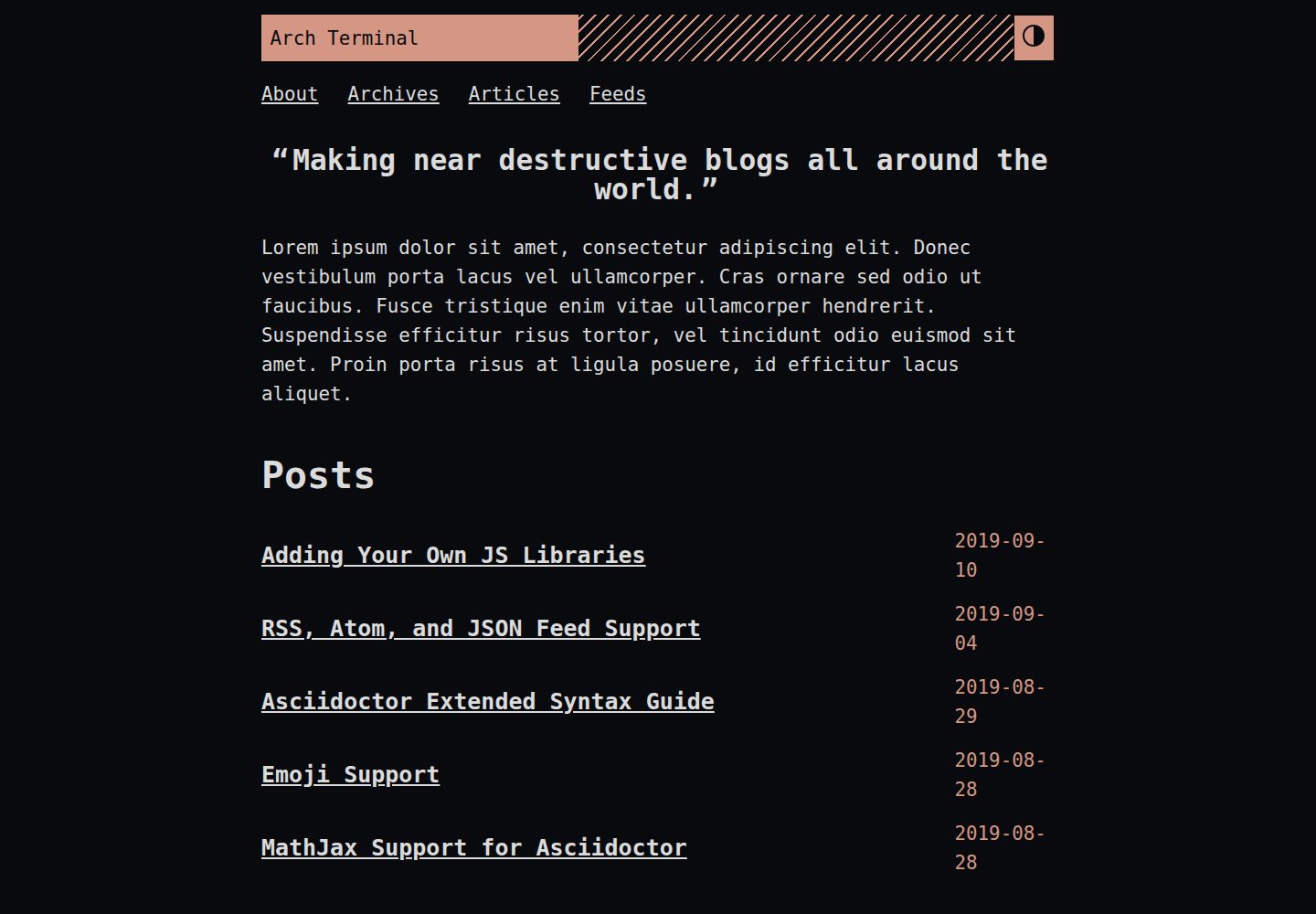
浏览真实页面截图,比较内容排版与手机效果。点击下方缩略图切换,放大查看整页细节。
全部页面与视图 3
截图用于了解视觉与布局,交互效果请以实际项目为准。
采集于 2026-10-02查看来源
值得关注的模板亮点
从已有项目资料中,快速了解它的特点。
内置 MathJax 数学公式渲染支持
通过 PrismJS 实现懒加载语法高亮
支持多语言模式与主题切换(暗色模式)
内置基于 Fuse.js 的搜索索引与搜索组件
提供 JSON+LD 结构化数据、图片缩放和自定义 404 消息
模板详细介绍
Arch Terminal 是对 Hugo Terminal 主题的完整重制,替换了原有功能并采用不同的开发构建方式。它明确面向技术写作者、程序员和技术爱好者,定位为单作者的作品集或博客站点;若需要多作者站点,该主题并不适合。
主题的设计目标之一是支持 Asciidoctor 内容,同时尽量作为内容的 UI 组件存在,不引入自定义 shortcode 和额外 frontmatter。它提供最小化的基础主题,但保留大量可定制选项,所有列出的功能都需要手动开启。README 建议阅读 MANUAL.adoc 获取完整说明,并提供了演示站点及其配置文件作为起步参考。
使用前需注意:主题要求 Hugo 扩展版本,部分功能(如应用编辑过的 SCSS)依赖扩展版;安装方式包括克隆仓库、Git submodule 和 Hugo module,其中 Hugo module 为推荐方式。
Hugo博客
适合你的项目吗?
适用场景
- 搭建单作者的技术博客,发布以 Asciidoctor 编写的内容
- 创建个人作品集页面,展示项目与文章
- 需要数学公式、语法高亮和站内搜索的技术文档站点
- 希望以最小配置起步、再按需开启功能的 Hugo 站点
适合人群
- 技术写作者、程序员和技术爱好者
- 偏好 DIY 配置、愿意阅读手册逐步开启功能的用户
- 使用 Hugo 扩展版本并需要 Asciidoctor 内容支持的开发者
- 运营单作者博客或作品集站点的个人
上手与定制指南
结合仓库当前版本的说明,按下面的资料检查内容、配置与运行要求。
- 1
需要 Hugo v0.58.0 及以上版本,并确保安装的是扩展版本(可通过 hugo version 检查)
- 2
需要最新的 Go 运行时环境
- 3
推荐通过 Hugo module 安装:先执行 hugo mod init,再在配置中添加模块导入并运行 hugo mod get
- 4
也可通过 git clone 或 git submodule 将主题放入 themes 目录
- 5
自定义 SCSS 外观需要 Hugo 扩展版本;否则需改用 CSS 覆盖方式
授权与来源资料
使用条件与限制
免费使用 · 保留许可声明本次收录的是公开仓库中采用 MIT 许可的免费版本;免费范围为该版本代码,不代表外部服务或第三方素材免费。
使用时需要遵守
- 允许免费使用、修改、商用和分发该版本代码。
- 分发代码副本或实质性部分时,保留原作者版权声明和完整 MIT 许可声明。
- 代码按现状提供;担保与责任限制以原许可证及适用法律为准。
额外费用与待核对事项
- 该主题仅面向单作者博客或作品集站点;若需多作者站点,官方明确表示不适合,需自行修改。
- 部分功能(如应用编辑过的 SCSS 样式)依赖 Hugo 扩展版本,非扩展版无法使用完整功能。
- 使用前必须安装 Hugo v0.58.0 及以上版本以及最新的 Go 运行时环境。
- 所有列出的功能默认关闭,需手动在配置中逐项开启,否则不会生效。
- 主题采用最小化设计,需要用户按手册自行组装配置,开箱即用程度较低。
- 演示图片、字体、图标及其他第三方素材需按各自许可核对,不能仅凭代码的 MIT 许可判断。
- 域名、托管、数据库、支付或 AI 等外部服务可能另外收费。
查看原文依据
Permission is hereby granted, free of charge
许可证原文
If it's supposed to be a site for multiple author, then this is not for you
README 原文
Needs Hugo extended version.
README 原文
This theme needs the following software and its required version.
README 原文
all of the listed features needs to be manually activated
README 原文
https://github.com/foo-dogsquared/hugo-theme-arch-terminal/blob/master/LICENSE.mdhttps://github.com/foo-dogsquared/hugo-theme-arch-terminal/blob/master/README.adocan IKEA-style assembly will be required
README 原文
DeepSeek 根据仓库许可证和 README 整理 ·2026-10-02。结果仅覆盖已读取资料,依赖、图片、字体及后续条款变更以各自原文为准。
项目核对记录与介绍依据
模板资料
- 来源平台
- GitHub
- 资料与维护参考分
- 资料一般 · 72 / 100
- 技术栈
- Hugo
- 网站类型
- 博客
这个分数如何计算
本站按许可资料(最高30分)、演示链接(12分)、预览图(10分)、Star数(15分)、记录的维护时间(15分)、描述完整度(8分)、功能记录(5分)和分类资料(5分)计算。它不是代码、安全或性能测试,也不是 Google 评分;有链接不代表已实测可用。
这个项目需要核对什么
- 记录的仓库更新时间
- 2021-02-03
- 截图检查日期
- 2026-10-02
已收录演示链接。请用你的内容与屏幕尺寸检查;有演示不代表表单、认证或支付已经可用。
目录记录的主要技术栈是 Hugo。请通过依赖清单和锁文件核对实际版本与托管要求。这些说明基于收录资料,不代表代码审计或部署实测。
查看具体选型方法 →介绍的制作与核对状态
介绍由 AI 辅助整理目录与仓库资料。仓库作者不等于这篇介绍的审核者。
已完成服务器许可规则与 AI 来源核对;未经过人工编辑审核。
查看当时使用的来源资料
SHA-256: a8e5dd1b688dbc0fe4d8c65b349e49e0fd0a6a6ad1fa0cd23e04fcd4412d0663
2026-10-02T10:23:55.444Z
来源文件 / 仓库= Arch Terminal
:toc:
:version: v3.0.0
A complete remake of the original https://github.com/panr/hugo-theme-terminal[Hugo Terminal theme] with additional features, new development build, and a totally different philosophy.
Also focuses on including support for Asciidoctor content.
Aimed for technical writers, programmers, tech enthusiasts, and people with a do-it-yourself (DIY) spirit.
As such, an IKEA-style assembly will be required.
It also aims to be a portfolio and/or blog of a single author.
If it's supposed to be a site for multiple author, then this is not for you (or you could hack it yourself).
This theme provides a minimal base theme while providing a lot of ways to customize it.
It also goes out of its way as much as possible as a UI component for your content.
(Meaning no custom shortcodes and frontmatter to deal with this theme.)
Be sure to read the link:./MANUAL.adoc[manual] for more details.
Nonetheless, with minimal configuration, it should be still enough to get started writing content.
== Demo
Demo is available https://foo-dogsquared.github.io/hugo-theme-arch-terminal-demo/[here].
The demo features more posts, serves as a documentation of some sort, and highlights with a detailed configuration.
The raw files of the demo is available in https://github.com/foo-dogsquared/hugo-theme-arch-terminal-demo/[a GitHub repo].
I also recommend to see the https://github.com/foo-dogsquared/hugo-theme-arch-terminal-demo/blob/master/config.toml[config file] used in the demo.
It's also well-commented so you can use it as a starter configuration for this theme.
== Manual
This is more like a "Getting Started" guide so please read the link:./MANUAL.adoc[manual] for more details.
This document only opens up a part of the things that you can do with this theme.
It includes more things such as snippets for various features, FAQ, and developer guidelines so you may want to take a looksies there.
You think you can escape the manual?
Not a chance.
== Features
Here's a general list of options that you can set and experiment with this theme.
(Note that all of the listed features needs to be manually activated. It's supposed to be minimal, after all.)
* Support RSS, Atom, and JSON feeds.
* Suitable for creating a quick single homepage portfolio and/or blogging.
* https://www.mathjax.org/[MathJax] support.
* Lazy syntax highlighting support with https://prismjs.com/[PrismJS].
* Multilingual mode support.
* Theme switch toggle (also known as dark mode).
* Customizable normal and alternate theme appearance. The theme will also set the alternate theme even if you didn't customize it yourself!
(Though, may result in ugly colors.)
footnote:needs-hugo-extended[Needs Hugo extended version.]
* Site breadcrumbs.
* LaTeX-like content counters.
* Customizable social links.
* Custom 404 messages.
* Custom content reader mode for easier readability for your readers.
* JSON+LD schema.
* Image zoom feature for your content.
* Built-in search indexing and widget with https://fusejs.io/[Fuse.js].
* Quick taxonomy search query list.
* Adding custom JS libraries for the whole site or for specific posts.
* Google Analytics integration.
* Disqus integration.
== Prerequisities
This theme needs the following software and its required version.
* Hugo v0.58.0 and above.
Also, make sure it's the extended version which you can check by running `hugo version`.
* The latest link:https://golang.org/[Go] runtime.
== Installation
This theme requires Hugo v0.58.0 and above.
However, some of the features of this theme can only be used with the extended version (such as applying edited SCSS files) so make sure you have it installed if you want the full package.
Also, the remote repo of this project is hosted on GitHub.
Thus, it uses Git as the version control system.
On your Hugo project, you can install the theme on two ways:
=== Installing by cloning
You can simply clone the Git repo of the theme.
[source,sh]
----
git clone --branch {version} https://github.com/foo-dogsquared/hugo-theme-arch-terminal.git themes/arch-terminal
----
This is a good option if you don't to modify the base theme too much.
=== Installing with submodule
You can also install the theme utilizing link:https://git-scm.com/book/en/v2/Git-Tools-Submodules[Git submodules].
[source,sh]
----
git submodule add --branch {version} https://github.com/foo-dogsquared/hugo-theme-arch-terminal.git themes/terminal
----
If you want to make major changes to the theme, then this might be the
option you're looking for.
=== Installing with Hugo module
TIP: This is the recommended installation method since this theme already makes use of Hugo module so why not use it yourself?
To start installing this theme as a link:https://gohugo.io/hugo-modules/[Hugo module], you need to initialize your Hugo project as a Hugo module — i.e., run `hugo mod init $HUGO_MOD_NAME`.
Then, edit your configuration (e.g., `config.toml`) to add the theme as an additional module.
[source, toml]
----
[module]
[[module.imports]]
path = "github.com/foo-dogsquared/hugo-theme-arch-terminal"
----
After the project has been configured to add the module, run `hugo mod get` (or `hugo serve`) to download the dependencies.
== Building with the theme
Now that you have the theme with the project, let's see it in action.
Run the following command and see the result:
[source,sh]
----
hugo serve -t arch-terminal
----
You can also add the following into your site configuration to serve with the theme without repeating the above command.
NOTE: If you've added the theme as a Hugo module, there's no need to do the following block since it is done automatically (unless you have a special case of using multiple themes).
[source,toml]
----
theme = "arch-terminal"
----
== Basic configuration
To get started, you can start with a simple and minimal configuration and work your way out there.
The theme is mostly suitable to be simple single-page portfolio or a blogging theme (or both).
Want to start right away? Here's the most minimal configuration of the theme.
[source,toml]
----
title = "Arch Terminal"
----
Seriously, that's it. :) You just completed the "Hello World" of making a Hugo site.
link:./docs/true-hugo-minimalism.png[Enjoy the view of your Hugo site with *T R U E M I N I M A L I S M* and no bloat.]
Ignore my rambling and let's continue on to the README, shall we?
Try to follow along the README, if you wish for a more fulfilling experience (of configuring a Hugo theme, that is).
=== Configuring appearance
You can change the appearance of the theme.
Start by copying `themes/arch-terminal/assets/scss/config.scss` to your own assets with similar directory structure (`assets/scss/config.scss`).
*Note that you need to have Hugo extended version installed to apply edited SCSS stylesheets.*
Otherwise, you would have to overwrite with a CSS stylesheet (at `scss/main.min.css`) instead and the following section does not apply anymore.
Also, please open `themes/arch-terminal/assets/scss/default.scss` to see the variables needed.
On second thought, here's the SCSS config file (as of 2019-09-07).
[source,scss]
----
// Create one at the similar location in your
// Hugo directory.
// To know what variables you should modify, take a
// look at `default.scss`.
// Here's a sample custom config with pretty colors and everything
// (at least for me) and try with the theme toggle switch.
// If there's no alternative palette given, it will set the
// alternate theme automatically for you.
// For those who cares about using font stacks, I've provided a quick list for you
// It's a mixed combination of free and open source fonts and system fonts,
// feel free to modify it as you wish
// Monospace: "Fira Code","Source Code Pro","IBM Plex","Monaco","Consolas","Ubuntu Mono","Bitstream Vera Sans Mono",monospace
// Sans: "Fira Sans","Copper Hewitt","IBM Plex",sans
// Serif: "Source Serif Pro","Charter","IBM Plex","Georgia",serif
// Here's a quick sample config for you. Try it out and enable theme toggling for a bit.
// $background: #703d57;
// $foreground: #dce2c8;
// $accent: #f28a3c;
// $fontFamily: sans-serif;
// $fontSize: 1.2rem;
----
It's empty. You can try to uncomment the comments for a start or open up the `default.scss` file from the theme folder to see the available variables.
=== Setting alternative themes
Here's the best part, it can generate an alternative theme (dark mode or whatever) automatically even if you provide those variables.
Please uncomment the part with the SCSS variables and add the `params.enableThemeToggle` in your site configuration like so:
[source,toml]
----
[params]
# ...
enableThemeToggle = true
----
And see the magic alternative toggle!
Go on and change the colors and believe!
== Customization
This theme has you covered.
Take note that most of the stuff from making the portfolio site applies to this section.
Compared to configuring it as a portfolio site, this is where you'll seeing link:./MANUAL.adoc[the manual] multiple times.
Be sure to know it well so you'll have less problems settling with this theme.
Now, the theme aims to be minimal but customizable enough.
Unfortunately, the theme takes the meaning of minimal to its heart.
Therefore, some of the usual features you would normally see in most of the Hugo themes are disabled by default and you have to manually activate it.
* Hiding posts on the homepage? You have to set `params.hidePostsOnHome` to `true` for that.
* A theme toggle switch (dark mode toggle)?
Turn the `params.enableThemeToggle` on, please.
* How about some lazy syntax highlighting where you don't have to rely on the `highlight` shortcode?
Activate the `params.enableLazySyntaxHighlighting` switch!
* Can you please turn on the MathJax support on `params.enableMathjax`, honey?
I'm dying of the lack of MathJax support over here.
* Have you forget to check if the `params.enableContentPagination` is on again?
Now I don't have a "Read more" section on my post page.
* Thanks, sir!
Good thing you enabled `params.enableBreadcrumbs` or else I would've lost in that website for hours on end!
If those situations happened to you previously, link:./MANUAL.adoc[you should've read the manual more] and check the <<Making a blog site>> section to see the available options.
=== Content frontmatter
The theme doesn't have much options for the frontmatter since it goes out of its way as much as possible to future-proofing your content with less frontmatter.
But here's the list of the fields that the theme covers:
* `title`, `author`, and `date` which is the usual stuff.
* `tags` and `categories` which is also the usual stuff.
They are the https://gohugo.io/content-management/taxonomies/#default-taxonomies[default taxonomies].
* `cover` which is the featured cover image in the post.
I think this is the only custom field (aside from the `libs` which is discussed below).
=== Starter configuration
If you don't want to check the options for now, here's a starter config you can fiddle around with.
Simply uncomment/comment the options that you want to enable/disable.
It should be enough for starting a "minimal" blog site.
[source,toml]
----
baseURL = "https://example.com/"
languageCode = "en-us"
title = "Arch Terminal"
description = "Generic description!"
summaryLength = 15
paginate = 5
copyright = "Unless explicitly stated, all content released here are licensed under [CC BY-NC-SA 4.0](https://creativecommons.org/licenses/by-nc-sa/4.0)."
canonifyURLs = true
[params]
# The subtitle of the blog. Mostly appears in the <title> tag.
subtitle = "Blogger"
keywords = ["John Dodo", "ordinary-extinction", "blog"]
# The tagline that'll appear in the homepage as the first header.
tagline = "Making near destructive blogs all around the world."
# Indicates if the site sections should be listed instead.
# Requires `hidePostsOnHome` to be disabled.
# listSiteSectionsOnHome = true
# Puts a pagination section on the posts linking to the previous and next posts.
# enableContentPagination = true
# Indicates to show the icon whether the link leads to a page or a section.
# The effect is visible if `hidePostsOnHome` is at least disabled.
# showPageTypeIcon = true
# 404
notFoundHeader = "404 Not Found :("
notFoundLinkMessage = "Now get back here."
notFoundMessage = "I see you're an explorer. I like that."
----
=== Advanced configuration
Here's a sample of a more advanced configuration made for configuring this theme.
This includes RSS, Atom, and JSON feeds, SEO improvements, additional configurable views for your homepage and content, MathJax support, lazy syntax highlighting, and other tiny stuff.
Like the starter config, you can simply uncomment/comment certain things for the features that you want to enable/disable.
[source,toml]
----
baseURL = "https://example.com/"
languageCode = "en-us"
title = "Arch Terminal"
description = "Generic description!"
summaryLength = 15
paginate = 5
copyright = "Unless explicitly stated, all content released here are licensed under [CC BY-NC-SA 4.0](https://creativecommons.org/licenses/by-nc-sa/4.0)."
canonifyURLs = true
# Defining the media type of the RSS and Atom feeds
# (you don't need to configure for JSON feeds since it's set at `index.json`)
[mediaTypes]
[mediaTypes."application/atom+xml"]
suffixes = ["atom", "atom.xml"] # You can remove the "atom.xml" if you want
# Redefining RSS media type for the additional suffix
[mediaTypes."application/rss+xml"]
suffixes = ["rss", "rss.xml"] # You can remove the "rss.xml" if you want
# You can set any media type you want but make sure it doesn't have any conflict with
# other media types (that'll be used by your site, anyway).
# Here's the list of registered media types for a reference.
# https://www.iana.org/assignments/media-types/media-types.xhtml
[mediaTypes."x-application/search+json"]
suffixes = ["search.json"]
# Including all of the feed output formats in the build
[outputFormats]
[outputFormats.Rss]
mediaType = "application/rss+xml"
baseName = "index"
[outputFormats.Atom]
mediaType = "application/atom+xml"
baseName = "index"
[outputFormats.SearchIndex]
mediaType = "x-application/search+json"
baseName = "index"
# Indicating what output formats shall be included for the following kinds
[outputs]
# .Site.BaseURL/index.* is available
home = ["HTML", "JSON", "RSS", "ATOM", "SEARCHINDEX"]
# .Site.BaseURL/$section/index.* is available
section = ["HTML", "JSON", "RSS", "ATOM"]
# Your parameters for the theme
[params]
# The subtitle of the blog. Mostly appears in the <title> tag.
subtitle = "Blogger"
keywords = ["John Dodo", "ordinary-extinction", "blog"]
# The tagline that'll appear in the homepage as the first header.
tagline = "Making near destructive blogs all around the world."
# SEO improvements
# enableTwitterCard = true
# enableOpenGraphSchema = true
# enableJsonLdSchema = true
# Puts a pagination section on the posts linking to the previous and next posts.
# enableContentPagination = true
# Include image zoom feature similar to Medium articles
# enableContentImageZoom = true
# Enables syntax highlighting. ;p
# enableLazySyntaxHighlighting = true
# Shows breadcrumbs in the post.
# enableBreadcrumbs = true
# Places a theme toggle button at the header logo
# enableThemeToggle = true
# Enable MathJax support
# enableMathjax = true
# 404
# notFoundHeader = "404 Not Found :("
# notFoundLinkMessage = "Now get back here."
# notFoundMessage = "I see you're an explorer. I like that."
# Enable content counters similar to LaTeX counters
# useContentCounters = true
# Use the icons of your contacts
# Take note this uses the icon from the Simple Icons set.
# useLinkIcons = true
----
== How to contribute
If you spot some bugs or want to suggest a feature, feel free to file an issue in the issue tracker.
Any feature requests are heavily considered since starting at v2.0.0, a feature freeze is observed for the sake of improving user experience (including the documentations), bug fixes, and content readability for the theme as much as possible.
It also avoids the problem of over-engineering and gold plating since the theme already has a lot of options/parameters to offer.
=== Setting up for development
If you want to contribute through code, you can do the following to set up the repo into your computer:
* Fork this repository
* Clone the forked repository
* Checkout to the development branch (`develop`)
* Create another branch from the development branch which you can freely implement your own stuff
Make sure the new branch name is appropriately named.
If creating a pull request, you have to pass it through the development branch.
=== Project style guides
If you're going to update the codebase, make sure you mind the following guidelines:
* The documentations have to be written in https://asciidoctor.org/[Asciidoctor].
If you're not familiar with it, here's the https://asciidoctor.org/docs/asciidoc-syntax-quick-reference/[quick reference page] for a rundown and their https://asciidoctor.org/docs/user-manual/[user manual] for deep details.
* The codebase follows the http://getbem.com/naming/[BEM naming convention] for the CSS naming.
* Using https://developer.mozilla.org/en-US/docs/Web/Guide/HTML/Using_HTML_sections_and_outlines[semantic HTML] should be observed.
* Not really a requirement but use the https://editorconfig.org/[EditorConfig] plugin for your text editor.
If you don't have any, try to follow according to the `.editorconfig` rules.
== License
For the original theme, copyright goes to Radosław Kozieł (https://twitter.com/panr[@panr]).
The original theme is released under the MIT License.
Check the https://github.com/panr/hugo-theme-terminal/blob/master/LICENSE.md[original theme license] for additional licensing information.
This fork is maintained by https://foo-dogsquared.github.io/[foo-dogsquared] and the extended theme is released under MIT license.
Copyright applies to my own modifications of the project.
Please see the previously linked license of the theme for more information on how to properly include copyright notices.
In other words:
© 2019 panr - for the original theme
© 2019–2021 foo-dogsquared - for the modification and extended parts of the theme
(IDK how to proceed with licensing so feel free to correct me pls -_-)
看看同类模板
对比同技术栈与用途的模板,找到更适合的视觉与内容结构。

hugo-PaperMod
PaperMod 是 Hugo 生态里知名度较高的主题之一,定位很明确:给博客和轻量作品集站点提供一套干净、响应式的阅读界面。
Hugo · 作品集

LoveIt
❤️A clean, elegant but advanced blog theme for Hugo 一个简洁、优雅且高效的 Hugo 主题
Hugo · 博客

hugo-coder
A minimalist blog theme for hugo.
Hugo · 博客

blowfish
Personal Website & Blog Theme for Hugo
Hugo · 博客

hugo-paper
🪺 A simple, clean, customizable Hugo theme
Hugo · 博客

hextra
Hextra 是一个 Hugo 主题,定位在文档站与博客之间:既提供侧边栏导航、目录、面包屑、分页这类文档站结构,也能承载博客内容。
Hugo · 文档