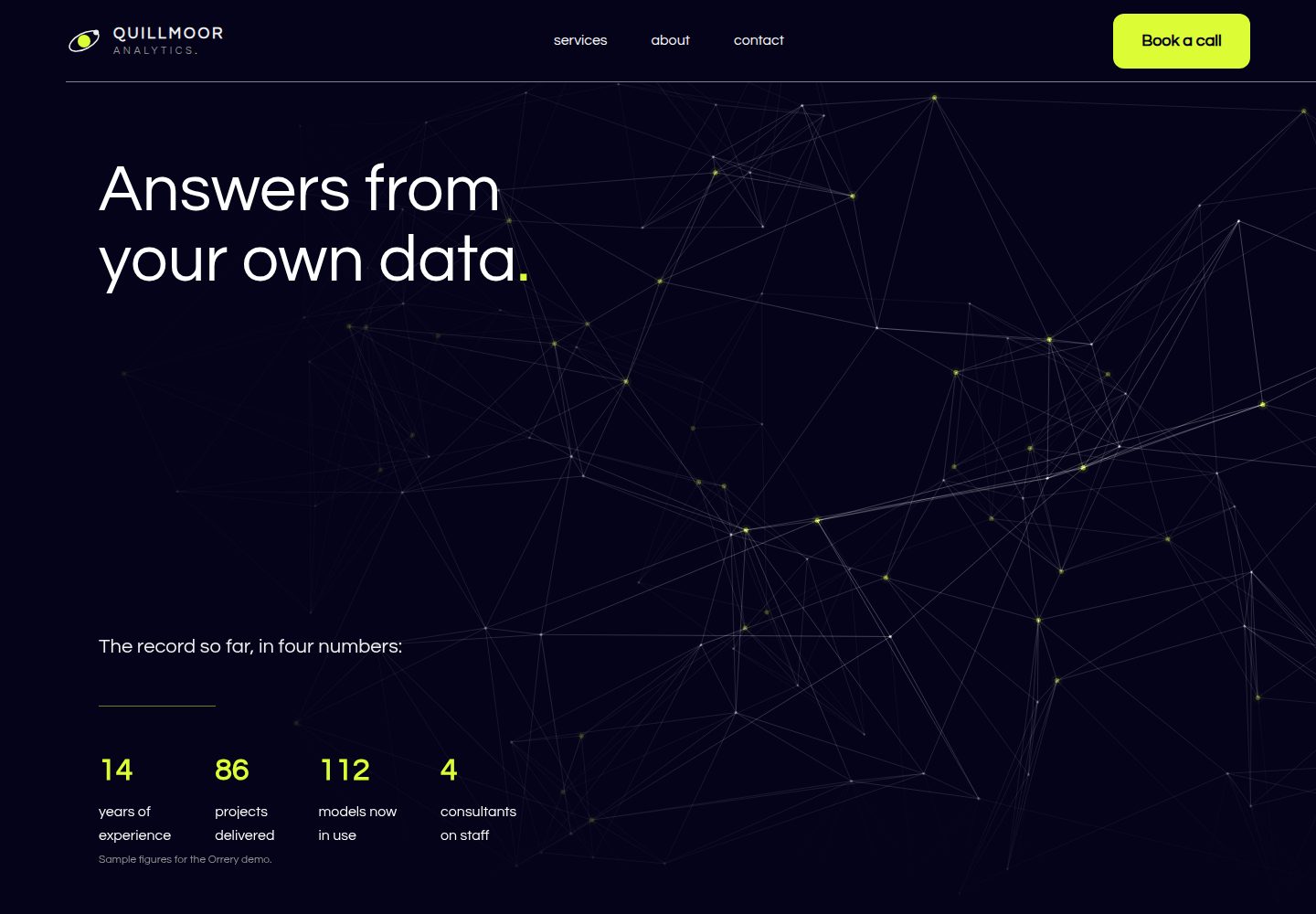
Brand information is centralized in src/config.ts, and services are Markdown files, making it easy to replace the sample content
AstroStarter
orrery-astro-theme — Astro Starter Template
By formgong
A free Astro theme for consultants and small B2B service firms, with a dark background, large light type, a single lime accent, scroll effects on the homepage, and a contact form that does not fake success.
Explore the design
Compare the page layouts and mobile experience. Open any screenshot for a closer look.
Desktop homepage1 / 3
Desktop captureTop of page
Actual screenshot captured by the server browser.
All pages & views 3
Screenshots show visual appearance; interactive behavior may differ.
Recorded 2026-10-08View source
What stands out
A quick read of the recorded project description.
Thirteen scroll and load effects are implemented with CSS and three small scripts, with no animation library dependency
The contact form only shows success when the Formgong backend returns success: true, and degrades to a normal HTML form without JavaScript
Provides a final static state for visitors who prefer reduced motion, pages without JavaScript, and browsers that do not support scroll-driven animations
Offers orrery-html.zip, a pure HTML version with no build step, which can be uploaded directly after replacing keys and domain
Template Details
Orrery is a free Astro-based theme for consultants and B2B service firms with up to five people. The site uses a dark background, large light type, and a single lime accent, and the homepage presents various effects as you scroll. The demo business Quillmoor Analytics is a fictional five-person data and strategy consultancy; phone numbers use the fictional 555-01xx range, emails and links point to example.com, and team members are described by role rather than name.
Brand information is centralized in src/config.ts, including name, contact details, business hours, homepage counters, accent color, and form keys; services are Markdown files. The contact form submits to the Formgong hosted backend and only shows success when it receives success: true; without JavaScript it still submits as a normal HTML form. The theme provides thirteen scroll and load effects, all implemented with CSS and three small scripts, and stops animations for visitors who prefer reduced motion.
Builds use Astro, Tailwind CSS, and TypeScript, and require Node 22.12 or newer. The repository is MIT-licensed, so you can use, modify, commercialize, and distribute this version of the code for free, but third-party assets such as demo images, fonts, and icons need separate license checks, and external services such as domains and hosting may cost extra.
AstroStarter
Is it right for your project?
Use Cases
- Building a showcase site with scroll effects for a consultant or small B2B service firm
- A static site that needs a contact form but does not want to fake a successful submission state
- Scenarios where you want to deploy quickly with pure HTML files and without running a build process
- A content site that needs an animation-free version for visitors who prefer reduced motion
Suitable For
- Small B2B service firms in consulting, data analysis, or strategy consulting
- Teams that accept a visual style with a dark background, large light type, and a single lime accent
- Developers using Astro who want to replace branding through a small number of configuration files
- Projects that need to connect the contact form to Formgong or a compatible standard POST backend
Getting started & customization
Use these recorded setup notes alongside the repository instructions for your chosen version.
- 1
Requires Node 22.12 or newer; start with npm create astro or by cloning the repository and running npm install
- 2
Set url to your real domain in src/config.ts, and replace sample fields such as name, contact details, business hours, and counters
- 3
Set PUBLIC_FORMGONG_ACCESS_KEY in .env or fill in formgong.accessKey in config.ts; the key starts with fk_
- 4
Replace the logo in src/components/Logo.astro and public/favicon.svg, and regenerate og.png and apple-touch-icon.png
- 5
When using another form backend, set PUBLIC_FORMGONG_ENDPOINT and adjust hidden fields and success detection according to that service's requirements
License & source material
Usage conditions & limitations
Free to use · keep license noticeThis entry covers the free version in the public repository under the MIT license; the free scope is the code of this version and does not mean external services or third-party assets are free.
Must comply with when using
- You may use, modify, commercialize, and distribute this version of the code for free.
- When distributing copies or substantial portions of the code, retain the original author's copyright notice and the full MIT license notice.
- The code is provided as is; warranties and limitations of liability are governed by the original license and applicable law.
Additional costs & items to verify
- Demo images, fonts, icons, and other third-party assets need to be checked under their respective licenses and cannot be judged solely by the code's MIT license.
- External services such as domains, hosting, databases, payments, or AI may cost extra.
- The contact form depends on the Formgong hosted backend service by default, requiring an account and an access key; you can also switch to another form service that accepts standard POST.
- Using the default form functionality requires creating a free form on formgong.com and holding an account, which is an external service dependency.
- A Formgong access key starting with fk_ must be configured for the form to submit properly.
- The Formgong free plan supports only 300 submissions per month; exceeding that may require a paid upgrade.
- Submission results are received by email; Telegram notifications require connecting that external service separately.
- The bundled font Questrial is licensed separately under SIL OFL 1.1, which differs from the theme's MIT license; commercial distribution must comply with its font license terms.
View Original Text Basis
Permission is hereby granted, free of charge
Original License Text
The contact form posts to [Formgong](https://formgong.com), a hosted form backend, so you don't need a server.
Original README
Create a free form at [formgong.com/new](https://formgong.com/new?name=Website%20contact%20form) (or from the dashboard if you already have an account).
Original README
Copy the form's access key. It starts with `fk_` and is public by design: it only lets visitors send submissions to that one form.
Original README
The free plan covers 300 submissions a month.
Original README
Submissions arrive by email and, if you connect it, in Telegram.
Original README
https://github.com/formgong/orrery-astro-theme/blob/main/LICENSEhttps://github.com/formgong/orrery-astro-theme/blob/main/README.mdThe font is Questrial, licensed under the SIL Open Font License 1.1 and installed from `@fontsource/questrial`.
Original README
Compiled by DeepSeek based on repository license and README ·2026-10-08. Results only cover the materials read; dependencies, images, fonts, and subsequent term changes are subject to their respective original texts.
Project checks & description sources
Template Information
- Source platforms
- GitHub
- Documentation and maintenance reference score
- More documented · 80 / 100
- Technologies
- Astro
- Website type
- Starter
How this score is calculated
Our heuristic uses license records (up to 30), a demo link (12), a preview (10), stars (15), recorded maintenance (15), description completeness (8), feature records (5) and classification data (5). It is not a code, security or performance test, or a Google score. A link does not establish tested functionality.
What to verify for this project
- Repository update recorded
- 2026-10-08
- Screenshot last checked
- 2026-10-08
A demo link is listed. Check it with your own content and viewport sizes; its presence does not confirm that forms, authentication or payments work.
The catalog identifies Astro as the primary stack. Check the actual dependency manifest and lockfile for versions and hosting requirements. These notes use recorded metadata, not a code audit or a deployment test.
Use a selection guide →How this description was prepared
AI-assisted description based on catalog records and repository material. Repository authors are not automatically the reviewers of this description.
Review declaration: [email protected] · 2026-10-09
Inspect the recorded source material
SHA-256: 0cb33ff0eae0c1d5a9fea3af3bf805c3213acac32b523483e3045fe4a10cf918
2026-10-08T22:09:32.387Z
Source file / repository# Orrery
A free Astro theme for consultants and small B2B service firms: a dark site with large light type, one lime accent and a home page that moves as you scroll.
**Live demo:** https://orrery.formgong.com · **No build step?** Download `orrery-html.zip` from the [latest release](https://github.com/formgong/orrery-astro-theme/releases/latest): plain HTML files, replace `fk_your_access_key` and `https://example.com` with your own and upload them anywhere.
[](https://deploy.workers.cloudflare.com/?url=https://github.com/formgong/orrery-astro-theme) [](https://vercel.com/new/clone?repository-url=https%3A%2F%2Fgithub.com%2Fformgong%2Forrery-astro-theme&project-name=orrery&repository-name=orrery&env=PUBLIC_FORMGONG_ACCESS_KEY&envDescription=Your%20Formgong%20access%20key%20%28fk_...%29.%20Create%20a%20free%20form%20to%20get%20one.&envLink=https%3A%2F%2Fformgong.com%2Fnew%3Fname%3Dorrery)
Each button copies the theme to your GitHub, builds it and asks for one value: your Formgong access key (`fk_…`), free at https://formgong.com/new. The form works from the first deploy. Then set `url` in `src/config.ts` to your domain.
The demo business is **Quillmoor Analytics**, a fictional five-person data and strategy consultancy in the fictional town of Port Alder. Everything on the site is sample content: phone numbers use the 555-01xx range reserved for fiction, every email and link uses `example.com`, and the team is described by role, not by name.
- **One file to rebrand.** Name, contact details, hours, the hero counters, the accent color and the form key live in `src/config.ts`. Services are Markdown files.
- **Thirteen scroll and load effects, no animation library.** Service cards that start as a staircase and pull up into a grid as you scroll, flipping in from flat; statements that fill line by line; a panel that slides in from the screen edge; titles that tilt into place. Timings, easings and scroll ranges were measured on the reference design with Playwright. All of it is CSS plus three tiny scripts, and all of it stops for visitors who prefer reduced motion.
- **A contact form that never fakes success.** It shows "Message received" only when the form backend answers `success: true`. Errors and lost connections show an error. Without JavaScript it still works as a plain HTML form.
- **Fast and accessible.** Static pages, one self-hosted font (Questrial), a few small scripts (the canvas scenes, the entrance trigger, the orbit lean, the form, closing the mobile menu). Labels on every field, visible focus, AA contrast for every text colour in its final state. Lighthouse mobile: 99–100 / 100 / 100 / 100.
Built with Astro 7, Tailwind CSS 4 and TypeScript.
## Quick start
```sh
npm create astro@latest -- --template formgong/orrery-astro-theme
cd your-project
npm run dev
```
Or clone the repository and run `npm install`, then `npm run dev`. Node 22.12 or newer is required.
| Command | What it does |
| ----------------- | ---------------------------------------------- |
| `npm run dev` | Local dev server at `http://localhost:4321` |
| `npm run build` | Static site in `dist/` |
| `npm run preview` | Serve the built site locally |
| `npm run check` | Type-check `.astro` and `.ts` files |
## Rebrand it
Open `src/config.ts`. The main fields:
| Field | Used for |
| ----------------------------------------- | ------------------------------------------------------------------------------------------ |
| `name`, `shortName`, `tagline`, `description` | Logo (two-line wordmark: `shortName`, then the rest of `name`), page titles, meta description, JSON-LD |
| `url` | Canonical URLs, Open Graph, sitemap, robots.txt and the form's redirect |
| `schemaType` | schema.org type, e.g. `ProfessionalService`, `AccountingService`, `LegalService` |
| `phone`, `email`, `address`, `areaServed` | Header menu, footer, contact page, JSON-LD |
| `hours`, `hoursNote` | Contact page, JSON-LD opening hours |
| `social` | Footer icons. Real profile URLs are also added to JSON-LD `sameAs` |
| `stats`, `statsNote` | The four counters in the hero. Sample values: replace them, then clear `statsNote` |
| `theme.accent`, `theme.accentText` | The one accent (key words, buttons, cards, the process panel) and the text color on it (keep 4.5:1) |
| `formgong` | Fallback access key, endpoint and email subject for the contact form |
| `nav`, `cta` | Header links and the accent button in the header and footer |
Replace the logo mark in `src/components/Logo.astro` and `public/favicon.svg`, and regenerate `public/og.png` (1200×630) and `public/apple-touch-icon.png` (180×180).
The JSON-LD block has no star rating on purpose: search engines ignore ratings a business publishes about itself.
## Set up the form
The contact form posts to [Formgong](https://formgong.com), a hosted form backend, so you don't need a server. It appears on the contact page; the buttons on the home page lead to it.
1. Create a free form at [formgong.com/new](https://formgong.com/new?name=Website%20contact%20form) (or from the dashboard if you already have an account).
2. Copy the form's access key. It starts with `fk_` and is public by design: it only lets visitors send submissions to that one form.
3. Add it to a `.env` file in the project root:
```sh
PUBLIC_FORMGONG_ACCESS_KEY=fk_your_access_key
```
or set `formgong.accessKey` in `src/config.ts`. While the placeholder key is in use, the dev server shows a reminder above the form.
4. Set `url` in `src/config.ts` to your real domain. Visitors without JavaScript are redirected to `/thanks/` on that domain. Formgong only follows a redirect on the site that sent the form, so on `localhost` you land on Formgong's own thank-you page instead.
Submissions arrive by email and, if you connect it, in Telegram. The free plan covers 300 submissions a month.
**How the form behaves**
- Without JavaScript: a normal `POST` to `https://formgong.com/submit`. The hidden `_redirect` field sends the visitor to `/thanks/` afterwards.
- With JavaScript: the same fields are sent with `fetch` and `Accept: application/json`. The button is disabled while sending. The success state, with its checkmark animation, appears only when the JSON response has `success === true`. Any other response shows the server's `message`. A network failure shows an error and your email address.
- The hidden `botcheck` field is a spam honeypot. Keep it empty and keep it in the markup.
**Using another form backend.** Any service that accepts a standard form `POST` works. Set `PUBLIC_FORMGONG_ENDPOINT` (or `formgong.endpoint`) to its URL and rename the hidden fields to what that service expects. If its JSON response is shaped differently, change the single `reply?.success === true` check in `src/components/ContactForm.astro`.
## Edit the content
- **Services:** one Markdown file per service in `src/content/services/`. Frontmatter: `title`, `tags` (the short line on the card), `summary`, `order`, `priceFrom`, `duration`, `deliverables` (list) and `art`, the card's line animation: `grid`, `bars`, `forecast`, `curve`, `bells` or `clusters` (see `src/components/ServiceArt.astro`). The body is shown on the services page.
- **Key words in the accent:** wrap them in asterisks, for example `lines={["Our *services*"]}`. This works in section headings, page headers and the lines that fill on scroll (`FillLines.astro`: one string per line).
- **Home page copy:** one file per section in `src/components/sections/`. The process steps are at the top of `Process.astro`.
- **About page:** roles and terms at the top of `src/pages/about.astro`.
## The effects
Numbers match the comments in the code.
| # | Effect | Where |
| -- | ------ | ----- |
| 1 | Fixed 90px header: logo, three links, accent button, a 1px divider from the content edge to the screen edge | `Header.astro` |
| 2 | On load the first heading line tilts in, the second is wiped in from the left, the lead fades in; a 3D particle network fills the whole hero behind the text, pushed aside by the pointer | `sections/Hero.astro`, `scripts/scenes.ts` (`plexus`) |
| 3 | Counters count up from 0 in steps, in the accent color | `.count` in `effects.css` |
| 4 | The hero stays put (sticky) while the next block slides up over it | `.hero-wrap` in `pages/index.astro` |
| 5 | A statement fills line by line: the key words turn from grey to the accent behind a front that sweeps left to right | `FillLines.astro`, `.fl-top` |
| 6 | Line-art orbits turn slowly and lean towards the pointer | `Orbits.astro`, `.orbit-ring`, `scripts/follow.ts` |
| 7 | A large rounded panel of drifting lines grows from 90% as it scrolls in; its quote flips in | `sections/MediaPanel.astro`, `.media`, `scenes.ts` (`flow`) |
| 8 | Two-tone section heading that fills like 5, a lead and a short accent rule | `sections/Services.astro` |
| 9 | Service cards start as a staircase, each 300px below the last, and pull up into a 3-column grid (2 columns on tablets) as you scroll; each flips in from flat when it reaches the screen; the finished grid scrolls away as one block | `sections/Services.astro`, `ServiceCard.astro`, `ServiceArt.astro`, `[data-enter="flip"]` |
| 10 | Split section: the picture grows from 90% as it scrolls in | `sections/Split.astro`, `Ridgelines.astro`, `.split-pic` |
| 11 | An accent panel slides in from the left edge of the screen next to sticky turning orbits; each step's dot opens, its title tilts in and its paragraph is wiped up | `sections/Process.astro`, `[data-enter]` |
| 12 | The closing heading fills like 5 | `sections/FinalCta.astro` |
| 13 | Footer over a rolling 3D field of dots | `Footer.astro`, `scenes.ts` (`wave`) |
How it is built:
- **Scroll-linked effects are CSS** (`animation-timeline: view(0px)`, one view timeline per element), so the browser runs them off the scroll position with no scroll listeners. They are all in `src/styles/effects.css`. `view(0px)` rather than `view()`: the default inset is the page's `scroll-padding`, which would shorten every range by the header height.
- **Entrances are CSS animations started by a 20-line script** (`src/scripts/enter.ts`): when 15% of an element is on screen it gets `.is-in` and its animation plays once. The card staircase is plain `position: sticky`: every card sits in its own track, and all tracks end together.
- **One canvas script** (`src/scripts/scenes.ts`, under 6 KB minified with the other two, no dependencies) draws the particle network, the drifting lines and the dot wave. It caps the device pixel ratio at 2, draws only while a canvas is on screen and the tab is visible, and draws one still frame for reduced motion.
- **The counters are CSS too:** a registered integer property stepped from 0 and printed with `counter()`. The real numbers are in the HTML for screen readers and search engines.
Phones (under 751px) get no entrances and no scroll effects, like the reference design. Browsers without scroll-driven animations, pages without JavaScript and visitors who prefer reduced motion see every section in its final state: text filled, cards flat and lit, the panel in place, titles straight. Nothing is hidden.
Three CSS details that keep it working:
- Scroll-driven rules use longhand properties (`animation-name`, `animation-timeline`, …). A minifier can merge a shorthand and `animation-timeline` into one declaration that Chrome rejects.
- Wrappers around animated content use `overflow: clip`, not `overflow: hidden`. `overflow: hidden` creates a scroll container, and a view timeline inside it would track that box instead of the page.
- Entrances keep `transform: none` in their first keyframe, so the observer measures the element's real box before it starts. The cards and the media quote fade in over 1.2 s while they flip (as on the reference); every text colour passes AA once settled.
## Look
Navy-black ground (`--c-bg`, #040319), #EEEEEE type (white for the hero heading), a grey (`--c-dim`, #949494, 6.7:1) for text that has not filled yet, and one accent from `theme.accent` (#DCFD35) with navy text on it. Type is Questrial (one weight; bold is synthesized), sized to the reference: 72px heading, 62px statements, 38px paragraphs, 22px leads. Cards and buttons have a 12px radius, pictures 24px.
## Project structure
```text
src/
├── components/
│ ├── sections/ Hero, Statement, MediaPanel, Services, Split, Process, FinalCta (the home page, in order)
│ ├── ContactForm.astro The form and its script
│ ├── FillLines.astro Line-by-line fill (5, 8, 12)
│ ├── Orbits.astro Line-art orbits (6, 11)
│ ├── Ridgelines.astro Build-time ridgeline chart (10)
│ ├── ServiceCard.astro, ServiceArt.astro Service cards and their line drawings (9)
│ ├── Head.astro Meta tags, Open Graph, JSON-LD
│ └── Header, Footer, Logo, Icon, PageHeader, SectionHeading, Highlight
├── content/services/ One Markdown file per service
├── layouts/ BaseLayout.astro
├── lib/ schema.ts (JSON-LD), highlight.ts
├── pages/ index, services/, about, contact, thanks, 404, robots.txt.ts
├── scripts/ scenes.ts (canvas scenes), enter.ts (entrance trigger), follow.ts (orbit lean)
├── styles/ global.css (tokens, components), effects.css (all motion)
├── config.ts Everything you rebrand
└── content.config.ts Collection schema
public/ favicon.svg, og.png, apple-touch-icon.png
```
## Deploy
`npm run build` produces a static site in `dist/` that any static host can serve. On Vercel or Netlify, set `PUBLIC_FORMGONG_ACCESS_KEY` in the project's build environment variables: the key is read at build time. The Deploy to Cloudflare button stores it as a Worker secret instead, and `worker.js` puts it into the form as each page is served. Set `url` in `src/config.ts` first so canonical links, the sitemap and the form redirect point at your domain.
## License
MIT, see `LICENSE`. The illustrations, line drawings and icons were drawn for this theme and are covered by the same license. The font is Questrial, licensed under the SIL Open Font License 1.1 and installed from `@fontsource/questrial`.
Explore similar templates
Compare previews and descriptions within the same stack and category.

astrowind
AstroWind is a free, open-source Astro starter theme using Astro and Tailwind CSS, released under the MIT license.
Astro · Blog
accessible-astro-starter
An accessibility-focused Astro 6 starter template with WCAG 2.2 AA practices, Tailwind CSS 4, TypeScript, Prettier, ESLint, form validation, blog and portfolio examples, and preference toggles for dark mode, high contrast, and reduced motion.
Astro · Blog

astro-erudite
astro-erudite is an opinionated, unstyled static blog template built with Astro and native CSS, with no UI or CSS framework and minimal dependencies.
Astro · Portfolio

astro-shopify
A lightweight Shopify headless ecommerce starter template built with Astro and Svelte, integrating the Shopify Storefront API for product and inventory data, with built-in cart state management and basic add-to-cart and checkout flow.
Astro · E-commerce

brutal
Brutal is a neobrutalism Astro starter theme from ElianCodes, derived from the author's personal site and generalized. It includes a Markdown blog collection, build-time RSS and sitemap, image optimization, Tailwind CSS styling, and Biome checks, with no JavaScript by default.
Astro · Starter

qwind
Qwind is a free and open-source website template built on Qwik and Tailwind CSS, featuring directory-based routing via QwikCity, a Markdown blog, dark mode, and static deployment configuration.
Astro · Tool Site