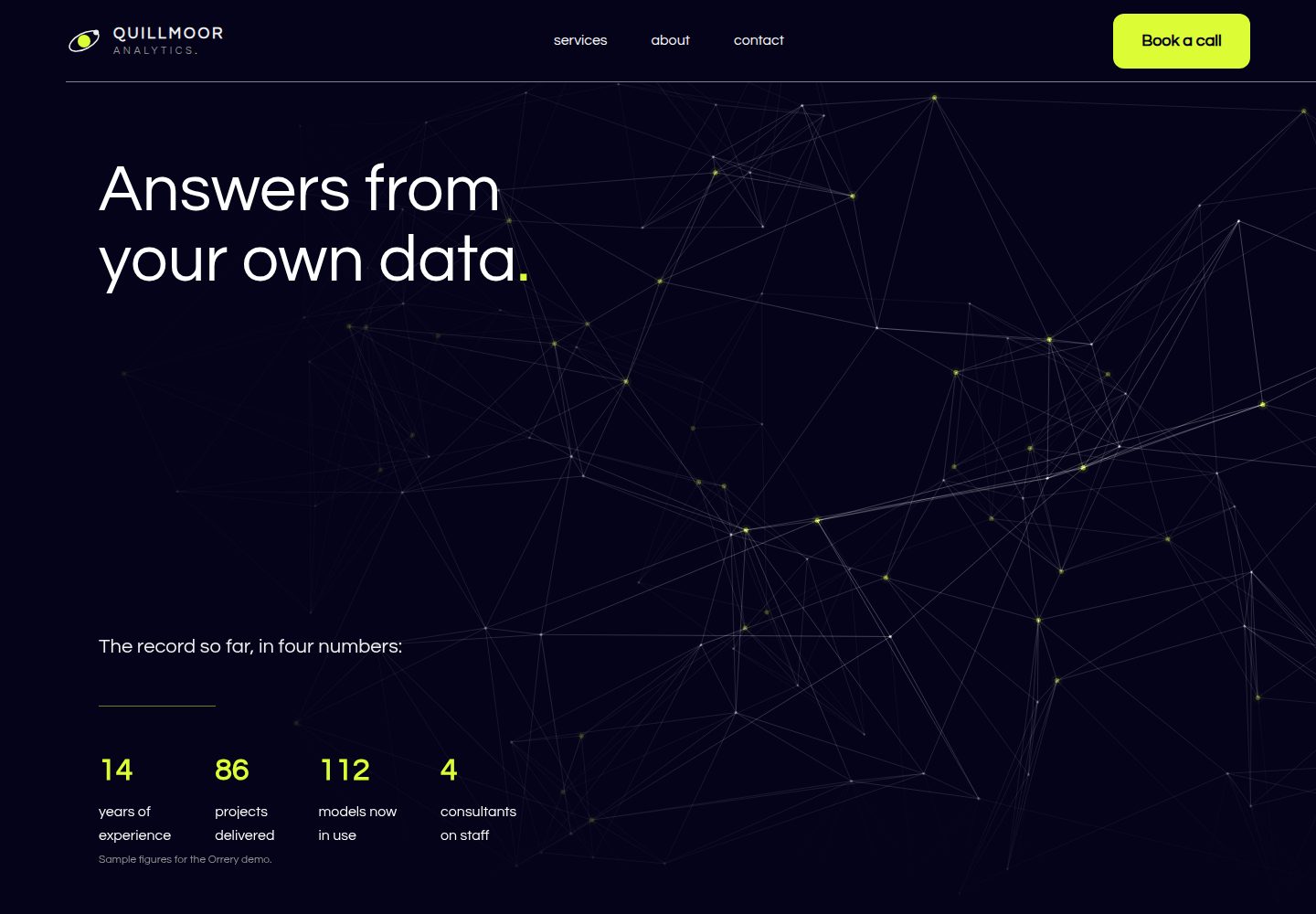
品牌信息集中在 src/config.ts,服务内容为 Markdown 文件,便于替换示例内容
Astro启动器
orrery-astro-theme — Astro 启动器模板
作者 formgong
面向顾问与小型 B2B 服务公司的免费 Astro 主题,深色底、浅色大字、单一青柠强调色,首页含滚动效果与不伪造成功的联系表单。
看看你的网站会是什么样
浏览真实页面截图,比较内容排版与手机效果。点击下方缩略图切换,放大查看整页细节。
全部页面与视图 3
截图用于了解视觉与布局,交互效果请以实际项目为准。
采集于 2026-10-08查看来源
值得关注的模板亮点
从已有项目资料中,快速了解它的特点。
十三种滚动与加载效果由 CSS 和三个小脚本实现,不依赖动画库
联系表单仅在 Formgong 后端返回 success: true 时显示成功,无 JavaScript 时降级为普通 HTML 表单
为偏好减少动效的访客、无 JavaScript 的页面和不支持滚动驱动动画的浏览器提供最终静态状态
提供无需构建步骤的 orrery-html.zip 纯 HTML 版本,可替换密钥和域名后直接上传
模板详细介绍
Orrery 是一个基于 Astro 的免费主题,面向顾问和五人以内的 B2B 服务公司。站点采用深色背景、大号浅色字体和单一青柠强调色,首页在滚动过程中呈现多种动效。演示业务 Quillmoor Analytics 是虚构的五人数据与战略咨询公司,站内电话使用 555-01xx 虚构号段,邮箱和链接均指向 example.com,团队按角色而非姓名描述。
品牌信息集中在 src/config.ts,包括名称、联系方式、营业时间、首页计数器、强调色和表单密钥;服务内容为 Markdown 文件。联系表单提交到 Formgong 托管后端,仅在收到 success: true 时显示成功,无 JavaScript 时仍可作为普通 HTML 表单提交。主题提供十三种滚动与加载效果,全部由 CSS 和三个小脚本实现,并会为偏好减少动效的访客停止动画。
构建使用 Astro、Tailwind CSS 和 TypeScript,需要 Node 22.12 或更新版本。仓库采用 MIT 许可,可免费使用、修改、商用和分发该版本代码,但演示图片、字体、图标等第三方素材需单独核对许可,域名、托管等外部服务可能另外收费。
Astro启动器
适合你的项目吗?
适用场景
- 为顾问或小型 B2B 服务公司搭建带滚动动效的展示站点
- 需要联系表单但不希望伪造提交成功状态的静态站点
- 希望用纯 HTML 文件快速部署、不运行构建流程的场景
- 需要为偏好减少动效的访客提供无动画版本的内容站点
适合人群
- 顾问、数据分析或战略咨询类小型 B2B 服务公司
- 接受深色底、浅色大字与单一青柠强调色视觉风格的团队
- 使用 Astro 并希望以少量配置文件完成品牌替换的开发者
- 需要将联系表单接入 Formgong 或兼容标准 POST 后端的项目
上手与定制指南
结合仓库当前版本的说明,按下面的资料检查内容、配置与运行要求。
- 1
需要 Node 22.12 或更新版本,可用 npm create astro 或克隆仓库后 npm install 启动
- 2
在 src/config.ts 中设置 url 为真实域名,并替换 name、联系方式、营业时间、计数器等示例字段
- 3
在 .env 中设置 PUBLIC_FORMGONG_ACCESS_KEY 或在 config.ts 中填写 formgong.accessKey,密钥以 fk_ 开头
- 4
替换 src/components/Logo.astro 与 public/favicon.svg 中的标识,并重新生成 og.png 和 apple-touch-icon.png
- 5
使用其他表单后端时,设置 PUBLIC_FORMGONG_ENDPOINT 并按该服务要求调整隐藏字段与成功判断逻辑
授权与来源资料
使用条件与限制
免费使用 · 保留许可声明本次收录的是公开仓库中采用 MIT 许可的免费版本;免费范围为该版本代码,不代表外部服务或第三方素材免费。
使用时需要遵守
- 允许免费使用、修改、商用和分发该版本代码。
- 分发代码副本或实质性部分时,保留原作者版权声明和完整 MIT 许可声明。
- 代码按现状提供;担保与责任限制以原许可证及适用法律为准。
额外费用与待核对事项
- 演示图片、字体、图标及其他第三方素材需按各自许可核对,不能仅凭代码的 MIT 许可判断。
- 域名、托管、数据库、支付或 AI 等外部服务可能另外收费。
- 联系表单默认依赖 Formgong 托管后端服务,需注册账号并获取访问密钥;也可改用其他接受标准 POST 的表单服务。
- 使用默认表单功能需在 formgong.com 创建免费表单并持有账号,属于外部服务依赖。
- 需配置以 fk_ 开头的 Formgong 访问密钥,表单才能正常提交。
- Formgong 免费方案每月仅支持 300 次提交,超出后可能需付费升级。
- 提交结果通过邮件接收,如需 Telegram 通知需额外连接该外部服务。
- 内置字体 Questrial 采用 SIL OFL 1.1 单独授权,与主题的 MIT 许可不同,商用分发时需遵守其字体许可条款。
查看原文依据
Permission is hereby granted, free of charge
许可证原文
The contact form posts to [Formgong](https://formgong.com), a hosted form backend, so you don't need a server.
README 原文
Create a free form at [formgong.com/new](https://formgong.com/new?name=Website%20contact%20form) (or from the dashboard if you already have an account).
README 原文
Copy the form's access key. It starts with `fk_` and is public by design: it only lets visitors send submissions to that one form.
README 原文
The free plan covers 300 submissions a month.
README 原文
Submissions arrive by email and, if you connect it, in Telegram.
README 原文
https://github.com/formgong/orrery-astro-theme/blob/main/LICENSEhttps://github.com/formgong/orrery-astro-theme/blob/main/README.mdThe font is Questrial, licensed under the SIL Open Font License 1.1 and installed from `@fontsource/questrial`.
README 原文
DeepSeek 根据仓库许可证和 README 整理 ·2026-10-08。结果仅覆盖已读取资料,依赖、图片、字体及后续条款变更以各自原文为准。
项目核对记录与介绍依据
模板资料
- 来源平台
- GitHub
- 资料与维护参考分
- 资料较完整 · 80 / 100
- 技术栈
- Astro
- 网站类型
- 启动器
这个分数如何计算
本站按许可资料(最高30分)、演示链接(12分)、预览图(10分)、Star数(15分)、记录的维护时间(15分)、描述完整度(8分)、功能记录(5分)和分类资料(5分)计算。它不是代码、安全或性能测试,也不是 Google 评分;有链接不代表已实测可用。
这个项目需要核对什么
- 记录的仓库更新时间
- 2026-10-08
- 截图检查日期
- 2026-10-08
已收录演示链接。请用你的内容与屏幕尺寸检查;有演示不代表表单、认证或支付已经可用。
目录记录的主要技术栈是 Astro。请通过依赖清单和锁文件核对实际版本与托管要求。这些说明基于收录资料,不代表代码审计或部署实测。
查看具体选型方法 →介绍的制作与核对状态
介绍由 AI 辅助整理目录与仓库资料。仓库作者不等于这篇介绍的审核者。
审核声明: [email protected] · 2026-10-09
查看当时使用的来源资料
SHA-256: 0cb33ff0eae0c1d5a9fea3af3bf805c3213acac32b523483e3045fe4a10cf918
2026-10-08T22:09:32.387Z
来源文件 / 仓库# Orrery
A free Astro theme for consultants and small B2B service firms: a dark site with large light type, one lime accent and a home page that moves as you scroll.
**Live demo:** https://orrery.formgong.com · **No build step?** Download `orrery-html.zip` from the [latest release](https://github.com/formgong/orrery-astro-theme/releases/latest): plain HTML files, replace `fk_your_access_key` and `https://example.com` with your own and upload them anywhere.
[](https://deploy.workers.cloudflare.com/?url=https://github.com/formgong/orrery-astro-theme) [](https://vercel.com/new/clone?repository-url=https%3A%2F%2Fgithub.com%2Fformgong%2Forrery-astro-theme&project-name=orrery&repository-name=orrery&env=PUBLIC_FORMGONG_ACCESS_KEY&envDescription=Your%20Formgong%20access%20key%20%28fk_...%29.%20Create%20a%20free%20form%20to%20get%20one.&envLink=https%3A%2F%2Fformgong.com%2Fnew%3Fname%3Dorrery)
Each button copies the theme to your GitHub, builds it and asks for one value: your Formgong access key (`fk_…`), free at https://formgong.com/new. The form works from the first deploy. Then set `url` in `src/config.ts` to your domain.
The demo business is **Quillmoor Analytics**, a fictional five-person data and strategy consultancy in the fictional town of Port Alder. Everything on the site is sample content: phone numbers use the 555-01xx range reserved for fiction, every email and link uses `example.com`, and the team is described by role, not by name.
- **One file to rebrand.** Name, contact details, hours, the hero counters, the accent color and the form key live in `src/config.ts`. Services are Markdown files.
- **Thirteen scroll and load effects, no animation library.** Service cards that start as a staircase and pull up into a grid as you scroll, flipping in from flat; statements that fill line by line; a panel that slides in from the screen edge; titles that tilt into place. Timings, easings and scroll ranges were measured on the reference design with Playwright. All of it is CSS plus three tiny scripts, and all of it stops for visitors who prefer reduced motion.
- **A contact form that never fakes success.** It shows "Message received" only when the form backend answers `success: true`. Errors and lost connections show an error. Without JavaScript it still works as a plain HTML form.
- **Fast and accessible.** Static pages, one self-hosted font (Questrial), a few small scripts (the canvas scenes, the entrance trigger, the orbit lean, the form, closing the mobile menu). Labels on every field, visible focus, AA contrast for every text colour in its final state. Lighthouse mobile: 99–100 / 100 / 100 / 100.
Built with Astro 7, Tailwind CSS 4 and TypeScript.
## Quick start
```sh
npm create astro@latest -- --template formgong/orrery-astro-theme
cd your-project
npm run dev
```
Or clone the repository and run `npm install`, then `npm run dev`. Node 22.12 or newer is required.
| Command | What it does |
| ----------------- | ---------------------------------------------- |
| `npm run dev` | Local dev server at `http://localhost:4321` |
| `npm run build` | Static site in `dist/` |
| `npm run preview` | Serve the built site locally |
| `npm run check` | Type-check `.astro` and `.ts` files |
## Rebrand it
Open `src/config.ts`. The main fields:
| Field | Used for |
| ----------------------------------------- | ------------------------------------------------------------------------------------------ |
| `name`, `shortName`, `tagline`, `description` | Logo (two-line wordmark: `shortName`, then the rest of `name`), page titles, meta description, JSON-LD |
| `url` | Canonical URLs, Open Graph, sitemap, robots.txt and the form's redirect |
| `schemaType` | schema.org type, e.g. `ProfessionalService`, `AccountingService`, `LegalService` |
| `phone`, `email`, `address`, `areaServed` | Header menu, footer, contact page, JSON-LD |
| `hours`, `hoursNote` | Contact page, JSON-LD opening hours |
| `social` | Footer icons. Real profile URLs are also added to JSON-LD `sameAs` |
| `stats`, `statsNote` | The four counters in the hero. Sample values: replace them, then clear `statsNote` |
| `theme.accent`, `theme.accentText` | The one accent (key words, buttons, cards, the process panel) and the text color on it (keep 4.5:1) |
| `formgong` | Fallback access key, endpoint and email subject for the contact form |
| `nav`, `cta` | Header links and the accent button in the header and footer |
Replace the logo mark in `src/components/Logo.astro` and `public/favicon.svg`, and regenerate `public/og.png` (1200×630) and `public/apple-touch-icon.png` (180×180).
The JSON-LD block has no star rating on purpose: search engines ignore ratings a business publishes about itself.
## Set up the form
The contact form posts to [Formgong](https://formgong.com), a hosted form backend, so you don't need a server. It appears on the contact page; the buttons on the home page lead to it.
1. Create a free form at [formgong.com/new](https://formgong.com/new?name=Website%20contact%20form) (or from the dashboard if you already have an account).
2. Copy the form's access key. It starts with `fk_` and is public by design: it only lets visitors send submissions to that one form.
3. Add it to a `.env` file in the project root:
```sh
PUBLIC_FORMGONG_ACCESS_KEY=fk_your_access_key
```
or set `formgong.accessKey` in `src/config.ts`. While the placeholder key is in use, the dev server shows a reminder above the form.
4. Set `url` in `src/config.ts` to your real domain. Visitors without JavaScript are redirected to `/thanks/` on that domain. Formgong only follows a redirect on the site that sent the form, so on `localhost` you land on Formgong's own thank-you page instead.
Submissions arrive by email and, if you connect it, in Telegram. The free plan covers 300 submissions a month.
**How the form behaves**
- Without JavaScript: a normal `POST` to `https://formgong.com/submit`. The hidden `_redirect` field sends the visitor to `/thanks/` afterwards.
- With JavaScript: the same fields are sent with `fetch` and `Accept: application/json`. The button is disabled while sending. The success state, with its checkmark animation, appears only when the JSON response has `success === true`. Any other response shows the server's `message`. A network failure shows an error and your email address.
- The hidden `botcheck` field is a spam honeypot. Keep it empty and keep it in the markup.
**Using another form backend.** Any service that accepts a standard form `POST` works. Set `PUBLIC_FORMGONG_ENDPOINT` (or `formgong.endpoint`) to its URL and rename the hidden fields to what that service expects. If its JSON response is shaped differently, change the single `reply?.success === true` check in `src/components/ContactForm.astro`.
## Edit the content
- **Services:** one Markdown file per service in `src/content/services/`. Frontmatter: `title`, `tags` (the short line on the card), `summary`, `order`, `priceFrom`, `duration`, `deliverables` (list) and `art`, the card's line animation: `grid`, `bars`, `forecast`, `curve`, `bells` or `clusters` (see `src/components/ServiceArt.astro`). The body is shown on the services page.
- **Key words in the accent:** wrap them in asterisks, for example `lines={["Our *services*"]}`. This works in section headings, page headers and the lines that fill on scroll (`FillLines.astro`: one string per line).
- **Home page copy:** one file per section in `src/components/sections/`. The process steps are at the top of `Process.astro`.
- **About page:** roles and terms at the top of `src/pages/about.astro`.
## The effects
Numbers match the comments in the code.
| # | Effect | Where |
| -- | ------ | ----- |
| 1 | Fixed 90px header: logo, three links, accent button, a 1px divider from the content edge to the screen edge | `Header.astro` |
| 2 | On load the first heading line tilts in, the second is wiped in from the left, the lead fades in; a 3D particle network fills the whole hero behind the text, pushed aside by the pointer | `sections/Hero.astro`, `scripts/scenes.ts` (`plexus`) |
| 3 | Counters count up from 0 in steps, in the accent color | `.count` in `effects.css` |
| 4 | The hero stays put (sticky) while the next block slides up over it | `.hero-wrap` in `pages/index.astro` |
| 5 | A statement fills line by line: the key words turn from grey to the accent behind a front that sweeps left to right | `FillLines.astro`, `.fl-top` |
| 6 | Line-art orbits turn slowly and lean towards the pointer | `Orbits.astro`, `.orbit-ring`, `scripts/follow.ts` |
| 7 | A large rounded panel of drifting lines grows from 90% as it scrolls in; its quote flips in | `sections/MediaPanel.astro`, `.media`, `scenes.ts` (`flow`) |
| 8 | Two-tone section heading that fills like 5, a lead and a short accent rule | `sections/Services.astro` |
| 9 | Service cards start as a staircase, each 300px below the last, and pull up into a 3-column grid (2 columns on tablets) as you scroll; each flips in from flat when it reaches the screen; the finished grid scrolls away as one block | `sections/Services.astro`, `ServiceCard.astro`, `ServiceArt.astro`, `[data-enter="flip"]` |
| 10 | Split section: the picture grows from 90% as it scrolls in | `sections/Split.astro`, `Ridgelines.astro`, `.split-pic` |
| 11 | An accent panel slides in from the left edge of the screen next to sticky turning orbits; each step's dot opens, its title tilts in and its paragraph is wiped up | `sections/Process.astro`, `[data-enter]` |
| 12 | The closing heading fills like 5 | `sections/FinalCta.astro` |
| 13 | Footer over a rolling 3D field of dots | `Footer.astro`, `scenes.ts` (`wave`) |
How it is built:
- **Scroll-linked effects are CSS** (`animation-timeline: view(0px)`, one view timeline per element), so the browser runs them off the scroll position with no scroll listeners. They are all in `src/styles/effects.css`. `view(0px)` rather than `view()`: the default inset is the page's `scroll-padding`, which would shorten every range by the header height.
- **Entrances are CSS animations started by a 20-line script** (`src/scripts/enter.ts`): when 15% of an element is on screen it gets `.is-in` and its animation plays once. The card staircase is plain `position: sticky`: every card sits in its own track, and all tracks end together.
- **One canvas script** (`src/scripts/scenes.ts`, under 6 KB minified with the other two, no dependencies) draws the particle network, the drifting lines and the dot wave. It caps the device pixel ratio at 2, draws only while a canvas is on screen and the tab is visible, and draws one still frame for reduced motion.
- **The counters are CSS too:** a registered integer property stepped from 0 and printed with `counter()`. The real numbers are in the HTML for screen readers and search engines.
Phones (under 751px) get no entrances and no scroll effects, like the reference design. Browsers without scroll-driven animations, pages without JavaScript and visitors who prefer reduced motion see every section in its final state: text filled, cards flat and lit, the panel in place, titles straight. Nothing is hidden.
Three CSS details that keep it working:
- Scroll-driven rules use longhand properties (`animation-name`, `animation-timeline`, …). A minifier can merge a shorthand and `animation-timeline` into one declaration that Chrome rejects.
- Wrappers around animated content use `overflow: clip`, not `overflow: hidden`. `overflow: hidden` creates a scroll container, and a view timeline inside it would track that box instead of the page.
- Entrances keep `transform: none` in their first keyframe, so the observer measures the element's real box before it starts. The cards and the media quote fade in over 1.2 s while they flip (as on the reference); every text colour passes AA once settled.
## Look
Navy-black ground (`--c-bg`, #040319), #EEEEEE type (white for the hero heading), a grey (`--c-dim`, #949494, 6.7:1) for text that has not filled yet, and one accent from `theme.accent` (#DCFD35) with navy text on it. Type is Questrial (one weight; bold is synthesized), sized to the reference: 72px heading, 62px statements, 38px paragraphs, 22px leads. Cards and buttons have a 12px radius, pictures 24px.
## Project structure
```text
src/
├── components/
│ ├── sections/ Hero, Statement, MediaPanel, Services, Split, Process, FinalCta (the home page, in order)
│ ├── ContactForm.astro The form and its script
│ ├── FillLines.astro Line-by-line fill (5, 8, 12)
│ ├── Orbits.astro Line-art orbits (6, 11)
│ ├── Ridgelines.astro Build-time ridgeline chart (10)
│ ├── ServiceCard.astro, ServiceArt.astro Service cards and their line drawings (9)
│ ├── Head.astro Meta tags, Open Graph, JSON-LD
│ └── Header, Footer, Logo, Icon, PageHeader, SectionHeading, Highlight
├── content/services/ One Markdown file per service
├── layouts/ BaseLayout.astro
├── lib/ schema.ts (JSON-LD), highlight.ts
├── pages/ index, services/, about, contact, thanks, 404, robots.txt.ts
├── scripts/ scenes.ts (canvas scenes), enter.ts (entrance trigger), follow.ts (orbit lean)
├── styles/ global.css (tokens, components), effects.css (all motion)
├── config.ts Everything you rebrand
└── content.config.ts Collection schema
public/ favicon.svg, og.png, apple-touch-icon.png
```
## Deploy
`npm run build` produces a static site in `dist/` that any static host can serve. On Vercel or Netlify, set `PUBLIC_FORMGONG_ACCESS_KEY` in the project's build environment variables: the key is read at build time. The Deploy to Cloudflare button stores it as a Worker secret instead, and `worker.js` puts it into the form as each page is served. Set `url` in `src/config.ts` first so canonical links, the sitemap and the form redirect point at your domain.
## License
MIT, see `LICENSE`. The illustrations, line drawings and icons were drawn for this theme and are covered by the same license. The font is Questrial, licensed under the SIL Open Font License 1.1 and installed from `@fontsource/questrial`.
看看同类模板
对比同技术栈与用途的模板,找到更适合的视觉与内容结构。

astrowind
⭕️ AstroWind: A free template using Astro v7 and Tailwind CSS v4. Astro starter theme.
Astro · 博客
accessible-astro-starter
Accessible Astro Starter 是一个以无障碍为核心理念的 Astro 6 启动模板,由 incluud 团队维护。
Astro · 博客

astro-erudite
An opinionated, unstyled static blogging template built with Astro and native CSS.
Astro · 作品集

astro-shopify
astro-shopify 是一个面向开发者的轻量级电商启动模板,用于构建基于 Shopify 的无头店面。
Astro · 电商

brutal
A neobrutalism Astro starter theme
Astro · 启动器

qwind
⭕️ Qwind: A template to make your website using Qwik + Tailwind CSS.
Astro · 工具站