Content is configured in a single file, src/data/site.json, or you can switch to site.ts to use Astro image imports
AstroCorporate WebsiteStarter
artistree — Astro Business Template
By francosuarez-dev
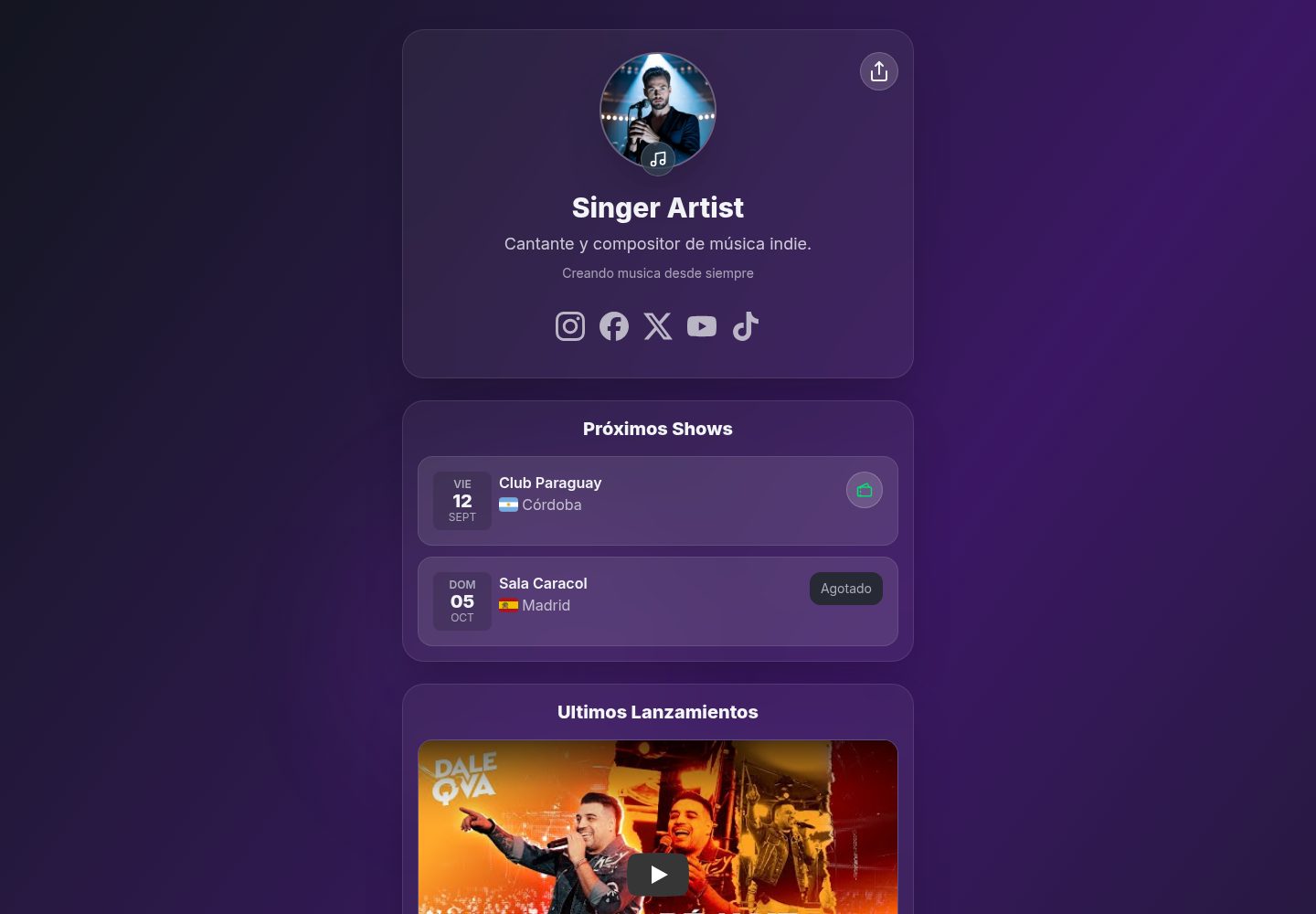
ArtisTree is a link-in-bio landing page template for musicians built with Astro and TailwindCSS. It centralizes social links, show schedules, releases, and booking contact details in src/data/site.json.
Explore the design
Compare the page layouts and mobile experience. Open any screenshot for a closer look.
Desktop homepage1 / 2
Desktop captureTop of page
Actual screenshot captured by the server browser.
All pages & views 2
Screenshots show visual appearance; interactive behavior may differ.
Recorded 2026-10-02View source
What stands out
A quick read of the recorded project description.
Includes eight built-in themes: light, dark, violet, blue, green, red, pink, and orange
Provides three font presets—modern, elegant, and grotesk—loading the corresponding fonts from Google Fonts automatically
The show list automatically filters future dates, sorts ascending, and displays flags and ticket status based on ISO country codes
The release list is sorted by release date descending, and the latest release can embed a YouTube video as the Featured item
socials and custom links render platform icons and only show entries that have been filled in
Template Details
ArtisTree is aimed at musicians, bringing social platform links, upcoming shows, music releases, and booking contact details together on a single page in the familiar link-in-bio format. The template is built with Astro and styled with TailwindCSS. All content is configured in a single file, src/data/site.json, and you can also switch to src/data/site.ts to use Astro's image import optimization.
Configuration covers: title, description, theme, and copyright in config; name, bio, and avatar in artist; links keyed by platform in socials; email and phone in booking; show date, city, venue, country code, and ticket status in the shows array; release title, album, release date, cover, and per-platform links in the releases array; plus an additional custom links list.
The theme is selected in config.theme from light, dark, violet, blue, green, red, pink, or orange, applied via the data-theme attribute on html together with globals.css. Fonts are selected in config.font from three presets: modern, elegant, and grotesk, which load Inter, Playfair Display, or Poppins from Google Fonts respectively.
Show entries are filtered to future dates based on ISO dates and sorted ascending; country uses ISO 3166-1 alpha-2 codes with flag-icons to render flags. When a ticket link exists and available is true, a buy-ticket button is shown; when available is false, Sold Out is shown without a link. Release entries are sorted by releaseDate descending, with the latest shown as Featured; if its links.youtube exists, the video is embedded, otherwise the cover is shown. The remaining releases are displayed as cards with cover art and platform icons.
Limitations: dates must be in YYYY-MM-DD format, and country codes must be two letters, otherwise the flag will not display. Some music videos cannot be embedded, and on mobile the page falls back to an "Open on YouTube" button. Third-party assets such as demo images, fonts, and icons must be checked separately under their own licenses; the code's MIT license does not cover these assets.
AstroCorporate websiteStarter
Is it right for your project?
Use Cases
- A musician needs a personal page that centralizes links to Spotify, Apple Music, YouTube, and other platforms
- A band or artist is announcing a tour schedule and needs to list shows by date with ticket or sold-out status
- An independent musician is releasing a new single or album and wants the latest release at the top of the page with an embedded YouTube video
- You need to quickly replicate the same landing page structure for different artists by replacing only the content in site.json
Suitable For
- Musicians and their teams who have Astro or front-end basics and are willing to deploy a static site themselves
- Independent artists who need a link-in-bio page and want to present show and release information together
- Developers who want to modify the page structure and styles based on MIT-licensed code
Getting started & customization
Use these recorded setup notes alongside the repository instructions for your chosen version.
- 1
After cloning the repository, install dependencies with pnpm install, start the local development server with pnpm dev (default http://localhost:4321), and use pnpm build and pnpm preview for production builds and previews
- 2
Edit all content in src/data/site.json; place images under public/covers/ and reference them with absolute paths like /covers/..., or switch to src/data/site.ts to import images for optimization
- 3
Date fields use ISO YYYY-MM-DD format, and show country uses ISO 3166-1 alpha-2 two-letter codes, otherwise flags cannot render
- 4
config.theme and config.font can only take values defined in the template; adding a new font preset requires modifying both FONT_LINKS in Layout.astro and the corresponding style block in globals.css
- 5
The code is MIT-licensed, and the copyright and license notice must be retained when distributing; third-party assets such as demo images, fonts, and icons must be checked separately for their licenses
License & source material
Usage conditions & limitations
Free to use · keep license noticeThis entry covers the free version in the public repository under the MIT license; the free scope is the code in that version and does not mean external services or third-party assets are free.
Must comply with when using
- You may use, modify, commercialize, and distribute the code in this version for free.
- When distributing copies or substantial portions of the code, retain the original author's copyright notice and the full MIT license notice.
- The code is provided as is; warranties and limitations of liability are governed by the original license and applicable law.
Additional costs & items to verify
- Font presets load Inter, Playfair Display, or Poppins from Google Fonts, so the page makes external requests to Google at runtime; you must assess the external service and privacy implications yourself.
- Some music videos cannot be embedded, and on mobile they cannot play inline, so the page falls back to a button that opens YouTube.
- The show list only displays future dates; past shows do not appear on the page.
- Show countries must use ISO 3166-1 alpha-2 two-letter codes, otherwise the flag icon cannot render.
- Show dates and release dates must use ISO YYYY-MM-DD format, otherwise sorting and display may be incorrect.
- Adding a new font preset requires manually modifying FONT_LINKS in Layout.astro and globals.css; the template itself does not provide a graphical configuration interface.
- Demo images, fonts, icons, and other third-party assets must be checked under their own licenses and cannot be judged solely by the code's MIT license.
- External services such as domains, hosting, databases, payments, or AI may incur additional charges.
View Original Text Basis
Permission is hereby granted, free of charge
Original License Text
Each preset automatically loads its typefaces from Google Fonts
Original README
some music videos block embedding. The UI shows an “Open on YouTube” button as a fallback.
Original README
The shows list filters future dates and sorts ascending by date.
Original README
ensure `country` is ISO alpha-2 (e.g., `BR`, not `BRA`).
Original README
Dates in `YYYY-MM-DD` format?
Original README
https://github.com/francosuarez-dev/artistree/blob/main/LICENCEhttps://github.com/francosuarez-dev/artistree/blob/main/README.mdYou can add more presets by editing the `FONT_LINKS` map in `Layout.astro`
Original README
Compiled by DeepSeek based on repository license and README ·2026-10-02. Results only cover the materials read; dependencies, images, fonts, and subsequent term changes are subject to their respective original texts.
Project checks & description sources
Template Information
- Source platforms
- GitHub
- Documentation and maintenance reference score
- More documented · 86 / 100
- Technologies
- Astro
- Website type
- Corporate Website · Starter
How this score is calculated
Our heuristic uses license records (up to 30), a demo link (12), a preview (10), stars (15), recorded maintenance (15), description completeness (8), feature records (5) and classification data (5). It is not a code, security or performance test, or a Google score. A link does not establish tested functionality.
What to verify for this project
- Repository update recorded
- 2025-09-04
- Screenshot last checked
- 2026-10-02
A demo link is listed. Check it with your own content and viewport sizes; its presence does not confirm that forms, authentication or payments work.
The catalog identifies Astro as the primary stack. Check the actual dependency manifest and lockfile for versions and hosting requirements. These notes use recorded metadata, not a code audit or a deployment test.
Use a selection guide →How this description was prepared
AI-assisted description based on catalog records and repository material. Repository authors are not automatically the reviewers of this description.
Automatically checked against source and license rules; no manual editorial review.
Inspect the recorded source material
SHA-256: 72a39bcaaee98a34312efe03c5d813d006aa6cc9d71792019f9a853a781dec43
2026-10-02T20:58:14.489Z
Source file / repository# ArtisTree – Link in Bio Page for Artists 🎶
[](LICENSE)
[](https://astro.build/)
[](https://tailwindcss.com/)
[](https://app.netlify.com/projects/artistree-astro/deploys)

ArtisTree is a customizable landing page for music artists.
It works like a modern “link-in-bio” for social networks: centralizing links to your platforms (Spotify, Apple Music, YouTube, etc.), upcoming shows, releases, and booking contacts.
Built with [Astro](https://astro.build/) + TailwindCSS v4, and designed to be easily configured via a single file: `src/data/site.json`.
## 🚀 Demo
👉 [View demo](https://artistree-astro.netlify.app/)
---
## 🚀 Quick Start
This project uses `pnpm`, but you can use `npm` without issues. The official lockfile is `pnpm-lock.yaml`.
1. Clone the repository
```bash
git clone https://github.com/francosuarez-dev/artistree.git
cd artistree
```
2. Install dependencies
```bash
pnpm install
```
3. Start the development server
```bash
pnpm dev
```
The site will be available at `http://localhost:4321`
4. Production build
```bash
pnpm build
pnpm preview
```
---
## 📦 Configuration via `site.json`
All configuration is centralized in:
```
src/
data/
site.json ← edit everything here
```
> Advanced alternative: if you want Astro’s optimized image imports, you can use `src/data/site.ts` and export a typed object (see the Images section).
---
## 🧰 General Structure
```jsonc
{
"config": {
"title": "Artistree Landing",
"description": "Landing built with Astro",
"theme": "violet", // one of: light | dark | violet | blue | green | red | pink | orange
"copyright": "© 2025 ..."
},
"artist": {
"name": "Franco Suárez",
"description": "Singer and songwriter...",
"bio": "Short text...",
"picture": "/covers/profile.jpeg" // see Images section
},
"socials": {
"instagram": "https://instagram.com/...",
"facebook": "https://facebook.com/...",
"x": "https://x.com/...",
"youtube": "https://youtube.com/..."
// optional: spotify, applemusic, tidal, whatsapp, email, website ...
},
"booking": {
"email": "[email protected]",
"phone": "+54 911 2345 6789"
},
"shows": [
{
"title": "Show name",
"date": "2025-09-12", // ISO YYYY-MM-DD
"city": "Córdoba",
"country": "AR", // ISO 3166-1 alpha-2 → renders the flag
"venue": "Club Paraguay",
"tickets": "https://tickets...", // optional
"available": true // if false → shows “Sold Out”
}
],
"releases": [
{
"title": "Noche Eterna",
"album": "Noche Eterna Album",
"releaseDate": "2025-08-15", // ISO YYYY-MM-DD (used for sorting)
"cover": "/covers/cover1.jpeg",
"links": {
"spotify": "https://open.spotify.com/track/...",
"applemusic": "https://music.apple.com/...",
"youtube": "https://www.youtube.com/watch?v=XXXXXXXXXXX"
}
}
]
}
```
---
## 🎨 Theme
- Defined in `config.theme`.
- Valid values: `light | dark | violet | blue | green | red | pink | orange`.
- The layout applies `data-theme={config.theme}`, and Tailwind v4 picks colors/gradients from `globals.css`.
---
## ✍️ Fonts
- Defined in `config.font`.
- Valid values: `modern | elegant | grotesk`.
- The layout applies `data-font={config.font}` on `<html>` and styles are sourced from `globals.css`.
- Each preset automatically loads its typefaces from Google Fonts:
- **modern** → Inter (text and headings)
- **elegant** → Inter (text) + Playfair Display (headings)
- **grotesk** → Poppins (text and headings)
> You can add more presets by editing the `FONT_LINKS` map in `Layout.astro` and the `:root[data-font="..."]` blocks in `globals.css`.
---
## 👤 Artist
- `name`, `description`, `bio` → free-form strings.
- `picture` → see **Images** below.
---
## 🔗 Socials
- Supported keys (you can add more):
`instagram, facebook, x, spotify, applemusic, tidal, youtube, whatsapp, email, website`
- The UI maps each key to an icon (yours, in `src/icons`).
- Only entries with a URL/value are rendered.
Examples of values:
- `email`: `"mailto:contact@..."`
- `website`: `"https://yoursite.com"`
- `whatsapp`: `"+5491123456789"` (the UI may convert to `https://wa.me/...` if implemented that way)
---
## 🎫 Booking
- Contact section for bookings.
- If there is `email` → “Email” button (`mailto:`).
- If there is `phone` → “Phone” button (`tel:`).
- If both exist → both are shown.
```json
"booking": { "email": "booking@...", "phone": "+54 911 2345 6789" }
```
---
## 📅 Shows (calendar, flag, and tickets)
Fields per show:
- `title` (optional, informational)
- `date` (**ISO `YYYY-MM-DD`**) → formatted with locale `es-AR` and displayed in a calendar-style card (day / date / month)
- `city`, `venue` → text
- `country` → **ISO 3166-1 alpha-2 code** (`AR`, `ES`, `US`…)
Used with **flag-icons:** `<span class="fi fi-ar"></span>`
- `tickets` (optional) + `available` (**boolean**):
- `tickets` + `available: true` → **Tickets** button
- `tickets` + `available: false` → **Sold Out** (no link)
- without `tickets` → no action is shown
The shows list filters future dates and sorts ascending by date.
---
## 💿 Releases (with “latest release” and YouTube video)
Each release:
- `title` (string)
- `album` (string)
- `releaseDate` (**ISO `YYYY-MM-DD`**) → used for **sorting** (desc)
- `cover` (string) → image path
- `links` (object):
- typical keys: `spotify`, `applemusic`, `deezer`, `tidal`, `youtube`, etc.
- **"Featured" behavior**: the most recent (by `releaseDate`) is shown first;
if it also has `links.youtube`, the **video is embedded** instead of the cover (with a fallback “Open on YouTube” if embedding isn’t available on mobile)
- The rest of the releases are shown as regular cards with cover + platform icons
---
## 🔗 Custom Links
In addition to basic social networks (`socials`), you can define a list of custom links in `site.json`:
````json
"links": [
{
"label": "Personal Instagram",
"description": "Personal Instagram profile",
"url": "https://instagram.com/user",
"icon": "website"
},
{
"label": "Label Instagram",
"description": "Record label Instagram profile",
"url": "https://instagram.com/label",
"icon": "instagram",
"cover": "./img/profile.jpeg"
},
{
"label": "YouTube",
"description": "Artist YouTube channel",
"url": "https://www.youtube.com/channel/...",
"icon": "youtube"
}
]
````
### Available fields
- label: Name of the link to display
- description: Short descriptive text
- url: Full URL of the link
- icon: Icon name (e.g., instagram, youtube, website, tiktok, etc.)
- cover (optional): Custom image
- If `cover` is present, it replaces the icon
---
## 🖼️ Images (covers / profile)
You have two options:
### Option A – JSON + `public/` (simple)
- Place images in `public/covers/...`
- Use absolute paths in JSON:
`"cover": "/covers/noche-eterna.jpg"`, `"picture": "/covers/profile.jpeg"`
### Option B – Optimized imports (advanced)
- Replace `src/data/site.json` with `src/data/site.ts`
- Import covers so Astro generates optimized URLs:
```ts
// src/data/site.ts
import cover1 from "../assets/covers/cover1.jpeg";
import profile from "../assets/covers/profile.jpeg";
export default {
artist: { picture: profile },
releases: [{ title: "Track", cover: cover1 /* ... */ }],
};
````
---
## ✅ Recommended rules and validations
- **Dates** (`date`, `releaseDate`): use ISO `YYYY-MM-DD`
- **Country** (`country` in shows): use ISO alpha-2 (e.g., `AR`, `ES`, `US`)
- **Links**:
- `email` as `mailto:...`
- `phone` as a readable number; the UI trims spaces for `tel:`
- `youtube` can be `watch?v=…`, `youtu.be/…` or `shorts/…` (the parser extracts the ID)
- **Theme** (`config.theme`): use one of those defined in `globals.css`
---
## 🛠️ How it maps to the UI (summary)
- `config.theme` → `<html data-theme="...">` (applies theme colors/gradients)
- `artist.*` → header/profile
- `socials` → `SocialIcons` maps key → icon and renders only those present
- `booking` → shows Email / Phone buttons as available
- `shows` → calendar card + flag (flag-icons) + Tickets/Sold Out action
- `releases` → sorted DESC by `releaseDate`; the first is featured and, if `links.youtube` exists, the video is embedded; the rest in a grid
---
## 🧪 Quick checklist
- [ ] Is `config.theme` a valid one?
- [ ] Do images point to `/covers/...` in `public/` or are you using `site.ts` with imports?
- [ ] Is each show’s `country` a 2-letter ISO code?
- [ ] Dates in `YYYY-MM-DD` format?
- [ ] Does `releases[0]` (the newest) have `links.youtube` if you want the embedded video?
---
## ❓ FAQ
- The flag doesn’t appear: ensure `country` is ISO alpha-2 (e.g., `BR`, not `BRA`).
- YouTube embed says “not available” on mobile: some music videos block embedding. The UI shows an “Open on YouTube” button as a fallback.
- I want to add another social platform: create the `.astro` icon, add it to the `SocialIcons` map, and add the key under `socials` in the JSON.
Explore similar templates
Compare previews and descriptions within the same stack and category.

astrowind
AstroWind is a free, open-source Astro starter theme using Astro and Tailwind CSS, released under the MIT license.
Astro · Blog
accessible-astro-starter
An accessibility-focused Astro 6 starter template with WCAG 2.2 AA practices, Tailwind CSS 4, TypeScript, Prettier, ESLint, form validation, blog and portfolio examples, and preference toggles for dark mode, high contrast, and reduced motion.
Astro · Blog

astro-erudite
astro-erudite is an opinionated, unstyled static blog template built with Astro and native CSS, with no UI or CSS framework and minimal dependencies.
Astro · Portfolio

astro-landing-page
An Astro + Tailwind CSS landing page example template with theme variables, dark mode, responsive layout, and Open Graph tags, under the MIT license, suitable as a starting point for single-page product, event, or corporate homepage sites.
Astro · Corporate Website

astro-shopify
A lightweight Shopify headless ecommerce starter template built with Astro and Svelte, integrating the Shopify Storefront API for product and inventory data, with built-in cart state management and basic add-to-cart and checkout flow.
Astro · E-commerce

brutal
Brutal is a neobrutalism Astro starter theme from ElianCodes, derived from the author's personal site and generalized. It includes a Markdown blog collection, build-time RSS and sitemap, image optimization, Tailwind CSS styling, and Biome checks, with no JavaScript by default.
Astro · Starter