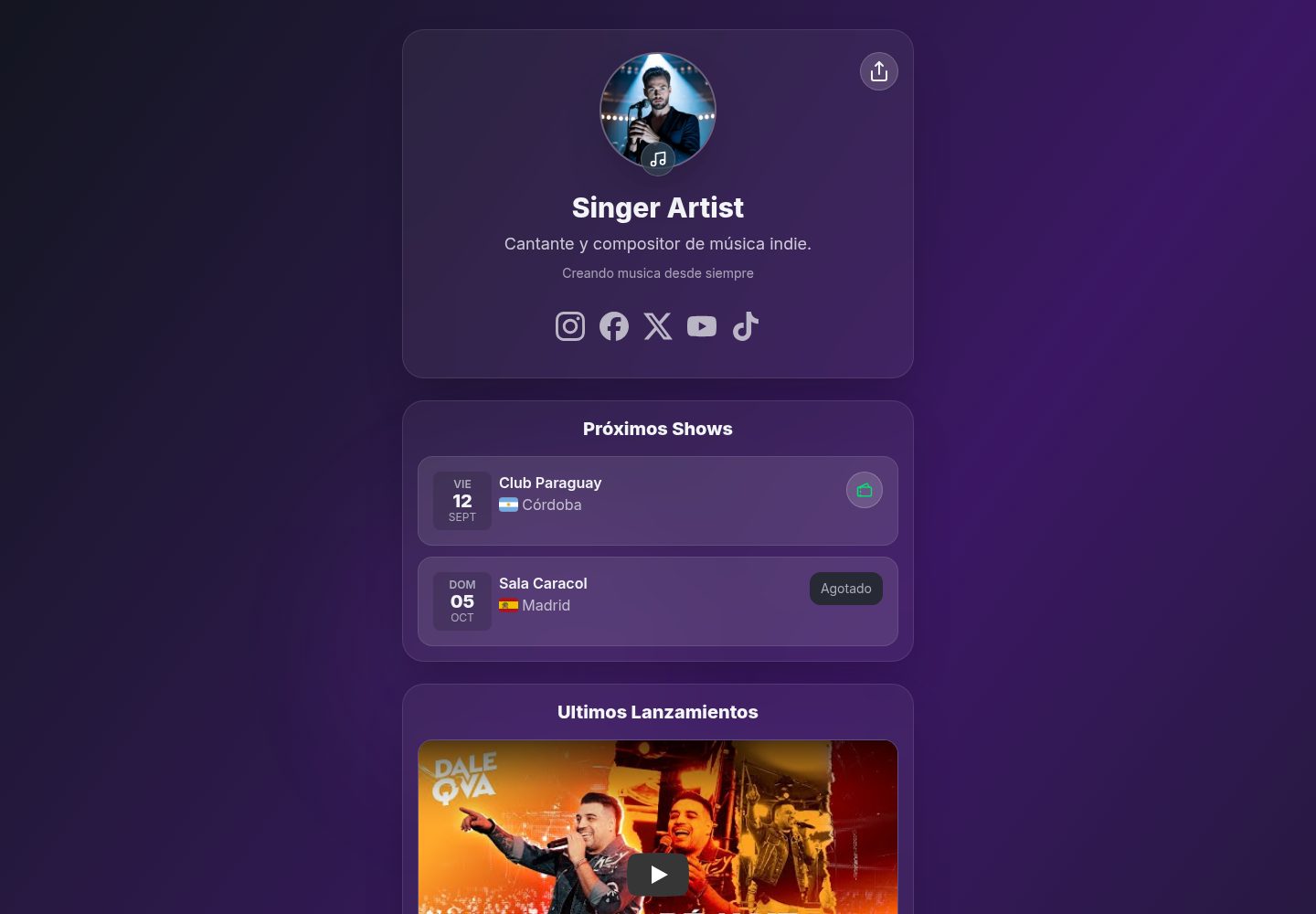
内容集中在 src/data/site.json 单文件配置,也可改用 site.ts 使用 Astro 图片导入
Astro企业官网启动器
artistree — Astro 企业官网模板
作者 francosuarez-dev
ArtisTree 是一个基于 Astro 与 TailwindCSS 的音乐人 Link-in-Bio 落地页模板,通过 src/data/site.json 集中配置社交链接、演出日程、发行作品与预订联系方式。
看看你的网站会是什么样
浏览真实页面截图,比较内容排版与手机效果。点击下方缩略图切换,放大查看整页细节。
全部页面与视图 2
截图用于了解视觉与布局,交互效果请以实际项目为准。
采集于 2026-10-02查看来源
值得关注的模板亮点
从已有项目资料中,快速了解它的特点。
内置 light、dark、violet、blue、green、red、pink、orange 八种主题
提供 modern、elegant、grotesk 三种字体预设,自动从 Google Fonts 加载对应字体
演出列表自动过滤未来日期、升序排列,并按 ISO 国家代码显示国旗与票务状态
发行列表按发行日期降序,最新一条可嵌入 YouTube 视频作为 Featured 展示
socials 与自定义 links 支持按平台图标渲染,仅显示已填写的条目
模板详细介绍
ArtisTree 面向音乐人,把社交平台链接、即将到来的演出、音乐发行和预订联系方式集中在一个页面上,形态接近社交网络常见的“link-in-bio”。模板使用 Astro 构建,样式基于 TailwindCSS,所有内容集中在 src/data/site.json 一个文件里配置,也支持改用 src/data/site.ts 以使用 Astro 的图片导入优化。
配置项覆盖:config 中的标题、描述、主题与版权;artist 中的姓名、简介、头像;socials 中按平台键值填写的链接;booking 中的邮箱与电话;shows 数组中的演出日期、城市、场馆、国家代码与票务状态;releases 数组中的发行标题、专辑、发行日期、封面与各平台链接;以及额外的自定义链接列表。
主题在 config.theme 中选择 light、dark、violet、blue、green、red、pink、orange 之一,通过 html 上的 data-theme 属性与 globals.css 配合生效。字体在 config.font 中选择 modern、elegant、grotesk 三种预设,分别从 Google Fonts 加载 Inter、Playfair Display 或 Poppins。
演出条目按 ISO 日期过滤未来场次并升序排列,country 使用 ISO 3166-1 alpha-2 代码配合 flag-icons 渲染国旗;有票务链接且 available 为 true 时显示购票按钮,available 为 false 时显示 Sold Out 且不带链接。发行条目按 releaseDate 降序排列,最新一条作为 Featured 展示,若其 links.youtube 存在则嵌入视频,否则显示封面;其余发行以封面加平台图标的卡片形式排列。
限制方面:日期需为 YYYY-MM-DD 格式,国家代码必须是两位字母,否则国旗不显示;部分音乐视频禁止嵌入,移动端会回退为“Open on YouTube”按钮;演示图片、字体、图标等第三方素材需按各自许可单独核对,代码的 MIT 许可不覆盖这些素材。
Astro企业官网启动器
适合你的项目吗?
适用场景
- 音乐人需要一个集中展示 Spotify、Apple Music、YouTube 等平台链接的个人页面
- 乐队或艺人发布巡演日程,需要按日期列出演出并标注购票或售罄状态
- 独立音乐人发布新单曲或专辑,希望把最新发行放在页面顶部并嵌入 YouTube 视频
- 需要为不同艺人快速复制同一套落地页结构,只替换 site.json 中的内容
适合人群
- 有 Astro 或前端基础、愿意自行部署静态站点的音乐人及其团队
- 需要 link-in-bio 页面并希望把演出与发行信息一并呈现的独立艺人
- 希望以 MIT 许可代码为基础二次修改页面结构与样式的开发者
上手与定制指南
结合仓库当前版本的说明,按下面的资料检查内容、配置与运行要求。
- 1
克隆仓库后使用 pnpm install 安装依赖,pnpm dev 启动本地开发服务器(默认 http://localhost:4321),pnpm build 与 pnpm preview 用于生产构建与预览
- 2
所有内容在 src/data/site.json 中编辑;图片放在 public/covers/ 下并以 /covers/... 绝对路径引用,或改用 src/data/site.ts 导入图片以获得优化
- 3
日期字段使用 ISO YYYY-MM-DD 格式,演出 country 使用 ISO 3166-1 alpha-2 两位代码,否则国旗无法渲染
- 4
config.theme 与 config.font 只能取模板中已定义的值;新增字体预设需同时修改 Layout.astro 的 FONT_LINKS 与 globals.css 中的对应样式块
- 5
代码采用 MIT 许可,分发时需保留版权与许可声明;演示图片、字体、图标等第三方素材需单独核对其许可
授权与来源资料
使用条件与限制
免费使用 · 保留许可声明本次收录的是公开仓库中采用 MIT 许可的免费版本;免费范围为该版本代码,不代表外部服务或第三方素材免费。
使用时需要遵守
- 允许免费使用、修改、商用和分发该版本代码。
- 分发代码副本或实质性部分时,保留原作者版权声明和完整 MIT 许可声明。
- 代码按现状提供;担保与责任限制以原许可证及适用法律为准。
额外费用与待核对事项
- 字体预设会从 Google Fonts 加载 Inter、Playfair Display 或 Poppins,页面运行时会向 Google 发起外部请求,需自行评估该外部服务与隐私影响。
- 部分音乐视频禁止嵌入,移动端无法内嵌播放,只能回退为跳转到 YouTube 的按钮。
- 演出列表只显示未来日期的场次,已过去的演出不会出现在页面上。
- 演出国家必须使用 ISO 3166-1 alpha-2 两位代码,否则国旗图标无法渲染。
- 演出日期与发行日期必须使用 ISO YYYY-MM-DD 格式,否则排序与展示可能出错。
- 新增字体预设需手动修改 Layout.astro 的 FONT_LINKS 与 globals.css,模板本身不提供界面化配置。
- 演示图片、字体、图标及其他第三方素材需按各自许可核对,不能仅凭代码的 MIT 许可判断。
- 域名、托管、数据库、支付或 AI 等外部服务可能另外收费。
查看原文依据
Permission is hereby granted, free of charge
许可证原文
Each preset automatically loads its typefaces from Google Fonts
README 原文
some music videos block embedding. The UI shows an “Open on YouTube” button as a fallback.
README 原文
The shows list filters future dates and sorts ascending by date.
README 原文
ensure `country` is ISO alpha-2 (e.g., `BR`, not `BRA`).
README 原文
Dates in `YYYY-MM-DD` format?
README 原文
https://github.com/francosuarez-dev/artistree/blob/main/LICENCEhttps://github.com/francosuarez-dev/artistree/blob/main/README.mdYou can add more presets by editing the `FONT_LINKS` map in `Layout.astro`
README 原文
DeepSeek 根据仓库许可证和 README 整理 ·2026-10-02。结果仅覆盖已读取资料,依赖、图片、字体及后续条款变更以各自原文为准。
项目核对记录与介绍依据
模板资料
- 来源平台
- GitHub
- 资料与维护参考分
- 资料较完整 · 86 / 100
- 技术栈
- Astro
- 网站类型
- 企业官网 · 启动器
这个分数如何计算
本站按许可资料(最高30分)、演示链接(12分)、预览图(10分)、Star数(15分)、记录的维护时间(15分)、描述完整度(8分)、功能记录(5分)和分类资料(5分)计算。它不是代码、安全或性能测试,也不是 Google 评分;有链接不代表已实测可用。
这个项目需要核对什么
- 记录的仓库更新时间
- 2025-09-04
- 截图检查日期
- 2026-10-02
已收录演示链接。请用你的内容与屏幕尺寸检查;有演示不代表表单、认证或支付已经可用。
目录记录的主要技术栈是 Astro。请通过依赖清单和锁文件核对实际版本与托管要求。这些说明基于收录资料,不代表代码审计或部署实测。
查看具体选型方法 →介绍的制作与核对状态
介绍由 AI 辅助整理目录与仓库资料。仓库作者不等于这篇介绍的审核者。
已完成服务器许可规则与 AI 来源核对;未经过人工编辑审核。
查看当时使用的来源资料
SHA-256: 72a39bcaaee98a34312efe03c5d813d006aa6cc9d71792019f9a853a781dec43
2026-10-02T20:58:14.489Z
来源文件 / 仓库# ArtisTree – Link in Bio Page for Artists 🎶
[](LICENSE)
[](https://astro.build/)
[](https://tailwindcss.com/)
[](https://app.netlify.com/projects/artistree-astro/deploys)

ArtisTree is a customizable landing page for music artists.
It works like a modern “link-in-bio” for social networks: centralizing links to your platforms (Spotify, Apple Music, YouTube, etc.), upcoming shows, releases, and booking contacts.
Built with [Astro](https://astro.build/) + TailwindCSS v4, and designed to be easily configured via a single file: `src/data/site.json`.
## 🚀 Demo
👉 [View demo](https://artistree-astro.netlify.app/)
---
## 🚀 Quick Start
This project uses `pnpm`, but you can use `npm` without issues. The official lockfile is `pnpm-lock.yaml`.
1. Clone the repository
```bash
git clone https://github.com/francosuarez-dev/artistree.git
cd artistree
```
2. Install dependencies
```bash
pnpm install
```
3. Start the development server
```bash
pnpm dev
```
The site will be available at `http://localhost:4321`
4. Production build
```bash
pnpm build
pnpm preview
```
---
## 📦 Configuration via `site.json`
All configuration is centralized in:
```
src/
data/
site.json ← edit everything here
```
> Advanced alternative: if you want Astro’s optimized image imports, you can use `src/data/site.ts` and export a typed object (see the Images section).
---
## 🧰 General Structure
```jsonc
{
"config": {
"title": "Artistree Landing",
"description": "Landing built with Astro",
"theme": "violet", // one of: light | dark | violet | blue | green | red | pink | orange
"copyright": "© 2025 ..."
},
"artist": {
"name": "Franco Suárez",
"description": "Singer and songwriter...",
"bio": "Short text...",
"picture": "/covers/profile.jpeg" // see Images section
},
"socials": {
"instagram": "https://instagram.com/...",
"facebook": "https://facebook.com/...",
"x": "https://x.com/...",
"youtube": "https://youtube.com/..."
// optional: spotify, applemusic, tidal, whatsapp, email, website ...
},
"booking": {
"email": "[email protected]",
"phone": "+54 911 2345 6789"
},
"shows": [
{
"title": "Show name",
"date": "2025-09-12", // ISO YYYY-MM-DD
"city": "Córdoba",
"country": "AR", // ISO 3166-1 alpha-2 → renders the flag
"venue": "Club Paraguay",
"tickets": "https://tickets...", // optional
"available": true // if false → shows “Sold Out”
}
],
"releases": [
{
"title": "Noche Eterna",
"album": "Noche Eterna Album",
"releaseDate": "2025-08-15", // ISO YYYY-MM-DD (used for sorting)
"cover": "/covers/cover1.jpeg",
"links": {
"spotify": "https://open.spotify.com/track/...",
"applemusic": "https://music.apple.com/...",
"youtube": "https://www.youtube.com/watch?v=XXXXXXXXXXX"
}
}
]
}
```
---
## 🎨 Theme
- Defined in `config.theme`.
- Valid values: `light | dark | violet | blue | green | red | pink | orange`.
- The layout applies `data-theme={config.theme}`, and Tailwind v4 picks colors/gradients from `globals.css`.
---
## ✍️ Fonts
- Defined in `config.font`.
- Valid values: `modern | elegant | grotesk`.
- The layout applies `data-font={config.font}` on `<html>` and styles are sourced from `globals.css`.
- Each preset automatically loads its typefaces from Google Fonts:
- **modern** → Inter (text and headings)
- **elegant** → Inter (text) + Playfair Display (headings)
- **grotesk** → Poppins (text and headings)
> You can add more presets by editing the `FONT_LINKS` map in `Layout.astro` and the `:root[data-font="..."]` blocks in `globals.css`.
---
## 👤 Artist
- `name`, `description`, `bio` → free-form strings.
- `picture` → see **Images** below.
---
## 🔗 Socials
- Supported keys (you can add more):
`instagram, facebook, x, spotify, applemusic, tidal, youtube, whatsapp, email, website`
- The UI maps each key to an icon (yours, in `src/icons`).
- Only entries with a URL/value are rendered.
Examples of values:
- `email`: `"mailto:contact@..."`
- `website`: `"https://yoursite.com"`
- `whatsapp`: `"+5491123456789"` (the UI may convert to `https://wa.me/...` if implemented that way)
---
## 🎫 Booking
- Contact section for bookings.
- If there is `email` → “Email” button (`mailto:`).
- If there is `phone` → “Phone” button (`tel:`).
- If both exist → both are shown.
```json
"booking": { "email": "booking@...", "phone": "+54 911 2345 6789" }
```
---
## 📅 Shows (calendar, flag, and tickets)
Fields per show:
- `title` (optional, informational)
- `date` (**ISO `YYYY-MM-DD`**) → formatted with locale `es-AR` and displayed in a calendar-style card (day / date / month)
- `city`, `venue` → text
- `country` → **ISO 3166-1 alpha-2 code** (`AR`, `ES`, `US`…)
Used with **flag-icons:** `<span class="fi fi-ar"></span>`
- `tickets` (optional) + `available` (**boolean**):
- `tickets` + `available: true` → **Tickets** button
- `tickets` + `available: false` → **Sold Out** (no link)
- without `tickets` → no action is shown
The shows list filters future dates and sorts ascending by date.
---
## 💿 Releases (with “latest release” and YouTube video)
Each release:
- `title` (string)
- `album` (string)
- `releaseDate` (**ISO `YYYY-MM-DD`**) → used for **sorting** (desc)
- `cover` (string) → image path
- `links` (object):
- typical keys: `spotify`, `applemusic`, `deezer`, `tidal`, `youtube`, etc.
- **"Featured" behavior**: the most recent (by `releaseDate`) is shown first;
if it also has `links.youtube`, the **video is embedded** instead of the cover (with a fallback “Open on YouTube” if embedding isn’t available on mobile)
- The rest of the releases are shown as regular cards with cover + platform icons
---
## 🔗 Custom Links
In addition to basic social networks (`socials`), you can define a list of custom links in `site.json`:
````json
"links": [
{
"label": "Personal Instagram",
"description": "Personal Instagram profile",
"url": "https://instagram.com/user",
"icon": "website"
},
{
"label": "Label Instagram",
"description": "Record label Instagram profile",
"url": "https://instagram.com/label",
"icon": "instagram",
"cover": "./img/profile.jpeg"
},
{
"label": "YouTube",
"description": "Artist YouTube channel",
"url": "https://www.youtube.com/channel/...",
"icon": "youtube"
}
]
````
### Available fields
- label: Name of the link to display
- description: Short descriptive text
- url: Full URL of the link
- icon: Icon name (e.g., instagram, youtube, website, tiktok, etc.)
- cover (optional): Custom image
- If `cover` is present, it replaces the icon
---
## 🖼️ Images (covers / profile)
You have two options:
### Option A – JSON + `public/` (simple)
- Place images in `public/covers/...`
- Use absolute paths in JSON:
`"cover": "/covers/noche-eterna.jpg"`, `"picture": "/covers/profile.jpeg"`
### Option B – Optimized imports (advanced)
- Replace `src/data/site.json` with `src/data/site.ts`
- Import covers so Astro generates optimized URLs:
```ts
// src/data/site.ts
import cover1 from "../assets/covers/cover1.jpeg";
import profile from "../assets/covers/profile.jpeg";
export default {
artist: { picture: profile },
releases: [{ title: "Track", cover: cover1 /* ... */ }],
};
````
---
## ✅ Recommended rules and validations
- **Dates** (`date`, `releaseDate`): use ISO `YYYY-MM-DD`
- **Country** (`country` in shows): use ISO alpha-2 (e.g., `AR`, `ES`, `US`)
- **Links**:
- `email` as `mailto:...`
- `phone` as a readable number; the UI trims spaces for `tel:`
- `youtube` can be `watch?v=…`, `youtu.be/…` or `shorts/…` (the parser extracts the ID)
- **Theme** (`config.theme`): use one of those defined in `globals.css`
---
## 🛠️ How it maps to the UI (summary)
- `config.theme` → `<html data-theme="...">` (applies theme colors/gradients)
- `artist.*` → header/profile
- `socials` → `SocialIcons` maps key → icon and renders only those present
- `booking` → shows Email / Phone buttons as available
- `shows` → calendar card + flag (flag-icons) + Tickets/Sold Out action
- `releases` → sorted DESC by `releaseDate`; the first is featured and, if `links.youtube` exists, the video is embedded; the rest in a grid
---
## 🧪 Quick checklist
- [ ] Is `config.theme` a valid one?
- [ ] Do images point to `/covers/...` in `public/` or are you using `site.ts` with imports?
- [ ] Is each show’s `country` a 2-letter ISO code?
- [ ] Dates in `YYYY-MM-DD` format?
- [ ] Does `releases[0]` (the newest) have `links.youtube` if you want the embedded video?
---
## ❓ FAQ
- The flag doesn’t appear: ensure `country` is ISO alpha-2 (e.g., `BR`, not `BRA`).
- YouTube embed says “not available” on mobile: some music videos block embedding. The UI shows an “Open on YouTube” button as a fallback.
- I want to add another social platform: create the `.astro` icon, add it to the `SocialIcons` map, and add the key under `socials` in the JSON.
看看同类模板
对比同技术栈与用途的模板,找到更适合的视觉与内容结构。

astrowind
⭕️ AstroWind: A free template using Astro v7 and Tailwind CSS v4. Astro starter theme.
Astro · 博客
accessible-astro-starter
Accessible Astro Starter 是一个以无障碍为核心理念的 Astro 6 启动模板,由 incluud 团队维护。
Astro · 博客

astro-erudite
An opinionated, unstyled static blogging template built with Astro and native CSS.
Astro · 作品集

astro-landing-page
An Astro + Tailwind CSS Example/Template for Landing Pages
Astro · 企业官网

astro-shopify
astro-shopify 是一个面向开发者的轻量级电商启动模板,用于构建基于 Shopify 的无头店面。
Astro · 电商

brutal
A neobrutalism Astro starter theme
Astro · 启动器