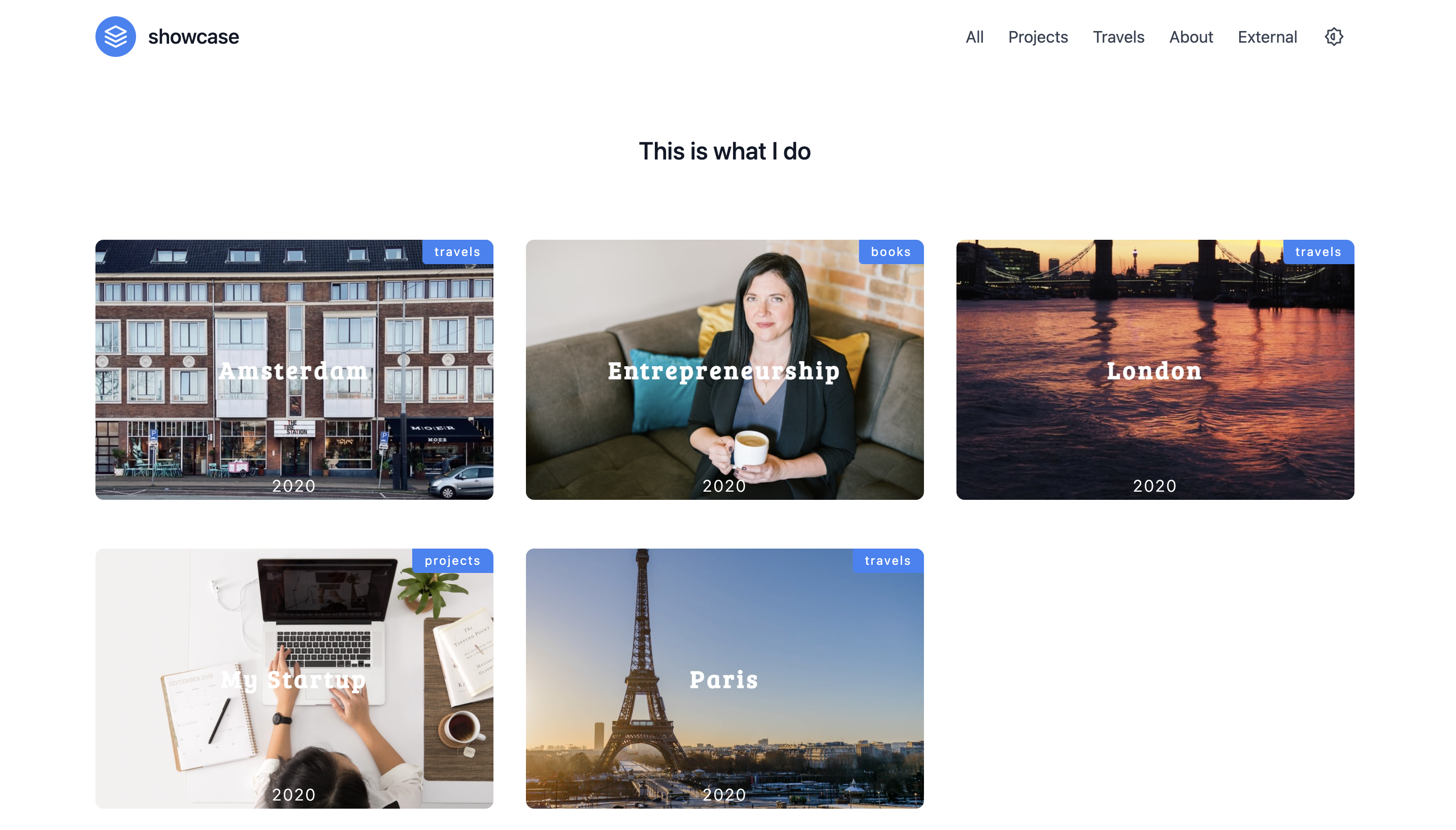
Single-page portfolio layout with project content organized by sections under the content directory
HugoPortfolioStarter
portfolio-showcase-hugo-theme — Hugo Portfolio Template
By fu4303
Showcase is a minimalist single-page portfolio theme for Hugo that automatically generates menus from content sections and supports content filtering, social links, custom menus, and dark mode.
Explore the design
Compare the page layouts and mobile experience. Open any screenshot for a closer look.
Author preview
Author-provided preview
Preview provided in the project README.
One original preview is available. Open the full image to inspect the design.
Screenshots show visual appearance; interactive behavior may differ.
Recorded 2026-10-03View source
What stands out
A quick read of the recorded project description.
Menus are automatically generated from content sections and can be excluded using the private field in _index.md
Supports content filtering, social links, and custom menus
Dark mode is enabled via the params.darkMode switch in config.toml
Comes with a fully configured exampleSite for direct local preview
Provides example build commands for Netlify / Vercel
Template Details
Showcase is a minimalist single-page portfolio theme for Hugo, with both the repository and the example site centered on project display. The theme automatically generates menus from sections in the Hugo site's content directory, where each entry under a section is a project; setting private to true in a section's _index.md excludes that section from the automatic menu, or you can use a custom menu in config.toml instead. The README lists features including automatic menu generation, responsive content, content filtering, social links, custom menus, and dark mode, where dark mode requires setting params.darkMode to true in config.toml for the toggle to appear.
To use it, clone the repository or add it as a git submodule into the Hugo site's themes/showcase directory, then copy config.toml from exampleSite to the site root and modify the fields as commented. The theme includes a fully configured example site, which can be previewed under themes/showcase/exampleSite with hugo serve --themesDir ../..; migrating to v1.3.0 requires Hugo version 0.69.0 or later, and you need to copy package.json from the theme directory to the site root and run npm install. When deploying to platforms such as Netlify or Vercel, the README provides the build command npm i && hugo -D --gc.
In terms of limitations, the materials do not specify the theme's browser compatibility range, level of accessibility support, or actual usage scale beyond the example site; the README's Used By lists only two sites. The theme code is under the MIT license, but third-party assets such as demo images, fonts, and icons must be checked separately under their respective licenses, and external services such as domains and hosting may incur costs.
HugoPortfolioStarter
Is it right for your project?
Use Cases
- Building a single-page showcase site for personal design or development work
- Quickly creating a portfolio page with project filtering using Hugo
- A personal homepage that needs dark mode and social link entries
- Categorizing existing project content by section to automatically generate a navigation menu
Suitable For
- Developers or designers building static sites with Hugo
- Those who need a minimalist single-page portfolio and do not want to introduce a complex front-end framework
- Users willing to manually maintain site configuration through config.toml and the content directory
Getting started & customization
Use these recorded setup notes alongside the repository instructions for your chosen version.
- 1
In the Hugo site root, run git clone or git submodule add to place the repository into themes/showcase
- 2
Copy config.toml from exampleSite to the site root and modify the fields as commented
- 3
Migrating to v1.3.0 requires Hugo version 0.69.0 or later, and you need to copy package.json from the theme directory to the site root and run npm install
- 4
Local preview: enter themes/showcase/exampleSite and run hugo serve --themesDir ../..
- 5
Build command for platforms such as Netlify / Vercel: npm i && hugo -D --gc
License & source material
Usage conditions & limitations
Free to use · keep license noticeThis entry covers the free version under the MIT license in the public repository; the free scope is the code of that version and does not mean external services or third-party assets are free.
Must comply with when using
- Free use, modification, commercial use, and distribution of that version's code are permitted.
- When distributing copies or substantial portions of the code, retain the original author's copyright notice and the full MIT license notice.
- The code is provided as is; warranties and limitations of liability are governed by the original license and applicable law.
Additional costs & items to verify
- Enabling Google Analytics requires setting googleAnalytics in config.toml, which sends visit data to Google as an external service and may be subject to its account and privacy terms.
- Using and previewing the theme requires running npm install in the site root, depending on a Node.js/npm environment and downloading dependencies from the npm registry.
- Deploying to hosting platforms such as Netlify or Vercel is an external service that may incur costs and require registering an account with the respective platform.
- Demo images, fonts, icons, and other third-party assets must be checked under their respective licenses and cannot be judged solely by the code's MIT license.
- External services such as domains, hosting, databases, payments, or AI may incur additional charges.
View Original Text Basis
Permission is hereby granted, free of charge
Original License Text
Set `googleAnalytics` in `config.toml` to activate Hugo's [internal Google Analytics template]
Original README
Copy the `package.json` file from `themes/showcase` folder to your hugo website root folder, and run `npm install`.
Original README
https://github.com/fu4303/portfolio-showcase-hugo-theme/blob/main/LICENSEhttps://github.com/fu4303/portfolio-showcase-hugo-theme/blob/main/README.mdWhen deploying to services like Netlify or Vercel, use the following command for building your site:
Original README
Compiled by DeepSeek based on repository license and README ·2026-10-03. Results only cover the materials read; dependencies, images, fonts, and subsequent term changes are subject to their respective original texts.
Project checks & description sources
Template Information
- Source platforms
- GitHub
- Documentation and maintenance reference score
- Partly documented · 70 / 100
- Technologies
- Hugo
- Website type
- Portfolio · Starter
How this score is calculated
Our heuristic uses license records (up to 30), a demo link (12), a preview (10), stars (15), recorded maintenance (15), description completeness (8), feature records (5) and classification data (5). It is not a code, security or performance test, or a Google score. A link does not establish tested functionality.
What to verify for this project
- Repository update recorded
- 2021-07-23
- Screenshot last checked
- 2026-10-03
A demo link is listed. Check it with your own content and viewport sizes; its presence does not confirm that forms, authentication or payments work.
The catalog identifies Hugo as the primary stack. Check the actual dependency manifest and lockfile for versions and hosting requirements. These notes use recorded metadata, not a code audit or a deployment test.
Use a selection guide →How this description was prepared
AI-assisted description based on catalog records and repository material. Repository authors are not automatically the reviewers of this description.
Automatically checked against source and license rules; no manual editorial review.
Inspect the recorded source material
SHA-256: 407b0046867b60524f831b315384c94fcaddc5d51cbaca91dfe87b43b8aefc71
2026-10-03T03:03:46.023Z
Source file / repository# Showcase theme for Hugo



Showcase is a minimal, single page theme for Hugo


Features:
- Auto-generated menu
- Responsive content
- Filtering content
- Social links
- Custom menu
- Darkmode
## Get the theme
Run from the root of your Hugo site:
```sh
git clone https://github.com/apvarun/showcase-hugo-theme.git themes/showcase
```
Alternatively, you can include this repository as a [git submodule](https://git-scm.com/docs/gitsubmodules). This makes it easier to update this theme if you have your Hugo site in git as well:
```sh
git submodule add https://github.com/apvarun/showcase-hugo-theme.git themes/showcase
```
## Preview the theme
Showcase theme ships with an fully configured example site. For a quick preview:
Copy the `package.json` file from `themes/showcase` folder to your hugo website root folder, and run `npm install`.
```sh
cd themes/showcase/exampleSite/
hugo serve --themesDir ../..
```
Then visit `http://localhost:1313/` in your browser to view the example site.
When deploying to services like Netlify or Vercel, use the following command for building your site:
```sh
npm i && hugo -D --gc
```
## Migrating to v1.3.0
Minimum Hugo Version: 0.69.0
- Copy the `package.json` file from `themes/showcase` folder to your hugo website root folder, and run `npm install`.
## Add content
The following explains how to add content to your Hugo site. You can find sample content in the `exampleSite/` folder.
### Structure:
.
├── ...
├── projects # Section Name
│ ├── project1 # Project 1
│ ├── project2 # Project 2
│ └── _index # (optional) Customize section name &
│ # default image for section contents
└── ...
## Configure your site
From `exampleSite/`, copy `config.toml` to the root folder of your Hugo site and change the fields as you like. Helpful comments are provided.
## Menu
Menu in Showcase theme is auto-generated from the sections inside your content folder.
### Exclude Sections from Menu
It is possible to exclude sections from the auto-generated list. In order to exclude a section, create an `_index.md` file in that section and set the property `private` to `true`. Refer example [index file](https://github.com/apvarun/showcase-hugo-theme/blob/master/exampleSite/content/books/_index.md).
### Custom Menu
You can also add a custom menu item using the `config.toml` and disable auto-generated sections if not required. Refer config in [exampleSite](https://github.com/apvarun/showcase-hugo-theme/blob/master/exampleSite/config.toml)
## Dark mode
In order to enable darkmode toggle in your side, set the `params.darkMode` property to `true` in your `config.toml`.
## Google Analytics
Set `googleAnalytics` in `config.toml` to activate Hugo's [internal Google Analytics template](https://gohugo.io/templates/internal/#google-analytics).
## Used By
- [Madhu Akula](https://madhuakula.com/content/)
- [@cloudmiracle](http://cloud.vn/)
## Issues
If you have a question, please [open an issue](https://github.com/apvarun/showcase-hugo-theme/issues) for help and to help those who come after you. The more information you can provide, the better!
## Contributing
Contributions are welcome. For major changes, please open an issue first to discuss what you would like to change.
## License
Licensed under [MIT](LICENSE)
## Acknowledgements
[Madhu Akula](https://github.com/madhuakula)
Explore similar templates
Compare previews and descriptions within the same stack and category.

hugo-PaperMod
A fast, clean, responsive Hugo theme for blogs and lightweight portfolios, with three layout modes (Regular, Home-Info, Profile), automatic and manual light/dark themes, Fuse.js client-side search, multilingual support, and built-in Open Graph, Twitter Cards, and Schema.org data.
Hugo · Portfolio

Congo
Congo is a minimal Hugo content theme built on Tailwind CSS 3.0, designed for blogs, portfolios, and lightweight content sites. It offers multiple homepage layouts, customizable dark mode, multilingual support including RTL, and built-in client-side search, Mermaid, Chart.js, and KaTeX.
Hugo · Blog

toha
Toha is a Hugo theme for personal portfolios, featuring a minimalist, responsive design with configurable homepage sections such as about, experience timeline, and achievements gallery.
Hugo · Portfolio

hugo-profile
hugo-profile is a mobile-first Hugo theme for personal portfolios and blogs, with multilingual support, light/dark themes, categories and tags, Google Analytics, Disqus comments, and Formspree contact forms.
Hugo · Portfolio

hugo-xmin
hugo-xmin is an extremely minimal Hugo theme written by Yihui Xie for template beginners. HTML and CSS total about 140 lines, with no external dependencies, and it uses the MIT license.
Hugo · Starter

hugo-theme-gallery
A Hugo Extended photo gallery theme that organizes images with Page Bundles, automatically generating album lists and gallery pages with a Justified layout and PhotoSwipe lightbox.
Hugo · Starter