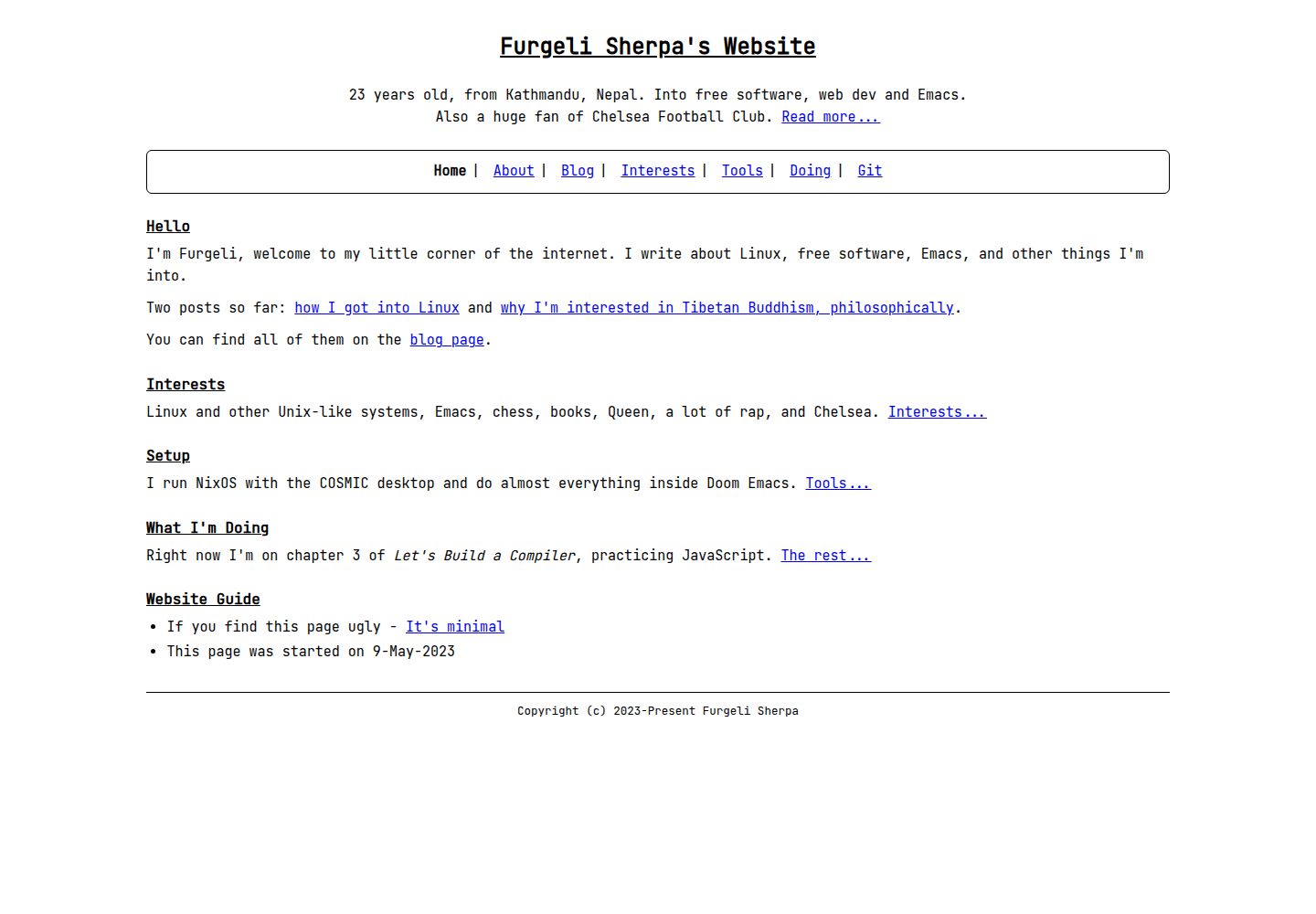
Plain-text first: all content comes from Markdown and _config.yml, with no JavaScript
JekyllHTMLPortfolioBlog
furgelisherpa-jekyll — Jekyll Portfolio Template
By furgelisherpa
A minimal, text-first Jekyll theme that manages blogs and pages with Markdown and _config.yml, no JavaScript, suitable for personal websites and portfolios.
Explore the design
Compare the page layouts and mobile experience. Open any screenshot for a closer look.
Desktop homepage1 / 3
Desktop captureTop of page
Actual screenshot captured by the server browser.
All pages & views 3
Screenshots show visual appearance; interactive behavior may differ.
Recorded 2026-10-05View source
What stands out
A quick read of the recorded project description.
Provides five layouts: home, page, post, blog, and not-found, plus multiple reusable includes
Front matter controls metadata such as title, description, tagline, noindex, and JSON-LD
Colors and sizes are centralized in _sass/_variables.scss and can be modified by appending CSS or copying partials
Does not depend on plugins such as jekyll-sitemap, keeping the theme lightweight
MIT licensed, allowing free use, modification, commercial use, and distribution
Template Details
furgelisherpa-jekyll is a minimal, text-first Jekyll theme that uses the JetBrains Mono font, black text on a white background, clean HTML5, and includes no JavaScript. All content rendered by the theme comes from the user's own Markdown files and _config.yml, with no theme-specific page conventions, required plugins, or build-time magic.
The theme provides five layouts: home, page, post, blog, and not-found, along with includes such as head, header, nav, footer, and post-list. Navigation is driven by the nav configuration key, while page title, description, tagline, last updated, noindex, JSON-LD, and other metadata are controlled through front matter. Colors and sizes are centralized in _sass/_variables.scss, and there are two ways to modify them: create assets/css/style.scss in your site to append CSS, or copy the relevant partials into your site's _sass/ directory and edit the variables.
The theme gem does not include robots.txt, CNAME, root pages, or a sitemap; these must be provided by the user's site. The theme does not depend on jekyll-sitemap; if needed, it can be enabled in the site's own Gemfile and _config.yml. Post permalinks use the :title placeholder; :basename is not valid in post permalinks. The GitHub Actions deployment template provided in the README is untested, and no deployment workflow is committed in the repository.
JekyllHTMLPortfolioBlog
Is it right for your project?
Use Cases
- Building a text-focused personal website or portfolio
- Migrating an existing static HTML site to Jekyll and managing content with Markdown
- Needing a blog or page site with no JavaScript and a simple structure
- Wanting a Jekyll site where you control the sitemap, robots.txt, and root pages yourself
Suitable For
- Developers familiar with Markdown and basic Jekyll configuration
- Personal site authors who prefer a minimal, text-first design style
- Users who need to migrate hand-written HTML pages to Jekyll
- Projects that want a theme without forcing additional plugins or JavaScript
Getting started & customization
Use these recorded setup notes alongside the repository instructions for your chosen version.
- 1
Add gem "furgelisherpa-jekyll" to your Gemfile, set theme: "furgelisherpa-jekyll" in _config.yml, then run bundle install.
- 2
The theme includes default values for google_font, css_path, and favicon; the minimal configuration only needs four lines: title, description, url, and theme.
- 3
To modify colors or sizes, create assets/css/style.scss in your site to append CSS, or copy the relevant partials into your site's _sass/ directory and edit the variables; copying only _variables.scss will not take effect.
- 4
robots.txt, CNAME, the 404 page, and the sitemap must be provided by your site; the theme does not depend on jekyll-sitemap, so enable it in your site's Gemfile and _config.yml if needed.
- 5
Post permalinks use the :title placeholder; :basename is not valid in post permalinks. The GitHub Actions deployment template in the README is untested, and no deployment workflow is committed in the repository.
License & source material
Usage conditions & limitations
Free to use · keep license noticeThis entry covers the free version under the MIT license in the public repository; the free scope is the code of that version and does not mean external services or third-party assets are free.
Must comply with when using
- You may use, modify, commercially use, and distribute the code of this version for free.
- When distributing copies or substantial portions of the code, retain the original author's copyright notice and the full MIT license notice.
- The code is provided as is; warranties and limitations of liability are governed by the original license and applicable law.
Additional costs & items to verify
- Demo images, fonts, icons, and other third-party assets must be checked against their respective licenses; they cannot be judged solely by the code's MIT license.
- External services such as domains, hosting, databases, payments, or AI may incur additional charges.
- When installing an unpublished version from GitHub, the repository must have at least one commit, because Bundler's GitHub source performs a git clone and an empty repository cannot be used.
- If google_font is set to an empty string or false, you must also override the font family in your own CSS; otherwise the stylesheet still references JetBrains Mono and the browser will fall back to another font.
- Copying only _variables.scss without the relevant partials will not take effect, because Sass's @use resolves the theme's own variable file first.
- Using :basename in post permalinks is invalid; Jekyll will throw an error and cause the build to fail, so posts should use :title.
- The GitHub Actions deployment template in the README is untested; the repository has no Actions runner and no deployment workflow is committed, so it must be adjusted before use.
- When deploying with a custom GitHub Actions workflow, GitHub Pages ignores the CNAME file, so the custom domain must be configured in settings.
- On GitHub Actions, a fresh checkout makes each file's lastmod the checkout time, i.e., the deployment time rather than the last edit time; if needed, set last_modified_at explicitly in front matter.
View Original Text Basis
Permission is hereby granted, free of charge
Original License Text
This requires the repository to be pushed with at least one commit -- the Bundler GitHub source runs `git clone`, so it cannot work against an empty repository.
Original README
If you set it to `""`, override the font family in your own CSS as well -- otherwise the stylesheet still names JetBrains Mono and the browser falls back to its next available font.
Original README
Copying only `_variables.scss` and no partials does nothing.
Original README
`:basename` is **not** valid in a post permalink -- Jekyll raises `The URL template doesn't have basename keys` and the build fails.
Original README
The template below is provided as a starting point and is **not tested here** -- this repository has no Actions runner, and no deployment workflow is committed.
Original README
GitHub Pages ignores `CNAME` when you deploy with a custom GitHub Actions workflow
Original README
https://github.com/furgelisherpa/furgelisherpa-jekyll/blob/main/LICENSE.txthttps://github.com/furgelisherpa/furgelisherpa-jekyll/blob/main/README.mdon GitHub Actions a fresh checkout gives every file the *checkout time*, so `lastmod` is the time of the deploy rather than the time you last edited anything.
Original README
Compiled by DeepSeek based on repository license and README ·2026-10-05. Results only cover the materials read; dependencies, images, fonts, and subsequent term changes are subject to their respective original texts.
Project checks & description sources
Template Information
- Source platforms
- GitHub
- Documentation and maintenance reference score
- More documented · 85 / 100
- Technologies
- Jekyll · HTML
- Website type
- Portfolio · Blog
How this score is calculated
Our heuristic uses license records (up to 30), a demo link (12), a preview (10), stars (15), recorded maintenance (15), description completeness (8), feature records (5) and classification data (5). It is not a code, security or performance test, or a Google score. A link does not establish tested functionality.
What to verify for this project
- Repository update recorded
- 2026-10-05
- Screenshot last checked
- 2026-10-05
A demo link is listed. Check it with your own content and viewport sizes; its presence does not confirm that forms, authentication or payments work.
The catalog identifies Jekyll as the primary stack. Check the actual dependency manifest and lockfile for versions and hosting requirements. These notes use recorded metadata, not a code audit or a deployment test.
Use a selection guide →How this description was prepared
AI-assisted description based on catalog records and repository material. Repository authors are not automatically the reviewers of this description.
Review declaration: [email protected] · 2026-10-06
Inspect the recorded source material
SHA-256: 2fe3ffcb0340da9ed03eca4f2a64d7564e67151e9815d9529b2edc13795b1eeb
2026-10-05T16:24:26.818Z
Source file / repository# furgelisherpa-jekyll
A minimal, text-first Jekyll theme: JetBrains Mono, black text on white, clean
HTML5, no JavaScript.
Everything the theme renders comes from your own Markdown and your own
`_config.yml`. There are no theme-specific page conventions to learn, no
required plugins, and no build-time magic. A site is a handful of `.md` files
with front matter plus one `theme:` line.
Two documents come with the theme:
- [`docs/configuration.md`](docs/configuration.md) is the reference for every
setting and every front matter key.
- [`example_site/`](example_site/) is a complete, buildable site you can copy
from.
Both are in the repository rather than the packaged gem, so those links only
resolve when browsing the repository.
## Installation
### From RubyGems
Add the gem to your site's `Gemfile`:
```ruby
gem "furgelisherpa-jekyll"
```
And to your site's `_config.yml`:
```yaml
theme: "furgelisherpa-jekyll"
```
Then:
```sh
bundle install
```
### From GitHub, before a RubyGems release
To use an unreleased commit, point the gem at the repository:
```ruby
gem "furgelisherpa-jekyll", github: "furgelisherpa/furgelisherpa-jekyll"
```
This requires the repository to be pushed with at least one commit -- the
Bundler GitHub source runs `git clone`, so it cannot work against an empty
repository.
To pin a branch, tag or commit, add a `ref:`:
```ruby
gem "furgelisherpa-jekyll", github: "furgelisherpa/furgelisherpa-jekyll", branch: "main"
```
## Configuration
The theme ships defaults for `google_font`, `css_path` and `favicon`, so the
two lines above are enough to get a working site. A minimal `_config.yml`:
```yaml
title: "Example Site"
description: "An example site."
url: "https://example.com"
theme: "furgelisherpa-jekyll"
```
A fuller starting point, with every key the theme reads:
```yaml
title: "Example Site"
site_name: "Example Site"
description: "An example site."
url: "https://example.com"
baseurl: ""
lang: "en"
timezone: "Asia/Kathmandu"
author:
name: "Example Author"
social:
- "https://example.com/"
nav:
- title: "Home"
url: "/"
- title: "About"
url: "/about.html"
- title: "Blog"
url: "/blogs.html"
blog_url: "/blogs.html"
back_text: "Back to Blog"
permalink: /blogs/:title.html
footer:
start_year: 2026
theme: "furgelisherpa-jekyll"
google_font: "JetBrains Mono"
sass:
sourcemap: never
```
`docs/configuration.md` documents what each key does, its default, and the
three-state behaviour of `google_font`. Read it rather than copying this block
blind -- it is a summary, not the reference.
## Layouts
| Layout | For |
| --- | --- |
| `home` | The landing page. Adds `tagline` under the header. |
| `page` | An ordinary static page. |
| `post` | A blog post. Adds the date and a "back to blog" link. |
| `blog` | A blog index. Appends the shared post list after your content. |
| `not-found` | The 404 page. Always `noindex`, never emits a canonical URL. |
`default` wraps them all and is the base you would use directly only if none of
the others fit.
### Front matter
| Key | Type | Default | Used for |
| --- | --- | --- | --- |
| `title` | string | none | The `<title>` suffix and the post list text. |
| `heading` | string | `title` | The `<h1>`, when you want it to differ from `title`. |
| `title_tag` | string | `"<title> - <site_name>"` | The full `<title>`, bypassing the suffix. |
| `description` | string | `site.description` | The meta description and `og:description`. |
| `tagline` | string | none | A short line under the header. |
| `last_updated` | string or date | none | A "Last updated" line above the footer. |
| `noindex` | boolean | `false` | Emits `<meta name="robots" content="noindex">` and drops the canonical URL and `og:*` tags. |
| `jsonld` | boolean | `false` | Renders a schema.org `Person` JSON-LD block. |
| `og_type` | string | `"website"`, or `"article"` on posts | The `og:type` value. |
| `permalink` | string | Jekyll's default | The output URL, for pages and posts alike. |
A post also reads `date` and `slug`; a page reads nothing else. The
`permalink` key is covered under [Permalinks](#permalinks).
## Includes
| Include | For |
| --- | --- |
| `head.html` | The whole `<head>`: meta tags, canonical URL, `og:*`, font link, stylesheet, favicon, JSON-LD. |
| `header.html` | The `<h1>`. |
| `nav.html` | The navigation, driven entirely by the `nav` config key. |
| `footer.html` | The footer line. |
| `post-list.html` | The dated post list, newest first. |
## Colours and fonts
### Fonts
The `google_font` key names the Google Fonts family, and spaces are converted
to `+` for you. It has three states worth knowing:
| Value | Result |
| --- | --- |
| unset | Uses the bundled default, `JetBrains Mono`. |
| `""` or `false` | Omits the Google Fonts `<link>` entirely. |
| any other string | Requests that family. |
```yaml
google_font: "Iosevka"
```
If you set it to `""`, override the font family in your own CSS as well --
otherwise the stylesheet still names JetBrains Mono and the browser falls back
to its next available font.
### Colours
All colours and sizes live in `_sass/_variables.scss` in the theme. There are
two ways to change them, and **only the second one works** for a partial you
have not copied.
**Appending CSS to the theme's entry point.** Create
`assets/css/style.scss` in your site:
```scss
---
---
@use "base";
@use "layout";
@use "components";
@use "content";
body { color: #123456; }
a { color: #654321; }
.page { max-width: 33rem; }
```
Your file replaces the theme's, so it must `@use` the partials you want to keep
and then add your own rules after them. Equal-specificity rules later in the
file win, so no `!important` is needed. This is the simplest approach and the
one to reach for.
**Copying partials to edit the variables.** To change a value *inside* the
theme's own rules, copy the partial that uses it into your site's `_sass/`
directory alongside your own `_variables.scss`:
```sh
mkdir -p _sass assets/css
cp "$(bundle show furgelisherpa-jekyll)/_sass/_variables.scss" _sass/
cp "$(bundle show furgelisherpa-jekyll)/_sass/_base.scss" _sass/
cp "$(bundle show furgelisherpa-jekyll)/_sass/_layout.scss" _sass/
```
Edit the copied `_variables.scss`, and keep an entry point that loads your
copies plus the theme's remaining partials:
```scss
---
---
@use "base";
@use "layout";
@use "components";
@use "content";
```
Which partials you must copy depends on which variables you are changing:
`$color-black`, `$color-link`, `$color-muted` and `$font-size-base` are used by
`_base.scss`; `$page-max-width` is used by `_layout.scss`; `$color-code-block-bg`
and `$color-code-inline-bg` are used by `_content.scss`. Copy the one that
reads the variable you want to change.
Copying only `_variables.scss` and no partials does nothing. Sass resolves
`@use "variables"` relative to the file that contains it, so each theme partial
finds the theme's own `_variables.scss` before any load path is consulted. This
is why the variable file alone is not enough, and it is worth knowing before you
spend time on it.
## What a theme gem cannot ship
A theme gem can only contain what is inside the gem directory. These stay with
your site, and none of them are part of the theme.
### `robots.txt`
Generate it from your site so `site.url` is correct:
```text
---
layout: null
permalink: /robots.txt
---
User-agent: *
Disallow:
Sitemap: {{ site.url }}/sitemap.xml
```
Save that as `robots.txt` in your site's source directory. `layout: null` stops
Jekyll wrapping it in your pages; `permalink: /robots.txt` stops it becoming
`robots.html`.
### `CNAME`
For a custom domain on GitHub Pages, add a `CNAME` file containing just your
domain. Note that **GitHub Pages ignores `CNAME` when you deploy with a custom
GitHub Actions workflow** -- with Actions you set the domain in
**Settings → Pages → Custom domain** instead.
### Your root pages
Including the 404 page:
```yaml
---
layout: not-found
permalink: /404.html
sitemap: false
title: Page Not Found
---
```
`permalink: /404.html` is explicit rather than relying on the filename, and
`sitemap: false` keeps the error page out of your sitemap if you use one.
### Sitemap
The theme does not depend on `jekyll-sitemap`, on purpose: a dependency here
would force it on every site that uses the theme, whether or not you want a
sitemap. Enable it yourself in your site's own `Gemfile`:
```ruby
gem "jekyll-sitemap"
```
and in your site's `_config.yml`:
```yaml
plugins:
- jekyll-sitemap
```
Two things to know. `lastmod` comes from each file's modification time unless
you set `last_modified_at` in front matter -- and on GitHub Actions a fresh
checkout gives every file the *checkout time*, so `lastmod` is the time of the
deploy rather than the time you last edited anything. Set `last_modified_at`
explicitly if that matters to you.
## Permalinks
For posts, set a flat permalink:
```yaml
permalink: /blogs/:title.html
```
`:basename` is **not** valid in a post permalink -- Jekyll raises `The URL
template doesn't have basename keys` and the build fails. `:basename` is a page
placeholder only. `:title` is the one to use for posts.
The `:title` slug comes from the post's **filename**. A post stored as
`_posts/2026-03-14-hello-world.md` slugs to `hello-world` and lands at
`/blogs/hello-world.html`, so the filename and the URL are kept in step. Set
`slug:` in front matter to override it.
Because the default slugifier treats any run of non-alphanumeric characters as a
separator, a title like `It's a Jekyll Theme` would slug to
`it-s-a-jekyll-theme`. Set `slug:` when a title contains punctuation and you
want a specific URL.
Do not append an extension twice. The placeholder already ends in `.html`, so
`permalink: /blogs/:title.html` is correct.
Pages take `permalink:` per page in front matter:
```yaml
---
layout: page
title: About
permalink: /about.html
---
```
## Deploying with GitHub Actions
GitHub's built-in Pages build runs Jekyll with a fixed plugin allow-list and
will not run a custom workflow. Deploying through Actions instead removes that
restriction, so `jekyll-sitemap` and other gems work without an allow-list
entry.
The template below is provided as a starting point and is **not tested here** --
this repository has no Actions runner, and no deployment workflow is committed.
Adjust the branch and paths before relying on it.
```yaml
name: Deploy to GitHub Pages
on:
push:
branches: [main]
workflow_dispatch:
permissions:
contents: read
pages: write
id-token: write
concurrency:
group: pages
cancel-in-progress: false
jobs:
build:
runs-on: ubuntu-latest
steps:
- uses: actions/checkout@v4
- uses: ruby/setup-ruby@v1
with:
ruby-version: "3.3"
bundler-cache: true
- run: bundle exec jekyll build --trace
- uses: actions/upload-pages-artifact@v3
with:
path: _site
deploy:
needs: build
runs-on: ubuntu-latest
environment:
name: github-pages
url: ${{ steps.deployment.outputs.page_url }}
steps:
- id: deployment
uses: actions/deploy-pages@v4
```
`bundler-cache: true` runs `bundle install` for you using your `Gemfile.lock`.
## Migrating from hand-written HTML
Moving an existing static site onto this theme is mostly a matter of putting
front matter in front of the Markdown you already have.
1. **Move pages into the repository root as `.md`.** Cut the `<body>` contents
of each page into Markdown. Keep the page's file name, or set `permalink:` to
preserve the old URL exactly.
2. **Map the head values onto front matter.** Anything you wrote by hand in
`<head>` becomes a front matter key:
| Was in your HTML | Becomes |
| --- | --- |
| `<title>` | `title:` (and `title_tag:` for the full string) |
| `<meta name="description">` | `description:` |
| `<link rel="canonical">` | derived from `url:` and `baseurl:`; set those instead |
| `og:title`, `og:description`, `og:type` | derived; override with `title:`, `description:`, `og_type:` |
| `<meta name="robots" content="noindex">` | `noindex: true` |
| your JSON-LD block | `jsonld: true`, plus `author.name` and `author.social` in `_config.yml` |
The canonical URL is generated, not set per page. Set `url:` and `baseurl:`
once in `_config.yml` and every page gets a correct canonical link.
3. **Move posts into `_posts/`** with a dated filename. The date prefix is
required, the rest of the name becomes the `:title` slug, so
`2026-03-14-hello-world.md` gives `/blogs/hello-world.html`. If your old post
URLs differed, set `slug:` or an explicit `permalink:` to keep them.
4. **Delete the hand-written `sitemap.xml`.** It will be overwritten by the
build, and it belongs in `_site/`, never in your source. Generate it with
`jekyll-sitemap` instead.
5. **Diff the old and new sites URL by URL before switching.** This is the step
worth doing properly. Fetch every URL you care about from both the current
site and the new build, and compare status codes and normalized markup. Look
for redirects you did not intend, canonical URLs that changed, and pages that
vanished. Keep the old site reachable until the diff is clean.
Set `timezone:` in `_config.yml` while you are migrating. Post dates are
formatted with Liquid's `date` filter, which renders in the timezone of the
machine doing the build, so a front matter time can display as a different
calendar day depending on where the build runs. A `timezone:` setting fixes
that, and bare `YYYY-MM-DD` dates avoid the question entirely.
## Contributing
Issues and pull requests are welcome at
<https://github.com/furgelisherpa/furgelisherpa-jekyll/issues>.
Run the example site to check a change:
```sh
cd example_site
bundle install
bundle exec jekyll serve
```
## License
MIT. See [LICENSE.txt](LICENSE.txt).Explore similar templates
Compare previews and descriptions within the same stack and category.

al-folio
A Jekyll academic homepage theme for scholars and researchers, with a clean responsive design and out-of-the-box support for publication lists, project showcases, CVs, and blogs.
Jekyll · Portfolio

minimal-mistakes
Minimal Mistakes is a two-column Jekyll theme for personal sites, blogs, project documentation, or portfolios.
Jekyll · Portfolio

Beautiful Jekyll
Beautiful Jekyll is a mature, easy-to-use Jekyll blog theme maintained by Dean Attali since 2015, with over 50,000 users.
Jekyll · Blog

jekyll-TeXt-theme
A customizable Jekyll theme for personal sites, team sites, blogs, projects, and documentation.
Jekyll · Blog

startbootstrap-clean-blog-jekyll
The official Jekyll version of Start Bootstrap's Clean Blog theme, offering a blog home page, about page, contact page, and sample post pages, with a Formspree-powered contact form.
Jekyll · Blog

So Simple
A minimal reading-oriented Jekyll theme by Michael Rose for personal blogs, portfolios, and long-form reading. It offers multiple layouts, microformat markup, Disqus comments, Google Analytics, Jekyll SEO Tag, three skins, and aggregation by year, category, and tag with a grid view.
Jekyll · Blog