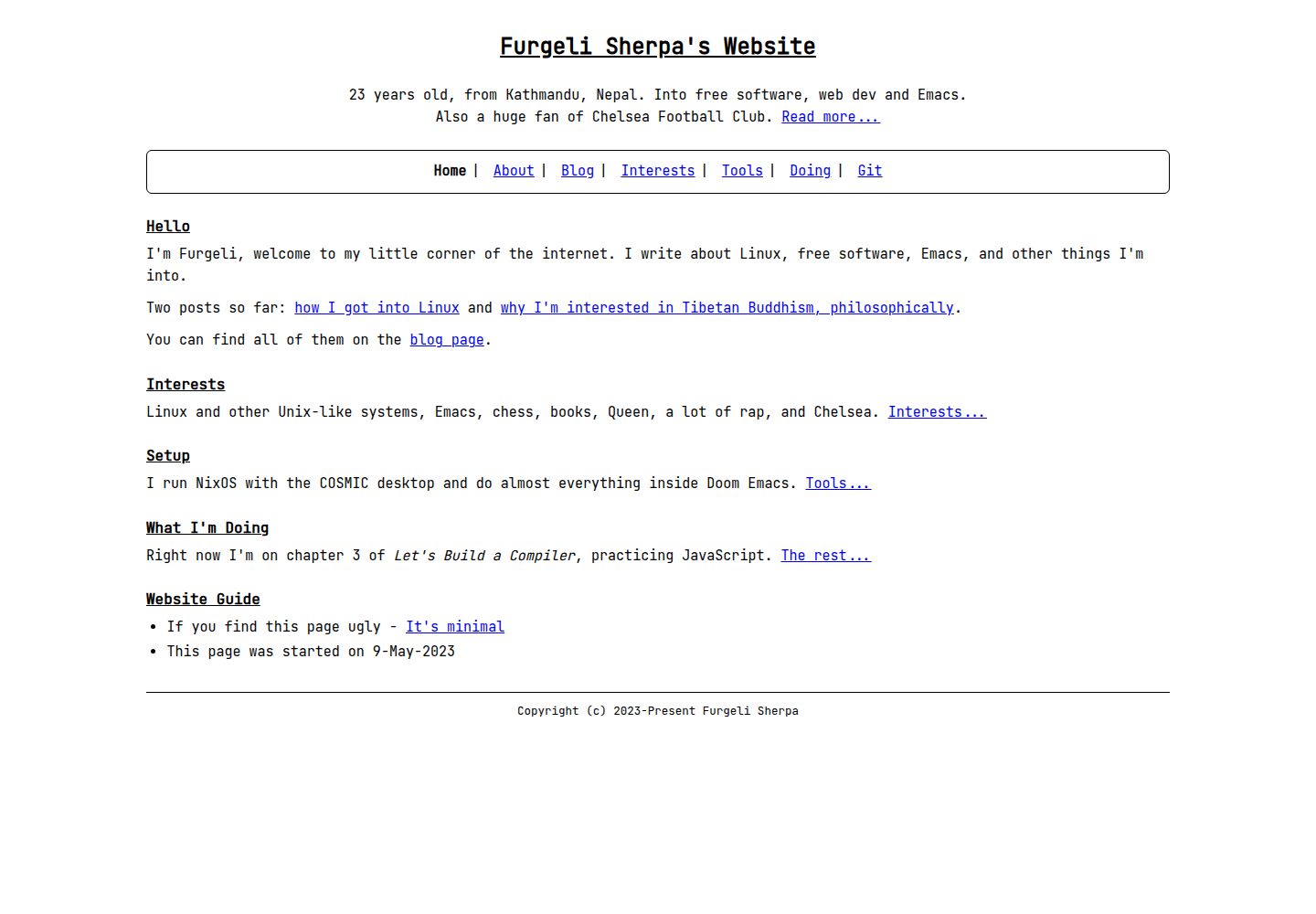
纯文本优先:内容全部来自 Markdown 与 _config.yml,无 JavaScript
JekyllHTML作品集博客
furgelisherpa-jekyll — Jekyll 作品集模板
作者 furgelisherpa
一个极简、文本优先的 Jekyll 主题,用 Markdown 和 _config.yml 管理博客与页面,无 JavaScript,适合个人网站和作品集。
看看你的网站会是什么样
浏览真实页面截图,比较内容排版与手机效果。点击下方缩略图切换,放大查看整页细节。
全部页面与视图 3
截图用于了解视觉与布局,交互效果请以实际项目为准。
采集于 2026-10-05查看来源
值得关注的模板亮点
从已有项目资料中,快速了解它的特点。
提供 home、page、post、blog、not-found 五种布局及多个可复用 includes
front matter 控制标题、描述、标签行、noindex、JSON-LD 等元数据
颜色与尺寸集中在 _sass/_variables.scss,可通过追加 CSS 或复制 partial 修改
不依赖 jekyll-sitemap 等插件,保持主题轻量
MIT 许可,允许免费使用、修改、商用和分发
模板详细介绍
furgelisherpa-jekyll 是一个极简、文本优先的 Jekyll 主题,采用 JetBrains Mono 字体、白底黑字、干净的 HTML5,不包含 JavaScript。主题渲染的内容全部来自使用者自己的 Markdown 文件和 _config.yml,没有主题特有的页面约定、必需插件或构建时魔法。
主题提供 home、page、post、blog、not-found 五种布局,以及 head、header、nav、footer、post-list 等 includes。导航由 nav 配置键驱动,页面的标题、描述、标签行、最后更新、noindex、JSON-LD 等通过 front matter 控制。颜色和尺寸集中在 _sass/_variables.scss,修改方式有两种:在站点中创建 assets/css/style.scss 追加 CSS,或把相关 partial 复制到站点的 _sass/ 目录后编辑变量。
主题 gem 不包含 robots.txt、CNAME、根页面和 sitemap,这些需要由使用者的站点自行提供。主题不依赖 jekyll-sitemap,需要时可在站点自己的 Gemfile 和 _config.yml 中启用。文章永久链接使用 :title 占位符,:basename 在文章永久链接中无效。README 中提供的 GitHub Actions 部署模板未经测试,仓库中没有提交部署工作流。
JekyllHTML作品集博客
适合你的项目吗?
适用场景
- 搭建以文字为主的个人网站或作品集
- 为已有静态 HTML 站点迁移到 Jekyll 并改用 Markdown 管理内容
- 需要无 JavaScript、结构简单的博客或页面站点
- 希望自行控制 sitemap、robots.txt 和根页面的 Jekyll 站点
适合人群
- 熟悉 Markdown 和 Jekyll 基本配置的开发者
- 偏好极简、文本优先设计风格的个人站点作者
- 需要将手写 HTML 页面迁移到 Jekyll 的用户
- 希望主题不强制引入额外插件或 JavaScript 的项目
上手与定制指南
结合仓库当前版本的说明,按下面的资料检查内容、配置与运行要求。
- 1
在 Gemfile 中添加 gem "furgelisherpa-jekyll",并在 _config.yml 中设置 theme: "furgelisherpa-jekyll",然后运行 bundle install。
- 2
主题自带 google_font、css_path 和 favicon 默认值,最小配置只需 title、description、url 和 theme 四行。
- 3
修改颜色或尺寸时,需在站点中创建 assets/css/style.scss 追加 CSS,或复制相关 partial 到站点 _sass/ 目录后编辑变量;仅复制 _variables.scss 不会生效。
- 4
robots.txt、CNAME、404 页面和 sitemap 需要由站点自行提供;主题不依赖 jekyll-sitemap,需要时在站点 Gemfile 和 _config.yml 中启用。
- 5
文章永久链接使用 :title 占位符,:basename 在文章永久链接中无效;README 中的 GitHub Actions 部署模板未经测试,仓库未提交部署工作流。
授权与来源资料
使用条件与限制
免费使用 · 保留许可声明本次收录的是公开仓库中采用 MIT 许可的免费版本;免费范围为该版本代码,不代表外部服务或第三方素材免费。
使用时需要遵守
- 允许免费使用、修改、商用和分发该版本代码。
- 分发代码副本或实质性部分时,保留原作者版权声明和完整 MIT 许可声明。
- 代码按现状提供;担保与责任限制以原许可证及适用法律为准。
额外费用与待核对事项
- 演示图片、字体、图标及其他第三方素材需按各自许可核对,不能仅凭代码的 MIT 许可判断。
- 域名、托管、数据库、支付或 AI 等外部服务可能另外收费。
- 从 GitHub 安装未发布版本时,仓库必须至少有一个提交,因为 Bundler 的 GitHub 源会执行 git clone,空仓库无法使用。
- 将 google_font 设为空字符串或 false 时,还需在自己的 CSS 中覆盖字体族,否则样式表仍引用 JetBrains Mono,浏览器会回退到其他字体。
- 仅复制 _variables.scss 而不复制相关 partial 不会生效,因为 Sass 的 @use 会优先解析主题自身的变量文件。
- 在文章永久链接中使用 :basename 无效,Jekyll 会报错并导致构建失败,文章应使用 :title。
- README 中的 GitHub Actions 部署模板未经测试,仓库没有 Actions 运行器,也未提交部署工作流,使用前需自行调整。
- 使用自定义 GitHub Actions 工作流部署时,GitHub Pages 会忽略 CNAME 文件,需在设置中配置自定义域名。
- 在 GitHub Actions 上,全新检出会使每个文件的 lastmod 变为检出时间,即部署时间而非最后编辑时间,需要时应在 front matter 中显式设置 last_modified_at。
查看原文依据
Permission is hereby granted, free of charge
许可证原文
This requires the repository to be pushed with at least one commit -- the Bundler GitHub source runs `git clone`, so it cannot work against an empty repository.
README 原文
If you set it to `""`, override the font family in your own CSS as well -- otherwise the stylesheet still names JetBrains Mono and the browser falls back to its next available font.
README 原文
Copying only `_variables.scss` and no partials does nothing.
README 原文
`:basename` is **not** valid in a post permalink -- Jekyll raises `The URL template doesn't have basename keys` and the build fails.
README 原文
The template below is provided as a starting point and is **not tested here** -- this repository has no Actions runner, and no deployment workflow is committed.
README 原文
GitHub Pages ignores `CNAME` when you deploy with a custom GitHub Actions workflow
README 原文
https://github.com/furgelisherpa/furgelisherpa-jekyll/blob/main/LICENSE.txthttps://github.com/furgelisherpa/furgelisherpa-jekyll/blob/main/README.mdon GitHub Actions a fresh checkout gives every file the *checkout time*, so `lastmod` is the time of the deploy rather than the time you last edited anything.
README 原文
DeepSeek 根据仓库许可证和 README 整理 ·2026-10-05。结果仅覆盖已读取资料,依赖、图片、字体及后续条款变更以各自原文为准。
项目核对记录与介绍依据
模板资料
- 来源平台
- GitHub
- 资料与维护参考分
- 资料较完整 · 85 / 100
- 技术栈
- Jekyll · HTML
- 网站类型
- 作品集 · 博客
这个分数如何计算
本站按许可资料(最高30分)、演示链接(12分)、预览图(10分)、Star数(15分)、记录的维护时间(15分)、描述完整度(8分)、功能记录(5分)和分类资料(5分)计算。它不是代码、安全或性能测试,也不是 Google 评分;有链接不代表已实测可用。
这个项目需要核对什么
- 记录的仓库更新时间
- 2026-10-05
- 截图检查日期
- 2026-10-05
已收录演示链接。请用你的内容与屏幕尺寸检查;有演示不代表表单、认证或支付已经可用。
目录记录的主要技术栈是 Jekyll。请通过依赖清单和锁文件核对实际版本与托管要求。这些说明基于收录资料,不代表代码审计或部署实测。
查看具体选型方法 →介绍的制作与核对状态
介绍由 AI 辅助整理目录与仓库资料。仓库作者不等于这篇介绍的审核者。
审核声明: [email protected] · 2026-10-06
查看当时使用的来源资料
SHA-256: 2fe3ffcb0340da9ed03eca4f2a64d7564e67151e9815d9529b2edc13795b1eeb
2026-10-05T16:24:26.818Z
来源文件 / 仓库# furgelisherpa-jekyll
A minimal, text-first Jekyll theme: JetBrains Mono, black text on white, clean
HTML5, no JavaScript.
Everything the theme renders comes from your own Markdown and your own
`_config.yml`. There are no theme-specific page conventions to learn, no
required plugins, and no build-time magic. A site is a handful of `.md` files
with front matter plus one `theme:` line.
Two documents come with the theme:
- [`docs/configuration.md`](docs/configuration.md) is the reference for every
setting and every front matter key.
- [`example_site/`](example_site/) is a complete, buildable site you can copy
from.
Both are in the repository rather than the packaged gem, so those links only
resolve when browsing the repository.
## Installation
### From RubyGems
Add the gem to your site's `Gemfile`:
```ruby
gem "furgelisherpa-jekyll"
```
And to your site's `_config.yml`:
```yaml
theme: "furgelisherpa-jekyll"
```
Then:
```sh
bundle install
```
### From GitHub, before a RubyGems release
To use an unreleased commit, point the gem at the repository:
```ruby
gem "furgelisherpa-jekyll", github: "furgelisherpa/furgelisherpa-jekyll"
```
This requires the repository to be pushed with at least one commit -- the
Bundler GitHub source runs `git clone`, so it cannot work against an empty
repository.
To pin a branch, tag or commit, add a `ref:`:
```ruby
gem "furgelisherpa-jekyll", github: "furgelisherpa/furgelisherpa-jekyll", branch: "main"
```
## Configuration
The theme ships defaults for `google_font`, `css_path` and `favicon`, so the
two lines above are enough to get a working site. A minimal `_config.yml`:
```yaml
title: "Example Site"
description: "An example site."
url: "https://example.com"
theme: "furgelisherpa-jekyll"
```
A fuller starting point, with every key the theme reads:
```yaml
title: "Example Site"
site_name: "Example Site"
description: "An example site."
url: "https://example.com"
baseurl: ""
lang: "en"
timezone: "Asia/Kathmandu"
author:
name: "Example Author"
social:
- "https://example.com/"
nav:
- title: "Home"
url: "/"
- title: "About"
url: "/about.html"
- title: "Blog"
url: "/blogs.html"
blog_url: "/blogs.html"
back_text: "Back to Blog"
permalink: /blogs/:title.html
footer:
start_year: 2026
theme: "furgelisherpa-jekyll"
google_font: "JetBrains Mono"
sass:
sourcemap: never
```
`docs/configuration.md` documents what each key does, its default, and the
three-state behaviour of `google_font`. Read it rather than copying this block
blind -- it is a summary, not the reference.
## Layouts
| Layout | For |
| --- | --- |
| `home` | The landing page. Adds `tagline` under the header. |
| `page` | An ordinary static page. |
| `post` | A blog post. Adds the date and a "back to blog" link. |
| `blog` | A blog index. Appends the shared post list after your content. |
| `not-found` | The 404 page. Always `noindex`, never emits a canonical URL. |
`default` wraps them all and is the base you would use directly only if none of
the others fit.
### Front matter
| Key | Type | Default | Used for |
| --- | --- | --- | --- |
| `title` | string | none | The `<title>` suffix and the post list text. |
| `heading` | string | `title` | The `<h1>`, when you want it to differ from `title`. |
| `title_tag` | string | `"<title> - <site_name>"` | The full `<title>`, bypassing the suffix. |
| `description` | string | `site.description` | The meta description and `og:description`. |
| `tagline` | string | none | A short line under the header. |
| `last_updated` | string or date | none | A "Last updated" line above the footer. |
| `noindex` | boolean | `false` | Emits `<meta name="robots" content="noindex">` and drops the canonical URL and `og:*` tags. |
| `jsonld` | boolean | `false` | Renders a schema.org `Person` JSON-LD block. |
| `og_type` | string | `"website"`, or `"article"` on posts | The `og:type` value. |
| `permalink` | string | Jekyll's default | The output URL, for pages and posts alike. |
A post also reads `date` and `slug`; a page reads nothing else. The
`permalink` key is covered under [Permalinks](#permalinks).
## Includes
| Include | For |
| --- | --- |
| `head.html` | The whole `<head>`: meta tags, canonical URL, `og:*`, font link, stylesheet, favicon, JSON-LD. |
| `header.html` | The `<h1>`. |
| `nav.html` | The navigation, driven entirely by the `nav` config key. |
| `footer.html` | The footer line. |
| `post-list.html` | The dated post list, newest first. |
## Colours and fonts
### Fonts
The `google_font` key names the Google Fonts family, and spaces are converted
to `+` for you. It has three states worth knowing:
| Value | Result |
| --- | --- |
| unset | Uses the bundled default, `JetBrains Mono`. |
| `""` or `false` | Omits the Google Fonts `<link>` entirely. |
| any other string | Requests that family. |
```yaml
google_font: "Iosevka"
```
If you set it to `""`, override the font family in your own CSS as well --
otherwise the stylesheet still names JetBrains Mono and the browser falls back
to its next available font.
### Colours
All colours and sizes live in `_sass/_variables.scss` in the theme. There are
two ways to change them, and **only the second one works** for a partial you
have not copied.
**Appending CSS to the theme's entry point.** Create
`assets/css/style.scss` in your site:
```scss
---
---
@use "base";
@use "layout";
@use "components";
@use "content";
body { color: #123456; }
a { color: #654321; }
.page { max-width: 33rem; }
```
Your file replaces the theme's, so it must `@use` the partials you want to keep
and then add your own rules after them. Equal-specificity rules later in the
file win, so no `!important` is needed. This is the simplest approach and the
one to reach for.
**Copying partials to edit the variables.** To change a value *inside* the
theme's own rules, copy the partial that uses it into your site's `_sass/`
directory alongside your own `_variables.scss`:
```sh
mkdir -p _sass assets/css
cp "$(bundle show furgelisherpa-jekyll)/_sass/_variables.scss" _sass/
cp "$(bundle show furgelisherpa-jekyll)/_sass/_base.scss" _sass/
cp "$(bundle show furgelisherpa-jekyll)/_sass/_layout.scss" _sass/
```
Edit the copied `_variables.scss`, and keep an entry point that loads your
copies plus the theme's remaining partials:
```scss
---
---
@use "base";
@use "layout";
@use "components";
@use "content";
```
Which partials you must copy depends on which variables you are changing:
`$color-black`, `$color-link`, `$color-muted` and `$font-size-base` are used by
`_base.scss`; `$page-max-width` is used by `_layout.scss`; `$color-code-block-bg`
and `$color-code-inline-bg` are used by `_content.scss`. Copy the one that
reads the variable you want to change.
Copying only `_variables.scss` and no partials does nothing. Sass resolves
`@use "variables"` relative to the file that contains it, so each theme partial
finds the theme's own `_variables.scss` before any load path is consulted. This
is why the variable file alone is not enough, and it is worth knowing before you
spend time on it.
## What a theme gem cannot ship
A theme gem can only contain what is inside the gem directory. These stay with
your site, and none of them are part of the theme.
### `robots.txt`
Generate it from your site so `site.url` is correct:
```text
---
layout: null
permalink: /robots.txt
---
User-agent: *
Disallow:
Sitemap: {{ site.url }}/sitemap.xml
```
Save that as `robots.txt` in your site's source directory. `layout: null` stops
Jekyll wrapping it in your pages; `permalink: /robots.txt` stops it becoming
`robots.html`.
### `CNAME`
For a custom domain on GitHub Pages, add a `CNAME` file containing just your
domain. Note that **GitHub Pages ignores `CNAME` when you deploy with a custom
GitHub Actions workflow** -- with Actions you set the domain in
**Settings → Pages → Custom domain** instead.
### Your root pages
Including the 404 page:
```yaml
---
layout: not-found
permalink: /404.html
sitemap: false
title: Page Not Found
---
```
`permalink: /404.html` is explicit rather than relying on the filename, and
`sitemap: false` keeps the error page out of your sitemap if you use one.
### Sitemap
The theme does not depend on `jekyll-sitemap`, on purpose: a dependency here
would force it on every site that uses the theme, whether or not you want a
sitemap. Enable it yourself in your site's own `Gemfile`:
```ruby
gem "jekyll-sitemap"
```
and in your site's `_config.yml`:
```yaml
plugins:
- jekyll-sitemap
```
Two things to know. `lastmod` comes from each file's modification time unless
you set `last_modified_at` in front matter -- and on GitHub Actions a fresh
checkout gives every file the *checkout time*, so `lastmod` is the time of the
deploy rather than the time you last edited anything. Set `last_modified_at`
explicitly if that matters to you.
## Permalinks
For posts, set a flat permalink:
```yaml
permalink: /blogs/:title.html
```
`:basename` is **not** valid in a post permalink -- Jekyll raises `The URL
template doesn't have basename keys` and the build fails. `:basename` is a page
placeholder only. `:title` is the one to use for posts.
The `:title` slug comes from the post's **filename**. A post stored as
`_posts/2026-03-14-hello-world.md` slugs to `hello-world` and lands at
`/blogs/hello-world.html`, so the filename and the URL are kept in step. Set
`slug:` in front matter to override it.
Because the default slugifier treats any run of non-alphanumeric characters as a
separator, a title like `It's a Jekyll Theme` would slug to
`it-s-a-jekyll-theme`. Set `slug:` when a title contains punctuation and you
want a specific URL.
Do not append an extension twice. The placeholder already ends in `.html`, so
`permalink: /blogs/:title.html` is correct.
Pages take `permalink:` per page in front matter:
```yaml
---
layout: page
title: About
permalink: /about.html
---
```
## Deploying with GitHub Actions
GitHub's built-in Pages build runs Jekyll with a fixed plugin allow-list and
will not run a custom workflow. Deploying through Actions instead removes that
restriction, so `jekyll-sitemap` and other gems work without an allow-list
entry.
The template below is provided as a starting point and is **not tested here** --
this repository has no Actions runner, and no deployment workflow is committed.
Adjust the branch and paths before relying on it.
```yaml
name: Deploy to GitHub Pages
on:
push:
branches: [main]
workflow_dispatch:
permissions:
contents: read
pages: write
id-token: write
concurrency:
group: pages
cancel-in-progress: false
jobs:
build:
runs-on: ubuntu-latest
steps:
- uses: actions/checkout@v4
- uses: ruby/setup-ruby@v1
with:
ruby-version: "3.3"
bundler-cache: true
- run: bundle exec jekyll build --trace
- uses: actions/upload-pages-artifact@v3
with:
path: _site
deploy:
needs: build
runs-on: ubuntu-latest
environment:
name: github-pages
url: ${{ steps.deployment.outputs.page_url }}
steps:
- id: deployment
uses: actions/deploy-pages@v4
```
`bundler-cache: true` runs `bundle install` for you using your `Gemfile.lock`.
## Migrating from hand-written HTML
Moving an existing static site onto this theme is mostly a matter of putting
front matter in front of the Markdown you already have.
1. **Move pages into the repository root as `.md`.** Cut the `<body>` contents
of each page into Markdown. Keep the page's file name, or set `permalink:` to
preserve the old URL exactly.
2. **Map the head values onto front matter.** Anything you wrote by hand in
`<head>` becomes a front matter key:
| Was in your HTML | Becomes |
| --- | --- |
| `<title>` | `title:` (and `title_tag:` for the full string) |
| `<meta name="description">` | `description:` |
| `<link rel="canonical">` | derived from `url:` and `baseurl:`; set those instead |
| `og:title`, `og:description`, `og:type` | derived; override with `title:`, `description:`, `og_type:` |
| `<meta name="robots" content="noindex">` | `noindex: true` |
| your JSON-LD block | `jsonld: true`, plus `author.name` and `author.social` in `_config.yml` |
The canonical URL is generated, not set per page. Set `url:` and `baseurl:`
once in `_config.yml` and every page gets a correct canonical link.
3. **Move posts into `_posts/`** with a dated filename. The date prefix is
required, the rest of the name becomes the `:title` slug, so
`2026-03-14-hello-world.md` gives `/blogs/hello-world.html`. If your old post
URLs differed, set `slug:` or an explicit `permalink:` to keep them.
4. **Delete the hand-written `sitemap.xml`.** It will be overwritten by the
build, and it belongs in `_site/`, never in your source. Generate it with
`jekyll-sitemap` instead.
5. **Diff the old and new sites URL by URL before switching.** This is the step
worth doing properly. Fetch every URL you care about from both the current
site and the new build, and compare status codes and normalized markup. Look
for redirects you did not intend, canonical URLs that changed, and pages that
vanished. Keep the old site reachable until the diff is clean.
Set `timezone:` in `_config.yml` while you are migrating. Post dates are
formatted with Liquid's `date` filter, which renders in the timezone of the
machine doing the build, so a front matter time can display as a different
calendar day depending on where the build runs. A `timezone:` setting fixes
that, and bare `YYYY-MM-DD` dates avoid the question entirely.
## Contributing
Issues and pull requests are welcome at
<https://github.com/furgelisherpa/furgelisherpa-jekyll/issues>.
Run the example site to check a change:
```sh
cd example_site
bundle install
bundle exec jekyll serve
```
## License
MIT. See [LICENSE.txt](LICENSE.txt).看看同类模板
对比同技术栈与用途的模板,找到更适合的视觉与内容结构。

al-folio
al-folio 是一个面向学者与研究人员的 Jekyll 作品集主题,设计简洁、响应式,适合搭建个人学术主页。
Jekyll · 作品集

minimal-mistakes
:triangular_ruler: Jekyll theme for building a personal site, blog, project documentation, or portfolio.
Jekyll · 作品集

Beautiful Jekyll
Beautiful Jekyll 是一个在 Jekyll 生态中经过长期打磨的博客主题,由 Dean Attali 维护,自 2015 年起积累了超过 5 万用户。
Jekyll · 博客

jekyll-TeXt-theme
💎 🐳 A super customizable Jekyll theme for personal site, team site, blog, project, documentation, etc.
Jekyll · 博客

startbootstrap-clean-blog-jekyll
A Jekyll version of the Clean Blog theme by Start Bootstrap
Jekyll · 博客

So Simple
So Simple 是 Michael Rose 开发的 Jekyll 主题,定位清晰:为文字和图片提供一个干净、可读性强的展示框架。
Jekyll · 博客