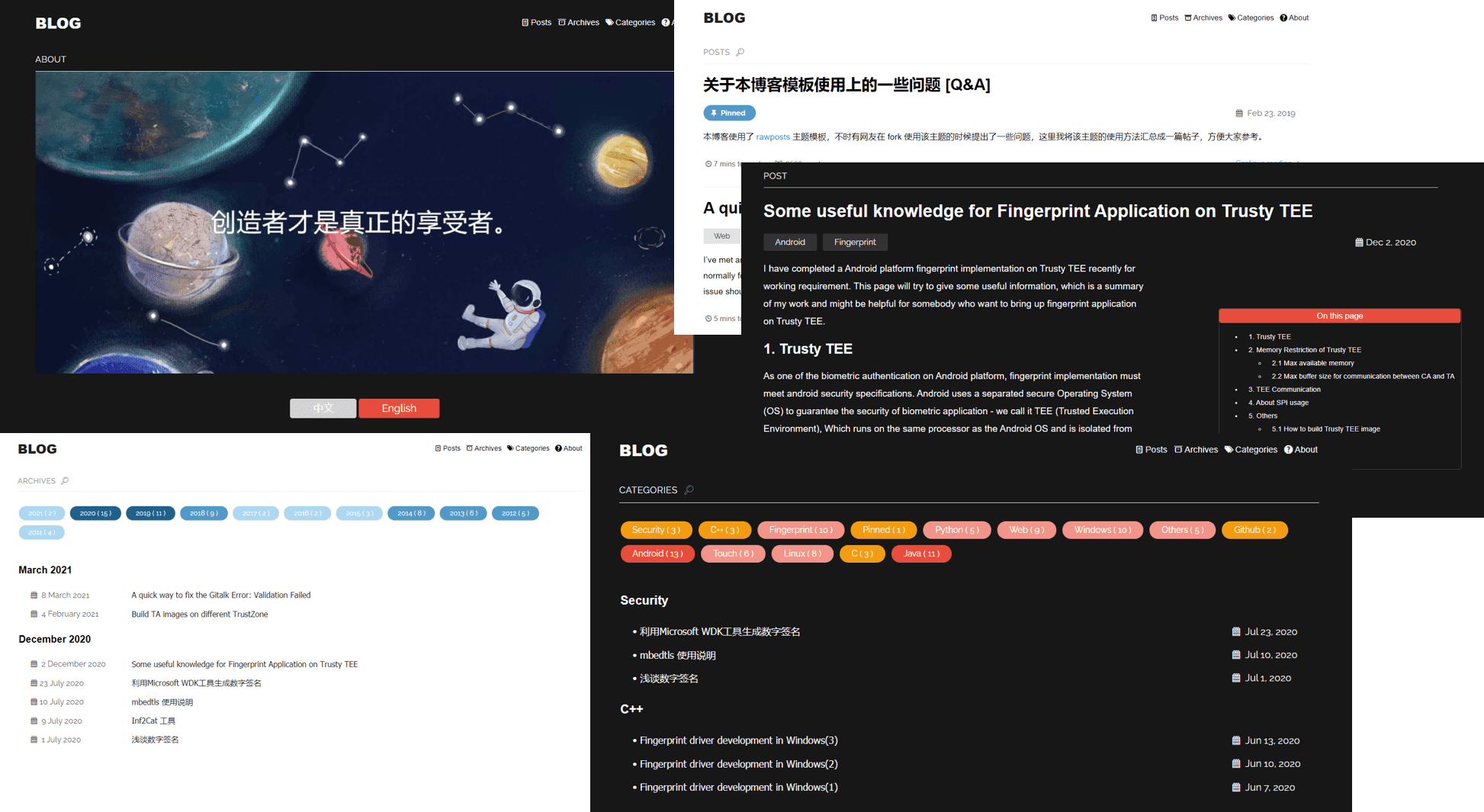
Responsive layout optimized for tablet and mobile screens
JekyllPortfolio
jekyll-theme-rawposts — Jekyll Portfolio Template
By gangdong
rawposts is a free Jekyll portfolio-style theme released under the MIT license. It can serve as a starting point for any Jekyll website and supports deployment to GitHub Pages.
Explore the design
Compare the page layouts and mobile experience. Open any screenshot for a closer look.
Author preview
Author-provided preview
Preview provided in the project README.
One original preview is available. Open the full image to inspect the design.
Screenshots show visual appearance; interactive behavior may differ.
Recorded 2026-10-03View source
What stands out
A quick read of the recorded project description.
Portfolio style with support for custom social links (GitHub, Facebook, Twitter, LinkedIn, etc.)
Built-in pagination, archiving by date, archiving by category, excerpts, and navigation
Comments can optionally use Gittalk or Disqus; statistics can optionally use Google Analytics or busuanzi
Supports light/dark skin switching, reading time, and article word count statistics
Provides RSS, sitemap, and jemoji emoji support
Template Details
rawposts was developed by David Dong. It is a Jekyll portfolio-style theme positioned as a starting point for any Jekyll website and can be deployed on GitHub Pages. The theme provides a responsive layout optimized for tablet and mobile screens, and includes portfolio theme image settings.
In terms of features, the theme includes built-in pagination, archiving by date, archiving by category, excerpts, navigation, RSS, sitemap, and jemoji emoji support. Comments can optionally use Gittalk or Disqus, site statistics can optionally use Google Analytics or busuanzi, and it offers light and dark skin switching, article word count, and reading time statistics. Social links support email, GitHub, Facebook, Twitter, LinkedIn, and others.
The theme depends on plugins such as jekyll-seo-tag, jemoji, kramdown, jekyll-archives, and jekyll-paginate. Configuration is centralized in _config.yml, where options such as excerpts, pagination count and path, sitemap, dark mode, reading time, archives, categories, Gittalk, visitor statistics, RSS, and source code links can be toggled. Before use, you need to replace default personal information such as the logo, social links, avatar image, and email.
The theme includes files such as index.html, archive.html, category.html, about.html, and under _includes: pagination.html, reading_time.html, title.html, corresponding to the homepage entry, archives, categories, about page, pagination, reading time statistics, and homepage menu. The repository version is 2.1.0 and uses the MIT license; third-party assets such as demo images, fonts, and icons need to be checked separately under their respective licenses.
JekyllPortfolio
Is it right for your project?
Use Cases
- Building a personal portfolio website or blog
- Static sites deployed to GitHub Pages
- Jekyll sites that need pagination, archives, and category features
- Personal websites that want to integrate comments and visitor statistics
Suitable For
- Developers using Jekyll to build personal websites or blogs
- Users who need a portfolio-style theme and deploy to GitHub Pages
- Personal site authors who want to toggle features and configure as needed via _config.yml
Getting started & customization
Use these recorded setup notes alongside the repository instructions for your chosen version.
- 1
Fork the theme repository and clone it locally, then run bundle install in the project root to install the theme and dependencies
- 2
Run bundle exec jekyll server to build and preview the site locally
- 3
Modify description, title, and url in _config.yml, and replace the logo, default social links, and default avatar image under /assets/
- 4
Change the email to an address used for receiving contact form inquiries
- 5
Configure features such as excerpts, pagination, sitemap, dark mode, reading time, archives, categories, Gittalk, statistics, RSS, and source code links via toggles in _config.yml
License & source material
Usage conditions & limitations
Free to use · keep license noticeThis entry covers the free version under the MIT license in the public repository; the free scope applies to that version's code and does not imply that external services or third-party assets are free.
Must comply with when using
- Free use, modification, commercial use, and distribution of this version's code are permitted.
- When distributing copies or substantial portions of the code, retain the original author's copyright notice and the full MIT license notice.
- The code is provided as is; warranties and limitations of liability are governed by the original license and applicable law.
Additional costs & items to verify
- Comment functionality relies on third-party services: Gittalk requires linking a GitHub repository and authorization; Disqus requires registering an account and configuring a site shortname; both require external accounts.
- Visitor statistics rely on external services: Google Analytics requires registering an account and obtaining a tracking ID; busuanzi is a third-party hosted statistics script.
- Before use, you must replace default personal information such as the logo, social links, avatar image, and email; the template's default content is the author's personal configuration.
- The contact form must be changed to the user's own email address; otherwise, inquiries cannot be received.
- Demo images, fonts, icons, and other third-party assets need to be checked under their respective licenses; they cannot be judged solely by the code's MIT license.
- External services such as domain, hosting, database, payment, or AI may incur additional charges.
View Original Text Basis
Permission is hereby granted, free of charge
Original License Text
评论模块:Gittalk / Disqus
Original README
站点统计:busuanzi / google analytics
Original README
你需要更改`描述`、`标题`和`url`以便与个人信息匹配。你还需要将/assets/目录中的`logo`、`默认社交链接`和`默认avatar图像`替换为您自己的图片
Original README
https://github.com/gangdong/jekyll-theme-rawposts/blob/master/LICENSEhttps://github.com/gangdong/jekyll-theme-rawposts/blob/master/README.mdThe email needs to be changed to the email you want to receive contact form enquirers with.
Original README
Compiled by DeepSeek based on repository license and README ·2026-10-03. Results only cover the materials read; dependencies, images, fonts, and subsequent term changes are subject to their respective original texts.
Project checks & description sources
Template Information
- Source platforms
- GitHub
- Documentation and maintenance reference score
- Partly documented · 56 / 100
- Technologies
- Jekyll
- Website type
- Portfolio
How this score is calculated
Our heuristic uses license records (up to 30), a demo link (12), a preview (10), stars (15), recorded maintenance (15), description completeness (8), feature records (5) and classification data (5). It is not a code, security or performance test, or a Google score. A link does not establish tested functionality.
What to verify for this project
- Repository update recorded
- 2023-07-10
- Screenshot last checked
- 2026-10-03
No demo link is recorded. Use the repository instructions to evaluate the project locally; the screenshot alone cannot establish interactive behavior.
The catalog identifies Jekyll as the primary stack. Check the actual dependency manifest and lockfile for versions and hosting requirements. These notes use recorded metadata, not a code audit or a deployment test.
Use a selection guide →How this description was prepared
AI-assisted description based on catalog records and repository material. Repository authors are not automatically the reviewers of this description.
Automatically checked against source and license rules; no manual editorial review.
Inspect the recorded source material
SHA-256: 5217f5799cbe19796476173357ca4f4fb2cdd2fd3206928c26bdb209a663d071
2026-10-03T00:19:00.406Z
Source file / repository# jekyll-theme-rawposts ## About rawposts is a free jekyll portfolio-style theme, which is designed to be as a starting point for any Jekyll website. This theme can be deployed on `Github Page`. `[Theme Author]`: [David Dong](https://github.com/gangdong) `[License]`: MIT ### Preview 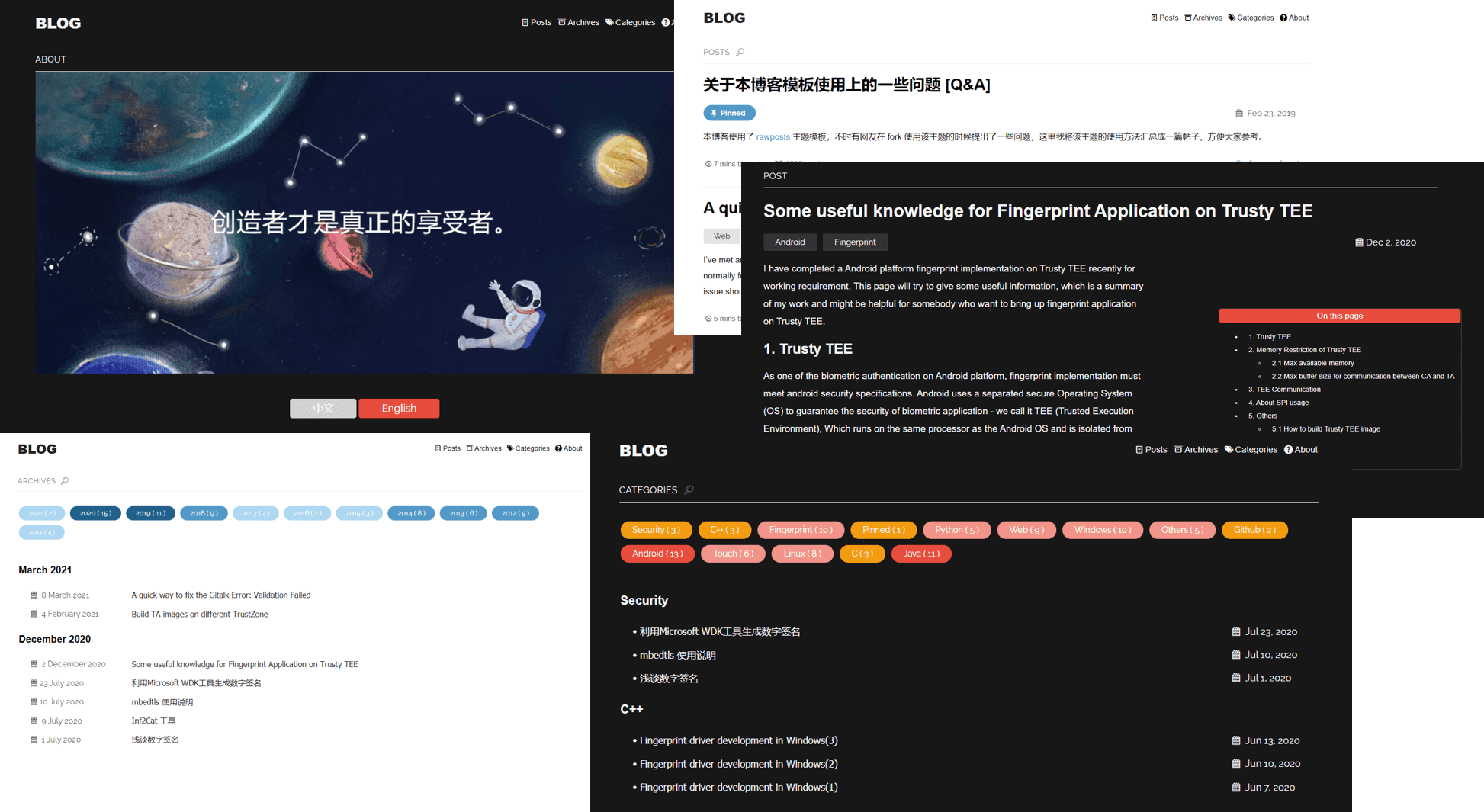 ### Demonstration Site [dqdongg.com](https://dqdongg.com) ## Features + Fully responsive + Optimized for tablets & mobiles + portfolio style + Customized social link (Github,facebook,twitter,linkedin...) + Optimized Github code style + Pagination + Archive by date + Archive by category + Excerpts + Navigation + Comments: Gittalk / Disqus + Statistics: Google analytics / busuanzi + RSS + sitemap + jemoji for emoji + dark skin selectable + Reading time statistics + post words count statistics ## Plugins + jekyll-seo-tag + jemoji + kramdown + jekyll-archives + jekyll-paginate ## Installation 1. Fork the theme at [here](https://github.com/gangdong/jekyll-theme-rawposts). 2. Clone the repository to your local machine. 3. If you don't have Jekyll installed, install it on your machine. If you don't know how to install, please refer to [Getting started with Jekyll (1)](https://gangdong.github.io/daviddong.github.io/web/2018/03/27/Web-jekyll-installation.html). 4. Run the command `bundle install` in the root of project to install the theme and its dependencies. 5. Run `bundle exec jekyll server` to build and serve your site. 6. Done! :v: Next you can customize your own website through the `_config.yml` ## Customization & Configuration You can use the `_config.yml` file to configure the theme with your preferences. #### `site personal settings` You'll need to change the `description`, `title` and `url` to match with your personal information. You'll also need to replace the `logo`, default `social` and default offline `images` in the /assets/ directory with your owns.The email needs to be changed to the email you want to receive contact form enquirers with. The default configuration of this theme is my personal information and just replace with yours. #### `show_excerpts` set to *true* to show excerpts on the homepage. #### `paginate` set the number of posts of each pages. #### `paginate_path` set the path of pages in your site. #### `sitemap` set to *true* to generate sitemap.xml content. #### `dark_mode` set to *true* to add dark mode toggle. #### `reading_time` set to *true* to add reading time statistics. #### `archives` set to *true* to generate archives page. #### `categories` set to *true* to generate categories page. #### `gittalk` set to *true* to add gittalk. #### `show_statistics` set to *true* to show statistics of site visitors number. #### `rss` set to *true* to add rss. #### `source_code` set to *true* to add link to source code. ## Include Files There are some necessary `.html` files for implementing the site's features and they are in the different folders. #### `index.html` index.html is the entry of homepage and is in the `/blog` folder. #### `archive.html` archive.html is for the archives function and is in the `/archive` folder. #### `category.html` category.html is used for category of the posts and is in the `/category` folder. #### `about.html` For *about* page contents display and is in the `/about` folder. #### `pagination.html` For paginate the pages and is in the `_includes` folder. #### `reading_time.html` reading_time.html is used for statistic the reading time of posts and display. It is in `_includes` folder. #### `title.html` Used for setting the menu bar of the homepage, is in the `_includes` folder. ## Development To set up your environment to develop this theme: 1. Clone this repo 2. cd into the root directory of your repo and run `bundle install`. To test the theme locally as you make changes to it: 1. cd into the root directory of the repo (e.g. jekyll-theme-rawposts). 2. Run `jekyll server` to preview and open your browser to `http://localhost:4000/your_baserul/`. This starts a Jekyll server using the theme's files and contents of the / directory. As modifications are made, refresh your browser to see any changes. ## Pull Requests When submitting a pull request: 1. Clone the repo. 2. Create a branch off of master and give it a meaningful name (e.g. my-awesome-new-feature) and describe the feature or fix. 3. Open a pull request on GitHub. Welcome to submitting pull requests to me, for each request, I will review as soon as possible and merge any good submits. ## Version 2.1.0 ## Q & A Welcome raise issues if you have any questions about this theme, not limited for any usage, bug fix, new features requirements... :smile: ## License The theme is available as open source under the terms of the MIT License. # Jekyll 主题 jekyll-theme-rawposts ## 关于该主题 rawposts 是一款轻量级,风格简洁清新的Jekyll主题。 该主题配置简单并支持丰富的特性,你可以将它用于Jekeyll网站或者个人博客的构建。该主题可以被用于部署在`Github page`上。 `[作者]:` [David Dong](https://github.com/gangdong) `[协议]:` MIT ### 预览  ### 演示网站 [dqdongg.com](https://dqdongg.com) ## 功能 + 响应式设计 + 针对平板&手机屏幕设计优化 + portfolio 主题图片设置 + 个性化社交链接(支持电子邮件,Github,Facebook,Twitter,领英等) + 分页功能 + 归档 + 文章分类 + 摘要 + 优化Github风格的代码样式 + 评论模块:Gittalk / Disqus 中国大陆用户推荐使用 Gittalk. + 阅读量统计:busuanzi + 站点统计:busuanzi / google analytics 中国大陆用户推荐使用 busuanzi analytics + RSS + Sitemap + jemoji emoji表情支持 + 两种皮肤可切换:浅色/深色 + 文章字数统计 + 阅读时间统计 ## 应用插件 + jekyll-seo-tag + jemoji + kramdown + jekyll-archives + jekyll-paginate ## 主题安装 1. fork [主题](https://github.com/gangdong/jekyll-theme-rawposts) 到你的github仓库。 2. 复制该主题的仓库到本地。 3. 如果你还没有安装Jekell,请先安装Jekyll。如果你不知道如何安装Jekyll,可以参考 [Getting started with Jekyll (1)](https://gangdong.github.io/daviddong.github.io/web/2018/03/27/Web-jekyll-installation.html)。 4. 在本地项目的根目录下运行命令 `bundle install` 来安装主题以及该主题的依赖。 5. 运行 `bundle exec jekyll server` 构建项目并生成网站。 6. 至此安装完成! :v: 下一步你需要通过配置 _config.yml来定制你自己的网站。 ## 客制化 & 配置 你可以通过配置 _config.yml 文件来客制化该主题。 #### `客制化设定` 你需要更改`描述`、`标题`和`url`以便与个人信息匹配。你还需要将/assets/目录中的`logo`、`默认社交链接`和`默认avatar图像`替换为您自己的图片,并需要将`电子邮件`更改为您要接收的联系人表单查询的电子邮件。 当前此主题的模板中的默认配置为我个人的信息,将该部分替换为你自己的信息。 #### `show_excerpts` _config.yml中设置该字段为 `true` 将会启用目录的摘要功能。 #### `paginate` _config.yml中通过设置该字段来设定每页最大的文章数量。 #### `paginate_path` _config.yml中设置该字段为你需要放置子页的路径。 #### `sitemap` _config.yml中设置该字段为 `true` 将生成 sitemap.html 文件。 #### `dark_mode` _config.yml中设置该字段为 `true` 将会启用网站的深色模式切换功能。 #### `reading_time` _config.yml中设置该字段为 `true` 将会增加文章的阅读时间和字数统计,并显示。 #### `archives` _config.yml中设置该字段为 `true` 将会启用文章的时间归档功能。 #### `categories` _config.yml中设置该字段为 `true` 将会启用文章的归类功能。 #### `gittalk` _config.yml中设置该字段为 `true` 将会增加gittalk评论模块。 #### `show_statistics` _config.yml中设置该字段为 `true` 将会启用网站访客统计功能,默认busuanzi引擎。 #### `rss` _config.yml中设置该字段为 `true` 将会启用rss生成功能。 #### `source_code` _config.yml中设置该字段为 `true` 将会增加源代码导引。 ## 包含文件 该主题有一些必要的 「.html」文件来实现网站的功能,它们位于不同的文件夹中。 #### `index.html` index.html 是主页的入口文件,生成在项目根目录 `/blog` 文件夹中。 #### `archive.html` archive.html 实现文章的归档功能,生成在根目录 `/archive` 文件夹中。 #### `category.html` category.html 实现文章的分类功能,生成在根目录 `/category` 文件夹中。 #### `about.html` about.html 文件内容对应网站的「关于」页面,里面的内容多为个人相关,将它们替换成你自己的信息,存在于根目录 `/about` 文件夹中。 #### `pagination.html` pagination.html 实现网站的分页功能,存放在根目录 `_includes` 文件夹中。 #### `reading_time.html` reading_time.html 统计文章的字数和阅读时间并显示. 存放在根目录 `_includes` 文件夹中。 #### `title.html` 生成主页的功能菜单项, 存放在根目录 `_includes` 文件夹中。 ## 开发 以下用于配置该主题的开发环境: 1. 复制该主题的仓库到本地; 2. 进入到该主题项目的根目录并执行`bundle install`。 在你对该主题做了修改后可以在本地测试然后再推送到远端: 1. 进入到该主题本地的根目录 (比如 jekyll-theme-rawposts); 2. 运行 `jekyll server` 构建该项目并生成网站,在浏览器中打开http://localhost:4000/你设定的baseurl 来预览网站。再度修改后可以通过刷新网页来预览效果。 ## Pull Requests 当你需要提交一个 pull request时,可以: 1. 复制该项目; 2. 创建一个分支并对该分支起一个容易辨认的名字并填写好`问题`或者`需求描述`,`更改记录`; 3. 在Github上提交该分支到一个 pull request。 欢迎大家提 pull requests 给我, 对于每一个pull request, 我都会尽快review,对于好的建议我都会merge进该主题的代码中,包括但不限于提交问题或需求,修复代码等。 ## 版本 2.1.0 ## 问题和回答 如果你有针对该主题的任何问题,欢迎提交Issue来交流,每个问题我都会认真回复。:smile: ## 协议 该主题为开源软件,基于MIT协议。
Explore similar templates
Compare previews and descriptions within the same stack and category.

al-folio
A Jekyll academic homepage theme for scholars and researchers, with a clean responsive design and out-of-the-box support for publication lists, project showcases, CVs, and blogs.
Jekyll · Portfolio

minimal-mistakes
Minimal Mistakes is a two-column Jekyll theme for personal sites, blogs, project documentation, or portfolios.
Jekyll · Portfolio

Beautiful Jekyll
Beautiful Jekyll is a mature, easy-to-use Jekyll blog theme maintained by Dean Attali since 2015, with over 50,000 users.
Jekyll · Blog

So Simple
A minimal reading-oriented Jekyll theme by Michael Rose for personal blogs, portfolios, and long-form reading. It offers multiple layouts, microformat markup, Disqus comments, Google Analytics, Jekyll SEO Tag, three skins, and aggregation by year, category, and tag with a grid view.
Jekyll · Blog
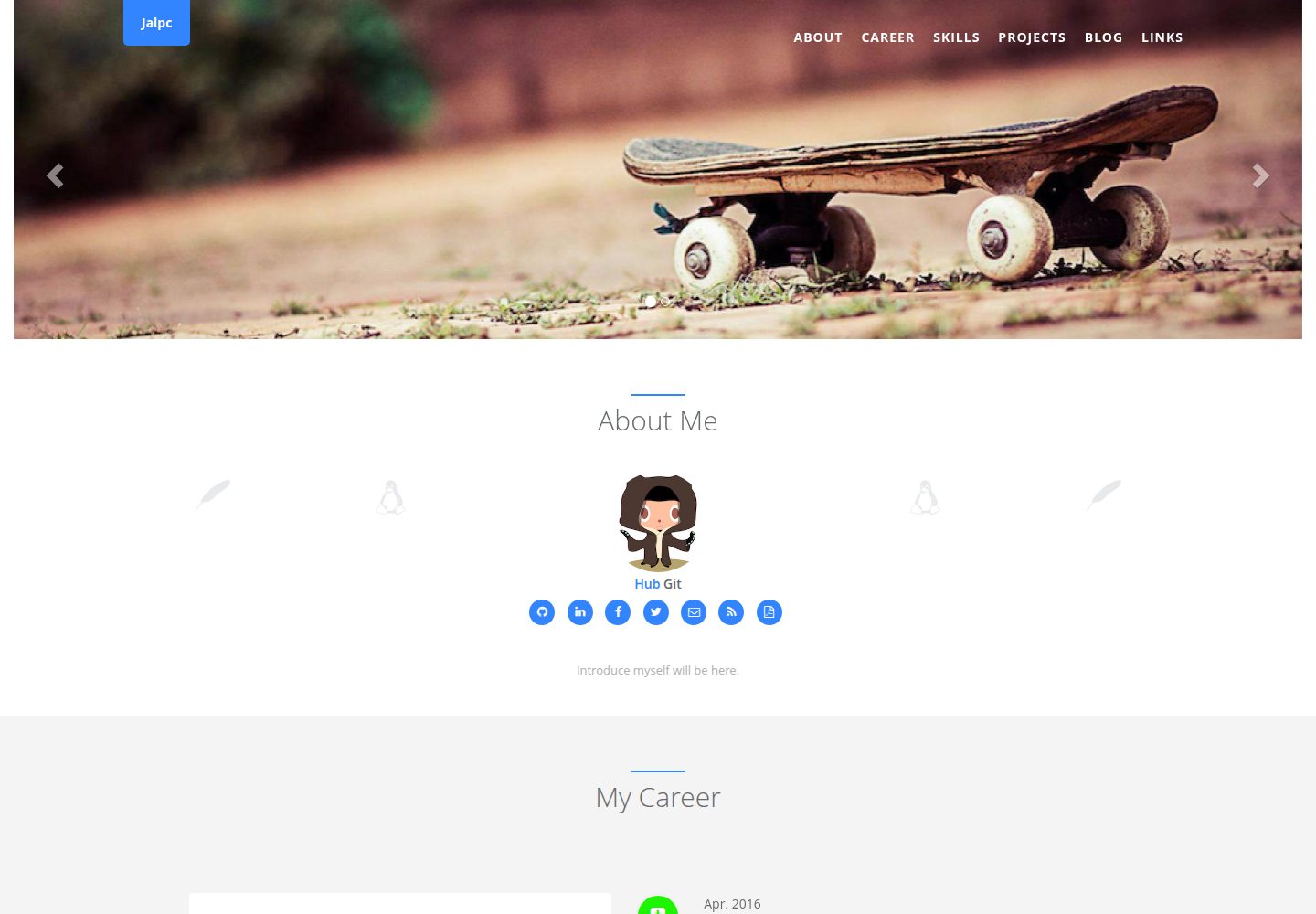
Jalpc
Jalpc is a Jekyll theme for a combined personal homepage and blog. The homepage is split into sections driven by YAML files under _data, so content changes usually do not require editing HTML.
Jekyll · Portfolio
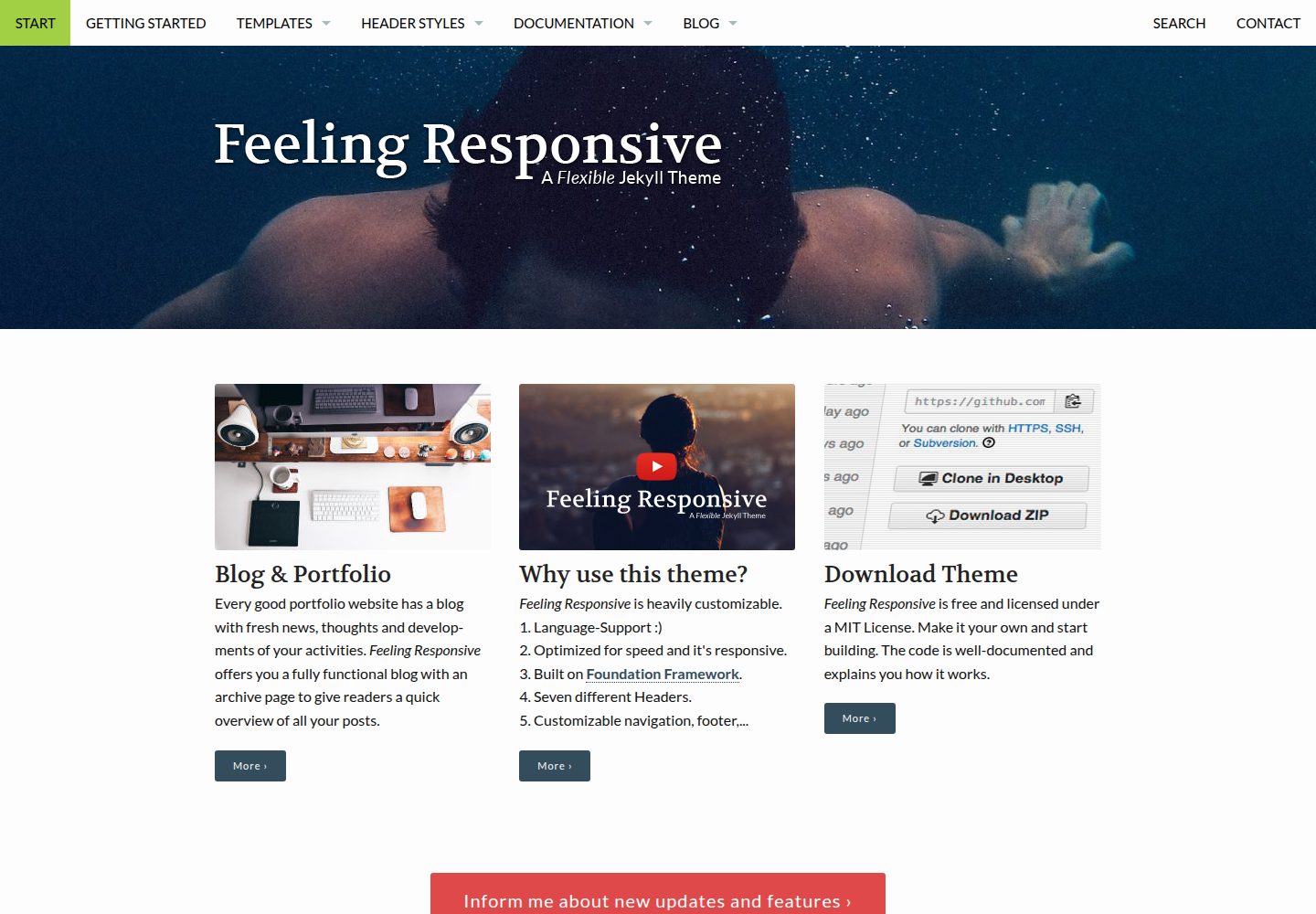
feeling-responsive
A free responsive Jekyll theme built on the Foundation framework, suitable for company sites, portfolios, or blogs. It offers language support, six header styles, customizable navigation and footer, plus documentation and an online demo.
Jekyll · Portfolio