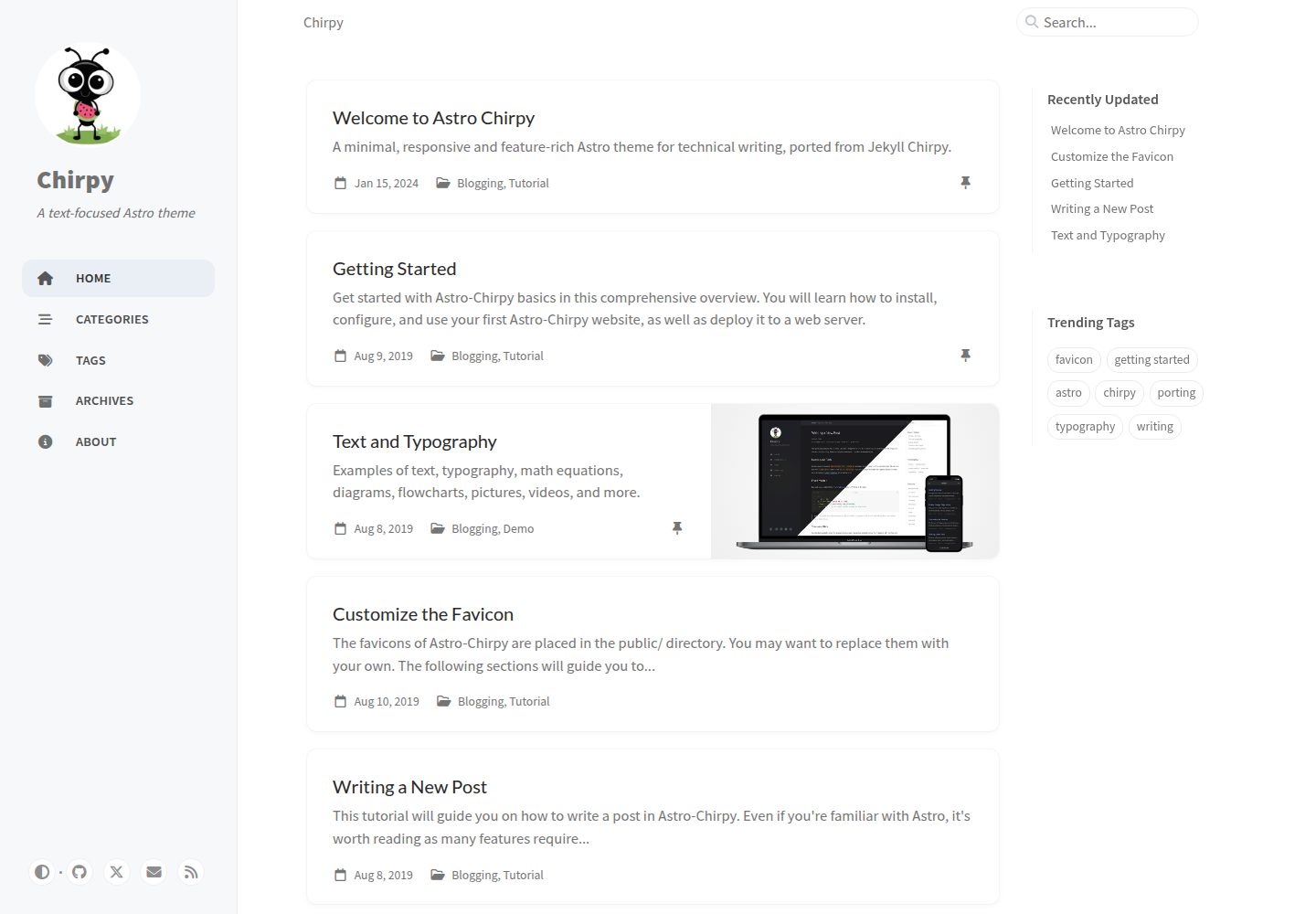
Ported from Jekyll Chirpy to Astro, retaining core blog features such as light/dark theme, search, table of contents, pinned posts, hierarchical categories, related posts, and RSS
AstroBlog
astro-chirpy — Astro Blog Template
By geocine
Astro Chirpy is a technical blog template that ports the Jekyll Chirpy theme to Astro, retaining most core writing features and switching to Astro content collections and component structure.
Explore the design
Compare the page layouts and mobile experience. Open any screenshot for a closer look.
Desktop homepage1 / 3
Desktop captureTop of page
Actual screenshot captured by the server browser.
All pages & views 3
Screenshots show visual appearance; interactive behavior may differ.
Recorded 2026-10-03View source
What stands out
A quick read of the recorded project description.
Uses Astro content collections to manage posts and tabs, with posts in src/content/posts/ and tabs in src/content/tabs/
Search runs client-side based on FlexSearch and provides a JSON API endpoint
Supports MathJax math formulas and Mermaid diagrams; syntax highlighting uses a custom Shiki theme with a line-number plugin
Configuration is centralized in src/config.ts, and the build output is a static dist/ directory deployable to Vercel, Netlify, GitHub Pages, or Cloudflare Pages
Licensed under MIT, free to use, modify, commercialize, and distribute, but copyright and license notices must be retained
Template Details
Astro Chirpy is an Astro port of the Jekyll Chirpy theme, aimed at technical writing. It retains most of the original theme's core blog features, including light/dark theme switching, client-side search based on FlexSearch, table of contents, syntax highlighting, MathJax math formulas, Mermaid diagrams, pinned posts, hierarchical categories, popular tags, last modified time, reading time, related posts, Atom/RSS feeds, and SEO metadata such as Open Graph and Twitter Cards.
Compared with the Jekyll version, this implementation uses Astro content collections to manage posts and tabs, replaces Liquid templates with reusable Astro components, and adds custom Remark/Rehype plugins to handle code blocks, images, and diagrams, while supporting View Transitions page transitions. Posts go in src/content/posts/, tabs go in src/content/tabs/, and site configuration is centralized in src/config.ts.
Note that some features of the original theme are not yet implemented: the comment systems (Disqus, Giscus, Utterances) have only configuration options without components; the PWA has no Service Worker or offline caching, only a basic manifest; post share buttons, multilingual UI (33 locale files exist but are not wired up, and components hardcode English only), analytics services other than Google Analytics, and page view statistics are all unimplemented. The build speed and feature parity ratios mentioned in the README are project self-descriptions and were not verified in the dependency list.
AstroBlog
Is it right for your project?
Use Cases
- Building a technical blog focused on Markdown writing that needs categories, tags, table of contents, and code highlighting
- Writing tutorials and technical notes that include math formulas or Mermaid diagrams
- Migrating from Jekyll Chirpy to Astro while hoping to reuse similar front matter and content structure
- Blog projects that need static output and deployment to Vercel, Netlify, GitHub Pages, or Cloudflare Pages
Suitable For
- Technical authors who write in Markdown and care about code highlighting and formula rendering
- Front-end developers who want to replace Liquid templates with Astro components and content collections
- Existing users evaluating the feasibility of migrating from Jekyll Chirpy
- Static blog users who accept an English interface and do not need comments or multilingual support
Getting started & customization
Use these recorded setup notes alongside the repository instructions for your chosen version.
- 1
Install dependencies and start the dev server: npm install, npm run dev, accessible by default at http://localhost:4321
- 2
Site information is configured in src/config.ts; posts and tabs are written to src/content/posts/ and src/content/tabs/ respectively
- 3
The build command is npm run build, and the dist/ output directory can be deployed directly to static hosting platforms
- 4
Comments, PWA, share buttons, multilingual support, and analytics services other than Google Analytics are not yet implemented and require custom components or integrations
- 5
Licenses for third-party assets such as demo images, fonts, and icons must be checked separately; the MIT license covers only the code itself
License & source material
Usage conditions & limitations
Free to use · keep license noticeThis entry covers the free version under the MIT license in the public repository; the free scope is the code of this version and does not mean external services or third-party assets are free.
Must comply with when using
- Free to use, modify, commercialize, and distribute the code of this version.
- When distributing copies or substantial portions of the code, retain the original author's copyright notice and the full MIT license notice.
- The code is provided as is; warranties and limitations of liability are governed by the original license and applicable law.
Additional costs & items to verify
- Built-in analytics supports only Google Analytics; other analytics services (GoatCounter, Umami, Matomo, Cloudflare Web Analytics, Fathom) are not implemented and require custom development.
- Comment systems (Disqus, Giscus, Utterances) have only configuration options without components; you must create components yourself before use.
- Multilingual UI is not wired up; 33 locale files exist but components hardcode English only, so internationalization must be implemented yourself.
- PWA is not implemented: there is no Service Worker, offline caching, or app installation support, only a basic manifest file.
- Demo images, fonts, icons, and other third-party assets must be checked against their respective licenses and cannot be judged solely by the code's MIT license.
- External services such as domains, hosting, databases, payments, or AI may incur separate charges.
View Original Text Basis
Permission is hereby granted, free of charge
Original License Text
Google Analytics only
Original README
Components need to be created in `src/components/comments/`.
Original README
Only English (en) is hardcoded in components
Original README
https://github.com/geocine/astro-chirpy/blob/main/LICENSEhttps://github.com/geocine/astro-chirpy/blob/main/README.mdNo service worker implementation
Original README
Compiled by DeepSeek based on repository license and README ·2026-10-03. Results only cover the materials read; dependencies, images, fonts, and subsequent term changes are subject to their respective original texts.
Project checks & description sources
Template Information
- Source platforms
- GitHub
- Documentation and maintenance reference score
- More documented · 83 / 100
- Technologies
- Astro
- Website type
- Blog
How this score is calculated
Our heuristic uses license records (up to 30), a demo link (12), a preview (10), stars (15), recorded maintenance (15), description completeness (8), feature records (5) and classification data (5). It is not a code, security or performance test, or a Google score. A link does not establish tested functionality.
What to verify for this project
- Repository update recorded
- 2026-05-17
- Screenshot last checked
- 2026-10-03
A demo link is listed. Check it with your own content and viewport sizes; its presence does not confirm that forms, authentication or payments work.
The catalog identifies Astro as the primary stack. Check the actual dependency manifest and lockfile for versions and hosting requirements. These notes use recorded metadata, not a code audit or a deployment test.
Use a selection guide →How this description was prepared
AI-assisted description based on catalog records and repository material. Repository authors are not automatically the reviewers of this description.
Automatically checked against source and license rules; no manual editorial review.
Inspect the recorded source material
SHA-256: 23f2885bd1ef8b749b83bf697b3fb2eacccd2802dbd37e34ab8f833a8de29a99
2026-10-03T00:48:22.453Z
Source file / repository# Astro Chirpy A minimal, responsive, and feature-rich Astro theme for technical writing, ported from the popular [Jekyll Chirpy theme](https://github.com/cotes2020/jekyll-theme-chirpy). Check [demo here](https://astro-chirpy.netlify.app/) <img width="1898" height="906" alt="image" src="https://github.com/user-attachments/assets/a20c50de-5fb2-4d84-a636-5dfb4d87c59f" /> All core features from Jekyll Chirpy are fully functional. This Astro version maintains 85% feature parity with the original while adding performance improvements. ## Unique to This Implementation ### Performance Improvements - **10x Faster Builds** - Astro's build system vs Jekyll/Ruby - **Enhanced Search** - FlexSearch client-side search with JSON API endpoint - **Optimized Syntax Highlighting** - Custom Shiki themes with line numbers plugin - **Modern Tooling** - Vite, TypeScript, ESM modules ### Technical Improvements - **Content Collections** - Type-safe content with Astro's built-in validation - **Component Architecture** - Reusable Astro components vs Liquid templates - **Custom Remark/Rehype Plugins** - Enhanced markdown processing for code blocks, images, and diagrams - **View Transitions** - Smooth page navigation with Astro's built-in transitions ## Quick Start ```bash npm install npm run dev ``` Edit `src/config.ts` to customize your site. Visit `http://localhost:4321`. ## Creating Content Create posts in `src/content/posts/`: ```markdown --- title: Your Post Title date: 2024-01-15T10:00:00+00:00 categories: [Category1, Category2] tags: [tag1, tag2, tag3] description: Brief description pin: false math: false mermaid: false --- Your content here... ``` Create tabs in `src/content/tabs/`: ```markdown --- title: Tab Title icon: fas fa-icon-name order: 1 --- Tab content... ``` ## Deployment ```bash npm run build ``` Deploy the `dist/` folder to Vercel, Netlify, GitHub Pages, or Cloudflare Pages ## Commands | Command | Action | |---------|--------| | `npm run dev` | Start development server | | `npm run build` | Build production site | | `npm run preview` | Preview production build | | `npm run astro` | Run Astro CLI commands | | `npm run lint:js` | Lint JavaScript/TypeScript | | `npm run lint:scss` | Lint SCSS files | ## Fully Implemented Features Core blogging features from Jekyll Chirpy: - Dark/Light theme toggle with system preference detection - Built-in search with FlexSearch (enhanced from Jekyll) - Table of Contents (mobile + desktop responsive) - Syntax highlighting with custom Chirpy themes - Mathematical expressions (MathJax v3) - Mermaid diagrams with theme awareness - Pinned posts on home page - Hierarchical categories - Trending tags - Last modified date tracking - Read time calculation - Related posts - Atom/RSS feeds - SEO optimization (Open Graph, Twitter Cards) - Google Analytics only ## Not Implemented These features from the original Jekyll Chirpy are not implemented: ### 1. Comment Systems Configuration exists in `src/config.ts` but no components: - Disqus - Giscus - Utterances Components need to be created in `src/components/comments/`. ### 2. PWA (Progressive Web App) - No service worker implementation - No offline caching - No app installation support - Only basic manifest file exists ### 3. Post Sharing Post sharing buttons are not implemented: - Twitter - Facebook - Telegram - Copy Link - Mastodon - LinkedIn - Weibo - Bluesky - Reddit - Threads ### 4. Multi-language Support While 33 locale files exist in `src/data/locales/`, they are not currently integrated: - Locale files are present but not being used - Only English (en) is hardcoded in components - Full internationalization support needs implementation ### 5. Extended Analytics Providers Only Google Analytics works. Not implemented: - GoatCounter - Umami - Matomo - Cloudflare Web Analytics - Fathom Analytics ### 6. Page View Counters No integration with analytics providers to display page view counts on posts. ## Porting from Jekyll Chirpy If porting from Jekyll Chirpy: 1. Copy posts from `_posts/` to `src/content/posts/` 2. Copy tabs from `_tabs/` to `src/content/tabs/` 3. Update `src/config.ts` with your `_config.yml` settings 4. Copy assets to `public/` Frontmatter is mostly compatible. No changes needed for most posts. ## License MIT License - Based on [Jekyll Chirpy theme](https://github.com/cotes2020/jekyll-theme-chirpy) by [Cotes Chung](https://github.com/cotes2020)
Explore similar templates
Compare previews and descriptions within the same stack and category.

astrowind
AstroWind is a free, open-source Astro starter theme using Astro and Tailwind CSS, released under the MIT license.
Astro · Blog

astro-paper
AstroPaper is a minimal, responsive, accessible, and SEO-friendly Astro blog theme. Articles are stored as Markdown/MDX in src/content/posts/, with subdirectories affecting URLs.
Astro · Blog

fuwari
Fuwari is a static blog template built with Astro and Tailwind CSS for personal blogs. It manages posts as Markdown files in src/content/posts/, with frontmatter for title, date, description, cover, tags, categories, draft status, and language.
Astro · Blog

Firefly
Firefly is a clean personal blog theme forked from Astro and Fuwari, offering four background modes, single/double sidebar and list/grid layouts, Pagefind client-side full-text search, and a six-language UI.
Astro · Blog

astro-theme-cactus
Astro Cactus is an Astro-based blog and portfolio theme that uses Markdown/MDX content collections to manage posts, notes, and tags, with frontmatter type-checked by a schema.
Astro · Portfolio

astrofy
Astrofy is a free and open-source personal portfolio website template built with Astro and TailwindCSS, with built-in blog, CV timeline, project showcase, store, and RSS feed modules.
Astro · Portfolio