从 Jekyll Chirpy 移植到 Astro,保留明暗主题、搜索、目录、置顶、层级分类、相关文章、RSS 等核心博客功能
Astro博客
astro-chirpy — Astro 博客模板
作者 geocine
Astro Chirpy 是把 Jekyll Chirpy 主题移植到 Astro 的技术博客模板,保留大部分核心写作功能,并改用 Astro 的内容集合与组件结构。
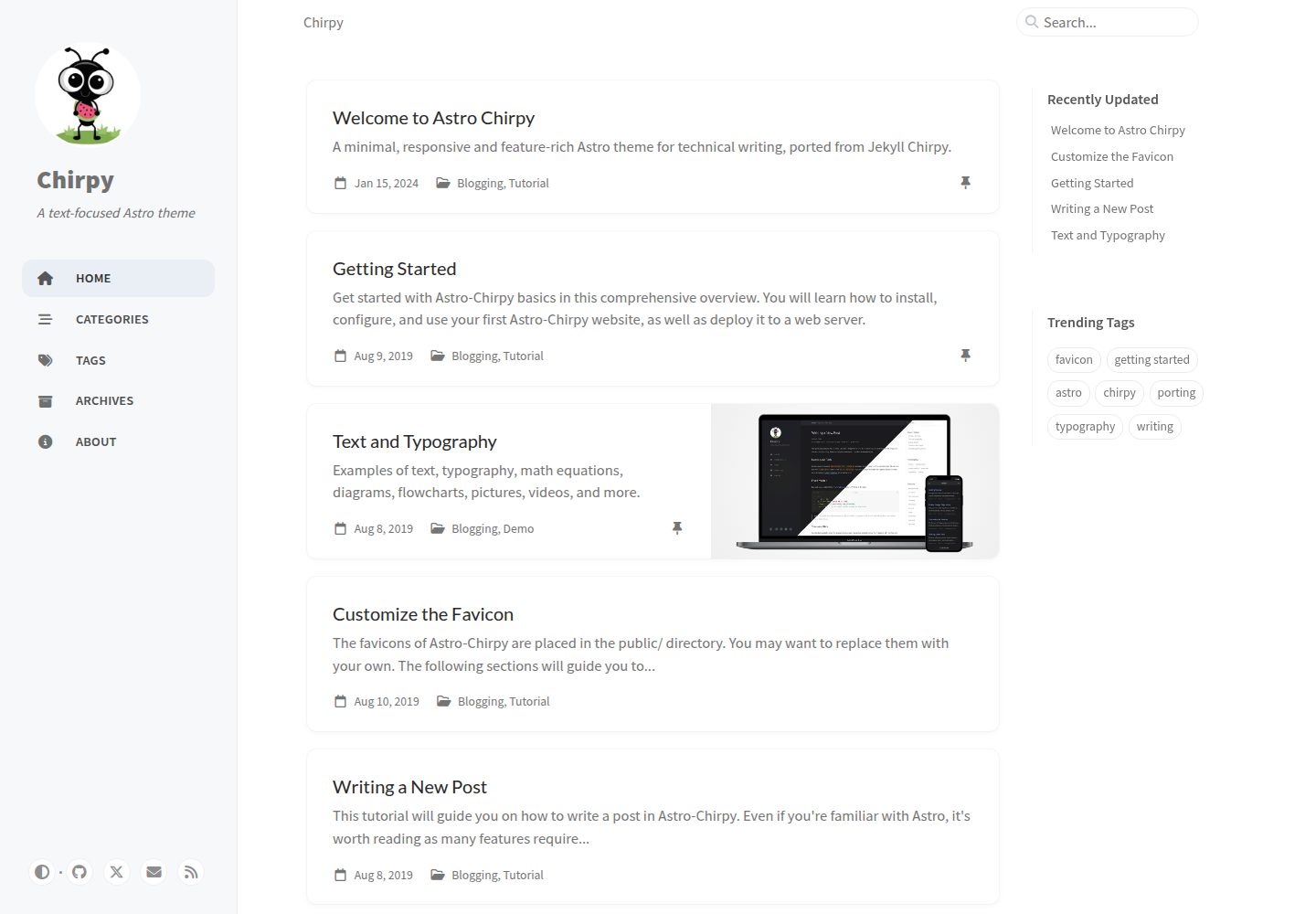
看看你的网站会是什么样
浏览真实页面截图,比较内容排版与手机效果。点击下方缩略图切换,放大查看整页细节。
全部页面与视图 3
截图用于了解视觉与布局,交互效果请以实际项目为准。
采集于 2026-10-03查看来源
值得关注的模板亮点
从已有项目资料中,快速了解它的特点。
使用 Astro 内容集合管理文章与标签页,文章位于 src/content/posts/,标签页位于 src/content/tabs/
搜索基于 FlexSearch 在客户端运行,并提供 JSON API 端点
支持 MathJax 数学公式与 Mermaid 图表,语法高亮使用自定义 Shiki 主题并带行号插件
配置集中在 src/config.ts,构建产物为 dist/ 静态目录,可部署到 Vercel、Netlify、GitHub Pages 或 Cloudflare Pages
采用 MIT 许可,可免费使用、修改、商用和分发,但需保留版权与许可声明
模板详细介绍
Astro Chirpy 是 Jekyll Chirpy 主题的 Astro 移植版,面向技术写作场景。它保留了原主题的大部分核心博客功能,包括明暗主题切换、基于 FlexSearch 的客户端搜索、目录、语法高亮、MathJax 数学公式、Mermaid 图表、置顶文章、层级分类、热门标签、最后修改时间、阅读时长、相关文章、Atom/RSS 订阅以及 Open Graph 和 Twitter Cards 等 SEO 元信息。
与 Jekyll 版本相比,这个实现改用 Astro 的内容集合来管理文章和标签页,使用可复用的 Astro 组件替代 Liquid 模板,并加入自定义 Remark/Rehype 插件处理代码块、图片和图表,同时支持 View Transitions 页面过渡。文章放在 src/content/posts/,标签页放在 src/content/tabs/,站点配置集中在 src/config.ts。
需要留意的是,原主题的部分功能尚未实现:评论系统(Disqus、Giscus、Utterances)只有配置项没有组件;PWA 没有 Service Worker 和离线缓存,仅有一个基础 manifest;文章分享按钮、多语言界面(33 个 locale 文件存在但未接入,组件中仅硬编码英文)、Google Analytics 之外的分析服务以及页面浏览量统计均未实现。README 中提到的构建速度与功能对等比例属于项目自述,未在依赖清单中核实。
Astro博客
适合你的项目吗?
适用场景
- 搭建以 Markdown 写作为主的技术博客,需要分类、标签、目录和代码高亮
- 撰写包含数学公式或 Mermaid 图表的教程与技术笔记
- 从 Jekyll Chirpy 迁移到 Astro,希望沿用相近的前置元数据与内容结构
- 需要静态输出并部署到 Vercel、Netlify、GitHub Pages 或 Cloudflare Pages 的博客项目
适合人群
- 习惯用 Markdown 写作、关注代码高亮与公式渲染的技术作者
- 希望用 Astro 组件和内容集合替代 Liquid 模板的前端开发者
- 正在评估从 Jekyll Chirpy 迁移可行性的现有用户
- 接受英文界面、不需要评论与多语言支持的静态博客使用者
上手与定制指南
结合仓库当前版本的说明,按下面的资料检查内容、配置与运行要求。
- 1
安装依赖并启动开发服务器:npm install、npm run dev,默认访问 http://localhost:4321
- 2
站点信息在 src/config.ts 中配置,文章与标签页分别写入 src/content/posts/ 和 src/content/tabs/
- 3
构建命令为 npm run build,输出目录 dist/ 可直接部署到静态托管平台
- 4
评论、PWA、分享按钮、多语言和 Google Analytics 之外的分析服务尚未实现,需要自行开发组件或接入
- 5
演示图片、字体、图标等第三方素材的许可需单独核对,MIT 许可仅覆盖代码本身
授权与来源资料
使用条件与限制
免费使用 · 保留许可声明本次收录的是公开仓库中采用 MIT 许可的免费版本;免费范围为该版本代码,不代表外部服务或第三方素材免费。
使用时需要遵守
- 允许免费使用、修改、商用和分发该版本代码。
- 分发代码副本或实质性部分时,保留原作者版权声明和完整 MIT 许可声明。
- 代码按现状提供;担保与责任限制以原许可证及适用法律为准。
额外费用与待核对事项
- 内置分析仅支持 Google Analytics,其他分析服务(GoatCounter、Umami、Matomo、Cloudflare Web Analytics、Fathom)未实现,如需使用需自行开发。
- 评论系统(Disqus、Giscus、Utterances)仅有配置项而无组件,需自行创建组件后才能使用。
- 多语言界面未接入,33 个 locale 文件存在但组件中仅硬编码英文,需自行实现国际化。
- PWA 未实现,无 Service Worker、离线缓存和应用安装支持,仅有一个基础 manifest 文件。
- 演示图片、字体、图标及其他第三方素材需按各自许可核对,不能仅凭代码的 MIT 许可判断。
- 域名、托管、数据库、支付或 AI 等外部服务可能另外收费。
查看原文依据
Permission is hereby granted, free of charge
许可证原文
Google Analytics only
README 原文
Components need to be created in `src/components/comments/`.
README 原文
Only English (en) is hardcoded in components
README 原文
https://github.com/geocine/astro-chirpy/blob/main/LICENSEhttps://github.com/geocine/astro-chirpy/blob/main/README.mdNo service worker implementation
README 原文
DeepSeek 根据仓库许可证和 README 整理 ·2026-10-03。结果仅覆盖已读取资料,依赖、图片、字体及后续条款变更以各自原文为准。
项目核对记录与介绍依据
模板资料
- 来源平台
- GitHub
- 资料与维护参考分
- 资料较完整 · 83 / 100
- 技术栈
- Astro
- 网站类型
- 博客
这个分数如何计算
本站按许可资料(最高30分)、演示链接(12分)、预览图(10分)、Star数(15分)、记录的维护时间(15分)、描述完整度(8分)、功能记录(5分)和分类资料(5分)计算。它不是代码、安全或性能测试,也不是 Google 评分;有链接不代表已实测可用。
这个项目需要核对什么
- 记录的仓库更新时间
- 2026-05-17
- 截图检查日期
- 2026-10-03
已收录演示链接。请用你的内容与屏幕尺寸检查;有演示不代表表单、认证或支付已经可用。
目录记录的主要技术栈是 Astro。请通过依赖清单和锁文件核对实际版本与托管要求。这些说明基于收录资料,不代表代码审计或部署实测。
查看具体选型方法 →介绍的制作与核对状态
介绍由 AI 辅助整理目录与仓库资料。仓库作者不等于这篇介绍的审核者。
已完成服务器许可规则与 AI 来源核对;未经过人工编辑审核。
查看当时使用的来源资料
SHA-256: 23f2885bd1ef8b749b83bf697b3fb2eacccd2802dbd37e34ab8f833a8de29a99
2026-10-03T00:48:22.453Z
来源文件 / 仓库# Astro Chirpy A minimal, responsive, and feature-rich Astro theme for technical writing, ported from the popular [Jekyll Chirpy theme](https://github.com/cotes2020/jekyll-theme-chirpy). Check [demo here](https://astro-chirpy.netlify.app/) <img width="1898" height="906" alt="image" src="https://github.com/user-attachments/assets/a20c50de-5fb2-4d84-a636-5dfb4d87c59f" /> All core features from Jekyll Chirpy are fully functional. This Astro version maintains 85% feature parity with the original while adding performance improvements. ## Unique to This Implementation ### Performance Improvements - **10x Faster Builds** - Astro's build system vs Jekyll/Ruby - **Enhanced Search** - FlexSearch client-side search with JSON API endpoint - **Optimized Syntax Highlighting** - Custom Shiki themes with line numbers plugin - **Modern Tooling** - Vite, TypeScript, ESM modules ### Technical Improvements - **Content Collections** - Type-safe content with Astro's built-in validation - **Component Architecture** - Reusable Astro components vs Liquid templates - **Custom Remark/Rehype Plugins** - Enhanced markdown processing for code blocks, images, and diagrams - **View Transitions** - Smooth page navigation with Astro's built-in transitions ## Quick Start ```bash npm install npm run dev ``` Edit `src/config.ts` to customize your site. Visit `http://localhost:4321`. ## Creating Content Create posts in `src/content/posts/`: ```markdown --- title: Your Post Title date: 2024-01-15T10:00:00+00:00 categories: [Category1, Category2] tags: [tag1, tag2, tag3] description: Brief description pin: false math: false mermaid: false --- Your content here... ``` Create tabs in `src/content/tabs/`: ```markdown --- title: Tab Title icon: fas fa-icon-name order: 1 --- Tab content... ``` ## Deployment ```bash npm run build ``` Deploy the `dist/` folder to Vercel, Netlify, GitHub Pages, or Cloudflare Pages ## Commands | Command | Action | |---------|--------| | `npm run dev` | Start development server | | `npm run build` | Build production site | | `npm run preview` | Preview production build | | `npm run astro` | Run Astro CLI commands | | `npm run lint:js` | Lint JavaScript/TypeScript | | `npm run lint:scss` | Lint SCSS files | ## Fully Implemented Features Core blogging features from Jekyll Chirpy: - Dark/Light theme toggle with system preference detection - Built-in search with FlexSearch (enhanced from Jekyll) - Table of Contents (mobile + desktop responsive) - Syntax highlighting with custom Chirpy themes - Mathematical expressions (MathJax v3) - Mermaid diagrams with theme awareness - Pinned posts on home page - Hierarchical categories - Trending tags - Last modified date tracking - Read time calculation - Related posts - Atom/RSS feeds - SEO optimization (Open Graph, Twitter Cards) - Google Analytics only ## Not Implemented These features from the original Jekyll Chirpy are not implemented: ### 1. Comment Systems Configuration exists in `src/config.ts` but no components: - Disqus - Giscus - Utterances Components need to be created in `src/components/comments/`. ### 2. PWA (Progressive Web App) - No service worker implementation - No offline caching - No app installation support - Only basic manifest file exists ### 3. Post Sharing Post sharing buttons are not implemented: - Twitter - Facebook - Telegram - Copy Link - Mastodon - LinkedIn - Weibo - Bluesky - Reddit - Threads ### 4. Multi-language Support While 33 locale files exist in `src/data/locales/`, they are not currently integrated: - Locale files are present but not being used - Only English (en) is hardcoded in components - Full internationalization support needs implementation ### 5. Extended Analytics Providers Only Google Analytics works. Not implemented: - GoatCounter - Umami - Matomo - Cloudflare Web Analytics - Fathom Analytics ### 6. Page View Counters No integration with analytics providers to display page view counts on posts. ## Porting from Jekyll Chirpy If porting from Jekyll Chirpy: 1. Copy posts from `_posts/` to `src/content/posts/` 2. Copy tabs from `_tabs/` to `src/content/tabs/` 3. Update `src/config.ts` with your `_config.yml` settings 4. Copy assets to `public/` Frontmatter is mostly compatible. No changes needed for most posts. ## License MIT License - Based on [Jekyll Chirpy theme](https://github.com/cotes2020/jekyll-theme-chirpy) by [Cotes Chung](https://github.com/cotes2020)
看看同类模板
对比同技术栈与用途的模板,找到更适合的视觉与内容结构。

astrowind
⭕️ AstroWind: A free template using Astro v7 and Tailwind CSS v4. Astro starter theme.
Astro · 博客

astro-paper
A minimal, accessible and SEO-friendly Astro blog theme.
Astro · 博客

fuwari
✨A static blog template built with Astro.
Astro · 博客

Firefly
Firefly 是一款基于 Astro 的静态博客主题,由 CuteLeaf 在 saicaca 的 Fuwari 模板基础上二次开发,主打清新美观的视觉风格。
Astro · 博客

astro-theme-cactus
A simple Astro theme. Use it to create your blog or website.
Astro · 作品集

astrofy
Astrofy is a free and open-source template for your Personal Portfolio Website built with Astro and TailwindCS…
Astro · 作品集