Astro-based static blog system with content managed as Markdown/MDX files and pages generated via file-based routing
AstroBlog
uinux-blog — Astro Blog Template
By Get-UINUX
UINUX Blog is an Astro-based static blog system for long-form writing, emphasizing typography, whitespace, and readability. Content is managed in Markdown, and only the search feature includes a small amount of client-side JavaScript.
Explore the design
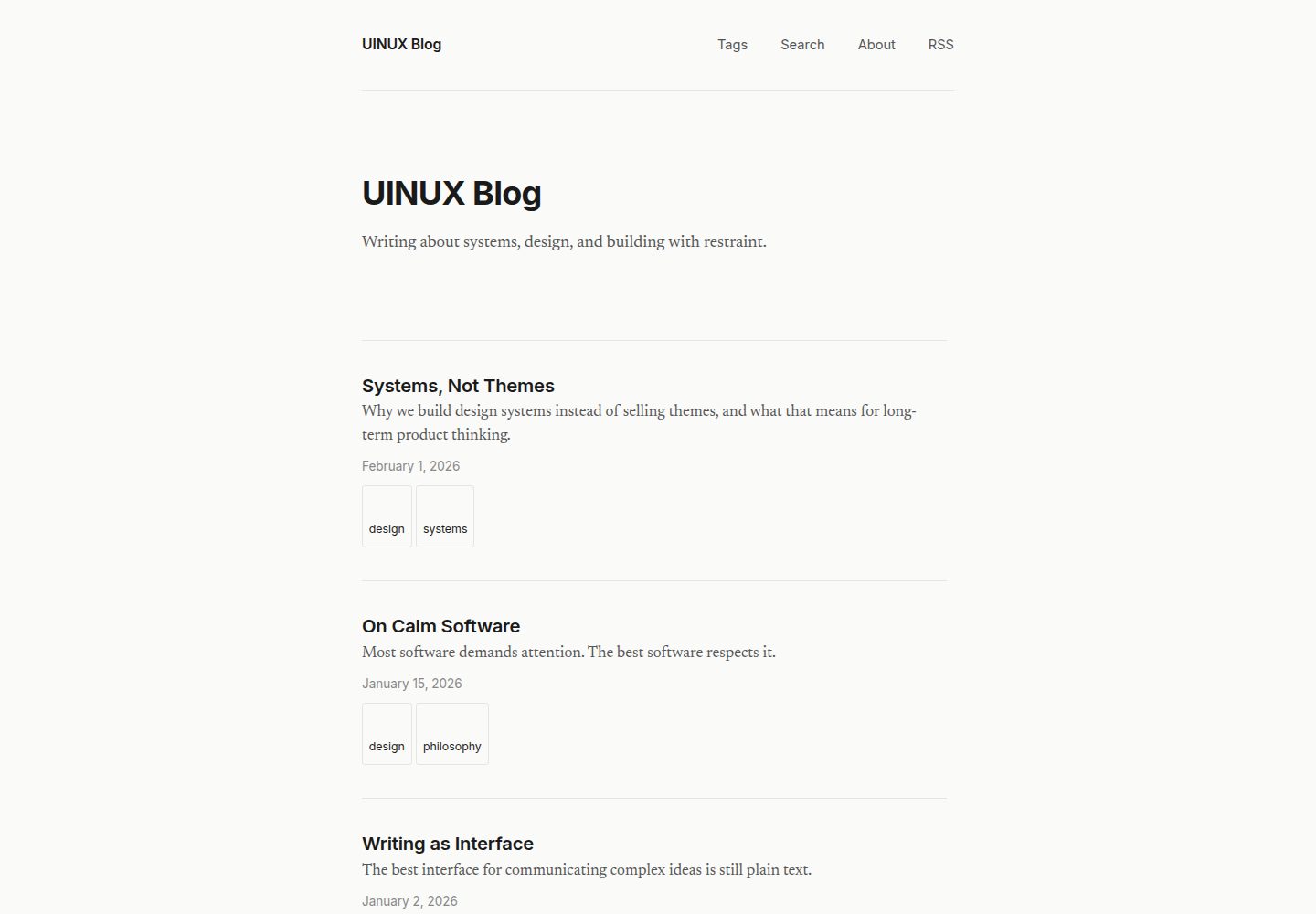
Compare the page layouts and mobile experience. Open any screenshot for a closer look.
Desktop homepage1 / 3
Desktop captureTop of page
Actual screenshot captured by the server browser.
All pages & views 3
Screenshots show visual appearance; interactive behavior may differ.
Recorded 2026-10-03View source
What stands out
A quick read of the recorded project description.
Typography oriented toward long-form writing: serif body text, sans-serif headings, 640px content width, prioritizing readability
Built-in paginated post list, tag browsing and filtering, about page, and RSS subscription
Client-side search based on a static JSON index generated at build time, with no reliance on external services or APIs
No client-side JavaScript except for search; no dark mode, no component library, no CMS backend
Built-in canonical links, Open Graph, Twitter Card, and JSON-LD structured data
Template Details
UINUX Blog is a static blog system built with Astro, positioned for long-form writing. It puts typography, whitespace, and readability before visual complexity. Content is stored as Markdown or MDX files in the src/content/posts/ directory, and pages are generated through file-based routing. The site provides by default a paginated post list, tag browsing and filtering, an about page, RSS subscription, and a client-side search that uses a static JSON index generated at build time. Except for search, all other pages are static HTML and CSS.
The design combines serif body text with sans-serif headings, and the content width is fixed at 640px to reduce the burden of reading long lines. The project explicitly does not provide theme color presets, dark mode toggle, CMS backend, database, email subscription, analytics, portfolio, or landing page features, nor does it include third-party SEO libraries or a sitemap generator. For SEO, it includes canonical links, Open Graph, Twitter Card, JSON-LD structured data, and Google Search Console verification configured via environment variables.
Before use, Node.js 18 or higher is required. After installing dependencies, run the development server to start writing. When using it as a template, you need to replace the site URL, blog name, tagline, about page, RSS title and description, default description, and OG site name according to the checklist provided in the repository, and delete the sample posts. The code is under the MIT license and can be used, modified, commercialized, and distributed for free, but third-party assets such as demo images, fonts, and icons need to be checked separately for their licenses, and external services such as domains and hosting may incur costs.
AstroBlog
Is it right for your project?
Use Cases
- Writing and publishing for a personal long-form blog, with content maintained as Markdown files
- Static content sites that need tag categorization, paginated browsing, and site search
- Blogs intended to be deployed to any static file hosting service, avoiding databases and backend management
- Writing sites that primarily distribute via RSS subscription and basic SEO metadata
Suitable For
- Writers who prefer writing in Markdown and deploying static sites
- Personal blogs that value typographic clarity and reading experience and do not need complex visual themes
- Users who accept the absence of additional features such as a CMS backend, database, or analytics
Getting started & customization
Use these recorded setup notes alongside the repository instructions for your chosen version.
- 1
Requires Node.js 18 or higher; clone the repository and run npm install to install dependencies
- 2
Create a new .md or .mdx file in src/content/posts/ and fill in frontmatter fields such as title, description, and date
- 3
Run npm run dev to start the development server, accessible by default at http://localhost:4321
- 4
When using as a template, update the site URL in astro.config.mjs, the blog name in the homepage and navigation, the about page, the RSS title and description, the default description and OG site name in Layout, and delete the sample posts
- 5
Optional: create a .env file and set PUBLIC_GOOGLE_SITE_VERIFICATION to enable Google Search Console verification
License & source material
Usage conditions & limitations
Free to use · keep license noticeThis entry covers the free version under the MIT license in the public repository; the free scope is the code of this version and does not mean that external services or third-party assets are free.
Must comply with when using
- The code of this version may be used, modified, commercialized, and distributed for free.
- When distributing copies or substantial portions of the code, retain the original author's copyright notice and the full MIT license notice.
- The code is provided as is; warranties and limitations of liability are governed by the original license and applicable law.
Additional costs & items to verify
- The optional Google Search Console verification feature requires you to have a Google account and obtain a verification code in Google Search Console, then configure it via the PUBLIC_GOOGLE_SITE_VERIFICATION variable in the .env file; not configuring this variable does not affect other site features.
- Demo images, fonts, icons, and other third-party assets need to be checked against their respective licenses; they cannot be judged solely by the code's MIT license.
- External services such as domains, hosting, databases, payments, or AI may incur additional charges.
View Original Text Basis
Permission is hereby granted, free of charge
Original License Text
https://github.com/Get-UINUX/uinux-blog/blob/main/LICENSEhttps://github.com/Get-UINUX/uinux-blog/blob/main/README.mdGet the code from Google Search Console > Settings > Ownership verification > HTML tag.
Original README
Compiled by DeepSeek based on repository license and README ·2026-10-03. Results only cover the materials read; dependencies, images, fonts, and subsequent term changes are subject to their respective original texts.
Project checks & description sources
Template Information
- Source platforms
- Astro Themes
- Documentation and maintenance reference score
- More documented · 87 / 100
- Technologies
- Astro
- Website type
- Blog
How this score is calculated
Our heuristic uses license records (up to 30), a demo link (12), a preview (10), stars (15), recorded maintenance (15), description completeness (8), feature records (5) and classification data (5). It is not a code, security or performance test, or a Google score. A link does not establish tested functionality.
What to verify for this project
- Repository update recorded
- 2026-05-22
- Screenshot last checked
- 2026-10-03
A demo link is listed. Check it with your own content and viewport sizes; its presence does not confirm that forms, authentication or payments work.
The catalog identifies Astro as the primary stack. Check the actual dependency manifest and lockfile for versions and hosting requirements. These notes use recorded metadata, not a code audit or a deployment test.
Use a selection guide →How this description was prepared
AI-assisted description based on catalog records and repository material. Repository authors are not automatically the reviewers of this description.
Review declaration: [email protected] · 2026-10-04
Inspect the recorded source material
SHA-256: 1b38a849f53caee74641e7cfd85874b58474b4f06ae389cfd201dc1f4ab10bdd
2026-10-03T22:44:31.377Z
Source file / repository# UINUX Blog
A calm, writing-first blogging system built with Astro.
## What it is
UINUX Blog is a static blog system designed for long-form writing. It prioritizes typography, whitespace, and readability over visual complexity. It uses Markdown for content, file-based routing, and ships minimal client-side JavaScript (search only).
## Quick start (template users)
If you clicked "Use this template" on GitHub:
1. Clone your new repository
2. Run `npm install`
3. Delete the example posts in `src/content/posts/`
4. Update `astro.config.mjs` with your own `site` URL
5. Update the blog name and tagline in `src/pages/index.astro` and `src/components/Nav.astro`
6. Update `src/pages/about.astro` with your own info
7. Run `npm run dev` and start writing
## What it is not
- Not a theme. There are no color presets, dark mode toggles, or visual variants.
- Not a CMS. There is no admin panel, no database, no integrations.
- Not a marketing tool. There are no newsletter signups, analytics, or growth hacks.
- Not a portfolio. There are no image galleries, project showcases, or landing pages.
## Who it is for
Writers who want a quiet place to publish. People who value clarity over features. Anyone who prefers to write in Markdown and deploy a static site.
## Getting started
### Prerequisites
- Node.js 18 or later
### Install
```
npm install
```
### Start writing
1. Create a new `.md` or `.mdx` file in `src/content/posts/`
2. Add frontmatter:
```md
---
title: "Your Post Title"
description: "A short description of the post."
date: 2026-02-07
tags: ["topic-a", "topic-b"]
---
Your content here.
```
3. Run the dev server:
```
npm run dev
```
4. Open `http://localhost:4321`
That is it. You are writing.
### Google Search Console
To enable Google Search Console verification, create a `.env` file:
```
PUBLIC_GOOGLE_SITE_VERIFICATION=your-verification-code
```
Get the code from Google Search Console > Settings > Ownership verification > HTML tag.
See `.env.example` for reference.
### Build for production
```
npm run build
```
Output is in the `dist/` directory. Deploy it anywhere that serves static files.
## Structure
```
src/
components/
Layout.astro Page shell, meta, fonts
Nav.astro Site navigation
Footer.astro Site footer
Heading.astro Typographic heading
Article.astro Post wrapper with metadata and tags
Prose.astro Markdown content styling
content/
config.ts Content collection schema
posts/ Markdown files go here
pages/
index.astro Home (paginated post list)
page/[page].astro Paginated post listing (page 2+)
search.astro Search page (client-side)
search-index.json.ts Static search index (built at build time)
about.astro About page
rss.xml.ts RSS feed
tags/index.astro All tags
tags/[tag].astro Posts filtered by tag
posts/[...slug].astro Individual post pages
styles/
global.css Design tokens and base styles
```
## Content model
Posts use these frontmatter fields:
| Field | Type | Required | Default |
|---------------|----------|----------|---------|
| `title` | string | yes | — |
| `description` | string | yes | — |
| `date` | date | yes | — |
| `tags` | string[] | no | `[]` |
## Features
### Tags
Posts can have zero or more tags. Tags appear on post pages and the home listing. Browse all tags at `/tags` or filter by tag at `/tags/[tag-name]`.
### Pagination
The home page shows 10 posts per page. When there are more than 10 posts, pagination links appear at the bottom. Pages 2+ are at `/page/2`, `/page/3`, etc.
### Search
Client-side search powered by a static JSON index built at build time.
- No external services or APIs
- No dependencies
- Index includes title, description, tags, and full post body
- Debounced input with instant results
- Supports `?q=` query parameter for direct linking
- Available at `/search`
## Design decisions
- **Serif body text** (Newsreader): optimized for sustained reading
- **Sans-serif headings** (Inter): clear hierarchy without competing with body text
- **640px content width**: prevents eye fatigue on long lines
- **Minimal client-side JS**: only used for search; all other pages are static HTML and CSS
- **No dark mode**: one mode, one experience, no maintenance surface
- **No component library**: six components, no more
## SEO
Built-in, zero-dependency SEO on every page:
- **Canonical URLs** on all pages
- **Open Graph meta** (og:title, og:description, og:url, og:type, og:site_name, og:image)
- **Twitter Card meta** (summary or summary_large_image)
- **JSON-LD structured data**:
- `WebSite` on the home page
- `BlogPosting` on each post (headline, datePublished, author, publisher, keywords)
- `AboutPage` on the about page
- **Google Search Console** verification via environment variable
- **RSS feed** at `/rss.xml`
No third-party SEO libraries. No sitemap generator. No tracking.
## Environment variables
| Variable | Required | Description |
|---|---|---|
| `PUBLIC_GOOGLE_SITE_VERIFICATION` | no | Google Search Console verification code |
## Customization checklist
When using this as a template, update these files:
- [ ] `astro.config.mjs` — set your `site` URL
- [ ] `src/pages/index.astro` — update blog name and tagline
- [ ] `src/components/Nav.astro` — update brand name
- [ ] `src/pages/about.astro` — write your own about page
- [ ] `src/pages/rss.xml.ts` — update feed title and description
- [ ] `src/components/Layout.astro` — update default description and OG site_name
- [ ] `src/content/posts/` — delete example posts, add your own
- [ ] `.env` — add your Google Search Console code (optional)
## License
MIT
Explore similar templates
Compare previews and descriptions within the same stack and category.

astrowind
AstroWind is a free, open-source Astro starter theme using Astro and Tailwind CSS, released under the MIT license.
Astro · Blog

astro-paper
AstroPaper is a minimal, responsive, accessible, and SEO-friendly Astro blog theme. Articles are stored as Markdown/MDX in src/content/posts/, with subdirectories affecting URLs.
Astro · Blog

fuwari
Fuwari is a static blog template built with Astro and Tailwind CSS for personal blogs. It manages posts as Markdown files in src/content/posts/, with frontmatter for title, date, description, cover, tags, categories, draft status, and language.
Astro · Blog

Firefly
Firefly is a clean personal blog theme forked from Astro and Fuwari, offering four background modes, single/double sidebar and list/grid layouts, Pagefind client-side full-text search, and a six-language UI.
Astro · Blog

astro-theme-cactus
Astro Cactus is an Astro-based blog and portfolio theme that uses Markdown/MDX content collections to manage posts, notes, and tags, with frontmatter type-checked by a schema.
Astro · Portfolio

astrofy
Astrofy is a free and open-source personal portfolio website template built with Astro and TailwindCSS, with built-in blog, CV timeline, project showcase, store, and RSS feed modules.
Astro · Portfolio