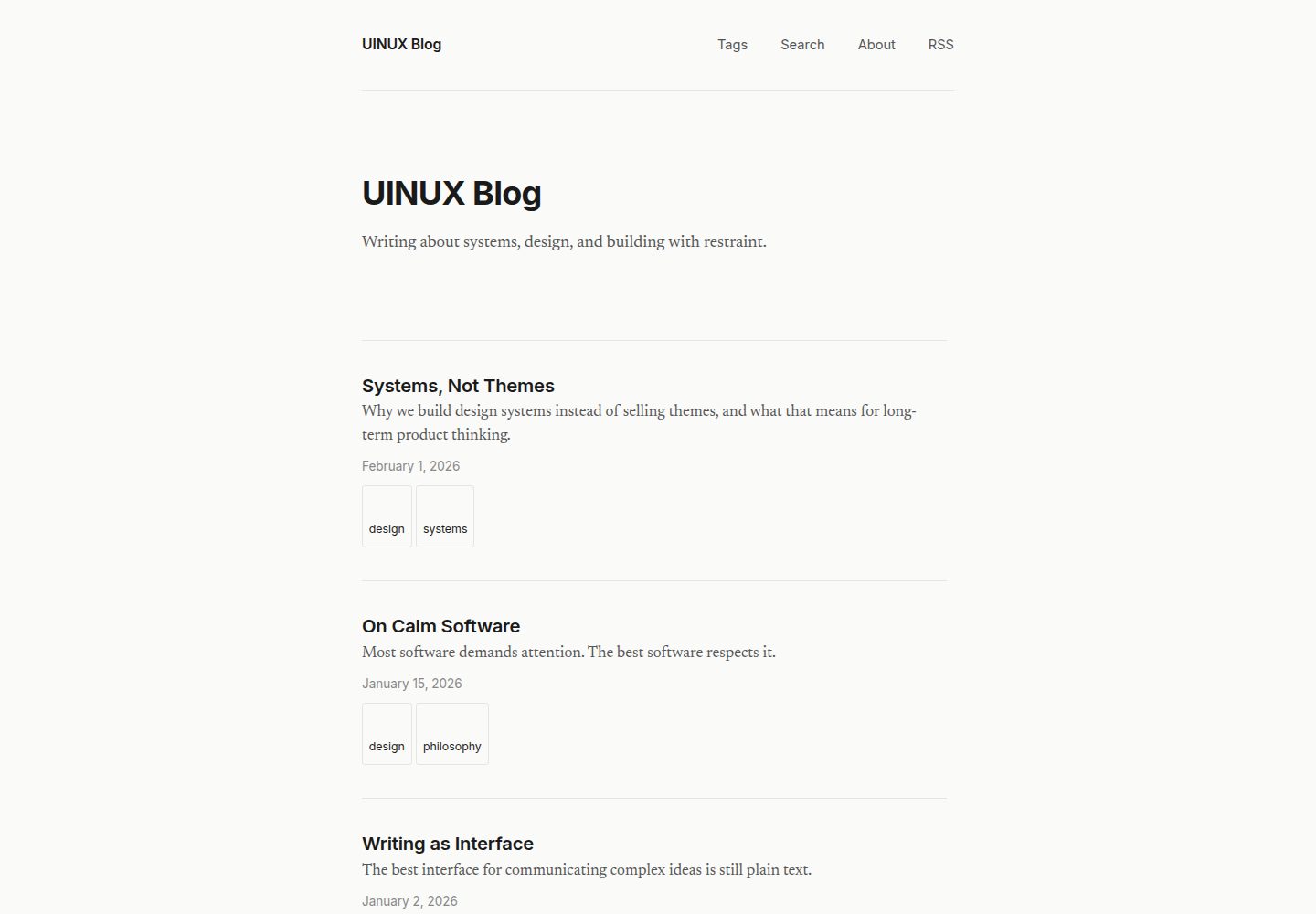
基于 Astro 的静态博客系统,内容以 Markdown/MDX 文件管理,通过文件路由生成页面
Astro博客
uinux-blog — Astro 博客模板
作者 Get-UINUX
UINUX Blog 是一个基于 Astro 的静态博客系统,面向长文写作,强调排版、留白与可读性,使用 Markdown 管理内容,仅搜索功能包含少量客户端 JavaScript。
看看你的网站会是什么样
浏览真实页面截图,比较内容排版与手机效果。点击下方缩略图切换,放大查看整页细节。
全部页面与视图 3
截图用于了解视觉与布局,交互效果请以实际项目为准。
采集于 2026-10-03查看来源
值得关注的模板亮点
从已有项目资料中,快速了解它的特点。
面向长文写作的排版取向:衬线正文、无衬线标题、640px 内容宽度,优先可读性
内置分页文章列表、标签浏览与筛选、关于页和 RSS 订阅
客户端搜索基于构建时生成的静态 JSON 索引,不依赖外部服务或 API
除搜索外不引入客户端 JavaScript,无暗色模式、无组件库、无 CMS 后台
内置规范链接、Open Graph、Twitter Card 与 JSON-LD 结构化数据
模板详细介绍
UINUX Blog 是一个用 Astro 构建的静态博客系统,定位是长文写作。它把排版、留白和可读性放在视觉复杂度之前,内容以 Markdown 或 MDX 文件存放在 src/content/posts/ 目录,通过文件路由生成页面。站点默认提供分页文章列表、标签浏览与筛选、关于页、RSS 订阅,以及一个在构建时生成静态 JSON 索引的客户端搜索。除搜索外,其余页面均为静态 HTML 与 CSS。
设计上采用衬线正文与无衬线标题的组合,内容宽度固定为 640px,以减少长行阅读负担。项目明确不提供主题配色预设、暗色模式切换、CMS 后台、数据库、邮件订阅、分析统计、作品集或落地页等功能,也不包含第三方 SEO 库或站点地图生成器。SEO 方面内置了规范链接、Open Graph、Twitter Card、JSON-LD 结构化数据以及通过环境变量配置的 Google Search Console 验证。
使用前需要 Node.js 18 或更高版本,安装依赖后运行开发服务器即可写作。作为模板使用时,需要按仓库提供的清单替换站点 URL、博客名称、标语、关于页、RSS 标题与描述、默认描述和 OG 站点名,并删除示例文章。代码采用 MIT 许可,可免费使用、修改、商用和分发,但演示图片、字体、图标等第三方素材需单独核对许可,域名、托管等外部服务可能产生费用。
Astro博客
适合你的项目吗?
适用场景
- 个人长文博客的写作与发布,内容以 Markdown 文件维护
- 需要标签分类、分页浏览和站内搜索的静态内容站点
- 希望部署到任意静态文件托管服务、避免数据库与后台管理的博客
- 以 RSS 订阅和基础 SEO 元数据为主要分发方式的写作站点
适合人群
- 偏好用 Markdown 写作并部署静态站点的写作者
- 重视排版清晰度与阅读体验、不需要复杂视觉主题的个人博客
- 接受无 CMS 后台、无数据库、无分析统计等附加功能的使用者
上手与定制指南
结合仓库当前版本的说明,按下面的资料检查内容、配置与运行要求。
- 1
需要 Node.js 18 或更高版本,克隆仓库后运行 npm install 安装依赖
- 2
在 src/content/posts/ 中新建 .md 或 .mdx 文件并填写 title、description、date 等 frontmatter 字段
- 3
运行 npm run dev 启动开发服务器,默认访问 http://localhost:4321
- 4
作为模板使用时需更新 astro.config.mjs 的 site URL、首页与导航中的博客名称、关于页、RSS 标题与描述、Layout 中的默认描述和 OG 站点名,并删除示例文章
- 5
可选:创建 .env 文件并设置 PUBLIC_GOOGLE_SITE_VERIFICATION 以启用 Google Search Console 验证
授权与来源资料
使用条件与限制
免费使用 · 保留许可声明本次收录的是公开仓库中采用 MIT 许可的免费版本;免费范围为该版本代码,不代表外部服务或第三方素材免费。
使用时需要遵守
- 允许免费使用、修改、商用和分发该版本代码。
- 分发代码副本或实质性部分时,保留原作者版权声明和完整 MIT 许可声明。
- 代码按现状提供;担保与责任限制以原许可证及适用法律为准。
额外费用与待核对事项
- 可选的 Google Search Console 验证功能需要你拥有 Google 账号并在 Google Search Console 中获取验证码,再通过 .env 文件中的 PUBLIC_GOOGLE_SITE_VERIFICATION 变量配置;不配置该变量不影响站点其他功能。
- 演示图片、字体、图标及其他第三方素材需按各自许可核对,不能仅凭代码的 MIT 许可判断。
- 域名、托管、数据库、支付或 AI 等外部服务可能另外收费。
查看原文依据
Permission is hereby granted, free of charge
许可证原文
https://github.com/Get-UINUX/uinux-blog/blob/main/LICENSEhttps://github.com/Get-UINUX/uinux-blog/blob/main/README.mdGet the code from Google Search Console > Settings > Ownership verification > HTML tag.
README 原文
DeepSeek 根据仓库许可证和 README 整理 ·2026-10-03。结果仅覆盖已读取资料,依赖、图片、字体及后续条款变更以各自原文为准。
项目核对记录与介绍依据
模板资料
- 来源平台
- Astro Themes
- 资料与维护参考分
- 资料较完整 · 87 / 100
- 技术栈
- Astro
- 网站类型
- 博客
这个分数如何计算
本站按许可资料(最高30分)、演示链接(12分)、预览图(10分)、Star数(15分)、记录的维护时间(15分)、描述完整度(8分)、功能记录(5分)和分类资料(5分)计算。它不是代码、安全或性能测试,也不是 Google 评分;有链接不代表已实测可用。
这个项目需要核对什么
- 记录的仓库更新时间
- 2026-05-22
- 截图检查日期
- 2026-10-03
已收录演示链接。请用你的内容与屏幕尺寸检查;有演示不代表表单、认证或支付已经可用。
目录记录的主要技术栈是 Astro。请通过依赖清单和锁文件核对实际版本与托管要求。这些说明基于收录资料,不代表代码审计或部署实测。
查看具体选型方法 →介绍的制作与核对状态
介绍由 AI 辅助整理目录与仓库资料。仓库作者不等于这篇介绍的审核者。
审核声明: [email protected] · 2026-10-04
查看当时使用的来源资料
SHA-256: 1b38a849f53caee74641e7cfd85874b58474b4f06ae389cfd201dc1f4ab10bdd
2026-10-03T22:44:31.377Z
来源文件 / 仓库# UINUX Blog
A calm, writing-first blogging system built with Astro.
## What it is
UINUX Blog is a static blog system designed for long-form writing. It prioritizes typography, whitespace, and readability over visual complexity. It uses Markdown for content, file-based routing, and ships minimal client-side JavaScript (search only).
## Quick start (template users)
If you clicked "Use this template" on GitHub:
1. Clone your new repository
2. Run `npm install`
3. Delete the example posts in `src/content/posts/`
4. Update `astro.config.mjs` with your own `site` URL
5. Update the blog name and tagline in `src/pages/index.astro` and `src/components/Nav.astro`
6. Update `src/pages/about.astro` with your own info
7. Run `npm run dev` and start writing
## What it is not
- Not a theme. There are no color presets, dark mode toggles, or visual variants.
- Not a CMS. There is no admin panel, no database, no integrations.
- Not a marketing tool. There are no newsletter signups, analytics, or growth hacks.
- Not a portfolio. There are no image galleries, project showcases, or landing pages.
## Who it is for
Writers who want a quiet place to publish. People who value clarity over features. Anyone who prefers to write in Markdown and deploy a static site.
## Getting started
### Prerequisites
- Node.js 18 or later
### Install
```
npm install
```
### Start writing
1. Create a new `.md` or `.mdx` file in `src/content/posts/`
2. Add frontmatter:
```md
---
title: "Your Post Title"
description: "A short description of the post."
date: 2026-02-07
tags: ["topic-a", "topic-b"]
---
Your content here.
```
3. Run the dev server:
```
npm run dev
```
4. Open `http://localhost:4321`
That is it. You are writing.
### Google Search Console
To enable Google Search Console verification, create a `.env` file:
```
PUBLIC_GOOGLE_SITE_VERIFICATION=your-verification-code
```
Get the code from Google Search Console > Settings > Ownership verification > HTML tag.
See `.env.example` for reference.
### Build for production
```
npm run build
```
Output is in the `dist/` directory. Deploy it anywhere that serves static files.
## Structure
```
src/
components/
Layout.astro Page shell, meta, fonts
Nav.astro Site navigation
Footer.astro Site footer
Heading.astro Typographic heading
Article.astro Post wrapper with metadata and tags
Prose.astro Markdown content styling
content/
config.ts Content collection schema
posts/ Markdown files go here
pages/
index.astro Home (paginated post list)
page/[page].astro Paginated post listing (page 2+)
search.astro Search page (client-side)
search-index.json.ts Static search index (built at build time)
about.astro About page
rss.xml.ts RSS feed
tags/index.astro All tags
tags/[tag].astro Posts filtered by tag
posts/[...slug].astro Individual post pages
styles/
global.css Design tokens and base styles
```
## Content model
Posts use these frontmatter fields:
| Field | Type | Required | Default |
|---------------|----------|----------|---------|
| `title` | string | yes | — |
| `description` | string | yes | — |
| `date` | date | yes | — |
| `tags` | string[] | no | `[]` |
## Features
### Tags
Posts can have zero or more tags. Tags appear on post pages and the home listing. Browse all tags at `/tags` or filter by tag at `/tags/[tag-name]`.
### Pagination
The home page shows 10 posts per page. When there are more than 10 posts, pagination links appear at the bottom. Pages 2+ are at `/page/2`, `/page/3`, etc.
### Search
Client-side search powered by a static JSON index built at build time.
- No external services or APIs
- No dependencies
- Index includes title, description, tags, and full post body
- Debounced input with instant results
- Supports `?q=` query parameter for direct linking
- Available at `/search`
## Design decisions
- **Serif body text** (Newsreader): optimized for sustained reading
- **Sans-serif headings** (Inter): clear hierarchy without competing with body text
- **640px content width**: prevents eye fatigue on long lines
- **Minimal client-side JS**: only used for search; all other pages are static HTML and CSS
- **No dark mode**: one mode, one experience, no maintenance surface
- **No component library**: six components, no more
## SEO
Built-in, zero-dependency SEO on every page:
- **Canonical URLs** on all pages
- **Open Graph meta** (og:title, og:description, og:url, og:type, og:site_name, og:image)
- **Twitter Card meta** (summary or summary_large_image)
- **JSON-LD structured data**:
- `WebSite` on the home page
- `BlogPosting` on each post (headline, datePublished, author, publisher, keywords)
- `AboutPage` on the about page
- **Google Search Console** verification via environment variable
- **RSS feed** at `/rss.xml`
No third-party SEO libraries. No sitemap generator. No tracking.
## Environment variables
| Variable | Required | Description |
|---|---|---|
| `PUBLIC_GOOGLE_SITE_VERIFICATION` | no | Google Search Console verification code |
## Customization checklist
When using this as a template, update these files:
- [ ] `astro.config.mjs` — set your `site` URL
- [ ] `src/pages/index.astro` — update blog name and tagline
- [ ] `src/components/Nav.astro` — update brand name
- [ ] `src/pages/about.astro` — write your own about page
- [ ] `src/pages/rss.xml.ts` — update feed title and description
- [ ] `src/components/Layout.astro` — update default description and OG site_name
- [ ] `src/content/posts/` — delete example posts, add your own
- [ ] `.env` — add your Google Search Console code (optional)
## License
MIT
看看同类模板
对比同技术栈与用途的模板,找到更适合的视觉与内容结构。

astrowind
⭕️ AstroWind: A free template using Astro v7 and Tailwind CSS v4. Astro starter theme.
Astro · 博客

astro-paper
A minimal, accessible and SEO-friendly Astro blog theme.
Astro · 博客

fuwari
✨A static blog template built with Astro.
Astro · 博客

Firefly
Firefly 是一款基于 Astro 的静态博客主题,由 CuteLeaf 在 saicaca 的 Fuwari 模板基础上二次开发,主打清新美观的视觉风格。
Astro · 博客

astro-theme-cactus
A simple Astro theme. Use it to create your blog or website.
Astro · 作品集

astrofy
Astrofy is a free and open-source template for your Personal Portfolio Website built with Astro and TailwindCS…
Astro · 作品集