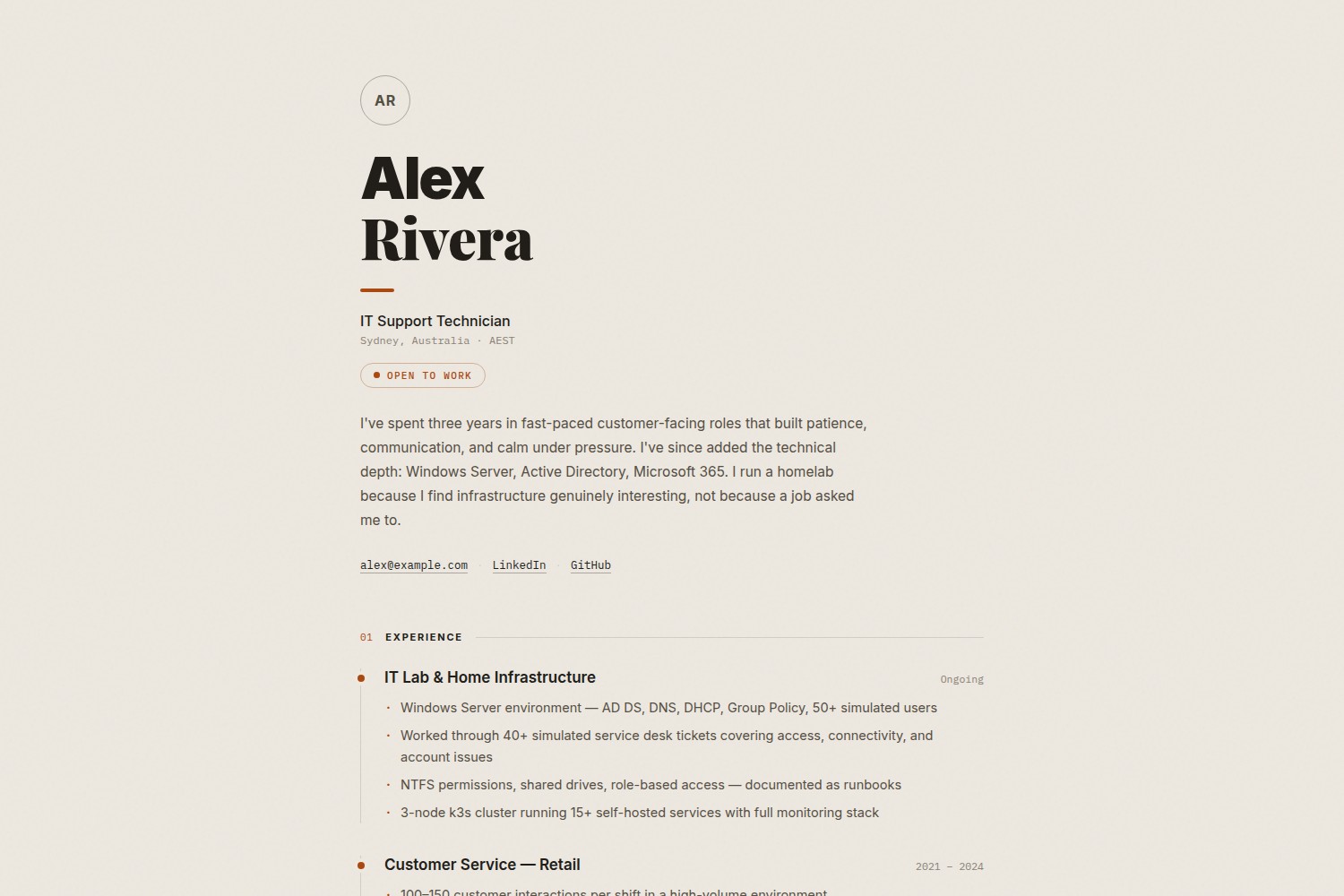
Single-page resume layout with all content driven by data/*.yaml and hugo.toml parameters; templates contain no hard-coded personal content
HugoPortfolio
grain-hugo-theme — Hugo Portfolio Template
By ghimireaacs
A single-page Hugo theme for personal resumes and portfolios, with content driven by data/*.yaml and hugo.toml, and a print stylesheet.
Explore the design
Compare the page layouts and mobile experience. Open any screenshot for a closer look.
Desktop homepage1 / 2
Desktop captureTop of page
Actual screenshot captured by the server browser.
All pages & views 2
Screenshots show visual appearance; interactive behavior may differ.
Recorded 2026-10-02View source
What stands out
A quick read of the recorded project description.
Experience is presented as a timeline, the Lab block is used to show hands-on projects, skills are a merged table, and certifications and education are a two-column list
Built-in print stylesheet uses a white background and no animations when printing, and tries to keep sections from being split across pages
Avatar is optional; if not provided, a circular initials placeholder is generated from params.name
Colors and fonts are centrally defined through CSS custom properties, making it easy to adjust them uniformly in theme files
Provides an exampleSite sample site and a netlify.toml build configuration
Template Details
grain-resume is a single-page Hugo theme positioned as a personal resume and portfolio page, with typography modeled on a printed CV: warm paper texture, a serif/sans-serif combined masthead, numbered sections, a timeline of experience, a Lab block for showing hands-on projects, and a real print stylesheet. The theme templates themselves do not hard-code personal content; name, job title, bio, contact details, and similar information are written in [params] in hugo.toml, while experience, Lab, skills, certifications, and education are placed in data/experience.yaml, data/lab.yaml, data/skills.yaml, and data/certifications.yaml respectively. When a data file does not exist, the corresponding section is not rendered. The avatar is optional; if not set, a circular placeholder is generated from the initials of the name. The theme requires Hugo v0.110 or later, and the repository provides an exampleSite as a runnable example along with a Netlify build configuration. Colors and fonts are adjusted through CSS custom properties at the top of static/css/style.css, which requires directly modifying theme files.
HugoPortfolio
Is it right for your project?
Use Cases
- Creating a personal online resume and wanting to print it directly as a paper CV
- Showcasing work experience and hands-on projects for IT operations, networking, or technical support roles
- Maintaining skills, certifications, and education information in YAML data files to avoid changing templates
- Deploying a Hugo site on Netlify and automatically pulling the theme submodule
Suitable For
- Users who need a single-page resume and portfolio page and accept maintaining content in YAML
- Developers familiar with basic Hugo configuration and data file syntax
- Job seekers who want print output to match the web version
- Personal site authors who prefer warm paper texture and print-style typography
Getting started & customization
Use these recorded setup notes alongside the repository instructions for your chosen version.
- 1
Requires Hugo v0.110 or later
- 2
Add the theme to themes/grain-resume as a git submodule and set theme = "grain-resume" in hugo.toml
- 3
Create content/_index.md and keep empty front matter so Hugo can invoke the homepage template
- 4
Copy hugo.toml, data/*.yaml, and netlify.toml from exampleSite to the site as a starting point
- 5
Set the environment variable GIT_SUBMODULE_STRATEGY=recursive in Netlify to ensure the theme submodule is pulled during builds
License & source material
Usage conditions & limitations
Free to use · keep license noticeThis listing covers the free version in the public repository under the MIT license; the free scope is the code of that version and does not mean that external services or third-party assets are free.
Must comply with when using
- Free use, modification, commercial use, and distribution of that version's code are permitted.
- When distributing copies or substantial portions of the code, retain the original author's copyright notice and the complete MIT license notice.
- The code is provided as is; warranties and limitations of liability are governed by the original license and applicable law.
Additional costs & items to verify
- Demo images, fonts, icons, and other third-party assets must be checked against their respective licenses and cannot be judged solely by the code's MIT license.
- External services such as domains, hosting, databases, payments, or AI may incur separate charges.
View Original Text Basis
https://github.com/ghimireaacs/grain-hugo-theme/blob/main/LICENSEhttps://github.com/ghimireaacs/grain-hugo-theme/blob/main/README.mdPermission is hereby granted, free of charge
Original License Text
Compiled by DeepSeek based on repository license and README ·2026-10-02. Results only cover the materials read; dependencies, images, fonts, and subsequent term changes are subject to their respective original texts.
Project checks & description sources
Template Information
- Source platforms
- GitHub
- Documentation and maintenance reference score
- Partly documented · 72 / 100
- Technologies
- Hugo
- Website type
- Portfolio
How this score is calculated
Our heuristic uses license records (up to 30), a demo link (12), a preview (10), stars (15), recorded maintenance (15), description completeness (8), feature records (5) and classification data (5). It is not a code, security or performance test, or a Google score. A link does not establish tested functionality.
What to verify for this project
- Repository update recorded
- 2026-06-11
- Screenshot last checked
- 2026-10-02
A demo link is listed. Check it with your own content and viewport sizes; its presence does not confirm that forms, authentication or payments work.
The catalog identifies Hugo as the primary stack. Check the actual dependency manifest and lockfile for versions and hosting requirements. These notes use recorded metadata, not a code audit or a deployment test.
Use a selection guide →How this description was prepared
AI-assisted description based on catalog records and repository material. Repository authors are not automatically the reviewers of this description.
Automatically checked against source and license rules; no manual editorial review.
Inspect the recorded source material
SHA-256: c43b252b87f5bc76738c74373095ea9eef57ae69f850ae48689c8a6c4ef4cbcb
2026-10-02T14:16:50.045Z
Source file / repository# grain-resume
A single-page Hugo resume theme typeset like a printed CV. Warm paper grain, serif/sans masthead, numbered sections, timeline experience, a proof-of-work lab section, and a real print stylesheet. Data-driven: all content lives in `data/*.yaml` and `hugo.toml`.
---
## Requirements
- [Hugo](https://gohugo.io/installation/) v0.110 or later
---
## Example site
A working example is in [`exampleSite/`](exampleSite/). Copy its contents as a starting point:
```
exampleSite/
├── hugo.toml # all params with comments
├── netlify.toml # Netlify build config
├── content/_index.md # required by Hugo — leave empty
└── data/
├── experience.yaml # work history (timeline)
├── lab.yaml # homelab / proof-of-work section
├── skills.yaml # one merged skills table
└── certifications.yaml # certs and education
```
To run the example locally:
```bash
cd exampleSite
hugo server --themesDir ../..
```
---
## Installation
Add the theme as a git submodule inside your Hugo site:
```bash
git submodule add https://github.com/ghimireaacs/grain-hugo-theme themes/grain-resume
```
Then set the theme in your `hugo.toml`:
```toml
theme = "grain-resume"
```
---
## Configuration
### `hugo.toml` params
All personal content is set in `[params]`. The theme templates contain no hardcoded content.
```toml
baseURL = "https://yoursite.com/"
languageCode = "en-us"
title = "Your Name"
theme = "grain-resume"
disableKinds = ["taxonomy", "term"]
[params]
name = "Your Name" # single or multi-word both work; last word is set in serif
role = "Job Title"
available = "Open to work" # pill badge with status dot — remove line to hide
bio = "One or two sentences. Personal voice works best here."
email = "[email protected]" # optional — link hidden if omitted
linkedin = "https://linkedin.com/in/your-handle" # optional
github = "https://github.com/your-handle" # optional
# avatar = "/img/photo.jpg" # optional — initials shown if omitted
# description = "..." # optional — overrides meta description
# favicon = "/img/favicon.png"
# location = "Sydney, Australia" # mono line under the role
# labLabel = "The Lab" # heading of the lab section
# footerNote = "Built with Hugo." # left side of the footer
```
Sections render only when their data file exists. Delete a data file and its section disappears.
### `content/_index.md`
Hugo requires this file to invoke the homepage template. Create it with empty front matter:
```
---
---
```
---
## Data files
All content lives in `data/`. See [`exampleSite/data/`](exampleSite/data/) for working samples.
### `data/experience.yaml`
Rendered as a timeline. Each entry is a heading row (title + date) with bullets below.
```yaml
- title: IT Internship — Some Company
date: "Nov 2025 – Feb 2026"
items:
- "What you did, action-verb first"
- "Another concrete line"
```
`date` is a plain string: a year range, `"Ongoing"`, whatever fits.
### `data/lab.yaml`
The proof-of-work section. An intro paragraph plus entries that say what runs, in plain language a recruiter can follow.
```yaml
intro: "One or two sentences framing the lab: what it is, how long it has run, why it exists."
items:
- name: Network segmentation
what: "What is actually running, in plain language. End with what it shows about you, as prose."
stack: [OPNsense, VLANs, Pi-hole]
```
`stack` is optional per entry. Rename the section heading with the `labLabel` param.
### `data/skills.yaml`
One merged table. `category` is the mono left column, `skills` is free text. Use `·` (middle dot, U+00B7) to separate items.
```yaml
- category: Windows & Desktop
skills: "Windows 10/11 · Windows Server · printer support · RDP"
- category: Networking
skills: "TCP/IP · VLANs · DNS / DHCP · VPN"
```
### `data/certifications.yaml`
Two columns: name on the left, org or year on the right.
```yaml
- name: CompTIA A+
org: CompTIA
- name: Bachelor of Information Technology
org: "2024"
```
---
## Profile photo
1. Place your image at `static/img/photo.jpg` in your site root
2. Add to `hugo.toml`:
```toml
avatar = "/img/photo.jpg"
```
If `avatar` is not set, a circle with your initials (derived from `params.name`) is shown instead.
---
## Printing
The theme ships a print stylesheet: plain white background, no animation, sections kept whole across page breaks. Ctrl+P produces a usable paper CV.
---
## Netlify deployment
Set this environment variable in Netlify site settings so the theme submodule is pulled during build:
| Key | Value |
|---|---|
| `GIT_SUBMODULE_STRATEGY` | `recursive` |
Use [`exampleSite/netlify.toml`](exampleSite/netlify.toml) as your `netlify.toml`. It pins the Hugo version and sets the build command.
---
## Customisation
Colors and type are CSS custom properties at the top of `static/css/style.css`. Fork the theme and edit them directly.
| Variable | Default | Purpose |
|---|---|---|
| `--paper` | `#ede8e0` | Page background (warm paper) |
| `--ink` | `#211d18` | Headings and primary text |
| `--mid` | `#554e43` | Body text |
| `--muted` | `#8a8175` | Meta text, dates, labels |
| `--accent` | `#ab4a10` | Rules, numbering, badges, hovers |
Explore similar templates
Compare previews and descriptions within the same stack and category.

hugo-PaperMod
A fast, clean, responsive Hugo theme for blogs and lightweight portfolios, with three layout modes (Regular, Home-Info, Profile), automatic and manual light/dark themes, Fuse.js client-side search, multilingual support, and built-in Open Graph, Twitter Cards, and Schema.org data.
Hugo · Portfolio

Congo
Congo is a minimal Hugo content theme built on Tailwind CSS 3.0, designed for blogs, portfolios, and lightweight content sites. It offers multiple homepage layouts, customizable dark mode, multilingual support including RTL, and built-in client-side search, Mermaid, Chart.js, and KaTeX.
Hugo · Blog

toha
Toha is a Hugo theme for personal portfolios, featuring a minimalist, responsive design with configurable homepage sections such as about, experience timeline, and achievements gallery.
Hugo · Portfolio

hugo-profile
hugo-profile is a mobile-first Hugo theme for personal portfolios and blogs, with multilingual support, light/dark themes, categories and tags, Google Analytics, Disqus comments, and Formspree contact forms.
Hugo · Portfolio

hugo-theme-introduction
Introduction is a minimal Hugo theme that can be configured as a single-page site or a full site with multiple sections. Homepage sections are generated from Markdown files under content/home/, with weight sorting and optional images.
Hugo · Portfolio

hugo-theme-console
A minimalist, responsive Hugo theme inspired by the system terminal and built on Terminal CSS. It includes blog posts, photo galleries, and custom pages, with light/dark theming and style overrides via CSS variables.
Hugo · Portfolio